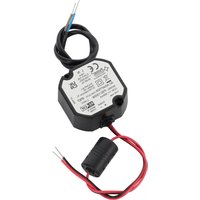
PSC13008 - Power Supply PULSAR - Free user manual and instructions
Find the device manual for free PSC13008 PULSAR in PDF.


| Product Type | Barcode Scanner |
| Model | PSC13008 |
| Brand | Pulsar |
| Dimensions (W x D x H) | 170 x 95 x 100 mm |
| Weight | 180 g |
| Power Supply | USB powered (5V, 100mA) |
| Interface | USB, RS232, Keyboard Wedge |
| Scan Technology | Laser |
| Decode Capability | 1D and 2D barcodes |
| Scan Speed | Up to 200 scans per second |
| Resolution | 4 mil (min.) |
| Depth of Field | 0 - 250 mm |
| Operating Temperature | 0°C to 40°C |
| Storage Temperature | -20°C to 60°C |
| Humidity | 5% - 95% non-condensing |
| Drop Resistance | 1.5 m onto concrete |
| Laser Class | Class 1 (safe for eyes) |
| Compatible Operating Systems | Windows, macOS, Linux |
| Included Accessories | USB cable, stand |
| Maintenance | Clean lens with a soft, dry cloth |
| Warranty | 1 year limited warranty |
| Spare Parts Availability | Replacement cables and stands |
| Repairability | Professional service required |
Frequently Asked Questions - PSC13008 PULSAR
User questions about PSC13008 PULSAR
0 question about this device. Answer the ones you know or ask your own.
Ask a new question about this device
Download the instructions for your Power Supply in PDF format for free! Find your manual PSC13008 - PULSAR and take your electronic device back in hand. On this page are published all the documents necessary for the use of your device. PSC13008 by PULSAR.
USER MANUAL PSC13008 PULSAR
Features of power supply:
• power output 0,8 A/13,8 V DC
- universal supply voltage range \~100-240 V
• high efficiency 84%
• standby power <0,3 W
- IP67 case
- protections:
- SCP short-circuit protection
• overvoltage protection (AC input) - overload (OLP)
- warranty – 2 years from production date
1. Technical description.
1.1. General description.
Stabilized DC power supply is intended for supply CCTV cameras that require stabilised voltage of 13,8 V DC. Unit is protected against short-circuit and overload.
1.2. Technical parameters.
| Supply voltage | ~100-240 V; 50/60 Hz |
| Current consumption | 0,24 A |
| Supply power | 11 W max. |
| Efficiency | 84% |
| Output voltage | 13,8 V DC |
| Output current | 0,8 A |
| Ripple voltage | 100 mV p-p max. |
| Short-circuit protection SCP | electronic, automatic recovery |
| Overload protection OLP | 105-150% of power supply, automatic recovery |
| IP protection class | IP67 |
| Operation conditions | temperature 0°C÷40°Crelative humidity 20%...90% |
| Dimensions (LxWxH) | 50 x 48 x 25 [mm] |
| Net/gross weight | 0,1 / 0,12 [kg] |
| Protection class EN 62368-1 | II (second) |
| Lenght of DC cable | 0,3 m |
| Lenght of AC cable | 0,3 m |
| Storage temperature | -20°C...+60°C |
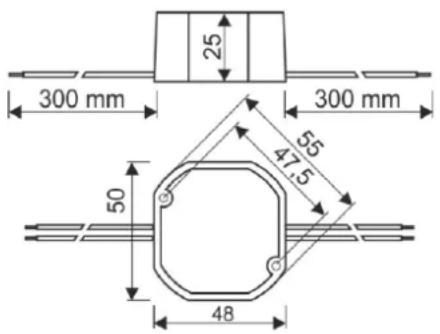
Fig.1. Dimensions of power supply.
1.3. Accessories.
For power supplies are available accessories - fuse blocks and cable adapter. For details –visit www.pulsar.pl.
2. Installation.
2.1. Requirements.
Power supply shall be mounted by the qualified installer having appropriate (required and necessary for a given country) permissions and qualifications for connecting (operating) low-voltage installations. Power supply shall be mounted in closed rooms, of the normal air humidity (RH=90% max.) and the temperature within the range from 0^ C to +40^ C.
In order to fulfill LVD and EMC requirements the rules for power supplies, encasing and shielding shall be observed according to application.
2.2. Installation procedure.
- Fit power supply inside the box or other device.
- Connect the DC output to the load or to the terminal block.
- Connect the power supply to the AC line.
- After tests and operation control are performed, close installation box, case etc. and switch on power (230 V AC).
3. Maintenance.
Any and all maintenance operations may be performed following the disconnection of the power supply from the power network. The power supply does not require any specific maintenance procedures, however, in the case of significant level of dust, it should be cleaned with the compressed air.

WEEE MARK
According to the EU WEE Directive – It is required not to dispose of electric or electronic waste as unsorted municipal waste and to collect such WEEE separately.
Pulsar
Siedlec 150, 32-744 Łapczyca, Poland
Tel. (+48) 14-610-19-40, Fax. (+48) 14-610-19-50
e-mail: biuro@pulsar.pl, sales@pulsar.pl
Brand : PULSAR
Model : PSC13008
Category : Power Supply