GRACO InvisiPac PC-8e - Industrial Controller

InvisiPac PC-8e - Industrial Controller GRACO - Free user manual and instructions

Find the device manual for free InvisiPac PC-8e GRACO in PDF.

📄 4 pages English EN Download 💬 AI Question 10 questions ⚙️ Specs
Notice GRACO InvisiPac PC-8e - page 1
Pick your language and provide your email: we'll send you a specifically translated version.
Product Type Airless Paint Sprayer
Brand Graco
Model InvisiPac PC-8e
Power Source Electric (120V AC)
Max Pressure 3000 PSI
Max Flow Rate 0.8 GPM
Motor Power 1.2 HP
Weight 45 lbs
Dimensions (L x W x H) 20 in x 18 in x 15 in
Hose Length 50 ft
Tip Size .017 in (standard)
Material Compatibility Latex, enamel, stain, oil-based paints
Adjustable Pressure Yes, with control knob
Easy Clean Flush system with water or solvent
Safety Features Pressure relief valve, trigger lock
Spare Parts Available Filters, seals, tips, hoses
Maintenance Flush after each use; lubricate moving parts
Warranty 1 year limited

Frequently Asked Questions - InvisiPac PC-8e GRACO

How do I prime the pump before spraying?
Turn the pressure control to low, open the prime valve, and run the motor until paint flows steadily. Then close the prime valve and increase pressure.
What is the maximum recommended paint viscosity?
The sprayer can handle paints up to 70 KU (Krebs Units). Thicker paints may need thinning.
How do I clean the sprayer after use?
Flush with water for latex paints or mineral spirits for oil-based paints. Run clean fluid through the system until clear.
Why is the motor running but no paint coming out?
Check if the prime valve is open, the tip is not clogged, or the suction tube is not submerged. Also ensure the pressure is set high enough.
Can I use the sprayer with exterior paints?
Yes, the sprayer is suitable for both interior and exterior paints, including latex and oil-based.
How often should I replace the filter?
Replace the inlet filter after every 50 gallons of paint or sooner if clogging occurs. The gun filter should be cleaned regularly.
What should I do if the spray pattern is uneven?
Adjust the pressure, clean the tip, or replace the tip if worn. Also ensure paint is properly mixed and viscosity is correct.
Is it safe to use extension cords?
Use a heavy-duty extension cord rated for at least 15 amps and no longer than 100 ft. Avoid using multiple cords.
How do I store the sprayer for long periods?
Thoroughly clean the system, drain all fluids, and store in a dry, frost-free area. Apply a light oil to moving parts.
What is the warranty period and how to claim?
Graco offers a 1-year limited warranty. Contact Graco customer service with proof of purchase for repairs or replacement.

User questions about InvisiPac PC-8e GRACO

0 question about this device. Answer the ones you know or ask your own.

Ask a new question about this device

The email remains private: it is only used to notify you if someone responds to your question.

No questions yet. Be the first to ask one.

Download the instructions for your Industrial Controller in PDF format for free! Find your manual InvisiPac PC-8e - GRACO and take your electronic device back in hand. On this page are published all the documents necessary for the use of your device. InvisiPac PC-8e by GRACO.

USER MANUAL InvisiPac PC-8e GRACO

Read instruction manual 334784 for complete instructions and warnings. This Quick Guide is not a substitute for reading and understanding all instructions manuals and warnings labels supplied with the equipment.

Quick Guide

InvisiPac® Pattern Controller

GRACO InvisiPac PC-8e - InvisiPac® Pattern Controller - 1

GRACO

335007B

EN

Turn System OnGRACO InvisiPac PC-8e - InvisiPac® Pattern Controller - 2Screen Navigation
Turn System OffGRACO InvisiPac PC-8e - InvisiPac® Pattern Controller - 3 - or - GRACO InvisiPac PC-8e - InvisiPac® Pattern Controller - 4Integrated SystemsGRACO InvisiPac PC-8e - InvisiPac® Pattern Controller - 5Stand-Alone SystemsGRACO InvisiPac PC-8e - InvisiPac® Pattern Controller - 6
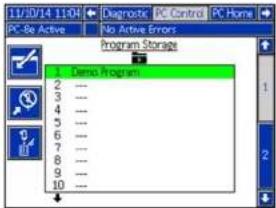
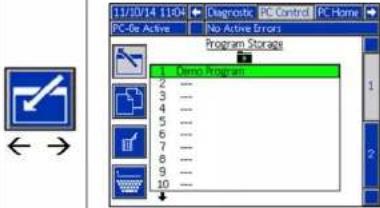
Select ProgramGRACO InvisiPac PC-8e - InvisiPac® Pattern Controller - 7GRACO InvisiPac PC-8e - InvisiPac® Pattern Controller - 8GRACO InvisiPac PC-8e - InvisiPac® Pattern Controller - 9
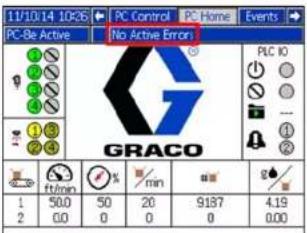
Clear ErrorsAcknowledge errors by pressing once for each error.Display will show “No Active Errors” unless error was unable to clear. Seek technical support if any error persists.GRACO InvisiPac PC-8e - InvisiPac® Pattern Controller - 10

Screen Navigation

Integrated Systems

Stand-Alone Systems

PROVEN QUALITY. LEADING TECHNOLOGY.

Wiring Installation
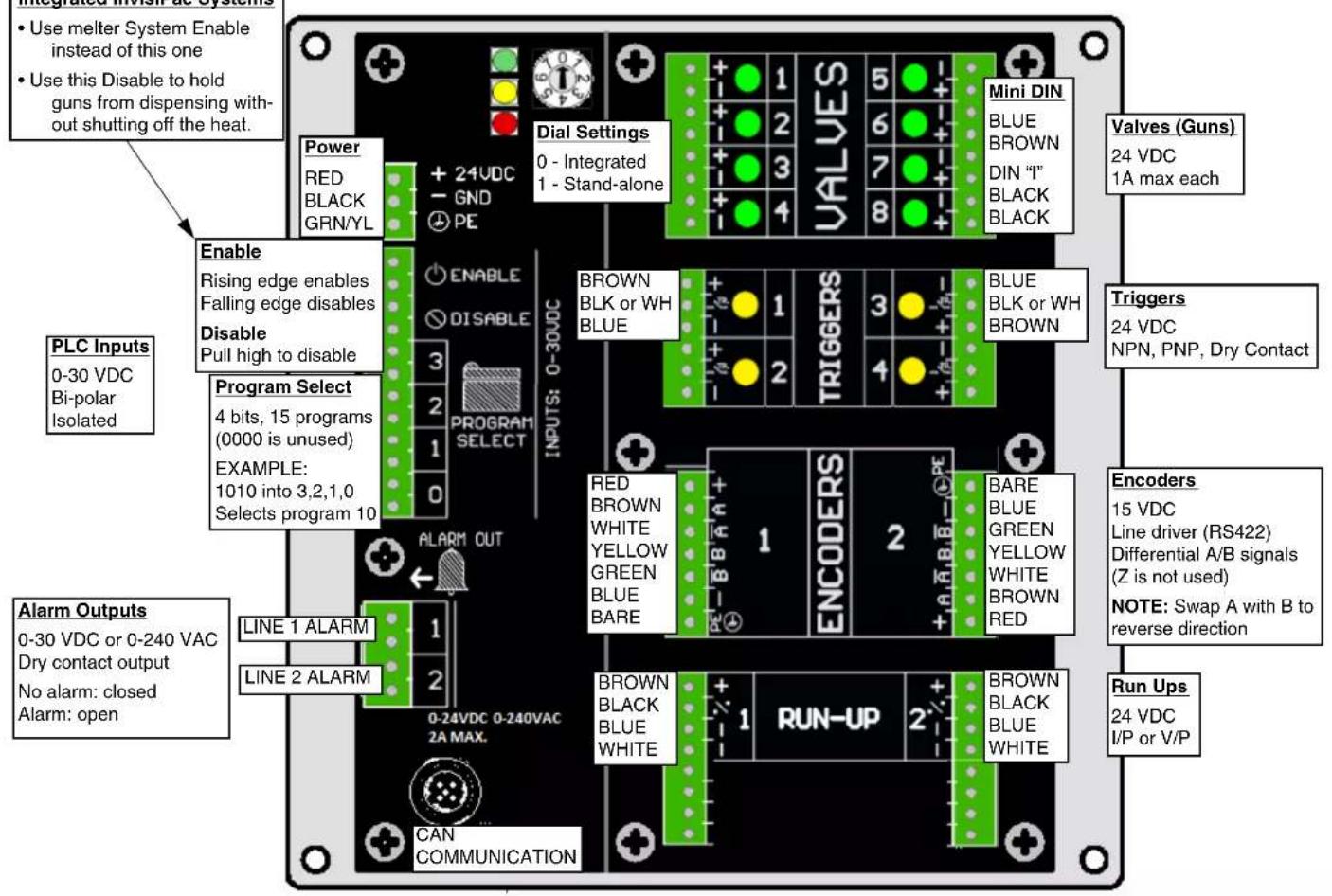
Use melter System Enable instead of this one Use this Disable to hold guns from dispensing with- out shutting off the heat. Dial Settings 0 - Integrated 1 - Stand-alone Power RED BLACK GRN/YL + 24VDC - GND ⊕ PE Enable Rising edge enables Falling edge disables Disable Pull high to disable Program Select 4 bits, 15 programs (0000 is unused) EXAMPLE: 1010 into 3,2,1,0 Selects program 10 PLC Inputs 0-30 VDC Bi-polar Isolated Line 1 ALARM LINE 2 ALARM 0-24VDC 0-240VAC 2A MAX. CAN COMMUNICATION DIAL Settings BROWN BLK or WH BLUE TRIGGERS MINI DIN BLUE BROWN DIN "T" BLACK BLACK Valves (Guns) 24 VDC 1A max each Triggers 24 VDC NPN, PNP, Dry Contact Encoders 15 VDC Line driver (RS422) Differential A/B signals (Z is not used) NOTE: Swap A with B to reverse direction Run Ups 24 VDC I/P or V/P

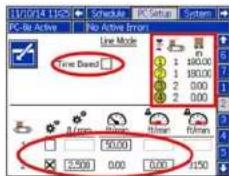
Line Mode2.No EncoderCheck time based or distance mode.Un-check encoder box (PC-8e only)Set fixed speed to adjust last measured product length.Encoder (PC-8e only)Un-check time based mode.Check encoder box [CWHT]Set pulses per mm adjust last measured product length. Set low line speed advisory level
Trigger Setup3.Set trigger polarity Indicators show on 1 or off. Assign to line 1 or 2 (PC-8e only).
General 4.No Run UpDisable pressure compensation.Enable or disable modulated bead (PC-8e only).Run Up (PC-8e only)Enable pressure compensation.
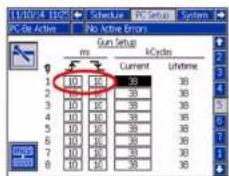
Gun (Valve) Setup5.Set gun open and close compensation~5ms for high speed guns~10ms for standard gunsNOTE: Applies to high speed lines requiring precise beads.
Run Up Control6.Set Modulated Bead CurveSet output value at line speedSet max and minSet Run Up CurveSet output value line speedSet max and min

11/10/14 11/25 Schedule No. 00 System PC-Be Active No. Active Errors Event Map 1 1 1 10 00 0 10 10 6 2 1 10 00 90 10 7 3 1 10 00 80 10 1 4 1 10 00 0 10 10 3 5 - 10 00 0 10 10 3 6 - 10 00 0 10 10 4 7 - 10 00 0 10 10 4 8 - 10 00 0 10 10

11/09/14 19:30 Schedule PC-Ba Active No Active Error Line Mode Time Based 80.00 2.500 0.00 0.00 1150

1/10/14 11:25 Schedule PC Setup System PC-Be Active No Active Errors Trigger Setup Cycles Current Lifetime 30053 30053 0 0 0 0 0 0 7 1 2 3 4 5 6 7 8 9 10 11 12 13 14 15 16 17 18 19 20 21 22 23 24 25 26 27 28 29 30 31 32 33 34 35 36 37 38 39 40 41 42 43 44 45 46 47 48 49 50 51 52 53 54 55 56 57 58 59 60 61 62 63 64 65 66 67 68 69 70

11/2014 11CS Schedule PC-56 Active No Active Errors General Lock Pattern Defectors Pressure Compensation Modulated Bead

11/10/4 11:25 Schedule PC Setup Systems PC Be Active No Active Errors Run Setup ms I/Cycles Current Lifetime 1 10 10 38 38 2 10 10 38 38 3 10 10 38 38 4 10 10 38 38 5 10 10 38 38 6 10 10 38 38 7 10 10 38 38 8 10 10 38 38

11/3/14 1:05 Schedule PC Setup System PC-Bu Active No Active Errors Run Up Control #1 100 95 5 0 0 100 % 0 Flatten

Select ProgramSelect and Name Programs1. Enter page to select program to edit.2. Name program3. Copy or delete program.TipsCopy existing to start new programsMake backup copies before editingGRACO InvisiPac PC-8e - Stand-Alone Systems - 8GRACO InvisiPac PC-8e - Stand-Alone Systems - 9
Enter Event MapSet Up Even Map1. Assign triggers to valve2. Set gun-to-trigger offset3. Set minimum box length (optional)4. Enable or disable pattern mirroring5. Set stitch savings and intervalGRACO InvisiPac PC-8e - Stand-Alone Systems - 10
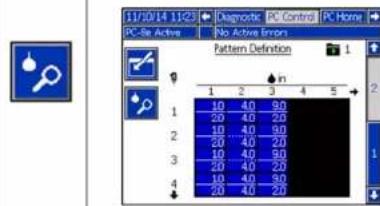
Define PatternEnter Bead Information1. Enter page,use arrows and press enter to edit beads.2. Offset from start of product3. Length of bead4. Stitched or notNOTE: Stitch option not shown when sav-ings on Event Map is set to 0%.5. Confirm changesPreview PatternSee which beads are solid or stitchedView endpoint of last bead on each gunView trigger assignment (red if none)GRACO InvisiPac PC-8e - Stand-Alone Systems - 11GRACO InvisiPac PC-8e - Stand-Alone Systems - 12
GRACO InvisiPac PC-8e - Stand-Alone Systems - 13
Manual assistant
Powered by Anthropic
Waiting for your message
Product information

Brand : GRACO

Model : InvisiPac PC-8e

Category : Industrial Controller