
Taxon 24732 - Webcam TRUST - Free user manual and instructions
Find the device manual for free Taxon 24732 TRUST in PDF.


| Product Type | Webcam |
| Brand | Trust |
| Model | Taxon 24732 |
| Resolution | 1280 x 720 pixels (HD) |
| Frame Rate | 30 fps |
| Lens Type | Fixed focus |
| Field of View | 70° |
| Built-in Microphone | Yes |
| Connection | USB 2.0 |
| Cable Length | 1.5 m |
| Mounting Options | Clip for monitor or tripod mount |
| Dimensions (W x H x D) | 80 x 40 x 40 mm |
| Weight | 80 g |
| Power Source | USB powered (5V) |
| System Requirements | Windows 7+, macOS 10.10+, Chrome OS, Linux |
| Compatible Software | Skype, Zoom, Microsoft Teams, Google Meet |
| Cleaning Instructions | Wipe lens and body with a soft, dry cloth. Do not use liquids or solvents. |
| Safety Precautions | Keep away from moisture, heat sources, and direct sunlight. Do not disassemble. |
| Spare Parts Availability | Not available separately; contact Trust support for issues. |
| General Information | Plug and play – no additional drivers required for most operating systems. |
Frequently Asked Questions - Taxon 24732 TRUST
User questions about Taxon 24732 TRUST
0 question about this device. Answer the ones you know or ask your own.
Ask a new question about this device
Download the instructions for your Webcam in PDF format for free! Find your manual Taxon 24732 - TRUST and take your electronic device back in hand. On this page are published all the documents necessary for the use of your device. Taxon 24732 by TRUST.
USER MANUAL Taxon 24732 TRUST
Thank you, and very clever of you to choose Trust! We simplify everyday life with clever solutions.
We hope you enjoy your new product. Please consider the environment when disposing of this product's packaging.
natural_image
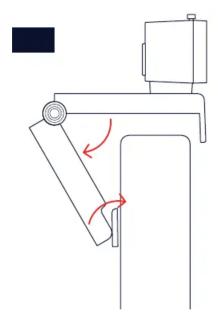
Diagram of a mechanical device with rotating components and red arrows indicating motion (no text or symbols)
natural_image
Mechanical diagram showing a lever mechanism with a rotating component and red directional arrows indicating motion (no text or symbols)2.1.3


The image contains no text or characters. Therefore, the correct OCR output is an empty string.

natural_image
Diagram of a webcam with a circular lens and a red arrow indicating rotation (no text or symbols)
Brand : TRUST
Model : Taxon 24732
Category : Webcam