
16490 MultiCover Chat - Webcam TRUST - Free user manual and instructions
Find the device manual for free 16490 MultiCover Chat TRUST in PDF.


Pick your language and provide your email: we'll send you a specifically translated version.
| Product Type | Webcam |
| Model | 16490 MultiCover Chat |
| Brand | Trust |
| Connectivity | USB 2.0 |
| Maximum Resolution | 1280 x 720 (720p HD) |
| Frame Rate | 30 fps |
| Field of View | 70° |
| Built-in Microphone | Yes, mono |
| Focus Type | Fixed focus |
| Clip Type | Universal clip for monitors and laptops |
| Cable Length | 1.5 meters |
| Dimensions (cm) | 8 x 4 x 4 |
| Weight | 100 g |
| Power Source | USB powered |
| Operating Systems Supported | Windows, macOS, Chrome OS |
| Maintenance | Clean lens with a soft, dry cloth |
| Safety Precautions | Do not expose to liquids or high temperatures |
| Spare Parts Available | No |
| Repairability | Not user-serviceable |
| General Information | Plug-and-play; no driver required |
Frequently Asked Questions - 16490 MultiCover Chat TRUST
How do I install the Trust 16490 MultiCover Chat webcam?
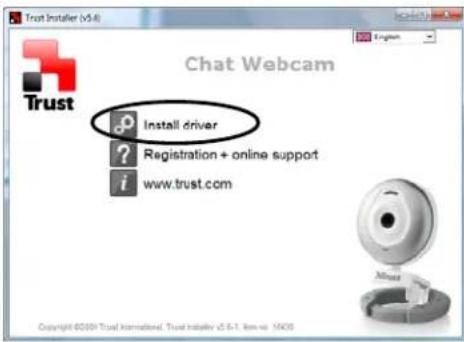
Simply plug the USB cable into an available USB port on your computer. The webcam is plug-and-play and does not require additional drivers.
Does the webcam work with Windows 10?
Yes, it is compatible with Windows 10, Windows 8, and Windows 7. It also works with macOS and Chrome OS.
What is the maximum video resolution?
The webcam supports a maximum resolution of 1280 x 720 (720p HD) at 30 frames per second.
Does it have a built-in microphone?
Yes, the webcam includes a built-in mono microphone for capturing audio.
How do I adjust the focus?
The focus is fixed and cannot be adjusted manually. Ensure the webcam is positioned at a suitable distance for clear video.
Can I mount the webcam on a tripod?
No, the webcam has a clip designed to attach to monitors or laptops, but it does not have a tripod mount.
The webcam is not detected by my computer. What should I do?
Try plugging it into a different USB port. If it still does not work, restart your computer. It should be recognized automatically as a USB video device.
Is the webcam compatible with Skype or Zoom?
Yes, it works with all major video calling applications like Skype, Zoom, and Microsoft Teams.
How do I clean the lens?
Use a soft, dry cloth to gently wipe the lens. Do not use liquids or abrasive materials.
Where can I find the user manual?
The user manual can be downloaded in PDF format from the Trust support website at www.trust.com/16490/faq.
User questions about 16490 MultiCover Chat TRUST
0 question about this device. Answer the ones you know or ask your own.
Ask a new question about this device
No questions yet. Be the first to ask one.
Download the instructions for your Webcam in PDF format for free! Find your manual 16490 MultiCover Chat - TRUST and take your electronic device back in hand. On this page are published all the documents necessary for the use of your device. 16490 MultiCover Chat by TRUST.
USER MANUAL 16490 MultiCover Chat TRUST
2
3

4

natural_image
Illustration showing a hand holding a ring with a double-headed arrow indicating rotation (no text or symbols present)5

natural_image
Line drawing of two mechanical devices: a pump mount and a dial on a workbench (no text or symbols)6
A
B
natural_image
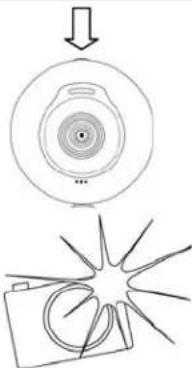
Diagram showing a camera lens with an arrow pointing to it and a starburst graphic below (no text or symbols)
8


www.trust.com/16490/faq

Manual assistant
Powered by Anthropic
Waiting for your message
Product information
Brand : TRUST
Model : 16490 MultiCover Chat
Category : Webcam