
MC-620 - Security Camera Clas Ohlson - Free user manual and instructions
Find the device manual for free MC-620 Clas Ohlson in PDF.


| Product Type | Weatherproof Surveillance Camera |
| Brand | Clas Ohlson |
| Model | MC-620 |
| Picture Sensor | 1/3" Colour CMOS |
| Pixels | 628 x 586 |
| Resolution | 420 lines |
| Electronic Shutter | 1/50 s - 12.5 μs |
| Lens | 6.0 mm f/2.0 |
| Light Sensitivity | 3.0 Lux (0 Lux with IR diodes) |
| IR Range | Up to 6 metres (12 IR diodes) |
| Power Supply | 12 V DC (net adaptor included) |
| Temperature Range | -10°C to 45°C |
| Dimensions | 60 mm (diameter) x 78 mm (length) |
| Weight | 280 g |
| Material (Housing) | Silver aluminium |
| Cable Length (Camera) | 1.8 m |
| Extension Cable Length | Approx. 19 m |
| Connection Options | RCA (2x video) and SCART |
| Mounting | Wall or ceiling with included bracket |
| Sun Visor | Removable |
| Weatherproof | Yes |
| Safety | Use only included adaptor; avoid moisture; disconnect before cleaning; do not disassemble |
| Care Instructions | Clean with soft damp cloth; avoid strong solvents |
| Disposal | Follow local ordinances |
Frequently Asked Questions - MC-620 Clas Ohlson
User questions about MC-620 Clas Ohlson
0 question about this device. Answer the ones you know or ask your own.
Ask a new question about this device
Download the instructions for your Security Camera in PDF format for free! Find your manual MC-620 - Clas Ohlson and take your electronic device back in hand. On this page are published all the documents necessary for the use of your device. MC-620 by Clas Ohlson.
USER MANUAL MC-620 Clas Ohlson
Please read the entire instruction manual before using and save it for future use. We apologise for any text or photo errors and any changes of technical data. If you have any questions concerning technical problems please contact our Customer Service Department.
Safety
- Use only the included or recommended adaptor.
- Never expose the camera to moisture or humidity.
• Always disconnect the camera from the electricity network before cleaning. - Never take the camera or its accessories apart. Certain parts inside the casing carry dangerous currents. Touching these can give you an electric shock.
Product Description
Weatherproof surveillance camera for connecting to TV, video, or monitor.
- Easy to mount on wall or ceiling with the included mounting kit.
- Comes with charger cable and extension cable (approx. 19 m).
- Comes with two different connection cables for connecting between the TV and extension cable.
Installation
Installation example for TV
- Attach the camera bracket to the designated spot.
- Attach the camera to the camera bracket using any of the two designated screw holes on the camera housing.
- The camera is equipped with a 1.8 m cable (A). Connect one end of the extension cable (B) to the camera.
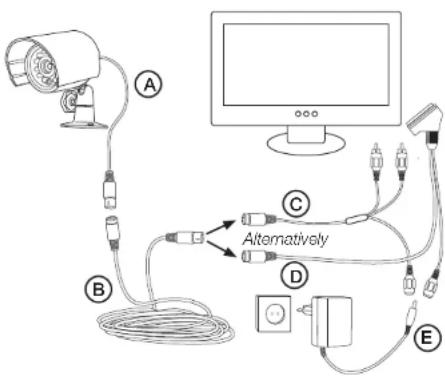
- Connect the other end of the extension cable to the connection cable with the (2 x RCA) (C) video connections or to the one with the SCART connection (D). Then connect the chosen connection cable to an available connection on your TV.
- Connect the adaptor's power cable (E) to the mounted connection cable. Then plug the adaptor into a wall socket.
- Set the TV to AUX or A/V mode to display the camera picture (see the TV instruction manual).
- Adjust the camera's position for the desired area to be monitored.
Removing and replacing the sun visor
The camera's sun visor is located on top of the camera and may easily be removed if necessary.
- Hold the camera firmly with the back of the camera towards yourself and slowly push the sun protector towards you.
- Hold the camera firmly with the back of the camera towards yourself and slowly push the sun protector away from you towards the camera's front.
Care and Maintenance
Use a soft damp cloth to wipe the product. Never use strong solvents or detergents.
Troubleshooting Guide
Problem Solution
| No picture. | Power adaptor is not connected.The TV is not set to the correct channel. |
| Poor picture quality. | Clean the camera lens.Adjust the TV's contrast and brightness. |
Disposal
Follow local ordinances when disposing of this product. If you are unsure about the disposal of this product contact your municipality.
Specifications
Picture sensor 1/3" Colour CMOS
Pixels 628 x 586
Resolution 420 lines
Electronic shutter 1/50 s - 12.5 μs
Lens 6.0 mm f/2.0
Light sensitivity 3.0 Lux
Light sensitivity
with IR diodes 0 Lux
IR range Up to 6 metres in the dark
(12 IR diodes)
Power supply 12 V DC (net adaptor included)
Temperature Range -10 °C to 45 °C
Dimensions 60 mm (diameter) x 78 mm (length)
Weight 280 g
Material camera housing Silver aluminium
Övervakningskamera
Art.nr 18-1082 Modell MC-620-UK
36-2628 MC-620

Brand : Clas Ohlson
Model : MC-620
Category : Security Camera