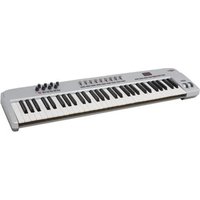
Oxygen 49 - MIDI Keyboard PINNACLE - Free user manual and instructions
Find the device manual for free Oxygen 49 PINNACLE in PDF.


| Product Type | MIDI Keyboard Controller |
| Brand | Pinnacle |
| Model | Oxygen 49 |
| Number of Keys | 49 |
| Key Type | Velocity-sensitive |
| Connectivity | USB, MIDI Out (5-pin DIN) |
| Power Supply | USB bus-powered or optional 9V DC adapter |
| Dimensions (W x D x H) | 830 x 200 x 70 mm (32.7 x 7.9 x 2.8 in) |
| Weight | 2.5 kg (5.5 lbs) |
| Included Accessories | USB cable, software download card |
| Compatible Operating Systems | Windows (7/8/10/11), macOS (10.10+), iOS (via Camera Connection Kit) |
| Control Elements | Pitch Bend wheel, Modulation wheel, 8 assignable knobs, 8 assignable buttons, Transport controls, Octave shift buttons |
| Maintenance | Clean with a soft, dry cloth. Do not use solvents or abrasives. |
| Safety Precautions | Keep away from liquids. Use only USB or specified power adapter. Do not disassemble. |
| Spare Parts Availability | Individual parts are not available for repair. Contact support for service options. |
| Reparability | Not user-serviceable. Refer to qualified technician if needed. |
| Warranty | 1 year limited warranty (check local terms) |
Frequently Asked Questions - Oxygen 49 PINNACLE
User questions about Oxygen 49 PINNACLE
0 question about this device. Answer the ones you know or ask your own.
Ask a new question about this device
Download the instructions for your MIDI Keyboard in PDF format for free! Find your manual Oxygen 49 - PINNACLE and take your electronic device back in hand. On this page are published all the documents necessary for the use of your device. Oxygen 49 by PINNACLE.
USER MANUAL Oxygen 49 PINNACLE
Congratulations on purchasing an Oxygen keyboard from M-Audio. The Oxygen keyboards offer diverse controls and all the programming features and functions you will need to develop your MIDI studio.
The Oxygen keyboards come with 25, 49, or 61 full-size, velocity-sensitive keys and eight fully assignable knobs, with 6 fully assignable Transport buttons. The 49- and 61-note models also include 9 fully assignable buttons and 9 assignable sliders for performance and programming. One simple USB connection serves as both a MIDI interface and bus-power source. Class-compliance with Windows XP and Mac OS X means that you can get down to business without even installing any drivers.
You can also expand on the functions of the Oxygen range by downloading the Enigma software editor and librarian. For more information, see the Enigma Software Editor (replace with section's number) of this manual or visit www.m-audio.com to register and download the free software.
2 > What's in the Box
Your Oxygen keyboard package contains the following:
■ 25-, 49-, or 61-note keyboard
■ CD-ROM containing Driver Software and User Manual in PDF format
■ Printed Quick Start Guide
■ CD-ROM containing bundled software
■ 5-foot USB 1.1 Type B cable
3 > Features
Top Panel
The top panel has the following functional components:
■ 25-, 49-, and 61-note key bed: full-sized velocity-sensitive keys with synth action
■ 8 fully assignable MIDI controller knobs
■ 9 assignable sliders (49 and 61 only)
■ 9 assignable buttons (49 and 61 only)
■ 6 Transport buttons
- Assignable Pitch Bend and Modulation wheels
■ Octave and Transpose up, down buttons
■ 10 non-volatile memories
■ 7 top-panel Function buttons (only 5 on 25-note model)
■ 3-segment LED screen
■ Advanced programming functions on the keybed
Back Panel
The back panel has the following functional components:
USB 1.1 upstream (Type B) port
■ Sustain pedal input
MIDI Out port
On/Off switch
■ Power input for optional power supply
General
The product has the following general features:
USB bus powered
■ Compatible with Enigma librarian and parameter editor for storing and organizing setups
■ MIDI Data from controllers
• MIDI control number
- RPN/NRPN
• Program, Bank LSB, Bank MSB
- Pitch Bend
• GM/GM2/XG SysEx Messages
■ MIDI Data from buttons:
- Note on
- Note on/off toggle
- MIDI CC on/off toggle
- RPN/NRPN
• Program, Bank LSB, Bank MSB presets
• MIDI Machine Control functions
• GM/GM2/XG SysEx Messages
• Program increment/decrement
• MIDI CC value increment/decrement
■ All controls fully programmable to MIDI controller number
■ All controls fully programmable to MIDI channel
■ Controller Mute function mutes controller output to avoid parameter jumps
■ Memory Dump via SysEx
4 > Minimum System Requirements
IMPORTANT: The Oxygen keyboard controllers are supported under Windows XP; they are not supported under Windows 98, 98SE or Windows ME or 2000. You must be running Service Pack 1 (SP1) or later. Visit the Windows update web pages (http://windowsupdate.microsoft.com/) to make certain you have the most current updates and fixes supplied by Microsoft.
On the Macintosh, the Oxygen controllers are supported under Mac OS X version 10.3.8 or version 10.4 or later. Earlier versions of Mac operating systems are not supported.
Windows\*
■ Pentium 3 – 800 MHz or higher
(CPU may be higher for laptops)
256 MB RAM
■ DirectX 9.0b or higher
■ Windows XP (SP1) or higher
(Windows 98, Me, NT, or 2000 not supported)
Mac OS\*
■ Macintosh G3 800/G4 733 MHz or higher
(CPU may be higher for laptops)
■ OS X 10.2.8 with 256 MB RAM,
■ OS X 10.3.4 or greater with 512 MB RAM
*M-Audio suggests you also check the minimum system requirements for your software, as they may be greater than the above.
Windows XP and Mac OS X Class-Compliancy
If you are using Windows XP or Mac OS X, you may simply connect your keyboard using the USB lead (supplied) and turn the power switch to "on." Because the Oxygen keyboards are class-compliant, your unit will work without any further installation.
5 > Driver Installation and Powering the Keyboard
Power and Connection via USB
You can power the keyboard via USB or an optional external power supply. Use only one method at a time.
- Check that the on/off switch on the back of the unit is set to "off"
- Plug in the USB cable provided with the Oxygen keyboard to a free USB port on your computer
- Plug in the other end of the USB cable to the USB input on the Oxygen keyboard and turn the Oxygen keyboard on.
The single USB cable powers the Oxygen, and sends MIDI data to and from your computer.
You can also use a power adapter (not included) with the following specification: 12V DC output, 250-300mA, center positive.
Verify that you are not powering the Oxygen keyboard via USB, then simply plug in the power supply to the input labelled DC 12V and switch the power on.
Note: Do not leave the adapter plugged in for long periods if the unit is not in use.
6 > Controls and Connectors
Top Panel Descriptions
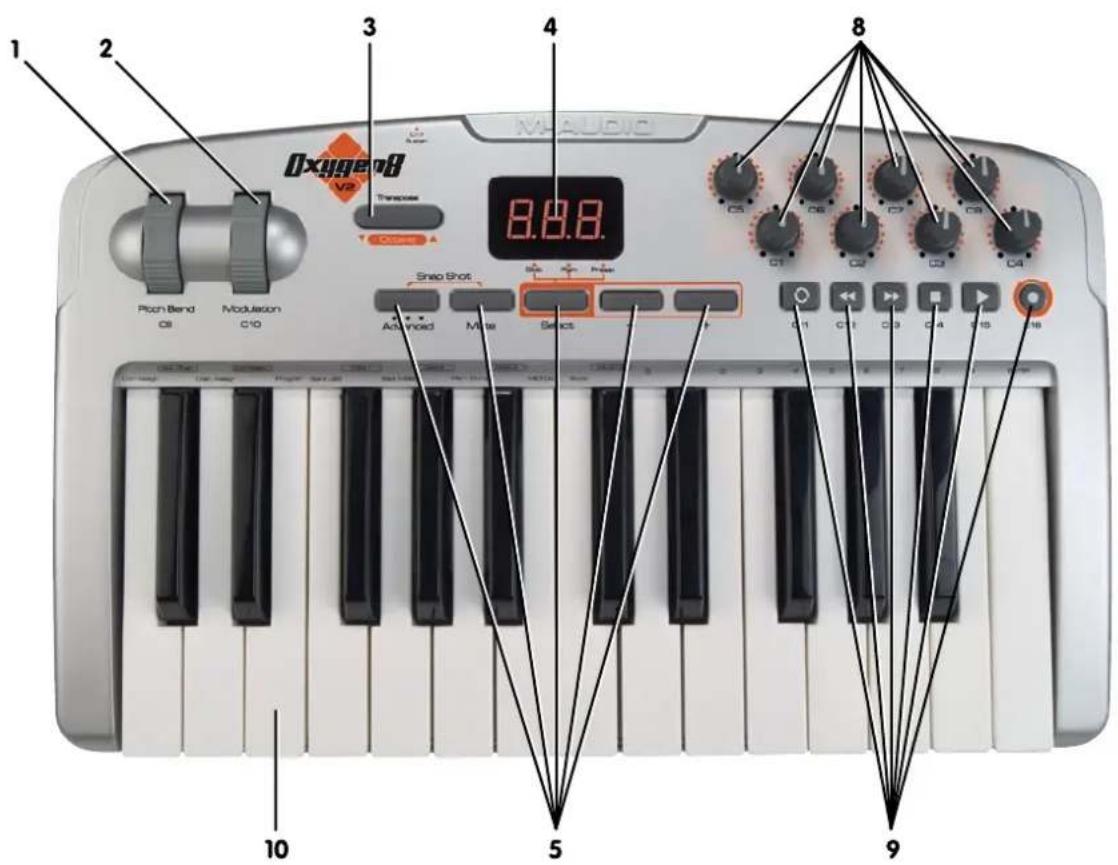
The Pitch Bend wheel is used for modifying the pitch of sounds played on a given channel. Rolling the Pitch Bend wheel upward or downward will cause a raising or lowering of the pitch of a sound. The Pitch Bend wheel is an assignable controller, and can also be used to control other effects.
2. Modulation Wheel:
The Modulation wheel is used to change the intensity of effects, such as Vibrato (pitch change), Tremolo (change in volume), and Modulation (change in tone). Roll the Modulation upward to add modulation effect and roll downward to reduce modulation effect. The Modulation wheel is an assignable controller, and can also be used to control other effects.
3. Octave +/- and Transpose Buttons:
The Octave buttons allow you to shift the octave of the keyboard up or down to extend the range of the key bed.
The left button is for the Octave down function, and the right button is for the Octave up function. The top to bottom range available via the Octave up and down function is 11 octaves.
- Press Octave + one time for each up octave shift on the keyboard
- Press Octave - one time for each down octave shift on the keyboard
Transpose is a secondary function of the Octave buttons. The Transpose function allows a pitch transposition up or down 12 steps. To activate the Transpose function, press both Octave up and down buttons simultaneously and then use the up and down buttons to adjust transposition by one semitone.
- Press Octave + and Octave - together.
- Press Octave + one time for each semi tone you want to transpose up.
- Press Octave – one time for each semi tone you want to transpose down.
4. LED Screen:
The LED is a standard 3-segment LED display. The display provides feedback while you are programming various MIDI functions.
5. Function Buttons:
There are 7 function buttons on the 49 and 61-Note and 5 on 25-Note. The Function buttons are used for on the fly programming. The Advanced button is used to access the advanced programming functions on the keyed.
6. 9 Assignable MIDI Sliders (49- and 61- Note Only):
The Oxygen 49 and 61 have 9 assignable sliders that are fully programmable. Additionally, each fader can be assigned to an individual MIDI channel.
7. 9 Assignable MIDI Buttons (49- and 61- Note Only):
The Oxygen 49 and 61 have 9 assignable buttons that are fully programmable. Additionally, each button can be assigned to an individual MIDI channel.
8. 8 Assignable MIDI Knobs:
The Oxygen keyboards have 8 assignable knobs that are fully programmable. Additionally, each knob can be assigned to an individual MIDI channel.
9. 6 Assignable Transport Buttons:
The Oxygen keyboards have 6 fully assignable Transport buttons that send MIDI controller data on any MIDI channel. Each Transport button is fully programmable. Additionally, each button can be assigned to an individual MIDI channel.
10. Velocity-sensitive Keyboard:
The product's key bed is velocity sensitive.
Back Panel Descriptions

1. DC Power Supply Port:
For connection of a 12V DC 250-300mA power supply. (The power supply is an optional accessory and is not included in the package.)
2. USB 1.1 Port:
USB 1.1 upstream (Type B) port
3. MIDI Output:
The external MIDI Out port is used to connect external MIDI devices such as sound modules, hardware sequencers, and synthesizers. The port will accept a standard 5 pin DIN-type connector.
4. Sustain Pedal Input:
The Sustain Pedal input accepts a 1/4" TR jack plug. It is located on the rear or back panel as shown in the illustration. The sustain pedal controls the hold length of any note played on the keyboard. However, the pedal is fully programmable and can be used to control other effects.
- The polarity of the sustain pedal is determined when you power up your Oxygen controller. The state at power up is assumed to be off. If the pedal is not pressed at power up, the pedal will be on when pressed, and off when released.
- The sustain pedal is an optional accessory and is not included in the package.
5. On/Off Switch:
The power switch on the rear of the product will function in a simple on or off mode. When the unit is on, it is powered by either the external supply or USB bus power.
6. Kensington Lock Hole:
This connector is compatible with Kensington® security cables to protect your device from theft.
7 > Introduction to MIDI Programming Functions
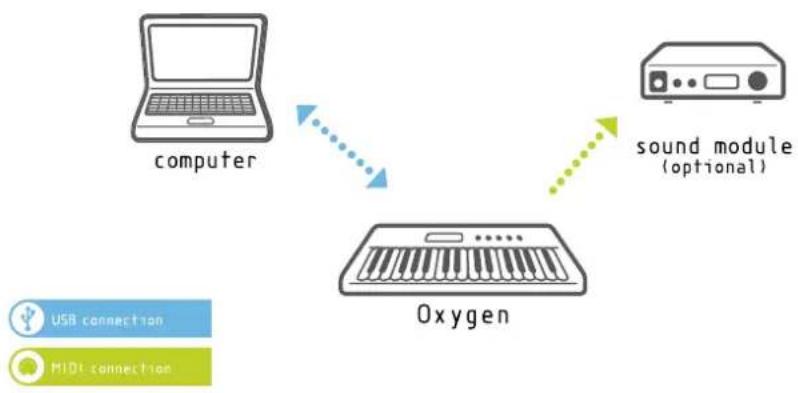
flowchart
graph TD
    A["computer"] --> B["Oxygen"]
    B --> C["sound module (optional)"]
    D["USB connection"] --> A
    E["MIDI connection"] --> B
Introduction
Before you begin exploring the MIDI section of the manual, please refer to the beginning of this guide and read the installation information. It is necessary to install the Oxygen and ensure it is working properly before you begin to work with the MIDI functions.
Testing Your Oxygen keyboard with Your Computer Software
We recommend that you verify that your software application is properly communicating with the Oxygen keyboard. Most software applications have a MIDI Input indicator. To confirm data is received, press any key on the keyboard.
If you encounter any issues or if the software receives no data, please verify that you have selected the keyboard's driver as the MIDI Input for your software. In addition, please read the troubleshooting section at the back of this manual and consult the manual that came with your software for proper configuration within the software application.
Edit Mode
This manual will frequently refer to the "Edit mode." Edit mode defines the state of the Oxygen after pressing the Advanced Function button which is labeled "Advanced."
In Edit mode, use the Oxygen keys for selecting programming functions. These functions are listed above each key on the key bed.
When entering numerical values in Edit mode, the LED display shows the value entered. This value will update as you enter numerical data.
Use the Enter key each time the numerical data entry keys are used to enter a value. This will save that value. To exit Edit mode, simply press the Edit button again, the LED will no longer be lit and you will have restored the keyboard.
8 > Function Buttons Defined
Advanced
The Advanced Functions feature will put the keyboard into Edit mode, and the keys on the key bed will then call up the assigned programming function written on the panel above them.
When the Advanced Function button is pressed, and the keyboard enters edit mode, the LED screen will show three dots along the bottom of the display.
Mute
The Mute function mutes all MIDI output from the rotary dials, or faders on your Oxygen controller. This allows for adjustment of controller parameters without altering software settings—useful for preventing parameter jumps in your software. To activate Controller Mute, press the Mute button. The LED display will read "OFF" each time a controller is moved, in order to make it clear that the controller is not sending any MIDI data.
The Mute function does not affect the buttons, the sustain pedal, or the keys. Pressing any of these controllers on your Oxygen keyboard will cancel Mute mode automatically. To exit the Controller Mute mode, press the Controller Mute button again (the LED screen will read "On").
Snap Shot
The Snap Shot function sends out the current settings for each knob and fader on their current MIDI channel. This feature lets you record the settings of the controllers into your sequencer, or update your software's parameters to match the settings on your Oxygen.
Snap Shot can be used in conjunction with the Mute function to create interesting effects. For example, Mute can be used to adjust the position of the controllers on your Oxygen without affecting the software parameters, Then, Snap Shot can be used to immediately shift all parameters to the new levels you have changed while muted, all at once.
Select
The Select button is used to select the function of the 2 data buttons. Each time the Select button is pressed, a different dot will light along the bottom of the LED display to indicate which of the functions the Data buttons are currently assigned to.
The functions that can be assigned to the data buttons are Global Channel, Program and Preset Select (Preset is available from these buttons on the 25-note Oxygen 8 v2 only. On the 49- and 61-note versions, there are separate dedicated buttons for Preset). On initial power up, the data buttons will alter the selected preset on the 25-note version. On the 49- and 61-note versions, by default the data buttons will alter the Global Channel. The settings for the Data buttons will be remembered even when you power down your Oxygen.
If the Data buttons are assigned to 'Prog' then the buttons have the effect of sending a Program change. This is a useful setting if you want to change quickly between patches on a synthesizer and audition the sound. Program Changes are always sent on the Global MIDI Channel.
If the Data buttons are assigned to 'Preset' then the buttons are used to change between various presets of your Oxygen. This means that each time a Data button is pressed, a new preset will be recalled.
If the Data buttons are assigned to 'Glob.' the buttons will change the Global MIDI Channel that the Oxygen controller is transmitting on.
Data -/+ Buttons
The left Data button is ‘-’ and will decrement the assigned function’s value. The right Data button is ‘+’ and will increment the assigned function’s value.
Preset -/+ and Dual Press Memory Recall (49- and 61-note)
Note: the 25-note version does not have Preset – and + buttons. Simply press Preset - (down) or Preset + (up) to toggle through the preset memories. Alternately, you can press both Preset - and Preset + which will put the keyboard into Advanced Function mode, and then enter the memory number on the key bed to load one of the 10 presets from preset memory.
9 > Keybed Functions Defined
Control Assign
The Control Assign function assigns a MIDI controller message (MIDI CC) to a selected controller.
To assign a MIDI CC to a selected controller:
- Press the Advanced Function button.
- Press the Control Assign key.
- Enter the MIDI CC value with the numeric keys.
- Press the Enter key.
The controller that is affected by the Control Assign function is always the last used controller. By default, controller 1 is selected. However, it is possible to alter the selected controller during edit mode by moving a different controller. As you enter a new MIDI cc assignment using the data entry keys, the LED will update to give feedback on the number that has been entered.
Please see appendix A for a list of MIDI cc's that are assignable. Note that we have expanded on the standard MIDI CC list. This is to include other useful MIDI messages such as NRPN messages, GM/GM2 Sys Ex and even some CC's that define how the controller should operate. This simplifies programming such messages which are often complicated to program on other devices.
Global Channel
The Global Channel function changes the MIDI channel assigned to the keyboard. Your Oxygen controller will transmit on any of the standard 16 MIDI channels. The Global MIDI Channel will affect the channel on which program changes, bank changes, and any controllers set to respond to the global channel will transmit.
To set the Global Channel:
- Press the Advanced Function button
- Press the Global Channel key.
3 Enter the MIDI channel number on the key bed.
4 Press the Enter key.
When engaging the Global Channel function, the LED screen will display the "c" symbol, and the last selected channel.
Note that it is also possible to set the Data keys to control the Global Channel. To do this:
- Press the Select Function button until the dot above Glob Chan is lit.
- Use the - and + Data buttons to decrement/increment the Global Channel.
Channel Assign
The Channel Assign function assigns a channel to an individual MIDI controller.
- Press the Advanced button and then the Channel Assign key.
- Enter the MIDI channel number using the data entry keys.
- Then press the Enter key.
When assigned to channel 00, the controller will transmit on the Global Channel.
When engaging the Channel Assign function, the LED screen will display the "c" symbol, and the last selected channel.
Note: When a controller is assigned to send SysEx messages, the individual control channel number defines a Device ID and not a transmit channel. Please see Appendix A to find out which of the extra MIDI CC numbers determine that the control should send a SysEx message.
Control Select
The Control Select function selects a MIDI controller for parameter editing. Use the Control Select function to select a MIDI controller before assigning a MIDI CC number to that controller.
To select a MIDI controller for editing, move the knob or fader that you want to edit. The last used controller is always the controller that is currently selected for editing.
The second method to select a MIDI controller for editing:
- Press the Advanced Function button
- Press the Control Select button
- Enter the controller's ID number using the data entry keys.
- Press the Enter key to confirm.
Note: If you move a controller after pressing Control Select, the LED will display the ID number of the selected controller to edit. The ID number of each controller is shown on the printing by each control.
Program
The Program function is used to send a Program Change on the Global Channel. To send a Program Change:
- Press the Advanced Function button.
- Press the Program key.
- Enter the Program Change to send using the data entry keys.
- Press the Enter key to confirm.
Note that it is also possible to set the data keys to control Program Change. To do this:
- Press the Select Function button until the dot above Prog is lit.
- Use the - and + Data buttons to step through Program Changes. The Program Change number shown in the LED display will be sent.
Bank LSB
The Bank LSB function can be used to access additional banks of sounds on your sound module or sound card by sending a bank change LSB message. Note, this is only possible if your receiving device has additional banks of sounds.
- Press the Advanced button.
- Press the Bank LSB key.
- Enter the bank number using the keypad.
- Press the Enter key.
Please check your receiving device's documentation to ensure that it will respond to these messages.
The Bank MSB message is always sent on the Global Channel.
Bank MSB
The Bank MSB function can be used to access additional banks of sounds on your sound module or sound card by sending a bank change MSB message. Note: this is only possible if your receiving device has additional banks of sounds.
- Press the Advanced button.
- Press the Bank MSB key.
- Enter the bank number using the keypad.
- Press the Enter key.
Please check your receiving device's documentation to ensure that it will respond to these messages.
The Bank MSB message is always sent on the Global Channel.
Data 1
The Data 1 function key only applies to the unit's programmable buttons and pedal. The function of Data 1 depends on the MIDI CC that is currently assigned to the controller that is to be edited. Please refer to Appendix A where each assignable MIDI CC is listed, along with the Data 1, 2 and 3 functions.
When editing Data 1 values, the range of values that can be selected is 0-127.
Data 2
The Data 2 function is located on the key bed. The function of Data 2 depends on the MIDI CC that is currently assigned to the controller that is to be edited. Please refer to Appendix A where each assignable MIDI CC is listed, along with the Data 1, 2 and 3 functions.
When editing Data 2 values, the range of values that can be selected is 0-127.
It is possible to limit the range of the rotary dials and faders on your Oxygen keyboard. To assign minimum value to a knob or fader:
- Press the Advanced Function button
- Select an assignable controller for editing
- Press the Data 2 button
- Type the minimum value for the controller and press Enter.
To assign minimum value to a button:
- Press the Advanced Function button.
- Select an assignable button for editing.
- Press the Data 2 button.
- Type the minimum value for the controller and press Enter.
The maximum value is assigned in the same way by using the Data 3 function key.
Data 3
The Data 3 function is located on the key bed. The function of Data 3 depends on the MIDI CC that is currently assigned to the controller that is to be edited. Please refer to appendix A where each assignable MIDI CC is listed, along with the Data 1, 2 and 3 functions.
When editing Data 3 values, the range of values that can be selected is 0-127.
To assign maximum value to a knob or fader:
- Press the Advanced Function button.
- Select an assignable controller for editing.
- Press the Data 3 button.
- Type the maximum value for the controller and press Enter.
It is possible to limit the range of the rotary dials and faders on your Oxygen keyboard. To assign maximum value to a button:
- Press the Advanced Function button.
- Select an assignable button for editing.
- Press the Data 3 button.
- Type the maximum value for the controller and press Enter.
The minimum value is assigned in the same way by using the Data 2 function key.
MIDI OUT FROM USB
This mode is controlled as follows:
- Press the Advanced Function button.
- Press the MIDI Out key.
- The display will show either "Int" or "USB."
On initial power up, the data from the keyboard and its controls is sent directly out of the MIDI Out port. This mode is shown in the display as "Int" (Internal).
When set to USB, the data generated by the keyboard will no longer be sent from the external MIDI Out port. Instead, the data received via the USB connection to the host computer will be transmitted directly to the external MIDI Out port. This mode is analogous to the MIDI Output port on a dedicated USB-MIDI interface.
Velocity Curve
The Velocity Curve Select button selects the velocity curve that the keyboard will use to regulate each MIDI note. Oxygen controllers offer 12 different velocity curve settings, 9 curves, and 3 fixed curves. The 3 fixed curves give velocities of 64, 100 and 127.
On the Oxygen keyboard:
- Press the Advanced Function button.
- Press the Velocity key.
- Type the number of the desired velocity curve using the key pad, and press the Enter key.

line
c1 | Point | Value | |---|---| | 1 | 0 | | 2 | 30 | | 3 | 125 |

line
c3 | Category | Value | |---|---| | 1 | 35 | | 2 | 45 | | 3 | 85 | | 4 | 110 | | 5 | 128 |
line
c4 | Time Point | Value | | :--- | :--- | | 1 | 20 | | 2 | 30 | | 3 | 65 | | 4 | 100 | | 5 | 125 |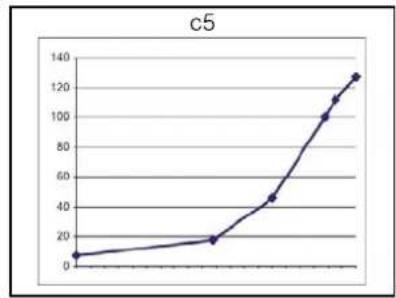
line
c5 | Time Point | Value | | :--- | :--- | | 1 | 5 | | 2 | 15 | | 3 | 45 | | 4 | 100 | | 5 | 110 | | 6 | 125 |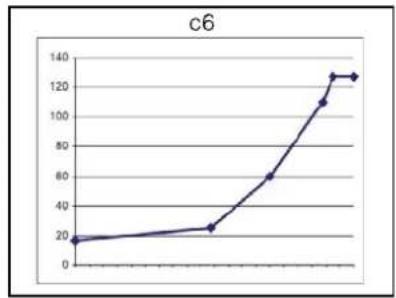
line
c6 | Point | Value | |---|---| | 1 | 15 | | 2 | 20 | | 3 | 25 | | 4 | 60 | | 5 | 105 | | 6 | 125 | | 7 | 125 |
line
| x | y | |----|-----| | 0 | 0 | | 1 | 10 | | 2 | 20 | | 3 | 30 | | 4 | 40 | | 5 | 60 | | 6 | 80 | | 7 | 100 | | 8 | 120 | | 9 | 130 |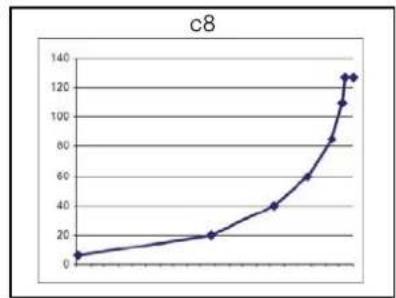
line
| x | y | |----|-----| | 0 | 0 | | 1 | 10 | | 2 | 20 | | 3 | 30 | | 4 | 40 | | 5 | 60 | | 6 | 80 | | 7 | 100 | | 8 | 120 | | 9 | 130 |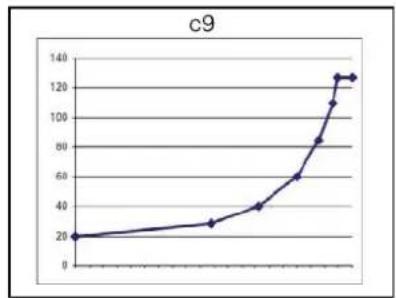
line
| x | y | |---|-----| | 0 | 20 | | 1 | 25 | | 2 | 30 | | 3 | 40 | | 4 | 60 | | 5 | 80 | | 6 | 100 | | 7 | 120 | | 8 | 130 |Drawbar Mode (49- and 61-note only)
The Drawbar function reverses the polarity of the faders.
- Press the Advanced Function button.
- Press the Drawbar key.
To exit the Drawbar function, press the Drawbar button a second time.
Device ID (49- and 61-note only)
The Device ID function will allow the assigning of a Device ID to differentiate between multiple keyboards when sending a memory dump. On initial power up, the Device ID for your Oxygen keyboard is 127, meaning the device will respond to any SysEx received regardless of the Device ID setting. If a Device ID is set at a number other than 127, the device will not respond to SysEx messages that do not have a device ID of either 127, or the same as the device.
- Press Advanced Function button and then the Device ID key.
- Enter new device number on keypad.
- Press the Enter key.
When engaging the Device ID function, the last saved device id number will display on the LED screen.
Memory Dump
The Memory Dump function sends out a Sys Ex memory dump from your Oxygen keyboard. The memory dump will send out Sys Ex data for the 10 preset memories on the Oxygen line to allow for storing the memories in external software.
- Press the Advanced Function button.
- Press the Memory Dump key.
A stored Memory Dump can be played back to the Oxygen, and it will automatically read the preset settings from the file.
The Memory Dump is standard memory data. This means it is possible to store a memory dump by putting your sequencer into record mode and simply sending the Memory Dump to your sequencer.
Store
The Store function saves a preset memory. After making changes to the MIDI controllers, save the changes to one of the 10 preset memories by selecting that memory and pressing the Store button.
To save a preset:
- Press the Advanced Function button
- Press the Store key, the last selected memory number will display
- Type in the number of the memory to store settings, and press Enter to save the changes.
All Store operations will delete the previous memory contents and replace with new ones. Please note that the factory presets are stored in the product's ROM and can therefore be restored at any time.
The factory settings are recalled by holding down the - and + Data buttons on power up.
Enter Key
The Enter key puts changes into effect when programming the keyboard. Press the Enter key after you have made a parameter change with one of the function keys on the key bed. After the Enter key is pressed, Advanced Function mode will exit and the three dots in the LED display will turn off.
Cancel Key
The Cancel function allows you to exit Edit mode while you are editing some data, without altering the previous data setting for the parameter you are editing. So if you make a mistake during editing and don't want to alter the previous setting, just press the Cancel key.
10 > Advanced Programming Functions
Introduction to Programming Options
MIDI CC (continuous controller) numbers are part of the General MIDI specification and are typically used to control the real-time changing of parameters in musical equipment. For a complete list of standard MIDI controller numbers from 0 to 131, please see Appendix A.
As mentioned in Section 6, many of the controls on the Oxygen range are fully programmable. This means that you can assign them to send all sorts of different MIDI messages. This is achieved by selecting the controller for programming and assigning a 3-digit number. Appendix A lists the numbers that can be assigned to different types of controllers on the Oxygen. It also defines the type of MIDI message that will be sent out if you assign each number to a controller. As you can see from Appendix A, there is a wide variety of MIDI messages that can be assigned to controllers. The uses of these messages will be explained in more detail in this section.
The assignable buttons and pedals have slightly different options from the faders or rotary dials.
The two charts show the transmit messages that can be programmed for each of the knobs, faders, and assignable buttons or pedal.
Please pay extra attention to the differences between programming the faders or knobs and programming the buttons or pedal.
Faders and Rotary Dials:
| MIDI CC Description Data 2 Data 3 | |||
| 0-119 Standard MIDI CC's Min Max | |||
| 120-127 Channel Mode Messages Min Max | |||
| 128 Pitch Bend Sensitivity | |||
| 129 Channel Fine Tune | |||
| 130 Channel Coarse Tune | |||
| 131 Channel Pressure | |||
| 132 RPN coarse RPN LSB | RPN MSB | ||
| 133 RPN Fine | RPN LSB | RPN MSB | |
| 134 NRPN Coarse | NRPN LSB | NRPN MSB | |
| 135 NRPN Fine | NRPN LSB | NRPN MSB | |
| 136 Master Volume GM* | |||
| 137 | Master Pan GM* | ||
| 138 Master Coarse Tune GM* | |||
| 139 Master Fine Tune GM* | |||
| 140 Chorus Moderate GM2* | |||
| 141 Chorus Mod Depth GM2* | |||
| 142 Feedback GM2* | |||
| 143 Send to Reverb GM2* | |||
| 144 Pitch Bend | - | - | |
| 255 | Controller Off*** | - | - |
Buttons and Pedal:
| MIDI CC Description Data 1 Data 2 Data 3 | ||||
| 0-119 Standard MIDI CC's - Toggle Value 2 Toggle Value 1 | ||||
| 120-127 Channel Mode Messages - Toggle Value 2 Toggle Value 1 | ||||
| 128 Pitch Bend Range - Sensitivity Value - | ||||
| 129 Channel Fine Tune - Tuning Amount | - | |||
| 130 Channel Coarse Tune - Tuning Amount | - | |||
| 131 | Channel Pressure | - | Pressure Amount | - |
| 132 RPN Coarse | Value | RPN LSB | RPN MSB | |
| 133 RPN Fine | Value | RPN LSB | RPN MSB | |
| 134 | NRPN Coarse | Value | NRPN LSB | NRPN MSB |
| 135 NRPN Fine | Value | NRPN LSB | NRPN MSB | |
| 136 Master Volume GM* | - Volume LSB | Volume MSB | ||
| 137 Master Pan GM* | - Pan LSB | Pan MSB | ||
| 138 Master Coarse Tune GM* | - Tuning LSB | Tuning MSB | ||
| 139 Master Fine Tune GM* | - Tuning LSB | Tuning MSB | ||
| 140 Chorus Mod rate GM2* | - Mod Rate | - | ||
| 141 | Chorus Mod Depth GM2* | - Mod Depth | - | |
| 142 Feedback GM2* | - Feedback Level | - | ||
| 143 Send to Reverb GM2* | - | Reverb Send Level - | ||
| 144 Pitch Bend | - Pitch Shift LSB | Pitch Shift MSB | ||
| 145 | Program/Bank Preset | Program | Bank LSB | Bank MSB |
| 146 | MIDI CC (On/Off) | MIDI CC | Button Press Value | Button Release Value |
| 147 | Note (On/Off) | Note | Velocity Off | Velocity On |
| 148 Note (On/Off Toggle) Note Velocity Off | Velocity On | |||
| 149 MMC Command** | - Command Select. | - | ||
| 150 Reverb Type GM2 * | - Type | - | ||
| 151 | Reverb Time GM2 * - Time | - | ||
| 152 Chorus Type GM2* | - Type | - | ||
| 153 MIDI CC decrement MIDI CC Min | Max | |||
| 154 MIDI CC increment | MIDI CC Min | Max | ||
| 155 Program decrement | - Min | Max | ||
| 156 Program increment - Min | Max | |||
| 255 | Controller Off*** | -- | - | |
* General MIDI SysEx messages
** General MIDI 2 SysEx messages
*** MMC SysEx messages
**** Press "0," and then press the Enter key. Next press the Data - button.
[This table above is in need of the asterisks fixing. What is listed below the table is wrong. Tim Chandler should fix this]
Setting Toggle Values for the Buttons or Pedal
When a standard MIDI CC number is programmed to the assignable buttons or the sustain pedal, the controller will toggle between an on and off value. That means when you press the controller, an on value is sent. When you next press the controller, the off value is sent.
The on and off values are set using the Data 3 and Data 2 parameters respectively. Please try the example below; this will cause a button to hard pan your sound from left to right each time the button is pressed:
- Press the Advanced Function button, followed by the Ctrl Assign key.
- Type 10 using the numerical data entry keys.
- Press the Enter key to confirm.
- Press the Advanced Function button, followed by the Data 2 key.
- Type in 00 using the numerical data entry keys.
- Press the Enter key to confirm.
- Press the Data 3 key.
- Type in 127 using the numerical data entry keys.
- Press the Enter key to confirm.
Here, 00 is assigned as the off value, and 127 is assigned as the on value. With your button programmed in this way, as you play your keyboard, depressing the button will switch the sound between the left and right speakers.
If you want the button to send the same value every time, enter the same value for both the Data 2 and Data 3 parameters.
Setting Trigger Values for the Buttons or Pedal
The above method will toggle the button value each time it is pressed. It is possible to set the button to send one value when pressed, and another value when released. This is known as a trigger, since each time you press the button the same value is sent. Such operation is useful when triggering samples in your software.
A trigger button has an on value when pressed, and an off value when released. The sustain pedal is generally set up as a trigger to ensure it will always turn off when released. The on value is set using the Data 3 parameter, and the off value is set using the data 2 parameter. Data 1 is used to define the MIDI CC that the controller should send as the trigger. In order to set the button/pedal to operate as a trigger, it is necessary to assign MIDI CC 146 to the controller.
The following example works like a 'mute' for your keyboard. When you press the button, you will not hear any sound from the keyboard until the button is released. To set this up, it is necessary to set up a trigger for the volume (MIDI CC 007), with a ON value of 0 and an OFF value of 127:
- Press the Advanced Function button, followed by the Ctrl assign key.
- Type "146" using the numerical data entry keys and ENTER to confirm.
- Press the Advanced Function button, followed by the DATA 1 key.
- Type "007" using the numerical data entry keys and ENTER to confirm.
- Press the Advanced Function button, followed by the DATA 2 key.
- Type "127" using the numerical data entry keys and ENTER to confirm.
- Press the Advanced Function button, followed by the DATA 3 key.
- Type "000" using the numerical data entry keys and ENTER to confirm.
Assigning MMC Control to a Button
- Select the button to control the MMC message.
- Press the Advanced Function button.
- Press the Control Assign key. Type the number 149 with the keypad, and confirm by pressing the Enter key.
- Press the Advanced Function button.
- Press the Channel Assign key.
- Enter 127 using the key pad, then press Enter. This ensures all receiving devices will respond to the MMC message.
- Press the Advanced Function button.
- Press the DATA 2 key and enter a number from the chart below to select the MMC message you want. Finally, confirm your selecting by pressing the Enter key.
| Number MMC Command | |
| 01 STOP | |
| 02 PLAY | |
| 03 DEFERRED PLAY | |
| 04 FAST FORWARD | |
| 05 REWIND | |
| 06 RECORD STROBE | |
| 07 RECORD EXIT | |
| 08 RECORD PAUSE | |
| 09 PAUSE | |
| 10 EJECT | |
| 11 CHASE | |
| 12 COMMAND ERROR RESET | |
| 13 MMC RESET | |
Assigning RPN/NRPN to a Fader/Rotary Controller
Note: For a detailed description of RPN/NRPN data see the "MIDI Messages Explained" section.
- Select the desired knob/fader as described earlier.
- Press the Advanced Function button.
- Press the Control Assign key. While the three display dots are visible, enter controller 132 for RPN Coarse, or 133 for RPN Fine, or 134 for NRPN Coarse or 135 for NRPN Fine using the numerical data entry keys. Press the Enter key to confirm your selection.
- Press the Advanced Function button.
- Press the DATA 3 key, and enter the desired number for the RPN/NRPN MSB. Press the Enter key to confirm.
- Press the Advanced Function button.
- Press the DATA 2 key, and enter the desired number for the RPN/NRPN LSB. Press the Enter key to confirm.
- Press the Advanced Function button.
- Press the Chan Assign Key, and enter a number from 1-16 to represent the MIDI channel you would like this message transmitted on. Press the Enter key to confirm.
Many data sheets for synths make use of NRPN messages and will give the MSB and LSB values that should be entered for Data 3 and Data 2 (See Appendix E). Some manuals may only give the hex values, but Oxygen requires the decimal value be entered. Convert hexadecimal values to decimal values using the Windows or Mac calculator; select Scientific mode (Programmer mode on the Mac), select Hex, then enter the hexadecimal value needed to convert. Press the Dec button to convert it to a decimal value. Please reference Appendix C for more information.
Assigning a Note to a Button
The following shows the procedure for setting a button to transmit a MIDI Note On message when pressed, and a MIDI Note Off message when released.
1 Press the Advanced Function button, then the CTRL ASGN key.
2 Enter "147" using the numerical data entry keys.
3 Press the Enter key to confirm.
This is the MIDI CC number that corresponds to Note On/Off mode (see Appendix A).
4 Press the Advanced Function button again followed by the Data 3 key.
5 Enter "100" using the numerical data entry keys.
6 Press the Enter key to confirm.
This means when you press the button, a Note On message is sent out with a velocity of 100.
7 Press the Advanced Function button again followed by the Data 2 key.
8 Enter "0" using the numerical data entry keys.
9 Press the Enter key to confirm.
This means when you release the button, a Note Off message will be sent out.
10 Press the Advanced Function button followed by the Data 1 key.
11 Enter "64" using the numerical data entry keys.
12 Press the Enter key to confirm.
This means you are sending out MIDI note 64 or E4 each time you press the button.
The MIDI note numbers are given in Appendix D.
Setting Buttons as Program, Bank Triggers.
You can program a button on your Oxygen controller to send a Program, Bank LSB and Bank MSB message whenever it is pressed. This is useful for selecting patches on a sound module, or synthesizer on the fly.
To set up a button in this way:
- Press the Advanced Function button. Press the Ctrl Assign key.
- Enter "145" using the numerical data entry keys.
- Use the Data 1 parameter to enter the desired program change that should be sent by the button/pedal.
- Use the Data 2 parameter to enter the desired Bank LSB value that should be sent by the button/pedal.
- Use the Data 3 parameter to enter the desired Bank MSB that should be sent by the button/pedal.
Programming a Button to Increment/Decrement a MIDI CC value
It is also possible to set a button to increment/decrement the value of a MIDI CC by 1 each time it is pressed. This is useful if you are controlling parameters on your software that have a step-through operation with a small range.
To set a button to decrement from a maximum value to a minimum value, assign the button to MIDI CC 153. To set a button to increment from a minimum value to a maximum value, assign the button to MIDI CC 154. The maximum and minimum values are set using the Data 3 and Data 2 parameters respectively.
Please note that each button will only increment or decrement its own parameter value and this value is independent of any other button. It is not possible to assign one button to increment and another to decrement the same parameter value.
Programming a Button to Increment/Decrement a Program Change
It is also possible to set a button to send an incremented/decremented Program Change each time it is pressed. This allows you to set 2 assignable buttons up to step through programs on your software if desired. It is also possible to limit the range of the programs that you want to step through.
To set a button to decrement a Program Change between a maximum and minimum value, assign the button to MIDI CC 155. To set a button to increment a Program Change between a minimum and maximum value, assign the button to MIDI CC 156. The maximum and minimum values are set using the Data 3 and Data 2 parameters respectively.
Please note that each button will only increment or decrement its own parameter value and this value is independent of any other button. It is not possible to assign one button to increment and another to decrement the same parameter value.
About SysEx Messages and Device ID
When transmitting SysEx messages, the individual control channel number does not define a transmit channel, but a Device ID. When the Chan key is pressed, the "c" is NOT displayed in the LCD screen.
Device IDs range between 00–127. In most cases, the Device ID should be set at 127. This means that all devices will receive the SysEx message.
The Device ID for a SysEx message assigned to a controller cannot be changed using the Dev ID key. This key is used for varying the global Device ID of the Oxygen controller..
For more information, please reference the "SysEx Messages" and "Device ID" sections.
Non-Volatile Memory
Your Oxygen controller features non-volatile memory, which allows for automatic saving of presets after powering down and restarting. The current controller and channel assignments are stored whether you have stored the setup to a memory location or not. The Program, Bank LSB and Bank MSB data, Global Channel setting, MIDI Out from USB setting and last used memory preset are also stored.
Memory Dump
Press the Advanced Function button, then the Mem Dump key to send out SysEx data packets that represent the 20 memories set up in the Oxygen controller. This can be used for storing or backing up the contents of the memory presets externally.
It is possible to record the complete Memory Dump to a standard sequencer. Recall the Memory Dump by playing the MIDI track containing the recorded Memory Dump, making sure that the Oxygen's drivers are selected as the output for that particular track.
A Memory Dump or a Memory Send does not affect the current controller assignments to the keyboard. Recall a preset to access the new memory settings after a Memory Dump has been sent to the keyboard.
Press the Edit button, then the Mem Dump key to send out a number of SysEx data packets that represent the 20 memories set up in the Oxygen. This can be used for storing or backing up the contents of the memory presets externally.
Assigning the Device ID (not available on 25-note model)
The Device ID is a way of differentiating between multiple keyboards. Press the Advanced Function button, then the Dev ID key to assign a Device ID to your Oxygen controller. The default Device ID is 127 when a Memory Dump is performed. It is recommended to keep the Device ID setting as 127.
If a Device ID is assigned to any number other than 127, the Memory Dump performed will be specific to the Oxygen, with the same device ID. If the Device ID of the Oxygen differs from the one recorded with the Memory Dump, the data will be ignored.
When the Dev ID key is pressed, the LCD display represents the assigned Device ID. It is possible to enter a new Device ID using the numerical data entry keys. Press the Enter key to confirm.
For more information on SysEx messages and device ID, please reference the "MIDI Messages Explained" section of this manual.
Returning to the Factory Default Setting
You can reset the Oxygen controller back to the factory default settings on power-up by holding down the Data - and + buttons.
Note: Restoring the factory presets will erase all set-ups you have stored to memory.
11 > MIDI Messages Defined
Program and Bank Changes
The original GM MIDI specification allowed for only 128 voices, numbered from 0-127. It is possible to access a different voice by sending a Program Change.
In order to expand on the GM set of voices, Bank Changes were devised. Each bank contains 128 patches that can be accessed using a Program Change. 16,384 available banks can be accessed by sending a 14-bit Bank Change message. The first 7 bits of this message are sent in a single byte known as the Bank LSB. The last 7 bits are specified by another byte known as the Bank MSB. The BANK LSB is more commonly used. This allows for 128 Bank Changes, and often there is no need to send a Bank MSB.
Almost all MIDI devices respond to the Program Change, but some that do not conform to the GM set of voices use the Program Change message for other purposes. Many VST instruments have adopted this approach, allowing the use of a Program Change to change the instrument patch. (The FM7 by Native Instruments is an example of this.)
Bank Changes are used more rarely. Bank Changes are useful in manufacturers' extensions to the MIDI specification, such as Roland's GS specification and Yamaha's XG specification. Both of these require the specification of a Bank Change in order to access the extra voices and effects that these specifications provide.
Sending Program, Bank LSB and Bank MSB data is done by pressing the Edit button followed by the Program, Bank LSB or Bank MSB key, and then entering the Program or Bank Change desired.
RPN/NRPNs
Non-registered parameter numbers (NRPNs) are device-specific messages that enable the control of synths via MIDI. The MIDI specification defines parameter numbers to allow manufacturers to specify their own controllers. The more common of these have been registered by the MIDI Manufacturer's Association and are part of the MIDI specification (hence the term Registered Parameter Numbers – RPNs). (See Appendix F for additional information.)
MIDI controllers 98 and 99 represent the NRPN LSB and MSB respectively, while 100 and 101 represent the RPN LSB and MSB. This can be seen in the MIDI controllers list in Appendix E. To transmit an NRPN/RPN, these two controller messages are sent along with their user-specified values. An additional controller message and value needs to be sent to specify the (coarse or fine) value adjustment. This is specified by controller number 6 (Data Entry) for coarse adjustments or number 38 for fine adjustments.
Devices that receive NRPN messages will list NRPNs in the User Manual. It is essential to send the NRPN MSB and LSB messages together. Both will be specified in the device's manual, but typically only in Hexadecimal format. If this is the case, you may refer to Appendix C for help translating the value to decimal.
SysEx
System Exclusive (SysEx) messages were defined in the MIDI specification to allow control of individual devices via MIDI. The format of SysEx messages allows virtually any function to be performed via MIDI if the receiving device can read and translate the message. This allows devices to send audio sample memory data, memory dumps, controller settings, and much more. It also allows the controllers of one device to be controlled by another.
It is not possible to program your own specified SysEx message into the Oxygen controller. However, several useful SysEx messages are pre-programmed into the keyboard. They can be accessed by assigning the appropriate MIDI CC to a controller (see Appendix A).
A SysEx message is not transmitted on any specified channel. All SysEx messages contain a Device ID, which is used to single out devices to respond to the SysEx message. All other devices are ignored. If you are using a SysEx message on the Oxygen, the Global Channel is ignored. When you press the Channel Assign key, you will enter a Device ID instead. This is indicated by the fact that the LED displays a 3-digit number, not a 2-digit number proceeded by a "c."
Device IDs run from 00 to 127. 127 is the default device number setting on the Oxygen controller. This setting transmits the SysEx message to all devices.
It is not possible to program the controllers of the Oxygen with your own SysEx messages, there are software applications that can receive a MIDI input signal and transmit a different, user-specified message. You can program your SysEx messages into the translator software, and then translate the incoming data from the keyboard to your SysEx, depending on the controller you are using.
12 > Troubleshooting
My M-Audio keyboard suddenly stopped working after having performed fine since installation.
- Switch off the unit and leave it alone for 10 seconds. Restart your computer and try again. If the problem persists, you may have to re-install drivers for the unit.
My drivers are listed in the Device Manager and are said to be working, but the keyboard is not recognized in any software.
- Win2000 and XP have a limitation to how many MIDI device drivers you can have installed at any one time. However, the operating system will not give you any indication that you are using the maximum number of drivers—the drivers will install as if there is not a problem.
- To fix this problem, go to http://www.m-audio.com and locate the above question. You will find a link to an .exe file that will solve this problem for you.
I have plugged in a sustain pedal to my M-Audio keyboard, but it works the wrong way.
- The polarity of the sustain pedal is calculated by the keyboard when it is powered up. On power up, the sustain pedal is assumed to be in the OFF position. So, if you want the sustain pedal to be off when it is un-pressed, make sure the pedal is un-pressed when you power up.
When I press a key, there is a delay before I hear any sound.
- This delay is known as latency. Latency with MIDI signals is due to the softsynth you are using. MIDI data is simply control data. The MIDI is read by the softsynth. The softsynth then completes a large number of complex calculations, in order to produce the sound you hear. All this takes time. If you already have an adequate sound card, try re-installing the latest drivers for the sound card, or try reducing the buffer sizes of the audio drivers.
- If you feel that you may need a new or upgraded sound card please visit www.m-audio.com.
13 > Contact M-Audio
If you have any questions, comments or suggestions about this or any M-Audio product, we invite you to contact us by using the following information:
M-Audio USA
5795 Martin Rd., Irwindale, CA 91706
Technical Support
| tel (pro products): | (626) 633-9055 |
| tel (consumer products): | (626) 633-9066 |
| fax (shipping): | (626) 633-9032 |
| Sales | |
| e-mail: | .sales@m-audio.com |
| tel: | (626) 633-9050 |
| fax: | (626) 633-9070 |
| web: | http://www.m-audio.com |
M-Audio U.K.
Floor 6, Gresham House, 53 Clarenden Road, Watford WD17 1LA, United Kingdom
Technical Support
| e-mail: | support@maudio.co.uk |
| tel:(Mac support): | +44 (0)1765 650072 |
| tel: (PC support): | +44 (0)1309 671301 |
| Sales | |
| tel: | +44 (0)1923 204010 |
| fax: | +44 (0)1923 204039 |
| web: | http://www.maudio.co.uk |
M-Audio France
Floor 6, Gresham House, 53 Clarenden Road, Watford WD17 1LA, United Kingdom
Technical Support
| e-mail (PC support): | support@m-audio-france.com |
| e-mail (Mac support): | mac@m-audio-france.com |
| tel (PC support): | .0820 000 731 (0,12 Euros par minute) |
| tel (Mac support): | 0820 391 191 (0,12 Euros par minute) |
| fax: | 01 72 72 90 52 |
| Sales | |
| tel: | 0810 001 105 (Numero Azur) |
| e-mail: | .info@m-audio-france.com |
| fax: | 01 72 72 90 52 |
| web: | http://www.m-audio-france.com/ |
M-Audio Japan
1400 St-Jean Baptiste Ave. #150, Quebec City, Quebec G2E 5B7, Canada
Technical Support
| phone (PC support): | (418) 872-0444 |
| phone (MAC support): | (418) 872-0444 |
| fax | (418) 872-0034 |
| Sales | |
| e-mail: | infocanada@m-audio.com |
| phone: | (866) 872-0444 |
| fax: | (514) 396-7102 |
| web: | http://www.m-audio.ca |
M-Audio Latin America
5795 Martin Rd.
Irwindale, CA 91706 USA
Technical Support
| e-mail: | glozada@m-audio.com |
| phone: | (52 871) 747 90 25 |
| Sales | |
| e-mail: | cadams@m-audio.com |
| phone: | (949) 766-7589 |
| fax: | (949) 766-7590 |
| web: | http://www.m-audio.com |
14 > Technical Info
Caution: Electro Static Discharge, Electrical Fast Transient and Conducted RF interference may cause the unit malfunctioning. In such case, unplug the unit and plug it in again to restore normal operation.
Note: Your M-Audio product has been tested to comply with FCC Standards FOR HOME OR OFFICE USE. Modifications not authorized by the manufacturer may void users authority to operate this device.
Note: This equipment has been tested and found to comply with the limits for a Class B digital device, pursuant to Part 15 of the FCC Rules. These limits are designed to provide reasonable protection against harmful interference in a residential installation. This equipment generates, uses and can radiate radio frequency energy and, if not installed and used in accordance with the instructions, may cause harmful interference to radio communications. However, there is no guarantee that interference will not occur in a particular installation. If this equipment does cause harmful interference to radio or television reception, which can be determined by turning the equipment off and on, the user is encouraged to try to correct the interference by one or more of the following measures:
■ Re-orient or relocate the receiving antenna.
■ Increase the separation between the equipment and receiver.
■ Connect the equipment to an outlet on a circuit different from that to which the receiver is connected.
- Consult the dealer or an experienced radio/ TV technician for help.
ASIO is a trademark of Steinberg Soft- und Hardware GmbH.
VST is a trademark of Steinberg Soft- und Hardware GmbH

15 > Warranty Terms and Registration
Warranty Terms
M-Audio warrants products to be free from defects in materials and workmanship, under normal use and provided that the product is owned by the original, registered user. Visit www.m-audio.com/warranty for terms and limitations applying to your specific product.
Warranty Registration
Thank you for registering your new M-Audio product. Doing so immediately both entitles you to full warranty coverage and helps M-Audio develop and manufacture the finest quality products available. Register online at www.m-audio.com/register to receive FREE product updates.
16 > Appendixes
Appendix A: Assignable MIDI CC's
Faders and Rotary Dials:
| MIDI CC Description Data 2 Data 3 | |||
| 0-119 Standard MIDI CCs min max | |||
| 120-127 Channel Mode Messages min max | |||
| 128 Pitch Bend Sensitivity tft max | |||
| 129 Channel Fine Tune min max | |||
| 130 Channel Coarse Tune min max | |||
| 131 Channel Pressure min max | |||
| 132 RPN Coarse RPN LSB RPN MSB | |||
| 133 RPN Fine | RPN LSB | RPN MSB | |
| 134 NRPN Coarse | NRPN LSB | NRPN MSE | |
| 135 NRPN Fine | NRPN LSB | NRPN MSE | |
| 136 Master Volume GM* | min max | ||
| 137 Master Pan GM* | min max | ||
| 138 Master Coarse Tune GM* | min max | ||
| 139 Master Fine Tune GM* | min max | ||
| 140 Chorus Mod rate GM2* | min max | ||
| 141 Chorus Mod Depth GM2* | min max | ||
| 142 Feedback GM2* | min max | ||
| 143 Send to Reverb GM2* min max | |||
| 144 Pitch Bend | -- | ||
| 255 | Controller Off*** | -- | |
Buttons and Pedal:
| MIDI CC Description Data 1 Data 2 | Data 3 | |||
| 0-119 Standard MIDI CCs - Toggle Value 2 | Toggle Value 1 | |||
| 120-127 Channel Mode Messages - Toggle Value 2 | Toggle Value 1 | |||
| 128 Pitch Bend Range - Sensitivity Value | - | |||
| 129 Channel Fine Tune - Tuning Amount | - | |||
| 130 Channel Coarse Tune - Tuning Amount | - | |||
| 131 Channel Pressure - Pressure Amount | - | |||
| 132 RPN Coarse Value RPN LSB | RPN MSB | |||
| 133 RPN Fine Value RPN LSB | RPN MSB | |||
| 134 | NRPN Coarse | Value | NRPN LSB | NRPN MSB |
| 135 NRPN Fine Value NRPN LSB | NRPN MSB | |||
| 136 Master Volume GM* - Volume LSB | Volume MSB | |||
| 137 Master Pan GM* - Pan LSB | Pan MSB | |||
| 138 Master Coarse Tune GM* - Tuning LSB | Tuning MSB | |||
| 139 Master Fine Tune GM* - Tuning LSB | Tuning MSB | |||
| 140 Chorus Mod rate GM2* - Mod Rate | - | |||
| 141 Chorus Mod Depth GM2* - Mod Depth | - | |||
| 142 Feedback GM2* - Feedback Level | - | |||
| 143 Send to Reverb GM2* - Reverb Send level | - | |||
| 144 Pitch Bend - Pitch Shift LSB | Pitch Shift MSB | |||
| 145 | Program/Bank Preset | Program | Bank LSB | Bank MSB |
| 146 | MIDI CC (on/off) | MIDI CC | Button Press Value | Button Release Value |
| 147 | Note (on/off) | Note | Velocity Off | Velocity On |
| 148 | Note (on/off toggle) | Note | Velocity Off | Velocity On |
| 149 MMC Command** - Command Select. | - | |||
| 150 Reverb Type GM2 * - Type | - | |||
| 151 | Reverb Time GM2 * | - | Time | - |
| 152 Chorus Type GM2* - Type | - | |||
| 153 | MIDI CC Decrement | MIDICC | Minimum | Maximum |
| 154 | MIDI CC Increment | MIDICC | Minimum | Maximum |
| 155 Program Decrement - Minimum | Maximum | |||
| 156 Program Increment - Minimum | Maximum | |||
| 255 | Controller Off*** | -- | - | |
Appendix B - Hexadecimal Conversion Chart
Hexadecimal to Decimal Conversion Chart
| Hexadecimal value | Decimal Value Hexadecimal | value Decimal Value | Hexadecimal value Decimal Value | |
| 0 0 2B 43 56 86 | ||||
| 1 1 2C 44 57 87 | ||||
| 2 2 2D 45 58 88 | ||||
| 3 3 2E 46 59 89 | ||||
| 4 4 2F 47 5A 90 | ||||
| 5 5 30 48 5B 91 | ||||
| 6 6 31 49 5C 92 | ||||
| 7 7 32 50 5D 93 | ||||
| 8 8 33 51 5E 94 | ||||
| 9 9 34 52 5F 95 | ||||
| 0A 10 35 53 60 96 | ||||
| 0B 11 36 54 61 97 | ||||
| 0C 12 37 55 62 98 | ||||
| 0D 13 38 56 63 99 | ||||
| 0E 14 39 57 64 100 | ||||
| 0F 15 3A 58 65 101 | ||||
| 10 16 3B 59 66 102 | ||||
| 11 17 3C 60 67 103 | ||||
| 12 18 3D 61 68 104 | ||||
| 13 19 3E 62 69 105 | ||||
| 14 20 3F 63 6A 106 | ||||
| 15 21 40 64 6B 107 | ||||
| 16 22 41 65 6C 108 | ||||
| 17 23 42 66 6D 109 | ||||
| 18 24 43 67 6E 110 | ||||
| 19 25 44 68 6F 111 | ||||
| 1A 26 45 69 70 112 | ||||
| 1B 27 46 70 71 113 | ||||
| 1C 28 47 71 72 114 | ||||
| 1D 29 48 72 73 115 | ||||
| 1E 30 49 73 74 116 | ||||
| 1F | 31 4A 74 75 117 | |||
| 20 32 4B 75 76 118 | ||||
| 21 33 4C 76 77 119 | ||||
| 22 34 4D 77 78 120 | ||||
| 23 35 4E 78 79 121 | ||||
| 24 36 4F 79 7A 122 | ||||
| 25 37 50 80 7B 123 | ||||
| 26 38 51 81 7C 124 | ||||
| 27 39 52 82 7D 125 | ||||
| 28 40 53 83 7E 126 | ||||
| 29 41 54 84 7F 127 | ||||
| 2A 42 55 85 |
Appendix C - Useful MIDI Data
| Piano Bass Reed Synth Effects | |||
| 0 Acoustic Grand Piano | 32 Acoustic Bass | 64 Soprano Sax | 96 SFX Rain |
| 1 Bright Acoustic Piano | 33 Fingered Bass | 65 Alto Sax | 97 SFX Soundtrack |
| 2 Electric grand Piano | 34 Electric Picked Bass | 66 Tenor Sax | 98 SFX Crystal |
| 3 Honky Tonk Piano | 35 Fretless Bass | 67 Baritone Sax | 99 SFX Atmosphere |
| 4 Electric Piano 1 | 36 Slap Bass 1 | 68 Oboe | 100 SFX Brightness |
| 5 Electric Piano 2 | 37 Slap Bass 2 | 69 English Horn | 101 SFX Goblins |
| 6 Harpsichord | 38 Syn Bass 1 | 70 Bassoon | 102 SFX Echoes |
| 7 Clavinet | 39 Syn Bass 2 | 71 Clarinet | 103 SFX Sci-Fi |
| Chromatic Percussion Strings/Orchestra Pipe Ethnic | |||
| 8 Celesta | 40 Violin | 72 Piccolo | 104 Sitar |
| 9 Glockenspiel | 41 Viola | 73 Flute | 105 Banjo |
| 10 Music Box | 42 Cello | 74 Recorder | 106 Shamisen |
| 11 Vibraphone | 43 Contrabass | 75 Pan Flute | 107 Koto |
| 12 Marimba | 44 Tremolo Strings | 76 Bottle Blow | 108 Kalimba |
| 13 Xylophone | 45 Pizzicato Strings | 77 Shakuhachi | 109 Bag Pipe |
| 14 Tubular bells | 46 Orchestral Harp | 78 Whistle | 110 Fiddle |
| 15 Dulcimer | 47 Timpani | 79 Ocarina | 111 Shanai |
| Organ Ensemble Synth Lead Percussive | |||
| 16 Drawbar Organ | 48 String Ensemble 1 | 80 Syn Square Wave | 112 Tinkle Bell |
| 17 Percussive Organ | 49 String Ensemble 2 | 81 Syn Sawtooth Wave | 113 Agogo |
| 18 Rock Organ | 50 Syn Strings 1 | 82 Syn Calliope | 114 Steel Drums |
| 19 Church Organ | 51 Syn Strings 2 | 83 Syn Chiff | 115 Woodblock |
| 20 Reed Organ | 52 Choir Aahs | 84 Syn Charang | 116 Taiko Drum |
| 21 Accordion | 53 Voice Oohs | 85 Syn Voice | 117 Melodic Tom |
| 22 Harmonica | 54 Syn Choir | 86 Syn Sawtooth Wave | 118 Syn Drum |
| 23 Tango Accordion | 55 Orchestral Hit | 87 Syn Brass & Lead | 119 Reverse Cymbal |
| Guitar Brass Synth Pad Sound Effects | |||
| 24 Nylon Acoustic | 56 Trumpet | 88 New Age Syn Pad | 120 Guitar Fret Noise |
| 25 Steel Acoustic | 57 Trombone | 89 Warm Syn Pad | 121 Breath Noise |
| 26 Jazz Electric | 58 Tuba | 90 Polysynth Syn Pad | 122 Seashore |
| 27 Clean Electric | 59 Muted Trumpet | 91 Choir Syn Pad | 123 Bird Tweet |
| 28 Muted Electric | 60 French Horn | 92 Bowed Syn Pad | 124 Telephone Ring |
| 29 Overdrive | 61 Brass Section | 93 Metal Syn Pad | 125 Helicopter |
| 30 Distorted | 61 Syn Brass 1 | 94 Halo Syn Pad | 126 Applause |
| 31 Harmonics | 62 Syn Brass 2 | 95 Sweep Syn Pad | 127 Gun Shot |
MIDI Note Numbers
| Octave (n) Note Numbers | ||||||||||||
| Cn | C#n | Dn | D#n | En | Fn | F#n | Gn | G#n | An | A#n | Bn | |
| -1 | 0 | 1 | 2 | 3 | 4 | 5 | 6 | 7 | 8 | 9 | 10 | 11 |
| 0 | 12 | 13 | 14 | 15 | 16 | 17 | 18 | 19 | 20 | 21 | 22 | 23 |
| 1 | 24 | 25 | 26 | 27 | 28 | 29 | 30 | 31 | 32 | 33 | 34 | 35 |
| 2 | 36 | 37 | 38 | 39 | 40 | 41 | 42 | 43 | 44 | 45 | 46 | 47 |
| 3 | 48 | 49 | 50 | 51 | 52 | 53 | 54 | 55 | 56 | 57 | 58 | 59 |
| 4 | 60 | 61 | 62 | 63 | 64 | 65 | 66 | 67 | 68 | 69 | 70 | 71 |
| 5 | 72 | 73 | 74 | 75 | 76 | 77 | 78 | 79 | 80 | 81 | 82 | 83 |
| 6 | 84 | 85 | 86 | 87 | 88 | 89 | 90 | 91 | 92 | 93 | 94 | 95 |
| 7 | 96 | 97 | 98 | 99 | 100 | 101 | 102 | 103 | 104 | 105 | 106 | 107 |
| 8 | 108 | 109 | 110 | 111 | 112 | 113 | 114 | 115 | 116 | 117 | 118 | 119 |
| 9 | 120 | 121 | 122 | 123 | 124 | 125 | 126 | 127 | ||||
Standard MIDI Controller numbers (MIDI CCs)
| 00 Bank Select 46 Controller 46 92 Tremelo Depth | ||
| 01 Modulation 47 Controller 47 93 Chorus Depth | ||
| 02 Breath Control 48 Gen Purpose 1 LSB 94 Celeste (De-tune) | ||
| 03 Controller 3 49 Gen Purpose 2 LSB 95 Phaser Depth | ||
| 04 Foot Control 50 Gen Purpose 3 LSB 96 Data Increment | ||
| 05 Porta Time | 51 Gen Purpose 4 LSB 97 Data Decrement | |
| 06 Data Entry | 52 Controller 52 98 Non-Reg Param LSB | |
| 07 Channel Volume | 53 Controller 53 99 Non-Reg Param MSB | |
| 08 Balance 54 Controller 54 100 Reg Param LSB | ||
| 09 Controller 9 55 Controller 55 101 Reg Param MSB | ||
| 10 Pan 56 Controller 56 102 Controller 102 | ||
| 11 Expression 57 Controller 57 103 Controller 103 | ||
| 12 Effects Controller 1 58 Controller 58 104 Controller 104 | ||
| 13 Effects Controller 2 59 Controller 59 105 Controller 105 | ||
| 14 Controller 14 60 Controller 60 106 Controller 106 | ||
| 15 Controller 15 61 Controller 61 107 Controller 107 | ||
| 16 Gen Purpose 1 | 62 Controller 62 108 Controller 108 | |
| 17 Gen Purpose 2 63 Controller 63 109 Controller 109 | ||
| 18 Gen Purpose 3 | 64 Sustain Pedal | 110 Controller 110 |
| 19 Gen Purpose 4 | 65 Portamento | 111 Controller 111 |
| 20 Controller 20 66 Sostenuto 112 Controller 112 | ||
| 21 Controller 21 67 Soft Pedal 113 Controller 113 | ||
| 22 Controller 22 68 Legato Pedal | 114 Controller 114 | |
| 23 Controller 23 69 Hold 2 | 115 Controller 115 | |
| 24 Controller 24 70 Sound Variation | 116 Controller 116 | |
| 25 Controller 25 71 Resonance | 117 Controller 117 | |
| 26 Controller 26 72 Release Time | 118 Controller 118 | |
| 27 Controller 27 73 Attack Time 119 Controller 119 | ||
| 28 Controller 28 74 Cut-off Frequency | Channel Mode Messages | |
| 29 Controller 29 75 Controller 75 120 All Sound off | ||
| 30 Controller 30 76 Controller 76 121 Reset all Controllers | ||
| 31 Controller 31 77 Controller 77 | 122 Local Control | |
| 32 Bank Select LSB | 78 Controller 78 123 All Notes Off | |
| 33 Modulation LSB | 79 Controller 79 124 Omni Off | |
| 34 Breath Control LSB | 80 Gen Purpose 5 | 125 Omni On |
| 35 Controller 35 81 Gen Purpose 6 | 126 Mono On (Poly Off) | |
| 36 Foot Control LSB | 82 Gen Purpose 7 | 127 Poly On (Mono Off) |
| 37 Porta Time LSB | 83 Gen Purpose 8 | Extra RPN Messages |
| 38 Data Entry LSB | 84 Portamento Control | 128 Pitch Bend Sensitivity |
| 39 Channel Volume LSB | 85 Controller 85 129 Fine Tune | |
| 40 Balance LSB 86 Controller 86 130 Coarse Tune | ||
| 41 Controller 41 87 Controller 87 131 Channel Pressure | ||
| 42 Pan LSB | 88 Controller 88 | |
| 43 Expression LSB | 89 Controller 89 | |
| 44 Controller 44 90 Controller 90 | ||
| 45 Controller 45 91 Reverb Depth | ||
Appendix E - Roland GS and Yamaha XG NRPN Support to Roland JV/XP
| NRPN | NRPN | Data | Data |
| MSB | LSB | MSB | LSB |
| CC99 | CC98 | CC06 | CC38 |
| 01 | 08 | 00-7F | n/a (-64 - 0 - +63) Vibrato Rate (relative change) |
| 01 | 09 | 00-7F | n/a (-64 - 0 - +63) Vibrato Depth (relative change) |
| 01 | 0A | 00-7F | n/a (-64 - 0 - +63) Vibrato Delay (relative change) |
| 01 | 20 | 00-7F | n/a (-64 - 0 - +63) Filter Cutoff Freq. (relative change) |
| 01 | 21 | 00-7F | n/a (-64 - 0 - +63) Filter Resonance (relative change) |
| 01 | 63 | 00-7F | n/a (-64 - 0 - +63) EG (TVF&TVA) Attack Time (relative change) |
| 01 | 64 | 00-7F | n/a (-64 - 0 - +63) EG (TVF&TVA) Decay Time (relative change) |
| 01 | 66 | 00-7F | n/a (-64 - 0 - +63) EG (TVF&TVA) Release Time (relative change) |
| 14 | 00-7F | 00-7F | n/a (-64 - 0 - +63) Drum Filter Cutoff Freq. (relative change)* |
| 15 | 00-7F | 00-7F | n/a (-64 - 0 - +63) Drum Filter Resonance (relative change)* |
| 16 | 00-7F | 00-7F | n/a (-64 - 0 - +63) Drum EG Attack Rate (relative change)* |
| 17 | 00-7F | 00-7F n/a (-64 - 0 - +63) Drum EG Decay Rate (relative change)* | |
| 18 | 00-7F | 00-7F | n/a (-64 - 0 - +63) Drum Instrument Pitch Coarse (relative change) |
| 19 | 00-7F | 00-7F | n/a (-64 - 0 - +63) Drum Instrument Pitch Fine (relative change)* |
| 1A | 00-7F | 00-7F n/a (0 to Max) Drum Instrument Level (absolute change) | |
| 1C | 00-7F | 00-7F n/a (Random, L>C>R) Drum Instrument Panpot (absolute change) | |
| 1D | 00-7F | 00-7F n/a (0 to Max) Drum Instrument Reverb Send Level (absolute change) | |
| 1E | 00-7F | 00-7F n/a (0 to Max) Drum Instrument Chorus Send Level (absolute change) | |
| 1F | 00-7F | 00-7F n/a (0 to Max) Drum Instrument Variation Send Level (absolute change)** |
*added by Yamaha XG;
**changed from Delay to Variation by Yamaha XG
Appendix F - General MIDI Reverb and Chorus Types
Reverb Types
0: Small Room
1: Medium Room
2: Large Room
3: Medium Hall
4: Large Hall
7: Plate
Chorus Types
0: Chorus 1
1: Chorus 2
2: Chorus 3
3: Chorus 4
4: FB Chorus
5: Flanger



- > What's in the Box
- Your Oxygen keyboard package contains the following:
- > Features
- Top Panel
- The top panel has the following functional components:
- Back Panel
- The back panel has the following functional components:
- General
- The product has the following general features:
- > Minimum System Requirements
- Windows\*
- Mac OS\*
- Windows XP and Mac OS X Class-Compliancy
- > Driver Installation and Powering the Keyboard
- Power and Connection via USB
- > Controls and Connectors
- Top Panel Descriptions
- Modulation Wheel:
- Octave +/- and Transpose Buttons:
- LED Screen:
- Function Buttons:
- 9 Assignable MIDI Sliders (49- and 61- Note Only):
- 9 Assignable MIDI Buttons (49- and 61- Note Only):
- 8 Assignable MIDI Knobs:
- 6 Assignable Transport Buttons:
- Velocity-sensitive Keyboard:
- Back Panel Descriptions
- DC Power Supply Port:
- USB 1.1 Port:
- MIDI Output:
- Sustain Pedal Input:
- On/Off Switch:
- Kensington Lock Hole:
- > Introduction to MIDI Programming Functions
- Introduction
- Testing Your Oxygen keyboard with Your Computer Software
- Edit Mode
- > Function Buttons Defined
- Advanced
- Mute
- Snap Shot
- Select
- Data -/+ Buttons
- Preset -/+ and Dual Press Memory Recall (49- and 61-note)
- > Keybed Functions Defined
- Control Assign
- To assign a MIDI CC to a selected controller:
- Global Channel
- To set the Global Channel:
- Note that it is also possible to set the Data keys to control the Global Channel. To do this:
- Channel Assign
- Control Select
- The second method to select a MIDI controller for editing:
- Program
- Bank LSB
- Bank MSB
- Data 1
- Data 2
- To assign minimum value to a button:
- Data 3
- To assign maximum value to a knob or fader:
- MIDI OUT FROM USB
- This mode is controlled as follows:
- Velocity Curve
- On the Oxygen keyboard:
- Drawbar Mode (49- and 61-note only)
- Device ID (49- and 61-note only)
- Memory Dump
- Store
- To save a preset:
- Enter Key
- Cancel Key
- > Advanced Programming Functions
- Introduction to Programming Options
- Setting Toggle Values for the Buttons or Pedal
- Setting Trigger Values for the Buttons or Pedal
- Assigning MMC Control to a Button
- Assigning RPN/NRPN to a Fader/Rotary Controller
- Assigning a Note to a Button
- Setting Buttons as Program, Bank Triggers.
- To set up a button in this way:
- Programming a Button to Increment/Decrement a MIDI CC value
- Programming a Button to Increment/Decrement a Program Change
- About SysEx Messages and Device ID
- Non-Volatile Memory
- Assigning the Device ID (not available on 25-note model)
- Returning to the Factory Default Setting
- > MIDI Messages Defined
- Program and Bank Changes
- RPN/NRPNs
- SysEx
- > Troubleshooting
- > Contact M-Audio
- M-Audio USA
- M-Audio U.K.
- M-Audio France
- M-Audio Japan
- M-Audio Latin America
- > Technical Info
- > Warranty Terms and Registration
- Warranty Terms
- Warranty Registration
- > Appendixes
- Appendix A: Assignable MIDI CC's
- Appendix B - Hexadecimal Conversion Chart
- Appendix F - General MIDI Reverb and Chorus Types
- Reverb Types
- Chorus Types
Brand : PINNACLE
Model : Oxygen 49
Category : MIDI Keyboard