
CM480 - Security Camera FIRST ALERT - Free user manual and instructions
Find the device manual for free CM480 FIRST ALERT in PDF.


| Product Type | Wired Security Camera |
| Model | CM480 |
| Image Sensor | 1/4" Color CMOS |
| Effective Pixels (NTSC) | 656 (H) x 492 (V) |
| Horizontal Resolution | 480 TV Lines |
| Night Vision Range | 80 ft (24 m) |
| Number of Infrared LEDs | 36 |
| Minimum Illuminance | 0 Lux (IR On) |
| Lens | 6 mm |
| Angle of View | 48° |
| Frame Rate (NTSC) | 60 fields/sec |
| Signal System | NTSC / PAL (switchable) |
| Video Output | 1.0 Vp-p, 75 Ohms |
| Power Supply | DC 12V, 500 mA |
| Power Adapter Included | Yes (12V DC) |
| IP Rating | IP66 (Weatherproof) |
| Indoor/Outdoor Use | Both |
| Operating Temperature | 22°F to 122°F (-30°C to 50°C) |
| Mounting | Wall or ceiling mountable |
| Dimensions (approx.) | 2.5" (W) x 3.5" (H) x 4.5" (D) / 64 x 89 x 114 mm |
| Weight (approx.) | 0.5 lbs (230 g) |
| Warranty | 1 year limited |
| Included Accessories | Camera with bracket, 12V DC adapter, BNC video & power cable |
Frequently Asked Questions - CM480 FIRST ALERT
User questions about CM480 FIRST ALERT
0 question about this device. Answer the ones you know or ask your own.
Ask a new question about this device
Download the instructions for your Security Camera in PDF format for free! Find your manual CM480 - FIRST ALERT and take your electronic device back in hand. On this page are published all the documents necessary for the use of your device. CM480 by FIRST ALERT.
USER MANUAL CM480 FIRST ALERT

Welcome
Thank you for choosing First Alert for your security needs!
For more than half a century, First Alert has made the home-safety and security products that make your job easier. Our products are built to the highest standard which has earned us a leadership role in the home-safety and security product categories. We are committed to serving our customers, from the professionals who install our products, to the families and businesses who count on them. First Alert has been helping families and businesses stay safe for over 50 years. By having a First Alert Security System, you're taking the first step in protecting your home or business from damage or theft. We're watching, even when you're not.
This manual is written for the CM480, CM520, CM560, CM600 and CM700 security cameras. It was accurate at the time it was completed. However, because of our ongoing effort to constantly improve our products, additional features and functions may have been added since that time and on-screen displays may change. We encourage you to visit our website at www.firstalert.com to check for the latest manuals (English and Spanish), firmware updates, downloads, other security camera products and announcements. You'll find this product line under Home Security >> Security Cameras >> Wired Cameras.
© 2012 BRK Brands, Inc. All rights reserved. Distributed by BRK Brands, Inc., Aurora, Illinois 60504. BRK Brands, Inc. is a subsidiary of Jarden Corporation (NYSE: JAH). First Alert® is a registered trademark of the First Alert Trust. Due to continuing product development, the product inside the packaging may look slightly different than the one on the package. To obtain warranty service, contact the Consumer Affairs Division at 1-800-323-9005, Monday through Friday, 7:30 a.m. - 5 p.m., Central Standard Time. Made in China
Package Contents
• (1) Wire-thru or standard Camera with mounting bracket & hardware
• (1) 12vDC Power Adapter
• (1) BNC Video & DC Power Cable

natural_image
Two black security camera units on stands, one labeled 'wire-thru standard standard' (no other text or symbols visible)CM480

natural_image
Two black security camera units, one labeled 'wire-thru', mounted on a stand (no additional text or symbols visible)CM560

natural_image
Two security camera models: wire-thru and standard, shown from different angles (no text or symbols on the cameras themselves)CM520

natural_image
Two black security camera units with blue LED lights, labeled 'wire-thru wire-thru' below (no other text or symbols visible)CM600 CM700

natural_image
Coiled black cable with a power adapter and U-shaped plug, no visible text or symbols12V DC Power Adaptor

natural_image
Coiled black cable with three colored connectors (red, yellow, orange) against white background, no text or symbols visible.BNC Video & DC Power Cable

natural_image
Close-up of a black cable with multiple connectors, no visible text or symbols4-way splitter (only comes with CM6004PC)
SAFETY
CAUTION STATEMENTS
Safety Precautions
- Do not drop, puncture, or disassemble the cameras or DVR.
- Do not tug on the power adapter. Use the plug to remove it from the wall.
- Do not expose the cameras or DVR to high temperatures.
- For your own safety, avoid using the DVR when there is a storm or lightning in your area.
- Use the cameras and DVR with care. Avoid pressing hard on the cameras or DVR body.
- Do not use power cable if it is crushed or damaged
FCC Compliance
FCC Compliance Class B Digital Device
This equipment has been tested and found to comply with the limits for a Class B digital device, pursuant to Part 15 of the FCC rules. These limits are designed to provide reasonable protection against harmful interference in a residential installation. This equipment generates, uses and can radiate radio frequency energy and, if not installed and used in accordance with the instructions, may cause harmful interference to radio communications.
However, there is no guarantee that the interference will not occur in a particular installation. If this equipment does cause harmful interference to radio or television reception, which can be determined by turning the equipment off and on, the user is encouraged to try to correct the interference by one or more of the following measures:
• Reorient or relocate the receiving antenna.
- Increase the separation between the equipment and receiver.
- Connect the equipment into an outlet on a circuit different from that of the receiver.
- Consult the dealer or an experienced radio or TV technician for help.
Notice: Only peripherals complying with FCC class B limits may be attached to this equipment. Operation with non-compliant peripherals or peripherals not recommended by First Alert / BRK Brands, Inc. is likely to result in interference to radio and TV reception. Changes or modifications to the product, not expressly approved by First Alert / BRK Brands, Inc., could void the user's authority to operate the equipment.
We, First Alert / BRK Brands, Inc. declare under our sole responsibility that the device to which this declaration relates: Complies with Part 15 of the FCC Rules. Operation is subject to the following two conditions: (1) this device may not cause harmful interference, and (2) this device must accept any interference received, including interference that may cause undesired operation.
FCC Certification (if applicable)
This device contains a radio transmitter. Accordingly, it has been certified as compliant with 47 CFR Part 15 of the FCC Rules for intentional radiators. Products that contain a radio transmitter are labeled with an FCC ID.
Fire and Electric Shock Hazard Statement

CAUTION
RISK OF ELECTRIC SHOCK

CAUTION: TO REDUCE THE RISK OF ELECTRIC SHOCK. UNPLUG ALL POWER SOURCES, INCLUDING CAMERAS FROM THE DVR BEFORE REMOVING COVER. FAILURE TO DO SO CAN RESULT IN DAMAGE TO THE DVR OR ITS COMPONENTS AS WELL AS INJURY OR DEATH.

The lightning flash with arrowhead symbol, within an equilateral triangle, is intended to alert the user to the presence of un-insulated “dangerous voltage” within the product’s enclosure that may be of sufficient magnitude to constitute a risk of electric shock.

The exclamation point within an equilateral triangle, is intended to alert the user to the presence of important operating and maintenance (servicing) instructions in the literature accompanying the appliance.
WARNING: TO PREVENT FIRE OR SHOCK HAZARD, DO NOT EXPOSE THIS UNIT TO RAIN OR MOISTURE
CAUTION: TO PREVENT ELECTRIC SHOCK, MATCH WIDE BLADE OF THE PLUG TO THE WIDE SLOT AND FULLY INSERT
PRODUCT OVERVIEW
CAMERA AND POWER CONNECTIONS
Installing Cameras
Mounting Cameras and Running Cable
Select the position for the camera and secure the camera stand. Screw the camera onto the stand. Adjust camera to the proper view angle. Make sure the lens is upright relative to the subject. Tighten the thumb bolt. First Alert cameras can be either ceiling or wall mounted by simply reversing the camera stand mounting. See "Camera Orientation" Info box. Run cable from camera to DVR location. See Information box below on "Longer Cable Runs".

natural_image
Two black security camera components, one with a circular dial and the other with a curved cable (no visible text or symbols)
Camera Orientation
It's important the camera is mounted correctly to ensure the image is not upside down as the camera lens can only be positioned one way.

Longer Cable Runs
Longer cable runs may require an upgrade to RG59 Coax cable. First Alert kits ship with economical AV cable that is designed to work well up to the length of cable provided, usually around 60 feet. If longer distances between
camera and DVR are required, you will need to upgrade to RG59 Coax cable. We provide several lengths up to 300 feet. In addition, if you need to run cable for in-wall installations, then you may require fire rated cable, FT-4/CMR UL approved for in-wall installations.
Connecting Cameras
Follow this diagram to connect camera to a DVR or other device using a BNC connection. Note: DVR Power Adaptor is for illustration purposes only. Your power adaptor may be different.
Option 1
Power from DVR (Not Supplied)
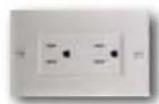
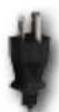
Power from 120V


Power to DVR
DC 12V Input
Splitter from DVR
Camera & Power




Power to Camera
Option 2
Power from Supplied Adaptor
Video to DVR
Video In
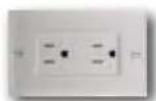
Supplied 12V DC Adaptor

Power to Camera


AV Cable: BNC/DC Power
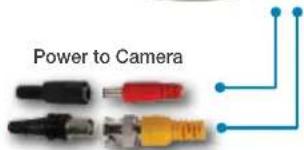
Video to Camera
APPENDIX
SPECIFICATIONS AND TROUBLESHOOTING
Technical Specifications
| Item Specifications | |||||
| Model CM480 CM520 CM560 CM60 CM700 | |||||
| Image Sensor Color | 1/4" CMOS | 1/4" CMOS | 1/4" CMOS | 1/4" CMOS | 1/4" CMOS |
| Effective Pixels | NTSC: 656 (H) X 492 (V):PAL: 768 (H) X 576 (V) | NTSC: 656 (H) X 492 (V):PAL: 768 (H) X 576 (V) | NTSC: 656 (H) X 492 (V):PAL: 768 (H) X 576 (V) | NTSC: 656 (H) X 492 (V):PAL: 768 (H ) X 576 (V) | NTSC: 720 (H) X 480 (V),PAL: 720 (H) X 576 (V) |
| Horizontal Resolution | 480TVL | 520TVL | 560TVL | 600TVL | 700TVL |
| IP Rating | IP66 | IP66 | IP66 | IP66 | IP66 |
| Number of infrared LED's | 36 | 36 | 36 | 36 | 36 |
| Night-Vision Range | 80 ft. | 80 ft. | 80 ft. | 80 ft. | 80 ft. |
| Indoor/Outdoor | Both | Both | Both | Both | Both |
| Signal System | NTSC/PAL | NTSC/PAL | NTSC/PAL | NTSC/PAL | NTSC/PAL |
| Lens | 6mm | 6mm | 6mm | 6mm | 6mm |
| Angle of Vision | 48° | 48° | 48° | 48° | 34° |
| Frame Rate | NTSC: 60 fields/sec ; PAL:50 fields/sec | NTSC: 60 fields/sec ;PAL: 50 fields/sec | NTSC: 60 fields/sec ; PAL: 50fields/sec | NTSC: 60 fields/sec ; PAL: 50fields/sec | NTSC: 60 fields/sec ; PAL: 50fields/sec |
| Minimum Illuminance | 0 Lux (IR ON) | 0 Lux (IR ON) | 0 Lux (IR ON) | 0 Lux (IR ON) | 0 Lux (IR ON) |
| Audio | No | No | No | No | No |
| Gain Control & White Balance | Auto | Auto | Auto | Auto | Auto |
| Signal to noise Ratio | >48dB (AGC OFF) | >48dB (AGC OFF) | >48dB (AGC OFF) | >48dB (AGC OFF) | >48dB (AGC OFF) |
| Gamma Characteristics | >0.45 | >0.45 | >0.45 | >0.45 | >0.45 |
| Shutter Speed | 1/50(1/60) 1/100000 | 1/50(1/60) 1/100000 | 1/50(1/60) 1/100000 | 1/50(1/60) 1/100000 | 1/50(1/60) 1/100000 |
| Infrared Wave Length | 850nm | 850nm | 850nm | 850nm | 850nm |
| Video Output | 1.0Vp-p 75 Ohm | 1.0Vp-p 75 Ohm | 1.0Vp-p 75 Ohm | 1.0Vp-p 75 Ohm | 1.0Vp-p 75 Ohm |
| Power Supply | DC 12V 500mA | DC 12V 500mA | DC 12V 500mA | DC 12V 500mA | DC 12V 500mA |
| Operation Temperature | -22 °F to 122 °F(-30 °C to 50 °C) | -22 °F to 122 °F(-30 °C to 50 °C) | -22 °F to 122 °F(-30 °C to 50 °C) | -22 °F to 122 °F(-30 °C to 50 °C) | -22 °F to 122 °F(-30 °C to 50 °C |
Troubleshooting
| Error Possible Cause Solutions | ||
| No Picture | Camera cables are loose or have become disconnectedMay also be caused by a malfunctioning power supply. | Check the camera video cable and connectionsDisconnect and reconnect the cable at the system and at thecameraTry moving the camera to another channel or use another cable |
| Flickering image Bright light | shining directly into camera lens | Move the camera or move any source of bright light away from the camera |
| Image is too light or dark M | s-adjustment of contrast and brightness levels | Adjust the contrast and brightness on the DVR or TVMove the camera or move any source of bright light away from the camera |
| A white image appears at night | Camera is placed too close to a window | The camera’s infrared LEDs shine invisible light that reflects off surfaces such as glass causing white lightPlace the camera on the other side of windows or place the lens flush against the surface to improve night vision |
Warranty
PRODUCT LIMITED WARRANTY
BRK Brands, Inc., ("BRK") the maker of First Alert® brand products warrants that for a period of one year from the date of purchase (the "Warranty Period"), this product will be free from defects in material and workmanship. BRK, at its sole option, will repair or replace this product or any component of the product found to be defective during the Warranty Period. Replacement or repair will be made with a new or remanufactured product or component. If the product is no longer available, replacement may be made with a similar product of equal or greater value. This is your exclusive warranty.
This warranty is valid for the original retail purchaser only from the date of initial retail purchase and is not transferable. In order to obtain warranty service, you must keep the original sales receipt and proof of purchase in the form of the UPC code from the package. BRK dealers, service centers, or retail stores selling BRK products do not have the right to alter, modify or any way change the terms and conditions of this warranty.
WARRANTY EXCLUSIONS
Parts and Labor: 1 year limited (warranted parts do not include bulbs, LEDs, and batteries)
This warranty does not apply to bulbs, LEDs, and batteries supplied with or forming part of the product.
This warranty is invalidated if non-BRK accessories are or have been used in or in connection with the product or in any modification or repair is made to the product.
This warranty does not apply to defects or damages arising by use of the product in other than normal (including normal atmospheric, moisture and humidity) conditions or by installation or use of the product other than in strict accordance with the instructions contained in the product owner's manual.
This warranty does not apply to defects in or damages to the product caused by (i) negligent use of the product, (ii) misuse, abuse, neglect, alteration, repair or improper installation of the product, (iii) electrical short circuits or transients, (iv) usage not in accordance with product installation, (v) use of replacement parts not supplied by BRK, (vi) improper product maintenance, or (vii) accident, fire, flood or other Acts of God.
This warranty does not cover the performance or functionality of any computer software included in the package with the product. BRK makes no warranty that the software provided with the product will function without interruption or otherwise be free of anomalies, errors, or "Bugs." This warranty does not cover any costs relating to removal or replacement of any product or software installed on your computer.
BRK reserves the right to make changes in design or to make additions to or improvements in its products without incurring any obligations to modify any product which has already been manufactured. BRK will make every effort to provide updates and fixes to its software via its website. This warranty does not cover any alteration or damage to any other software that may be or may become resident on the users system as a result of installing the software provided. This warranty is in lieu of other warranties, expressed or implied, and BRK neither assumes nor authorizes any person to assume for it any other obligation or liability in connection with the sale or service of the product. In no event shall BRK be liable for any special or consequential damages arising from the use of the product or arising from the malfunctioning or non-functioning of the product, or for any delay in the performance of this warranty due to any cause beyond its control.
BRK does not make any claims or warranties of any kind whatsoever regarding the product's potential, ability, or effectiveness to prevent, minimize, or in any way affect personal or property damage or injury. BRK is not responsible for any personal damage, loss, or theft related to the product or to its use for any harm, whether physical or mental related thereto. Any and all claims or statements, whether written or verbal, by salespeople, retailers, dealers, or distributors to the contrary are not authorized by BRK, and do not affect this provision of this warranty.
BRK's responsibility under this, or any other warranty, implied or expressed, is limited to repair, replacement or refund, as set forth above. These remedies are the sole and exclusive remedies for any breach of warranty. BRK is not responsible for direct, special, incidental, or consequential damages resulting from any breach of warranty or under any other legal theory including but not limited to, loss profits, downtime, goodwill, damage to or replacement of equipment and property and any costs of recovering, reprogramming or reproducing any program or data stored in or used with a system containing the product accompanying software. BRK does not warrant the software will operate with any other software except that which is indicated. BRK cannot be responsible for characteristics of their party hardware or software which may effect the operation of the software included.
Except to the extent prohibited by applicable law, any implied warranty of merchantability or fitness for a particular purpose is limited in duration to the duration of the above Warranty Period. Some states, provinces, or jurisdictions do not allow the exclusion or limitation of incidental or consequential damages or limitations on how long an implied warranty lasts, so the above limitations or exclusion may not apply to you. This warranty gives you specific legal rights, and you may also have other rights that vary from state to state, or province to province, or jurisdiction to jurisdiction.
OBTAINING SERVICE
If service is required, do not return the product to your place of purchase. In order to obtain warranty service, contact the Consumer Affairs Division at 1-800-323-9005, 7:30 a.m. – 5:00 a.m. Central Standard Time, Monday through Friday. To assist us in serving you, please have the model number and date of purchase available when calling.
After contacting the Consumer Affairs Division and it is determined that the product should be returned for Warranty Service, please mail the product to: BRK Brands, Inc., 3901 Liberty Street Road, Aurora, IL 60504-8122.
First Alert®
©2013 BRK Brands, Inc.
a Jarden Corporation Company (NYSE:JAH)
3901 Liberty Street Road, Aurora, IL 60504-8122
Phone: 630-851-7330 Tech Services: 800-323-9005
www.firstalert.com
M08-0397-019
- Thank you for choosing First Alert for your security needs!
- Package Contents
- SAFETY
- CAUTION STATEMENTS
- Safety Precautions
- FCC Compliance
- FCC Compliance Class B Digital Device
- FCC Certification (if applicable)
- Fire and Electric Shock Hazard Statement
- PRODUCT OVERVIEW
- CAMERA AND POWER CONNECTIONS
- Installing Cameras
- Mounting Cameras and Running Cable
- Camera Orientation
- Longer Cable Runs
- Connecting Cameras
- APPENDIX
- SPECIFICATIONS AND TROUBLESHOOTING
- Warranty
- PRODUCT LIMITED WARRANTY
- WARRANTY EXCLUSIONS
- OBTAINING SERVICE
- First Alert®
Brand : FIRST ALERT
Model : CM480
Category : Security Camera