AC22 - Tripod Valore - Free user manual and instructions
Find the device manual for free AC22 Valore in PDF.


| Product Type | Selfie Stick with Phone Holder |
| Brand | Valore |
| Model | AC22 |
| Connection | 3.5mm audio jack |
| Material | Aluminum + EVA |
| Folded Length | 230 mm |
| Extended Length | 860 mm |
| Folded Dimensions (LxWxH) | 230 x 43 x 30 mm |
| Weight | 178 g |
| Phone Holder Rotation | 270° |
| Shutter Button | Built-in on handle |
| Lock Mechanism | Twist lock (clockwise/counter-clockwise) |
| Compatibility | Smartphones with 3.5mm headphone jack |
| Power Source | None (wired, no battery required) |
| Package Contents | Selfie stick, wrist strap, pouch |
| Cleaning | Wipe with a dry, soft cloth |
| Storage | Store in a dry place at room temperature |
| Safety Warnings | Do not expose to moisture, high heat, or impact |
| Repairability | Not user-serviceable; contact support for issues |
| Warranty | Register at www.valore.sg |
Frequently Asked Questions - AC22 Valore
User questions about AC22 Valore
0 question about this device. Answer the ones you know or ask your own.
Ask a new question about this device
Download the instructions for your Tripod in PDF format for free! Find your manual AC22 - Valore and take your electronic device back in hand. On this page are published all the documents necessary for the use of your device. AC22 by Valore.
USER MANUAL AC22 Valore
Thank you for purchasing the Valore Selfie Stick.
Simply connect the built-in 3.5mm jack to your smartphone and capture self-portraits effortlessly with this compact design selfie stick.
Important: Please read the user manual thoroughly before using your Selfie Stick.
Specifications:
- Connection type: 3.5mm jack
• Material: Aluminum + EVA
• Length: 230 – 860mm - Dimension (L x W x H): 230 x 43 x 30mm
- Weight: 178g
Package Contents:
- Selfie stick
- Wrist strap
- Pouch
UNDERSTANDING THE PRODUCT

① Mobile holder
② Lock nut
③ 3.5mm cable
④ Shutter button
START USING SELFIE STICK
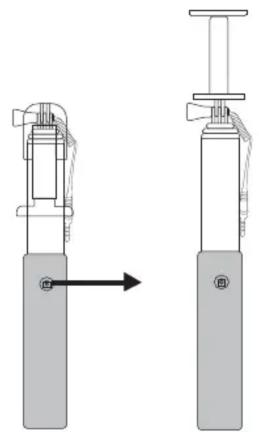
Step 1
Unfold the mobile holder of the selfie stick.
natural_image
Diagram of a mechanical device with two views showing a piston and lever mechanism (no text or symbols)Step 2
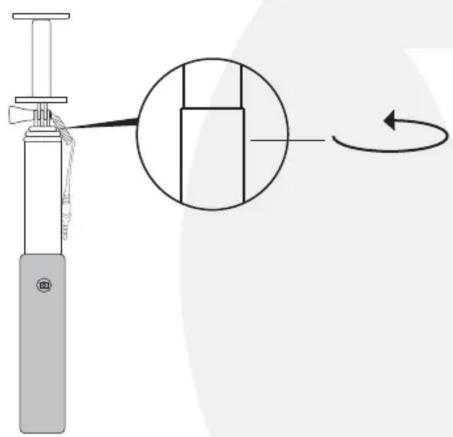
Rotate selfie stick counter-clockwise to unlock
natural_image
Diagram of a handheld device with a magnified inset showing a rotating component (no text or symbols)Step 3
When the groove matches, you may adjust the length of the stick freely.
Step 4
Rotate the selfie stick clockwise to lock at your desired length.

Step 5
Place your mobile phone into the phone clip.
Step 6
Plug the 3.5mm cable of the selfie stick into the headphone port of mobile phone. Open the camera function on mobile and press the shutter button to take photo.

natural_image
Diagram of a smartphone mounted on a long bar with a cable, showing no text or symbols


Foldable phone holder 270° rotatable

TECHNICAL SUPPORT & WARRANTY
- For Technical Support, email us at v.info@valore.sg.
- For Warranty Registration, visit www.valore.sg.
Cautions:
Read all the instructions and warnings carefully prior to using this product.
- Do not store the product in a high temperature environment.
- Do not place the product near a fire or other excessively hot environments.
- Do not expose the product to moisture or submerge it in liquid. Keep product dry at all times.
- Do not attempt to charge the product using any other method or connection other than the product's provided charging cable.
- Do not disassemble this product or attempt to repair or modify it in any manner.
- Battery usage by children should be supervised
- Be cautious of excessive drops, bumps, abrasions or other impacts to this product. If there is any damage to the product such as dents, punctures, tears, deformities or corrosion, stop using the product and contact us immediately via email at v.info@valore.sg, or return this product to the store where you have purchased it from.
- If the product produces an abnormal smell, high temperature (low temperature during normal use), discolours or changes shape abnormally, stop using the product and contact us immediately via email at v.info@valore.sg.
DISCLAIMER & TRADEMARKS
All information, trademarks, logos, graphics, and images (“Materials”) provided on this user manual are copyrighted or trademarked and are the property of Valore Lifestyle Pte Ltd. Any unauthorized use of any material contained on the instruction manual may violate copyright laws, trademark laws, laws of privacy and communications statutes. The trademarks, service marks and logos used and displayed in the Materials are registered and unregistered
trademarks and service marks of Valore and others. All other registered and unregistered company names, product names and marks mentioned herein the (“Materials”) are the property of their respective owners and may be trademarks or registered trademarks.
Brand : Valore
Model : AC22
Category : Tripod