
CDX-4050 - Car Radio SONY - Free user manual and instructions
Find the device manual for free CDX-4050 SONY in PDF.


| Product Type | Car Radio / CD Player |
| Model | CDX-4050 |
| Brand | Sony |
| Dimensions | 178 x 50 x 160 mm (1 DIN) |
| Weight | Approx. 1.2 kg |
| Power Supply | 12V DC (negative ground) |
| Max Power Output | 4 x 45W (peak) |
| Continuous Power Output | 4 x 20W RMS |
| Playback Media | CD, CD-R, CD-RW |
| Radio Bands | FM, AM (MW/LW) |
| FM Tuning Range | 87.5 - 108.0 MHz |
| AM Tuning Range | 531 - 1602 kHz |
| Preset Stations | 18 FM + 12 AM (30 total) |
| Audio Features | Mega Bass, EQ presets, Fader/Balance |
| Display | Dot-matrix LCD with illumination |
| Detachable Face | Yes (security feature) |
| Remote Control | Supplied (wired or wireless, check manual) |
| Auxiliary Input | Front or rear (3.5 mm jack) |
| Preamp Outputs | 1 pair (rear/sub) |
| CD-R/RW Playback | Yes (MP3 compatible? Not specified) |
| Cleaning | Use dry cloth; avoid solvents; clean lens with CD cleaner |
| Security | Detachable face panel (DCP) for theft prevention |
| Spare Parts Availability | Contact Sony support or authorized service center |
| Repairability | Service manual available; limited DIY repairs recommended |
Frequently Asked Questions - CDX-4050 SONY
User questions about CDX-4050 SONY
0 question about this device. Answer the ones you know or ask your own.
Ask a new question about this device
Download the instructions for your Car Radio in PDF format for free! Find your manual CDX-4050 - SONY and take your electronic device back in hand. On this page are published all the documents necessary for the use of your device. CDX-4050 by SONY.
USER MANUAL CDX-4050 SONY
Operating Instructions page 2
Before operating the unit, please read this manual thoroughly and retain it for future reference.
Owner's Record
The model and serial numbers are located on the top of the unit. Record the serial number in the space provided below. Refer to these numbers whenever you call upon your Sony dealer regarding this product.
Mode: No. CDX-4050 Serial No.
Mode d'emploi
page 16
For installation and connections, see the supplied installation/connections manual.
This equipment has been tested and found to comply with the limits for a Class B digital device, pursuant to Part 15 of the FCC Rules. These limits are designed to provide reasonable protection against harmful interference in a residential installation. This equipment generates, uses, and can radiate radio frequency energy and, if not installed and used in accordance with the instructions, may cause harmful interference to radio communications. However, there is no guarantee that interference will not occur in a particular installation. If this equipment does cause harmful interference to radio or television reception, which can be determined by turning the equipment off and on, the user is encouraged to try to correct the interference by one or more of the following measures:
- Reorient or relocate the receiving antenna.
- Increase the separation between the equipment and receiver.
- Connect the equipment into an outlet on a circuit different from that to which the receiver is connected.
- Consult the dealer or an experienced radio/TV technician for help.
You are cautioned that any changes or modifications not expressly approved in this manual could void your authority to operate this equipment.
CAUTION
The use of optical instruments with this product will increase eye hazard.
General
- With 4 ch x 7 W, you can enjoy a 4-speaker system.
• Line outputs for connecting an optional power amplifier.
Tuner section
- PLL synthesizer tuner
- Up to 24 stations can be preset, 18 stations on FM, 6 stations on AM (page 11).
- A.MEM (Auto Memory) function automatically selects and stores the stations with strong signals on the preset number buttons in order of frequency (page 10).
Table of Contents
CD player section
• 1 bit DAC (Digital-Analog Converter) for a clear sound reproduction.
- Quick recovery mechanism for preventing sound skipping.
- Intro scan function for playing the first 10 seconds of each track. (page 8)
- Repeat play function for listening to a currently playing track repeatedly. (page 8)
- Shuffle play function for playing tracks in random order. (page 8)
Precautions 4
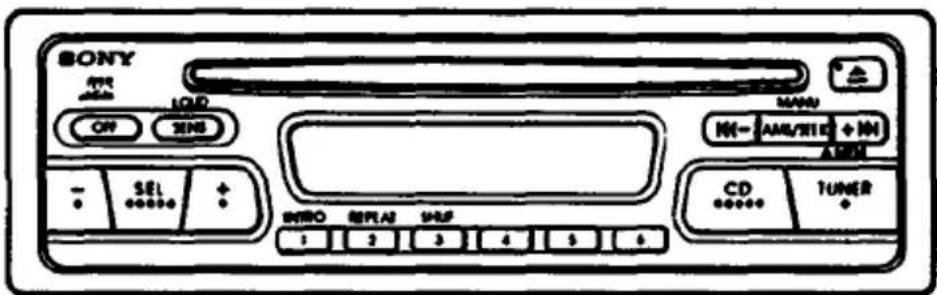
Location and Function of Controls ....5
CD Player Operation
Playing a CD 7
Playing in Other Modes 8
Radio Reception
Tuning in a Station 9
Using the Memory Preset Function .... 10
Specifications 13
Troubleshooting Guide 14
- If your car was parked in direct sunlight resulting in a considerable rise in temperature inside the car, allow the unit to cool off before operating it.
- If no power is being supplied to the unit, check the connections first. If everything is in order, check the fuse.
- If no sound comes from the speakers of a 2 speaker system, set the fader control to the center position.
- As the laser beam used in this compact disc player is harmful to the eyes, do not attempt to disassemble the cabinet. Refer servicing to qualified personnel only.
- If your car is equipped with a power antenna, note that it will be automatically extended while the unit is being operated.
Note on moisture condensation
On a rainy day or in a very damp environment, moisture in the atmosphere may condense on the lenses inside the unit. Should this occur, the unit may not operate properly. In such a case, remove the disc from inside the car and wait for about an hour or so until the moisture has evaporated.
If you have any questions or problems concerning your unit that are not covered in this manual, please consult your nearest Sony dealer.
Notes on Discs
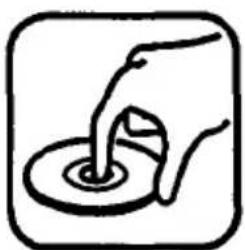
Handle the disc by its edge, and to keep the disc clean, do not touch the surface.
natural_image
Simple line drawing of a hand pouring liquid into a circular container (no text or symbols)This way
Do not attach any paper or tape.

natural_image
Symbol of a target with a diagonal line crossing through it, enclosed in a square frame (no text or numbers present)Not this way
Do not expose the disc to direct sunlight or heat sources such as hot air-ducts, or leave it in a car parked in direct sunlight where there can be a considerable rise in temperature inside the car.
Cleaning Discs
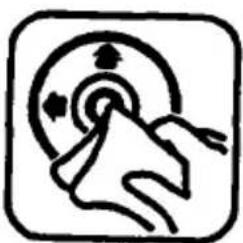
Before playing clean the disc with an optional cleaning cloth.
Wipe the disc in the direction of the arrows.
natural_image
Simple line drawing of a hand pressing down on a circular target with directional arrows (no text or symbols)Do not use solvents such as benzine, thinner, commercially available cleaners or antistatic spray intended for analog discs.
Location and Function of Controls
Main Unit
1
2
3
4
5 6
7
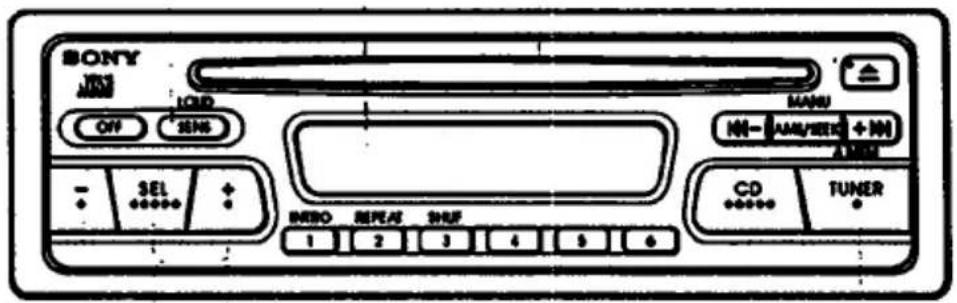
Refer to the pages in ● for details.
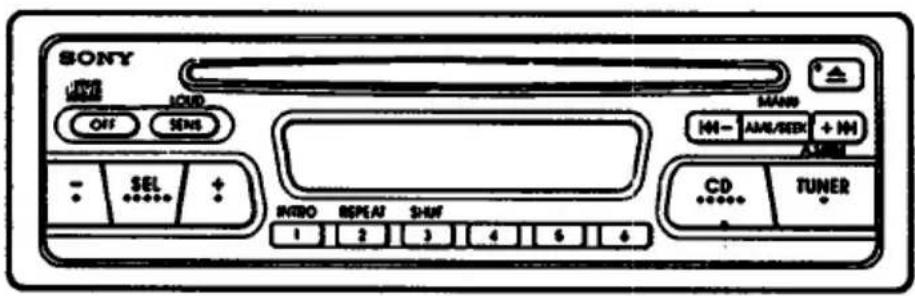
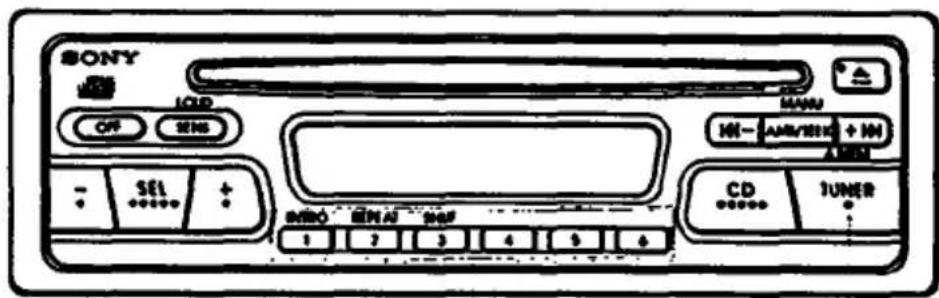
1 OFF button
Press to turn off the unit.
② SENS/LOUD (Sensitivity/loudness) button
Press to reinforce the bass and treble especially when listening at a low volume level. To cancel the mode, press it again.
3 Display window
4 Disc insertion slot
5 (control mode select) button
Press to select the desired control mode: BAS (bass), TRE (treble), BAL (balance), FAD (fader) or VOL (volume).
Press to adjust each mode.
TUNER/A.MEM (radio on/band select) button
At each pressing, the button changes the band cyclically as follows:
FMI → FMI → FMIII → AM → FMI
| Display window | Control mode | ||
| Press: | Press: | ||
| FlashBAS-TRE701 | Bass control | For less bass | For more bass |
| FlashBAS-TRE710 | Treble control | For less treble | For more treble |
| BALANCE800 | Balance control | To decrease the right-speakers' volume | To decrease the left-speakers' volume |
| FADER800 | Fader control | To decrease the rear-speakers' volume | To decrease the front-speakers' volume |
| 40 | Volume control | For less volume | For more volume |
8 9 10 11 12 13 14 15 16
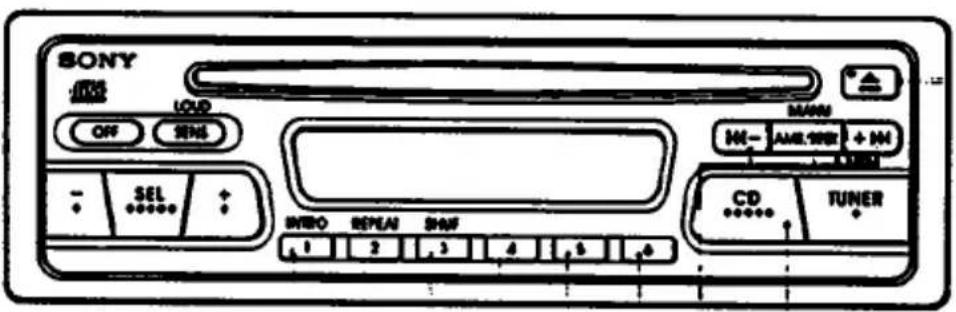
| During CD play | During radio reception | ||
| 8 | INTRO button INTRO 1 | Intro scan 3 | Preset number buttons 12 |
| 9 | REPEAT button REPEAT 2 | Repeat play 5 | |
| 10 | SHUF button SHUF 3 | Shuffle play 6 | |
| 11 | - | ||
| 12 | - | ||
| 13 | - | ||
| 14 | AMS/SEEK/MANU button MANU - AMS/SEEK + NH | AMS (Automatic Music Sensor) function ←← -: Press once to locate the beginning of the track being played. +→:Press once to locate the beginning of the next track. Press repeatedly to locate previous or succeeding tracks. | Automatic tuning 2 |
| Manual search ←← -: Keep pressed to go back at high speed. +→: keep pressed to go ahead at high speed. | Manual tuning 2 | ||
CD

Insert a disc into the slot.
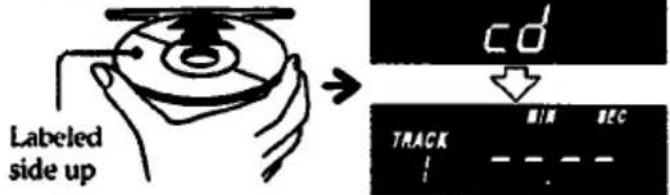
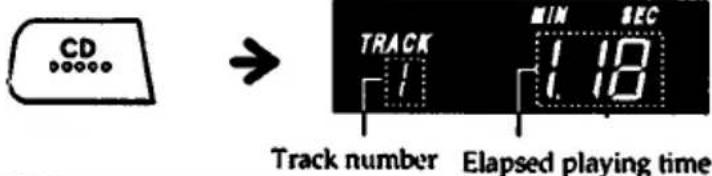
When a disc is inserted, CD play will automatically start.
If a disc is already inserted, press the CD button.
Ejecting the Disc
Press the ▲ button.
If you press the TUNER button during CD play
The CD play will stop automatically and the tuner will be activated.
important
Since the CD system offers a wide dynamic range, the peaks of the high level inputs are recorded with high fidelity and the noise level is very low. Do not turn up the volume while listening to a section with no audio signals or very low level inputs. If you do so, the speakers may be damaged when a section with a peak signal is played.
Notes
- If a disc is already loaded in the unit, never try to insert another disc.
- If you leave the ejected disc in the disc insertion slot after you have pressed the ▲ button, the disc will be automatically retracted into the unit after approximately 15 seconds in order to protect it.
- To play an 3 inch (8 cm) CD, use the Sony CSA-8 adaptor (not supplied).
- If the MANU button is kept pressed and the end of the disc has been reached, "הַרָרָר" will appear on the display window. Likewise if the beginning of the disc has been reached, play will start automatically.
- If the ▲ button is pressed during the CD play, the power will be set off and the CD will be ejected.
At the end of the disc
The track number will return to "1" and CD play will be repeated from the beginning of the disc.
Playing in Other Modes
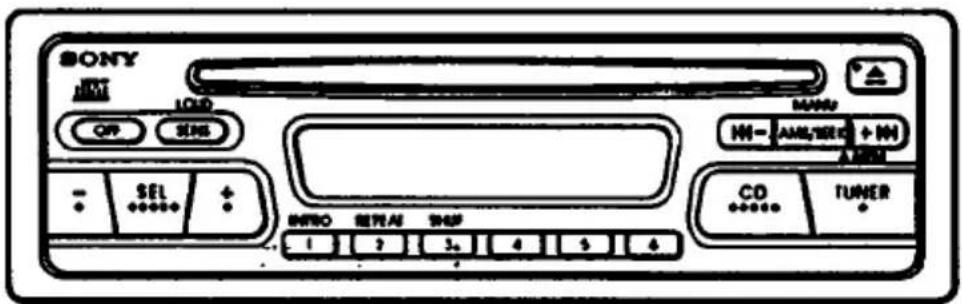
INTRO REPEAT SHUF
Playing the Beginning of Tracks
— Intro Scan Function
Press the ☐ button to play the first 10 seconds of each track in order.
To cancel the function, press it again.
Playing Repeatedly
— Repeat Play Function
Press the 2 button to repeat the same track.
To cancel the function, press it again.
Playing in Random Order
— Shuffle Play Function
Press the 3 button to play the tracks in random order.
To cancel the function, press it again.
Note
If the INTRO button is pressed during shuffle play, the first 10 seconds of every track will be played randomly.
Tuning in a Station
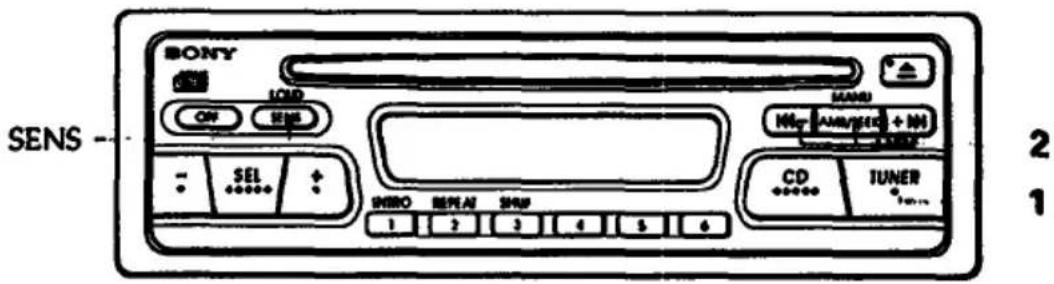
Searching for the Stations Automatically
— Automatic Tuning
1 Select the desired band.
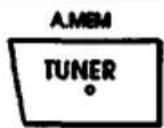
2 Press either side of the SEEK/MANU button lightly.
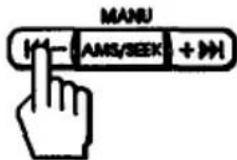
For lower frequencies
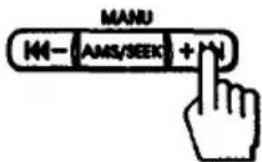
For higher frequencies
The scanning stops when a station is received. Press either side of the button repeatedly until the desired station is received.
Tuning in by Adjusting the Frequency — Manual Tuning
Select the desired band, then press and hold either side of the SEEK/MANU button.
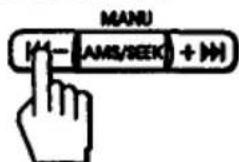
For lower frequencies
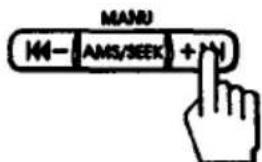
For higher frequencies
Release the button when the desired station is received.
At least two seconds after releasing the button, the system will return to Automatic Tuning.
PREVENTING ACCIDENTS!
While you are driving' the use of the Automatic Tuning and the Memory Preset Tuning is recommended instead of the Manual Tuning.
Note
Make sure that you press either side of the SEEK button lightly. If you keep it pressed, the button will function as the manual tuning button.
When an FM stereo program with a sufficient signal strength is tuned in
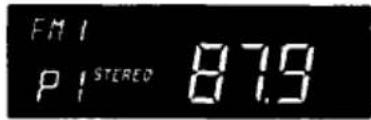
The "STEREO" indication will appear.
Avoiding the automatic tuning from stopping on stations too frequently (Local Seek Mode) Press the SENS button lightly to get the "LOCAL" indication. Only the stations with relatively strong signals can be tuned in. The local seek mode functions only when the Automatic Tuning is in operation.
Using the Memory Preset Function
Stations with clearest reception are automatically searched and memorized on each band (FMI).
FMII. FMIII and AM)
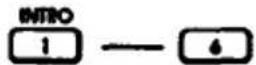
Up to 6 stations on each band can be stored on the preset number buttons 1 to 6 in the order of frequency.
1
Memorizing the Stations Automatically
— A.MEM (Auto Memory) Function
1 Select the desired band.
2 Press the A.MEM button for more than two seconds.
The A.MEM function
The A.MEM function searches all the receivable stations within the currently selected band and memorizes the ones in good receiving conditions in sequence from the frequency at present.
How to memorize the stations on the preset number buttons
— When there is no preset number indicated on the display window, all the preset number buttons set in the currently selected band will be filled with the memories.
— When there is a preset number indicated on the display window, the unit will memorize the stations on the preset number buttons from the one currently being displayed. For example, when you choose FMI and preset number 3 is being displayed, the operation will start from the preset number 3 on FMI and stops at the preset number 6 on FMI.
The receivable frequencies of FM1. FMII and FMIII are the same.
Therefore, 18 stations can be memorized on FM
Note
There may be cases where there are not enough receivable stations due to the lack of stations in the vicinity or weak broadcasting signals. In such cases, the A.MEM operation may stop without all the buttons being occupied with memories.
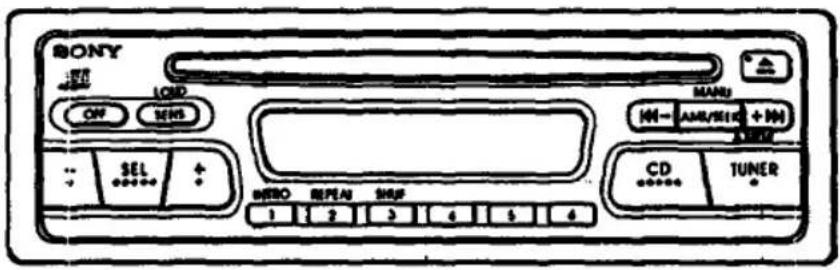
3
1
2
Memorizing Only the Desired Stations
For example, store a station on the preset number button 1.
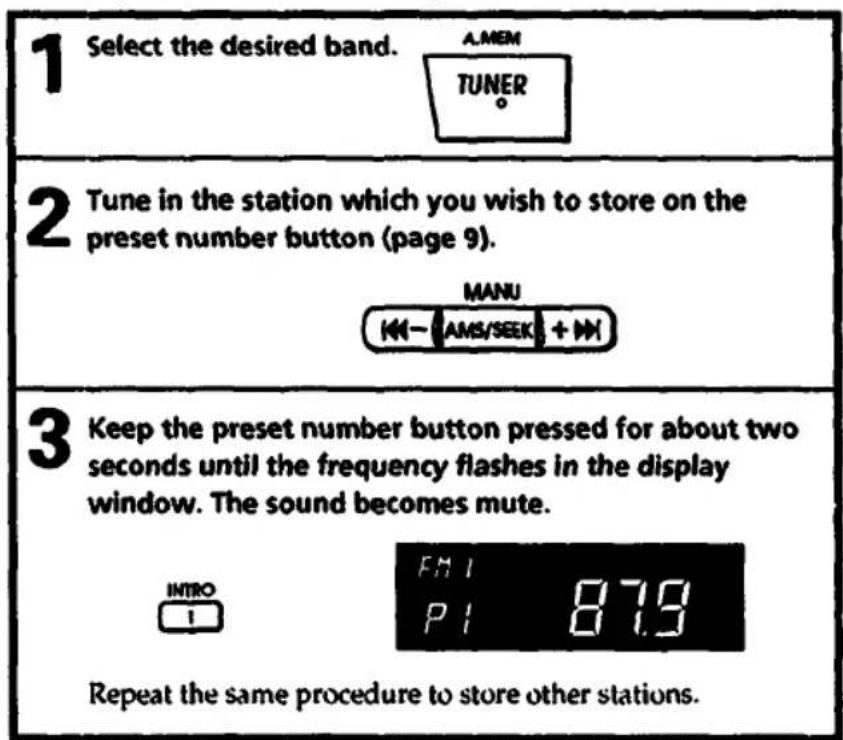
Up to 6 stations on each band (FMI, FMII, FMIII and AM) can be stored in the memory in order of your choice.
Only one station per band (FMI, FMII, FMIII and AM) can be stored in the memory on each preset number button.
If you try to store another station on the same preset number button, the previously stored station will be erased.
2
1
Receiving the Memorized Stations
1 Select the desired band.
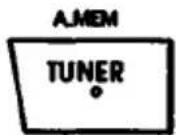
2 Press the desired preset number button lightly.
Notes
- There may be cases in which even the stations stored in the memory cannot be received due to weak signals in the vicinity of your car.
- If you keep pressing the preset number button for more than two seconds, the currently received station will be memorized. To receive the previously memorized station, press the preset number button only lightly.
AUDIO POWER SPECIFICATIONS
POWER OUTPUT AND TOTAL HARMONIC DISTORTION 4 Watts per channel minimum continuous average power into 4 ohms, 4 channels driven, from 70 Hz to 20 kHz with no more than 1% total harmonic distortion.
Other Specifications
Power amplifier section
| Outputs | Speaker output(sure seal connectors) |
| Speaker impedance | 4 - 8 ohms |
| Maximum power output | |
| 7W ×4 (at 4 ohms)**Measured at 14.4V | |
CD player section
| System | Compact disc digital audio system |
| Frequency response | 20 – 20,000 Hz |
| Wow and flutter | Below the measurable limit |
| Signal-to-noise ratio | 90 dB |
Tuner section
| FM | |
| Tuning range | 87.5 - 107.9 MHz |
| Antenna terminal | External antenna connector |
| Intermediate frequency | |
| 10.7 MHz | |
| Sensitivity | 12 dBf |
| Selectivity | 70 dB at 400 kHz |
| Signal-to-noise ratio | 68 dB (mono) |
| Harmonic distortion at | 1 kHz |
| 0.4% (mono) | |
| Separation | 28 dB |
| Frequency response | 30 - 15,000 Hz |
AM
| Tuning range | 530-1,710 kHz |
| Antenna terminal | External antenna connector |
| Intermediate frequency | |
| 450 kHz | |
| Sensitivity | 35 μV |
General
| Tone controls | Bass ±8 dB at 100 HzTreble ±8 dB at 10 kHz |
| Loudness | +10 dB at 100 Hz+8 dB at 10 kHz |
| Power requirements | 12V DC car battery(negative ground) |
| Current drain | 1 A (CD playback)1.5 A (during disc loading or eject) |
| Operating temperature | -10°C to 50°C |
| Dimensions | Approx. 178 × 50 × 176 mm. (7 ^1/_8 × 2 × 7 inch)(w/h/d) not incl.projecting parts and controls |
| Mounting dimensions | Approx. 182 × 53 × 155 mm (7 ^1/_4 × 2 ^1/_8 × 6 ^1/_8 inch) (w/h/d) not incl.projecting parts and controls |
| Mass | Approx. 1.5 kg (3 lb. 6 oz) |
| Supplied accessories | Mounting hardware(1 set) |
| Design and specifications subject to change without notice. | |
Troubleshooting Guide
The following checks will assist in the correction of most problems which you may encounter with your unit.
Before going through the check list below, refer back to the connection and operating procedures.
CD operation
| Trouble | Cause/Solution |
| CD play does not start. | Dusty or defective disc.The ambient temperature is more than 50°C |
| The disc cannot be loaded or is automatically ejected. | A disc is already loaded.The disc is inserted with the labeled side downwards. |
| The sound skips due to vibration. | The unit is installed at an angle of more than 20°.The unit is not installed on the sturdy part of a car.Dusty or defective disc. |
Radio Reception
| Trouble | Cause/Solution |
| Preset tuning is not possible. | Memorize the correct frequency.The broadcast is too weak. |
| Automatic tuning is not possible. | The broadcast is too weak.→ Use manual tuning. |
General
| Trouble | Cause/Solution |
| No sound | Adjust the volume with the button.Set the fader control to the center position on the 2-speaker system. |
Error displays
The following indication will flash for about five seconds and an alarm sound will be heard.
| Display | Cause | Solution |
| E-01 | The disc is not loaded or ejected properly. | Try again. |
| E-08 | The disc is dirty | Clean the disc. |
| The disc is inserted upside down. | Insert the disc correctly. | |
| E-10 | Electrical error | Try again. |
| E-12 | Electrical error | Try again. |
If the above mentioned remedies do not help to improve the situation, consult your nearest Sony dealer.
Français
Caractéristiques
Généralités
natural_image
Simple line drawing of a hand pouring liquid into a circular container (no text or symbols)De cette façon
natural_image
Simple black-and-white icon of a target with a diagonal line crossing through it, enclosed in a rounded square (no text or symbols)Pas de cette façon
natural_image
Simple line drawing of a hand pressing down at a target with arrows indicating motion (no text or symbols)FM/AM Compact Disc Player

CDX-4050
Installation/Connections
Installation/Connexions
Sony Corporation © 1994 Printed in Singapore
Connections
Connexions
Caution
- This unit is designed for negative ground 12 V DC operation only.
- Before making connections, disconnect the ground terminal of the car battery to avoid short circuits.
- Connect the red power input lead only after all other leads are connected. And be sure to connect it to the positive 12 V power terminal which is energized when the ignition key is set to the accessory position.
- Run all ground wires to a common ground point.
Précautions
Votes on speaker connections
- Use speakers with an impedance of 4 to 8 ohms, and with adequate power handling capacities.
Otherwise, the speakers may be damaged.
- Do not connect the terminals of the speaker system to the car chassis, and do not connect the terminals
of the right speaker with those of the left speaker.
• Do not connect the speakers in parallel.
Do not connect any active speakers (with built-in amplifiers) to the speaker terminals of the unit. Doing so may damage the active speakers. Therefore, be sure to connect passive speakers to these terminals.
Notes on the control leads
• A power antenna without relay box cannot be used with this unit.
The numbers in the list are keyed to those in the instructions.
- Operating Instructions page 2
- Owner's Record
- Mode d'emploi
- CAUTION
- General
- Tuner section
- Table of Contents
- CD player section
- CD Player Operation
- Radio Reception
- Note on moisture condensation
- Notes on Discs
- Cleaning Discs
- Location and Function of Controls
- Ejecting the Disc
- If you press the TUNER button during CD play
- important
- Notes
- At the end of the disc
- Playing in Other Modes
- Playing the Beginning of Tracks
- Playing Repeatedly
- Playing in Random Order
- Note
- Tuning in a Station
- Searching for the Stations Automatically
- — Automatic Tuning
- Tuning in by Adjusting the Frequency — Manual Tuning
- PREVENTING ACCIDENTS!
- Using the Memory Preset Function
- Memorizing the Stations Automatically
- — A.MEM (Auto Memory) Function
- The A.MEM function
- How to memorize the stations on the preset number buttons
- Memorizing Only the Desired Stations
- Receiving the Memorized Stations
- AUDIO POWER SPECIFICATIONS
- Other Specifications
- Troubleshooting Guide
- Error displays
- Français
- Caractéristiques
- Généralités
- CDX-4050
- Connections
- Connexions
- Précautions
- Votes on speaker connections
- Notes on the control leads
Brand : SONY
Model : CDX-4050
Category : Car Radio