
GXT 322 - Headphones TRUST - Free user manual and instructions
Find the device manual for free GXT 322 TRUST in PDF.


Pick your language and provide your email: we'll send you a specifically translated version.
| Product Type | Wired Gaming Headset |
| Brand | Trust |
| Model | GXT 322 |
| Connectivity | 3.5 mm audio jack (splitter included for PC) |
| Driver Size | 40 mm |
| Frequency Response | 20 Hz - 20,000 Hz |
| Impedance | 32 Ω |
| Sensitivity | 105 dB |
| Microphone Type | Flexible omnidirectional microphone |
| Microphone Frequency Response | 100 Hz - 10,000 Hz |
| Microphone Sensitivity | -38 dB |
| Cable Length | 2.0 m (braided) |
| Weight | 280 g |
| Dimensions (W x H x D) | 19 x 9 x 21 cm (earcup approx.) |
| Color | Black with red accents |
| Features | Adjustable headband, padded ear cushions, in-line volume control, microphone mute switch |
| Compatibility | PC, Mac, Xbox, PlayStation, Nintendo Switch, mobile devices with 3.5 mm jack |
| Power Source | No power required (passive) |
| Cleaning Instructions | Wipe with a soft, dry cloth; do not use liquids or solvents |
| Safety Warnings | Do not use at high volume for extended periods to prevent hearing damage. Keep away from children. |
| Spare Parts / Repairability | Replacement ear pads and cables available from Trust; consult manual for disassembly. |
| Warranty | 2 years limited warranty |
Frequently Asked Questions - GXT 322 TRUST
How do I connect the Trust GXT 322 headphones to my PC?
The headphones have a single 3.5 mm connector. For PC, use the included splitter cable to separate audio and microphone jacks. Plug the green jack into the audio port and the pink jack into the microphone port.
Can I use these headphones with my Xbox or PlayStation?
Yes, the GXT 322 works with Xbox, PlayStation, Nintendo Switch, and mobile devices that have a 3.5 mm headphone jack. For newer Xbox controllers, ensure the controller has a 3.5 mm port or use the Xbox One Stereo Adapter (sold separately).
How do I adjust the volume and mute the microphone?
The in-line controller on the cable has a volume wheel and a microphone mute switch. Slide the mute switch to mute/unmute. Turn the wheel to adjust volume.
What should I do if the microphone is not working?
First, ensure the mute switch is not activated. Check that the microphone plug is fully inserted. On PC, verify the correct input device is selected in sound settings. Test with another device.
How do I clean the ear cushions?
Wipe the ear cushions and headband with a soft, dry cloth. Do not use water, cleaning solvents, or abrasive materials. For stubborn dirt, slightly dampen the cloth and wring it out well before wiping.
Are the ear pads replaceable?
Yes, the ear pads are replaceable. You can purchase replacement pads from Trust's website or authorized retailers. To replace, gently pull the old pads off and snap the new ones into place.
Why is the sound only coming from one side?
This usually indicates a loose or damaged cable or connector. Try plugging the headphone jack fully into the device. If the problem persists, test on another device. If still one-sided, the cable may be defective.
Can I use these headphones with my phone?
Yes, they work with smartphones that have a 3.5 mm headphone jack. However, because the headphones have a microphone, you may need to use a TRRS-compatible plug (the single 3.5 mm plug is standard for phones).
What is the warranty period for the Trust GXT 322?
Trust offers a 2-year limited warranty from the date of purchase. Keep your proof of purchase. For warranty claims, contact Trust customer support.
How should I store the headphones when not in use?
Store the headphones in a cool, dry place away from direct sunlight. Avoid wrapping the cable tightly around the headband as it may damage the wires. Use a cable tie for loose coiling.
User questions about GXT 322 TRUST
0 question about this device. Answer the ones you know or ask your own.
Ask a new question about this device
No questions yet. Be the first to ask one.
Download the instructions for your Headphones in PDF format for free! Find your manual GXT 322 - TRUST and take your electronic device back in hand. On this page are published all the documents necessary for the use of your device. GXT 322 by TRUST.
USER MANUAL GXT 322 TRUST

natural_image
Technical line drawing of a helmet assembly with no visible text or symbols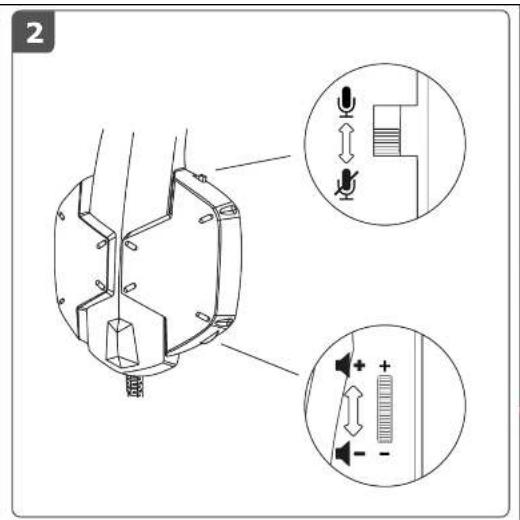

natural_image
Diagram showing audio jack connections to a computer tower (no text or symbols present)

Manual assistant
Powered by Anthropic
Waiting for your message
Product information
Brand : TRUST
Model : GXT 322
Category : Headphones