
WT-3181P - Wall clock LA CROSSE TECHNOLOGY - Free user manual and instructions
Find the device manual for free WT-3181P LA CROSSE TECHNOLOGY in PDF.


| Product Type | Wall Clock |
| Brand | La Crosse Technology |
| Model | WT-3181P |
| Dimensions | 12 inches (30.48 cm) diameter |
| Weight | 1.5 lbs (680 g) |
| Power Source | 1 AA battery (not included) |
| Battery Life | Approximately 12 months |
| Movement Type | Quartz (analog) |
| Display | Analog hands with hour and minute markers |
| Color | White or black (verify product) |
| Features | Time only; silent sweep movement (optional) |
| Mounting | Wall mount with keyhole hanger |
| Material | Plastic frame, glass lens |
| Maintenance | Clean with a soft, dry cloth. Do not use water or cleaning agents. |
| Safety | Keep away from children under 3 years. Contains small parts. |
| Spare Parts | Battery only; contact manufacturer for other parts. |
| Reparability | Non-repairable by user; consult professional. |
| Operating Temperature | 32°F to 104°F (0°C to 40°C) |
| Warranty | 1 year limited warranty |
Frequently Asked Questions - WT-3181P LA CROSSE TECHNOLOGY
User questions about WT-3181P LA CROSSE TECHNOLOGY
0 question about this device. Answer the ones you know or ask your own.
Ask a new question about this device
Download the instructions for your Wall clock in PDF format for free! Find your manual WT-3181P - LA CROSSE TECHNOLOGY and take your electronic device back in hand. On this page are published all the documents necessary for the use of your device. WT-3181P by LA CROSSE TECHNOLOGY.
USER MANUAL WT-3181P LA CROSSE TECHNOLOGY
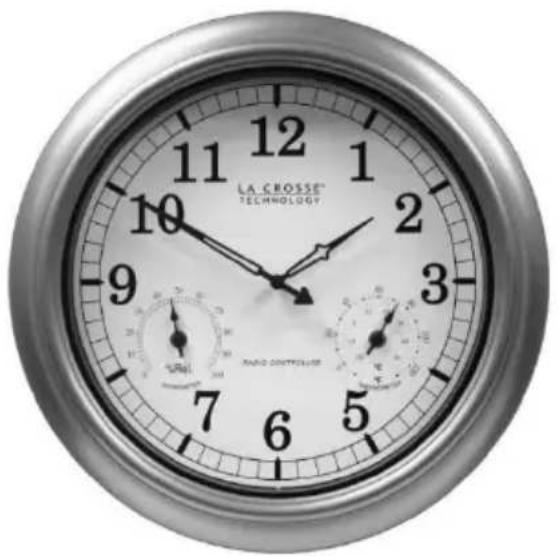
18" Indoor/Outdoor Atomic Wall Clock
natural_image
Close-up of a wall-mounted analog clock face showing time, duration, and gauge (no readable text or symbols beyond labels)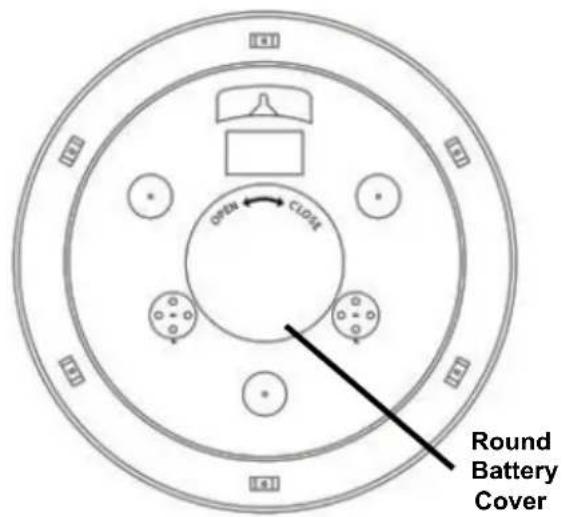
Get Started
Step 1: Remove the round battery cover from the back of the clock.
Step 2: Insert 1 fresh AA, LR6 1.5 volt ALKALINE battery according to the polarity marked on the case. Replace the battery cover.
Step 2: Firmly press the time zone button once.
Step 3: Position the clock on an exterior wall that faces Ft. Collins, Colorado. During the night, your clock will automatically set itself. Note: The hands will move to the 12:00, 4:00 or 8:00 position and search for the radio signal. If the radio signal is received the time will set. If the signal is not received the clock will stay at the 12:00, 4:00 or 8:00 position and search for the WWVB time signal on the even hours. Once the radio signal is decoded, the hands will automatically adjust to the correct time. This may take up to 5 nights.
Step 4: The default time zone is Pacific Time. If the clocks sets itself and the hours are off, hold the correct time zone button for 5 seconds to correct.
Position Clock
- Indoor: Choose a location 6 feet or more from electronics such as cordless phones, wireless gaming systems, televisions, microwaves, routers, baby monitors, etc., which can prevent signal reception.
-
Position near an exterior wall that faces Ft. Collins, Colorado for WWVB time signal reception.
-
The antenna is available for signal reception when the front or back of the clock faces Colorado.
- Outdoor: Choose a location with an overhang to protect the clock from the overhead sun or standing snow or rain.
- A shaded location will prevent inaccurate temperature readings. Mount the clock on a wall with the hanging hole on the back of the clock. Be sure the battery cover is on snug.
Manual Set Time
On rare occasions in certain areas, the clock may not be able to receive the radio controlled time signal due to the strength of the signal or the geographic location.
In this case, the clock can be set manually and used as a regular quartz wall clock.

Note: Allow up to five nights for the clock to receive the WWVB signal before manually setting the time.
Set the clock manually:
- Remove battery for 15 minutes and press the Manual Set Tab 20 times.
- After 15 minutes, insert the battery and allow the clock to spin to 12:00, 4:00 or 8:00.
- Hold the Manual Set Tab and the hand will spin. Continue holding until the correct time is achieved.
Note: You can only set the clock manually for about 2 minutes after the battery is inserted. If the clock receives the WWVB time signal, this signal will override manually set time.
Temperature and Humidity
The La Crosse Technology® atomic wall clock has two analog sensors that measure surrounding temperature and humidity. The temperature information is displayed in degrees Fahrenheit and Celsius, and humidity data is displayed in percentage.

gauge
| Ring | Temperature (°C) | Humidity (%) | |-------|------------------|--------------| | Outer ring | 120 | 30 | | Inner ring | 0 | 40 | | Outer ring displays temperature in degree Fahrenheit | 100 | 60 | | Inner ring displays temperature in degree Celsius | 0 | 50 |The thermometer and hygrometer have been calibrated at the factory. To check the sensors accuracy, tune to your local weather forecast information broadcast for the latest weather information. The sensors may be adjusted.
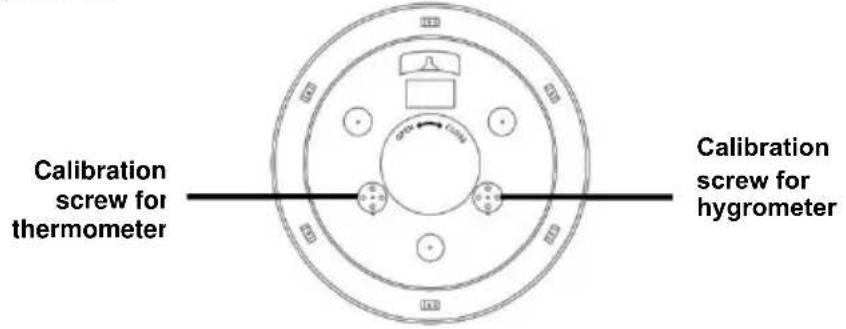
To manually adjust the sensors, use a flat tipped screwdriver to gently turn the temperature or humidity sensor screw at the back of the clock until desired setting has been reached.
Daylight Saving Time
The National Institute of Standards and Technology and WWVB encode a special DST "bit" in the WWVB transmission for DST. Your clock will read this information and automatically advance the hands one hour in the spring and eleven hours in the fall.
Arizona: If you live in an area that does not recognize DST, you must press the DST button one time only to turn OFF.
Manual WWVB Time Signal Search
For information about WWVB, visit: www.nist.gov/pml/div688/grp40/wwvb.cfm
Signal Interference
In some cases, the signal is affected by weather conditions and electrical interferences, or the location of the clock itself may result in poor reception. If the clock has not synchronized to the correct time within a few days of activation, you may need to move the clock to a different location.
Frequently Asked Questions
Q. How long will the battery last?
A. A good AA alkaline battery will last over 12 months.
Q: Is there a version of analog clock with more than the four continental US times zones?
A: La Crosse Technology ^® does not make an analog clock with more than four time zones. These time zones are PT (Pacific Time), MT (Mountain Time), CT (Central Time), and ET (Eastern Time).
Q: Can I shut off the WWVB signal?
A: No. If you manually set the time, when the clock receives a WWVB signal, that signal will override the manual set.
Q: Is there a booster antenna to receive the WWVB signal in a difficult location?
A: No, the clock cannot work with a booster antenna. Opening the clock or movement voids the warranty.
Q: Can I wire a control timing circuit to the La Crosse Technology® atomic clock?
A: No, the clock cannot work on a timing circuit. Opening the clock voids the warranty.
Q: Why do the hands spin?
A: When the hands spin about the same time every day the clock is auto-correcting the time. The hour hand should not spin more than twice around the clock.
A: Hands may spin if the battery is under powered or over powered. Use only Alkaline batteries in the clock.
Q: How do I adjust the Temperature or Humidity?
A: Use a flat tipped screwdriver to gently turn the temperature or humidity sensor screw at the back of the clock, until desired setting has been reached.
Troubleshooting
The wonderful advantage of owning a radio-controlled clock is that it is virtually trouble free. If the clock receives a clear time signal, it will set
itself perfectly. If it does not receive a time signal, consider the following:
- Battery: The clock must have a fresh battery to receive and process the time signal.
- Location: Try a different location, ideally near a window. Your clock should be at least six feet from computers, TVs, air conditioners, other radio-controlled clocks and other electrical appliances that cause interference.
- Weather: Electrical storms between you and Colorado during the night will interfere with the WWVB signal.
Care and Maintenance
- Do not mix old and new batteries
• Do not mix Alkaline, Standard, Lithium or Rechargeable Batteries - Always purchase the correct size and grade of battery most suitable for intended use.
- Replace all batteries of a set at the same time.
- Clean the battery contacts and also those of the device prior to battery installation.
- Ensure the batteries are installed with correct polarity (+and -).
- Remove batteries from equipment with is not to be used for an extended period of time.
- Remove used batteries promptly.
• Do not expose to extreme temperature, vibration or shock. - Clean with a soft damp cloth. Do not use solvents.
• The product is not a toy. Keep it out of reach of children. - The product is not to be used for medical purpose or for public information. It is intended for home use only.
• The specs of this product may change without prior notice.
• Improper use or unauthorized opening of housing voids warranty.
Warranty and Support Information
La Crosse Technology, Ltd. provides a 1-year limited time warranty (from date of purchase) on this product relating to manufacturing defects in materials & workmanship.
View full warranty details online at: www.lacrossetechnology.com/warranty_info.pdf
For warranty work, technical support or other information contact:
La Crosse Technology, Ltd
2830 26 ^th Street S.
La Crosse, WI 54601
Contact Support:
1-608-782-1610
Product Registration:
www.lacrossetechnology.com/support/register
Online Product Support:
www.lacrossetechnology.com/support


FCC Statement
This equipment has been tested and found to comply with the limits for a Class B digital device, pursuant to part 15 of the FCC Rules. These limits are designed to provide reasonable protection against harmful interference in a residential installation. This equipment generates, uses and can radiate radio frequency energy and, if not installed and used in accordance with the instructions, may cause harmful interference to radio communications. However, there is no guarantee that interference will not occur in a particular installation. If this equipment does cause harmful interference to radio or television reception, which can be determined by turning the equipment off and on, the user is encouraged to try to correct the interference by one or more of the following measures:
- Reorient or relocate the receiving antenna.
- Increase the separation between the equipment and receiver.
- Connect the equipment into an outlet on a circuit different from that to which the receiver is connected.
- Consult the dealer or an experienced radio/TV technician for help.
This device must not be co-located or operating in conjunction with any other antenna or transmitter. Operation is subject to the following two conditions:
(1) this device may not cause harmful interference, and
(2) this device must accept any interference received, including interference that may cause undesired operation.
Caution!
The manufacturer is not responsible for any radio or TV interference caused by unauthorized modifications to this equipment. Such modifications could void the user authority to operate the equipment.
All rights reserved. This manual may not be reproduced in any form, even in part, or duplicated or processed using electronic, mechanical or chemical process without the written permission of the publisher.
This booklet may contain errors or misprints. The information it contains is regularly checked and corrections are included in subsequent editions. We disclaim any responsibility for any technical error or printing error, or their consequences.
All trademarks and patents are recognized.
- 18" Indoor/Outdoor Atomic Wall Clock
- Get Started
- Position Clock
- Manual Set Time
- Set the clock manually:
- Temperature and Humidity
- Daylight Saving Time
- Manual WWVB Time Signal Search
- Signal Interference
- Frequently Asked Questions
- How long will the battery last?
- Q: Is there a version of analog clock with more than the four continental US times zones?
- Q: Can I shut off the WWVB signal?
- Q: Is there a booster antenna to receive the WWVB signal in a difficult location?
- Q: Can I wire a control timing circuit to the La Crosse Technology® atomic clock?
- Q: Why do the hands spin?
- Q: How do I adjust the Temperature or Humidity?
- Troubleshooting
- Care and Maintenance
- Warranty and Support Information
- Product Registration:
- Online Product Support:
- FCC Statement
- Caution!
Brand : LA CROSSE TECHNOLOGY
Model : WT-3181P
Category : Wall clock