
TX60U-IT-D - Temperature and humidity sensor LA CROSSE TECHNOLOGY - Free user manual and instructions
Find the device manual for free TX60U-IT-D LA CROSSE TECHNOLOGY in PDF.


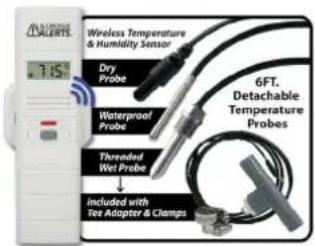
| Product Type | Temperature/Humidity Add-on Sensor with Probe |
| Brand | La Crosse Technology |
| Model | TX60U-IT-D |
| Temperature Range | -40°F to 140°F (-40°C to 50°C) |
| Humidity Range | 3% RH to 99% RH |
| Probe Temperature Range | -40°F to 140°F (-40°C to 50°C) |
| Transmission Range | 200 ft (60.96 m) in open air |
| Battery Requirements | 2 x AAA (LR3) batteries (not included) |
| Dimensions | 1.44" L x 0.76" W x 5.73" H (3.66 x 1.93 x 14.55 cm) |
| Gateway Required | GW1000-U (with power cord and LAN cable) |
| App Requirement | La Crosse Alerts Mobile app |
| System Requirements (iOS) | iOS 8+ with Safari |
| System Requirements (Android) | Android 4.0.3+ with Chrome or Stock browser |
| Warranty | 1-year limited |
| FCC Classification | Class B digital device |
| Optional Probe Types | Wet, dry, threaded, or hot tub |
| Recommended Battery Care | Do not mix old/new batteries; use correct polarity; remove if not used for long |
Frequently Asked Questions - TX60U-IT-D LA CROSSE TECHNOLOGY
User questions about TX60U-IT-D LA CROSSE TECHNOLOGY
0 question about this device. Answer the ones you know or ask your own.
Ask a new question about this device
Download the instructions for your Temperature and humidity sensor in PDF format for free! Find your manual TX60U-IT-D - LA CROSSE TECHNOLOGY and take your electronic device back in hand. On this page are published all the documents necessary for the use of your device. TX60U-IT-D by LA CROSSE TECHNOLOGY.
USER MANUAL TX60U-IT-D LA CROSSE TECHNOLOGY
WARRANTY AND SUPPORT
La Crosse Technology, Ltd. provides a 1-year limited time warranty (from date of purchase) on this product relating to manufacturing defects in materials & workmanship. Before returning a product, please contact our friendly customer support with questions or visit our online help:
Phone: 1-608-785-7920
Online Product Support and Registration:
https://www.lacrossetechnology.com/support/lacrossealertsmobile/
FCC STATEMENT
This equipment has been tested and found to comply with the limits for a Class B digital device, pursuant to part 15 of the FCC Rules. These limits are designed to provide reasonable protection against harmful interference in a residential installation. This equipment generates, uses and can radiate radio frequency energy end, if not installed and used in accordance with the instructions, may cause harmful interference to radio communications. However, there is no guarantee that interference will not occur in a particular installation.
If this equipment does cause harmful interference to radio or television reception, which can be determined by turning the equipment off and on, the user is encouraged to try to correct the interference by one or more of the following measures: • Report or re-locate the receiving antenna
- increase the separation between the equipment and receiver
- Connect the equipment into an outlet on a circuit different from that to which the receiver is connected.
- Consult the dealer or an experienced radio/TV technician for help.
This device must not be co-located or operating in conjunction with any other antenna or transmitter.
Operation is subject to the following two conditions:
(i) This device may not cause harmful interference, and
(2) This device must accept any interference received, including interference that may cause undesired operation.
Caution!
The manufacturer is not responsible for any radio or TV interference caused by unauthorized changes or modifications to this equipment. Such changes or modifications could void the user authority to operate the equipment.
This equipment must be installed and operated in accordance with provided instructions and the antenna(s) used for this transmitter must be installed to provide a separation distance of at least 20 cm from all persons and must not be co located or operating in conjunction with any other antenna or transmitter
All rights reserved. This manual may not be reproduced in any form, even in part, or duplicated or processed using electronic, mechanical or chemical process without the written permission of the publisher. This booklet may contain errors or misprints. The information it contains is regularly checked and corrections are included in subsequent editions. We disclaim any responsibility for any technical error or pricing error, or their consequences. All trademarks and patents are recognized.
Apple and the Apple logo are trademarks of Apple Inc., registered in the U.S. and other countries. App Store is a service mark of Apple Inc.
Google Play and the Google Play logo are trademarks of Google Inc.

By LA CROSSE TECHNOLOGY® MOBILE™
Temperature/Humidity Add on Sensor with Probe
CONTENTS NOT INCLUDED
- Sensor TX60U-IT
- One Probe (wet, dry, threaded or hot tub)
- Screws & anchors
• High speed INTERNET service and router to connect gateway
- Mobile device with cellular or WiFi service to use app
• GW1000-U gateway, power cord, and LAN cable
Model: TX60U-IT
DC: 041218
SETUP
Setup Video: www.lacrossetechnology.com/support/lacrossealertsmobile/
- Check that your gateway has a solid red light showing.
- Insert 2 AAA batteries into sensor. Observe correct polarity.
- Optional: Insert Probe into sensor.
- Download La Crosse Alerts Mobile App.


- Follow the on screen instructions.
GATEWAY LIGHTS
4 BLINKS: Ready to register
NO LIGHT: Check power cord
3 BLINKS: Cannot find server
RED/GREEN LIGHTS BLINK: Delete existing registration
2 BLINKS: No IP address
SOLID RED: Registered
1 BLINK: Check LAN cable
FACTORY RESET
Gateway:
- Remove power cord
- Hold gray button & insert power cord
- Continue to hold until red light flashes twice. Release button.
- When light flashes 4 times, register.
Sensor:
- Hold gray button on sensor until sensor display resets.
CARE AND MAINTENANCE
- Do not mix old and new batteries.
- Do not mix Alkaline, Lithium, standard, or rechargeable batteries.
• Always purchase the correct size and grade of battery most suitable for intended use; - Clean the battery contacts and also those of the device prior to battery installation;
- Ensure the batteries have with correct polarity (+ / -)
- Remove batteries from equipment that will not to be used for an extended period.
- Promptly remove expired batteries.
SPECIFICATIONS
• Temperature: -40°F to 140°F (-40°C to 50°C)
• Humidity: 3% RH to 99% RH
- Optional Probe Temperature: -40°F to 140°F (-40°C to 50°C)
• Transmission: 200 ft. (60.96m) in open air
- Battery Requirements: Sensor: 2 "AAA" (LR3) battery (not included)
- Dimensions: 1.44" L x 0.76" W x 5.73" H (3.66 L x 1.93 W x 14.55 H cm)
System Requirements:
- iOS 8 or greater is required with a Safari browser
- Android 4.0.3 or greater is required with Chrome or Stock browser
Browser:
• Mac supported versions (min) OSX 10.8, 10.9 or 10.10 with Safari 6.1.1+, Chrome 36+ or Firefox 39+
- Windows supported versions (min) 7/SP1, 8.1/Update 1, or 10 (Pro/Home) with Chrome 36+, Firefox 39+ or Internet Explorer 10/11.
⚠ WARNING: This product can expose you to chemicals including styrene, which is known in the State of California to cause cancer. For more information go to: www.P65Warnings.ca.gov

Brand : LA CROSSE TECHNOLOGY
Model : TX60U-IT-D
Category : Temperature and humidity sensor