
Steam Master Deluxe 3946 - Iron press SUNBEAM - Free user manual and instructions
Find the device manual for free Steam Master Deluxe 3946 SUNBEAM in PDF.


| Product type | Ironing press |
| Brand | Sunbeam |
| Model | Steam Master Deluxe 3946 |
| Dimensions (L x W x H) | 30 x 20 x 15 cm |
| Weight | 2.5 kg |
| Power supply | 230 V, 50 Hz, 1200 W |
| Tank capacity | 200 ml |
| Steam function | Continuous |
| Temperature setting | Thermostat |
| Auto shut-off | Yes, after 8 minutes of inactivity |
| Repairability index | 8/10 |
| Maintenance | Regular tank cleaning, descaling recommended |
| Safety | Overheat protection, auto shut-off |
| Spare parts | Tank, soleplate, power cord |
| Included accessories | Measuring cup, ironing mat |
Frequently Asked Questions - Steam Master Deluxe 3946 SUNBEAM
User questions about Steam Master Deluxe 3946 SUNBEAM
0 question about this device. Answer the ones you know or ask your own.
Ask a new question about this device
Download the instructions for your Iron press in PDF format for free! Find your manual Steam Master Deluxe 3946 - SUNBEAM and take your electronic device back in hand. On this page are published all the documents necessary for the use of your device. Steam Master Deluxe 3946 by SUNBEAM.
USER MANUAL Steam Master Deluxe 3946 SUNBEAM
IMPORTANT SAFEGUARDS
When using your iron, basic safety precautions should always be followed, including the following:
READ ALL INSTRUCTIONS BEFORE USING
- Use iron only for its intended use.
- To protect against risk of electric shock, do not immerse the iron in water or other liquids.
- The iron should always be turned to "OFF" before plugging or unplugging from outlet. Never yank cord to disconnect from outlet; instead, grasp plug and pull to disconnect.
- Do not allow cord to touch hot surfaces. Let iron cool completely before putting away.
- Always disconnect iron from electrical outlet when filling with water or emptying and when not in use.
- Do not operate iron with a damaged cord or if the iron has been dropped or damaged. To avoid the risk of electric shock, do not disassemble the iron. Take it to a qualified serviceman for examination and repair. Incorrect reassembly can cause a risk of electric shock when the iron is used.
- Close supervision is necessary for any appliance being used by or near children. Do not leave iron unattended while connected or on an ironing board.
- Burns can occur from touching hot metal parts, hot water or steam. Use caution when you turn a steam iron upside down – there may be hot water in the reservoir.
- If the flatiron is not operating normally, disconnect from the power supply and contact your nearest authorized Sunbeam distributor.
- Your Sunbeam Iron is designed to rest on the heel. Do not leave the iron unattended. Do not set the iron on an unprotected surface, even if it is on its heel rest.
SPECIAL INSTRUCTIONS
- This is a 1200 Watt appliance. To avoid a circuit overload, do not operate another high wattage appliance on the same circuit.
- If an extension cord is absolutely necessary, a 10-ampere cord should be used. Cords rated for less amperage may overheat. Care should be taken to arrange the cord so that it cannot be pulled or tripped over.
SAVE THESE INSTRUCTIONS
2
KNOW YOUR SUNBEAM® STEAM/SPRAY/DRY IRON
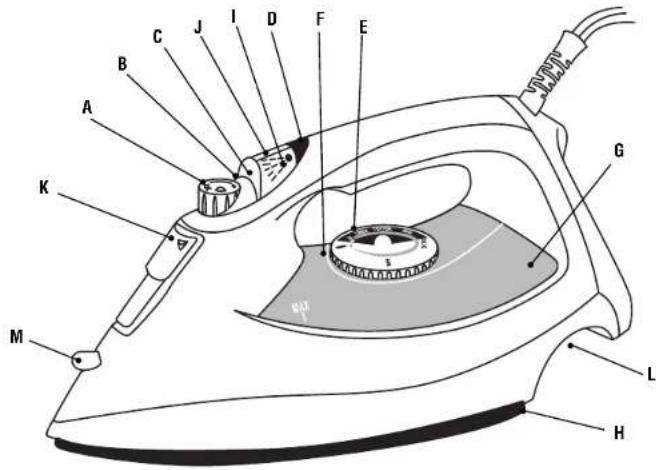
A. VARIABLE STEAM DIAL – Adjust steam level for different ironing needs. (Refer to Ironing Guide for recommended settings).
B. STEAM VALVE (Connected to the Variable Steam Dial) – Removable to minimize scale build up.
C. STEAM INDICATOR MARK
D. AUTO-OFF INDICATOR – Red Lens / Light
E. TEMPERATURE DIAL – Controls heat output of iron. Adjust dial according to ironing needs. For Steam Ironing set dial to red Steam Band.
F. HEATER STATUS LIGHT – Indicates On/Off status of soleplate heaters.
G. TEMPERATURE INDICATOR MARK
H. RESERVOIR WINDOW
I. NON-STICK SOLEPLATE – Has full-length button grooves for added convenience when ironing shirts and blouses.
J. SLIDING WATER RESERVOIR COVER - Prevents dust and foreign matter from entering the water tank; stops any water spillage during ironing.
K. SPRAY MIST®NOZZLE
L. SPRAY MIST® BUTTON – Provides a fine spray mist for spot dampening.
M.SHOT OF STEAM® BUTTON
Provides a powerful burst of steam for maximum steam power.
- SAFETY SMART® AUTOMATIC SHUT-OFF – Shuts off if iron is unmoved for 15 minutes in the upright position or 30 seconds in the ironing position.
3
BEFORE THE FIRST USE
- When turned on for the first time, your new iron may give off a slight odor for up to ten minutes. This is due to the initial heating of the materials used. It is safe, not detrimental to the performance of the product, and will not recur.
- Prior to first use, clean steam vents using the SHOT OF STEAM ^2 feature. After cleaning vents, run iron over an all-cotton cloth to remove any residue.
- When not ironing, always have steam dial turned to "0" No steam.
INSTRUCTIONS FOR USE
DRY IRONING
- Plug the cord into a 230 volt AC outlet. On units with automatic shut-off, the auto off light will illuminate.
- Turn the temperature dial to the desired setting (refer to Ironing Guide for recommended settings). While iron is heating, place iron on heel rest on a stable, protected surface.
- Set the steam dial on ( ) to prevent steam flow if water is in the tank.
STEAM IRONING
- Make sure the plug is removed from the wall socket before filling the iron with water.
- Turn the steam dial to no steam icon area.
- Place the iron on its heel and open the water reservoir cover. Pour water slowly into the water reservoir. Fill up to the maximum water level. To prevent the risk of burns, use caution when filling a hot iron with water. Burns can occur from touching hot metal parts, hot water or steam. Push firmly to close the cover. NOTE: Tap water may be used due to the special design of this iron. However, in areas with very hard water, distilled or demineralized water is recommended.
- Turn the temperature dial to any of the temperatures within the steam band and allow the iron to heat for approximately 2 minutes before ironing. While heating, place iron on heel rest on a stable, protected surface.
- Adjust Steam Dial to desired level of steaming.
SHOT OF STEAM® FEATURE
- The SHOT OF STEAM ^ feature provides an extra burst of steam for deep penetration of stubborn wrinkles. The SHOT OF STEAM ^ feature can be used with dry or steam ironing provided the tank is at least 1/2 full of water and the Temperature Dial is set within the steam band.
- Allow the iron to heat for approximately 2 minutes.
- Press the SHOT OF STEAM ^2 button several times to prime the pump.
- Pump SHOT OF STEAM ^® button another three to four times in order to clean the unit. The SHOT OF STEAM ^® feature is now ready for use. The SHOT OF STEAM ^® feature can be used continuously with just a short pause between shots. The SHOT OF STEAM ^® feature is most effective with the iron held in a horizontal position just above the fabric being ironed.
- If the tank runs dry, unplug the iron and refill with water. The iron may be filled with water while it is hot. NOTE: It may be necessary to re-prime the pump before using the SHOT OF STEAM ^® feature again.
SPRAY MIST® FEATURE
- Use the SPRAY MIST ^® feature to dampen fabrics with stubborn wrinkles.
- Press the gray SPRAY MIST ^® button firmly to produce spray.
SAFETY SMART® FEATURE AUTO SHUT-OFF
- When the iron is plugged into 230 volt AC electrical outlet, the steady red light signals that the iron is powered in and is ready to be used.
- If the iron is left on the heel rest unmoved the iron will stop heating in 15 minutes. The light on the handle will blink to indicate the iron has automatically shut off and will continue blinking until the iron is restarted or unplugged.
- If the iron is left unmoved in the ironing position or accidentally tipped over, the iron will stop heating in 30 seconds. Again, the light on the handle will blink to indicate the iron has automatically shut off and will continue blinking until the iron is restarted or unplugged.
- NOTE: If the Temperature Dial is turned to the Off position, light will continue blinking and then go off.
- To restart the iron move the iron back and forth. Allow the iron to heat and continue ironing as normal.
- NOTE: Although heat is no longer generated once the iron has automatically shut off, allow sufficient time for the iron to cool before touching the soleplate or storing the iron.
NON-STICK FINISH
- Non-Stick coating prevents sticking of fabrics and starch residue to the soleplate.
- To clean the soleplate, allow iron to cool and wipe with a soft cloth using a mild vinegar solution.
- Do not use scouring pads, abrasives or chemical cleaning solvents as they may damage the finish.
• NOTE: Scratches in the non-stick soleplate do not affect the performance of the iron.


CARE AFTER EACH USE
- Turn the Steam Dial to the no steam icon.
- Unplug the iron from the power outlet.
- Empty the water tank by opening the water reservoir cover and turning the iron upside down to allow water to flow from the opening. Shake the iron gently to remove trapped water drops.
- Close cover and allow the iron to cool.
- When not ironing, always set Steam Dial to no steam icon.
CARE AND MAINTENANCE
STEAM VALVE
The Steam Valve (attached to the Variable Steam Dial) is removable for easy cleaning of lint and scale build up. Cleaning the Steam Valve is only necessary if you notice a reduction in steam performance. To remove the Steam Valve; empty the water tank and place iron on the soleplate. Turn the Variable Steam Dial to CLEAN. The valve will "pop-up." Pull up to remove the Steam Valve fully. Wipe the tip gently with a damp cloth to clean. To replace, align CLEAN with the indicator mark. Push down and rotate clockwise to the no steam icon.
NOTE: Do not pour water into the steam valve hole.
SOLEPLATE
If starch or other material clings to the iron's soleplate, allow the iron to cool and wipe with a soft, damp cloth. Avoid ironing over snaps, zippers, rivets, etc., as they may scratch the soleplate.
STORAGE
Always store your iron on the heel rest. Never store with the soleplate facing down or in the carton. Always store your iron with the Steam Dial turned to DRY.
MAINTENANCE
Other than recommended care instructions contained in this pamphlet, no further user maintenance should be necessary.
However, following is a list of frequently asked questions and their resolutions. If for any reason your Sunbeam iron continues to exhibit one of these symptoms, or should require repair for another reason contact your nearest authorized Sunbeam distributor.
SYMPTOM / POTENTIAL REASONS AND SOLUTIONS
IRON EMITS AN ODOR
- Iron gives off an odor when turned on for the first time.
- Allow 10 minutes for odor to disappear.
IRON DOES NOT HEAT
- Iron should be plugged into a 230 volt, AC electrical outlet only.
- The Temperature Dial must be set at the desired temperature.
- The auto shut-off feature may have been activated. Move the iron back and forth to restart.
IRON DOES NOT STEAM
- The water tank may be empty. Turn the Steam Valve to ( ) and add water.
- Allow iron to heat, then set the Steam Dial to one of the steam settings. Turn the Steam Valve to one of the steam icons.
- There may be an obstruction. Remove Steam Valve by turning it to CLEAN. Replace and set the Steam Dial to one of the steam settings.
SHOT OF STEAM ^® FEATURE DOES NOT WORK
- The water tank must be at least 1/2 full.
• Temperature must be set to steam position. - Iron should be in the horizontal position.
- Prime pump briefly.
- Allow a short pause between shots.
- Be sure to fully depress the S HOT OF STEAM ^® button.
SPRAY MIST® FEATURE DOES NOT WORK
- The water tank must be at least 1/2 full.
IRON IS LEAKING
- The Variable Steam Dial must be set on DRY until the iron is hot.
- The temperature setting is too low to produce steam. (See Ironing Guide)
TWO-YEAR LIMITED HOSPITALITY WARRANTY
Sunbeam Products, Inc. ("Sunbeam") warrants that for a period of 2 years from the date of purchase, this product will be free from defects in material and workmanship. Sunbeam, at its option, will repair or replace this product or any component of the product found to be defective during the warranty period. Replacement will be made with a new or remanufactured product or component. If the product is no longer available, replacement may be made with a similar product of equal or greater value. This is your exclusive warranty.
This warranty is valid for the original purchaser from the date of initial purchase and is not transferable. Sunbeam dealers, service centers, or stores selling Sunbeam products do not have the right to alter, modify or any way change the terms and conditions of this warranty.
This warranty does not cover normal wear of parts or damage resulting from any of the following: negligent use or misuse of the product, use on improper voltage or current, use contrary to the operating instructions, disassembly, repair or alteration by anyone other than Sunbeam or an authorized service center. Further, the warranty does not cover Acts of God, such as fire, flood, hurricanes and tornadoes.
Sunbeam shall not be liable for any incidental or consequential damages caused by the breach of any express or implied warranty. Except to the extent prohibited by applicable law, any implied warranty of merchantability or fitness for a particular purpose is limited in duration to the duration of the above warranty. Some states, provinces or jurisdictions do not allow the exclusion or limitation of incidental or consequential damages or limitations on how long an implied warranty lasts, so the above limitations or exclusion may not apply to you. This warranty gives you specific legal rights, and you may also have other rights that vary from state to state or province to province.
HOW TO OBTAIN WARRANTY SERVICE
Contact your Sunbeam authorized dealer.
NOTES
PRÉCAUTIONS IMPORTANTES
SYMPTOME ET CAUSES POSSIBLES ET SOLUTIONS
S'IL Y A UN ODEUR PROVENANT DE L'APPAREIL
natural_image
Line drawing of a steam iron with handle and rotary dial (no text or symbols)ANTES DE USAR PELA PRIMEIRA VEZ
natural_image
Line drawing of a steam iron with handle and spool, showing internal components (no text or symbols)PRIMA DEL PRIMO Uso
- IMPORTANT SAFEGUARDS
- READ ALL INSTRUCTIONS BEFORE USING
- SPECIAL INSTRUCTIONS
- SAVE THESE INSTRUCTIONS
- BEFORE THE FIRST USE
- INSTRUCTIONS FOR USE
- DRY IRONING
- STEAM IRONING
- SHOT OF STEAM® FEATURE
- SPRAY MIST® FEATURE
- SAFETY SMART® FEATURE AUTO SHUT-OFF
- NON-STICK FINISH
- CARE AFTER EACH USE
- CARE AND MAINTENANCE
- STEAM VALVE
- NOTE: Do not pour water into the steam valve hole.
- SOLEPLATE
- STORAGE
- MAINTENANCE
- SYMPTOM / POTENTIAL REASONS AND SOLUTIONS
- IRON EMITS AN ODOR
- IRON DOES NOT HEAT
- IRON DOES NOT STEAM
- SHOT OF STEAM ® FEATURE DOES NOT WORK
- SPRAY MIST® FEATURE DOES NOT WORK
- IRON IS LEAKING
- TWO-YEAR LIMITED HOSPITALITY WARRANTY
- HOW TO OBTAIN WARRANTY SERVICE
- NOTES
- PRÉCAUTIONS IMPORTANTES
- SYMPTOME ET CAUSES POSSIBLES ET SOLUTIONS
- S'IL Y A UN ODEUR PROVENANT DE L'APPAREIL
- ANTES DE USAR PELA PRIMEIRA VEZ
- PRIMA DEL PRIMO Uso
Brand : SUNBEAM
Model : Steam Master Deluxe 3946
Category : Iron press