
COM-105 - Camera Steren - Free user manual and instructions
Find the device manual for free COM-105 Steren in PDF.


| Product Type | Digital Camera |
| Brand | Steren |
| Model | COM-105 |
| Dimensions | 10.5 x 6.2 x 4.0 cm |
| Weight | 180 g (without batteries) |
| Power Supply | 2x AA batteries or USB 5V DC |
| Image Sensor | CMOS, 5 MP |
| Lens | Fixed focus, f/3.0 |
| Storage | SD card up to 32 GB (not included) |
| Interface | USB 2.0 |
| Photo Resolution | 2592 x 1944 pixels |
| Video Resolution | 640 x 480 pixels (VGA) |
| Functions | Photo capture, video recording, playback, time-lapse |
| Display | 2.4-inch LCD screen |
| Maintenance | Clean lens with soft, dry cloth; store in dry place |
| Safety | Avoid water and extreme temperatures; do not disassemble |
| Spare Parts | Not available; device is non-repairable by user |
| Warranty | 1 year |
Frequently Asked Questions - COM-105 Steren
User questions about COM-105 Steren
0 question about this device. Answer the ones you know or ask your own.
Ask a new question about this device
Download the instructions for your Camera in PDF format for free! Find your manual COM-105 - Steren and take your electronic device back in hand. On this page are published all the documents necessary for the use of your device. COM-105 by Steren.
USER MANUAL COM-105 Steren
natural_image
Black webcam with a USB cable attached, placed on a grid-patterned surface (no text or symbols visible)natural_image
Illustration of a laptop with a camera sensor and a separate black-and-white webcam, no text or symbols present.4. INSTALACIÓN
Mini webcam with magnetic clip

natural_image
Black webcam with attached USB cable against a light blue grid background (no text or symbols)Instruction manual
V0512c
S4-B
Mini webcam with magnetic clip
COM-105
Thank You on purchasing your new Steren product.
This manual includes all the feature operations and troubleshooting necessary to install and operate your new Steren's Mini webcam with magnetic clip.
Please review this manual thoroughly to ensure proper installation and operation of this product. For support, shopping, and everything new at Steren, visit our website:
www.steren.com

The instructions of this manual are for reference about the product. There may be differences due to updates.
Please check our web site (www.steren.com) to obtain the latest version of the instruction manual.
IMPORTANT
- Do not expose the device to extreme temperatures.
• Always use a soft, dry cloth to clean the equipment. - Avoid touching the camera lens.
- Don't let fall the device, could cause failures.
1. HIGHLIGHTS
• Color with CMOS technology sensor.
- Resolution of 1.3 Mpxeles (by interpolation).
- Integrated microphone.
- Adjustment of focus.
- Base magnetic multi-position.
• 360 Degrees rotation.
- Ideal for portable devices.
- USB 2.0 connection.
- Stills capture.
- Compatible with any instant messaging program.
2. CONTROLS
- Button to capture still images.
- Lens.
- Microphone.
- Multi position magnetic base.
- USB connector.
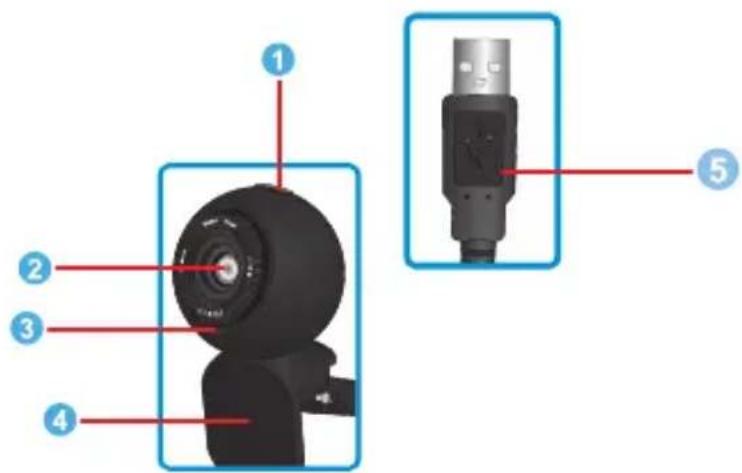
3. HOW TO INSTALL THE CAMERA
The camera may be placed on its base, to put it on a desktop, or through the clip, to fix it on the computer screen.

natural_image
Illustration of a laptop connected to a camera and a webcam, with no visible text or symbols.4. INSTALLATION
- Connect the camera in an available USB port on the computer.
- The computer will automatically detect the camera and the necessary drivers will be installed.
- You can also take videos using the program that comes on the installation driver.
- Insert the installation CD into the CD ROM unit.
- Automatically the welcome window appears. Otherwise, locate and run the installation file on the CD.
The images will be stored in different folders, depending on the messaging program that you are using.
- Press NEXT to begin installation of the drivers and press FINISH to complete the process.
![Winicero USB2.0 UVC PC Camera - InstallShield Wizard Reverserade a InstallShield Wizard de Vinicero USB2.0 UVC PC Camera InstallShield® installed version:Vinico USB2.0 UVC PC Camera set up equipo - Pass software, hierarche on Siguante Install (F) [OK] [Sequence] Cancel](/content/2026/05/1087470/images/37dd96d89993a47f625ee24947c74b0d66b30116e50f7412241636e1f8b2e194.jpg)
- Execute amcap.exe to see the image sent from the camera and start recording.

Product design and specifications are subject to change, without notice.
Product: Mini webcam with magnetic clip
Part number: COM-105
Brand: Steren
WARRANTY
This Steren product is warranted under normal usage against defects in workmanship and materials to the original purchaser for one year from the date of purchase.
CONDITIONS
1.- This warranty card with all the required information, invoice, product box or package, and product, must be presented when warranty service is required.
2.- If the product stills on the warranty time, the company will repair it free of charge.
3.- The repairing time will not exceed 30 natural days, from the day the claim was received.
4.- Steren sell parts, components, consumables and accessories to customer, as well as warranty service, at any of the addresses mentioned later.
THIS WARRANTY IS VOID IN THE NEXT CASES:
If the product has been damaged by an accident, acts of God, mishandling, leaky batteries, failure to follow enclosed instructions, improper repair by unauthorized personnel, improper safe keeping, among others.
a) The consumer can also claim the warranty service in the purchase establishment.
b) If you lose the warranty card, we can reissue it, if you show the invoice or purchase ticket.
RETAILER INFORMATION
Name of the retailer
Address
Product
Brand
Part number ____
Serial number
Date of delivery ____

In case your product fails or have questions, please contact your nearest dealer. If you are in Mexico, please give a call to our Call Center.
01 800 500 9000

STEREN
Help us to improve this instruction manual, call us:

01800 500 9000
Customer Service Center
www.steren.com
Brand : Steren
Model : COM-105
Category : Camera