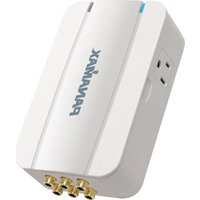
MD2-AV - Power Strip Panamax - Free user manual and instructions
Find the device manual for free MD2-AV Panamax in PDF.


| Product Type | Surge Protector Power Strip with Signal Line Protection |
| Model | MD2-AV |
| Brand | Panamax |
| Number of AC Outlets | 2 (with outlets rotated 90° for different plug types) |
| Indicators | Blue "Power On Protection OK" LED; Red "Line Fault" LED |
| Signal Line Protection | Yes, via included MD2-AV MODULE (coaxial/phone lines) |
| Input Voltage | 120 V AC (typical US standard) |
| Maximum Current | 15 A (estimated for typical power strip) |
| Grounding Requirement | Properly grounded 3-wire outlet; NEC (US) or CEC (Canada) compliant |
| Mounting Options | Removable cover; can be screwed to wall outlet faceplate; cover can be flipped 180° |
| Cover Customization | Removable and paintable (sides, top, bottom not to be painted) |
| Equipment Protection Policy | $100,000 Limited Connected Equipment Protection Policy (conditions apply) |
| Warranty | Limited Lifetime Product Warranty |
| Dimensions (Approx.) | 3 x 2 x 1.5 inches (estimated for 2-outlet block) |
| Weight (Approx.) | 0.5 lb (estimated) |
| Operating Environment | Indoor, dry location only; avoid heat/moisture |
| Safety Features | Line Fault detection; 3-wire grounding required; no 2-prong adaptor |
| Installation | Include signal line connection via MD2-AV MODULE; turn off equipment first |
| Compliance | UL/ETL listed (assumed for US market) |
Frequently Asked Questions - MD2-AV Panamax
User questions about MD2-AV Panamax
0 question about this device. Answer the ones you know or ask your own.
Ask a new question about this device
Download the instructions for your Power Strip in PDF format for free! Find your manual MD2-AV - Panamax and take your electronic device back in hand. On this page are published all the documents necessary for the use of your device. MD2-AV by Panamax.
USER MANUAL MD2-AV Panamax
INSTALLATION INSTRUCTIONS MD2-AV
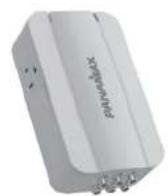

MD2-AV MODULE
- Turn off the equipment you are plugging into the MD2-AV.
- Plug the surge protector into the wall outlet. A red "Line Fault" light indicates an improperly wired outlet that must be checked by a qualified electrician.
- If the blue "Power On Protection OK" light is on, plug your equipment into the AC outlets on the surge protector.
The protection circuitry on the MD2-AV and MD2-AV MODULE only work if the signal lines are connected properly and ground wire is bonded as depicted in diagram below.
- Connecting signal lines to the MD2-AV: The lines coming from the MD2-AV MODULE plug into the "IN" jacks. Lines from the "OUT" jacks then connect to the equipment being protected.
4.5 Connecting signal lines to the MD2-AV MODULE: The lines coming from the MD2-AV plug into the "IN" acks. Lines from the "OUT" acks then connect to the source equipment in the rack.
-
To mount module to rack, slide zip ties through slots on back. Wrap and tie around legs on equipment rack.
-
Turn the connected equipment ON and check for power and correct operation.

TYPICAL INSTALLATION

IMPORTANT SAFETY POINTS
Panamax surge protectors and the connected equipment must be indoors in a dry location and in the same building. Do not install any Panamax product near heat emitting appliances such as a radiator or heat regulator. Do not install this product where excessive moisture is present; for example, near a bathtub, sink pool, basement floor, fish tank, etc.
It is not uncommon for a building to be improperly grounded. In order to protect your equipment and validate the warranty, Panamax products must be plugged into a properly grounded 3-wire outlet. Additionally, building wiring and grounding must conform to applicable NEC (USA) or CEC (Canada) codes for the Panamax warranty to be valid.
Do not use 2-prong adaptors with this product. If an extension cord is required, use only Panamax #SEC1410. If at any time your surge protector indicates a Line Fault, call your electrician to correct the building wiring.
FEATURES
Top view of product
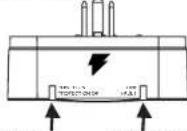
POWER ON:
PROTECTION OK- (blue)
normally CN - indicates
that the power is on,
surge protector is
facing property,
and all connected
equipment is protected
LINE FAULT INDICATOR-
(red) - Fit rec, indicates
an improperly wired bullet


Side views of product
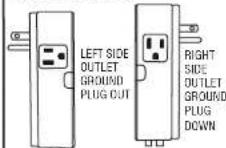
AC bullets are turned 90 degrees from one another to accommodate different style plugs or transformers.
OPTIONS FOR SECURITY MOUNTING & FRONT COVER FACEPLATE
Cover of MD2-AV can easily be removed by pulling cover at the 2 side indents (1). Unit can be securely screwed into wall outlet faceplate using either hole (2) indicated (screw is included).
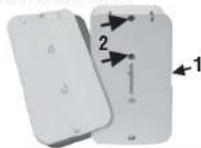
Cover can be flipped around 180 degrees to hide LEDs from front straight-on view if desired.

Cover can be removed and painted to match color of wall. Do not paint the sides, top or bottom. Warranty will be voided.

natural_image
Two identical white rectangular electronic devices with ports, shown from different angles (no visible text or symbols)Properly Connecting Your Surge Protector
To completely protect your equipment from power surges, every wire leading into or out of the equipment you want to protect must be connected to the appropriate Panama surge protector. Damaging lightning and power surges can get into your system through any AC power or signal line (phone lines, grounding wires, coax cables, modem cables, etc.) connected to your electrical equipment.
The \$100,000 Connected Equipment Protection Policy is invalid if any wire leading into or out of the equipment is not properly connected to the appropriate Panamax surge protector(s). The surge protector must also be plugged into a properly wired and grounded outlet. Please see the warranty for details or contact the Panamax Customer Relations department with questions.
Overview
Make sure you have the right surge protector to protect your electronic equipment. Panamax makes protectors for almost every type of electronic equipment. Surge protectors that may look identical from the outside can be very different on the inside. It is very important to use the surge protector designed for your application. Two-outlet surge protectors are not designed for use with systems having more than two AC powered components. Panamax offers a wide range of surge protectors designed for use with larger systems. If you have any questions about which product is best for your applications, please see our web site www.panamax.com or contact Panamax Customer Relations at 800-472-5555 (7:30 a.m. - 4:30 p.m. PST).
\$100,000 Limited Connected Equipment Protection Policy\*
Limited Lifetime Product Warranty\*
*See documentation on back side for details.
CUSTOMER SUPPORT: 800-472-5555
PANAMAX®

Brand : Panamax
Model : MD2-AV
Category : Power Strip