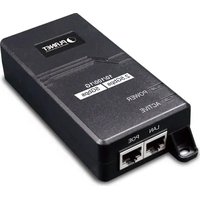
POE-165 - PoE Injector Planet - Free user manual and instructions
Find the device manual for free POE-165 Planet in PDF.


| Product Type | Power over Ethernet (PoE) Injector |
| Model | PLANET POE-165 |
| Ports | 1 x RJ45 Data Input, 1 x RJ45 PoE (Data+Power) Output |
| Data Rate | 10/100/1000 Mbps, 2.5 Gbps, 5 Gbps |
| PoE Standard | IEEE 802.3at PoE+ (Backward compatible with 802.3af) |
| PoE Power Output | DC 50-54V, 0.6A, up to 30W |
| PoE Power Supply Type | Mid-span PSE |
| Power Pin Assignment | 4/5 (+), 7/8 (-) |
| AC Input | 100-240V AC, 50/60Hz, 0.75A |
| Dimensions (W x D x H) | 115 x 62.5 x 31 mm |
| Weight | 204 g |
| LED Indicators | POWER (Green), ACTIVE (Green) |
| Enclosure | Plastic case |
| Network Cable | 10BASE-T: Cat.3/4/5; 100BASE-TX: Cat.3/4/5; 1000BASE-T: Cat.5/5e/6; 2.5G/5G: Cat.5e/6/7 (up to 100m) |
| Standards Compliance | IEEE 802.3, 802.3u, 802.3ab, 802.3bz, 802.3af, 802.3at |
| Regulatory Compliance | FCC Part 15 Class B, CE |
| Operating Temperature | 0°C to 50°C |
| Storage Temperature | -10°C to 70°C |
| Operating Humidity | 5% to 95% (non-condensing) |
| Package Contents | PoE Injector, User's Manual, AC Power Cord |
Frequently Asked Questions - POE-165 Planet
User questions about POE-165 Planet
0 question about this device. Answer the ones you know or ask your own.
Ask a new question about this device
Download the instructions for your PoE Injector in PDF format for free! Find your manual POE-165 - Planet and take your electronic device back in hand. On this page are published all the documents necessary for the use of your device. POE-165 by Planet.
USER MANUAL POE-165 Planet
Thank you for purchasing PLANET IEEE 802.3at Power over Ethernet plus Injector, POE-163/POE-165.
| Model LAN Port Speed | PoE Standard | PoE Budget | |
| POE-163 10/100/1000Mbps | 802.3af/802.3af | 30 watts | |
| POE-165 10/100/1000Mbps/2.5Gbps/5Gbps | |||
"802.3at PoE+ Injector" used in this user's manual refers to the POE-163/POE-165.
Unpack the box of the IEEE 802.3at Power over Ethernet plus Injector carefully and the box should contain the following items:
■ The IEEE 802.3at Power over Ethernet plus Injector x 1
■ User's Manual × 1
■ AC Power Cord x 1
If any of these are missing or damaged, please contact your dealer immediately. If possible, retain the carton including the original packing material, and use them again to repeak the product in case there is a need to return it to us for repair.
- IEEE 802.3af Power over Ethernet (802.3at Type 1) - IEEE 802.3at Power over Ethernet (802.3at Type 2) - FCC Part 15 Class B, CE
| Note | PSE (Power Sourcing Equipment) is a device (switch or hub for instance) that will provide power in a PoE setup. The maximum continuous output power allowed for each IEEE 802.3af/IEEE 802.3af device is 30W/15.4W.PDs (Powered Devices) like IP phones, network cameras and wireless access points, etc. are PoE-enabled terminals and thus they are power sourcing equipment (PSE). |
- Product Specifications
| Product POE-163 POE-165 | ||
| Hardware Specifications | ||
| Interface | "Data"Input Port | 1 x RJ45 STP |
| "PoE (Data=Power)"Output Port | 1 x RJ45 STP | |
| AC InputPowerSocket | 1 | |
-1-
-3
| Operating Humidity | 5~95%, relative humidity, non-condensing |
| Storage Humidity | 5~95%, relative humidity, non-condensing |
| Power over Ethemct | |
| PoE Standard | IEEE 802.3at Power over Ethernet Plus/Mid-span PSE |
| PoE Power Output | DC 50-54V/30 watts |
| PoE Power Supply Type | Mid-span |
| Power Pin Assignment | 4/5(+), 7/8(-) |
| Standards Conformance | |
| Standards Compliance | IEEE 802.3 10BASE-T Ethernet IEEE 802.3u 100BASE TX Fast Ethernet IEEE 802.3ab 1000BASE-T Gigabit Ethernet IEEE 802.3oz 2.5Gbps/5Gbps BASE-T Gigabit Ethernet* IEEE 802.3af Power over Ethernet (802.3at Type 1) IEEE 802.3at Power over Ethernet (802.3at Type 2) |
| Regulatory Compliance | FCC Part 15 Class B, CE |
* Remark: For model POE-165 only
-5-
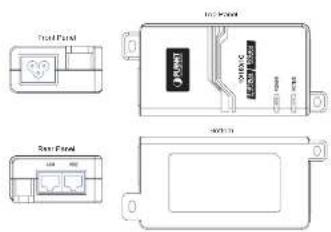
Figure 2: POE-165 Outlook
LED Indicators
| LED | Color | Function |
| POWER | Green | Lights to indicate that the 802.3at PoE+Injector has power. |
| ACTIVE | Green | Lights off to indicate the port is not providing 50-54V DC in-line power.Lights to indicate the port is providing 50-54V DC in-line power. |
-7-
2. Product Features
■ Interface
□ 2 RJ45 interfaces
1-port Data + Power output
1-port Data input
□ 1 AC 100-240V input power socket
■ Power over Ethernet
□ Power over Ethernet Mid-span PSE
□ IEEE 802.3at PoE Plus compliant
□ Backward compatible with IEEE 802.3af PD device
□ Supports PoE Power up to 30 watts for PoE+ port
☐ Auto-detects PoE IEEE 802.3at/802.3af equipment and devices for preventing damage from incorrect installation
□ Remote power feeding up to 100m
Hardware
□ Plastic case
☐ LED Indicators for Power LED and Active LED (PoE ready-in-use)
■ Standard Compliance
□ IEEE 802.3 10BASE-T
□ IEEE 802.3u 100BASE-TX
□ IEEE 802.3ab 1000BASE-T
☐ IEEE 802.3bz 2.5Gbps/5GbpsBASE-T (POE-165 only)
| LED Indicator | System: Power x 1 (Green) PoE Port: Active, PoE ready/ In Use x 1 (Green) | |
| Network Cable | 10BASE-T: 2-pair UTP Cat. 3, 4, 5, up to 100m (328ft)100BASE-TX: 2-pair UTP Cat. 3, 4, 5, up to 100m (328ft)100BASE-T: 2-pair UTP Cat. 5, 5c, 6 up to 100m (328ft)2.5Gbps/5GbpsBASE-T: 2-pair UTP Cat. 5c, 6, 7 up to 100m (328ft)*EIA/TIA- 568 100-ohm STP (100m) | |
| Data Rate | 10/100/1000Mbps | 10/100/1000Mbps/2.5Gbps/5Gbps |
| Dimensions(W x D x H) | 115 x 62.5 x 31 mm | |
| Weight 185g 204g | ||
| Unit Output Voltage DC 50-54V, 0.6A | ||
| Power Requirements 100-240V AC, 50/60Hz, 0.75A | ||
| Power Consumption 30 watts max. | ||
| Number of devices that can be powered | 1 | |
| Operating Temperature | 0 ~ 50 degrees C | |
| Storage Temperature | -10 ~ 70 degrees C | |
4. Product Outlook
Figures 1 & 2 show an overview of the 802.3at PoE+ injector

Figure 1: POE-163 Outlook
5. Hardware Installation
The following section describes the hardware features of the 802.3at PoE+ Injector. Before connecting any network device to the 802.3at PoE+ Injector, read this chapter carefully.
This POE-163 provides three different running speeds - 10Mbps/100Mbps/1000Mbps and the POE-165 provides five different running speeds - 10Mbps/100Mbps/1000Mbps/2.5Gbps/5Gbps in the same device for automatically distinguishing the speed of the incoming connection. Please refer to following sections for detailed information about the IEEE 802.3at Power over Ethernet plus Injector.
5-1 Before Installation
Before your installation, it is recommended to check your network environment. If there is any IEEE 802.3at devices that need higher power to power on and work normally, the 802.3at PoE+ Injector can provide you with power for this Ethernet device easily. The 802.3at PoE+ Injector is equipped with an AC power cord with 100-240V AC input and injects DC 50-54V power into the pin of the twisted-pair cable (pair 4, 5 [+] and pair 7, 8 [-]).
If a power socket for the AC-DC adapter of your non IEEE 802.3at networked device is not available, the 802.3at PoE+ Injector and POE-162S can provide you with DC power for this Ethernet device easily.
-2-
-4-
-6-
-8-

The 802.3at PoE+ Injector and POE-162S can be installed in pair. However, the use of third-party device is allowed if the device complies with IEEE 802.3at Power over Ethernet.
The 802.3at PoE+ Injector Installation
- Connect the AC power cord to the "AC slot" of the 802.3at PoE+ Injector; the "POWER" LED will be steadily on.
- Connect a standard network cable from a switch/workstation to the "LAN" port of the 802.3at PoE-Injector.
- And connect the Injector to a remote device like a PoE PTZ IP camera over the UTP cable.
** The 802.3at PoF+ Injector can directly connect with any IEEE 802.3at/802.3af end-nodes, such as PTZ IP and speed dome cameras, color touch-screen Voice over IP (VoIP) telephones, multi-channel wireless LAN access points, etc. The installation is shown in Figure 3 below.
![graph LR A["Device 1"] --> B["Data Processing Unit"] B --> C["Storage Unit"] C --> D["Data Transfer Unit"] D --> E["Output"] style A fill:#f9f,stroke:#333 style B fill:#ccf,stroke:#333 style C fill:#cfc,stroke:#333 style D fill:#fcc,stroke:#333 style E fill:#ffc,stroke:#333](/content/2026/05/1087071/images/32e0bf81fd6c8ccc17fb6b0a95f600b09cc80e3b87d0417de42a3e8098271f0c.jpg)
Figure 3: Connection to IEEE 802.3a/602.3af Devices
-9-
When the 802.3at PoE+ Injector detects the existence of an IEEE 802.3at/802.3af device, the ACTIVE LED indicator will be steadily on to show it is providing power.

- Since the 802.3at PoE+ Injector PoE port supports 50-54V DC PoE power output, please check and assure the powered device's (PD) acceptable DC power range is 50-54V DC. Otherwise, it will damage the PD.
- If the connected device is not fully complying with IEEE 802.3at/802.3af Power over Ethernet or in-line power device, the LED indicator of the 802.3at PoE+ Injector will not be steadily on.
The 802.3at PoE+ Injector and POE-162S, the IEEE 802.3at Injector Splitter Installation
- Connect the AC power cord to "AC slot" of the 802.3at PoE+ Injector; the "POWER" LED will be steadily on.
- Connect a standard network cable from the "POE" port of the 802.3at PoE+ Injector to the "PoE In" port of the POE-162S. The "ACTIVE" LED of the 802.3at PoE+ Injector and PoE-in-use LED of the POE-162S will continue to be lit.
- Connect a standard network cable from a switch/workstation to the "LAN" port of the 802.3at PoE+Injector.
• 10
- Connect the UTP cable in the package from the "Ethernet" port of the POE-162S to the RJ45 port of a remote device.
- Adjust the proper DC power output and connect the DC plug from the "DC OUT" of the POE-162S to a remote device.
- Power on the remote device and its power LED indicator will remain on.
![graph LR A["Input"] --> B["PCI2-16.0/16.0 micro"] B --> C["PCI2-16.0/16.0 5.0 micro"] C --> D["PCI2-16.0/16.0 5.0 micro"] D --> E["PCI2-16.0/16.0 5.0 micro"] E --> F["PCI2-16.0/16.0 5.0 micro"] F --> G["PCI2-16.0/16.0 5.0 micro"] G --> H["PCI2-16.0/16.0 5.0 micro"] H --> I["PCI2-16.0/16.0 5.0 micro"…](/content/2026/05/1087071/images/32da23055485a738426b2c038c2f4b9b4a643360eb371f5618aa8c8b79838c6c.jpg)
Figure 4: Connection architecture over 802.3at PoE+ Injection/POE-1625

- Owing to IEEE 802.3at/802.3af Power over Ethernet standards, the 802.3at PoE+ Injector will not inject power over the cable if not connected to IEEE 802.3at/802.3af devices.
- Please ensure the POE-162S output voltage is correct before applying power to remote devices.
-11-
The 802.3at PoE+ Injector and POE-E201 IEEE 802.3at PoE+ Extender Installation
- Connect the AC power cord to the "AC slot" of the 802.3st PoE+ Injector; the "POWER" LED will be steadily on.
- Connect a standard network cable from the "POE" port of the 802.3at PoE+ Injector to the "IN" port of the POE-E201.
- The 802.3at PoE+ Injector delivers both Ethernet Data and PoE power over UTP cable to the POE-E201 and the "ACTIVE" LED of the 802.3at PoE+ Injector and the "PoE IN" LED of the POE-E201 will continue to be lit.
- Connect an additional standard network cable that will be used to connect from the "OUT" port of the POE-E201 to a remote Powered Device (PD).
- The "OUT" port of the power injector transmits DC voltage over the standard network cable and transfers data and power simultaneously between the 802.3at PoE+ Injector and the PD.
- Once the POE-E201 detects the existence of an IEEE 802.3at/802.3af device, the "PoE OUT" LED indicator will be steadily on to show it is providing power.

Figure 5: Connection architecture over 802.3at PoE+ InjectionPOE-E201
-12--13-

PLANET
PLANET Networking & Communications
User 1 Manual
www.PLANET.com.tw
IEEE 802.3at Power over Ethernet Plus Injector
POE-163/POE-165

PLANET Technology Corp.
11F, No. 96, Mingyan Rd., Xiedian Dist.
New Taipei City 231, Taiwan
2351-6F2410-103

CE


- If the connected device is not fully complying with IEEE 802.3at/802.3at standards or in-line power device, the PoE OUT LED indicator of the POE-E201 will not be steadily on.
- Owing to IEEE 802.3at/802.3af standards, the POE-E201 will not inject power over the cable if a standard IEEE 802.3at/802.3af device is not connected.
Customer Support
Thank you for purchasing PLANET products. You can browse our online FAQ resource at the PLANET Web site first to check if it could solve you issue. If you need more support information, please contact PLANET support team.
PLANET online FAQs:
http://www.planet.com.tw/en/support/faq.php?type=2
Support team mail address:
support@planet.com.tw
Copyright © PLANET Technology Corp. 2021.
Contents are subject to revision without prior notice.
PLANET is a registered trademark of PLANET Technology Corp. All other trademarks belong to their respective owners.

Brand : Planet
Model : POE-165
Category : PoE Injector