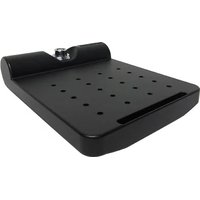
7160-0857 - Keyboard Gamber-Johnson - Free user manual and instructions
Find the device manual for free 7160-0857 Gamber-Johnson in PDF.


| Product Type | Rugged Keyboard |
| Brand | Gamber-Johnson |
| Model | 7160-0857 |
| Dimensions (W x D x H) | 17.5 x 6.5 x 1.2 inches |
| Weight | 2.2 lbs (1 kg) |
| Power Supply | USB bus-powered |
| Interface | USB Type-A |
| Key Type | Membrane, spill-resistant |
| Number of Keys | 104 (standard US layout) |
| Backlight | Optional (not included) |
| Operating Temperature | -20°C to 60°C (-4°F to 140°F) |
| Protection Rating | IP54 (dust and splash resistant) |
| Mounting | Compatible with Gamber-Johnson vehicle mounts |
| Cable Length | 6 ft (1.8 m) coiled |
| Primary Functions | Data entry, cursor control, shortcut keys |
| Maintenance & Cleaning | Wipe with soft, damp cloth; mild detergent if needed |
| Safety | Not applicable (low-voltage device) |
| Spare Parts & Repairability | Contact Gamber-Johnson for replacement cable or keycap sets |
| General Information | Suitable for fleet, public safety, and industrial applications |
Frequently Asked Questions - 7160-0857 Gamber-Johnson
User questions about 7160-0857 Gamber-Johnson
0 question about this device. Answer the ones you know or ask your own.
Ask a new question about this device
Download the instructions for your Keyboard in PDF format for free! Find your manual 7160-0857 - Gamber-Johnson and take your electronic device back in hand. On this page are published all the documents necessary for the use of your device. 7160-0857 by Gamber-Johnson.
USER MANUAL 7160-0857 Gamber-Johnson
INSTALLATION INSTRUCTIONS
Product Revision Form
7160-0857
LOW PROFILE QUICK RELEASE KEYBOARD TRAY
Rev.B
INST-727
Printing Spec: PS-001
The 7160-0857 keyboard tray is a keyboard mount that can be used to hold just about any size keyboard. The keyboard tray consists of the VESA75 hole pattern. Attach most keyboards by utilizing the AMPS hole patterns and the provided flat head screws. Strips of adhesive backed Dual Lock are provided in the hardware bag for customers that choose to use the keyboard tray with a keyboard that does not have the AMPS pattern.
Tools Needed
Phillips head screw driver 1/2 inch wrench

To remove the top quick release plate - press and hold the latch button while lifting slightly and sliding in the shown direction.
Mounting the Quick Release Keyboard Tray
Attach the bottom plate of the quick release keyboard tray to a Gamber-Johnson Clevis (Figure 1), using a 1/2 inch wrench and the 1/4" lock washers, and 1/4-20 x .50 hex head screws provided in the hardware bag 7120-0734.
Attach the keyboard to the tray using (4) #8-32 x .50 phillips flat head screws or dual lock adhesive strips.
FIGURE 1: CLEVIS MOUNT

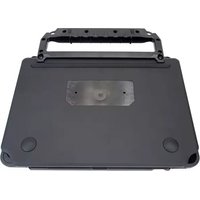

Brand : Gamber-Johnson
Model : 7160-0857
Category : Keyboard