
433-29917 - Wall clock LA CROSSE TECHNOLOGY - Free user manual and instructions
Find the device manual for free 433-29917 LA CROSSE TECHNOLOGY in PDF.


| Product Type | Analog Wall Clock with Atomic Time, Thermometer, Hygrometer |
| Model | 433-29917 |
| Dimensions | 21 inches diameter, 2.75 inches depth (53.34 cm x 6.98 cm) |
| Weight | Approx. 2.5 lbs (with batteries) |
| Power Source | 1 AA alkaline battery (required, movement); optional 2 extra AA for extended battery life (batteries not included) |
| Battery Life | 12 months with 1 battery, up to 60 months with 3 batteries |
| Time Accuracy | Atomic time signal (WWVB) from Fort Collins, CO; auto-sync or manual set |
| Time Zones | Selectable (Pacific, Mountain, Central, Eastern) via Time Zone Buttons |
| Daylight Saving Time | Default ON; can be disabled via DST button |
| Temperature Measurement Range | -40°F to 140°F (-40°C to 60°C) |
| Humidity Measurement Range | 0% to 100% RH |
| Lens Material | Glass |
| Hands Material | Metal |
| Warranty | 1-year limited warranty (manufacturing defects) |
| Care & Maintenance | Use same type/grade batteries; replace all batteries at once; clean contacts; remove during non-use; dispose of used batteries properly |
| Safety Warnings | Contains chemicals known to cause cancer/reproductive harm (California Prop 65); avoid battery leakage |
| Country of Origin | Made in China |
| Additional Features | Thermometer and hygrometer pre-calibrated; manual sensor adjust; atomic time override; optional extra battery compartments |
Frequently Asked Questions - 433-29917 LA CROSSE TECHNOLOGY
User questions about 433-29917 LA CROSSE TECHNOLOGY
0 question about this device. Answer the ones you know or ask your own.
Ask a new question about this device
Download the instructions for your Wall clock in PDF format for free! Find your manual 433-29917 - LA CROSSE TECHNOLOGY and take your electronic device back in hand. On this page are published all the documents necessary for the use of your device. 433-29917 by LA CROSSE TECHNOLOGY.
USER MANUAL 433-29917 LA CROSSE TECHNOLOGY
La Crosse Technology, Ltd. provides a 1-year limited time warranty (from date of purchase) on this product, relating to manufacturing defects in materials and workmanship.
For Full Warranty Details, Visit: www.lacrossetechnology.com/pages/warranty Patents: www.lacrossetechnology.com/pages/patents
La Crosse Technology, Ltd · 2830 S. 26 ^th Street · La Crosse, WI 54601
CARE & MAINTENANCE
When batteries of different brand or type are used together, or new and old batteries are used together, some batteries may be over-discharged due to a difference of voltage or capacity. This can result in venting, leakage, and rupture and may cause personal injury.
• Always purchase the correct size and grade of battery most suitable for intended use.
- Always replace the whole set of batteries at one time, taking care not to mix old and new ones, or batteries of different types.
- Clean the battery contacts and also those of the device prior to battery installation.
- Ensure the batteries are installed correctly with regard to polarity (+ and -).
- Remove batteries from product during periods of non-use. Battery leakage can cause corrosion and damage to this product.
- Remove used batteries promptly.
- For recycling and disposal of batteries, and to protect the environment, please check the internet or your local phone directory for local recycling centers and/or follow local government regulations.
STAY IN TOUCH!
Ask questions, watch set up videos, and provide feedback on our social media outlets. Follow La Crosse Technology on Youtube, Facebook, Instagram, and X (Twitter).


WARNING: This product can expose you to chemicals including acrylonitrile, 1, 3-butadiene, and styrene, which are known to the State of California to cause cancer and birth defects or other reproductive harm. For more information go to: www.P65Warnings.ca.gov
Made in China - Printed in China Page 14
LA CROSSE® TECHNOLOGY
21" INDOOR | OUTDOOR ATOMIC WALL CLOCK

natural_image
Close-up of a wall clock with analog numerals and a decorative border (no readable text or symbols beyond labels)Model: 433-29917 DC: 111523
POWER UP
- Remove the round Battery Cover and insert 1 AA battery into the Center Battery Compartment. Optional: Insert batteries into the Extra Battery Compartments. IMPORTANT: Be sure all batteries are of the same voltage level.
- The hands will move to the 4, 8, or 12 o'clock position and stay there while it searches for the WWVB Atomic Time Signal. Allow up to 5 nights for the clock to receive this transmission.
- For the best reception, place the clock on an exterior wall near a window with the front or back of it facing Fort Collins, CO.
- Once the Atomic Time Signal is received, the clock will set to Pacific Time. Firmly press and hold your correct Time Zone Button until the hands begin to spin. The time will then set correctly.
- If you live in an area that does not follow Daylight Saving Time, while the hands are spinning to the correct time, press the Daylight Saving Time Button once to turn the DST setting to OFF.
Watch the setup video: bit.ly/wallclock_setup
Note: In certain areas, this clock may not be able to receive the WWVB reception due to signal strength or interference. In this case, your clock can be set manually until the Atomic Time Signal can be received.
MANUALLY SET TIME
- Remove all batteries from the clock.
- Press the Manual Set Tab at least 20 times and wait 15 minutes.
- Insert at least one battery into the Center Battery Compartment.
- Allow the hands to spin around and stop in either the 4, 8, or 12 o'clock position.
- Hold the Manual Set Tab until your correct time is achieved.
Note: The Atomic Time Signal will override your manual setting if the transmission is received in the future.
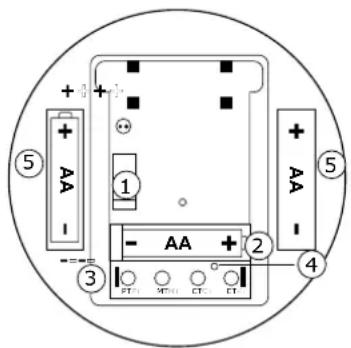
① Manual Set Tab
② Center Battery Compartment
③ Time Zone Buttons
④ Daylight Saving Time Button (Default is DST ON)
⑤ Optional: Extra Battery Compartments
Thermometer/Hygrometer
- Your thermometer and hygrometer have been pre-calibrated and should not need adjustment.
- Before manually adjusting your sensors, allow the clock to sit at room temperature for 2 hours.
- To manually adjust your sensors, gently turn the temperature or humidity sensor adjustment on the back of the clock until desired setting is reached.
SPECIFICATIONS
Battery Requirements: 1 AA (IEC LR6) Alkaline, required in movement Optional: 2 AA (IEC LR6) Alkaline, for added battery life Batteries not included.
Battery Life: 1 Battery - 12 months, 3 Batteries - 60 months
Temperature Range: -40°F to 140°F (-40°C to 60°C)
Humidity Range: 0% to 100% RH
Dimensions: 21 in x 2.75 in (53.34 cm x 6.98 cm)
Lens: Glass Hands: Metal
Brand : LA CROSSE TECHNOLOGY
Model : 433-29917
Category : Wall clock