
MW1000PD - Kitchen Appliances GALAXY - Free user manual and instructions
Find the device manual for free MW1000PD GALAXY in PDF.


| Type | Microwave Oven |
| Model Number | MW1000PD / 177MW1000PD |
| Power Output | 1000 Watts |
| Control Type | Dial (Mechanical Timer) |
| Maximum Cooking Time | 6 minutes per setting |
| Interior Light | Yes (dim at low power) |
| Safety Features | Grounding plug, door interlock, automatic shutoff |
| Cleaning | Mild detergent, soft sponge; avoid ammonia or citrus cleaners |
| Usage | Indoor, non-commercial (office/light duty) |
| Warranty | 90 days limited (non-transferable) |
| Certifications | Not certified for commercial use |
Frequently Asked Questions - MW1000PD GALAXY
User questions about MW1000PD GALAXY
0 question about this device. Answer the ones you know or ask your own.
Ask a new question about this device
Download the instructions for your Kitchen Appliances in PDF format for free! Find your manual MW1000PD - GALAXY and take your electronic device back in hand. On this page are published all the documents necessary for the use of your device. MW1000PD by GALAXY.
USER MANUAL MW1000PD GALAXY
1000W Microwave

Model: 177MW1000PD
07/2019
Please read and keep these instructions. Indoor use only.
IMPORTANT SAFETY INSTRUCTIONS

When using electrical equipment, basic safety precautions should be followed to reduce the risk of burns, electrical shock, fire, or injury to persons.
READ ALL OF THE INSTRUCTIONS BEFORE USING THIS EQUIPMENT.
- This equipment MUST BE GROUNDED. Connect only to properly GROUNDED outlet. See "GROUNDING INSTRUCTIONS" on page 3 for further details.
- Use this equipment ONLY for its intended use as described in this manual. This type of microwave is specifically designed to heat, cook or dry food. It is not designed for industrial, laboratory or commercial food service use.
- DO NOT heat items able to explode in this microwave, such as: eggs, sealed containers, glass jars, etc.
- DO NOT operate this equipment if the cord, plug and/or door is damaged, if is not working properly or if it has been damaged or dropped.
- This equipment, including power cord, must be serviced ONLY by qualified service personnel. Contact the nearest authorized service facility for examination, repair, or adjustment.
- DO NOT cover or block filter or other openings on equipment.
- DO NOT store this equipment outdoors.
-
DO NOT use this product near water or immerse the cord and/or plug in water.
-
Keep cord AWAY from HEATED surfaces.
-
DO NOT let cord hang over edge of table or counter.
-
DO NOT overcook food as to avoid fire in microwave cavity.
-
If materials inside the microwave ignite, keep microwave door CLOSED, turn microwave off and disconnect the power cord, or shut off power at the fuse or circuit breaker panel.
-
DO NOT use the cavity for storage.
-
Do not overheat liquids.
-
After heating, allow the container to stand in the microwave oven for a short time before removing the container.
-
DO NOT operate equipment without load or food in oven cavity.
-
DO NOT use metal utensils in microwave.
-
NEVER use paper, plastic, or combustible materials that are not intended for cooking.
-
Clean microwave regularly and remove any food deposits.
-
Not certified for commercial food service use.
-
This product is intended for office/light duty non-commercial food service use. Excessive use can shorten the lifespan of electrical parts.
SAVE THESE INSTRUCTIONS

TO AVOID RISK OF ELECTRICAL SHOCK OR DEATH, THIS MICROWAVE MUST BE EARTHED. TO AVOID RISK OF ELECTRICAL SHOCK OR DEATH, DO NOT ALTER THE PLUG.
- Inspect microwave for any damage such as cracks or dents in door or inside microwave cavity.
- Remove all materials from microwave interior.
- Remove all plastic wrap and packaging material before use.
- Do not install microwave next to or above source of heat, such as an oven or radiator. This could cause the microwave oven to operate improperly and could shorten life of electrical parts.
• Install microwave on a level countertop surface. - Outlet should be located so that the plug is accessible when microwave is in place.
GROUNDING INSTRUCTIONS
Microwave MUST be grounded. Grounding reduces risk of electric shock by providing an escape wire for the electric current, if an electrical short occurs. This microwave is equipped with a cord having a ground wire with a grounding plug. The plug must be plugged into an outlet that is properly installed and grounded. Do not use an extension cord.
User Manual
Galaxy equipment
DIAL OPERATION
INSTRUCTIONS:
- Open microwave door, place food in microwave, and close microwave door.
- Turn time entry knob clockwise to desired time.
- Cooking time can be set up to 6 minutes.
- Microwave begins operation and time counts down.
- When cooking time has elapsed, microwave energy stops and microwave signal sounds.
INTERRUPTING OPERATION:
Open microwave door to interrupt operation or turn time entry knob counterclockwise to "0".
When cooking is interrupted by opening door, microwave automatically resets to zero time.
To resume microwave oven operation, close door and re-enter desired time by turning knob clockwise.
CHANGING TIME AND CANCELING MISTAKES:
Heating time can be changed at any time while the microwave is operating. Turn knob to desired new setting. To set cooking time to zero, turn knob counterclockwise to "0". Setting the time to zero cancels the set cooking time and turns the microwave off.

CARE AND CLEANING

TO AVOID ELECTRICAL SHOCK WHICH CAN CAUSE SEVERE PERSONAL INJURY OR DEATH, UNPLUG POWER CORD OR OPEN CIRCUIT BREAKER TO MICROWAVE BEFORE CLEANING OR REMOVING LIGHT BULB.
- Cleaning the interior and exterior will require a mild detergent, water and a soft sponge or cloth.
- Do not use cleaners that include ammonia or citrus.
- Do not use water pressure cleaning systems on your microwave.
- Inspect air vents monthly and clean using a damp cloth.
TROUBLESHOOTING
| COMPLAINT POSSIBLE CAUSE REMEDY | ||
| Dim microwave light Cooking at low | power level This is normal | |
| Steam forms on microwave door W | When cooking foods in a microwave steam is generated. | This is normal |
| Hot air expelled from vents Foods | cooking in a microwave may release heat | This is normal |
| Microwave does not start | Power cord not plugged in correctlyFuse blown or circuit breaker openMalfunctioning outletDoor not closed | Plug cord into outlet correctlyReplace fuse (should be repaired by authorized servicer) or reset breakerTest outlet with other electrical applianceClose door |
Equipment Limited Warranty
Galaxy warrants its equipment to be free from defects in material and workmanship for a period of 90 days. This is the sole and exclusive warranty made by Galaxy covering your Galaxy brand equipment. A claim under this warranty must be made within 90 days from the date of purchase of the equipment. Only the equipment's original purchaser may make a claim under this warranty. Galaxy reserves the right to approve or deny the repair or replacement of any part or repair request. The warranty is not transferable. Galaxy Equipment installed in/on a food truck or trailer will be limited to a period of 30 days from the original date of purchase.
To Make a Warranty Claim:
For Warranty Inquiries contact the location where you purchased the product:
- WebstaurantStore.com: Contact help@webstaurantstore.com. Please have your order number ready.
• The Restaurant Store: If you purchased this unit from your local store, please contact your store directly.
• TheRestaurantStore.com: Online purchases, call 717-392-7261. Please have your order number ready.
Failure to contact the designated location prior to obtaining equipment service may void your warranty.
EQUIPMENT IS NOT AUTHORIZED FOR USE IN A COMMERCIAL APPLICATIONS.
Galaxy makes no other warranties, express or implied, statutory or otherwise, and HEREBY DISCLAIMS ALL IMPLIED WARRANTIES, INCLUDING THE IMPLIED WARRANTIES OF MERCHANTABILITY AND OF FITNESS FOR A PARTICULAR PURPOSE.
This Limited Warranty does not cover:
• Equipment sold or used outside the Continental United States
- Use of unfiltered water (if applicable)
• Galaxy has the sole discretion on wearable parts not covered under warranty
• Equipment not purchased directly from an authorized dealer
• Equipment that has been altered, modified, or repaired by anyone other than an authorized service agency
- Equipment where the serial number plate has been removed or altered.
- Damage or failure due to improper installation, improper utility connection or supply, and issues resulting from improper ventilation or airflow.
• Defects and damage due to improper maintenance, wear and tear, misuse, abuse, vandalism, or Act of God.
Any action for breach of this warranty must be commenced within 90 days of the date on which the breach occurred.
No modification of this warranty, or waiver of its terms, shall be effective unless approved in a writing signed by the parties.
The laws of the Commonwealth of Pennsylvania shall govern this warranty and the parties' rights and duties under it.
Galaxy shall not under any circumstances be liable for incidental or consequential damages of any kind, including but no limited to loss of profits.
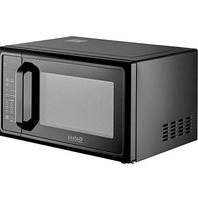
- 1000W Microwave
- IMPORTANT SAFETY INSTRUCTIONS
- SAVE THESE INSTRUCTIONS
- GROUNDING INSTRUCTIONS
- User Manual
- Galaxy equipment
- DIAL OPERATION
- INSTRUCTIONS:
- INTERRUPTING OPERATION:
- CHANGING TIME AND CANCELING MISTAKES:
- CARE AND CLEANING
- TROUBLESHOOTING
- Equipment Limited Warranty
- To Make a Warranty Claim:
- EQUIPMENT IS NOT AUTHORIZED FOR USE IN A COMMERCIAL APPLICATIONS.
- This Limited Warranty does not cover:
Brand : GALAXY
Model : MW1000PD
Category : Kitchen Appliances