
AT-PS-POE - Wi-Fi repeater Atlona - Free user manual and instructions
Find the device manual for free AT-PS-POE Atlona in PDF.


| Product Type | Wi-Fi Repeater / Extender with PoE |
| Brand | Atlona |
| Model | AT-PS-POE |
| Dimensions (W x D x H) | 100 mm x 60 mm x 30 mm |
| Weight | 150 g |
| Power Supply | Power over Ethernet (PoE) 802.3af compliant |
| Wireless Standards | IEEE 802.11 b/g/n/ac (2.4 GHz / 5 GHz) |
| Maximum Data Rate | Up to 1200 Mbps (depending on environment) |
| Frequency Band | Dual-band: 2.4 GHz and 5 GHz |
| Functions | Extends Wi-Fi coverage, supports AP mode and repeater mode |
| Interfaces | 1 x RJ45 PoE port, 1 x Reset button |
| Security | WPA/WPA2 encryption, SSID broadcast control |
| Operating Temperature | 0°C to 40°C |
| Storage Temperature | -20°C to 60°C |
| Humidity | 10% to 90% non-condensing |
| Maintenance | Clean with a soft, dry cloth. Do not use harsh chemicals. |
| Safety | Keep away from water and extreme heat. Indoor use only. |
| Spare Parts | No user-serviceable parts. Contact support for repairs. |
| Certifications | CE, FCC, RoHS |
Frequently Asked Questions - AT-PS-POE Atlona
User questions about AT-PS-POE Atlona
0 question about this device. Answer the ones you know or ask your own.
Ask a new question about this device
Download the instructions for your Wi-Fi repeater in PDF format for free! Find your manual AT-PS-POE - Atlona and take your electronic device back in hand. On this page are published all the documents necessary for the use of your device. AT-PS-POE by Atlona.
USER MANUAL AT-PS-POE Atlona
Mid-Span Power Supply

Version Information
| Version Release Date Notes | |
| 2 Jun 2024 New color format |
Sales, Marketing, and Customer Support
Main Office
Atlona Incorporated
70 Daggett Drive
San Jose, CA 95134
United States
Office: +1.408.962.0515
Sales and Customer Service Hours
Monday - Friday: 6:00 a.m. - 4:30 p.m. (PST)
https://atlona.com/
International Headquarters
Atlona International AG
Tödistrasse 18
8002 Zürich
Switzerland
Office: +41.43.508.4321
Sales and Customer Service Hours
Monday - Friday: 09:00 - 17:00 (UTC +1)
Operating Notes

IMPORTANT: Visit https://atlona.com/product/at-ps-poe/ for the latest firmware updates and User Manual.
Warranty

To view the product warranty, use the following link or QR code:
https://atlona.com/warranty/
Safety and Certification
CAUTION
RISK OF ELECTRIC SHOCK
DO NOT OPEN
CAUTION: TO REDUCT THE RISK OF
ELECTRIC SHOCK
DO NOT OPEN ENCLOSURE OR EXPOSE
TO RAIN OR MOISTURE
NO USER-SERVICEABLE PARTS
INSIDE REFER SERVICING TO
QUALIFIED SERVICE PERSONNEL.

The exclamation point within an equilateral triangle is intended to alert the user to the presence of important operating and maintenance instructions in the literature accompanying the product.

The information bubble is intended to alert the user to helpful or optional operational instructions in the literature accompanying the product.
- Read these instructions.
- Keep these instructions.
- Heed all warnings.
- Follow all instructions.
- Do not use this product near water.
- Clean only with a dry cloth.
- Do not block any ventilation openings. Install in accordance with the manufacturer's instructions.
-
Do not install or place this product near any heat sources such as radiators, heat registers, stoves, or other apparatus (including amplifiers) that produce heat.
-
Do not defeat the safety purpose of a polarized or grounding-type plug. A polarized plug has two blades with one wider than the other. A grounding type plug has two blades and a third grounding prong. The wide blade or the third prong are provided for your safety. If the provided plug does not fit into your outlet, consult an electrician for replacement of the obsolete outlet.
- Protect the power cord from being walked on or pinched particularly at plugs, convenience receptacles, and the point where they exit from the product.
- Only use attachments/accessories specified by Atlona.
- To reduce the risk of electric shock and/or damage to this product, never handle or touch this unit or power cord if your hands are wet or damp. Do not expose this product to rain or moisture.
- Unplug this product during lightning storms or when unused for long periods of time.
- Refer all servicing to qualified service personnel. Servicing is required when the product has been damaged in any way, such as power-supply cord or plug is damaged, liquid has been spilled or objects have fallen into the product, the product has been exposed to rain or moisture, does not operate normally, or has been dropped.


FCC Compliance
FCC Compliance and Advisory Statement: This hardware device complies with Part 15 of the FCC rules. Operation is subject to the following two conditions: 1) this device may not cause harmful interference, and 2) this device must accept any interference received including interference that may cause undesired operation. This equipment has been tested and found to comply with the limits for a Class A digital device, pursuant to Part 15 of the FCC Rules. These limits are designed to provide reasonable protection against harmful interference in a commercial installation. This equipment generates, uses, and can radiate radio frequency energy and, if not installed or used in accordance with the instructions, may cause harmful interference to radio communications. However there is no guarantee that interference will not occur in a particular installation. If this equipment does cause harmful interference to radio or television reception, which can be determined by turning the equipment off and on, the user is encouraged to try to correct the interference by one or more of the following measures: 1) reorient or relocate the receiving antenna; 2) increase the separation between the equipment and the receiver; 3) connect the equipment to an outlet on a circuit different from that to which the receiver is connected; 4) consult the dealer or an experienced radio/TV technician for help. Any changes or modifications not expressly approved by the party responsible for compliance could void the user's authority to operate the equipment. Where shielded interface cables have been provided with the product or specified additional components or accessories elsewhere defined to be used with the installation of the product, they must be used in order to ensure compliance with FCC regulations.
Copyright, Trademark, and Registration
© 2024 Atlona Inc. All rights reserved. "Atlona" and the Atlona logo are registered trademarks of Atlona Inc. Pricing, specifications and availability subject to change without notice. Actual products, product images, and online product images may vary from images shown here.
All other trademark(s), copyright(s), and registered technologies mentioned in this document are the properties of their respective owner(s).
Table of Contents
Introduction 8
Features 8
Package Contents 8
Panel Description 9
Front Panel 9
Rear Panel 10
Installation 11
External Power Supply 11
Connection Instructions 12
Connection Diagram 13
Appendix 14
Specifications 14
Introduction
The Atlona AT-PS-POE is a 48 VDC mid-span power injector designed to send remote power to HDBaseT products that operate on IEEE 802.03af Power over Ethernet. When placed within an HDBaseT transmission line, it allows two PoE-powered products to work together. The power supply features two power switches to selectively send power up- or down-stream. The PS-POE is housed in a compact enclosure and can be conveniently placed anywhere between the transmitter and receiver to provide power for PoE-powered devices.
Power Source Equipment (PSE) devices have an internal power supply or plug into external power supply and provide power to the HDBaseT cable. Powered Devices (PD) receive their power from the HDBaseT cable.
The PS-POE can be used with Atlona HDVS-200 and UHD-EX Series HDBaseT endpoint devices requiring remote PoE powering, especially when used with HDBaseT-equipped products that do not provide PoE, including displays, switchers, or third-party endpoints.
Features
• Power supply for remote powering for powered devices on HDBaseT transmission lines
• Mid-span power supply
• Power switches for incoming and outgoing line
• Supports 4K/UHD signals
- Upgrade for PoCc systems
- Low-profile, discreet enclosure
- Award-winning 10 year limited product warranty
Package Contents
1 x AT-PS-POE
1 x 48 V / 0.83 A DC power supply
1 x 2-pin captive screw connector
1 x AC power cord
1 x User manual
Panel Description
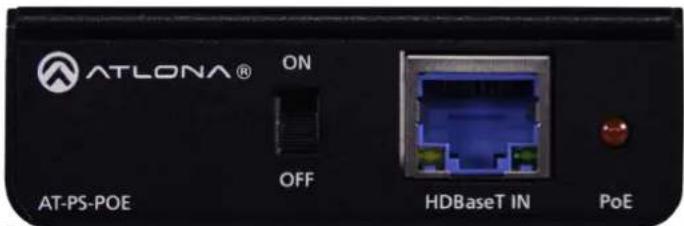
Front Panel

1 ON/OFF
Toggles power transmission to the transmitter on and off. When set to the ON position, power will be supplied to the transmitter over the HDBaseT IN port.

IMPORTANT: If the transmitter has power, then this switch must be set to the OFF position.
2 HDBaseT IN
Connect a category cable (CAT-5e or better) from this port to the transmitter.
3 PoE
This LED indicator is red when the ON/OFF switch is set to the ON position. In this state, power will be supplied to the transmitter over the HDBaseT IN port.
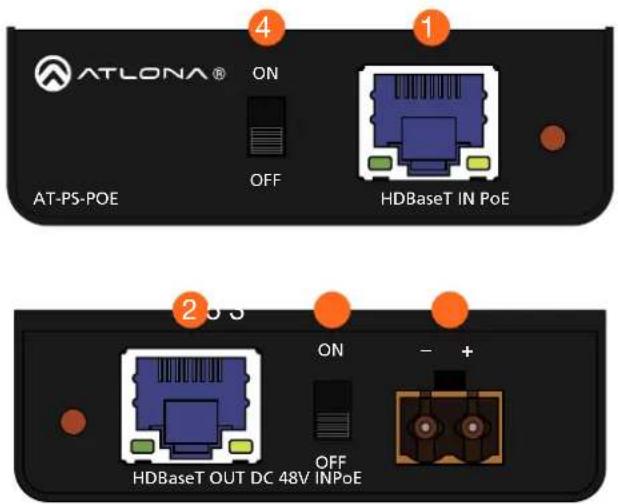
Rear Panel

1 PoE
This LED indicator is red when the ON/OFF switch is set to the ON position. In this state, power will be supplied to the transmitter over the HDBaseT IN port.
2 HDBaseT OUT
Connect a category cable (CAT-5e or better) from this port to the receiver.
3 ON/OFF
Toggles power transmission to the receiver on and off. When set to the ON position, power will be supplied to the receiver over the HDBaseT OUT port.

IMPORTANT: If the receiver has power, then this switch must be set to the OFF position.
4 DC 48V IN
Connect the included 2-pin captive screw connector to this port. Refer to External Power Supply (page 9) for more information.
Installation
External Power Supply
The AT-PS-POE is powered by the included 48 V / 0.83 A DC power supply. Insert the positive and negative leads, from the power supply, into the terminals of the 2-pin captive screw connector block, as shown. The orange 2-pin captive screw connector block is included.


Connection Instructions
- Connect a category cable (CAT-5e or better) from the HDBaseT IN port to the transmitter device.
- Connect a category cable (CAT-5e or better) from the HDBaseT OUT port to the receiver device.
- Connect the included 48 V / 0.83 A DC power supply to this port. Refer to External Power Supply (page 9) for more information.
- Set the transmitter ON/OFF switch to the proper position.

IMPORTANT: If the transmitter has power, then this switch must be set to the OFF position.
- Set the receiver ON/OFF switch to the proper position.

IMPORTANT: If the receiver has power, then this switch must be set to the OFF position.
- Connect the power supply to an available AC outlet.
Installation
Connection Diagram

flowchart
graph TD
    A["Laptop"] -->|HDMI| B["AT-HDVS-210H-TX-WP"]
    C["Laptop"] -->|HDMI| B
    B -->|HDBaseT| D["AT-PS-POE"]
    D -->|HDBaseT| E["Projector with HDBaseT"]
Appendix
Specifications
| Buttons and Indicators | |
| Switches:ON/OFF | 2 – Slide switch |
| Indicators:PoE | 1 – LED, red |
| Connectors | |
| HDBaseT IN 1 – RJ45 | |
| HDBaseT OUT 1 – RJ45 | |
| DC 48V IN 1 – Euroblock, 2-pin | |
| Environmental | Fahrenheit | Celsius |
| Operating Temperature | +32 to +122 | 0 to +50 |
| Storage Temperature | -4 to +140 | -20 to +60 |
| Operating Humidity (RH) | 20% to 90%, non-condensing | |
| Power | ||
| Consumption Max: 15.2 W | ||
| BTU/h 51.8 | ||
| External Power Supply (AT-PS-54-L) | Input: 100 - 240 V AC, 50/60 HzOutput: 48 V / 0.83 A DC | |
| Dimensions (H x W x D) Inches Millimeters | |
| Unit 0.96 x 2.89 x 2.77 24 x 73 x 70 | |
| Power Supply 1.42 x 1.81 x 4.41 36 x 46 x 112 |
| Weight Pounds Kilograms | ||
| Device 0.09 | 0.19 |
| Certification | ||
| Device CE, FCC | ||
| Power Supply CE, FCC, Level VI, RoHS, cULus, RCM, CCC | ||
| Compliance | |
| NDAA-889 | Yes |
| TAA | Yes |
| Warranty | |
| 3 years | View the full warranty information here:https://atlona.com/warranty |
- Mid-Span Power Supply
- Version Information
- Sales, Marketing, and Customer Support
- Operating Notes
- Warranty
- Safety and Certification
- CAUTION
- FCC Compliance
- Copyright, Trademark, and Registration
- Table of Contents
- Introduction
- Features
- Package Contents
- Panel Description
- ON/OFF
- HDBaseT IN
- PoE
- Rear Panel
- PoE
- HDBaseT OUT
- ON/OFF
- DC 48V IN
- Installation
- External Power Supply
- Connection Instructions
- Appendix
Brand : Atlona
Model : AT-PS-POE
Category : Wi-Fi repeater