
KFA837 - Fan Kambrook - Free user manual and instructions
Find the device manual for free KFA837 Kambrook in PDF.


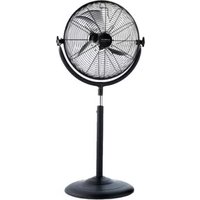
| Type of Product | Pedestal Fan |
| Brand | Kambrook |
| Model | KFA837 |
| Dimensions (Height x Head Diameter) | 130 cm x 40 cm |
| Weight | 5 kg |
| Power Supply | 220-240 V ~ 50 Hz |
| Power Consumption | 50 W |
| Fan Speeds | 3 speeds (Low, Medium, High) |
| Oscillation | Yes, 90° wide-angle |
| Tilt Adjustment | Yes, manually adjustable |
| Height Adjustment | Yes, adjustable pole |
| Remote Control | Yes, included |
| Noise Level | < 65 dB (max speed) |
| Blade Material | ABS plastic |
| Guard Material | Metal with anti-rust coating |
| Base Material | Heavy-duty plastic with non-slip pads |
| Cleaning Instructions | Wipe with a damp cloth; do not immerse in water |
| Safety Features | Overload protection, stable base, finger guard |
| Spare Parts Available | Replacement blades, guard, remote control |
| Repairability Index | 7/10 (user-serviceable parts) |
| Warranty | 12 months |
Frequently Asked Questions - KFA837 Kambrook
User questions about KFA837 Kambrook
0 question about this device. Answer the ones you know or ask your own.
Ask a new question about this device
Download the instructions for your Fan in PDF format for free! Find your manual KFA837 - Kambrook and take your electronic device back in hand. On this page are published all the documents necessary for the use of your device. KFA837 by Kambrook.
USER MANUAL KFA837 Kambrook
natural_image
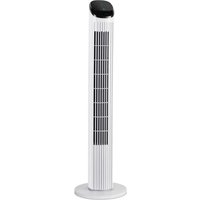
Exterior view of a modern KAMBROOK temperature tower with vertical cooling fins and digital display (no text or symbols on the tower itself)Suits all KFA837 modelsINSTR
Important
Please retain your instruction book for future use.
In the event that you need some assistance with your Kambrook appliance, please contact our Customer Service Department on 1300 139 798 (Australia) or 0800 2738 45 (New Zealand). Alternatively, visit us on our website at www.kambrook.com.au or www.kambrook.co.nz
Contents
Kambrook Recommends p4
Safety First
Your Kambrook Arctic p6
Remote Controlled Tower Fan
Quick Start Guide p7
Using Your Kambrook p9
Tower Fan
Care, Cleaning and Storage p14
IMPORTANT: Please retain your instruction book for future use.
At Kambrook, we believe that safe performance is the first priority in any consumer product, so that you, our valued customer can confidently use and trust our products. We ask that any electrical appliance that you use be operated in a sensible fashion with due care and attention placed on the following important operating instructions.
Important Safeguards For Your Kambrook Arctic Remote Controlled Tower Fan
- Carefully read all instructions before operating the tower fan for the first time and save for future reference.
- Remove and safely discard any packaging material and promotional labels before using the tower fan for the first time.
- To eliminate a choking hazard for young children remove and safely discard the protective cover fitted to the power plug of this fan.
- This tower fan is intended for household use only and not for commercial or industrial use.
- Switch off the tower fan and unplug at the power outlet, prior to assembling, cleaning and storing the tower fan.
- Avoid touching mobile parts of the fan.
- Do not place the tower fan near the edge of a bench or table during operation. Ensure that the surface is level, clean and free of water and other substances.
- Always ensure the tower fan is properly assembled before use. Follow the instructions provided in this book.
- Do not leave the tower fan unattended when in use.
-
Do not place anything on top of the tower fan when assembled, when in use and when stored.
-
Never insert fingers, pencils or any other objects through the guards whenever the power plug is connected, in particular while the tower fan is switched on.
- The tower fan must not be used if the base is not fastened correctly, according to the instructions.
- Do not operate in the presence of explosives and/or flammable fumes or liquids.
- Do not unplug the tower fan by pulling on the cord.
- Never carry the tower fan by the cord or yank to disconnect from an outlet; instead, grasp the cord and pull to disconnect.
- Do not pull the cord around sharp edges or corners.
- When unpacking the tower fan, check to see you have received all the items listed in the parts list, before discarding the packaging.
- To avoid electrical circuit overload, it is recommended that no other appliances are plugged into the same circuit as your fan, when it is in use.
- Keep the tower fan clean. Follow the cleaning instructions provided in this book.
Important Safeguards For All Electrical Appliances
- Fully unwind the power cord before use.
- Connect only to a 230V or 240V power outlet.
- Do not let the power cord hang over the edge of a bench or table, touch hot surfaces or become knotted.
- To protect against electric shock, do not immerse the power cord, power plug or appliance in water or any other liquid or allow moisture to come in contact with the part, unless it is recommended in the cleaning instructions.
- The appliance is not intended for use by persons (including children) with reduced physical, sensory or mental capabilities, or lack of experience and knowledge, unless they have been given supervision or instruction concerning use of the appliance by a person responsible for their safety.
- Children should be supervised to ensure that they do not play with the appliance.
- It is recommended to regularly inspect the appliance. To avoid a hazard, do not use the appliance if power cord, power plug or appliance becomes damaged in any way. Return the entire appliance to the nearest authorized Kambrook service centre for examination and / or repair.
- Any maintenance other than cleaning should be performed at an authorised Kambrook Service Centre.
- This appliance is for household use only. Do not use this appliance for anything other than its intended use. Do not use in moving vehicles or boats. Do not use outdoors.
Misuse may cause injury.
- The installation of a residual current device (safety switch) is recommended to provide additional safety protection when using electrical appliances. It is advisable that a safety switch with a rated residual operating current not exceeding 30mA be installed in the electrical circuit supplying the appliance. See your electrician for professional advice.
- Always turn the appliance to the OFF position, switch off at the power outlet and unplug at the power outlet when the appliance is not in use.
-
Before cleaning, always turn the appliance to the OFF position, switch off at the power outlet, unplug at the power outlet and remove the power cord, if detachable, from the appliance and allow all parts to cool.
-
Do not place this appliance on or near a heat source, such as a hot plate, oven or heaters.
- Position the appliance at a minimum distance of 20cm away from walls, curtains and other heat or steam sensitive materials and provide adequate space above and on all sides for air circulation.
Your Kambrook Arctic Remote Controlled Tower Fan
- LED screen
-
Control panel featuring:
-
POWER On/Off button
• Fan SPEED button (Includes 3 speed settings; low, medium and high)
• MODE button (includes 3 cooling modes; normal, nature and reduction mode)
• TIMER button (up to 12 hours) -
OSC button to set oscillation
-
Tower fan body
- Remote control signal receiver
- Oscillating platform
- 2 piece base stand (a) and (b)

natural_image
Two circular mechanical components labeled a and b, showing internal structure with mounting holes (no text or symbols beyond labels)
- Remote control with soft touch buttons
Not Shown
- Remote control storage (top and back)
- Carry handle (at rear of unit)
• 4 screws to secure the base to the unit

Model KFA837GRY
Quick Start Guide
Turning the tower fan on

Plug the power cord into a 230V or 240V power point and switch on.

Once the power outlet is switched on, this will automatically illuminate the LED screen to display to current room temperature. SEE NOTE
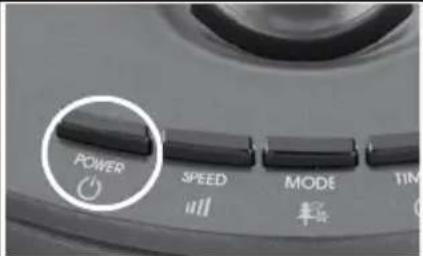
To start the tower fan, turn the tower fan on by pressing the 'POWER' button once; the unit will be in NORMAL fan mode, at LOW speed setting. SEE NOTE
Pressing the 'SPEED' button once will set the tower fan into MEDIUM speed setting. SEE NOTE

Pressing the 'SPEED' button twice will set the tower fan into HIGH speed setting. The speed indicator bar on the control panel will flash continuously on this cycle. SEE NOTE
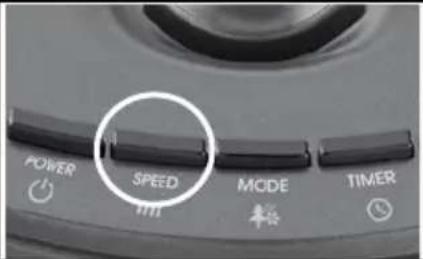
Pressing the 'SPEED' button three times will set the tower fan into LOW speed setting. The speed indicator bar on the control panel will flash continuously on this cycle. SEE NOTE
Setting the fan mode Setting the oscillation

Once the tower fan is switched on and the 'POWER' button is selected; the unit will be in NORMAL fan mode. Pressing the 'MODE' button once will set the tower fan into NATURE mode. SEE NOTE
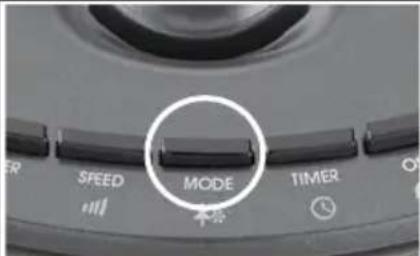
Pressing the 'MODE' button twice will set the tower fan into REDUCTION mode. To set the tower fan back to NORMAL mode, press the 'MODE' button again. SEE NOTE

Pressing the 'OSC' button will allow the tower fan to oscillate side to side. To stop the oscillation, press the 'OSC' button again. SEE NOTE
NOTE: When any of the 3 mode types are selected or the timer function is set, the LED display panel will automatically switch off after 30 seconds, only displaying the temperature dimly on the screen. Press any key to turn the display on again.
Using Your Kambrook Tower Fan
Before first use
Remove your tower fan from its carton and associated protective wrapping.
Unwind the cord to its full length and remove any protective cardboard or foam that may have been used to minimise transportation damage. Once assembled by following the directions below, place the tower fan on a firm, level surface in a stable upright position. Visually inspect the air inlet and outlets to ensure no foreign material is blocking these areas.

WARNING: When Unpacking the fan, check to see you have received all the items listed in the parts list, before discarding the packaging.
Assembling Your Kambrook Arctic Tower Fan
To assemble the base stand;
-
The tower fan base stand comes in two separate pieces that are to connect with one another.
-
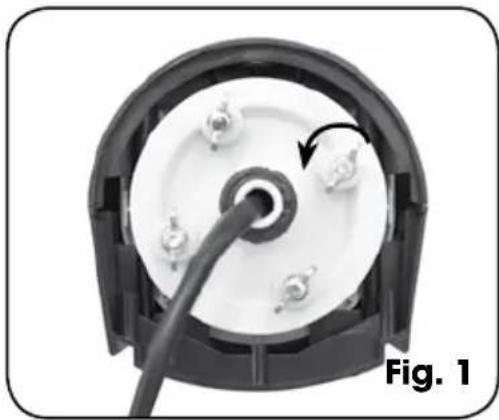
To assemble the base stand, place the tower fan body on its side. Remove the 4 fastening screws from underneath the tower fan section of the fan and set aside. (See Fig. 1).
natural_image
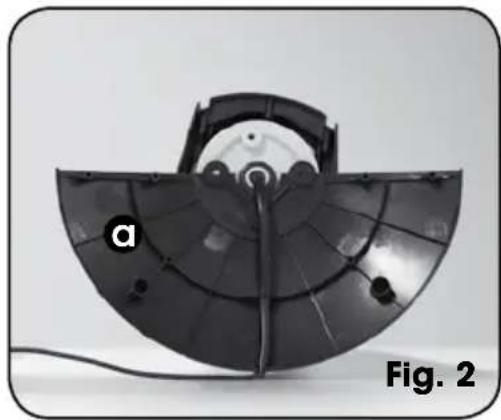
Close-up of a mechanical component with a curved cable inserted, showing internal components and a circular housing (no text or symbols visible)- Holding base stand piece (a) with the curved side facing towards the bottom part of the tower fan body, position base stand piece (a) screw posts over the corresponding screw posts located underneath the tower fan body. Firmly push down base stand piece (a) to set into place (See Fig 2). Secure base stand piece (a) with 2 of the fastening screws. (See Fig. 3.).
natural_image
Close-up of a black semi-circular electronic device with labeled component 'a', shown as Figure 2 (no text or symbols on the device itself)
natural_image
Close-up of a hand adjusting a black circular component with wires, labeled 'Fig. 3' (no text or symbols on the diagram itself)Using Your Kambrook Tower Fan continued
- Position base stand piece (b) with the curved side facing towards the bottom part of the tower fan body, onto base stand piece (a) by interlocking the four locating posts located along the straight edge of each of the base stand pieces and by aligning the two remaining screw posts located underneath the tower fan body with the corresponding screw posts on base stand piece (b). Firmly push down base stand piece (b) until it is secured into place with base stand piece (a) (See Fig. 4). Secure base stand piece (b) with the 2 remaining fastening screws. (See Fig. 5).

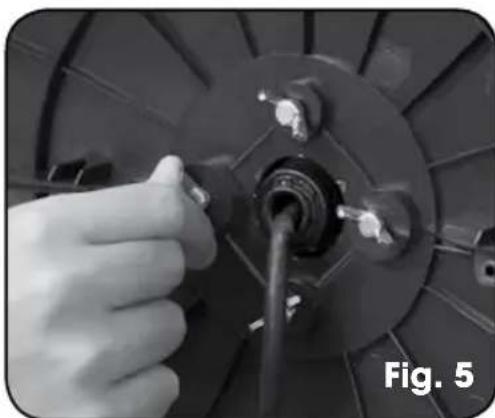
natural_image
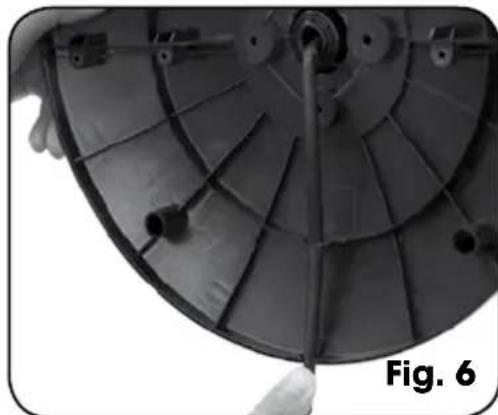
Close-up of a hand inserting a cable into a mechanical component (no visible text or symbols)- Thread the power cord through the circle cord opening located in the base stand piece, pressing into the cord clip to keep it secure. (See Fig. 6).

WARNING: Make sure the power cord is not trapped between the base stand pieces and tower fan body.
natural_image
Close-up of a satellite dish antenna array with visible internal blades and mounting points (no text or symbols)- Return the tower fan to its upright position; it is now ready for use.

WARNING: Do not operate the tower fan without the base stand fitted.
Turning Your Tower Fan On
To operate the tower fan, plug the power cord into a 230V or 240V electrical outlet and switch the outlet on. Be sure the plug fits tightly as a loose fit will cause overheating and damage the plug.
Once the power outlet is switched on, the fan is in 'Standby'. In Standby, the fan is not turned on but the LED screen will illuminate displaying the current room temperature only.
Using Your Kambrook Tower Fan continued
NOTE: When the unit is plugged into an electrical outlet and the outlet is turned on, the room temperature display will illuminate on the LED screen even though the tower fan is not operating. This is Standby mode.
NOTE: The tower fan is fitted with a power saving feature. When any of the 3 mode types are selected or the timer function is set, the LED display panel will automatically switch off after 30 seconds, only displaying the temperature dimly on the screen. Press any key to turn the display on again.
To turn the tower fan on, press the 'POWER' button once; the unit will be in NORMAL fan mode at LOW speed setting.
Setting the Fan Speed
The tower fan has three fan speed settings; LOW ..., MEDIUM ... and HIGH ....
Pressing the 'SPEED' button once will set the tower fan into LOW speed setting.
Pressing the 'SPEED' button twice will set the tower fan into Medium speed setting.
Pressing the 'SPEED' button three times will set the tower fan into HIGH speed setting.
NOTE: The SPEED indicator bar on the control panel will flash continuously during these cycles.
To turn the tower fan OFF, press the 'POWER' button and turn off at the power outlet and remove the plug from the power outlet.
Setting the Nature and Reduction Mode
Your tower fan has a NATURE and REDUCTION ⚙️ ^z setting.
Both the NATURE and REDUCTION modes can be used on any fan speed. The LED screen will indicate what mode the fan has been set in.
Nature Mode
The NATURE Node simulates the natural rise and fall of the wind over time, with speed settings automatically cycling between low, medium and high.
At any fan speed setting, pressing the MODE button once will turn the tower fan into NATURE mode.
To turn the NATURE mode OFF, press the MODE button twice, the fan will now be in NORMAL operation mode.
Reduction mode
The REDUCTION Ⓜ mode allows you to pre-select a variation in speed which automatically decreases the fan speed over time.
The REDUCTION ☑ ^2 mode only applies in the MED or HIGH speed settings.
Once the MED or HIGH fan speed is selected, press the MODE button twice will turn the tower fan into REDUCTION ☺ mode.
After 30 minutes, the selected setting will drop to the next lowest setting.
Using Your Kambrook Tower Fan continued
For example if the fan speed is set at MEDIUM, after 30 minutes it will drop down to LOW until the unit is manually turned off.
To turn the REDUCTION 😊 mode off, press the MODE button once, the fan will now be in NORMAL operation mode.
Diagram of speed cycle settings:
| NATURE: ↑Random speed cycles | REDUCTION: Speed steps down every 30 minutes for MED and HIGH settings. |
 | Pre-select speed (MED)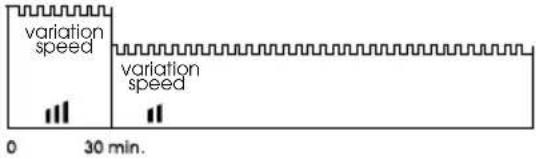 Pre-select speed (HIGH) Pre-select speed (HIGH) |
NOTE: When the NATURE mode setting is selected, the tower fan is programmed to self-regulate through the various fan speeds. The NATURE mode is independent from the fan speed settings while the LED screen will still display the last selected fan speed setting.
NOTE: The tower fan is fitted with a power saving feature. When any one of the 3 mode types are selected or the TIMER function is set, the LED display panel will automatically dim out after 30 seconds, only displaying the temperature dimly on the screen. Press any button to turn the display on again.
Setting the Oscillation
This function will work in any mode. Pressing the 'OSC' button will allow the tower fan to oscillate from side to side. To stop the unit oscillating, press the 'OSC' button once more.
Setting the Auto-Off Timer
The timer function works in all operating modes, and switches the unit into standby mode after a pre-set number of hours.
- Press the 'TIMER' button to activate the timer settings.
- Press the 'TIMER' button to cycle through the one hour increments, up to 12 hours.
- The tower fan will then switch itself to standby mode after the selected number of hours has passed.
- The TIMER can be set on any of the settings.
Using the Remote Control
Before using the remote control, remove the battery isolating slip by pulling the slip away from the remote control. The remote control buttons operate in the same way as those on the tower fan control panel. Your remote control includes 1 x CR2025 3V Lithium battery, and can be conveniently stored in the compartment on the top of the tower fan or at the rear housing of the unit.
To replace the battery open up the battery compartment at the back of the remote by forming a good grip of the remote, pushing the small arched groove to the right and simultaneously pushing out the battery compartment cover by pushing the rectangular groove outwards (See Fig.1a).
Insert the battery paying attention to the polarity (+ and -). Reinsert the battery compartment into the remote control ensuring that the + symbol is facing upwards when inserted (See Fig.1b). Make sure the battery compartment is correctly secured.
Using Your Kambrook Tower Fan continued

natural_image
Technical diagram showing a mechanical component with directional arrows indicating movement or force (no text or symbols present)NOTE: Do not place the heater close to other remote controlled appliances. The infrared remote control may trigger other appliances.

natural_image
Technical line drawing of a mechanical component with a central circular feature and two plus signs, labeled Fig. 1b (no text or symbols on the diagram itself)
WARNING - KEEP BATTERIES OUT OF REACH OF CHILDREN
Swallowing may lead to serious injury in as little as 2 hours or death, due to chemical burns and potential perforation of the oesophagus.
If you suspect your child has swallowed or inserted a button battery immediately call the 24-hour Poisons Information Centre on 13 11 26 for fast, expert advice.
Examine devices and make sure the battery compartment is correctly secured, e.g. that the screw or other mechanical fastener is tightened. Do not use if compartment is not secure.
Dispose of used button batteries immediately and safely. Flat batteries can still be dangerous.
Tell others about the risk associated with button batteries and how to keep their children safe.
Care, Cleaning and Storage
- Ensure that the tower fan is switched OFF and disconnected from the power outlet before cleaning.
- Use a clean, dry cloth to clean the external surfaces of the tower fan. If the tower fan has collected dirt inside the unit, have the unit cleaned by a qualified service agent. Do not operate the tower fan in this condition.
- Do not attempt to open the case of the tower fan at any time as there are no customer serviceable parts inside.
- When not in use, store the tower fan (preferably in its original box) in a cool, clean and dry location.

WARNING: Do not operate the tower fan without the base stand fitted.
Notes
Kambrook - Australia
Ground Floor, Suite 2, 170-180 Bourke Rd
Alexandria NSW 2015, Australia
Locked Bag 2000
Botany NSW 1455
Customer Service Line 1300 139 798
Customer Service Fax 1800 621 337
www.kambrook.com.au
Kambrook - New Zealand
Private Bag 94411
Botany, Manukau
Auckland 2163
New Zealand
Customer Service Line/
Spare Parts 0800 273 845
Customer Service Fax 0800 288 513
www.kambrook.co.nz

- Important
- Please retain your instruction book for future use.
- Contents
- IMPORTANT: Please retain your instruction book for future use.
- Important Safeguards For Your Kambrook Arctic Remote Controlled Tower Fan
- Important Safeguards For All Electrical Appliances
- Misuse may cause injury.
- Your Kambrook Arctic Remote Controlled Tower Fan
- Not Shown
- Quick Start Guide
- Using Your Kambrook Tower Fan
- Before first use
- Assembling Your Kambrook Arctic Tower Fan
- Using Your Kambrook Tower Fan continued
- Turning Your Tower Fan On
- Setting the Fan Speed
- Setting the Nature and Reduction Mode
- Nature Mode
- Reduction mode
- Diagram of speed cycle settings:
- Setting the Oscillation
- Setting the Auto-Off Timer
- Using the Remote Control
- WARNING - KEEP BATTERIES OUT OF REACH OF CHILDREN
- Care, Cleaning and Storage
- Notes
Brand : Kambrook
Model : KFA837
Category : Fan