
PMS6B - Docking Station Pyle - Free user manual and instructions
Find the device manual for free PMS6B Pyle in PDF.


| Product Type | Wireless Bluetooth Docking Station |
| Brand | Pyle |
| Model | PMS6B |
| Dimensions (W x D x H) | 8.5 x 4.5 x 2.5 inches |
| Weight | 1.2 lbs |
| Power Source | DC 5V USB (cable included) |
| Bluetooth Version | 5.0 |
| Bluetooth Range | 33 feet (10 meters) |
| Speaker Output | 2 x 10W RMS |
| Frequency Response | 20Hz - 20kHz |
| Impedance | 4 Ohms |
| Driver Size | 3.5 inches each |
| FM Radio | Yes, with digital tuner and memory presets |
| Alarm Clock | Yes, with buzzer or radio wake |
| USB Charging Port | Yes (5V/1A) for charging external devices |
| AUX Input | 3.5mm stereo |
| Remote Control | Yes, included |
| Color | Black |
| Material | ABS plastic with metal accent |
| Compatibility | Smartphones, tablets, and Bluetooth-enabled devices |
| Warranty | 1 year limited warranty |
| Box Contents | Docking station, USB cable, remote control, manual |
| Cleaning Instructions | Wipe with a dry, soft cloth; avoid moisture and solvents |
Frequently Asked Questions - PMS6B Pyle
User questions about PMS6B Pyle
0 question about this device. Answer the ones you know or ask your own.
Ask a new question about this device
Download the instructions for your Docking Station in PDF format for free! Find your manual PMS6B - Pyle and take your electronic device back in hand. On this page are published all the documents necessary for the use of your device. PMS6B by Pyle.
USER MANUAL PMS6B Pyle
Congratulations on the purchase of the speaker system. With the right cars and attention, it will
give you many years of trouble free operation
Before operating the system, please need this manual fully to obtain the best results from your new product, and retain it carefully for future guidance.
The lighting face with arrowhead, within an exceptional range, is intended to start the user to the presence of un-invasive dangerous village within the product's enclosure that may be of a sufficient magnitude to constitute a risk of electric shock to persons.


CAUTION: TO PREVENT THE RISK OF ELECTRIC SHOCK, DO NOT REMOVE COVER (OR BACK) NO USER SERVICABLE PARTS INSIDE. REFER SERVICING TO QUALIFIED SERVICE PERSONNEL ONLY. The escalation point within an equilateral triangle is intended to ask the user to the presence of
imperform operating and maintenance (nursing) instructions in the literature accompanying the product. SAFETY INSTRUCTIONS
Please read of the instructions herein. Please retain this status safety for future reference. Please need all safety warnings. Please install its accordance with the Manufacturer's instructions.
Please adjust the volume controls to a comfortable level to avoid damaging your hearing and the system.
WARNING: TO REDUCE
TO VELENCE THE RISK OF ELECTRIC SHOCK. Do not remove this amount in rain or snowflow.
Do not use the speakers and voters, and do not immerse them in any liquid or pour any liquid on them.
Do not block the openings in the speaker cabinets, never push objects into speakers or pins of keys because of the effective desk boards, and generate sufficient space around the speakers for proper ventilation.
Do we result near any heat sources such as radiation, heat treatment, steam, or other apparatus (including amplifier) that provides best.
Do not doubt the utility purpose of the polarized plug. It polarized plug has two sides with one side than the other. The side study is provided for your safety. If the provided plug does not fit into your outlet, consult an elimination for replacement of the absolute water. Promet the power cord from being walked on or placed particularly strings, convenient waypoints, and the point where they will turn the platform.
For added protection during lightning events, using the sound from the electrical radar and trans-offy computer.
Uttag this apprentice when announced for long periods of time.
Vibration — Do not block the openings in the speaker obores, never push objects into speaker seats or slots because of
fire or electric shock beams, and provide sufficient space around the speaker for proper ventilation. Location — Place the speaker in a static location so that it will not following damage to the speaker or healthy barn.
Cloning — Display the speakers from the computer and from the electrical outlet before cleaning them with a deep clutch. Listening — For what present electors (e.g., a spring, another) speakers from the electrical outlet and turn off the
Engineering. The base protection during operating time, including the scope of the electric bus and driver, the company. Servicing is required when the apparatus has been damaged in any way, such as the motors supply cord or plug in
damaged, liquid has been spilled or objects have fallen into the apparatus, the apparatus has been exposed to rain or mountains does not operate normally at has been dropped. Later all services to additional service personnel only.
1.1
Thank you for choosing our mini speaker, which is with high-quality sound and used for PC, DIGITAL PLAYER, IPOD, GAME PLAYER AND MOBILE PHONE. Please read this manual before using, in order to get the best performance of the product and to avoid unnecessary damages.
Notice
To allow for design and specification improvements, the information in this document is subject to change without prior notice.
Pionearing patented technology: extendable resonance of the bass boost technology enables strong bass sound.
The standard 3.5mm jack works with virtually all digital audio players, laptops, and CD players.
Built in battery, could be charged by computer via USB cable. No external power source is needed when the battery is at full capacity.
Warning
Please do not throw the product into the because this will cause personal injury;
Please do not put the product in any damp or high-temperature areas.
Please do not shift the product out to avoid danger
Please do not disassemble by yourself to avoid electrical shock
Please do not put the product within any reach of children;
Please do not insert anything conductive into the sound here body.

1.2 Product Configuration
1.2.1 Open package
You will find the following items.
Capsule Mini Speaker
USB/Audio Jack Cable
USER MANUAL
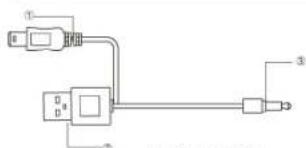
Function and explain
1 Mini charge / Audio Input USB
2Normal USB for charging
3.3.5mm Jack for audio source
This cable should not be used on other equipment except this product.
Warning:
This product has preset power supply equipment inside, please read manual carefully before using to avoid accidents.

1.2.2 Parts confirm


1.3 Connection equipment and charge
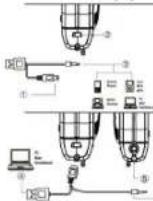
Connect Please make the Mini USB ^1 connect to the Mini USB port ^2 of the mini speaker
2.5mm standard audio jack ①connect digital player equipment.
Battery Charge Normal USB ④ for battery recharging 3.5mm audio port ⑤ to connect other speakers or earphones Either 3.8mm audio jack ⑥ directly connect music

1.4 How to open the "retractable resonator"

Step1 Hold the product
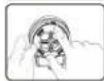
Step2 Press the toppart

Step3 Turn the top counter-clockwise
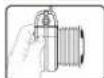
Step4 Loosen the top slowly
*To close the speaker, just repeat the same steps from bottom to top!
1.5 Specifications
Model: PMS6
Dimension: 2.55" X 2.17" X 1.26" (Closed Mode)
Net weight:2.3 o
Speaker: φ36MM
Input:L/R320mV
Power Output:
S/N:≥80dB
AMP Freq Range:280Hz-16KHz
Charge Voltage:5V ± 0.5V
Suitable Temperature:0℃-40℃

Please don't pull extendable resonance of the
base box forcibly, it will be damaged by th
please make sure the plugs are put down when you close the pre-treat.

PYLE®
www.PyleAudio.com

Brand : Pyle
Model : PMS6B
Category : Docking Station