
RDA986 - Home Theater System ROTEL - Free user manual and instructions
Find the device manual for free RDA986 ROTEL in PDF.


| Product Type | Home Theater System |
| Brand | Rotel |
| Model | RDA986 |
| Dimensions (W x H x D) | 430 mm x 140 mm x 380 mm |
| Weight | 12.5 kg |
| Power Supply | 110-120V / 220-240V, 50/60 Hz |
| Power Consumption | 350 W |
| Audio Output Channels | 5.1 |
| HDMI Inputs | 3 |
| HDMI Output | 1 (ARC compatible) |
| Video Upscaling | Up to 4K |
| Supported Audio Formats | Dolby Digital, DTS, PCM |
| Remote Control | Included |
| Warranty | 2 years |
| Cleaning Instructions | Use a soft, dry cloth. Do not apply liquids. |
| Safety Precautions | Do not block ventilation openings; avoid moisture. |
| Spare Parts & Repairability | Contact authorized Rotel service centers. |
Frequently Asked Questions - RDA986 ROTEL
User questions about RDA986 ROTEL
0 question about this device. Answer the ones you know or ask your own.
Ask a new question about this device
Download the instructions for your Home Theater System in PDF format for free! Find your manual RDA986 - ROTEL and take your electronic device back in hand. On this page are published all the documents necessary for the use of your device. RDA986 by ROTEL.
USER MANUAL RDA986 ROTEL
This symbol is to alert the user to the presence of uninsulated dangerous voltages inside the product's enclosure that may constitute a risk of electric shock.

This symbol is to alert the user to important operating and maintenance (service) instructions in this manual and literature accompanying the product.
WARNING:
There are no user serviceable parts inside. Refer all servicing to qualified service personnel.
WARNING:
To reduce the risk of fire or electric shock, do not expose the unit to moisture or water. Do not allow foreign objects to get into the enclosure. If the unit is exposed to moisture, or a foreign object gets into the enclosure, immediately disconnect the power cord from the wall. Take the unit to a qualified service person for inspection and necessary repairs.
Read all the instructions before connecting or operating the component. Keep this manual so you can refer to these safety instructions.
Heed all warnings and safety information in these instructions and on the product itself. Follow all operating instructions.
Clean the enclosure only with a dry cloth or a vacuum cleaner.
Keep the ventilation inlets on the unit unobstructed. For example, do not place the unit on a bed, sofa, rug, or similar surface that could block the ventilation slots. If the component is placed in a bookcase or cabinet, there must be sufficient clearance around the unit and ventilation of the cabinet to allow proper cooling.
Keep the component away from radiators, heat registers, stoves, or any other appliance that produces heat.
The unit must be connected to a power supply only of the type and voltage specified on the rear panel of the unit.
Connect the component to the power outlet only with the supplied power supply cable or an exact equivalent. Do not modify the supplied cable in any way. Do not attempt to defeat grounding and/or polarization provisions. The cable should be connected to a 2-pin polarized wall outlet, matching the wide blade of the plug to the wide slot of the receptacle. Do not use extension cords.
Do not route the power cord where it will be crushed, pinched, bent at severe angles, exposed to heat, or damaged in any way. Pay particular attention to the power cord at the plug and where it exits the back of the unit.
The power cord should be unplugged from the wall outlet if the unit is to be left unused for a long period of time.
Immediately stop using the component and have it inspected and/or serviced by a qualified service agency if:
- The power supply cord or plug has been damaged.
- Objects have fallen or liquid has been spilled into the unit.
• The unit has been exposed to rain.
• The unit shows signs of improper operation
• The unit has been dropped or damaged in any way
Place the unit on a fixed, level surface strong enough to support its weight. Do not place it on a moveable cart that could tip over.

natural_image
Silhouette of a person pushing a large cart with a flag, enclosed in a circular frame (no text or symbols)Figure 1: Controls and Connections

Figure 2: Basic Wiring Connections
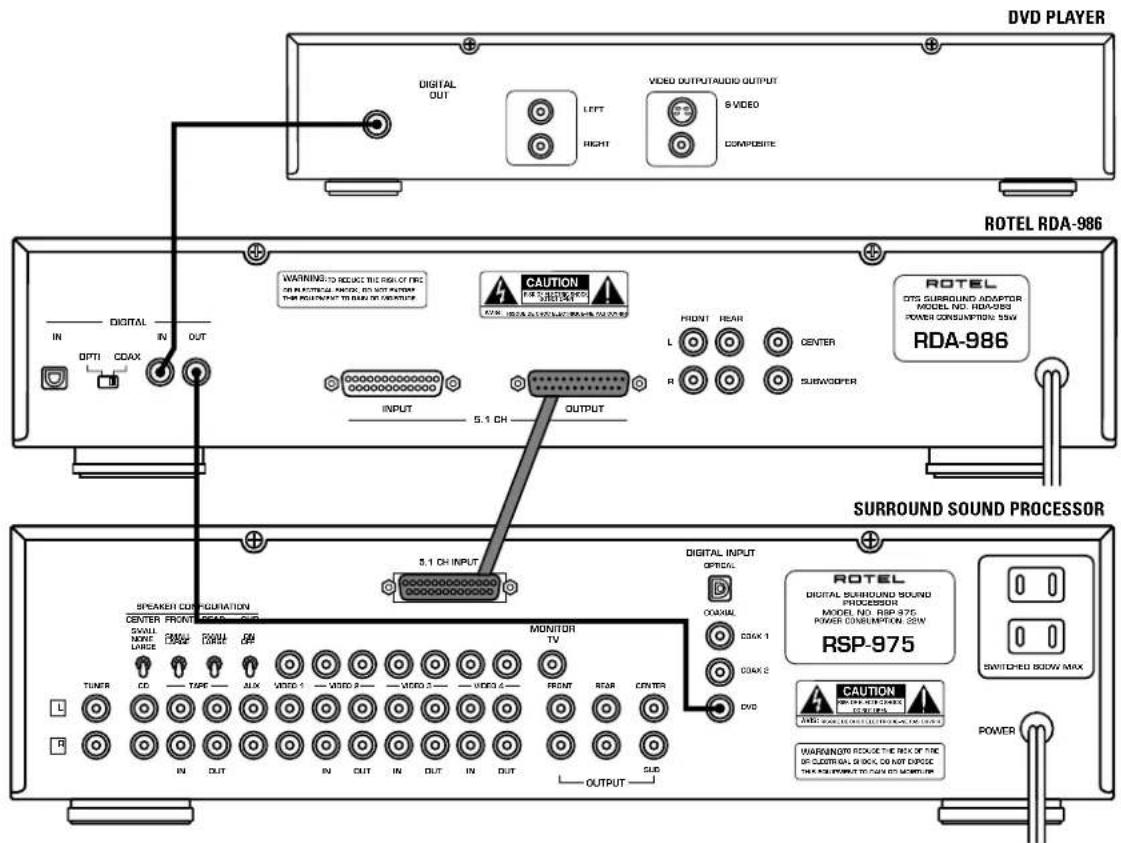
Figure 3: Wiring Connections with Second Surround Adaptor

Contents
Getting Started 33
A Few Precautions 3
Placement 3
AC Power and Control 3
AC Power Input 12 3
Power Switch 1 and Power Indicator 2 4
Digital Signal Connections 4
Digital Inputs 5 and 7 4
Digital Input Selector Switch 6 4
Coaxial Digital Output 8 4
DTS Indicator 3 and Signal Indicator 4
Analog Signal Connections 4
25-pin Analog Output 10 4
RCA Analog Outputs 11 4
25-pin Analog Input 9 4
Specifications 5
Getting Started
Thank you for purchasing the Rotel RDA-986 DTS® Surround Adaptor. The RDA-986 is a high-quality outboard digital processor for decoding discrete DTS 5.1 channel surround sound encoded Laser Discs and Digital Video Discs. The RDA-986 accepts an encoded DTS digital signal, decodes it, and sends six discrete analog surround sound audio signals to the 5.1 channel input on a surround sound processor or other system controller. With its premium components, Balanced Design, and robust construction, the RDA-986 will provide years of enjoyment in your system.
The RDA-986 is simple to operate. Other than a power switch, there are no front panel controls or switches. The unit senses when a DTS signal is present and engages the decoding circuitry automatically.
The RDA-986 also provides pass-through digital outputs and analog inputs to provide full flexibility in a number of system configurations. For example, a second outboard decoder (such as Dolby Digital) can be connected to the analog inputs of the RDA-986. When a DTS signal is present at the digital input, the RDA-986 will decode it and send the signal to the outputs. When no DTS signal is present, the RDA-986 will pass the signal from the analog inputs to the outputs.
A Few Precautions
Please read this manual carefully. In addition to installation and operating instructions, it provides valuable information on various RDA-986 system configurations as well as general information that will help you get optimum performance from your system. Please contact your authorized Rotel retailer for answers to any questions you might have. In addition, all of us at Rotel welcome your questions and comments.
Save the RDA-986 shipping carton and all enclosed packing material for future use. Shipping or moving the RDA-986 in anything other than the original packing material may result in severe damage that is not covered by the warranty. Be sure to keep the original sales receipt. It is your best record of the date of purchase, which you will need in the event warranty service is required.
Placement
Use common sense when placing the RDA-986 in a cabinet or when stacking other equipment. Make sure that the shelf or cabinet can support its weight. Do not stack heavy components on top of the RDA-986. Avoid placing the unit where it may be subject to excessive heat such as on top of a large power amplifier or near a heat register. For best performance, avoid placing the unit where it may be subject to vibration, such as near a speaker.
AC Power and Control
AC Power Input 12
Your RDA-986 is configured for the proper AC voltage in the country where you purchased it (either 115 volts or 230/240 volts). The AC line configuration is noted on a decal on the back panel.
Note: Should you move your unit to another country, it may be possible to reconfigure it for use on a different line voltage. Do not attempt to perform this conversion yourself. Opening the enclosure of the RDA-986 exposes you to dangerous voltages. Consult a qualified service person or the Rotel factory service department for information.
The RDA-986 should be plugged directly into a 2-pin polarized wall outlet or into the switched outlet on another component in your audio system. Do not use an extension cord.
Be sure the power switch on the front panel of the RDA-986 is turned off. Then, connect the supplied power cord to the AC power receptacle on the rear of the unit and the AC power outlet.
If you are going to be away from home for an extended period of time such as a month-long vacation, it is a sensible precaution to unplug your RDA-986 (as well as other audio and video components) while you are away.
Power Switch 1 and Power Indicator 2
The power switch is located on the front panel of your RDA-986 Surround Adaptor. To turn the unit on, push the switch in. The LED indicator above the switch will light, indicating that the unit is turned on. To turn the RDA-986 off, push the button again and return it to the out position.
Digital Signal Connections
The RDA-986 features two standard digital inputs (optical or coaxial) which receive a digital data stream from a DTS-compatible LaserDisc or DVD player. In addition, a pass-through digital output connector (coaxial) can be used to send the raw digital data stream to another processor, such as a Dolby Digital ^® decoder.
Digital Inputs 5 and 7
The RDA-986's digital inputs accept a digital signal from your LaserDisc or DVD player. Two types of digital inputs are available – an optical input connection and a 75 ohm coaxial input connection. Select the type of connection that best matches the output connector on your video disc player or other source component, using either a standard optical digital cable or a standard 75 ohm coax digital cable.
Digital Input Selector Switch 6
A two-position switch located between the digital inputs selects the appropriate digital input connector, either optical or coax. If you connect your video disc player to the RDA-986's optical input, place this switch in the left position (labeled OPTI). If you use the coax input, slide this switch to the right position (labeled COAX).
Coaxial Digital Output 8
The digital output connector is used to pass the unprocessed digital signal from the digital input through to another processor. For example, the same DVD player might be used to play both DTS encoded and Dolby Digital encoded surround sound material. A DTS encoded signal will be decoded by the RDA-986 and the resulting 5.1 channel analog signal sent to the surround sound processor. A Dolby Digital encoded signal will be sent, unprocessed, from the digital output to the digital input of a Dolby Digital decoder for processing. This pass-through feature allows you to use the RDA-986 with an outboard Dolby Digital decoder or with a surround sound processor that includes built-in Dolby Digital decoding.
Connect the digital output connector to the digital input connector on your Dolby Digital decoder or directly to your surround sound processor's digital input, if it has built-in Dolby Digital decoding.
DTS Indicator ③ and Signal Indicator ④
There are two LED indicators on the RDA-986 front panel which indicate whether a signal is present at the digital input. The SIGNAL indicator lights whenever a digital signal from a source component is sensed by the digital inputs. The DTS indicator lights if that digital signal is DTS encoded.
Analog Signal Connections
The RDA-986 has 5.1 channel analog output connections for sending decoded DTS information (six discrete channels: left front, right front, center, left rear, right rear, and subwoofer) to the surround processor or system controller. In addition, the RDA-986 features a 5.1 channel analog pass-through input, which can be used to accept a decoded 5.1 channel signal from another outboard decoder, such as Dolby Digital, to the surround processor, thus simplifying connections in an elaborate system.
25-pin Analog Output 10
The most convenient analog output connection is the rear panel 25-pin connector. This is a standard DB-25 connector which carries all six channels of decoded analog signal in a single cable. If you are using a surround processor which has a matching DB-25 input, such as all Rotel surround processors, this will provide a convenient, simplified output connection. Simply connect the output to the matching 5.1 channel input on your surround processor using a standard female-to-male DB-25 audio connector.
RCA Analog Outputs 11
The RDA-986 also provides six RCA output connectors for use with surround sound processors lacking a DB-25 input. These outputs provide exactly the same analog output signals as the DB-25 output, except that connecting them requires the use of six standard RCA-to-RCA audio cables. If you use the RCA outputs, make sure that you connect the signal properly – the LEFT FRONT output on the RDA-986 to LEFT FRONT input on the surround processor, etc.
25-pin Analog Input 9
In many systems, the RDA-986 will be the only outboard surround sound decoder; therefore, the only input connection will be connecting a DTS source component to the digital inputs described above. However, elaborate systems may use two outboard decoders (the RDA-986 for DTS signals and a separate Dolby Digital decoder). To simplify the wiring of such a system, the RDA-986 provides a 25-pin 5.1 channel analog input. This accepts the decoded output of a Dolby Digital decoder and passes it through, unchanged, to the analog output of the RDA-986 to be sent on to the surround processor. The RDA-986 does not have to be turned on for this pass-through connection to work.
Switching between the digital input and the pass-through analog input is completely automatic, with the digital input receiving priority. If a DTS signal is present at the digital inputs, the unit decodes the DTS signal and sends the discrete analog signal to the RDA-986 outputs. If no DTS signal is sensed at the digital inputs, the signal at the analog inputs is passed through to the outputs.
Specifications
Total Harmonic Distortion (front, 1 KHz) < 0.03%
Frequency Response (±1 dB) 15Hz-20kHz
Analog Inputs 1 DB-25
Digital Inputs 1 coaxial
1 optical
Digital Input Impedance 75 Ohms
Analog Outputs 1 DB-25
6 RCA
Output Impedance 1 KOhms
Power Requirements 115 Volts, 60 Hz or
230 Volts, 50 Hz
Power Consumption 55 Watts
Dimensions (W x H x D) 440 x 104 x 310 mm
173/8 × 31/4 × 105/8"
Weight (net) 5.3 kg, 11.7 lb.
All specifications are accurate at the time of printing.
Rotel reserves the right to make improvements without notice.
Rotel and the Rotel HiFi logo are registered trademarks of The Rotel Co, Ltd., Tokyo, Japan.
DTS is a registered trademark of Digital Theater Systems.
Dolby Digital is a registered trademark of the Dolby Licensing Corporation.
RDA-986
DTS® SURROUND ADAPTOR
The Rotel Co., Ltd.
10-10 Shinsen-Cho
Shibuya-Ku
Tokyo 150-0045
Japan
Phone: +81 3-5458-5325
Fax: +81 3-5458-5310
Rotel of America
54 Concord Street
North Reading, MA 01864-2699
USA
Phone: +1 978-664-3820
Fax: +1 978-664-4109
Rotel Europe
Meadow Road
Worthing, West Sussex BN11 2RX
England
Phone: +44 (0)1903 524 813
Fax: +44 (0)1903 524 831
Rotel Deutschland
Kleine Heide 12
- WARNING:
- The unit must be connected to a power supply only of the type and voltage specified on the rear panel of the unit.
- Contents
- Getting Started 33
- AC Power and Control 3
- Digital Signal Connections 4
- Analog Signal Connections 4
- Specifications 5
- Getting Started
- A Few Precautions
- Placement
- AC Power and Control
- AC Power Input 12
- Power Switch 1 and Power Indicator 2
- Digital Signal Connections
- Digital Inputs 5 and 7
- Digital Input Selector Switch 6
- Coaxial Digital Output 8
- DTS Indicator ③ and Signal Indicator ④
- Analog Signal Connections
- 25-pin Analog Output 10
- RCA Analog Outputs 11
- 25-pin Analog Input 9
- Specifications
- RDA-986
- DTS® SURROUND ADAPTOR
Brand : ROTEL
Model : RDA986
Category : Home Theater System