
450Q - Smartphone GOCLEVER - Free user manual and instructions
Find the device manual for free 450Q GOCLEVER in PDF.


| Product type | Smartphone |
| Brand | GoClever |
| Model | 450Q |
| Display size | 4.5 inches |
| Dimensions | 135 x 67 x 9.5 mm |
| Weight | 130 g |
| Battery capacity | 1800 mAh |
| Operating system | Android |
| Processor | Quad-core 1.2 GHz |
| RAM | 512 MB |
| Internal storage | 4 GB |
| Expandable storage | microSD up to 32 GB |
| Rear camera | 5 MP |
| Front camera | 2 MP |
| Connectivity | Wi-Fi 802.11 b/g/n, Bluetooth 4.0, GPS |
| SIM card | Dual SIM (Mini-SIM) |
| Ports | microUSB 2.0, 3.5 mm headphone jack |
| Sensors | Accelerometer, proximity |
| Battery type | Removable Li-Ion |
| Maintenance | Clean with soft dry cloth; avoid water exposure |
| Safety | Keep away from heat sources; use original charger |
| Spare parts and repairability | Spare batteries and chargers available; repairs by authorized service |
| General information | Released in 2013; user manual in PDF |
Frequently Asked Questions - 450Q GOCLEVER
User questions about 450Q GOCLEVER
0 question about this device. Answer the ones you know or ask your own.
Ask a new question about this device
Download the instructions for your Smartphone in PDF format for free! Find your manual 450Q - GOCLEVER and take your electronic device back in hand. On this page are published all the documents necessary for the use of your device. 450Q by GOCLEVER.
USER MANUAL 450Q GOCLEVER
GOCLEVER
INFINITE INVENTION
QUICK START GUIDE

FONE 450Q
www.goclever.com
Packing List
- GOCLEVER Fone
- AC Adapter
- Earphone
- USB Cable
- Quick Start Guide 6. Battery
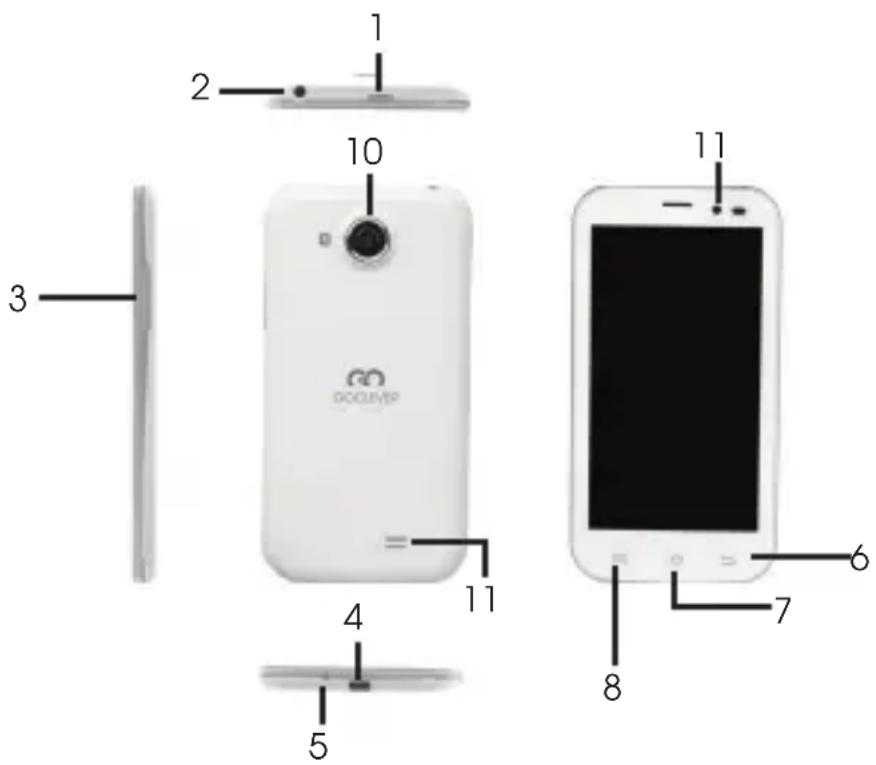
Device Overview
- Power Turn on/off the device; Suspend/Acti vate the device.
- Earphone Jack Earphones connecti on.
- Vol +\ Vol - Butt on Adjust the volume level
- USB port Micro USB cable connecti on.
- Microphone
- Back Back to the previous page.
- Home Back to the Home screen.
- Menu Display menu options.
- Front Camera
- Camera + LED light Take photos.
- Speaker Listen to phone 9 calls or music.
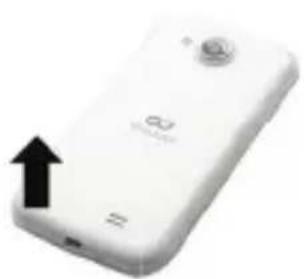
Uninstalling the back cover and batt ery
Uninstalling the back cover: hold the side of device ti ghtly with one hand and lift up the back cover at its buckle with the other hand.

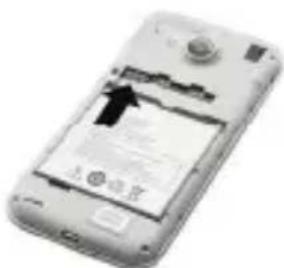
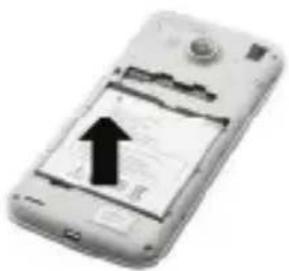
Taking out the battery: hold the side of device tightly with one hand and pull up the battery handle with the other hand.
Installing the SIM cards and Micro SD card


a. Insert SIM cards
The slot on the right is card 2 slot for GSM card, the left is card 1 slot for 3G WCDMA card (compatible with 2G card).
Insert SIM Insert SD Card
Please make sure the gold contact area on the SIM is facing downwards.
b. Insert Micro SD Card
To insert a Micro SD card, place the card connector towards the front side of the device and the printing side of the card towards the rear side of the device.
To remove the micro SD card, pull the card out of the slot.
Charging
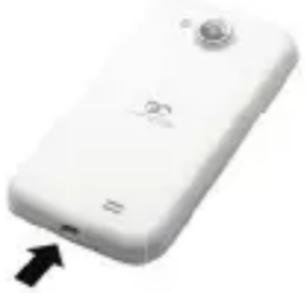
Insert one end of USB cable into the USB port on the device and plug the power adapter to the electrical socket. Normally it takes approximately 3.5 hours to fully charge the device. Operating the device while charging with the AC adapter may extend the charging time.
Noti ce: If you don't use your phone for a long ti me, it will gradually discharge. Please charge it fi rst before your next use or charge the phone every 3 months even you don't use it.
Power on/Sleep Mode/Power off
Press and hold the Power Butt on for a few seconds. It will automatically enter the Home screen after start-up screen. Press the Power Butt on once to enter sleep mode and press it again to awake the device. Press and hold the Power Butt on, and then tap on Power off /Standby to power off the device or to enter sleep mode.
Technical Specifi cati ons
Processor MT6589 Cortex A7 QuadCore at 1.2 GHz Memory 1GB RAM + 4GB eMMC, Micro SD slot supports up to 32GB OS Android 4.2 (Jelly Bean) Display 4.5" IPS LCD, Capaciti ve multi -touch Resoluti on 1280*720 pixels Band WCDMA + GSM (UMTS:900/2100MHz; GSM:900/1800MHz) Interfaces USB 2.0, Micro SD (micro SDHC compati ble) Communicati ons WiFi (802.11 b/g/n), 3G/HSPA+ Batt ery 1500 mAh Li-Poly batt ery Dimensions 131.5mm x 69mm x 8.9mm Weight 112g
CERTIFICATE OF CONFORMITY C€
GOCLEVER Ltd. hereby declares under our sole responsibility that the product GOCLEVER FONE 450Q is in conformity with the essential requirements of the following Directi ves is declared:
EMC DIRECTIVE 2004 / 108 / EC
LVD DIRECTIVE 2006 / 95 / EC
R&TTE DIRECTIVE 1999 / 5 / EC
The full document with detailed information is available on our website:
www.goclever.com. You should simply find the product sheet in the GOCLEVER product catalogue and the .pdf file with CE declaration is placed among the bookmarks.
Please read our Privacy Policy and Cookie Policy at www.goclever.com.

This product has been certified as RoHS Compliant.

MARK OF CONFORMITY - UKRAINE - Nati onal mark of conformity confi rms that the specifi ed product complies with the requirements of the technical regulati ons in Ukraine.
END OF LIFE DISPOSAL

Recycling facilities are now available for all customers at which you can deposit your old GOCLEVER devices or any other electrical products. This is a requirement under European legislation (the Waste Electrical and Electronic Equipment – or WEEE – Directi ve 2002/96/EU). Customers are able to take any old electrical equipment to waste recycling public centers or point of sales. Please remember that this devices/cables etc. will be further handled during the recycling process. To remind you to recycle, all electrical products are marked with a crossed out wheeled bin symbol. This symbol is on all GOCLEVER devices.
CONDITIONS OF WI-FI USAGE
When using the IEEE 802.11b/g/n Wireless LAN standard, channels 1 to 13 (2.4 GHz...2.4835 GHz) are selectable for both indoor and outdoor use, however with restricti ve conditi ons applying in France, Italy and Norway, as follows:
France: When using this product indoor, all channels can be used without restric-
ti ons. Outdoor only channels 1 to 6 are allowed. This means that in Peer-to-Peer, the WLAN feature can only be used outside if the peer sets up the communicati on on an authorized channel (i.e., between 1 & 6). In infrastructure mode, please make sure the access point is configured to a channel from 1 to 6 before setting up the connection.
Italy: Use of the RLAN network is governed: Disposal of Old Electrical & Electronic - with respect to private use, by the Legislati ve Decree of 1.8.2003, no. 259 ("Code of Electronic Communicati ons"). In particular Arti cle 104 indicates when the prior obtainment of a general authorizati on is required and Art. 105 indicates when free use is permitt ed; - with respect to the supply to the public of the WLAN access to telecom networks and services, by the Ministerial Decree 28.5.2003, as amended, and Art. 25 (general authorizati on for electronic communicati ons networks and services) of the Code of electronic communicati ons.
Norway: Use of this radio equipment is not allowed in the geographical area within a radius of 20 km from the center of Ny-Ålesund, Svalbard.
GOCLEVER'S GENERAL TERMS AND CONDITIONS OF WARRANTY
- GOCLEVER Sp. z o.o. with registered offi ce in Poznań (60-431) at Sianowska Street 4a, hereinaft er referred to as Guarantor, guarantees that GOCLEVER branded product is free from any design or material defects that could compromise its functi onality provided that user manual supplied at conclusion of the agreement has been adhered to.
- This warranty is applicable only on the territory of United Kingdom.
- Guarantor shall remove any possible defect of the device, in accordance with the provision of this warranty provided that the warranty card filled in on the day of the purchase together with a proof of purchase are presented. Any alterations or correcti ons in the warranty card done by unauthorized persons shall result in the loss of rights resulting from this warranty
- The duration of warranty for GOCLEVER devices shall be 24 months starting on the date the device was sold, hoverer not to exceed 27 months from the date of product on placed on the Product.
- The buyer is entitled to Return to Base service within 12 months from date of purchase, however not to exceed 15 months from the date of production. After those dates the user shall send the defective device to the repair center, having previously obtained an RMA number in accordance with the RMA procedure. Cost of delivery back to the customer after repair shall be covered by the Guarantor.
- Warranty for LCDs and batteries mounted in GOCLEVER products is limited to 12 months from the date of purchase, however not to exceed 15 months from the date
GOCLEVER | Quick Start Guide
of producti on TFT LCD screens with sizes from 3,5" to 10,1" may have up to 5 faulty pixels (white, black or the so-called sub-pixels).
- Warranty for accessories added to the device (e.g. holders, cables, etc.) is limited to 12 month from the date of sale and excludes mechanical damage.
- Defects detected within the warranty period shall be removed free of charge within the possibly shortest time not exceeding 21 working days from the date on which the devices have been received by the repair center. Should it become necessary to source spare parts from abroad, the above time may be extended by further 30 days.
- Fault must be reported to the repair center not later than within 14 days from its occurrence
- The buyer is obliged to supply the product in original packaging complete with all accessories. The Buyer shall be responsible for the damage resulting from use of different packaging.
- Ownership of the devices that have not be collected from the repair center within 3 months from completion of the repair shall pass on to the repair center.
- In case of unjustifi ed claim (claim relating to fault-free device or user damage) The Claimant shall be charged with testi ng fees and costs of transport.
- Warranty does not cover:
Any use of the equipment going beyond the scope of its intended use;
Claims relating to specificati on of the device if they are consistent with the ones given by the manufacturer in the user manual or other normati ve documents Defects caused by external forces, e.g. mechanical damage, eff ects of weather conditions, polluti on, water damage, overvoltage, etc.
Defecti ve functi oning of unauthorized soft ware installed in the device,
Capaciti ve stylus added to the bundle free of chargé.
- If a warranty repair requires parts to be changed, the replaced element remains the property of the Guarantor. Replaced parts may be of a different brand provided that technical parameters are at least equal.
- The Buyer loses the warranty right if warranty seals are broken, the tag with serial number if removed, or should repair centre detect unauthorised repair or systemic or constructi on changes of the device.
- Guarantor may waive the deadlines for warranty service should unexpected circumstances of force majeure arise e.g. natural disaster, social unrest, etc.
- Guarantor is not responsible for damages and losses incurred as a result of being unable to use the device while it was serviced.
- Warranty rights does not include the buyer's right to claim due to loss of profits, due to defects of the device.
-
Guarantor shall not be responsible for damage resulting from loss of data on magneti c drives, please note that maps are restored back to the factory condition.
-
The legal relations between the buyer and the device and the Guarantor is governed exclusively by the provisions of this warranty. Claims for compensati on going further than that are excluded unless they result from mandatory provisions of law..
- This warranty has a supplementary character in relations to buyer's rights towards the seller. Warranty does not exclude, nor limit, nor suspend buyer's rights resulting from nonconformity of goods with the contract.
REGISTER A PRODUCT
on register.goclever.com
Register your GOCLEVER product to get more!
Thank you for choosing GOCLEVER! We want you to enjoy your purchase to the fullest, and that starts with a few easy registrati on steps. Registrati on will take you a few minutes. Go to www.goclever.com and get more. Do not miss the chance to find a few of the benefits:
- 12 months of door-to-door warranty (for selected countries and products),
- Handy ti ps and rapid technical support,
- Reminders about fi rmware updates that will keep your product up-to-the-minute,
- Exclusive previews of new products,
- Special offers and promotions – up to 30% of discount (for selected countries and products),
- Free map updates (for selected countries and products).
TECHNICAL SUPPORT
WEBSITE:
www.goclever.com/support
- USER GUIDES (have a look on online user's manual, download and share with).
- SOFTWARE AND UPDATE MANUALS (be up to date with the latest OS soft ware or use the backup files to solve your soft ware problems).
- FREQUENTLY ASKED QUESTIONS
- SERVICE CENTRE LOCATIONS (we recommend to use GOCLEVER Central Service and local partner services directly than make a complaint or technical inquiries to stores).
- WARRANTY INFORMATION (your GOCLEVER TAB includes 24 month guarantee. The optional for selected countries is 12 month “door2door” guarantee. See our website for details).
- SERVICE PROCEDURE
- RMA APPLICATION (depends on country).
GOCLEVER | Quick Start Guide
Central Service
4a Sianowska Street
60-431 Poznan, POLAND
email: serwis@goclever.com
tel.: +48 618488767
Technical Support UK
tel.: 0844 8566848
email: uk@goclever.com
Technical Support Ireland
email: ireland@goclever.com
Technical Support Spain
tel: 902104953
email:
rma@gocleverspain.com
Technical and warranty support
Canary Islands
tel: 902 050 255
Partner Services
Partner Services
BELARUS
220053, Republic of Belarus, Minsk,
V.Slutskoi 67-2
email: belarus@goclever.com
tel.:+375(17)3354883
Lithuania, Estonia, Latvia
Servisa ICT
e-mail: suport@servisaict.com
Tel. Lithuania: +370 (37) 329000, +370
(37) 337458,
+370 (5) 2101160
Tel. Latvia: +371 (674) 08838
Tel. Estonia: +372 (66) 71796
www.servisaict.com
Serbia
ET Servis d.o.o. Beograd
Member of Logo d.o.o. group
Bulevar kralja Aleksandra 265, 11000
Beograd, Srbija
tel: +381 11 3820-535 , +381 11 3820-
536, +381 11 3820-537
www.etservis.rs
Bulgaria
Stemo
bul. Nikola Vaptsarov 55, EXPO 2000
tel. (+359 2) 8162300
fax: 8162303
e-mail: main@sf.stemo.bg
www.stemo.bg
CZECH REPUBLIC
Bouncer s.r.o
Slavonicka 324, 67531 Jemnice,
Czech Republic
email: servis@goclever.cz
tel.: +420 546 606 021
ROMANIA
S.C. Cordon Electronics S.R.L
email: office@cordongroup.ro
tel.: +40 372324762, +40 213009905
UKRAINE
Service Center KROK-TTC
Geroev Dnepra 2A, 04212 Kiev
email: info@krok-ttc.com
tel.: +380 800504504
Slovenia
BIROTEHNA
Litijska cesta 259, 1261 Ljubljana-
-Dobrunje
tel: 01 5853 777
fax: 01 5400 130
e-mail: servis@birotehna.si
Croatia
PlayCom
Heinzelova 78b, 10000 Zagreb
tel 1: +385 (0)1 5613-222, +385 (0)1
5618-433, +385 (0)1 6184-115
e-mail: info@play.com.hr
www.playcom.hr
Bosnia and Herzegovina
System One d.o.o.
Vilsonovo šetalište 10, 71000
Sarajevo
tel: +389 (0) 2-2653-270
fax: +387 33 652 781
e-mail: servis@itd.mk
www.slsee.com
www.itd.mk
Hungary
E-care Solutions

Wymiary: 131.5mm x 69mm x 8.9mm
Masa: 112g
CERTYFIKAT ZGODNOŚCI – KRAJE UE C€
UTYLIZACJA I RECYKLING

STRONA: www.goclever.com/support
Technical Support UK
tel.: 0844 8566848
email: uk@goclever.com
Technical Support Ireland
email: ireland@goclever.com
Technical Support Spain
tel: 902104953
email:
rma@gocleverspain.com
Technical and warranty support
Canary Islands
tel: 902 050 255
Partner Services
Partner Services
BELARUS
220053, Republic of Belarus, Minsk,
V.Slutskoi 67-2
email: belarus@goclever.com
tel.:+375 (17) 3354883
Lithuania, Estonia, Latvia
Servisa ICT
e-mail: suport@servisaict.com
Tel. Lithuania: +370 (37) 329000, +370
(37) 337458,
+370 (5) 2101160
Tel. Latvia: +371 (674) 08838
Tel. Estonia: +372 (66) 71796
www.servisaict.com
Serbia
ET Servis d.o.o. Beograd
Member of Logo d.o.o. group
Bulevar kralja Aleksandra 265, 11000
Beograd, Srbija
tel: +381 11 3820-535 , +381 11 3820-
536, +381 11 3820-537
www.etservis.rs
Bulgaria
Stemo
bul. Nikola Vaptsarov 55, EXPO 2000
tel. (+359 2) 8162300
fax: 8162303
e-mail: main@sf.stemo.bg
www.stemo.bg
CZECH REPUBLIC
Bouncer s.r.o
Slavonicka 324, 67531 Jemnice,
Czech Republic
email: servis@goclever.cz
tel.: +420 546 606 021
ROMANIA
S.C. Cordon Electronics S.R.L
email: office@cordongroup.ro
tel.: +40 372324762, +40 213009905
UKRAINE
Service Center KROK-TTC
Geroev Dnepra 2A, 04212 Kiev
email: info@krok-ttc.com
tel.: +380 800504504
Slovenia
BIROTEHNA
Litijska cesta 259, 1261 Ljubljana-
-Dobrunje
tel: 01 5853 777
fax: 01 5400 130
e-mail: servis@birotehna.si
Croatia
PlayCom
Heinzelova 78b, 10000 Zagreb
tel 1: +385 (0)1 5613-222, +385 (0)1
5618-433, +385 (0)1 6184-115
e-mail: info@play.com.hr
www.playcom.hr
Bosnia and Herzegovina
System One d.o.o.
Vilsonovo šetalište 10, 71000
Sarajevo
tel: +389 (0) 2-2653-270
fax: +387 33 652 781
e-mail: servis@itd.mk
www.slsee.com
www.itd.mk
Hungary
E-care Solutions

MARK OF CONFORMITY - UKRAINE - National mark of conformity confirms that the specified product complies with the requirements of the technical regulations in Ukraine.
Technical Support UK
tel.: 0844 8566848
email: uk@goclever.com
Technical Support Ireland
email: ireland@goclever.com
Technical Support Spain
tel: 902104953
email:
rma@gocleverspain.com
Technical and warranty support
Canary Islands
tel: 902 050 255
Partner Services
Partner Services
BELARUS
220053, Republic of Belarus, Minsk,
V.Slutskoi 67-2
email: belarus@goclever.com
tel.:+375 (17) 3354883
Lithuania, Estonia, Latvia
Servisa ICT
e-mail: suport@servisaict.com
Tel. Lithuania: +370 (37) 329000, +370
(37) 337458,
+370 (5) 2101160
Tel. Latvia: +371 (674) 08838
Tel. Estonia: +372 (66) 71796
www.servisaict.com
Serbia
ET Servis d.o.o. Beograd
Member of Logo d.o.o. group
Bulevar kralja Aleksandra 265, 11000
Beograd, Srbija
tel: +381 11 3820-535 , +381 11 3820-
536, +381 11 3820-537
www.etservis.rs
Bulgaria
Stemo
bul. Nikola Vaptsarov 55, EXPO 2000
tel. (+359 2) 8162300
fax: 8162303
e-mail: main@sf.stemo.bg
www.stemo.bg
CZECH REPUBLIC
Bouncer s.r.o
Slavonicka 324, 67531 Jemnice,
Czech Republic
email: servis@goclever.cz
tel.: +420 546 606 021
ROMANIA
S.C. Cordon Electronics S.R.L.
email: office@cordongroup.ro
tel.: +40 372324762, +40 213009905
UKRAINE
Service Center KROK-TTC
Geroev Dnepra 2A, 04212 Kiev
email: info@krok-ttc.com
tel.: +380 800504504
Slovenia
BIROTEHNA
Litijska cesta 259, 1261 Ljubljana-
-Dobrunje
tel: 01 5853 777
fax: 01 5400 130
e-mail: servis@birotehna.si
Croatia
PlayCom
Heinzelova 78b, 10000 Zagreb
tel 1: +385 (0)1 5613-222, +385 (0)1
5618-433, +385 (0)1 6184-115
e-mail: info@play.com.hr
www.playcom.hr
Bosnia and Herzegovina
System One d.o.o.
Vilsonovo šetalište 10, 71000
Sarajevo
tel: +389 (0) 2-2653-270
fax: +387 33 652 781
e-mail: servis@itd.mk
www.slsee.com
www.itd.mk
Hungary
E-care Solutions
Date and customer's signature
Repairs history
| Date | Confirmed defect | Made repairs | Servive sign and stamp |
KARTA GWARANCYJNA
DATA SPRZEDAŻY:
DATA PRODUKCJI:
NAZWA PRODUKTU:
NUMER SERYJNY:


- GOCLEVER
- INFINITE INVENTION
- QUICK START GUIDE
- PACKING LIST
- DEVICE OVERVIEW
- UNINSTALLING THE BACK COVER AND BATT ERY
- INSTALLING THE SIM CARDS AND MICRO SD CARD
- CHARGING
- POWER ON/SLEEP MODE/POWER OFF
- TECHNICAL SPECIFI CATI ONS
- CERTIFICATE OF CONFORMITY C€
- END OF LIFE DISPOSAL
- CONDITIONS OF WI-FI USAGE
- GOCLEVER'S GENERAL TERMS AND CONDITIONS OF WARRANTY
- GOCLEVER | QUICK START GUIDE
- REGISTER A PRODUCT
- TECHNICAL SUPPORT
- CENTRAL SERVICE
- CERTYFIKAT ZGODNOŚCI – KRAJE UE C€
- UTYLIZACJA I RECYKLING
- KARTA GWARANCYJNA
Brand : GOCLEVER
Model : 450Q
Category : Smartphone