
Oblanc SHELL200BT - Headphones Syba - Free user manual and instructions
Find the device manual for free Oblanc SHELL200BT Syba in PDF.


| Product Type | Wireless Over-Ear Headphones |
| Model | Oblanc SHELL200BT |
| Brand | Syba |
| Connectivity | Bluetooth 5.0 |
| Wireless Range | Up to 10 meters (33 feet) |
| Driver Size | 40 mm |
| Frequency Response | 20 Hz - 20 kHz |
| Impedance | 32 ohms |
| Battery Type | Lithium-ion rechargeable |
| Battery Life | Up to 15 hours playback |
| Charging Time | Approximately 2 hours |
| Charging Port | Micro USB |
| Weight | Approximately 200 grams |
| Dimensions (folded) | 18 x 15 x 5 cm |
| Controls | On-ear buttons for volume, playback, and calls |
| Built-in Microphone | Yes, for hands-free calling |
| Comfort Features | Adjustable headband, soft padded ear cushions |
| Foldable Design | Yes, for portability |
| Care Instructions | Wipe with dry cloth; avoid moisture |
| Safety | Do not expose to extreme temperatures; keep away from water |
| Spare Parts Availability | Ear pads and charging cable available from manufacturer |
Frequently Asked Questions - Oblanc SHELL200BT Syba
User questions about Oblanc SHELL200BT Syba
0 question about this device. Answer the ones you know or ask your own.
Ask a new question about this device
Download the instructions for your Headphones in PDF format for free! Find your manual Oblanc SHELL200BT - Syba and take your electronic device back in hand. On this page are published all the documents necessary for the use of your device. Oblanc SHELL200BT by Syba.
USER MANUAL Oblanc SHELL200BT Syba
NC3-3 Bluetooth Stereo Headphones
User Manual
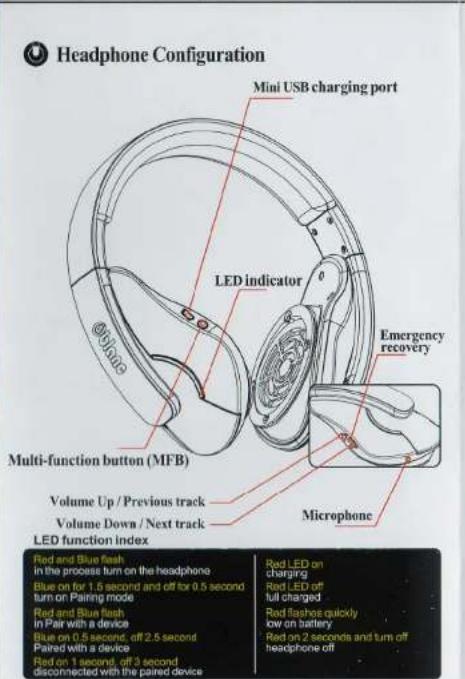
Functions Briefing

Step 1 Pairing / Sync
When the headphone is off, push and hold the MFB for 5 or more seconds until the LED flashes Blue and Red, ignore the power-on beep. Navigate to your mobile or Bluetooth device and choose the Oblanc Bluetooth device. The device may ask for a PIN number. Enter "0000" for PIN. A beep will indicate a connection has been established. The Blue LED will light up and flash slowly afterwards.

Step 2 Powering on/off
Push and hold the MFB for 3 seconds to turn the headphone on. A beep sound will be made and LED will flash Blue(On). Push and hold for 5 or more seconds to turn the headphone off (The Red LED will light up so release button when you hear a beep sound to shut down).

Step 3 Volume and Song control
Push +Vol and Vol- buttons for volume control. Push and hold the volume + or - button for 2 seconds for the next/previous song. Press the MFB button to pause/play the song. NOTE: You cannot Fast Forward or Rewind a song with these headphones.
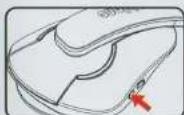
Step 4 Answering calls
When listening to music, push the MFB button to answer incoming calls. Push the button again to end the call. Push MFB twice to redial previous number. Push and hold for 3 seconds will activate voice dialing.
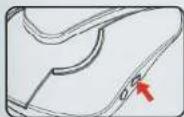
Step 5 Charging
To charge the headphone, connect the device to a USB port with the mini USB cable provided. The Red LED will remain lit when charging. (About 2 hours for a full charge.) When the device is fully charged, there will be no LED lit up on the device.

Step 6 ERS
Emergency recovery switch. Use a thin pointed object to insert into the hole. This will shutdown the headphone, and return the headphone to the manufacturer's default mode.

Thank you for purchasing Oblanc!
Enjoy the Musical Life


Brand : Syba
Model : Oblanc SHELL200BT
Category : Headphones