ASM-6 - Speaker Senal - Free user manual and instructions
Find the device manual for free ASM-6 Senal in PDF.


| Product Type | Two-Way Active Studio Monitor |
| Speaker Type | Near-field monitoring speaker |
| Woofer | 6.5" (165.1 mm) midwoofer |
| Tweeter | 0.8" (20 mm) metal dome tweeter |
| Frequency Range | 38 Hz – 20 kHz (±2.5 dB, free space) |
| Rated Power | 110 W RMS per channel |
| Active Crossover Frequency | 3.0 kHz |
| Signal-to-Noise Ratio | >94 dB (unweighted) |
| Input Impedance | 12,000 Ω |
| Input Sensitivity | 350 mV |
| Maximum Input Level | 3,000 mV |
| Bass Adjustment (LF) | +2, 0, -2 dB at 200 Hz |
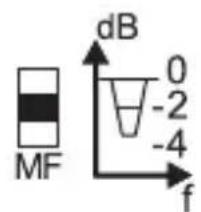
| Mid Adjustment (MF) | 0, -2, -4 dB at 500 Hz |
| Treble Adjustment (HF) | +1, 0, -1 dB at 10 kHz |
| High-Pass Filter | 38, 48, 58 Hz (3-position) |
| Cabinet Material | High-intensity aluminum alloy |
| Dimensions (W x H x D) | 9.5" x 9.8" x 13.8" (240 x 248 x 350 mm) |
| Weight | 22.4 lb (10.1 kg) |
| Mounting Options | Desktop (rubber base), wall mount (bracket sold separately), stand mount |
| Included Accessories | XLR to XLR cable, XLR to RCA cable, AC power cable, user manual, rubber base |
| Warranty | 1-year limited warranty |
| Recommended Placement Distance | 2.3' – 6' (0.7 – 1.8 m) from listener |
| Minimum Wall Clearance | 3.5" (9 cm) |
Frequently Asked Questions - ASM-6 Senal
User questions about ASM-6 Senal
0 question about this device. Answer the ones you know or ask your own.
Ask a new question about this device
Download the instructions for your Speaker in PDF format for free! Find your manual ASM-6 - Senal and take your electronic device back in hand. On this page are published all the documents necessary for the use of your device. ASM-6 by Senal.
USER MANUAL ASM-6 Senal
natural_image
Black studio audio speaker with a dome-shaped head and visible sound grille (no text or symbols)Introduction ...... 2
Overview ...... 3
Precautions .....4
Setting Up .....5-9
Specifications ..... 10-11
Troubleshooting ....12-13
Warranty 14
Thank you for choosing Senal.
The Senal ASM-6 Two-Way Active Speaker is designed for near-field monitoring in professional audio applications. The ASM-6 features active filter technology and a dual-channel power amplifier, driven by a 6.5" woofer and 0.8" metal dome tweeter that deliver a wide and flat frequency response with pristine audio reproduction and accurate sound imaging. The cabinet's curved port tube provides natural low-frequency output and minimizes distortion, while the ellipsoidal design and rigid, high-intensity aluminum alloy construction prevent diffraction and cabinet resonance. This meticulous engineering allows the ASM-6 to handle high sound pressure levels in a compact cabinet size.
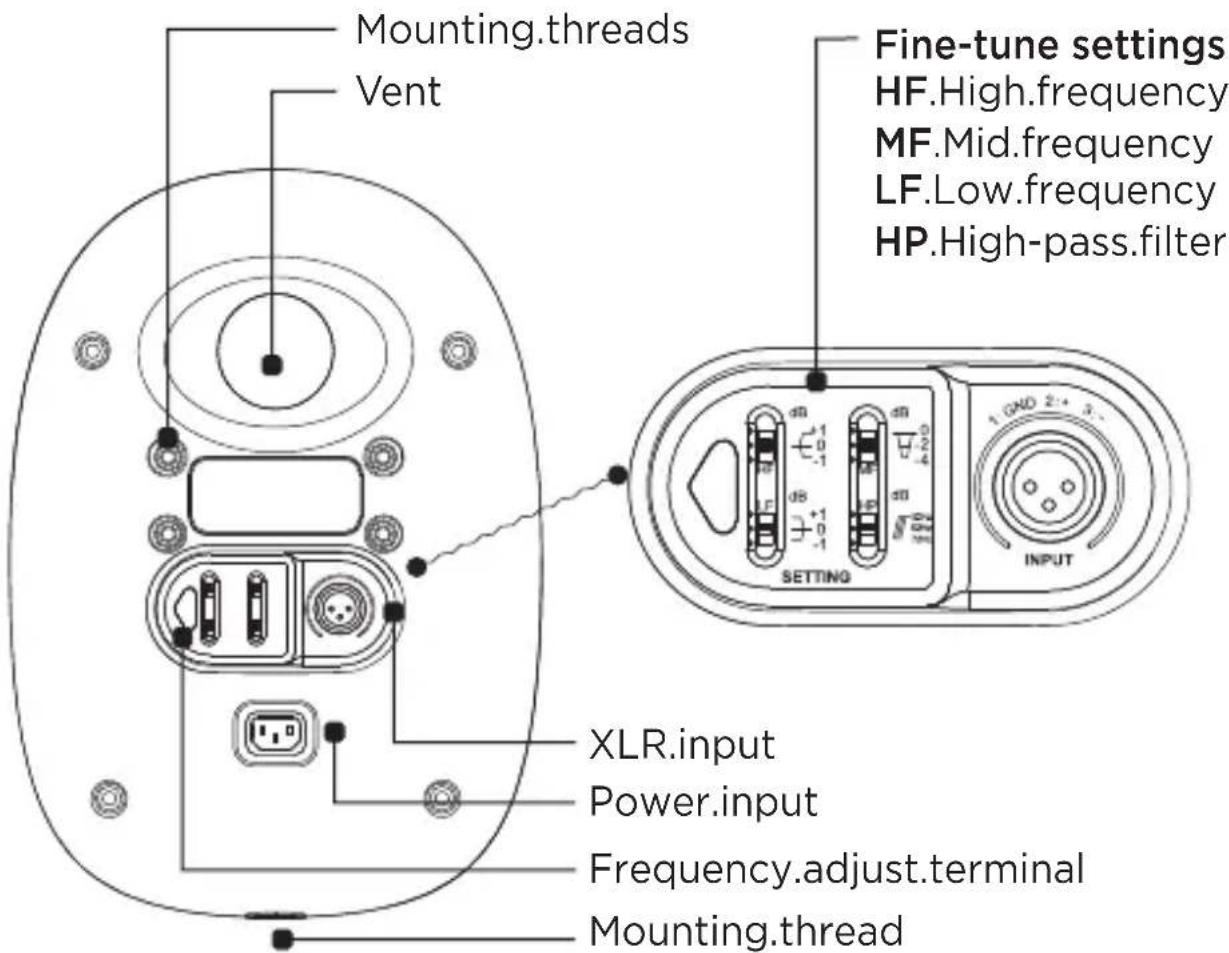
Fine-tune settings allow the user to adjust the high, mid, and low frequencies to compensate for the listening environment, speaker placement, and audio source. There is also a three-position high-pass filter for low-frequency cutoff that makes it easy to match the speaker with a subwoofer. The ASM-6 comes with a rubber base that isolates the speaker from its resting surface to prevent resonant coupling, and makes it easy to adjust the vertical angle of the speaker to down fire or up fire. The speaker can also be mounted on a wall or a stand via the mounting threads on the cabinet.
Overview
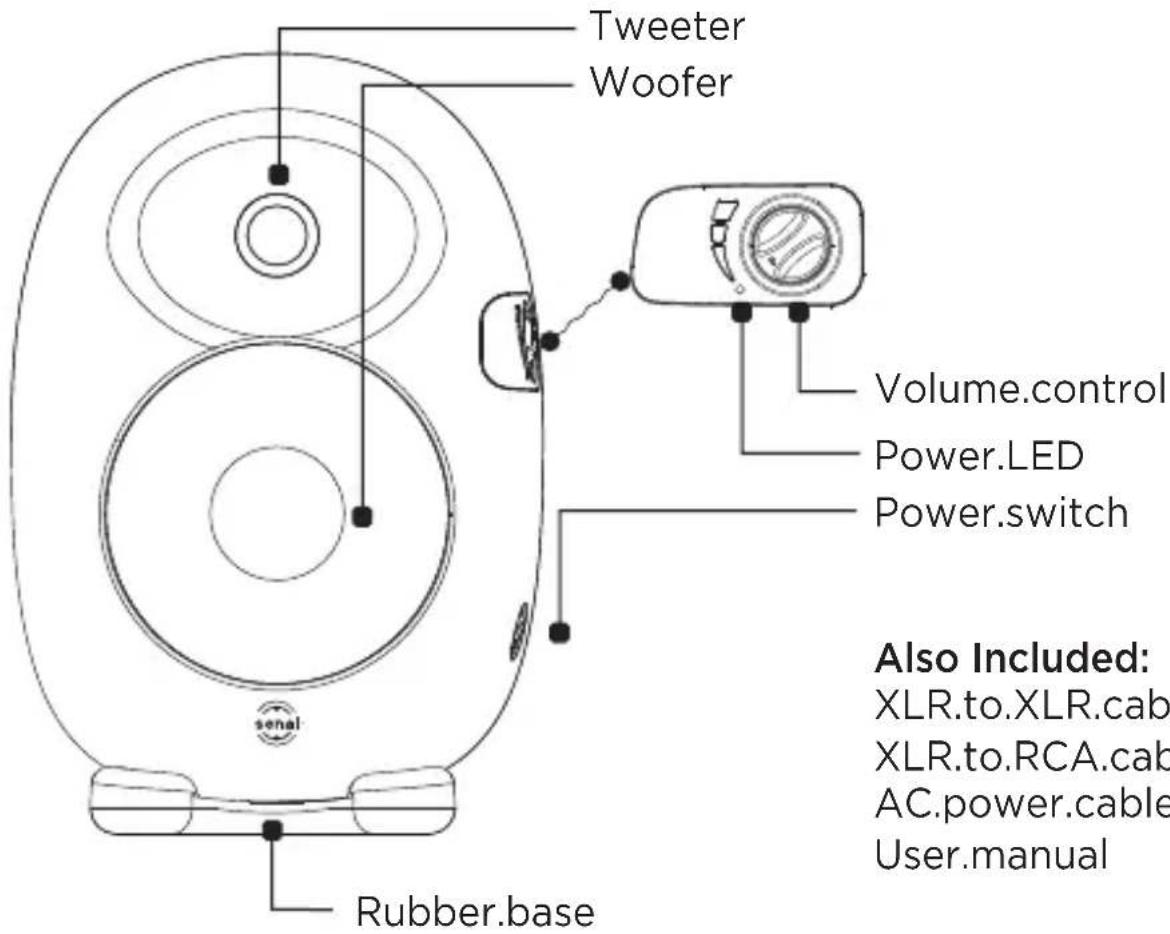
Also Included:
XLR.to.XLR.cable
XLR.to.RCA.cable
AC.power.cable
User.manual
Precautions ⚠️ ⚣️
- Please read and follow these instructions, and keep this manual in a safe place.
- Exposure to high sound levels can cause permanent hearing loss. Avoid listening at high volumes for extended periods of time.
- Keep this product away from water, moisture, and any flammable gases or liquids.
- Make sure this product is powered off when plugging it into a power source.
- Use only the correct, recommended voltage.
- Do not attempt to disassemble or repair this product. There are components inside that can produce a hazardous electric shock.
- Handle this product with care.
- Clean this product with only a soft, dry cloth.
- Keep this product away from children.
- All photos are for illustrative purposes only.
Setting Up
Mounting the Speaker
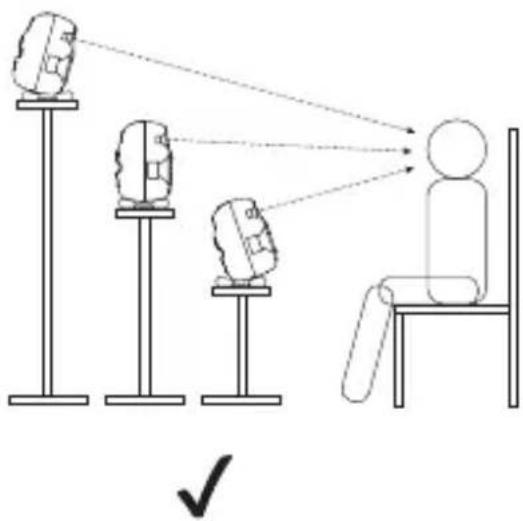
For desktop placement, place the speaker on the included rubber base. This base serves to isolate the speaker from its resting surface and prevent resonant coupling. The base is designed to make it easy for you to adjust the vertical angle of the speaker to down fire or up fire, so you can aim the acoustic axis at the listener's ear.

natural_image
Diagram showing a person sitting at a desk receiving signals from three cameras on a stand, with no text or symbols present.
natural_image
Illustration of a person sitting at a desk receiving signals from three monitors, with no text or symbols present.The speaker may also be mounted on a wall via the mounting threads on the rear of the cabinet, or on a speaker stand via the threaded mount on the bottom of the cabinet. To mount the speaker on a wall, you can use the Senal speaker bracket kit, sold separately.
Speaker Placement and Positioning
Position the speakers 2.3' to 6' (0.7 to 1.8 m) from where the listener will be situated, and aim the tweeter at the approximate height of the listener's ears. There should be no obstructions between the speakers and the listener. Each speaker should be 3.5" (9 cm) or more from the wall to prevent early reflections, which can interfere with stereo imaging.

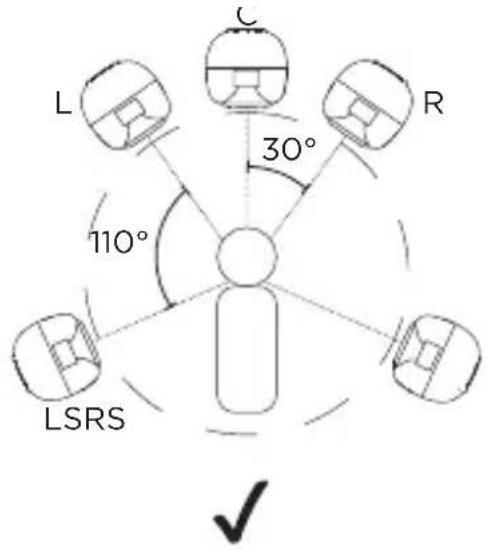
For stereo placement, space the speakers equally to form an equilateral triangle with the listener at the third point of the triangle.

For five-channel placement, arrange the speakers in a circle, with the listener in the center. As with stereo placement, the left and right speakers should form an equilateral triangle with the listener. Place the center speaker between the left and right speakers, so they are spaced evenly at 30^ from each other. Place the rear left and rear right speakers behind the listener, at an angle of 100^ to 120^ from the center speaker.

flowchart
graph TD
    L["Device L"] -->|dashed arrow| User["User"]
    C["Device C"] -->|dashed arrow| User
    R["Device R"] -->|dashed arrow| User
    LSRS["Local System"] -->|dotted arrow| User
    X["X"] -.-> User
Note that both setups are perfectly symmetrical, with each speaker at an equal distance from the listener, and the right and left sides a mirror image from each other. For optimal audio performance, the listener and the center speaker should be on the centerline of the room.
The Listening Environment
A room with dimensions that are multiples of each other, such as a room that is twice as wide as it is tall, may result in standing waves that can blur the bass frequencies. Large areas of a smooth material like glass will cause acoustic reflections and may interfere with sound-field reproduction and imaging. You can avoid reflections by strategically placing sound-absorbing materials like acoustic foam, carpeting, and heavy curtains around the room.
Connecting the Speaker
Before connecting your speaker to the audio source and the power source, make sure that the speaker and the audio source are turned off and that the volume controls are turned all the way down.
- Determine whether the line level output of your audio source requires an XLR or an RCA connector. If your audio source requires an XLR connector, use the included XLR to XLR cable. If your audio source requires an RCA connector, use the included XLR to RCA cable.

- Use the included AC power cable to plug the speaker into an AC power source.
- Turn on your audio source and the speaker.
- Use the volume controls on the speaker and your audio source to adjust the audio level. When using an audio source that has its own master level, such as a recording console, turn the volume on the speaker all the way up, and control the volume through the master level on the console.
Fine-Tune Settings
You can fine-tune the frequency response of the speaker via four fine-tune settings on the rear of the cabinet.
You can adjust the high frequency (HF) by ±1 dB and the low frequency (LF) by ±2 dB. We recommend adjusting these to suit the listening environment.


You can adjust the mid frequency (MF) by -2 and -4 dB. We recommend adjusting these to suit your speaker placement. When the speaker is placed on a stand or mounted on a wall, we recommend setting the MF switch to 0. When the speaker is placed on a desk or table and its face is 3.1" to 9.8" (8 to 25 cm) from the edge of the desk, we recommend setting the MF switch to -2. When the speaker is more than 9.8" (25 cm) from the edge of the desk, we recommend setting the MF switch to -4. These measurements are approximate and will depend on your specific listening environment.
You can adjust the high-pass (HP) filter to cut off low frequencies at 38, 48, and 58 Hz. This feature is ideal when matching the speaker with a subwoofer. When using the speaker in pairs, we recommend setting the HP switch to 38 Hz.

The frequency adjust terminal is for testing and adjusting the curve. It had been adjusted in an anechoic chamber to its optimal position, and we strongly recommended that you do not adjust this setting.
Specifications
| System series: | Professional monitor active filter speaker system |
| System type: | Two-way vented |
| Drivers configuration: | 6.5" (165.1 mm) midwoofer, 0.8" (20 mm) metal dome tweeter |
| Frequency range: | 38 Hz to 20 kHz(±2.5 dB, free space) |
| Harmonic distortion: | 65 Hz to 20 kHz ≤1% (85 dB/1 m) |
| Filter type: | Professional active filter |
| Rated power: | 110 W RMS/channel |
| Active crossover frequency: | 3.0 kHz |
| Bass adjustment range: | + 2, 0, -2 dB (200 Hz) |
| Mid-low adjustment range: | 0, - 2, -4 dB (500 Hz) |
| Treble adjustment range: | +1, 0, -1 dB (10 kHz) |
| High-pass filter: | 38, 48, 58 Hz |
| Signal-to-noise: | >94 dB (unweighted) |
| Input sensitivity: | 350 mV |
| Input impedance: | 12,000 Ω |
| Maximum input: | 3,000 mV |
| Finish: | High-intensity aluminum alloy cabinet |
| Dimensions: | 9.5" × 9.8" × 13.8"(240 × 248 × 350 mm) |
| Weight: | 22.4 lb. (10.1 kg) |
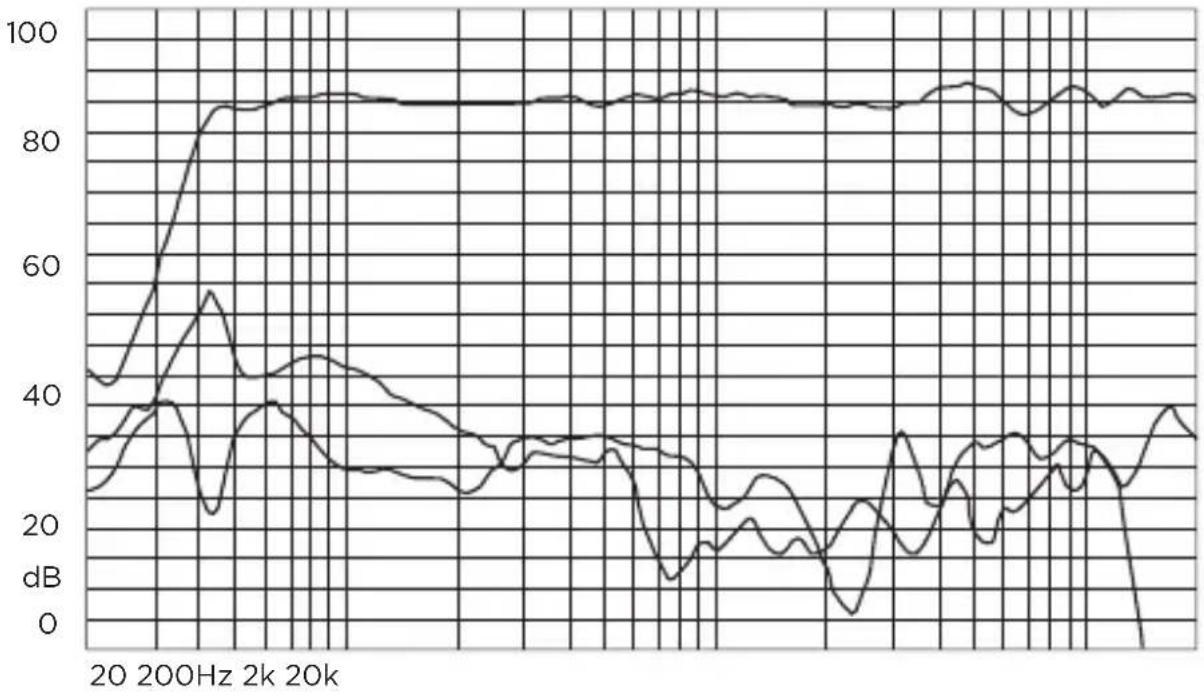
Distortion Curve
Harmonic Distortion: 80mV/1m (Fund, 2H, 3H)
line
| Frequency | Value (dB) | | --------- | ---------- | | 20 | ~40 | | 200Hz | ~85 | | 2k | ~35 | | 20k | ~30 | | 200kHz | ~35 | | 200kHz | ~30 | | 200kHz | ~25 | | 200kHz | ~15 | | 200kHz | ~5 | | 200kHz | ~35 | | 200kHz | ~30 | | 200kHz | ~25 | | 200kHz | ~15 | | 200kHz | ~5 | | 200kHz | ~35 | | 200kHz | ~30 | | 200kHz | >35 | | 200kHz | >30 | | 200kHz | >25 | | 200kHz | >20 | | 200kHz | >15 | | 200kHz | >10 | | 200kHz | >5 | | 200kHz | >3 | | 200kHz | >2 | | 200kHz | >1 | | 200kHz | >0 | | 2k | ~85 | | 2k | ~85 | | 2k | ~85 | | 2k | ~85 | | 2k | ~85 | | 2k | ~85 | | 2k | ~85 | | 2k | ~85 | | 2k | ~85 | | 2k | ~85 |Total Harmonic Distortion: dB and % (THD)

line
| Frequency | Value (dB) | | --------- | ---------- | | 20 | ~0 | | Hz | ~-40 | | 200 | ~-50 | | 2k | ~-65 | | 20k | ~-55 |Troubleshooting
| Problem Reason Solution Comment | |||
| There is no sound coming from the speaker. | The power cable is not connected. | Connect the power cable. | |
| The speaker is turned off. | Turn the speaker on. | ||
| There is a short circuit or the audio source is not connected to the speaker. | Check whether the audio cable has a short circuit or is disconnected from the speaker. If necessary, plug the cable into the speaker. | If the audio cable connector is oxidized, worn out, or corroded, we recommend replacing the connector or the cable. | |
| The volume control is turned down. | Turn up the volume control on the speaker or the audio source. | ||
| There is no sound coming from one of the channels in a multichannel setup. | The balance of the audio source is not set properly. | Adjust the balance of the audio source. | This usually occurs when configuring two or more channels. |
Problem Reason Solution Comment
| The sound is distorted or noisy. | The speaker is not placed correctly or the listening environment is poor. | Place the speaker correctly or improve the listening environment according to the instructions in this manual. | |
| The fine-tune settings on the speaker are not adjusted correctly. | Adjust the fine-tune settings according to the instructions in this manual. | The fine-tune settings can be adjusted to compensate for the listening environment, speaker placement, and audio source. | |
| The audio source has a malfunction or the quality of the audio source is poor. | Check your audio source to determine the cause of the malfunction. | ||
| The connection between the audio cable and the speaker is poor. | Make sure the audio cable is fully plugged into the speaker and the audio source. If necessary, plug the cable into the speaker. | We suggest using one of the included high-quality audio cables or a cable of comparable quality. |
One-Year Limited Warranty
Senal provides a limited warranty to the original purchaser that this product is free from defects in materials and workmanship under normal consumer use for a period of one (1) year from the original purchase date or thirty (30) days after replacement, whichever occurs later. Senal's responsibility with respect to this limited warranty shall be limited solely to repair or replacement, at Senal's discretion, of any product that fails during normal consumer use.
Inoperability of the product or part(s) shall be determined by Senal. If the product has been discontinued, we reserve the right to replace it with a model of equivalent quality and function.
To obtain warranty coverage, contact Senal to obtain a return merchandise authorization (“RMA”) number, and return the defective product to Senal, along with the RMA number and proof of purchase. Shipment of the defective product is at the purchaser’s own risk.
This warranty does not cover damage or defect caused by misuse, neglect, accident, alteration, abuse, improper installation or maintenance. EXCEPT AS PROVIDED HEREIN, SENAL MAKES NEITHER ANY EXPRESS WARRANTIES NOR ANY IMPLIED WARRANTIES, INCLUDING BUT NOT LIMITED TO ANY IMPLIED WARRANTY OF MERCHANTABILITY OR FITNESS FOR A PARTICULAR PURPOSE. This warranty provides you with specific legal rights, and you may also have additional rights that vary from state to state.
© Copyright 2013 Gradus Group
All other trademarks are the property of their respective owners. All photos are for illustrative purposes only.

SENAL™ A Gradus Group Brand
Brand : Senal
Model : ASM-6
Category : Speaker