
i3140 - Computer Case GIGABYTE - Free user manual and instructions
Find the device manual for free i3140 GIGABYTE in PDF.


| Product Type | Computer Case |
| Brand | Gigabyte |
| Model | i3140 |
| Form Factor | Mid-Tower |
| Motherboard Support | ATX, Micro-ATX, Mini-ITX |
| Dimensions (L x W x H) | 450 mm x 210 mm x 480 mm |
| Weight | Approx. 6.0 kg |
| Material | Steel, Plastic, Tempered Glass |
| Power Supply | Not included (supports standard ATX PSU) |
| Drive Bays | 2 x 3.5", 2 x 2.5" |
| Expansion Slots | 7 |
| Fan Support | Front: 3 x 120 mm; Rear: 1 x 120 mm; Top: 2 x 120 mm |
| Radiator Support | Front: 240/280 mm; Rear: 120 mm |
| I/O Ports | USB 3.0 x2, USB 2.0 x2, Audio I/O |
| Maximum GPU Length | Up to 350 mm |
| Maximum CPU Cooler Height | Up to 160 mm |
| Side Panel | Tempered Glass |
| Dust Filters | Front, Top, Bottom |
| Cleaning Instructions | Use a soft, dry cloth. Avoid abrasive cleaners. |
| Safety Precautions | Ensure proper ventilation, avoid blocking fans. Keep away from liquids. |
| Spare Parts | Contact Gigabyte support for replacement fans, filters, or screws. |
| Repair | Opening case voids warranty. Refer to manual for disassembly. |
| General Information | Designed for gaming and high-performance builds. Supports cable management. |
Frequently Asked Questions - i3140 GIGABYTE
User questions about i3140 GIGABYTE
0 question about this device. Answer the ones you know or ask your own.
Ask a new question about this device
Download the instructions for your Computer Case in PDF format for free! Find your manual i3140 - GIGABYTE and take your electronic device back in hand. On this page are published all the documents necessary for the use of your device. i3140 by GIGABYTE.
USER MANUAL i3140 GIGABYTE
Casing's Panel Structure
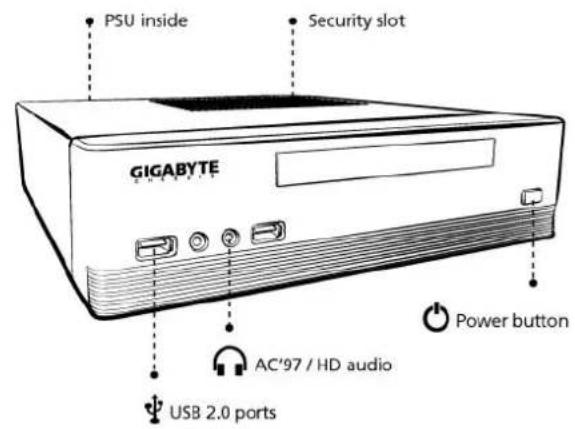

Product is not warranted if the products is modified, altered or repaired without authorization by GIGABYTE. Specifications and pictures are to change without notice.
Casing's Internal Structure

Accessory Box

Installation of Front Multi-Media I/O ports
USB 2.0 ports & AC'97 / HD audio

STEP 1
Remove top cover

natural_image
Diagram of a computer monitor front panel with three arrows pointing to the screen (no text or symbols present)STEP 2
Installation of Motherboard
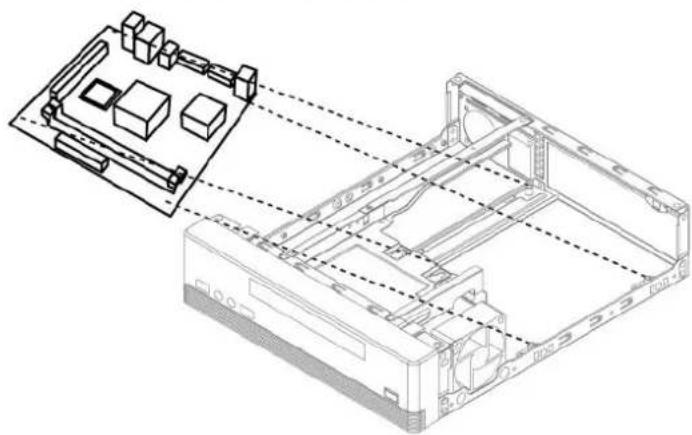
natural_image
Technical line drawing of a computer chassis with internal components and wiring (no text or symbols)STEP 3
Installation of 3.5" HDD & Slim ODD
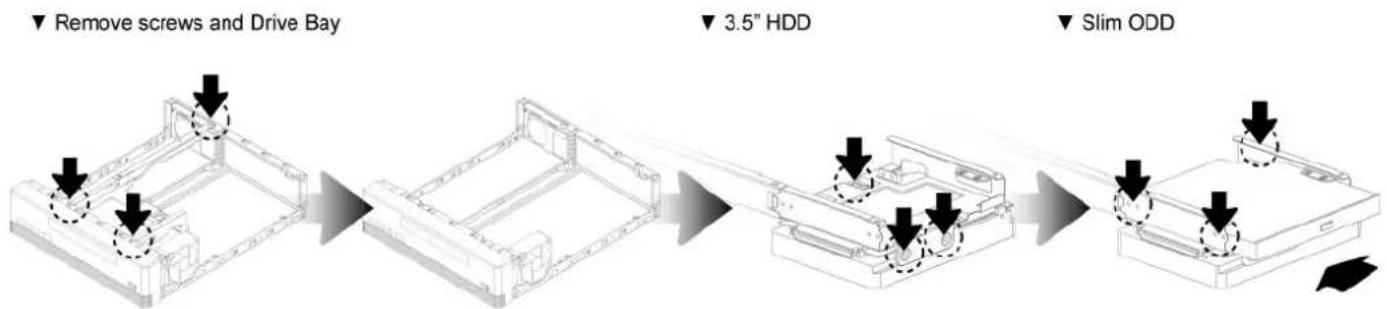
flowchart
graph LR
    A["Remove screws and Drive Bay"] --> B["3.5" HDD"]
    B --> C["Slim ODD"]


Brand : GIGABYTE
Model : i3140
Category : Computer Case