
500556 - Processor MuxLab - Free user manual and instructions
Find the device manual for free 500556 MuxLab in PDF.


| Product Type | Dante 4-Channel Audio DSP (Digital Signal Processor) |
| Brand | MuxLab |
| Model | 500556 |
| Dimensions | 142 x 157 x 46 mm (5.6 x 6.2 x 1.8 in) |
| Power Supply | DC 12V or PoE (IEEE 802.3af) |
| Dante Interface | 2 Ethernet ports (Dante digital audio) |
| Analog Audio I/O | 4 balanced inputs, 4 balanced outputs |
| Phantom Power | 48V DC per input (switchable) |
| Sampling Rate | 48 kHz, 24-bit |
| Frequency Response | 20 Hz – 20 kHz (±0.25 dB) |
| Total Harmonic Distortion | ≤0.005% @ +4 dBu |
| Noise Floor (A-weighted) | -88 dBu |
| Channel Isolation | 100 dB @ 1 kHz |
| System Delay | 1 ms |
| Maximum Input Level | +10 dBu (balanced) |
| Maximum Output Level | +14 dBu (balanced) |
| Input Impedance | 100 Ω |
| Gain Range (analog) | -6 dB to +36 dB (simulated) |
| Control Interface | RS485, TCP/IP (API) |
| DSP Functions | AEC, AFC, ANC, Compressor, Limiter, Graphic EQ, Parametric EQ, Matrix Mixer |
| Software | Windows PC software (download via device web interface) |
| Operating Temperature | 0°C to 50°C |
| Warranty | 2 years |
| Safety & Cleaning | Unplug before cleaning; do not use liquid cleaners; keep away from moisture; refer servicing to qualified personnel. |
| Included Accessories | 2 mounting brackets, 4×6-pin plugs, 2×3-pin plugs, 1 screwdriver, user manual (download) |
Frequently Asked Questions - 500556 MuxLab
User questions about 500556 MuxLab
0 question about this device. Answer the ones you know or ask your own.
Ask a new question about this device
Download the instructions for your Processor in PDF format for free! Find your manual 500556 - MuxLab and take your electronic device back in hand. On this page are published all the documents necessary for the use of your device. 500556 by MuxLab.
USER MANUAL 500556 MuxLab
Dante 4-Channel Audio DSP
User Manual
500556

Table of Contents
- Safety Precautions....3
- Introduction......4
- Features....4
- Package Contents......4
- Specifications....5
- Hardware Interface....5
6.1 Front Panel....5
6.2 Rear Panel....6 - Software Interface....6
7.1 Software Download....6
7.2 Connecting to the Unit....7
7.3 Settings....8
7.4 Pre-Pocessing....8
7.4.1 Input Settings....8
7.4.2 Parametric Equalizer....9
7.4.3 Compressor....10
7.4.4 AFC/AEC/ANS....11
7.5 Matrix Mixing....13
7.6 Post-Processing....13
7.6.1 Graphic Equalizer....13
7.6.2 Limiter....14
7.7 Output Settings....14 - Application Diagram....15
1. Safety Precautions
To ensure the best performance from the product, please read all instructions carefully before using the device. Save this manual for future reference.
- Follow basic safety precautions to reduce the risk of fire, electrical shock, and injury.
- Do not dismantle the housing or modify the module. It may result in electrical shock or burns.
- Do not open or remove the housing of the device as you may be exposed to dangerous voltage or other hazards.
- To prevent fire or shock hazard, do not expose the unit to rain, moisture and do not install this product near water. Keep the product away from liquids.
- Spillage into the housing may result in fire, electrical shock, or equipment damage. If an object or liquid falls or spills on the housing, unplug the module immediately.
- Do not use liquid or aerosol cleaners to clean this unit. Always unplug the power to the device before cleaning.
- Using supplies or parts not meeting the product specifications may cause damage, deterioration or malfunction.
• Refer all servicing to qualified service personnel.
• Install the device in a place with adequate ventilation to avoid damage caused by overheat. - Unplug the power when left unused for a long period of time.
- Information on disposal of devices: do not burn or mix with general household waste, please treat them as normal electrical waste.
Copyright Notice
All contents in this manual are copyrighted, and cannot be cloned, copied, or translated without the express permission of MuxLab Inc. Product specifications and information in this document are for reference only, and the content may be updated from time to time without prior notice.
2. Introduction
The Dante 4-Channel Audio DSP (Model 500556) is a product developed for the transmission, routing, and processing of audio signals in Dante networks. It can perform high-quality, low-delay audio transmission, supports 4-way input and output balanced analog channels, and can be powered via PoE from any PoE network switch or via a 12V DC power supply. This processor supports 4-way analog audio signal balance input and output, 4-way Dante digital audio signal input of 2 Dante devices, and the 4-way Dante digital audio signal output. The device has one of the best DSP algorithms in the industry that includes options such as AEC, AFC, ANC, Compressor, Limiter, Mixer and Graphic Equalization among others; In addition, the product provides PC version control software to monitor and operate all the functions on the DSP in an easy and intuitive way.
3. Features
• Built-in Dante module
• Supports PoE power from PoE network switches or via a 12V DC power supply
- Features 4 balanced inputs and 4 balanced outputs
- The input supports 48VDC phantom power supply
- DSP processing functions include gain adjustment, stage parameter equalization, compressor, mixer, graphic equalization, limiter, setting, etc
- Provides software for the Windows platform to manage all audio operations
• API provided for RS485 and TCP/IP control
4. Package Contents
• One (1) Dante 4-Channel Audio DSP
- Two (2) Cabinet mounting bracket
• Four (4) 6 pin connection plug
- Two (2) 3 pin connection plug
• One (1) Screwdriver
• One (1) User manual (available via download)
Notes: Confirm that the product and accessories are all included. If not, please contact the supplier from which you purchased the unit.
5. Specifications
| Specification | |
| Dante Interface | 4 |
| Simulated maximum gain | -6~36dB |
| Digitalizing bit | 24bit |
| Sampling Rate | 48kHz 24bit |
| Frequency Response | 20~20KHz (±0.25dB) |
| Phantom power (per input) | 48V |
| Maximum level (input/output) | +10dBu /+14dBu , balance |
| Total harmonic distortion | ≤0.005% @4dBu |
| Noise floor (A- weight) | -88dBu |
| Input impedance | 100Ω |
| System delay | 1ms |
| Channel isolation @1kHz | 100dB |
| Working Power Supply | DC 12V & PoE |
| Working Temperature | 0-50°C |
| Dimensions 142 X 157 X 46mm | |
| Warranty | 2 years |
| Order Information | 500556 Dante 4-Channel Audio DSP (UPC: 627699005569) |
6. Hardware Interface
6.1 Front Panel

- LED display: Indicates the current IP address information of the device.
- Channel indicator: Indicates In/Out when the channel has a signal flowing through.
- Power indicator light: Indicates device is powered on.
- System indicator light: When the device is running normally, the indicator light is flashing
6.2 Rear Panel

- 12VDC Power interface (optional, when PoE not present)
- Dante PoE network interface: Two network port interfaces, for Dante digital signal transmission or can connect to Dante Controller control software.
- Input signal interface: 4 x Input Analog Audio signals
- Output signal interface: 4 x Output Analog Audio signals
- RS485 interface: used for control.
7 Software Interface
7.1 Software Download
The source file of the installation software is embedded in the device. To download the software, you only need to enter the factory default IP address (default IP: 192.168.1.200 Subnet Mask: 255.255.255.0) in the browser url address bar, and press Enter to navigate to the download interface. According to the content information of the web interface. Just click to download the software, and please note that before installing the PC software, please ensure that the PC client has installed Microsoft .Net Framework3.5 or above.
Note: Make sure the IP address of the client PC and the device are on the same network segment; otherwise it will not be accessible.

Install the "Dante 4-Channel DSP" software you just downloaded so you can control all the DSP options.
7.2 Connecting to the unit
Main Interface
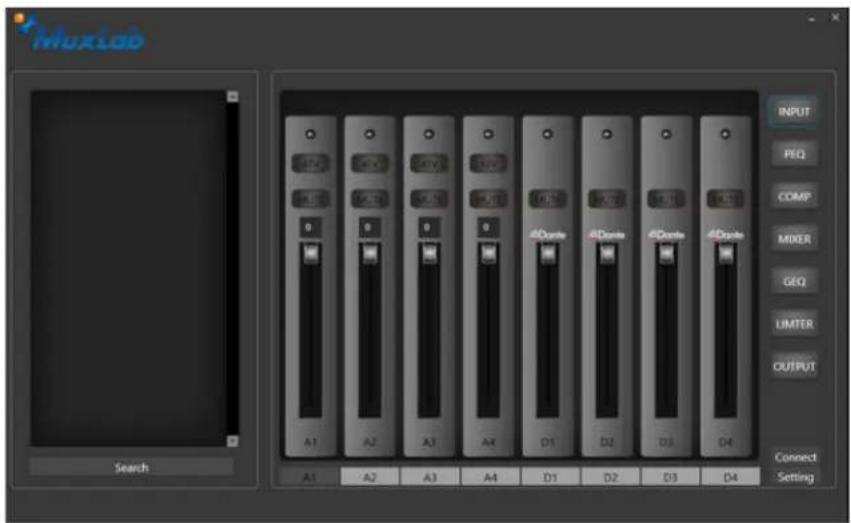
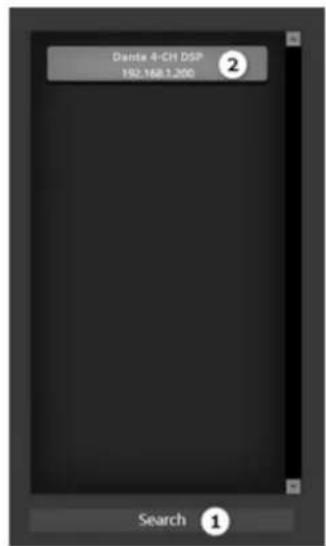


Steps:
- From the main interface, click search (1) to discover DSP units on the network.
- Double-click the device name in the device list, the Sign In login window will pop up.
- Enter the user name and password: (default user name: admin, password: 123456) click the [OK] button to enter.
- If you need to modify the device IP address information, right-click Device name, and the Setting window will pop up, and you can change it according to the requirements of the use environment.
7.3 Settings
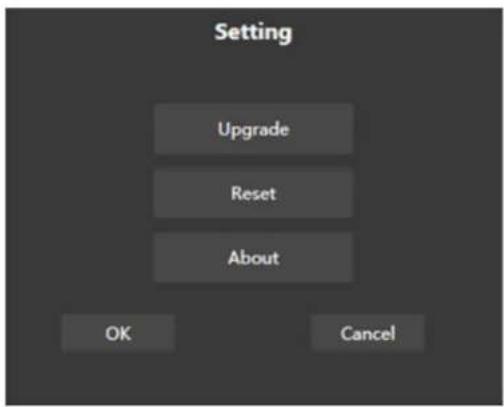
From the main interface, click Setting:
Upgrade: for the device firmware upgrade if necessary.
Reset: to restore the factory default parameter state.
About: to view device serial number information
7.4 Pre-Processing
7.4.1 Input Settings

- 48V: Turn on or off the 48V phantom power supply of the analog channel,
- Mute: mute button.
- Channel fader: the channel gain value range (0\~-72dBFS), can be controlled by the fader.
7.4.2 Parametric Equalizer
Parametric equalizers are digital filters used in audio for adjusting the frequency content of a sound signal. Parametric equalizers provide capabilities beyond those of graphic equalizers by allowing the adjustment of gain, center frequency, and bandwidth of each filter.

Equalizer type: 5-terminal parametric equalizer
Passthrough/Enable: enable/disable the equalizer;
Band Pass/Enable: Enable/disable the equalizer for the current band
Reset: restore the current parameters to the default state
Center frequency: the center frequency that needs to be equalized
Gain: the gain/attenuation value of the frequency center point
Bandwidth: That is, the range of influence of the segment around the center frequency, the larger the value, the greater the bandwidth and the greater the range of influence.
7.4.3 Compressor
Compressors are used to reduce the dynamic range of signals above a user-determined threshold, the signal levels below the threshold remain unchanged.
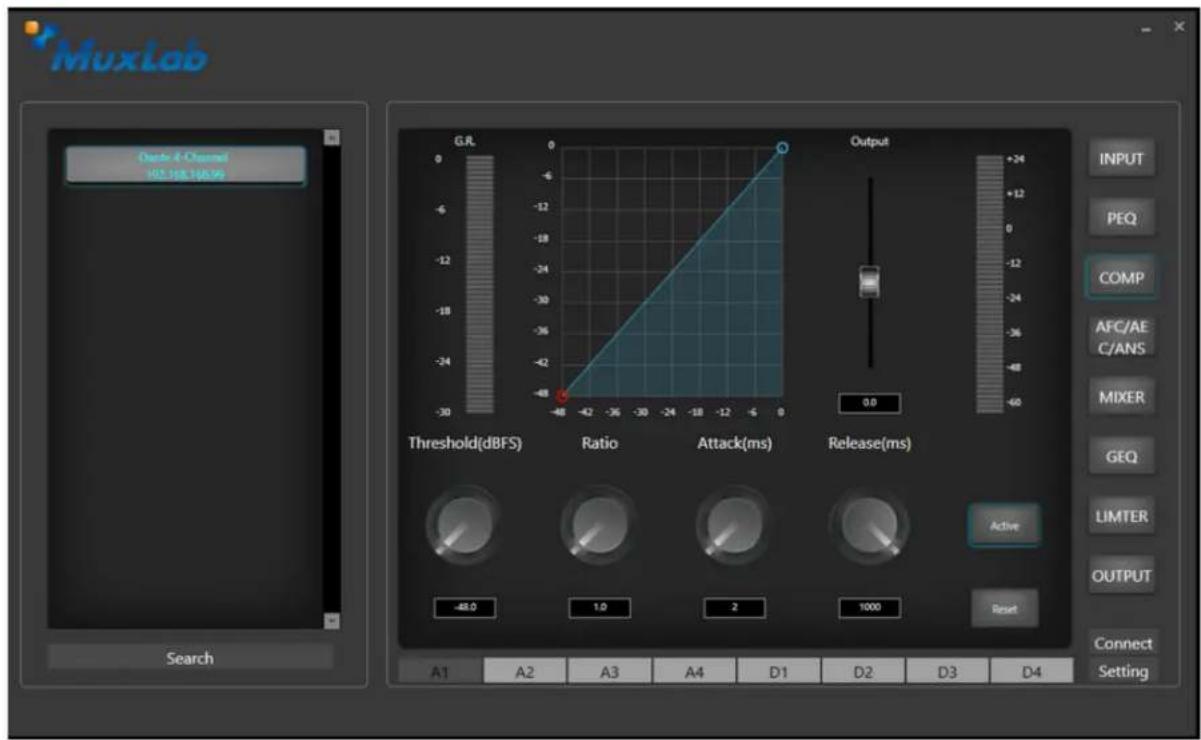
Threshold: Threshold of the compressor.
Ratio: The input and output compression ratio of the compressor.
Attack Time: The start time of the compressor.
Recovery Time: The recovery time of the compressor.
Reset: reset to default parameters
Enable: Compressor enable indicator or control

Acoustic Feedback Cancellation (AFC)
- Multi-point filtering and multi sub-band frequency shifting keep the harmonic property of the original pitch period without causing sound distortion.
- Through acoustic modeling of room feedback path, the acoustic feedback can be eliminated adaptively.
- It can quickly track the feedback path changes and greatly enhance the ability to suppress the noise. The microphone transmission gain can be increased by 6-18db, greatly enhancing the microphone gain, suitable for various large, medium and small meeting rooms.
Audio Echo Cancellation(AEC)
• Using sub-band algorithm, it has less MIPS consumption.
- The length of echo path can be set, the maximum echo off tail can be supported up to 512ms, suitable for all kinds of large, medium, and small meeting rooms.
- Using the stable Double Talk detection method, it is effective even in the environment of strong background noise and nonlinear distortion, and the residual echo will not increase during the simultaneous speech of both sides.
• Strong robustness, can work in all possible applications and environments.
- The embedded noise suppression algorithm can eliminate the additional noise in the noise environment.
- The variable step size and post-processing algorithm greatly improve the rate of convergence and the echo rejection ratio (ERLE) of the nonlinear distortion of the terminal speaker.
Acoustic Noise Suppression (ANS)
- It is a noise suppression technique to deal with noisy speech signals.
- It decompositions the input signal into a series of frequency sub-bands, estimates the environmental noise and signal level in each sub-band, and then attenuates the sub-band signal according to the real-time SNR. The output signal is synthesized by smoothing and post-processing of these processed sub-band signals.
- Because of the unique post-processing algorithm, the noise suppression algorithm can track the environmental noise changes quickly and accurately while maintaining good output sound quality. Noise suppression reaches -30db, speech is almost completely distortion free.
7.5 Matrix Mixing
Controls the mixing logic.

Columns: Input Channels
Row: Output Channels
7.6 Post Processing
7.6.1 Graphic Equalizer

The gain of 31 frequency points can be adjusted individually, to achieve the purpose of strengthening or weakening certain frequency points and achieve different effects.
Bypass/Enable: Enables and disables the equalizer.
Gain: Gain/attenuation at the frequency center point.
Flat: restore the gain of all frequency bands to 0dB.
Narrowband: A type of bandwidth that is lower than normal bandwidth.
Common: Commonly used ordinary bandwidth.
Broadband: the widest
7.6.2 Limiter

Thru/Enable: Enables or disables the limiter.
Threshold: The initial level of the limiter. When the signal is higher than this limit value, the limiter processing module is started.
Recovery time: When the input signal is lower than this setting value, the sound channel will not be turned off immediately, but the closing time will be delayed according to this setting value. During this time, as long as there is a signal above the "threshold" limit value, the sound channel can be continuously opened.
Compression: The difference between the signal processed by the limiter and the input signal.
7.7 Output Settings
You can and set the mute inversion of the output terminal and the output audio gain

- Application Diagram

flowchart
graph TD
    A["CD Player"] -->|500556| B["Switch"]
    C["Mic"] -->|500817| D["Powered Speakers"]
    E["Switch"] -->|4 In 4 Out Dante| F["Power Amplifier with Speakers"]
    F --> G["Mux-DSP Configurator"]
    G --> H["Laptop"]
    style A fill:#f9f,stroke:#333
    style C fill:#f9f,stroke:#333
    style E fill:#f9f,stroke:#333
    style F fill:#ccf,stroke:#333
    style G fill:#cff,stroke:#333
    style H fill:#ffc,stroke:#333

- Dante 4-Channel Audio DSP
- User Manual
- 500556
- Table of Contents
- Safety Precautions
- Copyright Notice
- Introduction
- Features
- Package Contents
- Specifications
- Hardware Interface
- Front Panel
- Rear Panel
- Software Interface
- Software Download
- Connecting to the unit
- Main Interface
- Steps:
- Settings
- Pre-Processing
- Input Settings
- Parametric Equalizer
- Compressor
- Acoustic Feedback Cancellation (AFC)
- Audio Echo Cancellation(AEC)
- Acoustic Noise Suppression (ANS)
- Matrix Mixing
- Post Processing
- Graphic Equalizer
- Limiter
- Output Settings
Brand : MuxLab
Model : 500556
Category : Processor