GO Biking - Mp3 player Zipy - Free user manual and instructions
Find the device manual for free GO Biking Zipy in PDF.


| Product Type | MP3 Player |
| Brand | Zipy |
| Model | GO Biking |
| Dimensions (approx.) | 4.5 x 2.5 x 0.8 cm |
| Weight | 30 g including clip |
| Power Source | Rechargeable lithium-ion battery, 3.7V, 150 mAh |
| Charging | USB 2.0 via micro-USB port |
| Storage Capacity | 8 GB internal (expandable via microSD up to 32 GB) |
| Supported Audio Formats | MP3, WMA, WAV, FLAC, OGG |
| Playback Features | Play, pause, skip, shuffle, repeat, equalizer presets |
| Display | 1.44-inch TFT color screen (128x128 pixels) |
| Water Resistance | IPX4 (splash-proof suitable for cycling) |
| Controls | Physical buttons: power/play, volume, forward, back, menu |
| Connectivity | USB mass storage, 3.5 mm headphone jack |
| Clip | Integrated bicycle mount clip on back |
| Battery Life | Up to 12 hours of continuous playback |
| Maintenance | Clean with dry soft cloth, avoid moisture and extreme temperatures |
| Safety | Do not disassemble; use only supplied charger; keep away from water and heat sources |
| Spare Parts | Battery, clip, USB cable available from Zipy service |
| Repairability | Battery and clip user-replaceable; other repairs by authorized service |
Frequently Asked Questions - GO Biking Zipy
User questions about GO Biking Zipy
0 question about this device. Answer the ones you know or ask your own.
Ask a new question about this device
Download the instructions for your Mp3 player in PDF format for free! Find your manual GO Biking - Zipy and take your electronic device back in hand. On this page are published all the documents necessary for the use of your device. GO Biking by Zipy.
USER MANUAL GO Biking Zipy
music, fitness, health, emotion, sport, swimming, adventure
go! with you
www.gowithyou-Zipy.com
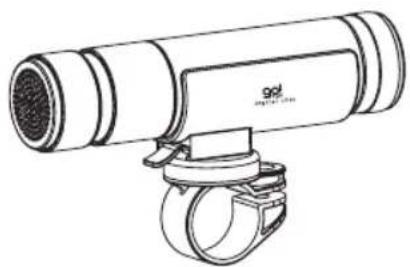
natural_image
Line drawing of a cylindrical mechanical device with attached clamping ring (no text or symbols)go! BIKING
www.gowithyou-Zipy.com
Welcome to the world of go! where style and personal audio pleasure intertwine!
go! would like to thank you for purchasing our unique, high-perfor mance product and hope that it will bring you hours of enjoyment.
Please read carefully the following instructions before use.
Box contents
- Bikeman GO BIKING MP3 player
- LED flashlight set
- Bicycle mounting kit (MP3 holder, bicycle handlebar bracket)
- USB charger cable
- Protective rubber cap
- User manual
Product diagram
a. LED flashlight
b. USB 2.0 port
c. 3.5 mm earphone jack
d. Loudspeaker
e. MP3 player ControlRing
f. MP3 holder
g. Bicycle handlebar bracket
h. MP3 holder release lever

MANUAL DEL USUARIO
GO! BIKING
OPERATIONAL INSTRUCTIONS
Mounting Bikeman GO BIKING to your bicycle
- Clip on bicycle handlebar bracket and turn screw until tightly secure.
- Slide Bikeman GO BIKING into MP3 holder.
- Slide MP3 holder onto bicycle handlebar bracket until it clicks into place.
- Adjust angle of flashlight by turning MP3 holder as required.
- To remove, press MP3 holder release lever and slide forward to detach from the bicycle handlebar bracket.
Charging your GO BIKING
- If protective rubber cap is attached, pull to remove.
- Is aligned with installed, twist flashlight until ↓ and remove.
- Insert the mini side of USB charger cable into the USB 2.0 port of the connection panel.
- Insert the normal side of USB charger cable into the USB port of your PC.
- On first use, please charge the GO BIKING for minimum of 30 minutes before use.
- Battery capacity is 2,000mAh and can be fully charged in 5-6 hours via the USB charger or 4-5 hours via the optional DC power adaptor (user can shop locally).
- When GO BIKING is fully charged, the LED light will turn off, and then disconnect the USB charger cable.
Upload music to your GO BIKING
- If protective rubber cap is attached, pull to remove.
- Is aligned with installed, twist flashlight until ↓ and remove.
- Insert the mini side of USB charger cable into the USB 2.0 port of the connection panel.
- Insert the normal side of USB charger cable into the USB port of

your PC.
- Copy MP3/WMA format files to go! MP3 player.
- Disconnect the USB cable.
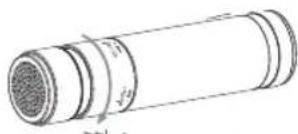
MP3 ControlRing operation
- Play: Pull control ring in the direction indicated by the arrow.

natural_image
Technical line drawing of a cylindrical mechanical component with internal grooves and a central bore (no text or symbols)- Stop: Pull control ring in the direction of the arrow and hold for 3 seconds.

- Volume: To increase volume, twist and hold control ring in the direction of the vol - sign. To decrease volume, twist and hold control ring in the direction of the vol - sign.

- Signsong: Twist control ring in the direction of the
MANUAL DEL USUARIO
GO! BIKING
natural_image
Technical line drawing of a cylindrical mechanical component with internal channels and a central gap (no text or symbols)- Psignous song: Twist control ring in the direction of the •

Installing flashlight set
- Remove flashlight set from packaging.
- Amark with theghmark on the GO BITING module and twist until the ↑ mark is aligned with the× mark.
Flashlight controls
- Is aligned with ligand remove.
- Flasaligned with twist flashlight until the
- Fis-aligned with twist flashlight until the *
- Flashighed withmittent: Twist flashlight until
RECOMMENDED APPLICATIONS
- Whether hiking, camping or engaging in any other outdoor activities, the GO BIKING can be easily removed using the quick release lever and used for entertainment – music via loudspeaker, handheld torch – to light your path or emergency light – to keep you safe.
- In the home, the MP3 holder serves as a desktop dock for in-home tunes.
- With your outdoor lifestyle, weather is never predictable there fore the GO BIKING has been designed to be splash-proof (rated IPx4) and may be used in the rain.

MANUAL DEL USUARIO
GO! BIKING
DECLARATION OF CONFORMITY
ACCESORIOS INTELIGENTES DIGITAL S.A. 6 CARPINTEROS, OF-13 VILLAVICIOSA DE ODON. 28670 MADRID
We hereby declare, under our exclusive responsibility, our conformity with the product:
Waterproof MP3 - GO BIKING-2GB by ZIPY
To which this declaration refers with the following directives:
EN55022:2006
EN55024:1998+A1:2001+A2:2003
In compliance with the resolutions of the Directive 99/05/CE, of the European Parliament and the March 9 ^th 1999 Council, included in the Spanish law system by El Real Decreto 1890/2000, November 20 ^th .
Issue location and date Signed by: Miguel Fauro 24 Abril 2008


MANUAL DEL USUARIO
GO! BIKING
natural_image
Technical line drawing of a cylindrical mechanical component with internal channels and a central hub (no text or symbols)natural_image
Diagram of a cylindrical object with internal layered structure and an arrow indicating direction (no text or symbols)
MANUAL DEL USUARIO
GO! BIKING
natural_image
Technical line drawing of a cylindrical mechanical component with internal channels and a textured outer layer (no text or symbols)- Box contents
- Product diagram
- OPERATIONAL INSTRUCTIONS
- Mounting Bikeman GO BIKING to your bicycle
- Charging your GO BIKING
- Upload music to your GO BIKING
- MP3 ControlRing operation
- Installing flashlight set
- Flashlight controls
- RECOMMENDED APPLICATIONS
- DECLARATION OF CONFORMITY
- Waterproof MP3 - GO BIKING-2GB by ZIPY
Brand : Zipy
Model : GO Biking
Category : Mp3 player