
BT8385-RTC - Mounting bracket B-Tech - Free user manual and instructions
Find the device manual for free BT8385-RTC B-Tech in PDF.


| Product Type | Rail-to-Column Mounting Bracket |
| Compatible Column | BT8385 Column (not included) |
| Material | Steel (typical for AV mounts) |
| Dimensions | Approx. 120mm x 50mm x 25mm (estimated from images) |
| Weight | Approx. 0.4 kg (estimated from hardware) |
| Fasteners Included | 4 x M6x40mm CSK Hex Screws, 4 x Rectangle Nuts, 4 x M8 Sliding Inserts, 4 x M8x12mm Screws, 2 Hex Keys (4mm and 5mm) |
| Installation | Attach bracket to column slots, then hook rail onto bracket using sliding inserts and screws |
| Maximum Load Capacity | Not specified; ensure equipment weight does not exceed column rating |
| Safety Features | Installation by qualified professional recommended; periodic inspection advised |
| Indoor Use Only | Yes |
| Warranty | Void if improperly installed or overloaded |
| Spare Parts Availability | Parts listed in manual; contact B-Tech or authorized dealers |
| Repairability | Replaceable fasteners and inserts; bracket itself not user-serviceable |
| Maintenance | Inspect periodically for tightness and wear; clean with dry cloth |
| Manufacturer | B-Tech International Design & Manufacturing Ltd. |
| Country of Origin | Made in Vietnam |
Frequently Asked Questions - BT8385-RTC B-Tech
User questions about BT8385-RTC B-Tech
0 question about this device. Answer the ones you know or ask your own.
Ask a new question about this device
Download the instructions for your Mounting bracket in PDF format for free! Find your manual BT8385-RTC - B-Tech and take your electronic device back in hand. On this page are published all the documents necessary for the use of your device. BT8385-RTC by B-Tech.
USER MANUAL BT8385-RTC B-Tech
RAIL-TO-COLUMN MOUNTING BRACKET
USE WITH A BT8385 COLUMN
PARTS LIST

| ITEM | DESCRIPTION | QTY |
| 1 | RAIL-TO-COLUMN MOUNTING BRACKET | 1 |
| 2 | M6 x 40mm CSK HEX SCREW | 4 |
| 3 | RECTANGLE NUT | 4 |
| 4 | M8 SLIDING INSERT | 4 |
| 5 | M8 x 12mm SCREW | 4 |
| 6 | 4AF x L55mm HEX KEY | 1 |
| 7 | 5AF x L120mm HEX KEY | 1 |
INSTALLATION SAFETY INSTRUCTIONS

CAUTION: This product is intended for use only with the maximum weights indicated. Use with equipment heavier than the maximum indicated may result in instability causing possible injury.
B-Tech AV Mounts, it's distributors and dealers are not responsible for damage or injury caused by improper installation, improper use, modifications, installations over the specified weight capacity and/or failure to observe these safety instructions. In such cases, any warranty will expire.
It is recommended that this product should only be installed by a qualified professional / installer.
B-Tech AV Mounts does not claim any liability for any difficulties that may arise from the interpretation contained in these instructions. Failure to mount this product correctly may lead to serious injury and/or death.
Please check carefully to make sure there are no missing or defective parts - defective parts must never be used. In the event of missing and/or defective parts, or technical questions, please contact an authorised dealer.
Pay careful attention to where this product is located, some locations are not suitable for installation. For indoor use only. It is recommended that periodic inspections of the product are made as frequently as possible to ensure that safety is maintained.
Please keep these instructions for future reference.
INSTALLATION INSTRUCTIONS
1 ATTACH MOUNTING BRACKET TO COLUMN
i. Insert 4 x item 2 into item 1 and attach item 3. Screw two full turns to leave item 3 at the end of item 2.


ii. Slide item 1 down the front slots of the column to the correct height and tighten items 2.

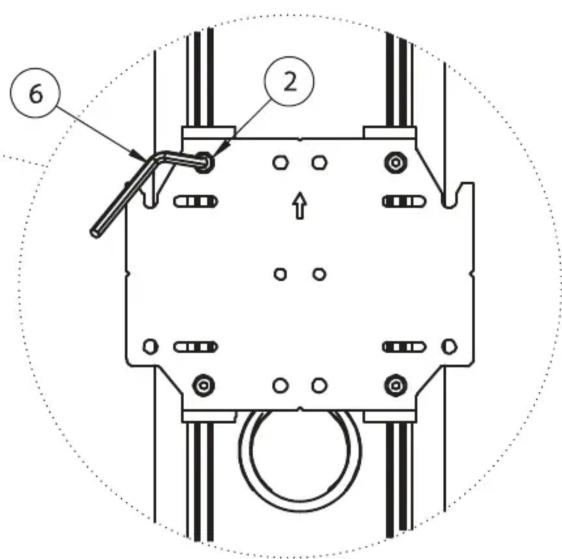
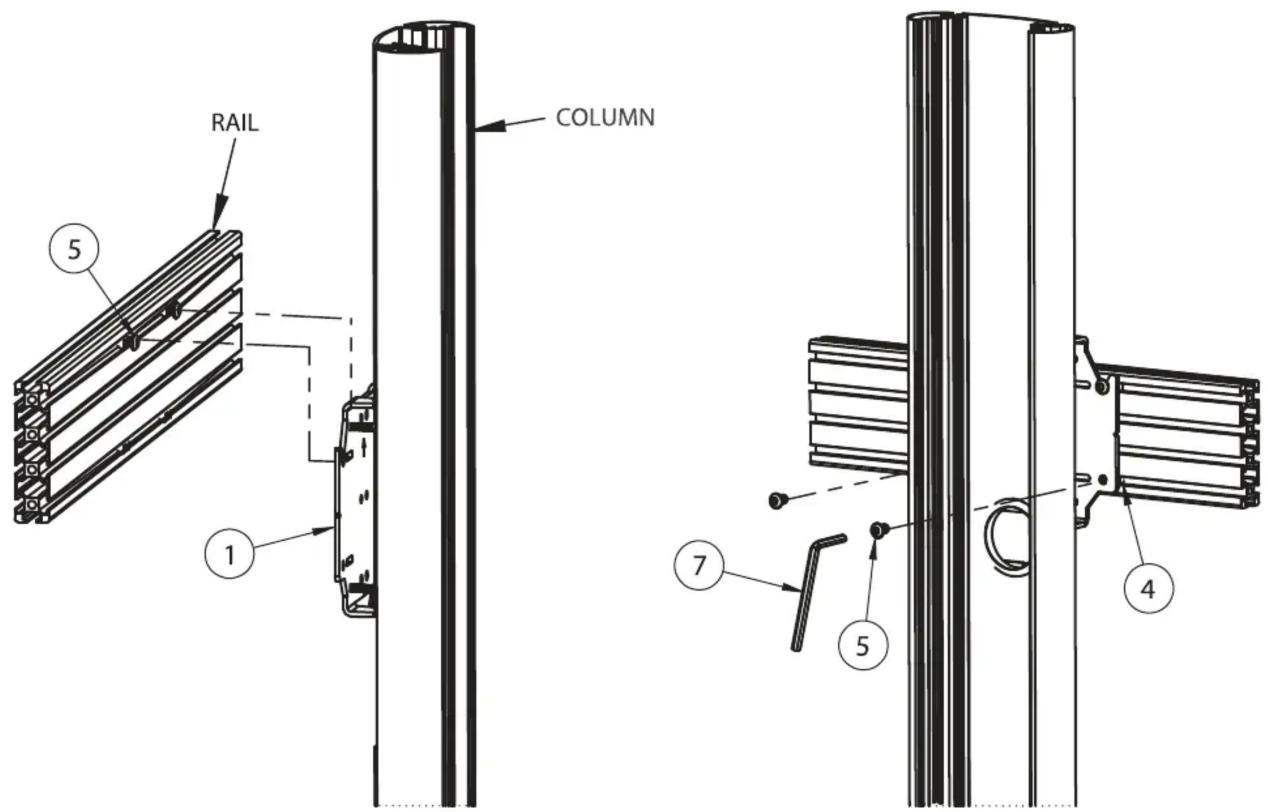
2. HOOK RAIL ONTO MOUNTING BRACKET
i. Insert 4 x item 4 into the rail (2 in the top channel, 2 in the bottom channel).
ii. Screw 2 x item 5 into item 4 in the top channel - allow at least a 6mm gap so the rail can be hooked on to item 1.
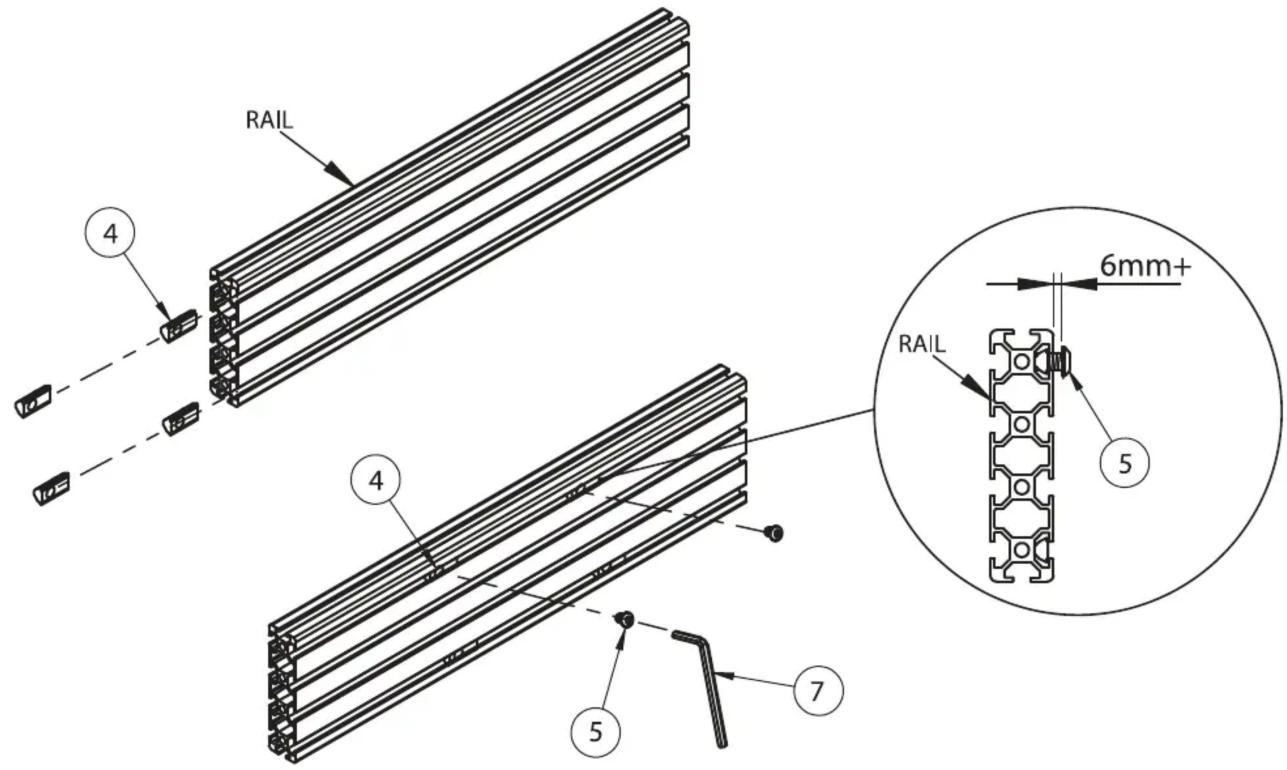
iii. Hook rail onto item 1 and fix with in place with item 5.
BT8385-RTC
RAIL-TO-COLUMN MOUNTING BRACKET
PRODUCT DIMENSIONS
FRONT VIEW

SIDE VIEW

natural_image
Pure diagram of a vertical pipe or tube with no text, numbers, or symbolsBOTTOM VIEW

CONTACT:
info@btechavmounts.com
©2019 B-Tech International Design & Manufacturing Ltd. All rights reserved.
B-Tech AV Mounts is a division of B-Tech International Design & Manufacturing Ltd.
B-Tech AV Mounts, the B-Tech logo and Mode-AL are registered trade marks.
All other brands and product names are trademarks of their respective owners.
Photographs are for illustrative purposes only. E&OE.
AMA-BT8385-RTC-V1-1119-110 MADE IN VIETNAM

Brand : B-Tech
Model : BT8385-RTC
Category : Mounting bracket