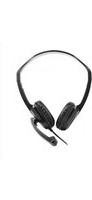
HS-400 - Headphones Vorago - Free user manual and instructions
Find the device manual for free HS-400 Vorago in PDF.


Pick your language and provide your email: we'll send you a specifically translated version.
| Product Type | Over-Ear Headset with Microphone |
| Brand | Vorago |
| Model | HS-400 |
| Connectivity | Wired (USB-A) |
| Driver Size | 40 mm |
| Frequency Response | 20 Hz – 20 kHz |
| Impedance | 32 Ω |
| Microphone | Built-in omnidirectional microphone |
| Controls | In-line volume control and mute button |
| Cable Length | 2.0 m |
| Weight | 150 g |
| Compatibility | PC, laptop, and devices with USB port |
| Noise Isolation | Passive noise isolation |
| Main Functions | Voice calls, video conferencing, music listening |
| Care and Cleaning | Wipe with a soft, dry cloth. Do not use liquids or solvents. |
| Safety | Avoid exposure to moisture and extreme temperatures. Keep away from small children. |
| Spare Parts and Repairability | Contact Vorago support for spare parts. Not user-serviceable internally. |
| General Information | Designed for comfortable long-term wear during conferences. |
Frequently Asked Questions - HS-400 Vorago
How do I connect the HS-400 headset to my computer?
Plug the USB connector into an available USB port on your computer. The headset should be automatically recognized by the operating system. If not, check your sound settings and select the Vorago HS-400 as the default audio device.
Does the headset work with smartphones?
The HS-400 uses a USB-A connector, which is typically found on computers and some tablets. It may not work with most smartphones unless you use an OTG adapter and the smartphone supports USB audio.
How do I adjust the volume and mute the microphone?
The headset features an in-line control module with a volume wheel and a mute button. Rotate the wheel to adjust volume; press the button to toggle mute. A small LED may indicate mute status.
Can I use the headset without the microphone?
The microphone is built-in and not detachable. However, you can mute it using the in-line control if you do not want to transmit audio.
How do I clean the Vorago HS-400?
Use a soft, dry cloth to wipe the earpads, headband, and other surfaces. For stubborn dirt, slightly dampen the cloth with water. Do not use alcohol, solvents, or abrasive cleaners.
What should I do if there is no sound from the headset?
First, check the USB connection. Then, ensure the headset is selected as the default playback device in your system sound settings. Also, check that the volume is not muted or turned down.
Are the earpads replaceable?
The earpads are not designed to be user-replaceable. If they become worn, contact Vorago customer support for possible repair or replacement options.
Is the headset compatible with PlayStation or Xbox?
The HS-400 is primarily designed for PC and may work with some consoles that support USB audio. Check your console's specifications. It likely does not support Xbox due to proprietary standards.
What is the warranty period for the Vorago HS-400?
Vorago typically offers a 1-year limited warranty against manufacturing defects. Please refer to the warranty card included in the package or contact Vorago support for details.
Can I use the headset with a Mac?
Yes, the Vorago HS-400 is compatible with Mac computers that have a USB-A port or with an adapter for USB-C. It should be recognized as a USB audio device without additional drivers.
User questions about HS-400 Vorago
0 question about this device. Answer the ones you know or ask your own.
Ask a new question about this device
No questions yet. Be the first to ask one.
Download the instructions for your Headphones in PDF format for free! Find your manual HS-400 - Vorago and take your electronic device back in hand. On this page are published all the documents necessary for the use of your device. HS-400 by Vorago.
USER MANUAL HS-400 Vorago
natural_image
Line drawing of a mechanical device with a lever and handle, no text or symbols presentCONFERENCIAS CON GRAN
COMODIDAD
HS-400 | DIADEMA


natural_image
Close-up of a black Vorago-branded electronic device with a blue accent (no visible text or symbols on the device body)natural_image
Close-up of a black USB device with connected cable and indicator lights (no visible text or symbols)
natural_image
Close-up of black headphones with earbuds and adjustable armrests (no text or symbols visible)natural_image
Black hardcover head with earplush and microphone, isolated on white background (no text or symbols)
natural_image
Black Vorago headset with headband and microphone, no visible text or symbols on the device itself
Table of contents
Click a title to access it
Manual assistant
Powered by Anthropic
Waiting for your message
Product information
Brand : Vorago
Model : HS-400
Category : Headphones