
GLEF384HB - Frying Pan FRIGIDAIRE - Free user manual and instructions
Find the device manual for free GLEF384HB FRIGIDAIRE in PDF.


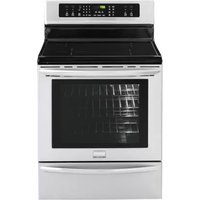
| Product Type | Freestanding Electric Range |
| Brand | Frigidaire |
| Model | GLEF384HB |
| Width | 30 inches (76.2 cm) |
| Depth | 27 inches (68.6 cm) |
| Height | 47 inches (119.4 cm) |
| Weight | Approximately 180 lbs (82 kg) |
| Power Supply | 240V / 40A / 60Hz |
| Cooktop Type | 4 Coil Burners |
| Oven Capacity | 5.0 cubic feet (141.6 L) |
| Oven Features | Self-Cleaning, Bake, Broil, Convection |
| Storage Drawer | Yes, for pots and pans |
| Control Type | Knobs and Digital Display |
| Timer | Yes, with delay start |
| Cleaning | Self-Cleaning oven cycle |
| Safety Features | Child lock, auto shut-off, indicator lights |
| Spare Parts | Available through Frigidaire or authorized dealers |
| Repairability | Modular design, user-replaceable burners and oven elements |
| Manual Format | PDF, 20 pages, English |
Frequently Asked Questions - GLEF384HB FRIGIDAIRE
User questions about GLEF384HB FRIGIDAIRE
0 question about this device. Answer the ones you know or ask your own.
Ask a new question about this device
Download the instructions for your Frying Pan in PDF format for free! Find your manual GLEF384HB - FRIGIDAIRE and take your electronic device back in hand. On this page are published all the documents necessary for the use of your device. GLEF384HB by FRIGIDAIRE.
USER MANUAL GLEF384HB FRIGIDAIRE
ES340 Control, Self-Cleaning Oven with Ceramic Cooktop

natural_image
Illustration of a standard white oven with control knobs and a front panel (no text or symbols)Questions? 1-800-944-9044 (United States) 1-800-668-4606 (Canada)
Visit the Frigidaire Web Site at: http://www.frigidaire.com
Welcome....2
Important Safety Instructions .....3-4
Features at a Glance ....5
Before Setting Oven Controls ....6-7
Setting Surface Controls ....8-9
Oven Control Functions .....10
Setting Oven Controls...... 10-13
Self Cleaning (Speed Clean) .. 14-15
Adjusting Oven Temperature.....15
General Care & Cleaning ..... 16-18
Before You Call
Solutions to Common Problems.... 19
Warranty ...... Back Page


Welcome & Congratulations

natural_image
Illustration of a standard oven with a close-up view showing the lid and base panel (no text or symbols)Serial plate location;
Open storage drawer (some models) or remove outer lower panel (some models).

Congratulations on your purchase of a new range! At Electrolux Home Products, we are very proud of our product and are completely committed to providing you with the best service possible. Your satisfaction is our number one priority.
We know you'll enjoy your new range and Thank You for choosing our product. We hope you consider us for future purchases.
PLEASE CAREFULLY READ AND SAVE THESE INSTRUCTIONS
This Use & Care Manual provides specific operating instructions for your model. Use your range only as instructed in this manual. These instructions are not meant to cover every possible condition and situation that may occur. Common sense and caution must be practiced when installing, operating and maintaining any appliance.
Please record your model and serial numbers below for future reference.
Model Number: ____
Serial Number: ____
Purchase Date: ____
This Use & Care Manual contains general operating instructions for your range and feature information for several models. Your range may not have all the described features. The graphics shown are representational. The graphics on your range may not look exactly like those shown.
Product Registration
Register Your Product
The self-addressed PRODUCT REGISTRATION CARD should be filled in completely, signed and returned to Electrolux Home Products.
Important Safety Instructions

Read all instructions before using this appliance. Save these instructions for future reference.
This manual contains important safety symbols and instructions. Please pay attention to these symbols and follow all instructions given.
WARNING
This symbol will help alert you to situations that may cause serious bodily harm, death or property damage.
CAUTION
This symbol will help alert you to situations that may cause bodily injury or property damage.
- Remove all tape and packaging before using the range. Destroy the carton and plastic bags after unpacking the range. Never allow children to play with packaging material.
- Proper Installation—Be sure your appliance is properly installed and grounded by a qualified technician in accordance with the National Electrical Code ANSI/NFPA No. 70 latest edition and local electrical code requirements. Install only per installation instructions provided in the literature package for this range.
Ask your dealer to recommend a qualified technician and an authorized repair service. Know how to disconnect the power to the range at the circuit breaker or fuse box in case of an emergency. - User servicing—Do not repair or replace any part of the appliance unless specifically recommended in the manuals. All other servicing should be done only by a qualified technician. This may reduce the risk of personal injury and damage to the range.
- Never modify or alter the construction of a range by removing leveling legs, panels, wire covers, anti-tip brackets/screws, or any other part of the product.
WARNING
- All ranges can tip.
• Injury to persons could result.
• Install anti-tip device packed with range.
• See Installation Instructions.

WARNING To reduce the risk of tipping, the range must be secured by properly installed anti-tip bracket provided with the range. To check if the bracket is installed properly, visually check that rear leveling leg is inserted into and fully secured by the anti-tip bracket by removing lower panel or storage drawer. For models with a warmer drawer, grasp the top rear edge of the range and carefully attempt to tilt it forward. Refer to the installation instructions for proper anti-tip bracket installation.

WARNING Stepping, leaning or sitting on the doors or drawers of this range can result in serious injuries and also cause damage to the range. Do not allow children to climb or play around the range. The weight of a child on an open door may cause the range to tip, resulting in serious burns or other injury.
! CAUTION Do not store items of interest to children in the cabinets above a range or on the backguard of a range. Children climbing on the range to reach items could be seriously injured.
WARNING
Do not use the oven or warmer drawer (if storage.
WARNING
Never Use Your Appliance for Warming or oom.
- Storage in or on Appliance—Flammable materials should not be stored in an oven, warmer drawer, near surface units or in the storage drawer. This includes paper, plastic and cloth items, such as cookbooks, plasticware and towels, as well as flammable liquids. Do not store explosives, such as aerosol cans, on or near the range.
- Do Not Leave Children Alone—Children should not be left alone or unattended in the area where appliance is in use. They should never be allowed to sit or stand on any part of the appliance.
- DO NOT TOUCH SURFACE UNITS, AREAS NEAR THESE UNITS, HEATING ELEMENTS OR INTERIOR SURFACES OF THE OVEN. Both surface units and oven heating elements may be hot even though they are dark in color. Areas near surface units may become hot enough to cause burns. During and after use, do not touch, or let clothing or other flammable materials touch these areas until they have had sufficient time to cool. Among these areas are the cook top, surfaces facing the cook top, the oven vent openings and surfaces near these openings, oven door and window.
- Wear Proper Apparel—Loose-fitting or hanging garments should never be worn while using the appliance. Do not let clothing or other flammable materials contact hot surfaces.
- Do Not Use Water or Flour on Grease Fires—Smother the fire with a pan lid, or use baking soda, a dry chemical or foam-type extinguisher.
- When heating fat or grease, watch it closely. Fat or grease may catch fire if allowed to become too hot.
- Use Only Dry Potholders - Moist or damp potholders on hot surfaces may result in burns from steam. Do not let potholders touch hot heating elements. Do not use a towel or other bulky cloth instead of a potholder.
- Do Not Heat Unopened Food Containers - Buildup of pressure may cause container to burst and result in injury.
- Remove the oven door from any unused range if it is to be stored or discarded.
IMPORTANT—Do not attempt to operate the range during a power failure. If the power fails, always turn off the range. If the range is not turned off and the power resumes, the range will begin to operate again. Once the power resumes, reset the clock and oven function.
IMPORTANT INSTRUCTIONS FOR USING YOUR COOKTOP
- Know which knob controls each surface heating unit. Place a pan of food on the unit before turning it on, and turn the unit off before removing the pan.
- Use Proper Pan Size—This appliance is equipped with one or more surface units of different sizes. Select utensils having flat bottoms large enough to cover the surface unit heating element. The use of undersized utensils will expose a portion of the heating element to direct contact and may result in ignition of clothing. Proper relationship of utensil to element will also improve efficiency.
- Utensil Handles Should Be Turned Inward and Not Extend Over Adjacent Surface Elements—To reduce the risk of burns, ignition of flammable materials, and spillage due to unintentional contact with the utensil, the handle of the utensil should be positioned so that it is turned inward, and does not extend over adjacent surface units.
- Never Leave Surface Elements Unattended at High Heat Settings—Boilovers cause smoking and greasy spillovers that may ignite, or a pan that has boiled dry may melt.
- Do Not Immerse or Soak Removable Heating Elements—Heating elements should never be immersed in water. Heating elements clean themselves during normal operation.
- Glazed Cooking Utensils—Only certain types of glass, glass/ceramic, ceramic, earthenware, or other glazed utensils are suitable for cook top service without breaking due to the sudden change in temperature. Check the manufacturer's recommendations for cook top use.
- When flaming foods under a ventilating hood, turn the fan on.
IMPORTANT INSTRUCTIONS FOR USING YOUR OVEN
- Use Care When Opening Oven Door or Warmer Drawer (if equipped)—Stand to the side of the range when opening the door of a hot oven. Let hot air or steam escape before you remove or replace food in the oven.
- Keep Oven Vent Ducts Unobstructed. The oven vent is located under the left rear surface element if your model is equipped with coil elements. The oven vent is located below the backguard for models equipped with ceramic-glass cook tops. Touching the surfaces in this area when the oven is operating may cause severe burns. Also, do not place plastic or heat-sensitive items on or near the oven vent. These items could melt or ignite.
- Placement of Oven Racks. Always place oven racks in desired location while oven is cool. If rack must be moved while oven is hot use extreme caution. Use potholders and grasp the rack with both hands to reposition. Do not let potholders contact the hot heating elements in the oven. Remove all utensils from the rack before moving.
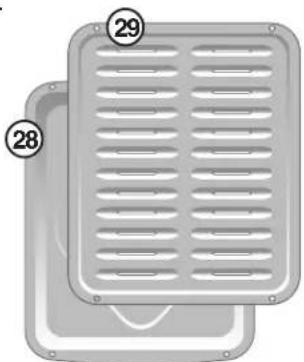
- Do not use the broiler pan without its insert. The broiler pan and its insert allow dripping fat to drain and be kept away from the high heat of the broiler.
- Do not cover the broiler insert with aluminum foil. Exposed fat and grease could ignite.
- Protective Liners—Do not use aluminum foil to line the oven bottom. Only use aluminum foil as recommended in this manual. Improper installation of these liners may result in risk of electric shock, or fire.
SELF CLEANING OVENS
- Clean in the self-cleaning cycle only the parts listed in this Use & Care Manual. Before self cleaning the oven, remove the broiler pan and any utensils or foods from the oven.
- Do Not Use Oven Cleaners—No commercial oven cleaner or oven liner protective coating of any kind should be used in or around any part of the oven.
- Do Not Clean Door Gasket—The door gasket is essential for a good seal. Care should be taken not to rub, damage or move the gasket.
•The health of some birds is extremely sensitive to the fumes given off during the self-cleaning cycle of any range. Move birds to another well-ventilated room.
IMPORTANT INSTRUCTIONS FOR CLEANING YOUR RANGE
- Clean the range regularly to keep all parts free of grease that could catch fire. Pay particular attention to the area underneath each surface element. Do not allow grease to accumulate.
- Kitchen cleaners and aerosols—Always follow the manufacturer's recommended directions for use. Be aware that excess residue from cleaners and aerosols may ignite causing damage and injury.
- Clean Ventilating Hoods Frequently—Grease should not be allowed to accumulate on the hood or filter. Follow manufacturer's instructions for cleaning.
FOR CERAMIC-GLASS COOK TOP MODELS
- Do Not Cook on Broken Cook Top—If cook top should break, cleaning solutions and spillovers may penetrate the broken cook top and create a risk of electric shock. Contact a qualified technician immediately.
- Clean Cook Top with Caution—If a wet sponge or cloth is used to wipe spills on a hot cooking area, be careful to avoid a steam burn. Some cleaners can produce noxious fumes if applied to a hot surface.
Important Safety Notice
The California Safe Drinking Water and Toxic Enforcement Act requires the Governor of California to publish a list of substances known to the state to cause cancer, birth defects or other reproductive harm, and requires businesses to warn customers of potential exposure to such substances.

Your Electric Range Features Include:
- Electronic Oven Control with Kitchen Timer.
- Left Front Single Radiant Element Control (some models) or Dual Radiant Element Control (some models).
- Left Rear Single Radiant Element Control (some models) or Dual Radiant Element Control (some models).
- Warming Zone Radiant Element Control (some models).
- Right Rear Single Radiant Element Control (some models) or Dual Radiant Element Control (some models).
- Right Front Single Radiant Element Control (some models) or Dual Radiant Element Control (some models).
- Element ON Indicator Light(s).
- HOT SURFACE Indicator Light(s).
- Speed-Bake™ Cooking System Switch (some models).
- Speed-Bake™ Cooking System Indicator Light (some models).
- Oven Interior Light with removable Cover.
- Automatic Oven Door Light Switch (some models).
- Self-Cleaning Oven interior.
- Self-Clean Door Latch.
- Speed-Bake™ Cooking System Fan (some models).
- Adjustable Interior Oven Rack(s).
- Large 1 piece Oven Door Handle.
- Full width Oven Door with Window.
- Storage Drawer with Integrated Handle (some models) or lower cover panel (some models).
- Easy to clean upswept Cooktop.
- Ceramic Smoothtop (elements, styles and color will vary by model).
- 6" Single Radiant Element (some models).
- 5-7" Dual Radiant Element (some models).
- 9" Single Radiant Element (some models).
- 6-9" Dual Radiant Element (some models).
- 12" Single Radiant Element (some models).
- Warming Zone Radiant Element (some models).
- Broil Pan (some models).
- Broil Pan Insert (some models).
- Leveling Legs and Anti-tip Bracket (included).
NOTE: The features of your range may vary according to model type & color.
natural_image
Two gray rectangular panels with ventilation grilles, labeled 28 and 29 (no text or symbols on the panels themselves)

Before Setting Oven Controls

Oven Vent Location
The oven vent is located under the left side of the control panel (See Fig. 1). When the oven is on, warm air passes through the vent. This venting is necessary for proper air circulation in the oven and good baking results. DO NOT BLOCK OVEN VENT.
Removing & Replacing Oven Racks
To remove, pull the rack forward until it stops. Lift up front of rack and slide out. To replace, fit the rack onto the guides on the oven walls. Tilt the front of the rack upward and slide the rack back into place.

Oven with visible bake element - Fig. 2
Arranging Oven Racks
ALWAYS ARRANGE OVEN RACKS WHEN THE OVEN IS COOL (PRIOR TO OPERATING THE OVEN). Always use oven mitts when using the oven.
For models with a visible lower Bake Element (Refer to Fig. 2) For models with a hidden lower Bake Element* (Refer to Fig. 3)
Recommended Rack Positions for Broiling, Baking & Roasting: Food Rack Position Rack Position\*
Broiling hamburgers & steaks See Broil section See Broil section Broiling meats, chicken or fish See Broil section See Broil section Cookies, cakes, pies, biscuits 4 or 5 4 or 5 & Muffins
Frozen pies, angel food cake, 2 or 3 2 or 3 yeast, bread, casseroles, small cuts of meat or poultry
Turkey, roast or ham 1 or 2 1

Oven with hidden bake element - Fig. 3*
Your range may be equipped with one or more of the oven rack types shown below; Flat rack (Fig. 4), Flat Handle rack (Fig. 5), Offset rack (use to make adjustment between two positions-Fig. 6) and Bottom rack (use this oven rack to maximize oven rack positions place in position 1 - Fig. 7).

Baking Layer Cakes with 1 or 2 Oven Racks
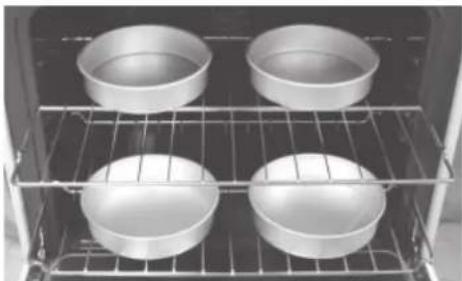
For best results when baking cakes using 2 oven racks, place cookware on rack positions 1 & 4 (See Fig. 7). For best results when using a single oven Flat Rack, place cookware on rack position 3 (See Fig. 8).
Air Circulation in the Oven
For best air circulation and baking results allow 2-4" (5-10 cm) around the cookware for proper air circulation and be sure pans and cookware do not touch each other, the oven door, sides or back of the oven cavity. The hot air must be able to circulate around the pans and cookware in the oven for even heat to reach around the food.
natural_image
Four identical metal bowls placed on a rack inside an oven (no text or symbols visible)Fig. 7

natural_image
Interior view of an oven with two metal grilles on a rack (no text or symbols visible)Fig. 8
Before Setting Oven Controls (cont'd)
About the Ceramic Glass Cooktop
The ceramic cooktop has radiant surface elements located below the surface of the glass. The design of the ceramic cooktop outlines the area of the surface element underneath. Be sure to match the pan size with the diameter of the element outline on the cooktop. Heat is transferred up through the surface of the cooktop to the cookware. Only flat-bottomed cookware should be used.
The type and size of cookware, the number of surface elements in use and their settings, are all factors that will affect the amount of heat that will spread to areas beyond the surface elements. The areas surrounding the elements may become hot enough to cause burns.

Warming Zone

Right
Rear


Right Front
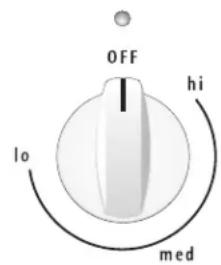
Warming Zone Surface Control (some models)
Single Radiant Surface Control (some models)
Single Radiant (some models)
Dual Radiant (some models)
Surface Control
About the Radiant Surface Elements
The element temperature rises gradually and evenly. As the temperature rises, the element will glow red. To maintain the selected setting, the element will cycle ON and OFF. The heating element retains enough heat to provide a uniform and consistent heat during the off cycle.
For efficient cooking, turn OFF the element several minutes before cooking is complete. This will allow residual heat to complete the cooking process.
NOTE: Please read detailed instructions for ceramic glass cooktop cleaning in the General Care & Cleaning and Before You Call checklist sections of this Use & Care Manual.

Element On & Hot Surface Indicator Lights
Your range is equipped with two different types of radiant surface control indicator lights that will glow on your range—the Element On indicator light and the Hot Surface indicator lights (See illustration at left).
The Element On indicator lights are located on the control panel above each radiant element control knob and will glow when a surface element is turned ON. A quick glance at this indicator light after cooking is an easy check to be sure ALL surface controls are turned OFF. The Hot Surface indicator light located on the control panel will glow when any surface cooking area heats up and will REMAIN ON until the glass cooktop has cooled to a MODERATE level.
NOTE: Radiant elements have a limiter that allows the element to cycle ON and OFF, even at the HI setting. This helps to prevent damage to the ceramic smoothtop. Cycling at the HI setting is normal and will occur more often if the cookware is too small for the radiant element or if the cookware bottom is not flat.
Cookware Material Types
The cookware material determines how evenly and quickly heat is transferred from the surface element to the pan bottom. The most popular materials available are:
ALUMINUM - Excellent heat conductor. Some types of food will cause it to darken (Anodized aluminum cookware resists staining & pitting). If aluminum pans slide across the ceramic cooktop, they may leave metal marks which will resemble scratches. Remove these marks immediately.
COPPER - Excellent heat conductor but discolors easily. May leave metal marks on ceramic glass (see Aluminum).
STAINLESS STEEL - Slow heat conductor with uneven cooking results. Is durable, easy to clean and resists staining.
CAST IRON - A poor heat conductor however will retain heat very well. Cooks evenly once cooking temperature is reached. Not recommended for use on ceramic cooktops.
PORCELAIN-ENAMEL on METAL - Heating characteristics will vary depending on base material. Porcelain-enamel coating must be smooth to avoid scratching ceramic cooktops.
GLASS - Slow heat conductor. Not recommended for ceramic cooktop surfaces because it may scratch the glass.
Setting Surface Controls
Using proper cookware
The size and type of cookware used will influence the setting needed for best cooking results. Cookware should have flat bottoms that make good contact with the entire surface heating element (See Fig. 1). Check for flatness by rotating a ruler across the bottom of the cookware (See Fig. 2).

natural_image
Illustration of hands using a measuring tool to measure a circular object, with rotation arrows indicating clockwise motion (no text or symbols)Be sure to follow the recommendations for using proper cookware as illustrated in Figs. 1 & 2. For more information about the ceramic cooktop see "Cooktop Cleaning & Maintenance" in the General Care & Cleaning section.
*CORRECT
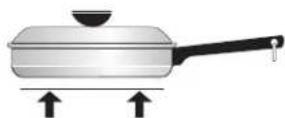
- Flat bottom and straight sides.
- Tight fitting lids.
- Weight of handle does not tilt pan. Pan is well balanced.
- Pan sizes match the amount of food to be prepared and the size of the surface element.
• Made of a material that conducts heat well. - Easy to clean.
• Always match pot diameter to element surface diameter. Fig. 1
Fig. 1
INCORRECT

- Curved and warped pan bottoms.

- Pan overhangs element b more than one-half inch.
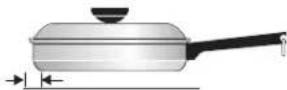
- Pan is smaller than element.

- Heavy handle tilts pan.
Single Radiant Surface Elements (all models)
To Operate a Single Radiant Element:
- Place correctly sized cookware on radiant surface element.
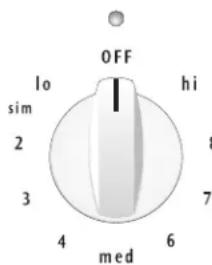
- Push in and turn the surface control knob in either direction to the desired setting (Refer to the Suggested Radiant Surface Element Settings Table, Figs. 3 & 4). Start most cooking operations on a higher setting and then turn to a lower setting to finish cooking. The surface control knobs do not have to be set exactly on a particular mark. Use the marks as a guide and adjust the control knob as needed. Each surface element provides a constant amount of heat at each setting. A glowing red surface heating area extending beyond the bottom edge of the cookware indicates the cookware is too small for the surface heating area.
- When cooking is complete, turn the surface element OFF before removing the cookware.
Note: The Element On indicator lights will glow when one or more elements are turned ON. A quick glance at these indicator lights when cooking is finished is an easy check to be sure all control knobs are turned OFF. The Hot Surface indicator light will continue to glow AFTER the control knob is turned to the "OFF" position and will glow until the heating surface area has cooled sufficiently.

Hot Surface
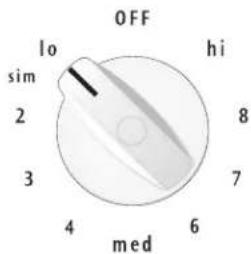
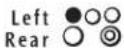
Fig. 3
Suggested Radiant Surface Element Settings Table
The suggested settings found in Fig. 4 are based when cooking with medium-weight aluminum pans with lids. Settings may vary when using other types of pans.
Note: The size and type of utensil used, and the amount and type of food being cooked will influence the setting needed for best cooking results.
SINGLE AND DUAL RADIANT SURFACE ELEMENTS Setting Type of Cooking
| HIGH (HI - 9) Start most foods, bring water to a boil, pan broiling |
| MEDIUM HIGH (7 - 8) Continue a rapid boil, fry, deep fat fry |
| MEDIUM (5 - 6) Maintain a slow boil, thicken sauces and gravies or steam vegetables |
| MEDIUM LOW (2 - 4) Keep foods cooking, poach, stew |
| LOW (LO - 1) Keep warm, melt, simmer |
Fig. 4
A CAUTION Radiant surface elements may appear to have cooled after they have been turned off. The glass surface may still be hot and burns may occur if the glass surface is touched before it has cooled sufficiently.
CAUTION Do not place plastic items such as salt and pepper shakers, spoon holders or plastic wrappings on top of the range when it is in use. These items could melt or ignite. Potholders, towels or wooden spoons could catch fire if placed too close to the surface elements.
Setting Surface Controls (cont'd)
To Operate Dual Radiant Surface Elements (some models)
Symbols on the backguard are used to indicate which coil of the Dual Radiant element will heat. The ○ symbol indicates the inner coil only. The Ⓞ symbol indicates both inner and outer coils will heat (See Figs. 1 & 2 and Suggested Radiant Surface Element Settings Table on previous page). You may switch from either coil setting at any time during cooking. Push in and turn the control knob in either direction to the desired setting as instructed above. Note: Areas that heat are shown in black.
A CAUTION Radiant surface elements may appear to have cooled after they have been turned off. The glass surface may still be hot and burns may occur if the glass surface is touched before it has cooled sufficiently.
A CAUTION Do not place plastic items such as salt and pepper shakers, spoon holders or plastic wrappings on top of the range when it is in use. These items could melt or ignite. Potholders, towels or wooden spoons could catch fire if placed too close to the surface elements.
A CAUTION Do not allow aluminum foil, or ANY material that can melt to make contact with the ceramic glass cooktop. If these items melt on the cooktop they will damage the ceramic cooktop.

Fig. 1
Fig. 2
Setting the Warming Zone (some models)
The purpose of the Warming Zone is to keep hot cooked foods at serving temperature. Always start with hot food. It is not recommended to heat cold food on the Warming Zone.
All food placed on the Warming Zone should be covered with a lid or aluminum foil to maintain quality. For best results, when warming pastries or breads, the cover should have an opening to allow moisture to escape. Do not use plastic wrap to cover food. Plastic may melt onto the surface and be very difficult to clean.
Use only dishware, utensils and cookware recommended for oven and cooktop use on the Warming Zone.

Fig. 3
Warming Zone Recommended Food Settings Table Food Item Heating Level
Breads/Pastries LO (Low)
Casseroles LO (Low)
Dinner Plates with Food LO (Low)
Eggs LO (Low)
Gravies LO (Low)
Meats MED (Medium)
Sauces MED (Medium)
Soups (cream) MED (Medium)
Stews MED (Medium)
Vegetables MED (Medium)
Fried Foods HI (High)
Hot Beverages HI (High)
Soups (liquid) HI (High)
Fig. 4
A CAUTION Unlike the surface elements, the Warming Zone will not glow red when it is hot.
CAUTION Always use potholders or oven mitts when removing food from the Warming Zone as cookware and plates will be hot.
Setting the Warming Zone Control:
- Push in either direction and turn the knob (See Fig 3). The temperatures are approximate, and are designated by HI, MED and LO. However, the control can be set at any position between HI and LO for different levels of warming.
- When ready to serve, turn the control to OFF. The Warming Zone will remain warm until the indicator light goes OFF.
Temperature Selection - Refer to the Warming Zone Recommended Food Settings Table (See Fig. 4). If a particular food is not listed, start with the medium level, and adjust as needed. Most foods can be kept at serving temperatures by using the medium level.
Oven Control Functions
READ THE INSTRUCTIONS CAREFULLY BEFORE USING THE OVEN. For satisfactory use of your oven, become familiar with the various pad functions of the oven as described below.

*Note: The OVEN indicator light on the electronic display will turn ON and OFF when using the Bake feature and during preheat. This is normal and indicates that the oven is cycling to maintain the selected baking temperature. When the preheat indicator light turns OFF, your oven is ready.
For a silent control panel
When choosing a function, a beep will be heard each time a pad is pressed. If desired, the control can be programmed for silent operation. Press and hold After 7 seconds, the control will beep once. This will block the controls from sounding when a pad is pressed. To return the sound, press and hold Start time again for 7 seconds until the control beeps once.
Temperature conversion
The electronic oven control is set to operate in °F
(Fahrenheit) when shipped from the factory. The oven can be programmed for any temperature from 170°F to 550°F (77°C to 287°C).
To change the temperature to °C (Celsius) or from °C to °F (control should not be in a Bake or Clean mode):
- Press "Noll—" appears in the display.
- Press and hold the until "HI" appears in the display.
- Press and hold until °F or °C appears in the display.
- Press the or to change °F to °C or °C to °F.
- Press any control pad to return to normal operating mode.

Setting Oven Controls
Note: The time of day must first be set in order to operate the oven.
To Set the Clock
When the range is first plugged in, or when the power supply to the range has been interrupted, the display will flash "12:00".
-
Press once (do not hold pad down).
-
Within 5 seconds, press and hold the ∧ or ∨ until the correct time of day appears in the display. Note: The clock cannot be changed during any timed bake or Self-Clean cycle.
Setting Oven Controls (cont'd)
To Set the Minute Timer:
- Press

- Press the to increase the time in one minute
increments. Press and hold the to increase the time in 10 minute increments. The timer can be set for any amount of time from 1 minute to 11 hours and 59 minutes.
Note: If the √ pad is pressed first, the timer will advance to 11 hours and 59 minutes.
- The display shows the timer countdown in minutes until 1 minute remains. Then the display will countdown in seconds.
- When the set time has run out, the timer will beep 3 times and will continue to beep 3 times every 60 seconds until pressed.
Notes: The indicator light located above the Timer pad will glow while the minute timer is active. The minute timer does not start or stop cooking. It serves as an extra timer in the kitchen that will beep when the set time has run out. The minute timer can be used alone or during any of the other oven functions. When the minute timer is in use with any other function, the minute timer will be shown in the display. To view other functions, press the pad for that function.
To Change the Minute Timer while it is in use:
While the timer is active and shows in the display, press and hold the to increase or decrease the time.
To Cancel the Minute Timer before the set time has run out: Press Timer En/Off
Note: To turn the time of day display OFF or ON in the display press and hold for 15 seconds (the control will beep once) and then release. This feature does not remove the set time of day from the memory of the control. When the display is turned OFF the time of day will re-appear for a few seconds any time the pad is touched.
To Set or Change the Temperature for Baking
The oven can be programmed to bake at any temperature from 170^ F to 550^ F ( 77^ C to 287^ C).
To Set the Controls for Baking:
- Press "take—" appears in the display.
- Within 5 seconds, press the on The display
will show "350°F (177°C)." By pressing and holding the A, the temperature can then be adjusted in 5°F increments (1°C if the control is set to display Celsius).
- As soon as the ∧ or √ is released, the oven will begin heating to the selected temperature. When the displayed temperature reaches the desired baking temperature, the preheat indicator light will turn OFF and the control will beep 3 times.
- To cancel baking, press ☐Clear /off .
To Change the Oven Temperature after Baking has Started:
- Press and make sure the bake temperature is displayed.
- Press the or pad to increase or decrease the set temperature.
To Set Control for Continuous Bake or 12 Hour Energy Saving
The oven control has a built-in 12 Hour Energy Saving feature that will shut off the oven if the control is left on for more than 11 hours and 59 minutes. The oven can be programmed to override this feature for continuous baking. To set control for continuous baking:
- Press and hold down for 5 seconds until tone is heard, " — — hr" will appear in display for continuous cooking. The current time of day will return to the display.
- To cancel the Continuous Bake function, press and hold for 5 seconds until tone is heard. "12hr" will appear in display indicating that the control has returned to the 12 Hour Energy Saving feature.
To Set Control for Oven Lockout 3 Controls
The control can be programmed to lock the oven door and lockout the oven control pads.
To set Control for Oven Lockout feature:
- Press and hold for 3 seconds. "Loc" will appear in display, the "Door Locked" indicator light will flash and the motor driven door lock will begin to close automatically. DO NOT open the oven door while the indicator light is flashing. Allow about 15 seconds for the oven door to lock. Once the oven door is locked, the current time of day will appear in the display.
- To cancel the Oven Lockout feature, press and hold for 3 seconds. The control will unlock the oven door and resume normal operation.
Note: If any control pad is pressed while in the Oven Lockout mode, "Loc" will appear in the display until the control pad is released.
Setting Oven Controls (cont'd)
To Set the Timed Bake and Delay Start (Delayed Timed Bake) Features
The Bake Time BAKE TIME and Start Time START TIME pads operate the features that will turn the oven ON and OFF at the times you select in advance. The oven can be programmed to start immediately and shut off automatically (Timed Bake) or to begin baking at a later time with a delayed start time (Delayed Timed Bake).
To Program the Oven to Begin Baking Immediately and To Shut Off Automatically (Timed Bake):
- Be sure that the clock shows the correct time of day.
- Place the food in the oven.
- Press Bake."———°" appears in the display.
- Within 5 seconds, press the or The display will show "350°F (177°C)." By holding the ∧ or √the temperature can then be adjusted in 5°F increments (1°C if the control is set to display Celsius).
- Press Bake time. "0:00" will flash in the display (HR:MIN).
- Press the or until the desired baking time appears in the display.
- The oven will turn ON and begin heating.
To Program Oven for a Delayed Start Time and to Shut-Off Automatically (Delayed Timed Bake):
- Be sure that the clock shows the correct time of day.
- Place the food in the oven.
- Press Bake."———°" appears in the display.
- Within 5 seconds, press the or The display will show "350°F (177°C)." By holding the or , the temperature can then be adjusted in 5°F increments (1°C if the control is set to display Celsius).
- Press . "10:00" will flash in the display (HR:MIN).
- Press the or until the desired baking time appears.
- Press . The earliest possible start time will appear in the display.
- Press the or until the desired start time appears in the display.
- Once the controls are set, the control calculates the time when baking will stop in order to start at the time you have set.
- The oven will turn ON at the delayed start time and begin heating.
When the Set Bake Time Runs Out:
a. "END" will appear in the display window and the oven will shut-off automatically.
b. The control will beep 3 times every 60 seconds until
Clear /off is pressed.
To Change the Oven Temperature or Bake Time after Baking has Started:
- Press the function pad you want to change.
- Press the or to adjust the setting.
Note: During Timed Bake the preheat indicator light will not function.
⚠️ CAUTION Use caution with the Timed Bake and Delayed Start (Delayed Timed Bake) features. Foods that can easily spoil such as milk, eggs, fish, meat or poultry, should be chilled in the refrigerator first. Even when chilled, they should not stand in the oven for more than 1 hour before cooking begins, and should be removed promptly when cooking is completed.
Speed Bake™ Cooking System
Benefits of Speed Bake™ Cooking System:
—Foods cook up to 25 to 30% faster, saving time and energy.
—Multiple rack baking.
—No special pans or bakeware needed.
How the Speed Bake™ Cooking System
works (some models)
Speed Bake™ Cooking System uses a fan to circulate the oven's heat uniformly and continuously around the oven. This improved heat distribution allows for fast, even cooking and browning results. It also gives better baking results when using two racks at the same time.
Heated air flows around the food from all sides, sealing in juices and flavors. Meats cooked with Speed Bake™ Cooking System are juicer. Poultry is crisp on the outside while staying tender and moist on the inside. Breads and pastry brown more evenly. Most foods baked in a standard oven can be cooked faster and more evenly with Speed Bake™ Cooking System.
NOTE: The Speed Bake feature will not work during a Self-Cleaning cycle.
General Cooking Instructions:
For Baking:
- For optimum cooking results it is recommended to preheat the oven when baking foods such as cookies, biscuits and breads.
- Reduce oven temperature 25^ from recipe's recommended oven temperature. Follow the remainder of the recipe's instructions using the minimum recommended cook time.
Setting Oven Controls (cont'd)

natural_image
Diagram of a refrigerator interior showing airflow paths with numbered labels (1-7) and no readable text or symbols.- When using 2 oven racks at the same time, place in positions 3 & 6 for best results (See Fig. 2) Note: Layer cakes will have better results using the normal Bake feature.
For Roasting:
-
Preheating is not necessary when roasting foods with Speed Bake™ Cooking System.
-
Since Speed Bake cooks food faster, reduce the cook time by 25% from the recommended cook time of your recipe. Increase the time until the desired doneness is obtained.
Note: Cook time reductions will vary depending on the amount and type of food being cooked.
To Set Speed Bake™ Cooking System:
-
Program the oven as you normally would to bake. Speed Bake may be used with Bake, Timed Bake and Delayed Time Bake features.
-
Press and release Speed Bake switch. The indicator light located above the Speed Bake switch will glow and the fan will come on. The fan stays on when the oven door is closed and shuts off while the oven door is opened. The fan will continue to operate until cooking is complete.
-
To cancel Speed Bake, press Clear /Off on the oven control as you would to stop any baking function.
To Set for Broiling:
-
Arrange the oven rack while oven is still cool. Position the rack as suggested in the Broil Rack Position Table.
-
Press Breil." — "will appear in display.
-
Press and hold the or until the desired broil setting level appears in the display. Press the for HI broil or the √ for LO broil. Most foods may be broiled at the HI broil setting. Select the LO broil setting to avoid excess browning or drying of foods that should be cooked to the well-done stage.
-
For optimum browning, preheat broil element for 3 - 4 minutes before adding food.
-
Place the insert on the broil pan (if equipped), then place the food on the broil pan insert (if equipped).
-
Place the broiler pan and insert on the oven rack (if equipped). Open the oven door to the broil stop position when broiling (See Fig 3).
-
Broil on one side until food is browned. Turn and broil food on 2nd side.
Note: Always pull the oven rack out to the stop position before turning or removing the food.
- When broiling is finished press

CAUTION Should an oven fire occur, close the oven door and turn the oven OFF. If the fire continues, use a fire extinguisher. DO NOT put water or flour on the fire. Flour may be explosive.
Broil Rack Position Table (Refer to Fig. 2)
Position Food category
7 Medium steaks & hamburgers
6 Fish, medium-well steaks & pork chops
5 Well-done foods such as chicken & lobster
CAUTION To insure proper results when broiling use ONLY Electrolux Home Products, Inc. approved Broil Pan & Insert.
The broiler pan and the insert (some models) allows grease to drain and be kept away from the high heat of the broiler. DO NOT use the pan without the insert. DO NOT cover the insert with foil; the exposed grease could ignite. DO NOT use the broil pan without the insert or cover the insert with aluminum foil. The exposed fat could ignite.

natural_image
Close-up of layered transparent material with wavy topography, labeled 5 to 7 (no text or symbols on the material itself)
To Operate the Oven Light
The interior oven light will automatically turn ON when the oven door is opened. Press to turn the interior oven light ON and OFF whenever the oven door is closed.
The interior oven light is located at the upper left rear wall of the oven interior and is covered with a glass shield held by a wire holder. The glass shield must be in place whenever the oven is in use. To change the interior oven light, see "Changing the Oven Light" in the General Care & Cleaning section.
Self-Cleaning Oven
A Self-Cleaning oven cleans itself with high temperatures (well above cooking temperatures) which eliminate soils completely or reduces them to a fine powdered ash you can wipe away with a damp cloth.
Adhere to the following cleaning precautions:
- DO NOT use oven cleaners or oven protective coatings in or around any part of the Self-Cleaning oven.
- DO NOT clean the oven door gasket. The woven material of the oven door gasket is essential for a good seal. Care should be taken not to rub, damage or remove the gasket.
- DO NOT use any cleaning materials on the oven door gasket. Doing so could cause damage.
- Remove the broiler pan and insert, all utensils and any aluminum foil. These items cannot withstand high cleaning temperatures.
- Oven racks do not have to be removed. If they are not removed during the Self-Clean cycle their color will turn slightly blue and the finish will be dull. After the cycle is complete and the oven has cooled, rub the sides of the oven racks with wax paper or a cloth containing a small amount of salad oil (this will make the racks glide easier into the rack position).
- Remove any excessive spillovers in the oven cavity before starting the Self-Cleaning cycle. To clean, use hot, soapy water and a cloth. Large spillovers can cause heavy smoke or fire when subjected to high temperatures. DO NOT allow food spills with a high sugar or acid content (such as milk, tomatoes, sauerkraut, fruit juices or pie filling) to remain on the surface as they may leave a dull spot even after cleaning.
- Clean any soil from the oven frame, the door liner outside the oven door gasket and the small area at the front center of the oven bottom. These areas heat sufficiently to burn soil on. Clean with soap and water.
! CAUTION During the Self-Cleaning cycle, the outside of the range can become very hot to the touch. DO NOT leave small children unattended near the appliance.
! CAUTION The health of some birds is extremely sensitive to the fumes given off during the Self-Cleaning cycle of any range. Move birds to another well-ventilated room.
CAUTION DO NOT line the oven walls, racks, bottom or any other part of the range with aluminum foil. Doing so will destroy heat distribution, produce poor baking results and cause permanent damage to the oven interior (aluminum foil will melt to the interior surface of the oven).
CAUTION DO NOT force the oven door open. This can damage the automatic door locking system. Use caution when opening the door after the Self-Cleaning cycle is completed. The oven may still be VERY HOT.
NOTE: Prior to setting the Self-Clean cycle, any spills remaining on the oven bottom should be removed.
The Bake element is located in the lower oven cavity (See illustration at left). The bake element is designed to be tilted up using your hand from the front of the bake element. This will allow easier access to the oven bottom for cleaning. Remove the Bottom Rack before raising the element. Be careful not to raise the element more than 4 or 5 inches from the resting position.

Baking element may be tilted about 4 or 5 inches to clean oven bottom
!CAUTION The oven bake and broil elements may appear to have cooled after they have been turned OFF. The elements may still be hot and burns may occur if these elements are touched before they have cooled sufficiently.
Choose a Self-Clean Cycle Time
Determine which Self-Clean Cycle time as required. Your appliance comes with two choices; (Speed Clean) for a
2 hour Self-Clean cycle (for lighter soils) or @clean) for a 3 hour cycle (for heavier soils). To set for Self-Clean follow the instructions provided below. PLEASE NOTE: The kitchen area should be well ventilated using an open window, ventilation fan or exhaust hood during the 1st Self-Clean cycle. This will help eliminate the normal odors associated with the 1st Self-Clean cycle.
To Set the Controls for a Self-Clean Cycle or a Delayed Start Self-Clean Cycle:
(Note: If you do not want to start a Delayed Self-Clean Cycle, skip steps 2 & 3.)
- Be sure the clock shows the correct time of day.
- Press Start time . The " : " in the time of day will flash.
- Press and hold the pad to scroll to the time to start the delayed Self-Clean cycle. Release the pad when the desired time is displayed.
Self-Cleaning (cont'd)
-
Press Speed (for 2 hour Self-Clean time) or Clean (for 3 hour Self-Clean time).
-
Press the or pad. The time selected in step 4
above should appear in the display.
As soon as the controls are set, the motor driven lock will begin to close automatically and the "LOCK" indicator light will flash. DO NOT open the oven door while the light is flashing (it takes about 15 seconds for the oven door to lock).
- "CLn" will appear in the display during the Self-Clean cycle and the "LOCK" light will glow until the Self-
Cleaning cycle is complete or cancelled and the oven temperature has cooled.
When the Self-Clean Cycle has Completed:
-
The time of day or "End" will appear in the display window and the "Clean" and "LOCK" light will continue to glow.
-
Once the oven has cooled down for about 1 HOUR and the "LOCK" light has gone out, the oven door can be opened.
-
If "End" is in the display and the Clean indicator light remains ON, press the time of day will appear in the display.
NOTE: When the oven is cool, wipe away any residue or powdered ash with a damp cloth or paper towel.
Stopping or Interrupting a Self-Cleaning Cycle If it becomes necessary to stop or interrupt a Self-Cleaning cycle:
-
Press .Clear /off
-
Once the oven has cooled down for about 1 HOUR and the "LOCK" light has gone out, the oven door can be opened.
-
Restart the Self-Clean cycle once all conditions have been corrected.
CAUTION To avoid possible burns use care when opening the oven door after the Self-Cleaning cycle. Stand to the side of the oven when opening the door to allow hot air or steam to escape.
CAUTION DO NOT force the oven door open. This can damage the automatic door locking system. Use caution and avoid possible burns when opening the door after the Self-Cleaning cycle has completed. The oven may still be VERY HOT.
Adjusting Your Oven Temperature

Your oven control has been precisely set at the factory. This setting may differ from your previous oven however, so your recipe times may not give you the results you expect. If you think that the oven is cooking too hot or too cool for your recipe times, you can adjust the control so that the oven cooks hotter or cooler than the temperature displayed.
To Adjust Oven Temperature:
-
Press . Bake
-
Set the temperature to 550^ F ( 287^ C) by pressing and holding the
-
Within 2 seconds, press and hold until the 2 digit display appears. Release The display now indicates the amount of degrees offset between the original factory temperature setting and the current temperature setting. If the oven control has the original factory calibration, the display will read "0."
-
The temperature can now be adjusted up or down 35^ F ( 17^ C), in 5^ F steps by pressing and holding the At
V. Adjust until the desired amount of offset appears in the display. When lowering the oven temperature, a minus sign (-) will appear before the number to indicate that the oven will be cooler by the displayed amount of degrees.
- When you have made the desired adjustment, press to go back to the time of day display.

Note: Oven temperature adjustments made will not change the Self-Cleaning feature temperature.

General Care & Cleaning
(Cleaning Table)
| Surfaces | How to Clean |
| Glass, Painted Plastic Body Parts & Control Knobs | For general cleaning, use a soft cloth, clean with mild dish detergent & water or a 50/50 solution of vinegar & water. Follow by rinsing the area with clean water; dry & polish with a soft cloth. Glass cleaners may be used if sprayed on a soft cloth 1st. DO NOT spray liquids directly on the control pad and display areas. DO NOT use large amounts of water on the control panel - excess water on the control area may cause damage to the appliance. DO NOT use other liquid cleaners, abrasive cleaners, scouring pads, or some paper towels - they will damage the finish. |
| Painted Control Panels & Display areas | Before cleaning the control panel, turn all controls to OFF & remove the control knobs. To remove, pull each knob straight off the shaft. Use the general cleaning instructions provided in the paragraph above. |
| Porcelain Cooktop Surface, Broiler Pan & Insert (some models), Broiler Drawer (some models), Door Liner & Oven Bottom | Gentle scouring with a soapy scouring pad will remove most spots. Rinse with a 1:1 solution of clean water & ammonia. If necessary, cover difficult spots with an ammonia-soaked paper towel for 30 to 40 minutes. Rinse with clean water and a damp cloth, then scrub with a soap-filled scouring pad. Rinse & wipe dry with a clean cloth. Remove all cleaners or the porcelain may become damaged during future heating. DO NOT use spray oven cleaners on the range top. |
| Oven Racks | Remove oven racks. See "Removing & Replacing Oven Racks" under Before Setting Oven Controls. Use a mild, abrasive cleaner, following the cleaner's recommendations. Rinse with clean water & let dry. After cleaning the racks, rub the sides of the racks with wax paper or a cloth containing a small amount of salad oil (this will make the racks glide easier into the oven rack positions). |
| Oven Door | Use soap & water to thoroughly clean the top, sides & front of the oven door. Rinse well. You may use a glass cleaner on the outside glass of the oven door. DO NOT immerse the door in water. DO NOT spray or allow water or the glass cleaner to enter the door vents. DO NOT use oven cleaners, cleaning powders or any harsh abrasive cleaning materials on the outside of the oven door. DO NOT clean the oven door gasket. The oven door gasket is made of a woven material, on Self-Cleaning models, which is essential for a good seal. Care should be taken not to rub, damage or remove this gasket. |
| Stainless Steel (some models) | Clean stainless steel with hot soapy water & a dishcloth. Rinse with clean water and a cloth. DO NOT use cleaners with high concentrations of chlorides or chlorines. DO NOT use harsh scrubbing cleaners. Only use kitchen cleaners that are especially made for cleaning stainless steel. Always be sure to rinse the cleaners form the surface as bluish stains may occur during heating that cannot be removed. |
| Ceramic Cooktop | See Cooktop Cleaning and Maintenance in the General Care & Cleaning section. |
Changing the Oven Light
The oven light automatically turns ON when the door is opened. The oven light may also be manually operated by pressing the Oven light pad. The oven light bulb is located at the rear of the oven and is covered with a glass shield held by a wire holder.
The glass shield must be in place whenever the oven is in use.
To replace the oven light bulb:
- Turn electrical power off at the main source or unplug the range.
- Press wire holder to one side to release the glass shield.
- Replace bulb with a new 40 watt appliance bulb.
- Replace glass shield over bulb and snap wire holder into place.
-
Turn power back on again at the main source (or plug the range back in).
-
The clock will then need to be reset. To reset, see Setting the Clock and Minute Timer in this Use & Care Manual.
! CAUTION Be sure the range is unplugged and all parts are COOL before replacing oven light. Wear a leather-faced glove for protection against possible broken glass.

General Care & Cleaning (cont'd)
Cooktop Cleaning & Maintenance
Consistent and proper cleaning is essential to maintaining your ceramic glass cooktop.
Note: Additional cooktop cleaning cream may be ordered by visiting the Frigidaire website at www.frigidaire.com
Prior to using your cooktop for the first time, apply some of the cooktop cleaning cream supplied with your new range. Buff with a non-abrasive cloth or no-scratch cleaning pad. This will make cleaning easier when soiled from cooking. The special cooktop cleaning cream leaves a protective finish on the glass to help prevent scratches and abrasions.
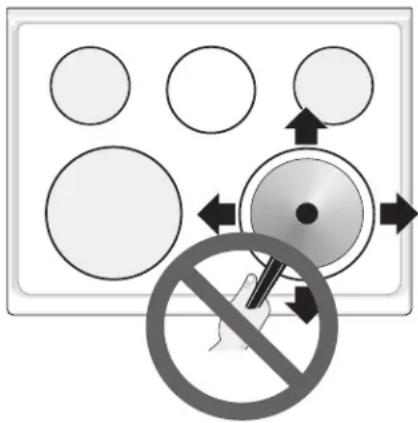
Sliding aluminum or copper clad bottom pans on the cooktop can cause metal markings on the cooktop surface. These marks should be removed immediately after the cooktop has cooled using the cooktop cleaning cream. Metal marks can become permanent if not removed prior to future use.
Cookware (cast iron, metal, ceramic or glass) with rough or dirty bottoms can mark or scratch the cooktop surface. Do not slide anything metal or glass across the cooktop. Do not use cookware with dirt or dirt build up on bottom; replace with clean cookware before using. Do not use your cooktop as a cutting board or work surface in the kitchen. Do not cook foods directly on the cooktop surface without a pan. Do not drop heavy or hard objects on the ceramic glass cooktop, they may cause it to crack.
CAUTION Before cleaning the cooktop, be sure the controls are turned to OFF and the cooktop is COOL.
WARNING DO NOT use a cooktop cleaner on a hot cooktop. The fumes can be hazardous to your health, and can chemically damage the ceramic-glass surface.
Cleaning Recommendations for the Ceramic Glass Cooktop
For light to moderate soil:
Apply a few drops of CookTop® Cleaning Creme directly to the cooktop. Use a paper towel or use a non-abrasive plastic type no-scratch cleaning pad to clean the entire cooktop surface. Make sure the cooktop is cleaned thoroughly, leaving no residue.
For heavy, burned on soil:
Apply a few drops of CookTop® Cleaning Creme directly to the soiled area. Rub the soiled area using a non-abrasive plastic type no-scratch cleaning pad, applying pressure as needed. Do not use the pad you use to clean the cooktop for any other purpose.

If soils remain, carefully scrape soils with a metal razor blade scraper, holding scraper at a 30 degree angle to the surface. Remove loosened soils with cooktop cleaning cream and buff surface clean.
IMPORTANT NOTE: Damage to the ceramic glass cooktop may occur if you use an abrasive type cleaning pad. Only use cleaning products that have been specifically designed for ceramic glass cooktops.
Plastic or foods with a high sugar content:
These types of soils need be removed immediately if spilled or melted onto the ceramic cooktop surface. Permanent damage (such as pitting of the cooktop surface) may occur if not removed immediately. After turning the surface elements OFF, use a razor blade scraper or a metal spatula with a mitt and scrape the soil from the hot surface (as illustrated). Allow the cooktop to cool, and use the same method for heavy or burned on soils.
General Care & Cleaning (cont'd)
Cleaning Recommendations for the Ceramic Glass Cooktop (cont'd)
Do not use the following on the ceramic glass cooktop:
- Do not use abrasive cleaners and scouring pads, such as metal and some nylon pads. They may scratch the cooktop, making it more difficult to clean.
- Do not use harsh cleaners, such as chlorine bleach, ammonia or oven cleaners, as they may etch or discolor the cooktop.
- Do not use dirty sponges, cloths or paper towels, as they can leave soil or lint on the cooktop which can burn and cause discoloration.

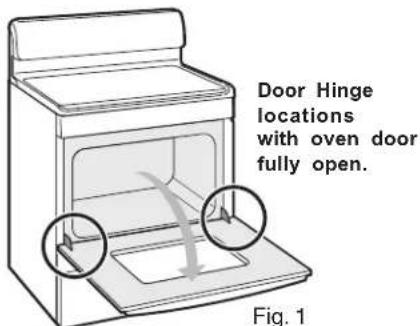
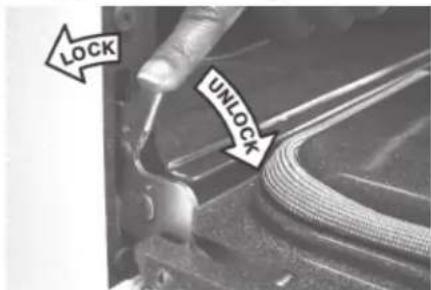
Fig. 2

Fig. 3
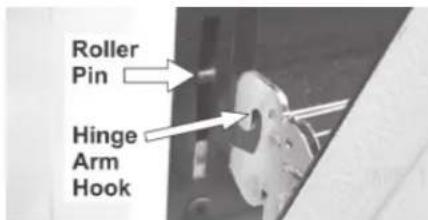
Fig. 4
Special Caution for Aluminum Use on the Ceramic Cooktop:
- Aluminum Foil - Use of aluminum foil on a hot cooktop will damage the ceramic cooktop. Do not use thin aluminum cooking utensils or allow aluminum foil to touch the ceramic cooktop under ANY circumstances.
- Aluminum utensils - The melting point of aluminum is much lower than that of other metals. Care must be taken when aluminum pots or pans are used on the cooktop. If allowed to boil dry, not only will the utensil be destroyed, but it may fuse to, break or mark the ceramic glass surface, permanently damaging the cooktop surface.
Removing and Replacing the Lift-Off Oven Door
CAUTION The door is heavy. For safe, temporary storage, lay the door flat with the inside of the door facing down.
To Remove Oven Door:
- Open oven door completely (horizontal with floor - See Fig. 1).
- Pull the door hinge locks on both left and right door hinges down from the oven frame completely towards the oven door (See Fig. 2). A tool such as a small flat-blade screwdriver may be required.
- Firmly grasp both sides of oven door along the door sides (Do not use the oven door handle - See Fig. 3).
- Close the door to the broil stop position (the oven door will stop into this position just before fully closing).
- With the oven door in the broil stop position, lift the oven door hinge arms over the roller pins located on each side of the oven frame (See Fig. 4).
To Replace Oven Door:
- Firmly grasp both sides of oven door along the door sides (Do not use the oven door handle - See Fig. 3).
- Holding the oven door at the same angle as the removal position, seat the hook of the hinge arm over the roller pins located on each side of the oven door frame (See Fig. 4). The hook of the hinge arms must be fully seated onto the roller pins.
- Fully open the oven door (horizontal with floor - See Fig. 1).
- Push the door hinge locks up towards and into the oven frame on both left and right oven door hinges (See Fig. 2) to the locked position.
- Close the oven door.
Special Door Care Instructions - Most oven doors contain glass that can break. Read the following recommendations:
- Do not close the oven door until all the oven racks are fully in place.
- Do not hit the glass with pots, pans, or any other object.
- Scratching, hitting, jarring or stressing the glass may weaken its structure causing an increased risk of breakage at a later time.
Before you call for service, review the following list. It may save you time & expense. The list includes common occurrences (shown in bold) that are not the result of defective workmanship or materials in this appliance. The possible corrections to these problems are provided with the problem listed:
Range is not level - (1) Poor installation. Place oven rack in center of oven. Place a level on the oven rack. Adjust leveling legs at base of range until the oven rack is level. (2) Be sure floor is level, strong & stable enough to adequately support range. (3) If floor is sagging or sloping, contact a carpenter to correct the situation. (4) Kitchen cabinet alignment may make range appear not level. Be sure cabinets are square & have sufficient room for range clearance.
Cannot move appliance easily. Appliance must be accessible for service - (1) Cabinets not square or are built in too tightly. Contact builder or installer to make appliance accessible. (2) Carpet interferes with range. Provide sufficient space so range can be lifted over carpet.
Surface element too hot or not hot enough - Incorrect control setting. Be sure the correct control is ON for the element to be used.
Surface element does not heat - (1) Lightweight or warped pans used. Use only flat, evenly balanced, medium or heavyweight cookware. Flat pans heat better than warped pans. Cookware materials and weight of the material affect heating. Heavy & medium-weight pans heat evenly. Because lightweight pans heat unevenly, foods may burn easily. (2) No power to the appliance. Check steps under "Entire Appliance Does Not Operate" in this checklist. (3) Incorrect control setting. Make sure the correct control is ON for the surface element to be used.
Entire appliance does not operate - (1) The time of day is not set. The time of day must first be set in order to operate the oven. See "To Set the Clock" in the Setting Oven Controls section.(2) Make sure cord/plug is plugged correctly into outlet.(3) Service wiring is not complete. Contact your authorized service agent.(4) Electrical power outage. Check house lights to be sure. Call your local electric company for service.
Oven does not operate - Be sure the oven controls are set properly for the desired function. See Setting Oven Controls in this Use & Care Manual or read the instructions "Entire appliance does not operate" in this checklist.
Oven light does not work (some models) - Replace or tighten bulb. See Changing Oven Light section in this Use & Care Manual.
Oven control beeps & displays any F code error (for example F11) - Electronic control has detected a fault condition. Press CLEAR/OFF to clear the display & stop beeping. Reprogram oven. If fault recurs, record fault number. Press CLEAR/OFF & contact an authorized service agent.
Flames inside oven or smoking from oven vent - Excessive spillovers in oven. For example this will happen for pie spillovers or large amounts of grease left on the oven bottom. Wipe up excessive spillovers before starting oven. If flames or excessive smoke are present see "Broiling" in the Setting Oven Controls section.
Oven smokes excessively during broiling - (1) Control(s) not set properly. Follow Broil instructions under Setting Oven Controls. (2) Make sure oven door is opened to broil stop position. (3) Meat too close to the broil element. Reposition the broil rack to provide proper clearance between the meat & the element. Preheat the broil element for searing. (4) Meat not properly prepared. Remove excess fat from meat. Cut fatty edges to prevent curling, but do not cut into lean. (5) Insert on broiler pan wrong side up & grease not draining. Always place grid on the broiler pan with ribs up & slots down to allow grease to drip into pan (some models). (6) Grease has built up on oven surfaces. Regular cleaning is necessary when broiling frequently. Old grease or food spatters cause excessive smoking.
Poor baking results - Many factors affect baking results. Make sure the proper oven rack position is used. Center food in the oven & space pans to allow air to circulate. Allow the oven to preheat to the set temperature before placing food in the oven. Try adjusting the recipe's recommended temperature or baking time. If you feel the oven is too hot or cool, see Adjusting Your Oven Temperature in this Use & Care Manual.
Soil not completely removed after Self-Cleaning cycle - Failure to clean bottom, front top of oven, frame of oven or door area outside oven seal. These areas are not in the Self-Cleaning area, but get hot enough to burn on residue. Clean these areas before the Self-Cleaning cycle is started. Burned-on residue can be cleaned with a stiff nylon brush and water or a nylon scrubber. Be careful not to damage the oven gasket.
Self-Cleaning cycle does not work - (1) Oven control not set properly. Follow instructions under Self-Cleaning. (2) Self-Cleaning cycle was interrupted. Follow steps under "Stopping or Interrupting a Self-Cleaning Cycle" under Self-Cleaning.
Metal marks (Ceramic Cooktop models) - Sliding or scraping of metal utensils on cooktop surface. Do not slide metal utensils on cooktop surface. Use a ceramic-glass cooktop cleaning creme to remove the marks. See "Cooktop Cleaning and Maintenance" in the Care & Cleaning section.
Scratches or abrasions on cooktop surface (Ceramic Cooktop models) - (1) Coarse particles such as salt or sand between cooktop and utensils can cause scratches. Be sure cooktop surface and bottoms of utensils are clean before usage. Small scratches do not affect cooking and will become less visible with time. (2) Cleaning materials not recommended for ceramic-glass cooktop have been used. See "Cooktop Cleaning & Maintenance." (3) Cookware with rough bottom has been used. Use smooth, flat-bottomed cookware.
Brown streaks or specks on cooktop surface (Ceramic Cooktop models) - Boilovers are cooked onto surface. Use razor blade scraper to remove soil. See "Cooktop Cleaning and Maintenance" in the Care & Cleaning section.
Areas of discoloration with metallic sheen (Ceramic Cooktop models) - Mineral deposits from water and food. Remove using a ceramic-glass cooktop cleaning creme. Use cookware with clean, dry bottoms.
Your appliance is covered by a one year limited warranty. For one year from your original date of purchase, Electrolux will pay all costs for repairing or replacing any parts of this appliance that prove to be defective in materials or workmanship when such appliance is installed, used and maintained in accordance with the provided instructions.
Exclusions
This warranty does not cover the following:
- Products with original serial numbers that have been removed, altered or cannot be readily determined.
- Product that has been transferred from its original owner to another party or removed outside the USA or Canada.
- Rust on the interior or exterior of the unit.
- Products purchased "as-is" are not covered by this warranty.
- Food loss due to any refrigerator or freezer failures.
- Products used in a commercial setting.
- Service calls which do not involve malfunction or defects in materials or workmanship, or for appliances not in ordinary household use or used other than in accordance with the provided instructions.
- Service calls to correct the installation of your appliance or to instruct you how to use your appliance.
- Expenses for making the appliance accessible for servicing, such as removal of trim, cupboards, shelves, etc., which are not a part of the appliance when it is shipped from the factory.
- Service calls to repair or replace appliance light bulbs, air filters, water filters, other consumables, or knobs, handles, or other cosmetic parts.
- Surcharges including, but not limited to, any after hour, weekend, or holiday service calls, tolls, ferry trip charges, or mileage expense for service calls to remote areas, including the state of Alaska.
- Damages to the finish of appliance or home incurred during installation, including but not limited to floors, cabinets, walls, etc.
- Damages caused by: services performed by unauthorized service companies; use of parts other than genuine Electrolux parts or parts obtained from persons other than authorized service companies; or external causes such as abuse, misuse, inadequate power supply, accidents, fires, or acts of God.
DISCLAIMER OF IMPLIED WARRANTIES; LIMITATION OF REMEDIES
CUSTOMER'S SOLE AND EXCLUSIVE REMEDY UNDER THIS LIMITED WARRANTY SHALL BE PRODUCT REPAIR OR REPLACEMENT AS PROVIDED HEREIN. CLAIMS BASED ON IMPLIED WARRANTIES, INCLUDING WARRANTIES OF MERCHANTABILITY OR FITNESS FOR A PARTICULAR PURPOSE, ARE LIMITED TO ONE YEAR OR THE SHORTEST PERIOD ALLOWED BY LAW, BUT NOT LESS THAN ONE YEAR. ELECTROLUX SHALL NOT BE LIABLE FOR CONSEQUENTIAL OR INCIDENTAL DAMAGES SUCH AS PROPERTY DAMAGE AND INCIDENTAL EXPENSES RESULTING FROM ANY BREACH OF THIS WRITTEN LIMITED WARRANTY OR ANY IMPLIED WARRANTY. SOME STATES AND PROVINCES DO NOT ALLOW THE EXCLUSION OR LIMITATION OF INCIDENTAL OR CONSEQUENTIAL DAMAGES, OR LIMITATIONS ON THE DURATION OF IMPLIED WARRANTIES, SO THESE LIMITATIONS OR EXCLUSIONS MAY NOT APPLY TO YOU. THIS WRITTEN WARRANTY GIVES YOU SPECIFIC LEGAL RIGHTS. YOU MAY ALSO HAVE OTHER RIGHTS THAT VARY FROM STATE TO STATE.
If You Need Service
Keep your receipt, delivery slip, or some other appropriate payment record to establish the warranty period should service be required. If service is performed, it is in your best interest to obtain and keep all receipts. Service under this warranty must be obtained by contacting Electrolux at the addresses or phone numbers below.
This warranty only applies in the USA and Canada. In the USA, your appliance is warranted by Electrolux Major Appliances North America, a division of Electrolux Home Products, Inc. In Canada, your appliance is warranted by Electrolux Canada Corp. Electrolux authorizes no person to change or add to any obligations under this warranty. Obligations for service and parts under this warranty must be performed by Electrolux or an authorized service company. Product features or specifications as described or illustrated are subject to change without notice.
USA
1.800.944.9044
Electrolux Major Appliances
North America
P.O. Box 212378
Augusta, GA 30907
Electrolux
Canada
1.800.668.4606
Electrolux Canada Corp.
5855 Terry Fox Way
Mississauga, Ontario, Canada
L5V 3E4


- Welcome & Congratulations
- PLEASE CAREFULLY READ AND SAVE THESE INSTRUCTIONS
- Product Registration
- Register Your Product
- Important Safety Instructions
- WARNING
- CAUTION
- IMPORTANT INSTRUCTIONS FOR USING YOUR COOKTOP
- IMPORTANT INSTRUCTIONS FOR USING YOUR OVEN
- SELF CLEANING OVENS
- IMPORTANT INSTRUCTIONS FOR CLEANING YOUR RANGE
- FOR CERAMIC-GLASS COOK TOP MODELS
- Important Safety Notice
- Your Electric Range Features Include:
- Before Setting Oven Controls
- Oven Vent Location
- Removing & Replacing Oven Racks
- Arranging Oven Racks
- Recommended Rack Positions for Broiling, Baking & Roasting: Food Rack Position Rack Position\*
- Baking Layer Cakes with 1 or 2 Oven Racks
- Air Circulation in the Oven
- Before Setting Oven Controls (cont'd)
- About the Ceramic Glass Cooktop
- About the Radiant Surface Elements
- Element On & Hot Surface Indicator Lights
- Cookware Material Types
- Setting Surface Controls
- Using proper cookware
- Single Radiant Surface Elements (all models)
- To Operate a Single Radiant Element:
- Suggested Radiant Surface Element Settings Table
- Setting Surface Controls (cont'd)
- To Operate Dual Radiant Surface Elements (some models)
- Setting the Warming Zone (some models)
- Warming Zone Recommended Food Settings Table Food Item Heating Level
- Setting the Warming Zone Control:
- Oven Control Functions
- For a silent control panel
- Temperature conversion
- To change the temperature to °C (Celsius) or from °C to °F (control should not be in a Bake or Clean mode):
- Setting Oven Controls
- To Set the Clock
- Setting Oven Controls (cont'd)
- To Set the Minute Timer:
- To Change the Minute Timer while it is in use:
- To Set or Change the Temperature for Baking
- To Set the Controls for Baking:
- To Change the Oven Temperature after Baking has Started:
- To Set Control for Continuous Bake or 12 Hour Energy Saving
- To Set Control for Oven Lockout 3 Controls
- To set Control for Oven Lockout feature:
- To Set the Timed Bake and Delay Start (Delayed Timed Bake) Features
- To Program the Oven to Begin Baking Immediately and To Shut Off Automatically (Timed Bake):
- To Program Oven for a Delayed Start Time and to Shut-Off Automatically (Delayed Timed Bake):
- When the Set Bake Time Runs Out:
- To Change the Oven Temperature or Bake Time after Baking has Started:
- Speed Bake™ Cooking System
- Benefits of Speed Bake™ Cooking System:
- How the Speed Bake™ Cooking System
- works (some models)
- General Cooking Instructions:
- For Baking:
- For Roasting:
- To Set Speed Bake™ Cooking System:
- To Set for Broiling:
- Broil Rack Position Table (Refer to Fig. 2)
- Position Food category
- To Operate the Oven Light
- Self-Cleaning Oven
- Adhere to the following cleaning precautions:
- Choose a Self-Clean Cycle Time
- To Set the Controls for a Self-Clean Cycle or a Delayed Start Self-Clean Cycle:
- Self-Cleaning (cont'd)
- When the Self-Clean Cycle has Completed:
- Stopping or Interrupting a Self-Cleaning Cycle If it becomes necessary to stop or interrupt a Self-Cleaning cycle:
- Adjusting Your Oven Temperature
- To Adjust Oven Temperature:
- General Care & Cleaning
- (Cleaning Table)
- Changing the Oven Light
- To replace the oven light bulb:
- General Care & Cleaning (cont'd)
- Cooktop Cleaning & Maintenance
- Consistent and proper cleaning is essential to maintaining your ceramic glass cooktop.
- Cleaning Recommendations for the Ceramic Glass Cooktop
- For light to moderate soil:
- For heavy, burned on soil:
- Plastic or foods with a high sugar content:
- Cleaning Recommendations for the Ceramic Glass Cooktop (cont'd)
- Special Caution for Aluminum Use on the Ceramic Cooktop:
- Removing and Replacing the Lift-Off Oven Door
- To Remove Oven Door:
- To Replace Oven Door:
- Special Door Care Instructions - Most oven doors contain glass that can break. Read the following recommendations:
- Exclusions
- This warranty does not cover the following:
- DISCLAIMER OF IMPLIED WARRANTIES; LIMITATION OF REMEDIES
- If You Need Service
- USA
- 1.800.944.9044
- Electrolux
- Canada
- 1.800.668.4606
Brand : FRIGIDAIRE
Model : GLEF384HB
Category : Frying Pan