
SDI-SDHDXPRO - Audio/video converter KanexPro - Free user manual and instructions
Find the device manual for free SDI-SDHDXPRO KanexPro in PDF.


| Product Type | Audio/Video Converter (SDI to HDMI) |
| Input Interface | 1 x BNC (SDI) |
| Output Interface | 1 x HDMI Type A |
| Supported SDI Formats | 3G-SDI (2.97 Gbps), HD-SDI (1.485 Gbps), SD-SDI (270 Mbps) |
| HDMI Output Resolution | Up to 1920x1080p at 60Hz |
| Dimensions (W x D x H) | 4.5 x 2.5 x 1.0 in (114 x 64 x 25 mm) |
| Weight | 0.5 lbs (227 g) |
| Power Supply | 5V DC, 1A (via USB or included adapter) |
| Power Consumption | 2.5W (max) |
| Operating Temperature | 32°F to 104°F (0°C to 40°C) |
| Storage Temperature | -4°F to 140°F (-20°C to 60°C) |
| Main Functions | Converts SDI signal to HDMI; supports embedded audio; auto-detects input format |
| LED Indicators | Power and Signal Status |
| Maintenance Instructions | Clean with soft dry cloth; avoid moisture; disconnect power before cleaning |
| Safety Precautions | Use only provided power adapter; avoid exposure to liquids; operate in well-ventilated area |
| Spare Parts & Repairability | No user-serviceable parts; contact KanexPro support for repairs |
| General Information | Plug-and-play; no driver required; compatible with various SDI sources |
Frequently Asked Questions - SDI-SDHDXPRO KanexPro
User questions about SDI-SDHDXPRO KanexPro
0 question about this device. Answer the ones you know or ask your own.
Ask a new question about this device
Download the instructions for your Audio/video converter in PDF format for free! Find your manual SDI-SDHDXPRO - KanexPro and take your electronic device back in hand. On this page are published all the documents necessary for the use of your device. SDI-SDHDXPRO by KanexPro.
USER MANUAL SDI-SDHDXPRO KanexPro
The KanexPro next generation of SDI to HDMI converters are designed for connecting your professional SDI video equipment to any HDMI display or consumer based TV's. It accepts SD, HD or 3G-SDI signals and converts it to HDMI maintaining signal integrity of the original image and resolution. The converter also has two SDI loop output for sending re-clocked SDI signals and connecting to down-stream equipment.
Feature
• Get the highest quality 3G-SDI conversion to HDMI
• Supports 2-channel audio @20 bit,192 KHz audio
• Supports multiple video resolutions: SDI 525i, 625i
• HD: 720p 24, 25,30,50 & 60 Hz.
• HD: 1080i 50 & 60 Hz.
• HD: 1080p 24, 25,30, 50 & 60 Hz.
• Data rates up to 2.97 Gbps
• Supports conversion to SMPTE 425M Level A 1080p 50/59.94/60 4:2:2 10-bit
• SDI Input Cable Length Support - up to 100m
• 3G mode length up to: 130m
• HD mode length up to: 170m
• SD mode length up to: 300m
• One-way SDI output with re-clock function
• Supports cascading of multiple SDI's in application
• Automatically switches between SD, HD and 3 Gb/s SDI standards
- Compact in size, perfect for mobile broadcasting units and users
Application Diagram
![graph LR A["SDI Camera"] -->|SDI IN| B["SDI to HDMI WITH SPLITTER"] B -->|HDMI OUT| C["Display"] B -->|HDMI OUT| D["Display"] B -->|HDMI OUT| E["Display"] B --> F["100M Video Transmission"]](/content/2026/05/1082692/images/7718e1a7b2a4a054040de341edab6d041d96b889d94698b490fc4e6c687a13c2.jpg)
Front Panel

| NO | Component | Function |
| 1 | SDI Output Port | From your SDI Display Device plug into these ports (Pass Through) |
| 2 | HDMI Output port | From your HDMI Display Device plug into this port. |
Rear Panel
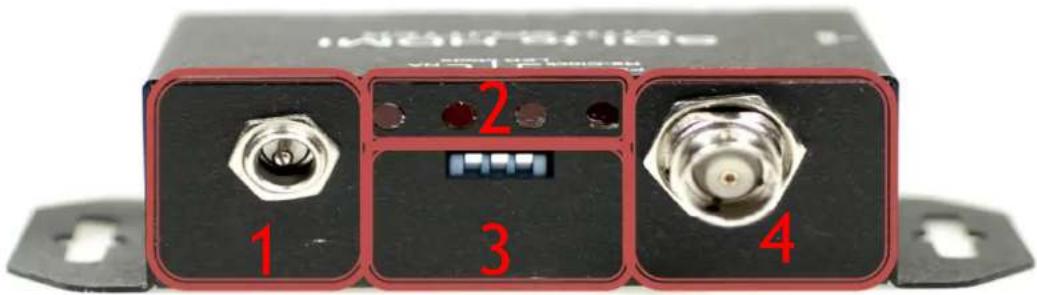
| NO | Component | Function |
| 1 | Power Jack | The Power adapter plug into here. |
| 2 | Power/Locked LED | The LEDs is indicating Signal indicate |
| 3 | Dipswitch |  1.Reclocker2.LED Mode3.NA. 1.Reclocker2.LED Mode3.NA. |
| 4 | SDI input Port | From your HDMI Source plug into these ports |
Dip Switch
- Re-clock: Receives a signal and retransmits it at a higher level and/or higher power, or onto the other side of an obstruction, so that the signal can cover longer distances.
- LED Mode:
Pin OFF (↓):
| Resolution | SD LED | HD LED | 3G LED | POWER LED |
| 720 x 480i (NTSC) | ○ | ○ | ○ | ● |
| 720 x 576i (PAL) | ○ | ○ | ● | ○ |
| 1280 x 720 p50 | ○ | ○ | ● | ● |
| 1280 x 720 p60 | ○ | ● | ○ | ○ |
| 1920 x 1080 i50 | ○ | ● | ○ | ● |
| 1920 x 1080 i60 | ○ | ● | ● | ○ |
| 1920 x 1080 p24 | ○ | ● | ● | ● |
| 1920 x 1080 p25 | ● | ○ | ○ | ○ |
| 1920 x 1080 p30 | ● | ○ | ○ | ● |
| 1920 x 1080 p50 | ● | ○ | ● | ○ |
| 1920 x 1080 p60 | ● | ○ | ● | ● |
| 2048 x 1080 p24 | ● | ● | ○ | ○ |
| 2048 x 1080 p25 | ● | ● | ○ | ● |
| Un-know | ○ | ○ | ○ | ○ |
● : LED ON
○ : LED OFF
Pin On (↑)
| Resolution | 3G LED | HD LED | SD LED |
| NTSC / PAL | ○ | ○ | ● |
| 720p / 1080i / 1080 [24p, 30p] | ○ | ● | ○ |
| 1080 [50p,60p] | ● | ○ | ○ |
● : LED ON
○ : LED OFF
NA:
Specifications
| DESCRIPTION | |
| Support Video Resolution | SD - 720 x 480i / 720 x 576iHD- 1280 x 720 50p/60p1920 x 1080 50i/60i1920 x 1080 24p/25p/30p3G- 1920 x 1080 50p/60p |
| SDI format | SD-SDI (SMPTE 259M)HD-SDI (SMPTE 292M)3G-SDI (SMPTE 424M / SMPTE 425M) |
| Audio Support | 2 Channel of Stereo |
| Re-clock Function | Yes (Dip Switch) |
| Coaxial Cable Type | RG6/RG59(75Ω) |
| Cable Equalization | 3G: 100m of RG6/ 86m of RG59HD: 170m of RG6/ 120m of RG59SD: 400m of RG6/ 280m of RG59*1 RG6: CANARE L-5CFB Cable / RG59: Belden 9275 Cable*2 Cable Length Performance: Depending on SDI Signal and Cable Quality |
| Firmware Updates | Via USB |
| Input | 1 x BNC [SDI] |
| Output | 1 x HDMI2 x BNC [SDI] |
| BNC Connector | 3G 75 Ω inter-locked socket |
| HDMI Connector | TYPE A [19-pin female] |
| DIP Switch | 3-pin [Re-clock / LED mode / NA] |
| Housing | SECC |
| Dimension | L:104mm x W:63.3mm xH:26mm |
| Power Source | Power Adapter: AC 100 ~ 240 V/DC (+6 ~ 15 V) |
| Operation Temperature | 0~50°C [32~114°F] |
| Storage Temperature | -20~+60°C |
Firmware Upload
● Firmware is upgradable in the field using the integrated USB port
How to Firmware upgrade:
Step 1.
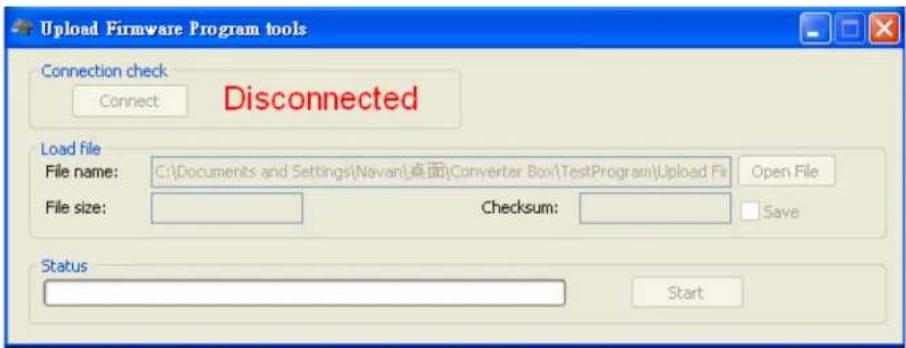
Open Upload Firmware Program tools.exe and connect box to PC by USB Cable.
Step 2.
Plug and un-plug "DC adapter" to power on/off the converter box (the connection check status will be changed to "Connect")

Step 3.
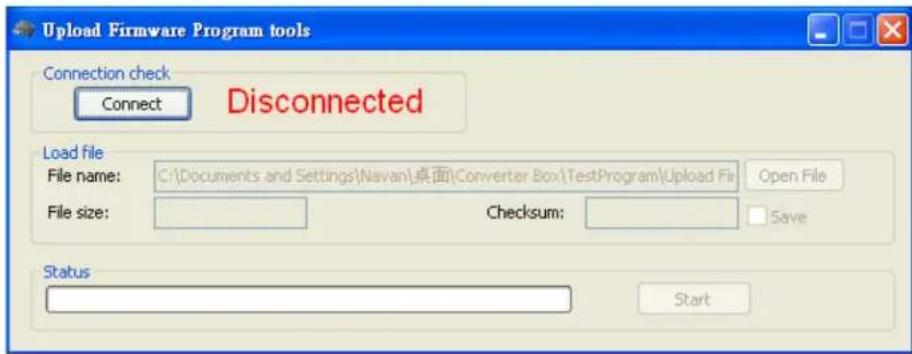
Plug and un-plug "DC adapter" again (the connection check status will be changed to "Connected") and Please click the Open File button to select the firmware bin file.

Step 4.
Please click "Start" Button to proceed with new firmware programming. The PASS message will appear when the procedures finished.

Step 5.
Close Upload Firmware Program tools
Update List
| Data | Version | Command | |
| 2013.03.14 | V1.1 | 1. Modify Cable Equalization | |
| 2015.03.20 | V1.2 | 1. Change Box Pic | |
Warranty
A. LIMITED WARRANTY
KanexPro™ warrants that (a) its products (the “Product”) will perform greatly in agreement with the accompanying written materials for a period of 36 months (3 full years) from the date of receipt and (b) that the product will be free from defects in materials and workmanship under normal use and service for a period of 3 years.
B. CUSTOMER REMEDIES
KanexPro's entire liability and Customer's exclusive remedy shall be, at KanexPro option, either return of the price paid for the product, or repair or replacement of the Product that does not meet this Limited Warranty and which is returned to KanexPro with a copy of customers' receipt. This Limited Warranty is void if failure of the Product has resulted from accident, abuse, or misapplication. Any replacement Product will be warranted for the remainder of the original warranty period of 3 years, whichever is longer.
C. NO OTHER WARRANTIES
To the maximum extent permitted by applicable law, KanexPro disclaims all other warranties, either express or implied, including, but not limited to implied warranties of merchantability and fitness for a particular purpose, with regard to the product and any related written materials. This limited warranty gives customers specific legal rights. Customers may have other rights depending on the jurisdiction.
KANEXPRO SDI-SDHDXPRO
D. NO LIABILITY FOR DAMAGES
To the maximum extent permitted by applicable law, in no event shall KanexPro be liable for any damages whatsoever (including without limitation, special, incidental, consequential, or indirect damages for personal injury, loss of business profits, business interruption, loss of business information, or any other pecuniary loss) arising out of the use of or inability to use this product, even if KanexPro has been advised of the possibility of such damages.
KanexPro
1405 pioneer street
Brea, CA 92821


Brand : KanexPro
Model : SDI-SDHDXPRO
Category : Audio/video converter