
EXT-HD50C - Audio/video converter KanexPro - Free user manual and instructions
Find the device manual for free EXT-HD50C KanexPro in PDF.


| Product Type | HDMI Extender (Transmitter + Receiver) |
| Brand | KanexPro |
| Model | EXT-HD50C |
| HDMI Compliance | HDMI 1.4 |
| HDCP Compliance | HDCP 1.4 |
| Video Bandwidth | 10.2 Gbps |
| Maximum Video Resolution | 4K@30Hz (3840x2160) |
| Audio Support | PCM 7.1, Dolby TrueHD, DTS-HD |
| Transmission Distance (CAT6) | 230 ft (70 m) for 1080p; 131 ft (40 m) for 4K30 |
| Transmission Distance (CAT5E) | 197 ft (60 m) for 1080p; 115 ft (35 m) for 4K30 |
| EDID Copy | Yes (selectable local or remote EDID via DIP switch) |
| IR Control | Yes (IR blaster and receiver included) |
| Loop Output | Yes (HDMI loop out on transmitter for local display or cascading) |
| Cascading | Supported via HDMI loop out port |
| Housing Material | Metal enclosure |
| Dimensions (Transmitter) | 79.5 x 69 x 16.5 mm (W x D x H) |
| Weight (Transmitter) | 132 g |
| Weight (Receiver) | 130 g |
| Power Supply | 5V/1A DC (2 adapters included) |
| Power Consumption (Transmitter) | 1.86 W |
| Power Consumption (Receiver) | 0.87 W |
| Operating Temperature | 0°C to 40°C (32°F to 104°F) |
| Storage Temperature | -20°C to 60°C (-4°F to 140°F) |
| ESD Protection | ±8 kV (air gap), ±4 kV (contact) |
| Warranty | 1 year limited warranty |
Frequently Asked Questions - EXT-HD50C KanexPro
User questions about EXT-HD50C KanexPro
0 question about this device. Answer the ones you know or ask your own.
Ask a new question about this device
Download the instructions for your Audio/video converter in PDF format for free! Find your manual EXT-HD50C - KanexPro and take your electronic device back in hand. On this page are published all the documents necessary for the use of your device. EXT-HD50C by KanexPro.
USER MANUAL EXT-HD50C KanexPro
HDMI Extender over CAT5/6 up to 164ft. (50m)
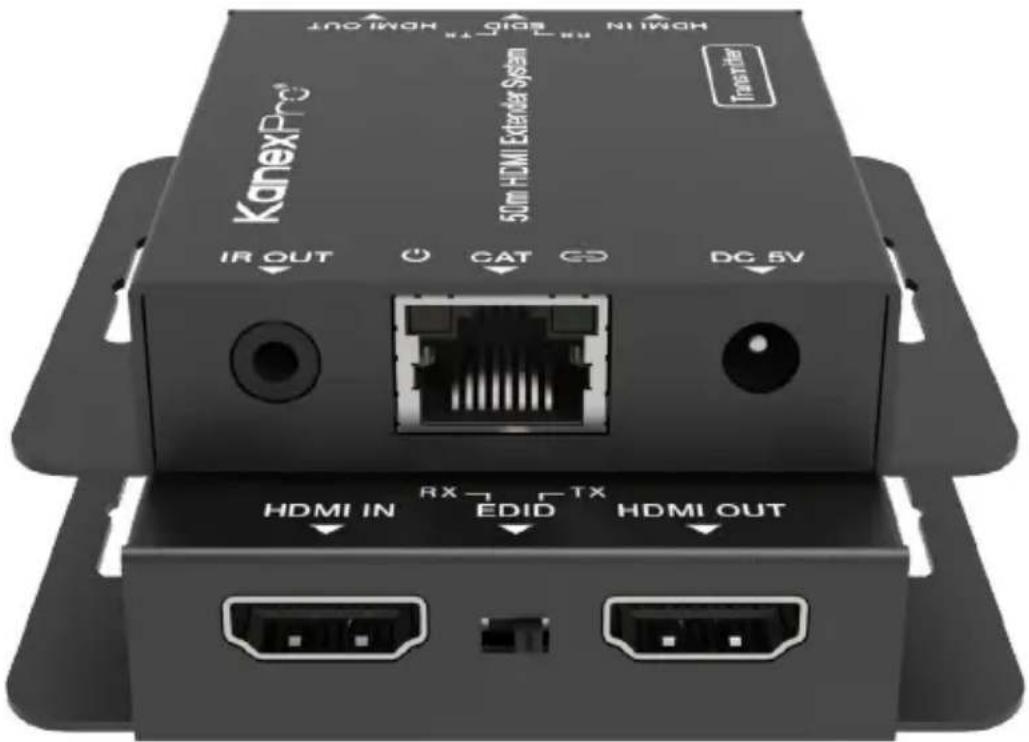
MPN: EXT-HD50C
VER 1.0
Thank you for purchasing this product
For optimum performance and safety, please read these instructions carefully before connecting, operating or adjusting this product. Please keep this manual for future reference.
Surge protection device recommended
This product contains sensitive electrical components that may be damaged by electrical spikes, surges, electric shock, lighting strikes, etc. Use of surge protection systems is highly recommended in order to protect and extend the life of your equipment.
Table of Contents
| 1. | Introduction. | ||
| 2. | Features. | ||
| 3. | Package | Contents. | |
| 4. | Specifications. | 4 | |
| 5. Operation Controls and Functions. | 5 | ||
| 5.1 | Transmitter | Panel. | |
| 5.2 | Receiver | Panel. | |
| 5.3 | IR | Pin Definition | |
| 6. | Application | Example. | |
1. Introduction
This KanexPro HDMI Extender system (EXT-HD50C) can extend high definition video/audio signal and IR control signals up to 230ft/70m for 1080p resolution, and 131ft/40m for 4K30 resolution via a single CAT6 cable. The system is capable of zero-latency, uncompressed long-distance transmissions between the transmitter and receiver units. This extender features an HDMI loop output which can be cascaded to another pair of extenders, supporting resolution up to 4K@30Hz. The system supports EDID copy function (you can choose local or remote EDID). It supports audio formats up to PCM7.1, Dolby True HD, DTS HD. This product can be widely used in multi-media conference halls, TV teaching and large-screen displays.
2. FEATURES:
• HDMI 1.4 and HDCP 1.4 compliant
• Support video resolution up to 4K@30Hz
• The maximum transmission distance via a single CAT6/5E
- cable is as follows:
- CAT6: 230ft/70m for 1080p, 131ft/40m for 4K30 CAT5E: 197ft/60m for 1080p, 115ft/35m for 4K30
- Support copying EDID from receiver display or loop out display
- Allow for cascading via additional HDMI loop out port
- Compact design for easy and flexible installation
3. PACKAGE CONTENTS:
• 1x HDMI Transmitter
- 1x HDMI Receiver
2 • 1x IR Blaster Cable
- 1x IR Receiver Cable
- 2X ^5 V/1A DC Power Adapter
- 1x User Manual
5
7
7
7
4. SPECIFICATIONS:
| Technical | |
| HDMI Compliance HDMI | 1.4 |
| HDCP Compliance HDCP | 1.4 |
| Video Bandwidth 10.2Gbps | |
| Video Resolution Up to 4K@30Hz | |
| Audio Support | Up to 7.1CH HD audio |
| Input TMDS Signal 3.3 volts | |
| Input DDC Signal | 5.0 volts/P-P |
| ESD Protection | Human body model:+/- 8KV (Air-gap discharge)+/- 4KV (Contact discharge) |
| Connection | |
| Transmitter | Input: 1 x HDMI Type A [19-pin female]Outputs: 1 x HDMI Type A [19-pin female]1 x IR OUT [3.5mm Stereo Mini-jack]1 x CAT OUT [RJ45, 8-pin female] |
| Receiver | Inputs: 1x IR IN [3.5mm Stereo Mini-jack]1x CAT IN [RJ45, 8-pin female]Output: 1x HDMI Type A [19-pin female] |
| Mechanical | |
| Housing | Metal Enclosure |
| Silkscreen Color | Black |
| Dimensions | 79.5mm (W) x 69mm (D) x 16.5mm (H) |
| Weight | Transmitter: 132g Receiver:130g |
| Power Supply | 5V/1A DC |
| Power Consumption | Transmitter: 1.86W, Reciever: 0.87W |
| Operation Temperature | 32 - 104°C / 0 - 40°F |
| Storage Temperature | -4 - 140°F / -20 - 60°C |
| Relative Humidity | 20-90% RH (non-condensing) |
5. Operation Controls and Functions:
5.1 Transmitter Panel

| No. Name Function Description | ||
| 1 | HDMI IN HDMI signal input port. Connect to HDMI source device such as DVD or Set-top box. | |
| 2 | EDID DIP Switch | The switch is used for selecting EDID: Switch to the right position, the extender will copy HDMI loop out display EDID information to signal source; Switch to the left position, the extender will copy Receiver display EDID to signal source. |
| 3 | HDMI OUT HDMI | signal loop out port. Connect to HDMI display device such as HDTV. |
| 4 | IR OUT Connect to IR blaster cable, the IR signal is from the IR IN port of the receiver. | |
| 5 | Power LED When the transmitter is powered on, the LED will be on. | |
| 6 | CAT CAT output port. Connect to the CAT input port of the receiver with CAT5E/6 cable. | |
| 7 | Link LED When the transmitter is connected to HDMI source, the LED will be on. | |
| 8 | DC 5V DC 5V power supply port. | |
5.2 Receiver Panel

| No. Name Function Description | ||
| 1 | AUDIO OUT (COAX, L/R) | Coaxial/analog audio output port, connect to amplifier or speaker. |
| 2 | HDMI port IN: HDMI input port, connect to HDMI source device such as DVD or set-top box with an HDMI cable. | |
| 3 | CAT OUTPUT port (1-4) | Connect to the CAT IN port of the CAT receiver with a CAT cable. |
| 4 | Link Signal Indicator lamp (Green) | Illuminate: Transmitter and receiver are connected.Dark: Transmitter and receiver are not connected. |
| 5 | Data Signal Indicator lamp (Orange) | Illuminating: HDMI signal with HDCP.Flashing: HDMI signal without HDCP.Dark: No HDMI signal. |
| 6 | IR OUT Connect | the IR Blaster cable to transmit IR signal from the CAT receiver. |
| 7 | DC 12V Plug the | DC 12V power supply into the unit and connect the adaptor to an AC outlet.(Note: The transmitter can power the receiver via a CAT cable.) |
5.3 IR Pin Definition
IR Receiver and Blaster pin's definition is as below:

- Application Example:

flowchart
graph TD
    A["Media Player"] --> B["HDMI IN"]
    B --> C["RX"]
    C --> D["EBDD"]
    D --> E["TX"]
    E --> F["HDMI OUT"]
    G["Transmitter"] --> H["IR OUT"]
    H --> I["CAT"]
    I --> J["DC SV"]
    K["Receiver"] --> L["IR Receiver"]
    L --> M["IR OUT"]
    M --> N["CAT"]
    N --> O["DC SV"]
    P["IR Remote"] --> Q["IR Receiver"]
    Q --> R["DC SV"]
HDMI®
The terms HDMI and HDMI High-Definition Multimedia interface, and the HDMI Logo are trademarks or registered trademarks of HDMI Licensing LLC in the United States and other countries.
9. Warranty
KanexPro TM warrants that (a) its products (the "Product") will perform greatly in agreement with the accompanying written materials for a period of 1 year from the date of receipt and (b) that the product will be free from defects in materials and workmanship under normal use and service for a period of 1 year.
B. CUSTOMER REMEDIES
KanexPro's entire liability and Customer's exclusive remedy shall be, at KanexPro option, either return of the price paid for the product, or repair or replacement of the Product that does not meet this Limited Warranty and which is returned to KanexPro with a copy of customers' receipt. This Limited Warranty is void if failure of the Product has resulted from accident, abuse, or misapplication. Any replacement Product will be warranted for the remainder of the original warranty period or 90 days whichever is longer.
C. NO OTHER WARRANTIES
TO THE MAXIMUM EXTENT PERMITTED BY APPLICABLE LAW, KANEX DISCLAIMS OTHER WARRANTIES, EITHER EXPRESS OR IMPLIED, INCLUDING, BUT NOT LIMITED TO IMPLIED WARRANTIES OF MERCHANTABILITY AND FITNESS FOR A PARTICULAR PURPOSE, WITH REGARD TO THE PRODUCT AND ANY RELATED WRITTEN MATERIALS. THIS LIMITED WARRANTY GIVES CUSTOMERS SPECIFIC LEGAL RIGHTS. CUSTOMERS MAY HAVE OTHER RIGHTS DEPENDING ON THE JURISDICTION.
D. NO LIABILITY FOR DAMAGES
TO THE MAXIMUM EXTENT PERMITTED BY APPLICABLE LAW, IN NO EVENT SHALL KANEX BE LIABLE FOR ANY DAMAGES WHATSOEVER (INCLUDING WITHOUT LIMITATION, SPECIAL, INCIDENTAL, CONSEQUENTIAL, OR INDIRECT DAMAGES FOR PERSONAL INJURY, LOSS OF BUSINESS PROFITS, BUSINESS INTERRUPTION, LOSS OF BUSINESS INFORMATION, OR ANY OTHER PECUNIARY LOSS) ARISING OUT OF THE USE OF OR INABILITY TO USE THIS PRODUCT, EVEN IF KANEX HAS BEEN ADVISED OF THE POSSIBILITY OF SUCH DAMAGES.
Brea, California
KanexPro.com
MPN: EXT-HD50C
The terms HDMI and HDMI High-Definition Mult-media interface, and the HDMI logo are trademarks or registered trademarks of HDMI licensing | C in the United States and other countries.


- HDMI Extender over CAT5/6 up to 164ft. (50m)
- Thank you for purchasing this product
- Surge protection device recommended
- Introduction
- FEATURES:
- PACKAGE CONTENTS:
- SPECIFICATIONS:
- Operation Controls and Functions:
- Receiver Panel
- IR Pin Definition
- HDMI®
- Warranty
- CUSTOMER REMEDIES
- NO OTHER WARRANTIES
- NO LIABILITY FOR DAMAGES
Brand : KanexPro
Model : EXT-HD50C
Category : Audio/video converter