
ABTS-SH01 - Docking Station AKAI - Free user manual and instructions
Find the device manual for free ABTS-SH01 AKAI in PDF.


| Product Type | Charging Dock / Stand |
| Brand | AKAI |
| Model | ABTS-SH01 |
| Dimensions (approx.) | 180 x 120 x 80 mm |
| Weight (approx.) | 350 g |
| Power Supply | 5V DC via USB (cable included) |
| Compatible Devices | Tablets and smartphones up to 10 inches |
| Main Functions | Charging, device holder, LED charging indicator |
| Charging Port | Micro USB or USB-C (depending on device) |
| Material | Plastic with anti-slip pads |
| Care and Cleaning | Wipe with a dry, soft cloth |
| Safety | Do not expose to water or moisture; unplug when not in use |
| Operating Temperature | 0°C to 40°C |
| Spare Parts | Not available separately |
| Repairability | Non-repairable; replace if defective |
| Included Accessories | Charging dock, USB cable, user manual |
| Warranty | 1 year |
| Certifications | CE, RoHS |
Frequently Asked Questions - ABTS-SH01 AKAI
User questions about ABTS-SH01 AKAI
0 question about this device. Answer the ones you know or ask your own.
Ask a new question about this device
Download the instructions for your Docking Station in PDF format for free! Find your manual ABTS-SH01 - AKAI and take your electronic device back in hand. On this page are published all the documents necessary for the use of your device. ABTS-SH01 by AKAI.
USER MANUAL ABTS-SH01 AKAI
EN - ENGL
For correctly operating, please read this manual carefully before using. Any content the manual won't declare again, and we are not responsible for consequence cause oversight of this manual.
FEATURES:
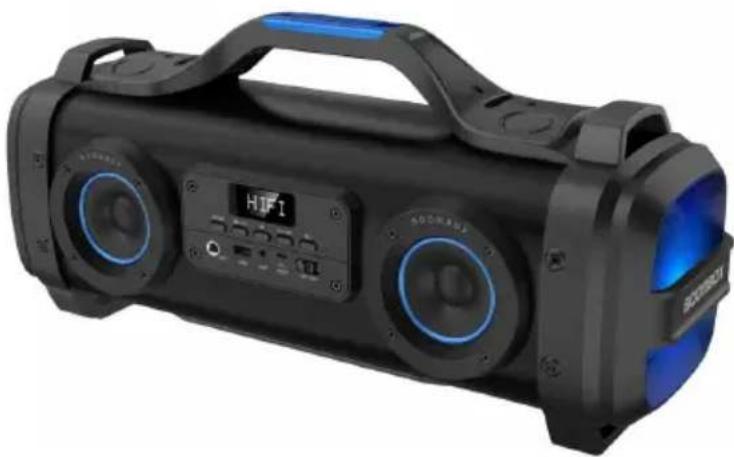
- Newest 2.2CH Super Blaster Boombox of High Performance;
- With cool appearance, clear sound and deep bass;
- Supporting USB disk, FM Radio and line in function;
- With karaoke function, 1 microphone input;
- With EQ function offering dynamic sound effect;
- 10 meters operating range;
- Build in lithium rechargeable battery 4400mAh;
- With classic handle, easy to take out.
ACCESSORIES:
Charging cable, Audio cable, User manual, Shoulder strap
SPECIFICATION:
Bluetooth range: up to 10 meters
Bluetooth version: 4.2
Speakers: Tweeter Size: 3inch x 2
Subwoofer Size: 4 inch x 2
Tweeter Output: 4.5W x 2, 4Ω
Subwoofer Output: 21W x 2, 4Ω
Connections: USB and Aux-in 3.5mm jack connection
Power supply: Built-in rechargeable lithium battery 4400mAh, 7.4V
Play time: 4 hours with max volume
Recharge power: DC 5V 1A (USB-to-micro USB charging called) incl
Product size: 533(L)*178(W)*239(H)MM
INSTRUCTION FOR APPEARANCE AND KEY:

| 1.MODE (Switch to Bluetooth, USB disk, FM and state) | 7.MIC JACK |
| 2. PREVIOUS/VOLUME DOWN | 8.USB PORT |
| 3.PLAY/PAUSE | 9.AUX IN JACK |
| 4.DIGITAL DISPLAY | 10. DC 5V Charging Port |
| 5. NEXT/VOLUME UP | 11. OFF/ON |
| 6.EQ |
EQ Introduction:
This unit offer 2 different kinds of sound effect, EQ in turn to be BASS, SITE.
USB Playing:
- Turn the power button to "ON".
- Plug the USB disk into the USB socket. The audio files on the USB disk w automatically.
- Short press PREVIOUS or NEXT button on the device to select songs you like
- Long press PREVIOUS or NEXT button to adjust volume down and up.
- Short press PLAY/PAUSE button to play or pause the music.
- Short press "EQ" to choose different style you like such as BASS or SITE.
- Please turn the Power button to "OFF" while without use.
Bluetooth:
- Turn the power button to "ON".
- Activate Bluetooth of mobile phone and search for device name "AKAI ABTS-SH connect it.
- Play the music from your mobile phone and enjoy.
- Short press PREVIOUS or NEXT button on the device or on Mobile phones to like. Long press PREVIOUS or NEXT button to adjust volume down and up. Or phones' volume.
- Press PLAY/PAUSE button on the device or on Mobile phones to play/stop the
- Short press "EQ" to choose different style you like such as BASS or SITE.
- Please turn the Power button to "OFF" while without use. Songs will play at starting up.
FM Radio:
- Turn the power button to "ON", press the "MODE" button to FM radio stat
- The audio cable provided can be used as antenna, please insert the audio c best FM signal before using.
- Short press "PLAY/PAUSE" button to auto search FM Channel from low level high level search and store it automatically; During searching, the RGB light won't light on once searching stops, and there is no sound during searching.
- Short press PREVIOUS or NEXT button to switch the stored FM channel.
- Short press "EQ" to choose different style you like such as BASS or SITE.
AUX-IN:
Use the supplied audio cable to connect "LINE OUT" of the music players like to the "AUX IN" of this speaker;
Press the "MODE" button to switch to AUX IN state;
Short press "PLAY/PAUSE" button to be mute, second short press to relieve;
Short press "EQ" to choose different style you like such as BASS or SITE;
Microphone Input:
This product with one Microphone input. Just plug the 6.5MM microphone jack tl use.
TWS Function:
- Turn on the two older speakers you want to pair, please noted they must be paring name, both under BT mode.
- Only need to set up one of the two units before paring with your device.
- Then long press “PLAY/PAUSE” button for around 5 seconds till show “BU” on the digital display of the speaker you set up.
- Then connect the BT paring name of the two machines (only one BT name device), then two speakers play music.
REMARKS:
- Press the MODE button to switch the different modes, the order is Bluetooth radio and AUX-IN.
- Turn the power button to "OFF" to cut off the power supply while without
CHARGING:
- Power off the unit, put the provided charge cable into the Micro charging s connect the other end to PC or other charger with DC 5V output, the red ch keep lighting and will be off once fully charged. Charge time should be 7-8 ho 2. When the unit is on, the light is always red, it works as an external input and the battery icon on digital display will work as charging indicator in progres fully charged, the icon will stop beating.


DISPOSAL OF WASTE ELECTRICAL AND ELECTRONIC EQUIPMENT
This symbol on the product or packaging means that the product should not be treated as household throw garbage at the end of its life, but take it to a collection center for recycling. In this way you will help to protect the environment and be able to prevent any negative consequences that it would have on the envi human health. To find your nearest collection center:
- Contact local authorities;
- Access the website: www.mmediu.ro;
- Request additional information from the store where you purchased the product.
AKAI
Boxa portabila cu BT
ABTS-SH01
GHIDUL UTILIZATORULUI
RO - ROMA
GR - EAAHN
БГ - БЪЛГАР
HU - MAG
PL - POI
CZ - ČE
SK - SLOVEN
Brand : AKAI
Model : ABTS-SH01
Category : Docking Station