
2038 000 - Refrigerator Foster - Free user manual and instructions
Find the device manual for free 2038 000 Foster in PDF.


| Product type | Refrigerator |
| Brand | Foster |
| Model | 2038 000 |
| Climate class | SN, N, ST, T (from +10°C to +43°C) |
| Refrigerant | R600a (flammable) |
| Adjustable temperature | 2°C to 8°C (digital display, recommended 4°C) |
| Main functions | Super Refrigeration, Open door alarm, High temperature alarm, LED lighting, Fan with ionizer (IonAir), Maxi Freshness drawer (FreshZone), CrispZone vegetable bin with humidity regulator, Bottle shelf, Multi-use box (MultiBox) |
| Defrosting | Automatic (refrigerator), manual if frost layer > 3-5 mm |
| Power supply | 230 V ~ 50 Hz (standard) |
| Included accessories | Glass shelves, Sliding door bins, Vegetable bin, FreshZone drawer, Multi-use box, Bottle shelf |
| Maintenance and cleaning | Interior cleaning with vinegar water, dust condenser regularly, do not wash accessories in dishwasher |
| Safety | Child lock not integrated, but precautions: do not allow children to play, unplug before cleaning, do not use electrical appliances inside |
| Spare parts and repairability | LED lighting to be replaced by after-sales service, power cord by qualified professional; use of refrigerant R600a, intervention on refrigeration circuit by authorized technician |
| General information | Appliance intended for household use; preservation of fresh food; reversible door opening direction (separate manual); energy saving advised |
Frequently Asked Questions - 2038 000 Foster
User questions about 2038 000 Foster
0 question about this device. Answer the ones you know or ask your own.
Ask a new question about this device
Download the instructions for your Refrigerator in PDF format for free! Find your manual 2038 000 - Foster and take your electronic device back in hand. On this page are published all the documents necessary for the use of your device. 2038 000 by Foster.
USER MANUAL 2038 000 Foster
natural_image
Line drawing of a refrigerator interior showing the doors and shelves (no text or symbols)natural_image
Line drawing of an electrical outlet with a plug inserted (no text or symbols)natural_image
Simple diagram with a circle, a diagonal line, and label A (no text or symbols beyond labels)natural_image
Simple diagram with a circle, a diagonal line, and label 'A' at the bottom (no text or symbols within the diagram itself)natural_image
Simple diagram with a circle and a vertical line, labeled A at the bottom (no text or symbols within the diagram itself)natural_image
Diagram of a cable or wire meshing setup with directional arrows and labeled component '2' (no text or symbols beyond basic lines)natural_image
Diagram of a mechanical component with a perforated base and internal slot (no text or symbols)natural_image
Diagram of a mechanical component with a perforated base and internal slot (no text or symbols)natural_image
Diagram of a refrigerator drawer with labeled parts and directional arrows (no text or symbols)natural_image
Architectural cross-section diagram of a multi-level building facade with structural layers (no text or symbols)natural_image
Illustration of four different storage containers: rectangular, rectangular with circular indentations, and a tray with white chocolate eggs (no text or symbols)VENTOLA\*
natural_image
Line drawing of an open refrigerator with various food items on shelves (no text or labels)natural_image
Line drawing of a hand holding a pen writing on a document inside a storage shelf (no text or symbols)natural_image
Illustration of a hand cleaning a coiled heater with a brush (no text or symbols)42041 Brescello (RE) - Italy
info@fosterspa.com
www.fosterspa.com
COOLER BI540 ADV FTR it (01-13
Foster

DETAILED
INSTRUCTIONS FOR USE
OF REFRIGERATOR

natural_image
Line drawing of a refrigerator interior showing the doors and shelves (no text or symbols)We thank you for the confidence you have shown by purchasing our appliance which is designed to simplify your life. To make the use of the product easier, we have supplied detailed instructions for use, and installation instructions supplied on a separate sheet. The instructions should allow you to learn about your new appliance as quickly as possible.
We wish you find a lot of pleasure in its use.
The appliance is intended solely for household use.
The refrigerator is intended for storing fresh food at temperatures above 0^ C.
Please visit our website where you can enter your appliance model number, indicated on the rating plate or the warranty sheet, to find detailed description of your appliance, tips on use, troubleshooting, service information, instructions for use etc.

Important safety warning

General information and tips

Protecting the environment

Do not wash in the dishwasher
CONTENTS
| 4 | IMPORTANT NOTES AND PRECAUTIONS | INTRODUCTION |
| 4 | BEFORE USING THE APPLIANCE FOR THE FIRST TIME | |
| 5 | IMPORTANT SAFETY INSTRUCTIONS | |
| 7 | IMPORTANT INFORMATION ON THE USE OF APPLIANCE | |
| 8 | ENVIRONMENT PROTECTION | |
| 9 | ADVICE FOR SAVING POWER WITH REFRIGERATION APPLIANCES | |
| 10 | INSTALLATION AND CONNECTION | APPLIANCE DESCRIPTION |
| 12 | APPLIANCE DESCRIPTION | |
| 13 | OPERATING THE APPLIANCE | |
| 17 | APPLIANCE INTERIOR EQUIPMENT | |
| 21 | RECOMMENDED DISTRIBUTION OF FOOD IN THE APPLIANCE | |
| 22 | STORING FOOD IN THE REFRIGERATOR | STORING AND FREEZING FOOD |
| 26 | STORING FOOD IN THE FreshZone DRAWER | |
| 27 | DEFROSTING THE APPLIANCE | DEFROSTING AND CLEANING THE APPLIANCE |
| 28 | CLEANING THE APPLIANCE | |
| 29 | TROUBLESHOOTING | MISCELLANEOUS |
| 31 | INFORMATION ABOUT APPLIANCE NOISE |

BEFORE USING THE APPLIANCE FOR THE FIRST TIME
Before connecting the appliance to the power mains, please read carefully the instructions for use which describe the appliance and its correct and safe use. The instructions apply to several appliance types/models; thus, settings or equipment may be described herein which is not available in your appliance. We recommend saving this instruction manual for future reference and attach it to the appliance if it is sold in the future.
Check for any damage or irregularities on your appliance. If you find your appliance is damaged, notify the retailer from which you have purchased the appliance.
Before connecting the appliance to the power mains, let the appliance rest in a vertical position for a minimum of 2 hours. This will reduce the possibility of operation faults due to the effect of transport on the cooling system.

IMPORTANT SAFETY INSTRUCTIONS
The appliance must be connected to the power mains and grounded in compliance with the effective standards and regulations.
Before cleaning the appliance, unplug it from the power mains (unplug the power cord from the wall outlet).
If the power cord is damaged, it must be replaced by a service technician or other adequately trained person.
If LED lighting does not work, call a service technician. Do not attempt a repair of the LED lighting yourself, as there is danger of contact with high voltage!

WARNING! Do not use any electric devices inside the appliance, except for those allowed by the manufacturer of this refrigeration appliance.

WARNING! Do not use mechanical devices or other means to accelerate the defrosting process, other than those recommended by the manufacturer.

WARNING! To avoid any hazard resulting from poor stability of the appliance, make sure it is installed as instructed.
Danger of frostbite
Never put frozen food in your mouth and avoid touching frozen food as this may cause frostnip or frostbite.
Safety of children and vulnerable persons
This appliance can be used by children aged from 8 years and above and persons with reduced physical, sensory or metal capabilities or lack of experience and knowledge if they have been given supervision or instruction concerning use of the appliance in a safe way and understand the hazards involved.
Remove the packaging intended to protect the appliance or particular parts during transport and keep it outside the reach of children.
It presents danger of injury or suffocation.
Do not let the children play with the appliance.
Cleaning and user maintenance shall not be made by children without supervision.
When removing a used appliance, disconnect the power cord, remove the door, and leave the shelves in the appliance. This will prevent children from locking themselves in the appliance.
Warning regarding the refrigerant
The appliance contains a small amount of an environmentally friendly yet flammable gas R600a. Make sure that no parts of the cooling system are damaged. A gas leak is not hazardous to the environment, but it could cause eye injury or fire.
In case of a gas leak, ventilate the room thoroughly, disconnect the appliance from the power mains, and call a service technician.
IMPORTANT INFORMATION ON THE USE OF APPLIANCE

WARNING! Keep ventilation openings, in the appliance enclosure or in the built-in structure, clear of obstruction.
The appliance may not be used outdoors and it may not be exposed to rain.
Do not store explosive substances such as aerosol cans with a flammable propellant in this appliance.
If the appliance will be out of use for an extended period of time, switch it off using the relevant button, and unplug it from the power mains. Empty the appliance, defrost it, clean it, and leave the door ajar.
In case of an error or power supply failure, do not open the freezer compartment unless the freezer has not operated for over 16 hours. After this period, use the frozen food or provide sufficient cooling (e.g. a replacement appliance).
Technical information on the appliance
Rating plate can be found in the appliance interior. It indicates data on voltage, gross and net volume, type and amount of refrigerant, and information on the climate classes.
If the language on the rating plate is not the language of your choice or the language of your country, replace it with the one supplied.

ENVIRONMENT PROTECTION
Packaging is made of environmentally friendly materials that can be recycled, disposed of, or destroyed without any hazard to the environment.

Removing an obsolete appliance
To protect the environment, take the obsolete appliance to an authorized home appliance collection centre.
Before doing so, do the following:
- disconnect the appliance from the power mains;
- do not allow children to play with the appliance.

WARNING! Do not damage the refrigerant circuit.
This will also prevent pollution.

The symbol on the product or its packaging indicates that the product should not be treated as normal household waste. The product should be taken to an authorized collection centre for waste electric and electronic equipment processing. Correct disposal of the product will help prevent any negative effects on the environment and health of people which could occur in case of incorrect product removal. For detailed information on removal and processing of the product, please contact the relevant municipal body in charge of waste management, your waste disposal service, or the store where you bought the product.
ADVICE FOR SAVING POWER WITH REFRIGERATION APPLIANCES
• Install the appliance as specified in the instruction manual.
- Do not open the door more often than necessary.
- Occasionally make sure air circulation underneath the appliance is unobstructed.
- Condenser unit on the rear wall should be kept clean (see chapter Cleaning the appliance).
- If the gasket is damaged or does not provide a perfect seal for any reason, have it replaced as soon as possible.
- Store the food in tightly sealed containers or appropriate packaging.
- Before placing the food in the refrigerator, allow it to cool down to room temperature.
- Defrost frozen food in the refrigerator compartment.
- To make use of the entire freezer compartment interior volume, remove some of the drawers as described in the instruction manual.
- Defrost your conventional freezer when an approximately 3–5 millimetre layer of frost or ice has built up on the refrigerated surfaces.
- Make sure the layout of shelves in the compartment is uniform and that the food is placed so that the air can freely circulate in the appliance interior (observe the recommended placement of food as described in the instructions).
• In appliances with a fan, do not block the fan slots or vents.
- If you do not need the fan or the ionizer, switch them off to reduce power consumption.
INSTALLATION AND CONNECTION
SELECTING THE ROOM
- Install the appliance in a dry and well ventilated room. The appliance will operate correctly if the environment temperature is in the interval specified in the table. The appliance class is indicated on the rating plate / label with the basic information on the appliance.
| Class Temperature | Relative Humidity | |
| SN (subnormal) | from +10 °C to +32 °C | ≤75% |
| N (normal) from | +16 °C to +32 °C | |
| ST (subtropical) | from +16 °C to +38 °C | |
| T (tropical) from | +16 °C to +43 °C |

- Do not place an appliance in a room where temperature can drop to below 5 °C as this may cause abnormal appliance operation or failure!
• After the installation, the appliance mains plug should be accessible!
- Do not place the appliance near appliances or devices radiating heat, such as a cooker, a stove, a radiator, water heater etc., and do not expose it to direct sunlight. The appliance should stand at least 3 cm away from an electric or gas cooker or at least 30 cm away from an oil or solid fuel stove. If the distance between such source of heat and the appliance is smaller, use an insulating panel.
Note: Place the appliance in a sufficiently large room. There should be at least 1 m ^3 of space per 8 grams of refrigerant. Amount of refrigerant is indicated on the rating plate in the appliance interior.
- At the base of the kitchen unit intended for building in the integrated appliance, there should be at least 200cm^2 free space, for adequate air circulation.
On the upper part of the appliance the air is coming out, so try not to cover the opening for the outflow air.
Ignoring this caution may result in damage to the appliance.
Warning: When installing appliances next to each other (side by side) that are taller than 1700 mm, an anti-condensation kit needs to be purchased and installed, should the humidity in the room where the appliances are installed exceed 70%. For safety reasons, dew prevention kit may only be installed by an authorized service technician!
Order code: 376078 (appliances higher than 1,700 mm)
CONNECTING THE APPLIANCE

natural_image
Line drawing of an electrical outlet with a plug inserted (no text or symbols)- Connect the appliance to the power mains using the power cord. The wall outlet should be fitted with a ground contact (safety socket). Nominal voltage and frequency are indicated on the rating plate/label with basic information on the appliance.
- The appliance must be connected to the power mains and grounded in compliance with the effective standards and regulations. The appliance will withstand short-term deviations from the nominal voltage, but not more than +/- 6%.
CHANGING THE DOOR OPENING DIRECTION AND INTEGRATING THE APPLIANCE INTO A CABINET
The process of changing the appliance door opening and integrating the appliance into a cabinet is described on the separate installation instructions supplied in the bag with the instruction manual.
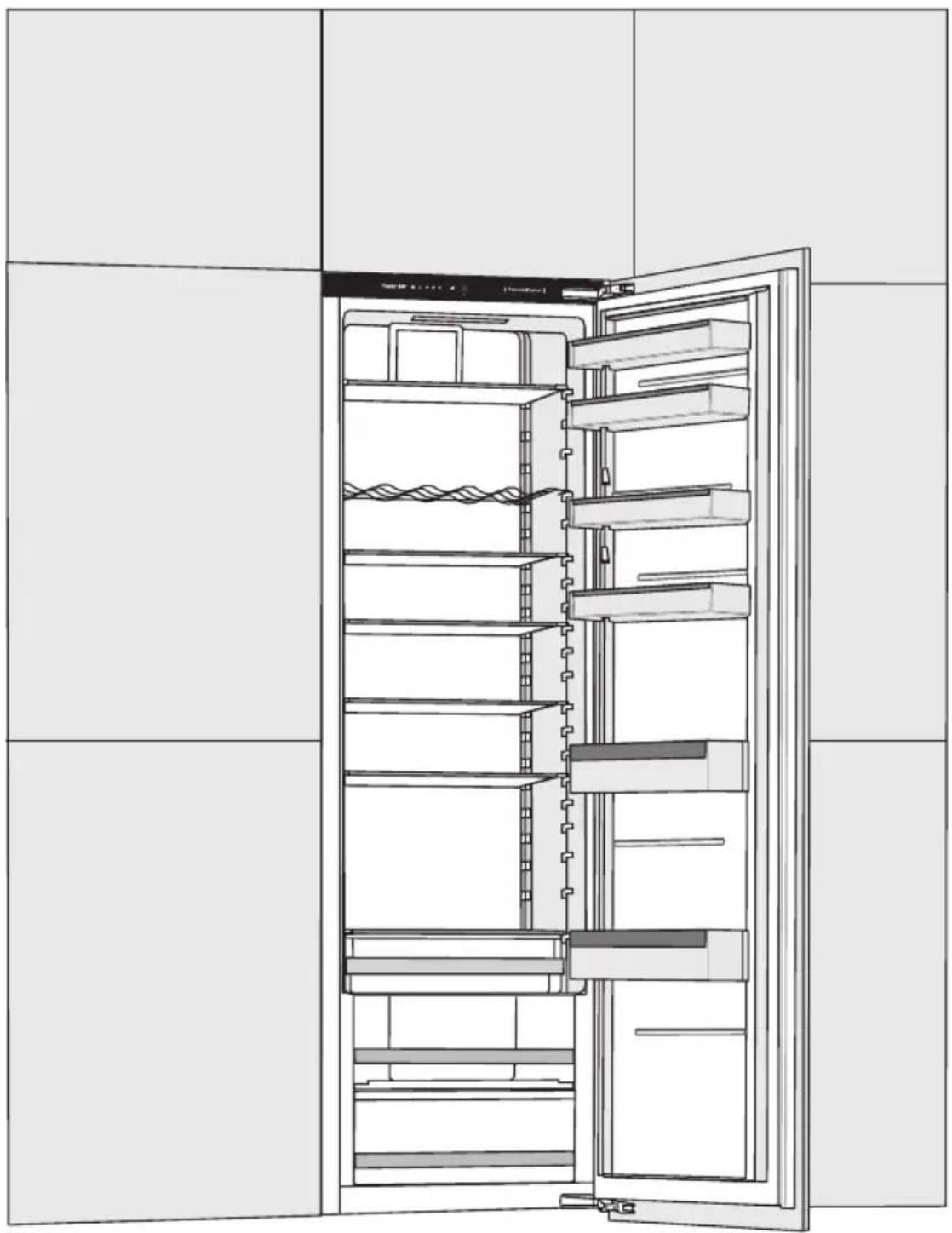
Appliance interior equipment may change according to the appliance model.
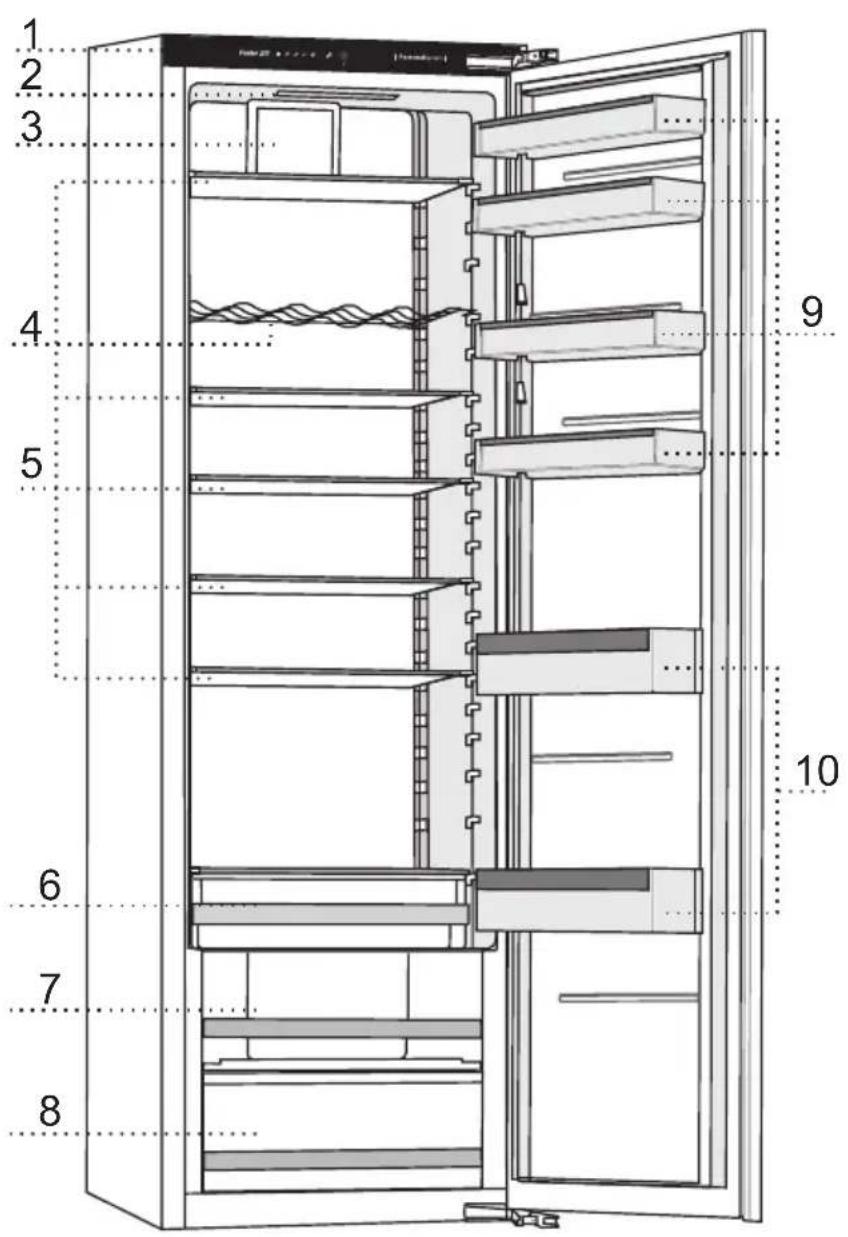
1 Control unit
2 LED lighting
3 Fan with air ionizer (+ on/off switch)
4 Bottle rack
5 Glass shelves
6 FreshZone drawer
7 CrispZone fruit and vegetables drawer with humidity control
8 Fruit and vegetables drawer
9 Low door shelves
10 Bottle shelve
OPERATING THE APPLIANCE

A Appliance on/off, temperature settings, and extra function key
B Refrigerator temperature display
The indicator for the selected temperature will be lit.
C Intensive cooling (cooling boost) function indicator
The C symbol will be lit when the intensive cooling function is activated.
D High temperature or open door alarm indicator
To set the appliance temperature or activate extra functions, press the A key successively. When the key is first pressed, the currently set value or function will start to flash. With each successive press of the key, the indicator moves to the next setting. The indicator cycles through the settings in a circular manner, from right to left. While the settings are being adjusted, the display will flash. Three seconds after the key is released, the setting will be stored automatically and the relevant symbol will be lit.
SWITCHING THE APPLIANCE ON/OFF

natural_image
Simple diagram with a circle, a vertical line, and label 'A' at the bottom (no text or symbols within the diagram itself)Switching the appliance on: Press the A key and hold it for 3 seconds.
Switching off the appliance: Again press the A key and hold it for 3 seconds. The appliance will be off, but there is still voltage in it as it is still connected to the power mains.
ADJUSTING THE TEMPERATURE IN THE APPLIANCE

- The factory default setting is the recommended temperature of 4^ .
- After the appliance is switched on, it may take several hours for the set temperature to be reached. Do not place any food into the refrigerator before the temperature drops to the selected setting.

natural_image
Simple diagram with a circle, a diagonal line, and label 'A' at the bottom (no text or symbols within the diagram itself)- Adjust the temperature as desired using the A key.
- Press the A key (several times) until the desired temperature indicator lights up.
- When the A key is pressed for the first time, the currently set value or function will start to flash. Every successive time you press the A key, the settings indicator will move to the next setting (from right to left, in a circular manner).
- After three seconds, the setting will stop flashing. Your setting will be stored and the corresponding indicator will be continuously lit.

The numbers 2, 4, 6 and 8 indicate the degrees Celsius (°C) in the appliance refrigerator compartment.
- The recommended temperature setting is +4 °C. At this temperature, food quality and freshness are preserved longer.
- If the temperature of the room where the appliance is installed is below 16 °C, we recommend setting a temperature lower than 4 °C.
INTENSIVE COOLING (COOLING BOOST) FUNCTION

To activate the intensive cooling (cooling boost) function, press the A key several times until the symbol C lights up.

- When the intensive cooling function is activated, the appliance will operate with maximum power. During this time, operation may be somewhat louder.
- Use this setting after switching on the appliance for the first time, before cleaning, or 24 hours before adding a large amount of food.
- If any other function is selected while the intensive cooling function is active, the intensive cooling function will be deactivated immediately.
- To switch off the intensive cooling function, press the A key to select the desired temperature (B). If the intensive cooling function is not deactivated manually, it will be automatically switched off (after approximately six hours), and the temperature will return to the most recently set value.
- If there is a power outage while the intensive cooling function is active, the function will be restarted when power supply resumes.
HIGH TEMPERATURE ALARM
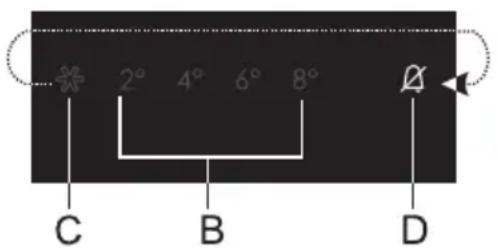
If the temperature inside the appliance is too high, acoustic alarm will be activated (intermittent tone) and the D symbol will flash.
- Every time the appliance is switched on with the A key, there is a 24-hour delay in high temperature alarm operation. If the appliance does not reach the sufficiently low temperature in this period, the alarm will be activated.
- To acknowledge and turn off the acoustic alarm, press the A key. If the alarm is not deactivated manually, it will be sounded for the first five minutes of every hour.
- When you press the A key for the first time, the alarm will be acknowledged and turned off. When you press the A key again, it will already work as a settings adjustment key.
- The D symbol flashes until the appliance reaches a suitable temperature.
OPEN DOOR ALARM

natural_image
Simple diagram with a circle, a diagonal line, and label 'A' at the bottom (no text or symbols within the diagram itself)If the refrigerator door is open for more than two minutes, an acoustic alarm (continuous beep) will be activated.
To acknowledge and turn off the acoustic alarm press the A key or close the door.
APPLIANCE INTERIOR EQUIPMENT
(*EQUIPMENT DEPENDS ON THE MODEL)
SHELF

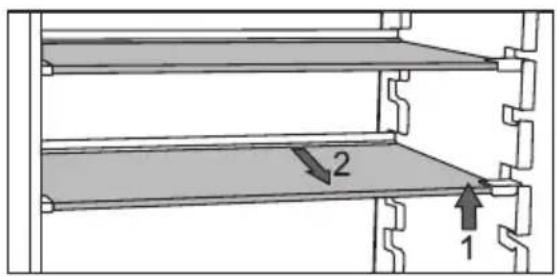
- Empty shelves can be distributed as you see fi t across the guides in the refrigerator interior without having to remove the shelf from the refrigerator.
To only move the shelf to a different height/guide, lift it at the front, hold it at the back, and move it higher or lower. To take the shelf from the refrigerator, first lift it at the front part, hold it at the back part, and pull it out from the appliance.
Store quickly perishable food at the back of the shelf where the temperature is the lowest.
WIRE BOTTLE RACK\*

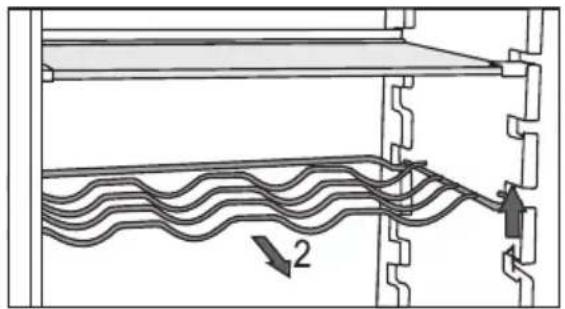
- Some models also feature a wire bottle holder. It is protected against being inadvertently pulled out. It can only be pulled out when it is empty. To pull it out, lift it slightly at the back and pull it towards you. Place the bottle holder so that the length of the bottles does not prevent proper closing of the door.
The holder can take a maximum load of nine 0.75-litre bottles or 13 kilograms of total weight – see label on the right side in the appliance interior.
• Cans may also be placed on the bottle rack (lengthwise or crosswise).
FRUIT AND VEGETABLE BIN WITH HUMIDITY CONTROL

- The bin at the bottom of the refrigerator is intended for storing fruit and vegetables. It provides humidity and prevents the food from drying out. The bin has integrated humidity regulator which allows setting the humidity level.

natural_image
Diagram of a window with a perforated metal grille and a small rectangular object on the right (no text or symbols)
natural_image
Diagram of a perforated metal shelf with an arrow indicating direction (no text or symbols)Slider position to the right: closed vents, higher humidity in the bin
Slider position to the left: open vents, lower humidity in the bin
If you observe droplets accumulating below the glass shelf, open the vents and wipe the shelf (see chapter TROUBLESHOOTING).
natural_image
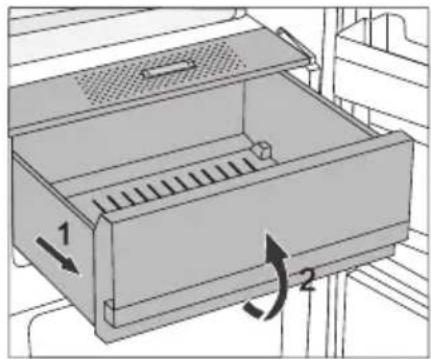
Diagram of a mechanical device with two directional arrows indicating movement or force (no text or symbols present)- Pulling out the bin: - Pull out the bin as far as it will go. Then, lift the front part and pull it out completely.
INTERIOR SIDE OF THE REFRIGERATOR DOOR
The shelves mounted on the interior side of the refrigerator door are intended for storing cheese, butter, eggs, yoghurt and other smaller packages, tubes, cans, etc. There is a bottle shelf at the lower end of the door.
ADJUSTABLE DOOR SHELVES


natural_image
Architectural cross-section diagram of a multi-level building facade with shelves and structural elements (no text or symbols)Interior side of the refrigerator door is fitted with shelves intended for storing cheese, butter, eggs, yoghurt, and other smaller packages, tubes, cans etc.
Maximum load on each door shelf is 5 kg.
MultiBox
STORAGE
BIN\*

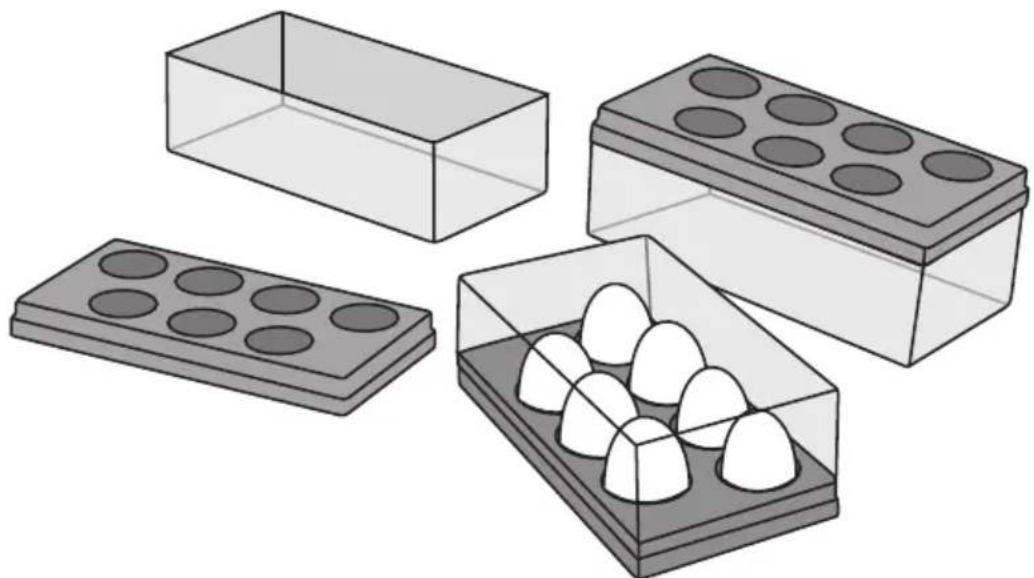
- MultiBox bin offers a convenient way for storing food with a strong or pungent smell, e.g. ripened or blue-vein cheese, sausages, onions, butter etc.
- The silicone lid provides an air-tight seal that prevents the food from drying out and the odour to spread throughout the refrigerator compartment.
- The silicone lid can also be used as an egg or ice tray.
- If the fl exible lid is used as an egg tray, place it directly on the bottom of the door bin and use the open lower part of the MultiBox bin to store food in smaller packages - pâté, jams, smaller tubes etc.
natural_image
Illustration of four different storage containers: rectangular, rectangular with circular indentations, and rectangular with white chocolate batters (no text or symbols)FAN\*
- The fan placed under the refrigerator compartment ceiling will make sure the temperature is distributed more evenly, and reduce condensation (dew) on the storage surfaces.
It is activated automatically when there is need for more intensive cooking.
AIR IONIZER (IonAir)\*
- Advanced fan system with dynamic cooling evenly distributes the ionized air and equalizes the temperature throughout the entire refrigerator. Air enriched with extra negative ions mimics the natural microclimate that keeps the food fresh for longer. Moreover, the any type of food can be placed on any shelf in the fridge as there are not temperature differences.
• To switch the air ionizer on and off, use the switch located on the fan housing.
Switching the ionizer on/off
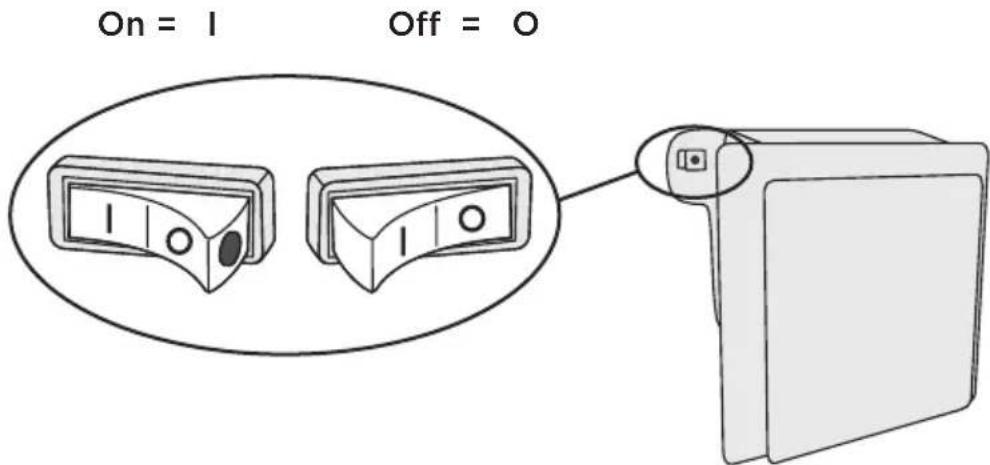
When the ionizer is switched on, a red dot will be visible on the switch.
AdapTech
Innovative sensor technology allows adjusting appliance operation to the user's habits or behaviour. Adaptive intelligent system monitors, analyzes, and records on a daily and weekly basis the use of appliance and adapts appliance operation to the perceived patterns. If the appliance is able to anticipate increased frequency of door opening, the appliance will automatically lower the temperature before such time to prevent the increase of food temperature as the door is opened more often. The appliance will also anticipate adding larger amounts of food into the refrigerator or freezer and adapt by cooling or freezing more intensively.
RECOMMENDED DISTRIBUTION OF FOOD IN THE APPLIANCE
Sections in the refrigerator compartment:
- upper part: canned food, bread, wine, pastry etc.
- middle part: dairy products, ready-made meals, desserts, soft drinks, beer, cooked food, etc.
- FreshZone bin: - meat, meat produce, delicatessen;
- Fruit and vegetable bin: fresh fruit, vegetables, salads, root vegetables, potatoes, onions, garlic, tomatoes, sauerkraut, turnips etc.

natural_image
Line drawing of an open refrigerator with various food items on shelves (no text or labels)Sections in the refrigerator compartment door:
- upper/middle door bins: eggs, butter, cheese etc.
- lower door bins: beverages, cans, bottles

Do not store fruit (bananas, pineapples, papaya, citruses) and vegetables (zucchini, eggplant, cucumbers, bell peppers, tomatoes, and potatoes) sensitive to low temperatures in the refrigerator.
IMPORTANT WARNINGS REGARDING FOOD STORAGE

Correct use of the appliance, appropriate packaging, maintaining the right temperature, and observing the food hygiene standards have a decisive impact on the quality of food storage.
Observe the expiry dates for the food, indicated on the packaging.
Food stored in the refrigerator should be kept in closed containers or in appropriate packaging to prevent it from emitting or receiving odours and humidity.
Do not store inflammable, volatile, and explosive substances in the refrigerator.
Bottles with high alcohol content should be tightly sealed and stored in an upright position.
Some organic solutions, essential oils in lemon and orange peel, butter acid, etc. may damage the plastic surfaces in case of a prolonged contact, causing damage and premature ageing of these materials.
Unpleasant odour warns of lacking cleanliness of the appliance or perished contents (see chapter Cleaning the Appliance).
If you are leaving home for a longer period of time, remove perishables from the refrigerator.
STORING FOOD
| TYPE OF FOOD Optimum storage temperature (°C) | Optimum storage humidity level (%) | Approximate storage time | |
| Pork -1 to 4 95 3 days | |||
| Beef 0 to 4 95 up to 3 weeks | |||
| Lamb 0 to 4 95 14 days | |||
| Chicken 0 to 4 95 3 days | |||
| Fish 0 to 4 95 3 to 10 days | |||
| Mollusc 0 to 4 95 2 days | |||
| Wet-aged beef 1,5 95 16 weeks | |||
| Dairy products (yoghurt, sour cream, butter, soft cheese, cheese spreads etc.) | 2 to 4 | 95 7 to 10 days | |
| Beetroot | 0 | 95 3 to 5 months | |
| Broccoli | 0 | 95-100 | 10 to 14 days |
| Cabbage, young | 0 | 98-100 | 3 to 6 weeks |
| Carrots, ripe | 0 | 98-100 | 4 to 5 months |
| Lettuce, winter | 0 | 95-100 | 2 to 3 weeks |
| Garlic | 0 | 65-70 | 6 to 7 months |
| Kohlrabi | 0 | 98-100 | 2 to 3 months |
| Brussels sprouts | 0 | 90-95 | 3 to 5 weeks |
| Cabbage, Chinese | 0 | 95-100 | 2 to 3 months |
| Cabbage, late varieties | 0 | 98-100 | 3 to 4 months |
| Carrots | 0 | 95-100 | 2 weeks |
| Cauliflower | 0 | 95-98 | 2 to 4 weeks |
| Celery, regular | 0 | 98-100 | 2 to 3 months |
| Swiss chard | 0 | 95-100 | 10 to 14 days |
| Radicchio 0 | 95-100 | 2 to 4 weeks | |
| Corn, sweet | 0 | 95-98 5 to 8 days | |
| Leeks 0 95-100 2 to 3 months | |||
| Mushrooms 0 95 3 to 4 days | |||
| Parsley 0 95-100 2 to 3 days | |||
| Parsnip 0 98-100 4 to 6 months | |||
| Radish, winter 0 95-100 2 to 4 months | |||
| Horseradish 0 98-100 10 to 12 months | |||
| Cauliflower 0 to 2 90-95 | 2 to 4 weeks | ||
| Onions | 0 to 2 65-70 | 6 to 7 months | |
| Asparagus | 0 to 2 | 95-100 | 2 to 3 weeks |
| Peas, green | 0 to 2 95-98 | 1 to 2 weeks | |
| Vegetables, chopped | 0 to 2 90-95 | up to 5 days | |
| Brussels sprout 0 to 2 90-95 | 1 to 2 weeks | ||
| Gooseberries | 0 to 2 90-95 | 3 to 4 weeks | |
| Cucumbers 4 to 10 | 95 | 10 to 14 days | |
| Potatoes | 7 to 10 | 90-95 | up to 9 months |
| Avocado, unripe | 7 to 10 | 85-95 | up to 6 weeks |
| Bell peppers | 7 to 10 | 90-95 | 2 to 3 weeks |
| Tomatoes | 10 to 12 | 85-90 | 4 to 7 days |
| Beans, seeds | < 15 | 40-50 6 to 10 months | |
| Pears | -3 | 90-95 | 2 to 7 months |
| Apricots | -1 90-95 | 1 to 3 weeks | |
| Strawberries | 0 90-95 | 3 to 7 days | |
| Raspberries | 0 to 2 | 90-95 | 2 to 3 days |
| Currants | 0 to 2 | 90-95 | 1 to 4 weeks |
| Blueberries | 0 to 2 | 90-95 | 14 days |
| Cherries | 0 to 2 | 90-95 | 2 to 3 weeks |
| Grapes | 0 to 2 | 85 | 2 to 8 weeks |
| Kiwi, ripe | 0 to 2 90-95 | 1 to 3 months | |
| Peaches | 0 to 2 90-95 | 2 to 4 weeks | |
| Cherries 0 to 2 90-95 2 to 3 weeks | |||
| Kiwi, unripe 0 to 2 90-95 2 to 6 months | |||
| Nectarines 0 to 2 90-95 1 to 3 weeks | |||
| Oranges 0 to 2 90-95 2 to 4 weeks | |||
| Persimmon 0 to 2 90-95 2 to 3 months | |||
| Plums 0 to 2 90-95 2 to 5 weeks | |||
| Fruit, chopped 0 to 2 90-95 up to 10 days | |||
| Apples 0 to 4 90-95 1 to 12 months | |||
| Melons | 4 | 90-95 | 15 days |
| Oranges | 4 to 7 90-95 2 to 4 weeks | ||
| Tangerines 5 to 8 | 90-95 2 to 4 weeks | ||
| Mango | 10 to 13 | 85-95 | 2 to 3 weeks |
| Melons | 10 to 13 | 85-95 | 1 to 2 weeks |
| Pineapples | 10 to 13 | 85-95 | 2 to 4 weeks |
| Lemons 11 to 13 90-95 2 to 3 weeks | |||
| Watermelon | 12 to 15 | 85-95 | 1 to 3 weeks |
| Bananas, ripe | 13 to 16 | 85-95 3 days | |
| Grapefruit | 13 to 16 | 90-95 1 to 3 weeks | |
STORING FOOD IN THE FreshZone DRAWER
(Only in some models)
In the FreshZone compartment, food stays fresh longer than in a conventional refrigerator, retaining more flavour and nutrients.
Decay and loss of mass are slowed down; therefore, fruit and vegetables remain fresh and natural longer. For optimum performance, the drawer should be fully closed.
- When buying food, make sure it is fresh as this will determine the quality of the food, as well as how long it will keep in the fridge.
- Store the food in closed containers or appropriate packaging to prevent it from emitting or receiving odours.
• Take the food from the drawer 30 to 60 minutes before use to allow the aroma and flavour develop at room temperature. - Food sensitive to low temperature and not appropriate for storage in the FreshZone drawer includes the following: pineapples, avocado, bananas, olives, potatoes, eggplant, cucumbers, beans, peppers (capsicum), melons, watermelons, pumpkins, squash, zucchini etc.
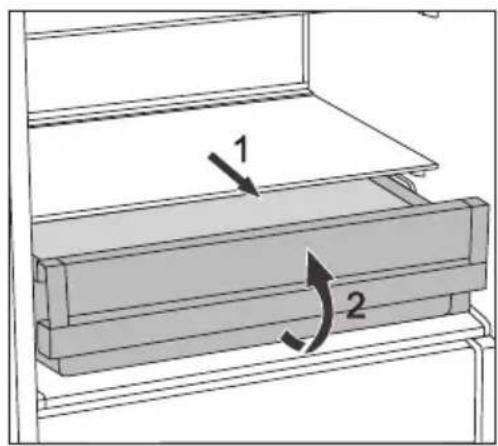
• To remove the drawer:
- Pull out the drawer until it is blocked.
- Then, lift it at the front and pull it all the way out.
AUTOMATIC REFRIGERATOR DEFROSTING
Refrigerator does not need defrosting because the ice on the back interior wall is thawed automatically.
Any accumulated ice will melt when the compressor unit is inactive. Drops will flow through an opening in the refrigerator rear wall into a tray fitted above the compressor, from where they will evaporate.
Make sure the opening in the back wall in the refrigerator interior is never blocked by food or any other object.
If an excessive layer of ice is formed on the rear wall of refrigerator interior (3-5 mm), switch off the appliance and defrost the appliance manually.

Before cleaning, unplug the appliance from the power mains – switch off the appliance (see chapter Switching the Appliance On/Off) and unplug the power cord from the wall outlet.
- Use a soft cloth to clean all surfaces. Cleaners that contain abrasive substances, acids, or solvents are not suitable for cleaning as they may damage the surface.
Clean the appliance exterior with water or a mild solution of suds. Lacquer-coated and aluminium surfaces may be cleaned with lukewarm water to which you have added a mild detergent. Use of cleaners with low alcohol content is allowed (e.g. window cleaners). Do not use cleaners containing alcohol for cleaning plastic materials.

Appliance interior can be cleaned with lukewarm water to which you can add some vinegar.

- Do not wash the parts of appliance interior equipment in a dishwasher as they may be damaged.

natural_image
Line drawing of a hand holding a pen over a flat surface, enclosed in a shelf (no text or symbols)- A gutter and an opening for discharging the water from thawed frost deposits are located underneath the cooling panel that cools the refrigerator interior. The gutter and the opening may not be clogged. Inspect them often and clean if necessary (e.g. with a plastic straw).
- Frost or ice build-up, 3-5 mm thick, will increase power consumption. Therefore, it should be regularly removed. Do not use any sharp objects, solvents, or sprays.

natural_image
Illustration of a hand using a tool to clean or store contents on a coiled heating element (no text or symbols visible)- The condenser unit mounted on the (exterior) back wall should always be kept clean, free of dust or deposits resulting from kitchen smoke or fumes. Occasionally clean the dust using a soft non-metal brush or a vacuum cleaner.
• After cleaning, switch the appliance back on and insert the food.
Problem: Cause or remedy:
| Appliance is connected to the power mains but it does not work. | Make sure there is voltage in the power outlet and that the appliance is switched on. |
Cooling system operates continuously for a long period of time: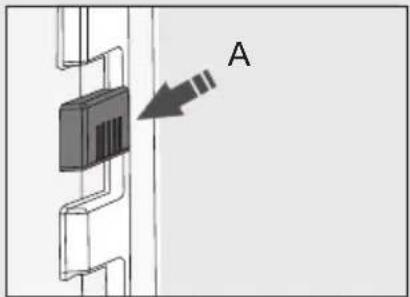 | Too high environment temperature. Door opened too frequently or too long. Door not closed correctly (possible impurities on the seal, misaligned door, damaged seal etc.). Too much fresh food inserted at once. Sensor in the refrigerator (A) blocked by fresh food. Make sure the air can circulate around the sensor (only with some models). Insufficient compressor and condenser unit cooling. Check for sufficient air circulation behind the appliance and clean the condenser unit. |
| Excessive build-up of ice on the back wall of refrigerator interior can be a result of the following: | Door opened too frequently or too long. Warm food placed in the refrigerator. Food or containers in contact with the back interior wall of the refrigerator. Poor door sealing. If the seal is dirty or damaged, clean or replace it. |
| Condensate (dew) on the shelf above the drawers: | This is transient phenomenon which cannot be entirely avoided in periods of high environment temperature and humidity. It subsides when temperature and humidity are normalized. We recommend cleaning the drawers more frequently and wiping the droplets occasionally. Open the humidity control slider. Put food in bags or other packaging with a good seal. |
| Water is dripping/ leaking from the refrigerator: | Clogged water discharge opening or water dripping past the water gutter. Clean the blocked opening, e.g. using a plastic straw. If a thick layer of ice builds up, defrost the appliance manually (see Defrosting the Appliance). |
| Problem: Cause or remedy: | |
| Indicator D flashes: • Door opened too frequently or too long. • Door not closed correctly (possible impurities on the seal, misaligned door, damaged seal etc.). • An extended power failure. • Too much fresh food inserted at once. | |
| Door is difficult to open: • If you are trying to open the refrigerator door after just having closed it, this could be difficult to do. As you open the door, some cool air escapes from the appliance and it is replaced by warm air from the environment. When this air is cooled, negative pressure is generated which results in problems as you try to open the door. After a few minutes, the condition is normalized and the door can be easily opened again. | |
| LED lighting does not work: | • If LED lighting does not work, call a service technician. • Do not attempt a repair of the LED lighting yourself, as there is danger of contact with high voltage! |
If the above tips do not resolve your problem, call the nearest authorized service centre and state the type, model, and serial number indicated on the appliance rating plate or label located in the appliance interior.
INFORMATION ABOUT APPLIANCE NOISE
Cooling in refrigerator freezers is made possible by a cooling system that also includes a compressor (and a fan with some appliances), which generates some noise. The level of noise depends on installation, proper use, and age of the appliance.
- After connecting the appliance to the power mains, compressor operation, or the sound of flowing liquid, may be somewhat louder. This is not a sign of malfunction and it will not affect the useful life of the appliance. In time, appliance operation and this noise will become quieter.
- Sometimes, unusual or loud noises may appear during appliance operation; these are mostly the result of improper installation:
- The appliance must stand level and stable on a solid base.
- The appliance may not be in contact with a wall or adjacent furniture.
- Make sure the interior equipment sits firmly in its place and that the noise is not caused by rattling cans, bottles or other containers placed next to each other.
- Due to the higher workload on the cooling system when the door is opened more frequently or for a longer time, when a large amount of fresh food is introduced or when intensive freezing or cooling functions are activated, the appliance can temporarily generate more noise.
WE RESERVE THE RIGHT TO CHANGES THAT DO NOT AFFECT THE APPLIANCE FUNCTIONALITY.
Foster s.p.a
via M.S. Ottone, 18-20
42041 Brescello (RE) - Italy
info@fosterspa.com
www.fosterspa.com
COOLER BI540 ADV FTR en (01-18)
711897
Foster

NOTICE D'UTILISATION
DÉTAILLÉE POUR UN
RÉFRIGÉRATEUR

natural_image
Line drawing of a refrigerator interior showing the doors and shelves (no text or symbols)natural_image
Illustration of a plug inserted into an electrical outlet (no text or symbols)natural_image
Simple diagram with a circle, a diagonal line, and label A (no text or symbols beyond labels)natural_image
Simple diagram with a circle and a vertical line, labeled A at the bottom (no text or symbols within the diagram itself)natural_image
Simple diagram with a circle and a diagonal line, labeled A at the bottom (no text or symbols within the diagram itself)natural_image
Diagram of a cable or wire connection setup with layered structure and directional arrows (no text or symbols)natural_image
Diagram of a mechanical component with a perforated base and internal slot (no text or symbols)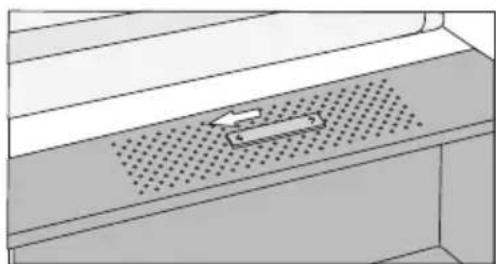
natural_image
Diagram of a perforated metal shelf with an arrow indicating direction (no text or symbols)
natural_image
Diagram of a refrigerator drawer with labeled parts and directional arrows (no text or symbols)natural_image
Architectural cross-section diagram of a multi-level building facade with structural beams and windows (no text or symbols)natural_image
Illustration of four different storage containers: rectangular, plastic tray with circular cavities, and open with eggs (no text or symbols)VENTILATEUR \*
natural_image
Line drawing of an open refrigerator with various food items including a cheese, fish, and vegetables (no text or symbols)natural_image
Illustration of a hand holding a pen writing on a document inside a storage shelf (no text or symbols present)natural_image
Illustration of a hand cleaning a coiled heat exchanger with a brush (no text or symbols)42041 Brescello (RE) - Italy
info@fosterspa.com
www.fosterspa.com
COOLER BI540 ADV FTR fr (01-13)
Foster

natural_image
Line drawing of a refrigerator interior showing the doors and shelves (no text or symbols)natural_image
Line drawing of an electrical outlet with a plug inserted (no text or symbols)natural_image
Simple diagram with a circular shape and a vertical line labeled A, no text or symbols present.Encendido del electrodoméstico:
natural_image
Simple diagram with a circle, a diagonal line, and label 'A' at the bottom (no text or symbols within the diagram itself)natural_image
Simple diagram with a circle, a diagonal line, and label 'A' at the bottom (no text or symbols within the diagram itself)natural_image
Diagram of a cable or wire connection setup with layered structure and directional arrows (no text or symbols)natural_image
Diagram of a window with perforated metal panel and a small arrow symbol (no text or labels)
natural_image
Diagram of a perforated metal surface with an arrow indicating direction (no text or symbols)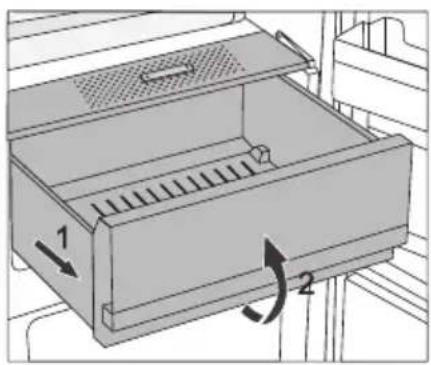
natural_image
Diagram of a mechanical drawer with labeled parts and directional arrows (no text or symbols)natural_image
Architectural cross-section diagram of a multi-level building facade with structural layers (no text or symbols)natural_image
Illustration of four different types of laboratory glassware: rectangular, tray with circular cavities, and a tray filled with white powders (no text or symbols)VENTILADOR \*
natural_image
Line drawing of an open refrigerator with various food items on shelves (no text or labels)natural_image
Line drawing of a hand holding a pen writing on a document inside a storage shelf (no text or symbols)natural_image
Illustration of a hand cleaning a coiled heat exchanger with a brush (no text or symbols)42041 Brescello (RE) - Italy
info@fosterspa.com
www.fosterspa.com
COOLER BI540 ADV FTR
Foster

natural_image
Line drawing of a refrigerator interior showing the doors and shelves (no text or symbols)natural_image
Line drawing of an electrical outlet with a plug inserted (no text or symbols)natural_image
Simple diagram with a circular shape and a vertical line labeled A, no text or symbols present.natural_image
Simple diagram with a circle, a diagonal line, and label 'A' at the bottom (no text or symbols within the diagram itself)natural_image
Simple diagram with a circle, a diagonal line, and label A (no text or symbols beyond labels)natural_image
Diagram of a mechanical component with a perforated base and internal slot, no text or symbols present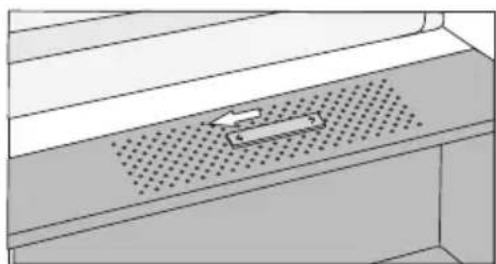
natural_image
Diagram of a perforated metal shelf with an arrow indicating direction (no text or symbols)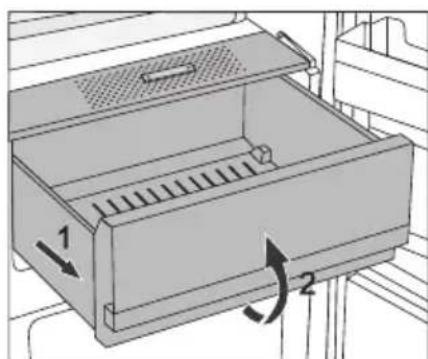
natural_image
Diagram of a refrigerator drawer with labeled parts and directional arrows indicating movement (no text or symbols present)natural_image
Architectural cross-section diagram of a multi-level building facade with structural elements (no text or symbols)natural_image
Illustration of four different storage containers: rectangular, rectangular with circular indentations, and a tray filled with eggs (no text or symbols)VENTILATOR \*
natural_image
Line drawing of an open refrigerator with various food items including vegetables, dairy products, and a cheese cabinet (no text or symbols)natural_image
Line drawing of a hand holding a pen writing on a document inside a shelf (no text or symbols)natural_image
Illustration of a hand using a tool to clean or store contents of a coiled heater (no text or symbols visible)42041 Brescello (RE) - Italy
info@fosterspa.com
www.fosterspa.com
COOLER BI540 ADV FTR de (C118)
Foster

natural_image
Line drawing of a refrigerator interior showing the doors and shelves (no text or symbols)natural_image
Line drawing of an electrical outlet with a plug inserted (no text or symbols)natural_image
Simple diagram with a circle, a diagonal line, and label 'A' at the bottom (no text or symbols within the diagram itself)Включение прибора
natural_image
Simple diagram with a circle, a diagonal line, and label 'A' at the bottom (no text or symbols within the diagram itself)
natural_image
Simple diagram with a circle and a vertical line, labeled A at the bottom (no text or symbols within the diagram itself)natural_image
Diagram of a mechanical or electrical system with layered components and wavy internal lines, no visible text or symbolsnatural_image
Diagram of a mechanical component with a perforated base and a central slot (no text or symbols)
natural_image
Diagram of a perforated metal shelf with a directional arrow indicating movement (no text or symbols)
natural_image
Diagram of a refrigerator drawer with labeled parts and directional arrows (no text or symbols)natural_image
Architectural cross-section diagram of a multi-level building facade with structural layers (no text or symbols)natural_image
Illustration of three types of laboratory glassware: rectangular, tray with circular cavities, and a tray filled with white eggs (no text or symbols)ВЕНТИЛЯТОР\*
natural_image
Line drawing of an open refrigerator with various food items on shelves (no text or symbols)natural_image
Line drawing of a hand holding a pen, writing on a document inside a storage shelf (no text or symbols)
natural_image
Illustration of a hand using a tool to clean a coiled heating element (no text or symbols present)42041 Brescello (RE) - Italy
info@fosterspa.com
www.fosterspa.com
COOLER BI540 ADV FTR ru (01-18)
Foster

全冷藏冰箱
使用说明书
natural_image
Line drawing of a refrigerator interior showing the doors and shelves (no text or symbols)natural_image
Line drawing of an electrical outlet with a plug inserted (no text or symbols)natural_image
Simple diagram with a circular shape and a vertical line labeled A, no text or symbols present.开启冰箱:按住A键3秒钟。
natural_image
Simple diagram with a circle, a diagonal line, and label 'A' at the bottom (no text or symbols within the diagram itself)natural_image
Simple diagram with a circle, a diagonal line, and label 'A' at the bottom (no text or symbols within the diagram itself)natural_image
Diagram of a perforated metal shelf with a rectangular object inserted into the center (no text or symbols)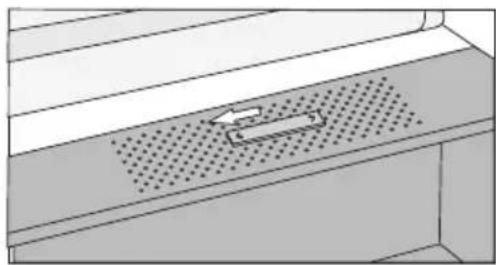
natural_image
Diagram of a mechanical component with a perforated base and an arrow indicating direction (no text or symbols)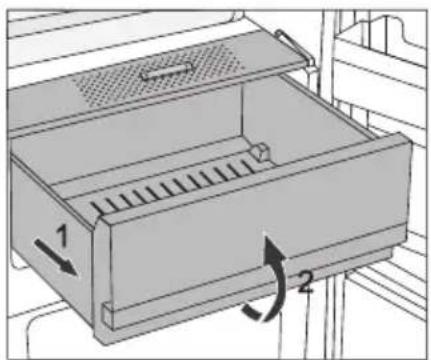
natural_image
Architectural cross-section diagram of a multi-level building facade with structural layers (no text or symbols)natural_image
Illustration of four different types of food containers: rectangular, rectangular with circular indentations, and a tray with eggs (no text or symbols)风扇\*
natural_image
Line drawing of an open refrigerator with various food items on shelves (no text or symbols)冷藏室门搁架:
natural_image
Illustration of a hand holding a pen writing on a document inside a shelf (no text or symbols visible)natural_image
Illustration of a hand using a tool to clean or store contents on a coiled heating element (no text or symbols)42041 Brescello (RE) - Italy
info@fosterspa.com
www.fosterspa.com
- VENTOLA\*
- Foster
- DETAILED
- INSTRUCTIONS FOR USE
- OF REFRIGERATOR
- The appliance is intended solely for household use.
- CONTENTS
- BEFORE USING THE APPLIANCE FOR THE FIRST TIME
- IMPORTANT SAFETY INSTRUCTIONS
- Danger of frostbite
- Safety of children and vulnerable persons
- Warning regarding the refrigerant
- IMPORTANT INFORMATION ON THE USE OF APPLIANCE
- Technical information on the appliance
- ENVIRONMENT PROTECTION
- Removing an obsolete appliance
- ADVICE FOR SAVING POWER WITH REFRIGERATION APPLIANCES
- INSTALLATION AND CONNECTION
- SELECTING THE ROOM
- CONNECTING THE APPLIANCE
- CHANGING THE DOOR OPENING DIRECTION AND INTEGRATING THE APPLIANCE INTO A CABINET
- OPERATING THE APPLIANCE
- SWITCHING THE APPLIANCE ON/OFF
- ADJUSTING THE TEMPERATURE IN THE APPLIANCE
- INTENSIVE COOLING (COOLING BOOST) FUNCTION
- HIGH TEMPERATURE ALARM
- OPEN DOOR ALARM
- APPLIANCE INTERIOR EQUIPMENT
- SHELF
- WIRE BOTTLE RACK\*
- FRUIT AND VEGETABLE BIN WITH HUMIDITY CONTROL
- INTERIOR SIDE OF THE REFRIGERATOR DOOR
- ADJUSTABLE DOOR SHELVES
- MultiBox
- STORAGE
- BIN\*
- FAN\*
- AIR IONIZER (IonAir)\*
- Switching the ionizer on/off
- AdapTech
- RECOMMENDED DISTRIBUTION OF FOOD IN THE APPLIANCE
- Sections in the refrigerator compartment:
- Sections in the refrigerator compartment door:
- IMPORTANT WARNINGS REGARDING FOOD STORAGE
- STORING FOOD IN THE FreshZone DRAWER
- (Only in some models)
- AUTOMATIC REFRIGERATOR DEFROSTING
- INFORMATION ABOUT APPLIANCE NOISE
- NOTICE D'UTILISATION
- DÉTAILLÉE POUR UN
- RÉFRIGÉRATEUR
- VENTILATEUR \*
- Encendido del electrodoméstico:
- VENTILADOR \*
- VENTILATOR \*
- Включение прибора
- ВЕНТИЛЯТОР\*
- 全冷藏冰箱
- 使用说明书
- 风扇\*
- 冷藏室门搁架:
Brand : Foster
Model : 2038 000
Category : Refrigerator