
CON-H2-EDID - AV extender WyreStorm - Free user manual and instructions
Find the device manual for free CON-H2-EDID WyreStorm in PDF.


| Product Type | AV Extender |
| Brand | WyreStorm |
| Model | CON-H2-EDID |
| Video Interface | HDMI 2.0 |
| Max Resolution | 4K@60Hz 4:4:4 |
| HDR Support | HDR10, Dolby Vision |
| HDCP Version | HDCP 2.2 |
| EDID Management | Built-in EDID emulation and passthrough |
| Audio Support | Up to 7.1ch PCM, Dolby TrueHD, DTS-HD Master Audio |
| Transmission Distance | Up to 70m (230ft) via Cat6/7 |
| Connectors (Transmitter) | 1x HDMI input, 1x RJ45 output, 1x USB (for power) |
| Connectors (Receiver) | 1x RJ45 input, 1x HDMI output, 1x USB (for power) |
| Power Supply | 5V/1A DC (USB-powered) |
| Power Consumption | < 2.5W per unit |
| Dimensions (each unit) | 82 x 60 x 22 mm (3.2 x 2.4 x 0.9 in) |
| Weight (each unit) | 65 g (2.3 oz) |
| Operating Temperature | 0°C to 50°C (32°F to 122°F) |
| Storage Temperature | -20°C to 60°C (-4°F to 140°F) |
| Humidity | 10% to 90% RH (non-condensing) |
| Housing Material | Aluminum alloy |
| Mounting | Wall-mountable screw holes included |
| LED Indicators | Power, Link, Signal |
| Maintenance & Cleaning | Wipe with dry cloth; avoid liquids and solvents |
| Safety | CE, FCC, RoHS certified |
| Spare Parts & Repairability | No user-serviceable parts; contact support |
Frequently Asked Questions - CON-H2-EDID WyreStorm
User questions about CON-H2-EDID WyreStorm
0 question about this device. Answer the ones you know or ask your own.
Ask a new question about this device
Download the instructions for your AV extender in PDF format for free! Find your manual CON-H2-EDID - WyreStorm and take your electronic device back in hand. On this page are published all the documents necessary for the use of your device. CON-H2-EDID by WyreStorm.
USER MANUAL CON-H2-EDID WyreStorm
WyreStorm recommends reading through this document in its entirety to become familiar with the product's features prior to starting the installation process.





IMPORTANT! Installation Requirements
- Advanced configuration of this product requires the use of the use of the WyreStorm Management Suite v1.6 or higher configuration tool. Download the latest version from the product page before continuing with the installation.
- Visit the product page to download the latest firmware, document version, additional documentation, and configuration tools.
- Read through the Wiring and Connections section for important wiring guidelines before creating or choosing premade cables.
- While this product supports CEC for the HDMI outputs, WyreStorm cannot guarantee compatibility with all forms of CEC communication.
In the Box
1x CON-H2-EDID
1x DC 12V 1A Power Supply (US/UK/EU/AU)
3x 3-Pin Terminal Block
2x Mounting Brackets
1x Quick Start Guide (This Document)
Basic Wiring Diagram

Wiring and Connections
WyreStorm recommends that all wiring for the installation is run and terminated prior to making connections to the switcher. Read through this section in its entirety before running or terminating the wires to ensure proper operation and to avoid damaging equipment.

IMPORTANT! Wiring Guidelines
- The use of patch panels, wall plates, cable extenders, kinks in cables, and electrical or environmental interference will have an adverse effect on signal transmission which may limit performance. Steps should be taken to minimize or remove these factors completely during installation for best results.
- WyreStorm recommends using pre-terminated HDMI cables due to the complexity of these connector types. Using pre-terminated cables will ensure that these connections are accurate and will not interfere with the performance of the product.
HDMI Cable Performance Guide

HD/4K Transmission
Audio Connections
Analog Audio Out

S/PDIF Digital Audio Out

RS-232 Guidelines
This product uses a 3-pin RS-232 with no hardware flow control. Most control systems and computers are DTE where pin 2 is RX, this can vary from device to device. Refer to the documentation for the connected device for pin functionally to ensure that the correct connections can be made.

| WyreStorm Connector | 3rd Party Device | ||
| Pin 1 | TX (Transmit) ---> To ---> RX (Receive) | ||
| Pin 2 | RX (Receive) ---> To ---> TX (Transmit) | ||
| Pin 3 | G (Ground) ---> To ---> G (Ground) | ||
Relay Wiring
The relays on this product can be used to be trigger devices such as projector screens that are Normally Open (NO) or Normally Closed (NC).
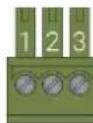
| WyreStorm Connector | 3rd Party Device | ||
| Pin 1 | NO (Normally Open) | --> To --> | NO (Normally Open) |
| Pin 2 | Common (Ground) | --> To --> | Common (Ground) |
| Pin 3 | NC (Normally Closed) | --> To --> | NC (Normally Closed) |
Troubleshooting
No or Poor Quality Picture (snow or noisy image)
- Verify that the output resolution of the source and display is supported by this product.
- If transmitting 3D or 4K, verify that the HDMI cables used are 3D or 4K rated.
- Verify that all source and display connections are not loose and are functioning properly.
No or Intermittent 3rd party Device Control
- Verify that the RS-232 cables are properly terminated. Refer to RS-232 Guidelines and/or Relay Wiring sections for pinout information.
Setup and Configuration
EDID Dial Settings
The dial located on the front of the product is used to set the EDIDs based on the following table.
| Resolution Dial Set |
| EDID copy from Output 0 |
| 1024x728 @60Hz 2Ch F |
| 1280x1024 @60Hz 2Ch C |
| 1280x720p @60Hz 2Ch 4 |
| 1280x768 @60Hz 2Ch E |
| 1280x960 @60Hz 2Ch D |
| 1360x768 @60Hz 2Ch B |
| 1400x1050 @60Hz 2Ch A |
| Resolution Dial Set |
| 1440x900 @60Hz 2Ch 9 |
| 1600x1200 @60Hz 2Ch 7 |
| 1600x900 @60Hz 2Ch 8 |
| 1680x1050 @60Hz 2Ch 6 |
| 1920x1080p @60Hz 2Ch 3 |
| 1920x1200 @60Hz 2Ch 5 |
| 3840x2160p @30Hz 2Ch 2 |
| 3840x2160p @60Hz 2Ch 1 |
Advanced Configuration
The following steps require the use of the use of the WyreStorm Management Suite v1.6 or higher. Download the latest version from the product page before continuing with the installation.
Initial Configuration Tool Setup
- Connect the converter to a PC using the RS-232 port. Refer to RS-232 Guidelines for pinout.
- Open the WyreStorm Management Suite and select the CON-H2-xxxx Configuration Tool from the menu.
- Under RS-232 Port Configuration select the COM port for the PC and set the baud rate to 57600.
- Select the Connect button to connect the PC to the converter.
EDID Write from a File
If an EDID file is available it can be uploaded into the converter for setting the desired EDID.
- Under RS-232 Port Configuration select the COM port for the PC and set the baud rate to 57600.
- Under EDID Write select Choose File to select the file to upload.
- Once the selection dialog closes, select Import to upload the file to the converter.
Connected Device On/Off Triggering
Devices such as projectors or displays connected to this product can be controlled from via connection to the RS-232 port. Commands for the devices are entered within the CON-H2-xxxx Configuration Tool.
- Under Power On/Off Pre Loading set the baud rate for the device to be controlled.
- Select Send next to the Baud Rate to send it to the converter.
- Enter a command for Power On and select HEX if the command is HEX.
- Select Send next to Power On to send the command to the converter.
- Enter a command for Power Off and select HEX if the command is HEX.
- Select a delay time for powering Off the device after no HDMI signal is detected.
- Select Send next to Power Off to send the command to the converter.
- Select a String terminator to use for the commands and select the Set button.
Configuring Relays
The relays on the converter can be programmed to be Latch or Momentary based on the functionality of the connected device. This setting is the same for both relays.
- Under Set Relay Mode select Latch or Momentary for Relay Mode.
- Select the Set button to send the setting to the converter.
Specifications
| Audio and Video | |
| Inputs 1x HDMI In: 19-pin type A | |
| Outputs | 1x HDMI Out: 19-pin type A1x Audio Out: 3.5mm (1/8in) TRS Stereo1x S/PDIF Out: S/PDIF Coaxial Digital |
| Audio Formats | HDMI Pass-through: 2ch PCM | Multichannel: LPCM and Up to DTS-X and Dolby AtmosS/PDIF Out: De-Embed: 2ch PCM | Multichannel: Up to 5.1 DTS and Dolby DigitalAnalog Out: 2ch |
| Video Resolutions (Max) | Video Resolution HDMI |
| 1920x1080p @60Hz 12bit 15m/49ft | |
| 3840x2160p @24Hz 10bit 4:2:0 HDR 7m/23ft | |
| 3840x2160p @30Hz 8bit 4:4:4 7m/23ft | |
| 3840x2160p @60Hz 10bit 4:2:0 HDR 5m/16ft | |
| 3840x2160p @60Hz 12bit 4:2:2 HDR 3m/10ft | |
| 4096x2160p @60Hz 8bit 4:2:0 7m/23ft | |
| 4096x2160p @60Hz 8bit 4:4:4 3m/10ft | |
| Supported Standards DCI | RGB | HDR | HDR10 | Dolby Vision | HLG | BT.2020 | BT.2100 | |
| Maximum Pixel Clock 600MHz | |
| Communication and Control | |
| HDMI | HDMI 2.0 | HDCP 2.2 | EDID | CEC TriggeringInputs supports DVI/D and DisplayPort Dual-Mode (DP++) v1.3 with adapter (not included) |
| CEC CEC Power Triggering | Requires CEC compatibility | |
| RS-232 1x RS-232: 3-pin Terminal Block - 3.5mm | |
| Relays | 1x Relay 2: 3-pin Terminal Block - 3.5mm | 1x Relay 1: 3-pin Terminal Block - 3.5mm | Max 1A load |
| Power | |
| Power Supply 12V DC 0.5A | |
| Max Power Consumption ≤2W | |
| Environmental | |
| Operating Temperature 32°F ~ 113°F (0°C ~ 45°C) | 10% ~ 90%, non-condensing | |
| Storage Temperature -4°F to ~ 158°F (-20°C ~ +70°C) | 10% ~ 90%, non-condensing | |
| Maximum BTU | 7 BTU/hr |
| Dimensions and Weight | |
| Rack Units | Wall Box | <1U |
| Height With | Without Feet | 20mm/0.79in |
| Width With | Without Brackets | 120mm/4.73in |
| Depth With | Without Handles | 80mm/3.15in |
| Weight | 0.23kg/0.51lbs |
| Regulatory | |
| Safety and Emission | CE | FCC | RoHS | RCM |
Note: WyreStorm reserves the right to change product specification, appearance or dimensions of this product at any time without prior notice.
Warranty Information
WyreStorm Technologies LLC warrants that its products to be free from defects in material and workmanship under normal use for a period of five (5) years from the date of purchase. Refer to the Product Warranty page on wyrestorm.com for more details on our limited product warranty.

- IMPORTANT! Installation Requirements
- In the Box
- Wiring and Connections
- IMPORTANT! Wiring Guidelines
- Audio Connections
- RS-232 Guidelines
- Relay Wiring
- Troubleshooting
- No or Poor Quality Picture (snow or noisy image)
- No or Intermittent 3rd party Device Control
- Setup and Configuration
- EDID Dial Settings
- Advanced Configuration
- Initial Configuration Tool Setup
- EDID Write from a File
- Connected Device On/Off Triggering
- Configuring Relays
- Warranty Information
Brand : WyreStorm
Model : CON-H2-EDID
Category : AV extender