
SGH-A110SB - Smartphone SAMSUNG - Free user manual and instructions
Find the device manual for free SGH-A110SB SAMSUNG in PDF.


| Product Type | Smartphone |
| Brand | Samsung |
| Model | SGH-A110SB |
| Dimensions | 118 x 49 x 16 mm (4.65 x 1.93 x 0.63 in) |
| Weight | 105 g (3.70 oz) |
| Display Size | 3.2 inches |
| Display Type | TFT resistive touchscreen, 256K colors |
| Resolution | 320 x 480 pixels |
| Operating System | Android 2.2 (Froyo) |
| Processor | 800 MHz ARM 11 |
| RAM | 256 MB |
| Internal Storage | 512 MB, 256 MB RAM |
| Battery | Li-Ion 1500 mAh, removable |
| Rear Camera | 3.15 MP, autofocus |
| Front Camera | 0.3 MP |
| Connectivity | Wi-Fi 802.11 b/g, Bluetooth 2.1, USB 2.0 |
| Sensors | Accelerometer, proximity |
| Colors Available | Black, Silver |
| What's in the Box | Phone, battery, charger, USB cable, user manual |
| Safety | Use only approved batteries and chargers. Avoid extreme temperatures. |
| Maintenance | Clean with soft dry cloth. Do not use harsh chemicals. |
| Repair Parts | Battery, charger, USB cable available from Samsung service centers. |
| General Information | This device is a feature smartphone designed for basic communication and multimedia. |
Frequently Asked Questions - SGH-A110SB SAMSUNG
User questions about SGH-A110SB SAMSUNG
0 question about this device. Answer the ones you know or ask your own.
Ask a new question about this device
Download the instructions for your Smartphone in PDF format for free! Find your manual SGH-A110SB - SAMSUNG and take your electronic device back in hand. On this page are published all the documents necessary for the use of your device. SGH-A110SB by SAMSUNG.
USER MANUAL SGH-A110SB SAMSUNG
DUAL BAND GSM TELEPHONE SGH-A110
SAMSUNG
ELECTRONICS
World Wide Web
http://www.samsungmobile.com
Printed in Korea
Code No.: GH68-01560A
English. 10/2000. Rev. 1.0

natural_image
Group of smiling people posing with a Samsung flip phone in the background (no text or symbols on main subjects)Contents
Important Safety Precautions 5
Unpacking 7
Your Phone 8
Phone Layout 8
Display 11
Service Light 13
Getting Started 14
Your First Call....14
Installing the SIM Card 15
Charging a Battery 17
Switching the Phone On/Off 19
Access Codes 20
General Functions 24
Making a Call 24
Adjusting the Volume 26
Answering a Call 27
Viewing Missed Calls 28
Selecting Functions and Options 30
Example: Setting the Display Language ..... 32
Phonebook 34
Storing a Phone Number with a Name 34
Speed Dialling by Memory Location 36
Searching for and Dialling a Number in the Phonebook .. 36
Phonebook Options 37
In-Call Options 42
Putting a Call on Hold 42
Switching the Microphone Off (Mute) 43
Muting/Sending Key Tones 44
Searching for a Number in the Phonebook ..... 45
Using the SMS Service 46
Answering a Second Call 46
Making a Multiparty Call 47
Using the Menus 49
Using the Navigation Keys 49
Using the Index System 50
Menu Map 51
Call Records 56
Missed Calls (Menu 1.1) 56
Received Calls (Menu 1.2) 56
Dialled Calls (Menu 1.3) 57
Call Time (Menu 1.4) 57
Call Cost (Menu 1.5) 58
Messages 59
Read Messages (Menu 2.1) 59
Write Messages (Menu 2.2) 61
Preset Message List (Menu 2.3) 61
Setup (Menu 2.4) 62
Broadcast (Menu 2.5) 63
Voice Mail (Menu 2.6) 65
Sound Settings 66
Ring Tone (Menu 3.1) 66
Melody Composer (Menu 3.2) 66
Ring Volume (Menu 3.3) 68
Alert Type (Menu 3.4) 69
Keypad Tone (Menu 3.5) 69
Message Tone (Menu 3.6) 70
Sound Settings (continued)
Error Tone (Menu 3.7) 70
Minute Minder (Menu 3.8) 71
Connect Tone (Menu 3.9) 71
Phone Settings 72
Infrared Activate (Menu 4.1) 72
Greeting Message (Menu 4.2) 73
Own Number (Menu 4.3) 73
Language (Menu 4.4) 74
Backlight (Menu 4.5) 74
Service Light (Menu 4.6) 74
Auto Redial (Menu 4.7) 75
Caller ID (Menu 4.8) 75
Active Flip (Menu 4.9) 75
Contrast (Menu 4.10) 76
Slide Menu (Menu 4.11) 76
Reset Settings (Menu 4.12) 76
Organiser 77
Calendar (Menu 5.1) 77
To Do List (Menu 5.2) 79
Time & Date (Menu 5.3) 81
Alarm (Menu 5.4) 83
Calculator (Menu 5.5) 84
ShortCut (Menu 5.6) 85
Security 86
PIN Check (Menu 6.1) 86
Change PIN (Menu 6.2) 87
Phone Lock (Menu 6.3) 87
Change Password (Menu 6.4) 88
SIM Lock (Menu 6.5) 88
FDN Mode (Menu 6.6) 89
Change PIN2 (Menu 6.7) 89
Network Services 90
Call Diverting (Menu 7.1) 90
Call Barring (Menu 7.2) 92
Call Waiting (Menu 7.3) 94
Network Selection (Menu 7.4) 95
Line Identification (Menu 7.5) 96
Closed User Group (CUG) (Menu 7.6) 97
Games 99
WAP Browser 100
Solving Problems ......101
Using the Batteries .....104
Precautions When Using Batteries 104
Safety Information 106
Road Safety 106
Operating Environment 106
Care and Maintenance 108
Emergency Calls 109
Glossary of Terms 110
Index 114
Quick Reference Card 119
Important Safety Precautions
Read these simple guidelines. Failure to comply with them may be dangerous or illegal.
For more detailed safety information, see Safety Information on page 106.
Road safety comes first
Do not use a hand-held phone while driving; park the vehicle first. Remember that in some countries, it is illegal to use a hand-held phone while driving.
Switch off when refuelling
Do not use the phone at a refuelling point (service station) or near fuels or chemicals.
Switch off in aircraft
Mobile phones can cause interference. Using them on aircraft is both illegal and dangerous.
Respect special regulations
Follow any special regulations in force in any area and always switch off your phone whenever it is forbidden to use it, or when it may cause interference or danger (in a hospital for example).
Interference
All mobile phones may be subject to radio interference, which may affect their performance.


Qualified service
Only qualified service personnel must repair cellular equipment. Use only approved accessories and batteries.
Use sensibly
Use only in the normal position (held to the ear).
Avoid unnecessary contact with the antenna when the phone is switched on.
Emergency calls
Ensure the phone is switched on and in service.
Enter the emergency number (112 or another official emergency number) and press the key. Give your location. Do not end the call until given permission to do so.
End the call by closing the flip cover or pressing the
/① key.
IMPORTANT! Use only SAMSUNG-approved accessories.
The use of any other power accessory will invalidate any approval or warranty applying to the phone, and may be dangerous.
When you disconnect the power cord of any accessory, grasp and pull the connector, not the cord.

Unpacking
Your package contains the following items.
Handset
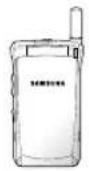
Battery

User's Manual

Travel Adapter

Hand Strap

Earphone

In addition, you can obtain the following accessories for your phone from your local SAMSUNG dealer:
- Desktop charger
- Travel adapter
- Simple hands-free kit
• Standard and Slim batteries
• Cigarette lighter adapter - Earphone
- Car holder

Your Phone
Phone Layout
The following illustrations show the main elements of your phone.

Top

Your Phone
Key Description

(soft keys)
Perform the functions indicated by the text above them (in the bottom line of the display).

In the menu facility, scroll through the menu options and phonebook memory.
When held down in idle mode, access your favourite menu options directly (for more information on shortcuts, see page 85).

In the menu facility, return to the previous menu level and select the current menu respectively.
When entering a name, move the cursor left and right respectively.
When pressed in idle mode, access your favourite menu options directly (for more information on shortcuts, see page 85).

Deletes characters from the display. In the menu facility, returns to the previous menu level.
When held down for more than two seconds in idle mode, accesses one of your favourite menu options directly (for more information on short-cuts, see page 85).

Makes or answers a call. In idle mode, recalls the last number dialled. In the menu facility, selects a menu function or stores information that you have entered (such as a name) in the phone or SIM memory.
Key Description

Ends a call. Also switches the phone on and off when pressed and held.
In the menu facility, returns to the idle mode and cancels your input.

Allows you to access quickly the Voice Mail menu.

Enter numbers, letters and some special characters.

Enter special dial characters.

(on the side of the phone)
During a call, adjust the earpiece volume.
In idle mode with the flip cover open, adjust the key volume.
In the menu facility, scroll through the menu options and phonebook memory.
Display
Display Layout
The display comprises three areas.

Area Description
First line Displays various icons (see page 12).
Middle lines Display messages, instructions and any information that you enter (number to be dialled, for example).
Last line Shows the functions currently assigned to the two soft keys.
Your Phone
Your Phone
Icons
Icon Description

Shows the received signal strength. The greater the number of bars, the better the signal strength.

Appears when a call is in progress.

Appears when a new text message has been received.

Appears when the vibrate mode is active.

Appears when you set the alarm.

Shows the level of your battery. The more bars you see, the more power you have left.

Indicates that you have activated the Infrared feature to communicate with an IrDA-compliant device and send or receive data/fax (for further details, see page 72).

Appears when you are out of your home area and have registered with a different network (when travelling in other countries, for example).

Appears when a new voice mail message has been received.

Appears when you set the mute mode.

Backlight
The display is illuminated by a backlight. When you press any key, the backlight illuminates. It turns off if no key is pressed within a given period of time, depending on the Backlight option set in the Phone Settings menu.
To specify the length of time for which the backlight is active, set the Backlight menu option (4.5); see page 74 for further details.
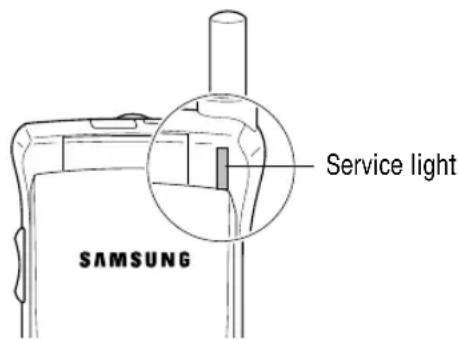
Service Light
The service light is in the top right-hand corner of the phone. It flashes when services are available on the phone.
To activate or deactivate use of the service light, set the Service Light menu option (4.6); see page 74 for further details.

Getting Started
Your First Call
The following diagram explains the main steps required when making your first call and indicates the pages on which you can find more detailed instructions.

flowchart
graph TD
    A["Insert the SIM card (phone switched off and battery removed)"] --> B["Charge the phone battery"]
    B --> C["Switch the phone on"]
    C --> D["Enter your PIN"]
    D --> E["Dial the phone number required"]
    E --> F["When you have finished, end the call"]
Getting Started
Installing the SIM Card
When you subscribe to a cellular network, you are provided with a plug-in SIM card loaded with your subscription details (PIN, optional services available and so on).
Important! The plug-in SIM card and its contacts can be easily damaged by scratches or bending, so be careful when handling, inserting or removing the card.
Keep all SIM cards out of the reach of small children.
-
If necessary, switch off the phone by holding down the key until the Bye Bye message is displayed.
-
Remove the battery. To do so:
① Push up and hold the catch above the battery on the back of the phone
② Lift the battery away

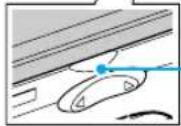
Use the grooves on both sides of the phone when you lift the battery away.

Getting Started
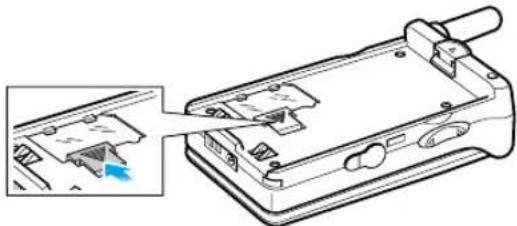
- Push the SIM card holder in the direction of the arrow and hold it in this position. Insert the SIM card under the two tabs on the left of the phone, ensuring that the cut corner is top left and the gold contacts of the card face into the phone.

- Hold the SIM card down and release the holder to lock it into place.
natural_image
Technical line drawing of a device casing with internal components and a highlighted section (no text or symbols)- Insert the tabs on the base of the battery into the notches on the base of the phone, as shown, and push the battery down until you hear a click.

natural_image
Diagram of a device being inserted into a folder, showing internal components and a magnified view (no text or symbols)Getting Started
Charging a Battery
Your phone is powered by a rechargeable Li-ion battery. A travel adapter is provided with your phone. Use only approved batteries and chargers. Ask your local SAMSUNG dealer for further details.
The phone can be used while the battery is charging.
Note: You must fully charge the battery before using your phone for the first time. A discharged battery is fully recharged in approximately 200 minutes.
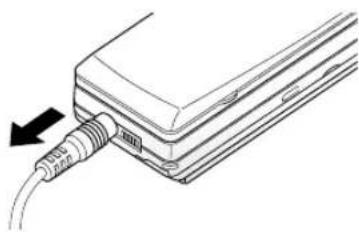
- With the battery in position on the phone, connect the lead from the travel adapter to the bottom of the phone.

natural_image
Line drawing of a device with a cable inserted into a housing (no text or symbols)-
Connect the adapter to a standard AC wall outlet.
-
When charging is finished, disconnect the adapter from the power outlet and from the phone.
natural_image
Diagram of a cable inserted into a device with a black arrow indicating direction (no text or symbols present)Low Battery Indicator
When the battery is weak and only a few minutes of talk time remain, you will hear a warning tone and a message will be repeated at regular intervals on the display:
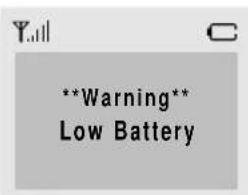
When the battery becomes too weak for the phone to operate, it switches off automatically.
Switching the Phone On/ Off
- Open the flip cover.
- Hold down the key for more than one second to switch the phone on.
- If the phone asks for a password, key in the password and press the OK soft key. The phone password is factory set to 00000000. For further details, see page 20.
- If the phone asks for a PIN, key in the PIN and press the OK soft key. For further details, see page 21. The phone searches for your network and when it finds it, the idle screen, illustrated below, is displayed.

Note: The display language is factory set to English. To change the language, use the Language menu option (4.4); for further details, refer to page 74.
- Press the Phone soft key and use the phone functions. Note: The Internet soft key enables you to set up the WAP browser. Refer to the WAP Browser User's manual supplied with the phone.
- When you wish to switch the phone off, hold down the button for more than two seconds.

Access Codes
There are several access codes that are used by your phone and its SIM card. These codes help you protect the phone against unauthorised use.
When requested for any of the codes explained below, key in the appropriate code (displayed as asterisks) and press the OK soft key. If you make a mistake, press the C key one or more times until the incorrect digit is cleared and then continue entering the correct code.
The access codes (except for the PUK and PUK2 codes) can be changed using Security menu options. See page 86 for further details.
Important! Avoid using access codes resembling emergency numbers, such as 112, so that you do not dial an emergency number accidentally.
Phone Password
The Phone Lock feature uses the phone password to protect your phone against unauthorised use. The phone password is supplied with the phone and is factory set to 00000000.
To... Refer to page...
Activate/deactivate 87 (menu option 6.3). the Phone Lock feature
Change the phone password 88 (menu option 6.4).
PIN
The Personal Identification Number or PIN (4 to 8 digits) protects your SIM card against unauthorised use. It is usually supplied with the SIM card.
If you enter an incorrect PIN three times in succession, the code is disabled and cannot be used until you re-enable it by entering the PUK (see below).
To... Refer to page...
Activate/deactivate 86 (menu option 6.1). the PIN Check feature
Change the PIN 87 (menu option 6.2).
PUK
The 8-digit PUK (Personal Unblocking Key) is required to change a disabled PIN. The PUK may be supplied with the SIM card. If not, or you have lost it, contact your service provider.
To re-enable your PIN, proceed as follows.
- Key in the PUK and press the OK soft key.
- Enter a new PIN of your choice and press the OK soft key.
- When the Confirm New PIN message is displayed, key in the same code again and press the OK soft key.
If you enter an incorrect PUK ten times in succession, the SIM card becomes invalid. Contact your service provider for a new card.

PIN2
The PIN2 (4 to 8 digits), supplied with some SIM cards, is required to access specific functions, such as setting the maximum cost of a call. These functions are available if supported by your SIM card.
If you enter an incorrect PIN2 three times in succession, the code is disabled and you cannot access the functions until you re-enable it by entering the PUK2.
To change the PIN2, refer to page 89 (menu option 6.7).
PUK2
The 8-digit PUK2 (Personal Unblocking Key 2), supplied with some SIM cards, is required to change a disabled PIN2. If you lose the code, contact your service provider.
To re-enable your PIN2, proceed as follows.
- Key in the PUK2 and press the OK soft key.
- Enter a new PIN2 of your choice and press the OK soft key.
- When the Confirm PIN2 message is displayed, key in the same code again and press the OK soft key.
If you enter an incorrect PUK2 ten times in succession, you will not be able to access the functions requiring the PIN2. Contact your service provider for a new card.
Barring Password
The 4-digit barring password is required when you use the Call Barring function. You obtain the password from your service provider when you subscribe to this function. See page 92 for further details.
General Functions
General Functions
Making a Call
When the idle screen is displayed, key in the area code and phone number and press the key.
Note: If you have set the Auto Redial menu option (4.7) to ON (see page 75) and the person called does not answer or is already on the phone, the number is redialled automatically up to ten times.
Making International Calls
- Press and hold down the 0 key. The + character appears.
- Key in the country code, area code and phone number and press the key.
Correcting the Number
To clear... Then...
The last digit Press the C key. displayed
Any other digit Press the or < key> until
in the number the cursor is immediately to the right of the digit to be cleared. Press the C key. You can also insert a missing digit simply by pressing the appropriate key.
The whole display Hold down the C key for more than one second.
Ending a Call
When you have finished your call, briefly press the 🔔/Φ key.
Making a Call from the Phonebook
You can store the names and phone numbers called regularly in the SIM card and phone memory, called the phonebook. You then simply select the required name to recall the associated number. For further details on the Phonebook feature, refer to page 34.
Redialling the Last Number
The phone stores the last 10 numbers dialled. To recall any of these numbers, proceed as follows.
- If you have typed any characters on the display, clear the display by holding down the C key for more than one second.
- Press the key to display the last number dialled.
- Use the and keys to scroll through the numbers until the required number is displayed.
- To... Then...
Dial the number Press the key displayed
Edit the number displayed •
- Press the Edit soft key. Change the number as required, referring to Correcting the Number opposite for further details.
Adjusting the Volume
During a call, if you want to adjust the earpiece volume, use the „ and keys on the left side of the phone. Press „ to increase and to decrease the volume.
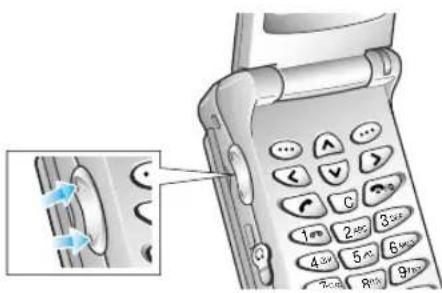
In idle mode with the flip open, you can adjust the key volume using the „ and keys on the left side of the phone.
Answering a Call
When somebody calls you, the phone rings and the phone icon in the middle of the screen flashes.
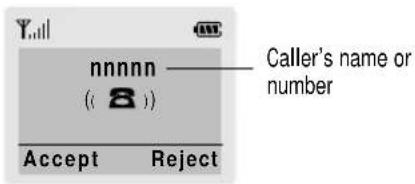
If the caller can be identified, the caller's phone number (or name if stored in your phonebook) is displayed. If the caller cannot be identified, only the phone icon flashes.
- If necessary, open the flip.
Press the key or the Accept soft key to answer the incoming call.
Notes:
- To reject an incoming call, press the Reject soft key.
-
If the Active Flip menu option (4.9) is set to Enable, you do not need to press any key. You can answer the call simply by opening the flip (see page 75).
-
End the call by closing the phone or pressing the ☎/☐ key.
Note: You can answer a call while using the phonebook or menu features.

Viewing Missed Calls
If you are unable to answer a call for any reason, you can find out who was calling you, provided that this service is available. In this way, you can call the person back, if necessary.
The number of missed calls is displayed on the idle screen immediately after the call was missed.
To view the missed call immediately, proceed as follows.
- If the phone is closed, open the flip cover.
- Press the View soft key.
The number corresponding to the most recent missed call is displayed, if available.
- To... Then press the...
Scroll through the and missed calls
keys.

Call the number displayed
key.
Edit or delete a missed call number
Options soft key (see opposite).
Editing a Missed Call Number
Note: If the number corresponding to the missed call is not available, the Edit option is not displayed.
- Press the Options soft key.
- If necessary, press the on key to highlight the Edit Number option.
- Press the Select soft key.
-
Change the number as required.
-
To... Then press the...
Call the number key.
Store the number Save soft key and enter the name and location required (for further details, refer to page 34).
Deleting a Missed Call
- Press the Options soft key.
- If necessary, press the on key to highlight the Delete option.
- Press the Select soft key.
You can press the key at any time to exit the Missed Call feature.
Note: You can access the Missed Call feature at any time by selecting the Missed Calls menu option (1.1); for further details, see page 56.

Selecting Functions and Options
Your phone offers a set of functions that allow you to customise your phone. These functions are arranged in menus and sub-menus, accessed via the two soft keys marked ⋯ . Each menu and sub-menu allows you to view and alter the settings of a particular function.
The roles of the soft keys vary according to the current context; the label on the bottom line of the display just above each key indicates its current role.
Example:
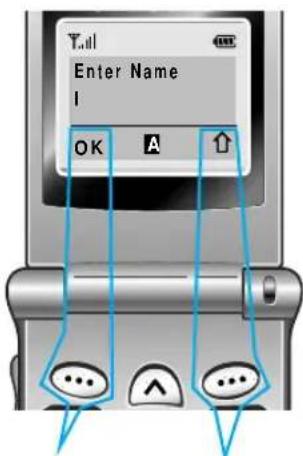
Press the left soft key to save the name entered.
Press the right soft key to switch between upper case, lower case and numeric characters.
Selecting Functions and Options
To view the various functions/options available and select the one required, proceed as follows.
-
Press the appropriate soft key.
-
To... Then press the...
Select the: Select soft key or
• Function displayed key. > or
- Option highlighted
View the next function key o▼key on or highlight the next the left side of the option in a list phone.
Move back to the key or „key on previous function or the left side of the option in a list phone.
Move back up one key, soft key level in the structure or C key.
Exit the structure
without changing the settings
/① key.
In some functions, you may be asked for a password or PIN. Enter the required code and press the OK soft key.
Note: When you access a list of options, your phone highlights the current option. If, however, there are only two options, such as On/Off or Enable/Disable, your phone highlights the option that is not currently active, so that you can select it directly.
Example: Setting the Display Language
- When the idle screen is displayed, press the Menu soft key to enter the menu facility.

- Scroll through the menus until you reach the Phone Settings menu, by pressing the ▲id ▲ keys.

- To select the Phone Settings menu, press the Select soft key or key.

- Scroll through the sub-menus until you reach the Language sub-menu, by pressing the and keys.

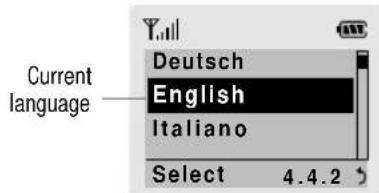
- To view the languages available, press the Select soft key or the key. The current setting is highlighted.
-
Scroll through the list of languages until the appropriate one is highlighted, by pressing the √ and keys.
-
Press the Select soft key or the > key to confirm your selection.
-
Press the C or < key twice to exit the menu structure.

Phonebook
You can store phone numbers and their corresponding names in the memory of your SIM card. In addition, you can store up to 99 numbers and names in the phone memory. The SIM card and phone memories, although physically separate, are used as if they were a single entity, called the phonebook.
Storing a Phone Number with a Name
As soon as you start to enter a number, Save appears above the left soft key to allow you to store the number in the phonebook.
- Key in the number to be stored. Note: If you make a mistake while entering a number, correct it using the C key. For further details, refer to page 24.
- When you are sure that it is correct, press the Save soft key.
- Enter the corresponding name (the maximum length depends on your SIM card). For information on how to enter a name, see opposite.
- When you are satisfied, press the OK soft key. The phone now displays the first free location in the phone memory for you to save the number and name. If the phone memory is full, the first free location in the SIM card is displayed.
- Press the right soft key to toggle between the phone (To Phone) and card (To Card) memories.
Phonebook
- If you do not want to save the number and name in the suggested location, press the C key to clear the location number and enter your preferred location by pressing the number keys.
- Press OK to store the name and number.
- Press to return to the idle screen.
Entering a Name
- To select... Then press the

soft key until...
Upper case characters is displayed.
Lower case characters is displayed.
Numbers only is displayed.1
- Press the key labelled with the required letter:
• Once for the first letter
• Twice for the second letter
- And so on
| Key | Characters in the Order Displayed | |
| Upper Case | Lower Case | |
| 1 | Space . 1 ! ? & i i § | Space % @ _ £ $ ¥ □ § |
| 2 | A B C 2 Ä Ä Æ Ç Γ | a b c 2 à ä å æ Γ |
| 3 | D E F 3 É Δ Φ | d e f 3 è é Φ |
| 4 | G H I 4 Θ Ψ | g h i 4 i Ψ |
| 5 | J K L 5 Λ | j k l 5 Λ |
| 6 | M N O 6 ň ∅ Ö ö | m n o 6 ň ø ò ö |
| 7 | P Q R S 7 Π Σ Ξ | p q r s 7 β Σ Ξ |
| 8 | T U V 8 Ü ü | † u v 8 ù ü |
| 9 | W X Y Z 9 Ω | w x y z 9 Ω |
| 0 | 0 , : ; ‘ “ / = | - + ( ) * # < > |

Phonebook
- Select the other letters in the same way.
Note: The cursor moves to the right when you press a different key. When entering the same letter twice (or a different letter on the same key), just wait for a few seconds for the cursor to move right automatically, and then select the next letter. You can also move the cursor by using the < and keys. To delete letters, press the C key.
Speed dialling by Memory Location
Once you have stored phone numbers in the phone book memory, you can dial easily whenever you want.
To speed dial the desired number:
For the 1-digit memory location number (2 through 9), press and hold down the appropriate key.
For the 2 or more-digit memory location number, press the appropriate keys, then the # key.
Searching for and Dialling a Number in the Phonebook
- When the idle screen is displayed, press the Name soft key. You are asked to enter a name.
- Enter the start of the name that you want to find and press the Search soft key.
Phonebook
Note: You can also scroll through the phonebook from the beginning, by pressing the Search soft key directly.
The phonebook entries are listed, starting with the first entry matching your input. This entry is also highlighted.
- To... Then press the...
View the View soft key. highlighted entry
Select a or key one or more ▲ different entry times until the required entry is highlighted.
Look for a name Key labelled with the starting with a required letter. different letter
- Once you have found the required entry, press the key to dial the number.
Phonebook Options
When storing or viewing a number in the phonebook, Options appears above the left soft key to allow you to access the phonebook options, described in the following paragraphs.
Accessing the Options
To access the various phonebook options, proceed as follows.
- Press the Options soft key. The first available option is highlighted.

Phonebook
Phonebook
2. To... Then press the...
Select the Select soft key or key. > highlighted option
Highlight a or key one or more different option times until the required option is highlighted.
Paste
This option allows you to paste the phonebook number into the normal dialling mode. Use this option to dial a number similar to one in the phonebook (a different extension in the same office for example).
Use the C key to change the number as required (refer to page 24 for further details). When you are ready to dial, press the key.
Edit
This option allows you to edit a number and name stored in the phonebook.
Erase
This option allows you to erase a number and name stored in the phonebook. You are asked to confirm that you wish to erase the name and number from the phonebook by pressing the Yes soft key.
Copy
This option allows you to copy a phonebook number to another location. Use this option to store a number similar to one already in memory; once copied, edit the number and store it in the phonebook.
Caller Group
You can set the phone to ring in a specific way and display a preselected graphic icon when a particular person calls you. To do so, you must:
- Define your caller groups
- Assign the numbers in the phonebook to the appropriate group
Defining a caller group
You can define up to five caller groups.
- In the idle mode, press the Name soft key.
- Press the Options soft key.
- Select the Caller group option.
- Select the group to be defined.
- Set the appropriate options.
The following options are available.
Call ring tone: allows you to select the ring tone to be used when you receive a voice phone call from a person in the group.
SMS tone: allows you to select the ring tone to be used when you receive a text message from a person in the group.
Graphic: allows you to select the graphic icon to be displayed when you receive a call from a person in the group.
Group Name: allows you to assign a name to the group; for further details on how to enter characters, refer to page 35.

Phonebook
Phonebook
Assigning numbers to a group
- View the required number in the phonebook.
- Press the Options soft key.
- Select the Caller Group option.
- Select the required group.
To remove a number from a group, select the No Group option.
Memory Status
You can check how many names and numbers are stored in the phonebook (card and phone memories). Proceed as follows.
- In the idle mode, press the Name soft key.
- Press the Options soft key.
- Select the Memory Status option.
- Press Next to toggle between the card and phone memories.
SDN
You can view the list of Service Dialling Numbers (SDN) assigned by your network provider. Such numbers include the emergency, directory enquiries and voice mail numbers.
- In the idle mode, press the Name soft key.
- Press the Options soft key.
- Select the SDN option.
- Scroll through the numbers using the and keys.
- To dial the number displayed, press the Dial soft key.
Note: This option is available only when your service provider SIM card supports Service Dialling Numbers (SDN).
In-Call Options
Your phone provides a number of control functions that you can use during a call.
Putting a Call on Hold
You can place the current call on hold whenever you want. You can make another call while you have a call in progress if this service is supported by the network. Of these two calls, one is active and the other is on hold and you can swap between the calls.
To place a call on hold, simply press the Hold soft key. You can reactivate the call whenever you want, by pressing the Unhold soft key.
To make a call while you have a call in progress, proceed as follows.
- Key in the phone number that you wish to dial or look it up in the phonebook.
- Press the key to dial the second call. The first call is automatically put on hold.
Or alternatively, proceed as follows.
- Put the current call on hold by pressing the Hold soft key.
- Make the second call in the normal way.
In-Call Options
To swap between the two calls, simply press the Swap soft key.
The current call is placed on hold and the call on hold is reactivated so that you can continue conversing with the other party.
When you have finished, end each call normally by pressing the key.
Switching the Microphone Off (Mute)
You can temporarily switch your phone's microphone off, so that the other party cannot hear you.
Example: You wish to say something to another person in the room but do not want the other party to hear you.
To switch the microphone off temporarily, proceed as follows.
- Press the Options soft key.
- If necessary, press the key to highlight the Mute option.
- Press the OK soft key.
Your correspondent can no longer hear you.

In-Call Options
In-Call Options
To switch the microphone back on, proceed as follows.
- Press the Options soft key.
- If necessary, press the key to highlight the Unmute option.
- Press the OK soft key.
Your correspondent can hear you again.
Muting/ Sending Key Tones
These options allow you to turn the key tones off or on. If the Mute keys option is selected, your phone does not transmit the key tones. It allows you to press keys without hearing annoying key tones during a call.
Note: To communicate with answering machines or computerised telephony systems, the Send keys option must be selected.
Searching for a Number in the Phonebook
You can search for a number in the phonebook during a call.
- Press the Options soft key.
- Press the key to highlight the Phonebook option.
- Press the OK soft key. The phonebook entries are listed.
- Enter the name that you wish to find.
If you enter the start of the name, the phonebook entries are listed, starting with the first entry matching your input. The entry is also highlighted. - To view the highlighted entry, press the View soft key.
For a more detailed description of the Phonebook feature, refer to page 34.
Using the SMS Service
If you receive an SMS (Short Message Service) message during a call, the message icon (✉) flashes in the display. The SMS Service option enables you to use this feature.
Read Messages: allows you to read the messages that you have received.
Write Messages: allows you to write a message.
For further details on the SMS service, refer to page 59.
Answering a Second Call
You can answer an incoming call while you have a call in progress, if this service is supported by the network and you have set the Call Waiting menu option (7.3) to Activate (see page 94). You will be notified of an incoming call by a call waiting tone.
To answer a call while you have a call in progress, proceed as follows.
- Press the key to answer the incoming call. The first call is automatically put on hold.
- To switch between the two calls, press the Swap soft key.
To end a held call, press the Options soft key and select the End Held Call option. - To end the current call, press the key
Making a Multiparty Call
A multiparty call is a network service that allows up to six people to take part simultaneously in a multiparty or conference call. For more information, contact your service provider.
Setting up the Multiparty Call
- Call the first participant in the normal way.
- Call the second participant in the normal way. The first call is automatically put on hold.
- To join the first participant to the multiparty call, press the Options soft key and select the Join option.
- To add a new person to the multiparty call, call the person in the normal way, then press the Options soft key and select the Join option.
You can add incoming callers by answering the call and pressing Options, followed by Join. Repeat as required.
Having a Private Conversation With One Participant
- Press the Options soft key and choose the Select one option. The list of call participants appears.

In-Call Options
- Highlight the required person, by pressing the ∧ or ∨ key, followed by the Select soft key or the ⬇ key.
- Select Private. Now you can talk privately with that person. The other participants can continue to converse with each other.
- To return to the multiparty call, press the Options soft key and select Join. All the multiparty call participants can now hear each other.
Dropping One Participant
- Press the Options soft key and choose the Select one option. The list of call participants appears.
- Highlight the required person, by pressing the or key, followed by the Select soft key or the key.
- Select Remove. The call is ended with that participant, but you can continue to talk with the other participants.
- End the multiparty call by closing the phone or pressing the 🔒/⊕ key.
Using the Menus
A menu structure is available to set the various options available on your phone. You can select the menu options in two different ways.
Using the Navigation Keys
The navigation keys are used as follows.
Key Purpose
√ Moves to the next option on the same level as the one displayed.
^ Moves to the previous option on the same level as the one displayed.
Selects the option displayed.
< Goes back to the previous menu level.
You can also use the and „ keys on the left side of the phone to move to the next or previous option on the same level as the one displayed.
Example: accessing the Language option.
- Press the Menu soft key.
- Scroll through the menus by using the and ^ keys until Phone Settings is displayed, then press the Select soft key or the Key.

- Scroll through the options by pressing the and keys until Language is displayed, then press the Select soft key or the Key.
The languages available are displayed.
Using the Index System
Each menu option is assigned a hierarchical number. You can use this number to access the corresponding option directly. Simply press the Menu soft key and key in the required number.
Example: accessing the Language option.
- Press the Menu soft key.
- Enter 4.
- Enter 4.
The languages available are displayed directly.
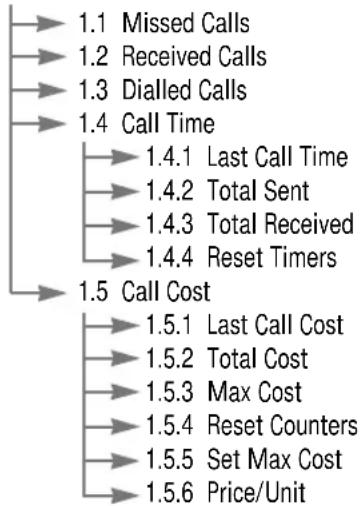
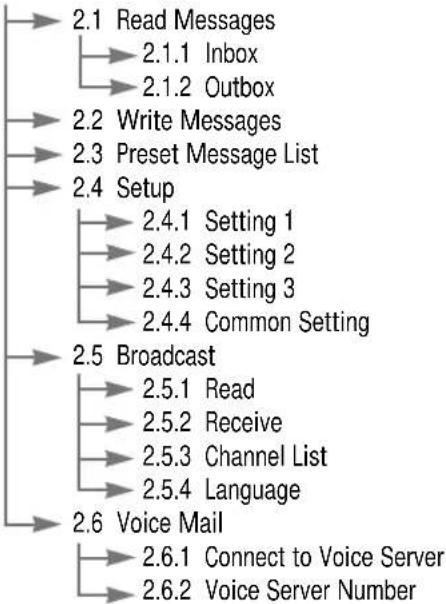
The numbers assigned to each option are indicated on the following menu map.
Menu Map
The following illustration shows the menu structure available and indicates the:
• Number assigned to each option
- Page on which you can find a description of each feature
Note: If you use a SIM AT card that provides additional services, the SIM AT menu (9) is displayed first when you press the Menu soft key to enter the menu facility. For further details, refer to your SIM card documentation.
1. Call Records (see page 56)
flowchart
graph TD
    A["1.1 Missed Calls"] --> B["1.2 Received Calls"]
    B --> C["1.3 Dialled Calls"]
    C --> D["1.4 Call Time"]
    D --> E["1.4.1 Last Call Time"]
    E --> F["1.4.2 Total Sent"]
    F --> G["1.4.3 Total Received"]
    G --> H["1.4.4 Reset Timers"]
    H --> I["1.5 Call Cost"]
    I --> J["1.5.1 Last Call Cost"]
    J --> K["1.5.2 Total Cost"]
    K --> L["1.5.3 Max Cost"]
    L --> M["1.5.4 Reset Counters"]
    M --> N["1.5.5 Set Max Cost"]
    N --> O["1.5.6 Price/Unit"]

Using the Menus
Using the Menus
2. Messages (see page 59)
flowchart
graph TD
    A["2.1 Read Messages"] --> B["2.1.1 Inbox"]
    B --> C["2.1.2 Outbox"]
    A --> D["2.2 Write Messages"]
    D --> E["2.3 Preset Message List"]
    A --> F["2.4 Setup"]
    F --> G["2.4.1 Setting 1"]
    F --> H["2.4.2 Setting 2"]
    F --> I["2.4.3 Setting 3"]
    F --> J["2.4.4 Common Setting"]
    A --> K["2.5 Broadcast"]
    K --> L["2.5.1 Read"]
    K --> M["2.5.2 Receive"]
    K --> N["2.5.3 Channel List"]
    K --> O["2.5.4 Language"]
    A --> P["2.6 Voice Mail"]
    P --> Q["2.6.1 Connect to Voice Server"]
    P --> R["2.6.2 Voice Server Number"]
3. Sound Settings (see page 66)
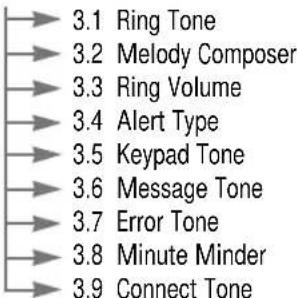
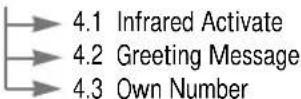
4. Phone Settings (see page 72)
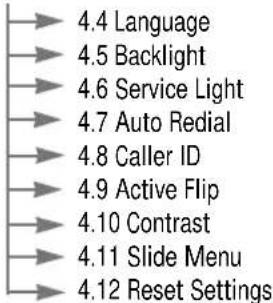
4. Phone Settings (continued)
5. Organiser (see page 77)
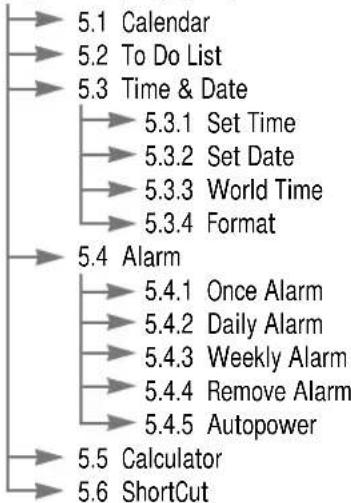
flowchart
graph TD
    A["5.1 Calendar"] --> B["5.2 To Do List"]
    B --> C["5.3 Time & Date"]
    C --> D["5.3.1 Set Time"]
    C --> E["5.3.2 Set Date"]
    C --> F["5.3.3 World Time"]
    C --> G["5.3.4 Format"]
    H["5.4 Alarm"] --> I["5.4.1 Once Alarm"]
    I --> J["5.4.2 Daily Alarm"]
    I --> K["5.4.3 Weekly Alarm"]
    I --> L["5.4.4 Remove Alarm"]
    I --> M["5.4.5 Autopower"]
    N["5.5 Calculator"] --> O["5.6 ShortCut"]
6. Security (see page 86)

Using the Menus
Using the Menus
7. Network Services (see page 90)
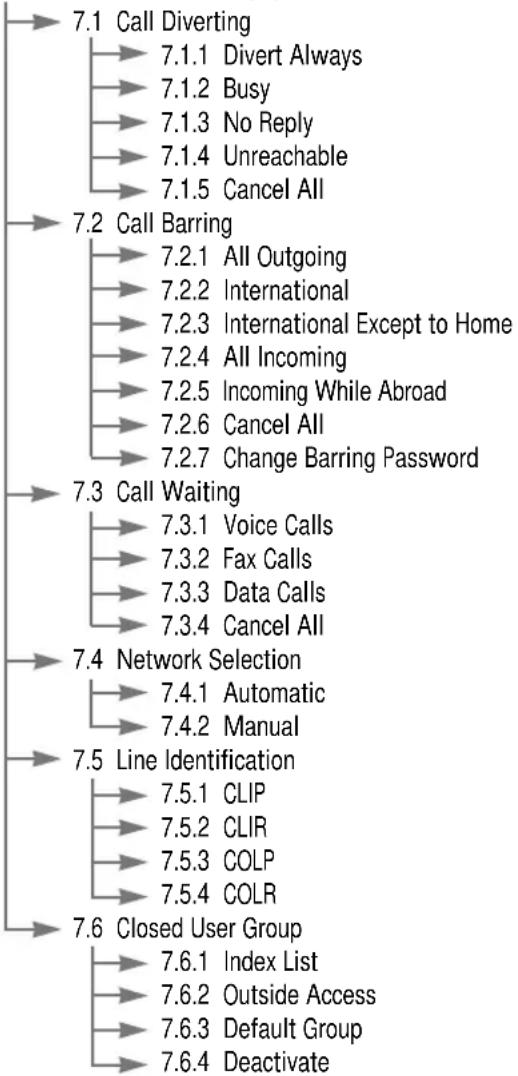
flowchart
graph TD
    A["7.1 Call Diverting"] --> B["7.1.1 Divert Always"]
    B --> C["7.1.2 Busy"]
    C --> D["7.1.3 No Reply"]
    D --> E["7.1.4 Unreachable"]
    E --> F["7.1.5 Cancel All"]

    G["7.2 Call Barring"] --> H["7.2.1 All Outgoing"]
    H --> I["7.2.2 International"]
    I --> J["7.2.3 International Except to Home"]
    J --> K["7.2.4 All Incoming"]
    K --> L["7.2.5 Incoming While Abroad"]
    L --> M["7.2.6 Cancel All"]
    M --> N["7.2.7 Change Barring Password"]

    O["7.3 Call Waiting"] --> P["7.3.1 Voice Calls"]
    P --> Q["7.3.2 Fax Calls"]
    Q --> R["7.3.3 Data Calls"]
    R --> S["7.3.4 Cancel All"]

    T["7.4 Network Selection"] --> U["7.4.1 Automatic"]
    U --> V["7.4.2 Manual"]

    W["7.5 Line Identification"] --> X["7.5.1 CLIP"]
    X --> Y["7.5.2 CLIR"]
    Y --> Z["7.5.3 COLP"]
    Z --> AA["7.5.4 COLR"]

    AB["7.6 Closed User Group"] --> AC["7.6.1 Index List"]
    AC --> AD["7.6.2 Outside Access"]
    AD --> AE["7.6.3 Default Group"]
    AE --> AF["7.6.4 Deactivate"]
8. Games (see page 99)

9. WAP Browser (see page 100)
(The Wap Browser menu is dependant on the version of the software. See the WAP Browser User's Manual supplied with your phone.)
Call Records
Via this menu, you can view the phone calls:
- Missed
- Received
- Dialled
The number and name (if available) are given, together with the date and time at which the call was made.
Note: Your phone can keep up to ten numbers in these lists.
Missed Calls Menu 1.1
This option lets you view the last 10 unanswered calls. You can also:
- Edit the number if available and dial it or save it in the phonebook
- Delete the number from the list
Received Calls Menu 1.2
This option lets you view the last 10 phone calls received. You can also:
- Edit the number if available and dial it or save it in the phonebook
- Delete the number from the list
Call Records
Dialled Calls Menu 1.3
This option lets you view the last 10 numbers dialled. You can also:
- Delete the number
• Edit the number and save it in the phonebook - Redial the number
Call Time Menu 1.4
This option lets you view the timers for calls made and received. The following timers are available.
Last Call Time: length of the last call.
Total Sent: total length of all calls made since the timer was last reset.
Total Received: total length of all calls received since the timer was last reset.
Reset Timers: option used to reset the call timers; you must first enter the phone password (see page 20) and then press the OK soft key.
Note: The actual time invoiced for calls by your service provider may vary, depending on network features, rounding-off for billing purposes and so forth.
Call Records
Call Cost Menu 1.5
This network feature lets you view the cost of calls. The following options are available.
Last Call Cost: cost of the last call made.
Total Cost: total cost of all calls made since the cost counter was last reset. If the total cost exceeds the maximum cost set via the Set Max Cost option, you can no longer make any calls until you reset the counter.
Max Cost: maximum cost set via the Set Max Cost option (see below).
Reset Counters: option used to reset the cost counter; you must first enter your PIN2 (see page 22) and then press the OK soft key.
Set Max Cost: option used to enter the maximum cost that you authorise for your calls.
Price/Unit: option used to set the cost of one unit; this price per unit is applied when calculating the cost of your calls.
Messages
The SMS (Short Message Service) function is a network service and may not be supported by your network. Messages can be sent by text, fax, E-mail and paging messaging systems, provided that these services are supported by your network. To send text messages by phone, you must obtain the number of the SMS centre from your service provider.
When the icon appears, you have received new text messages. If the message memory is full, an error message is displayed and you cannot receive any new messages. Use the Delete option in the Read Messages menu (2.1) to delete obsolete messages.
Read Messages Menu 2.1
Two message boxes are available:
Inbox: used to store the messages that you have received
Outbox: used to store the messages that you have already sent or will send
Select the required box. The header of the first message in the box is displayed:
- Message number
- Message status: New, Old, Not Sent, Sent (If you have set the Delivery Reports menu option to ON, the report is also shown; see page 63 for further details.)
- Date and time at which the message was received (inbox only)
Messages
Messages
To view this message, press the View soft key. The screen shows the:
- Sender's phone number (if sent with the message) or recipient's phone number
- Message text
To scroll through the message, press the and ^ keys.
You can choose the following options, by pressing the Options soft key.
Text Reply: allows you to reply by sending a text message. You can also change the SMS centre number (if required).
Call Back: allows you to call the sender back.
Delete: allows you to delete obsolete messages.
Cut Number: allows you to extract a number from the message text, so that you can call the number or save it in the phonebook.
Send: allows you to send a message that you have received or saved. You can:
- Send the message
- Save and send the message
- Save but not send the message
Edit Message: allows you to edit a message.
Note: The options available vary, depending on the message status (New/Old, Not Sent or Sent for example).
Write Messages Menu 2.2
Via this menu, you can write text messages of up to 160 alphanumeric characters.
Note: For further information on how to enter the characters in your message, refer to page 35.
After you complete the message, you can select the following options.
Send Only: Enter the destination and select a setting group in which you set up default information on the SMS feature via the Setup menu (see the following page).
Save and Send: allows you to save a copy of the message and then send the message to the required destination. You are also required to select a setting group. You can read the message in your outbox using the Read Messages option. Sent is displayed when you read the message to indicate the message status.
Save Only: allows you to save the message so that it can be sent later. When you read the message in your outbox, Not sent is displayed.
Preset Message List Menu 2.3
Using this menu, you can preset up to five messages that you use most frequently. This menu shows the preset message list. Scroll through the list using the √ and keys. When the required message number appears, press the Options soft key.
Messages
Edit: allows you to write a new message or edit the selected preset message.
Note: For further information on how to enter the characters in your message, refer to page 35.
Send Message: allows you to recall the selected message. Once you have completed the message, you can send, save and send, or simply save it.
Delete: allows you to delete the selected message.
Setup Menu 2.4
Via this menu, you can set up default information for the SMS feature. A setting group is a collection of settings required to send messages. The number of setting groups available depends on the capacity of your SIM card.
Setting x (where x is the setting group number): each group has its own sub-menu.
Service Centre: allows you to store or change the number of your SMS centre required when sending messages. You must obtain this number from your service provider.
Default Type: allows you to set the default message type (Text, Fax, Email and Paging). The network can convert the messages into the selected format.
Default Validity: allows you to set the length of time for which your text messages will be stored at the message centre while attempts are made to deliver them to you.
Setting Name: allows you to give a name to the setting group currently being defined.
Messages
Common Setting: Two options are available.
Reply Path: allows the recipient of your SMS message to send you a reply message via your message centre, if the service is provided by the network.
Delivery Reports: allows you to activate or deactivate the report function. When this function is activated, the network informs you whether your message has been delivered or not.
Broadcast Menu 2.5
This network service allows you to receive text messages on various topics, such as the weather or traffic. Messages are displayed immediately they are received, provided that:
• The phone is in the idle mode
• The Receive option is set to Enable
- The message channel is currently active in the channel list
The last ten messages are also stored for later retrieval.
The following options are available.
Read: lets you view the first message. Scroll through the message using the and keys. At the end of the message, press the Next soft key to move to the next message.
Messages
Messages
Receive: allows you to enable or disable the reception of broadcast messages.
Channel List: allows you to indicate the channels from which you wish to receive broadcast messages. Several options are available.
Select: used to enable or disable channels in the list by marking or unmarking them respectively (a check mark is displayed in front of each channel selected).
Add Channel: used to declare the ID and title for a new channel.
Delete: used to remove a channel from the list.
Edit: used to change the ID and title of an existing channel.
Language: allows you to select your preferred language to be used when displaying cell broadcast messages.
Please contact your service provider for more information.
Voice Mail Menu 2.6
This menu provides you with a quick way of accessing your voice mailbox (if provided by your network).
To quickly access the Voice Mail menu, press and hold down key.
Note: Voice Mail is a network feature. Please contact your service provider for more information.
Connect to Voice Server: Before using this feature, you must enter the voice server number obtained from your service provider (see menu option 2.6.2). You can then select this option and simply press the OK soft key to listen to your messages.
Voice Server Number: allows you to change the voice mail server number.
To... Then press the...
Enter the server number Corresponding numeric keys.
Correct a digit C key.
Move the cursor to or key. < > the left/right without clearing the digit
Sound Settings
You can use the Sound Settings feature to customise various settings, such as the:
- Ringing tone or melody, volume and type
- Sounds made when you press a key, make an error or receive a message
Ring Tone Menu 3.1
This option allows you to select the required ringing tone. You can choose between 20 different tones. Each time you select a tone, it is played for a few seconds. Tones 19 and 20 correspond to the melodies that you can compose, using the Melody Composer menu option (3.2).
Melody Composer Menu 3.2
This option allows you to compose your own melody to be used as the ring tone.
Three octaves are available. A maximum of 100 notes can be entered. You can adjust the length of the notes and add rests, as required.
Sound Settings
Composing a Melody
You can compose two melodies. When you access the menu, the names of any melodies created are displayed. Otherwise, Melody 1 and Melody 2 appear. Select the melody that you wish to create or edit.
To... Then press the...
Compose a Edit soft key. melody
Insert a note Next soft key.
Move a note a key. ^ semitone up
Move a note a key. √ semitone down
Change the < key one or more times until length of a note the note is of the required length.
Delete a note C key.
Enter a rest key and hold it down for the required length of time.
Listen to your Listen soft key. melody
Modify your Modify soft key. melody
Saving a Melody
When you are satisfied with your melody, you can save it and indicate that you wish to use it as the ring tone.
- Press the Save soft key.
- Enter a title for the melody.
Note: For further details on how to enter characters, refer to page 35.
You are asked if the melody is to become the ring tone. - To use the melody as the ring tone, press the Yes soft key.
The melody is saved and is played each time your phone rings. You can also select the melodies composed via the Ring Tone menu option (3.1); they are tones 19 and 20 respectively.
Otherwise, press the No soft key.
The melody is saved only.
Ring Volume Menu 3.3
This option allows you to adjust the ringing volume to one of five levels. Use the and keys. The greater the number of bars, the greater the volume.
Alert Type Menu 3.4
This option allows you to indicate how you are to be informed of any incoming calls. The following options are available.
Light only: only the backlight is switched on; the phone neither rings nor vibrates.
Melody: the phone rings using the ringing tone selected via the Ring Tone menu option (3.1).
Vibration: the phone vibrates but does not ring.
Note: In idle mode, you can set the phone to vibrate only (silent mode) or to start ringing again, simply by pressing one of the shortcut keys (for further details, see page 85).
Vibra+Melody: the phone first vibrates three times and then starts ringing.
Keypad Tone Menu 3.5
This option allows you to select the tone that the keypad generates when you press a key. The following options are available.
OFF: the keys do not make any sound.
Tone: each key, when pressed, makes a different sound.
Beep: each key, when pressed, makes the same sound.
Sound Settings
Sound Settings
Message Tone Menu 3.6
This option allows you to select how the phone informs you that a new message has been received.
The following options are available.
Light Only: the service light in the top right-hand corner of the phone flashes.
Single Beep: the phone beeps once.
SMS Tone1\~10: the phone uses an SMS tone. You are provided with ten SMS tones.
Error Tone Menu 3.7
This option allows you to select how the phone informs you that you have made a mistake.
The following options are available.
OFF: the phone does not beep.
ON: the phone beeps to indicate an invalid entry.
Minute Minder Menu 3.8
This option allows you to specify whether the phone must beep every minute during an outgoing call to keep you informed of the length of your call.
The following options are available.
OFF: the phone does not beep.
ON: the phone beeps every minute.
Connect Tone Menu 3.9
You can set your phone to beep when the person you are calling answers the phone.
The following options are available.
OFF: the phone does not beep.
ON: the phone beeps when your call is accepted.
Phone Settings
Many different features of your phone can be customised to suit your preferences. All of these features are accessed via the Phone Settings menu.
Infrared Activate Menu 4.1
This feature allows you to send or receive data/fax through the infrared port. To use an infrared connection, you must:
- Install the modem driver for receiving or sending data/fax (We recommended 14400 bps Data/Fax modem by 'Rockwell' company.)
- Install the network dial-up software supplied by your service provider or a fax application program for a fax call on your PC
- Configure and activate an IrDA-compliant infrared port on your PC
- Activate the Infrared feature on the phone; the symbol appears on the bottom line of the display
- Dial the network service number given to you by the service provider
If there is no communication between your phone and the IrDA-compliant device within 30 seconds of activating the feature, it is automatically deactivated.
For further details, contact your service provider.
Phone Settings
Greeting Message Menu 4.2
This option allows you to set a greeting message to be displayed briefly when the phone is switched on. The current message is displayed.
To... Then press the...
Clear the existing C key and hold it down until message the message is cleared.
Enter a new message Appropriate alphanumeric keys.
Change between soft key upper case, lower case and numeric characters
For further details on how to enter characters, refer to page 35.
Own Number Menu 4.3
This feature allows you to:
- Assign a name to each of your own phone numbers registered on your SIM card
• Edit the names and numbers
This function is a memory aid, which you can use to check your own phone numbers if you need to do so. Any changes made here do not in any way affect the actual subscriber numbers on your SIM card.
Phone Settings
Phone Settings
Language Menu 4.4
You can select a display language. When the language option is set to Automatic, the language is automatically selected according to the language of the SIM card used.
Backlight Menu 4.5
You can select whether or not the phone uses the backlight. A marginal increase in standby/talk time can be achieved by turning the backlight off.
The following options are available.
OFF: the backlight is not used.
Short: the backlight comes on when you press a key or receive a call and switches off 10 seconds after the last key is pressed.
Long: the backlight comes on when you press a key or receive a call and switches off 20 seconds after the last key is pressed.
Service Light Menu 4.6
This option allows you to select whether or not the service light in the top right-hand corner of the phone is used.
The following options are available.
OFF: the service light is not used.
ON: the service light flashes when the phone is ready for use.
Auto Redial Menu 4.7
With the Auto Redial function, the phone makes up to ten attempts to redial a phone number after an unsuccessful call.
Note: The interval between two call attempts varies.
The following options are available.
OFF: the number is not redialed.
ON: the number is redialled automatically.
Caller ID Menu 4.8
You can prevent your phone number from being displayed on the phone of the person being called.
Note: Some networks do not allow the user to change this setting.
The following options are available.
Default: the default setting provided by the network is used.
Hide Number: your number is not displayed on the other person's phone.
Send Number: your number is sent each time you make a call.
Active Flip Menu 4.9
This option allows you to answer a call simply by opening the flip.
Phone Settings
The following options are available.
Disable: to answer a call, you must open the flip and press any key except C, and the Reject soft key.
Enable: to answer a call, you simply open the flip.
Contrast Menu 4.10
This option allows you to adjust the contrast of the LCD screen by pressing the and keys.
Slide Menu Menu 4.11
With the Slide Menu feature, you can determine how the menus are displayed. If the feature is enabled, the menus seem to slide into position from the top, bottom, left or right, as applicable.
Reset Settings Menu 4.12
You can easily reset your phone to its default configuration. To do so, proceed as follows.
- Select the Reset Settings menu option.
- Enter the 8-digit phone password.
Note: The password is preset to 00000000. To change this password, refer to page 88.
Organiser
The Organiser feature enables you to:
• View the calendar and organise your schedule
- Define a list of things to do
- Set the current date and time
- Set the alarm so that the phone rings at a specific time (to remind you of an appointment for example)
• Use the phone as a calculator
- Assign functions to the navigation keys so that they can be used as shortcuts giving direct access to your favourite menus
Calendar Menu 5.1
With the Calendar feature, you can:
- Consult the calendar
- Write memos to keep a track of your schedule and trigger an alarm if necessary
Consulting the Calendar
When you select the Calendar menu option (5.1), the calendar is displayed. The following options are available when you press the Options soft key.
Search all: displays all memos set, regardless of the day and starting with the oldest. To scroll through the memos, press the and keys.
Delete all: allows you to delete all memos. You are asked to confirm your action.
Go to date: allows you to jump to a specific date.
Organiser
Organiser
Writing a Memo
To write or edit a memo on a specific date, proceed as follows.
- Select the required date in the calendar, using the navigation keys.
Note: To skip to the previous or next month, press the or „ keys on the left side of the phone.
- Press the Select soft key.
An empty memo screen is displayed to allow you to enter your memo.
- Enter your memo and then press the OK soft key.
Note: For further details on how to enter characters, refer to page 35.
You are asked if you wish to set the alarm.
- If you want the alarm to ring on the chosen day, press the Yes soft key.
Otherwise, press the No soft key.
- If you pressed Yes, set the time for the alarm and press OK.
A check mark is displayed in front of the date in the calendar to indicate that a memo exists.
Editing a Memo
If you select a day for which a memo already exists, you can press the Edit soft key to edit the memo displayed.
Note: For further details on how to enter characters, refer to page 35.
Once you have finished editing the memo, press the OK soft key. The following options are then available when you press the Options soft key.
Alarm: allows you to set the alarm to ring on the chosen day.
Erase: allows you to delete the memo.
Copy to: allows you to copy the memo to another date.
Move to: allows you to change the date and time of the memo.
To Do List Menu 5.2
This feature allows you to:
• Draw up a list of tasks to be done
- Assign a priority and deadline to each task
- Sort the tasks by priority and status mark (for tasks to be done, √ for completed tasks)
Creating the To Do List
To create the To Do List, proceed as follows.
- Press the New soft key.
- Enter the first task.
Note: You can enter up to 48 characters. For further details on how to enter characters, see page 35.
- Press the OK soft key.
Organiser
Organiser
- Select high or low priority using the keys and the Select soft key.
- Enter your deadline.
- Press the OK soft key.

Editing the To Do List
If tasks are already defined in the To Do List when you select the To Do List menu option (5.2), the current contents are displayed with the associated priority and status mark. The following options are available.
To... Then...
View the details • Highlight the task. for a specific task • Press the View soft key. • Press the * key to mark the task as completed as of the current date and time.
Change the status • Highlight the task. of a specific task • Press the * key. (☐r √) or_
- Highlight the task.
- Press the Options soft key.
- Select the Mark option.
- Select the appropriate status.
Create a new task - Press the Options soft key. - Select the New option. - Enter the text, priority and deadline for the task.
Edit an existing task Highlight the task. Press the Options soft key. Select the Edit option. Change the text, priority and deadline for the task.
To... Then...
Sort the existing
- Press the Options soft key.
tasks by priority
- Select the Sort option.
or status • Select the sort criterion (high, low, done, undo).
Copy a task • Highlight the task.
- Press the Options soft key.
- Select the Copy option.
- Change the text, priority and deadline for the task as required.
Delete a task • Highlight the task.
- Press the Options soft key.
- Select the Delete option.
Delete all tasks
- Press the Options soft key.
- Select the Delete all option.
- Confirm the deletion by pressing OK.
Time & Date Menu 5.3
This option allows you to change the current time and date displayed. You can also check the current time for Greenwich Mean Time (GMT) and 21 major cities around the world.
Organiser
Set Time: allows you to enter the current time. You can choose the time format via the Format menu option (5.3.4).
Note: Before setting the time, you must specify your time zone, via the World Time menu option (5.3.3).
Set Date: allows you to enter the day, month and year. You can change the date format via the Format menu option (5.3.4).
World Time: allows you to check the current time for Greenwich Mean Time (GMT) and 21 major cities around the world, using the and keys.
The screen shows the:
- City name
• Current date and time - Time difference between the selected city and your city if you have set the local time (see below for further details) or GMT (by default)
To select the time zone in which you are located, proceed as follows.
-
Select the city corresponding to your time zone by pressing the ▼ key one or more times.
The local date and time are displayed. -
Press the Set soft key.
Format: allows you to change the time and date formats.
Time format: 24 hours 12 hours
Date format: YYYY/MM/DD (year/month/day) DD/MM/YYYY (day/month/year) MM/DD/YYYY (month/day/year)
Organiser
Alarm Menu 5.4
This feature allows you to:
- Set the alarm to ring at a specific time
- Set the phone to switch on automatically and ring the alarm if the specified time is reached while the phone is switched off (Autopower menu option set to Enable)
In the Alarm menu, the following options are available.
Once Alarm: the alarm rings only once and is then deactivated.
Daily Alarm: the alarm rings every day at the same time.
Weekly Alarm: the alarm rings every week on the same day and at the same time.
To set the alarm, proceed as follows.
- Choose the alarm frequency option.
- Enter the required time and day of the week (if applicable).
To stop the alarm when it rings, open the flip and press the Exit soft key.
Remove Alarm: deactivates the alarm.
Autopower: if set to Enable, switches the phone on automatically when the alarm rings. You are then asked if you wish to leave the phone switched on.
Organiser
Organiser
To... Then...
Leave the phone on Hold down the key. 📞/∅
Switch the phone Press the Exit soft key or off again any other key.
If the menu option is set the Disable and the phone is switched off at the specified time, the alarm will not ring.
Calculator Menu 5.5
Using this feature, you can use the phone as a calculator. The calculator provides the basic arithmetic functions: addition, subtraction, multiplication and division.
Using the Calculator
- Enter the first number using the numeric keys.
- Press the right soft key until the required arithmetic symbol appears: + (add), - (subtract), x (multiply), / (divide).
-
Enter the second number.
-
Repeat Steps 1 to 3 as many times as required. Notes:
-
To erase any mistakes and clear the display, press the C key.
-
To include a decimal point or a bracket, press the left soft key until the required symbol is displayed.
-
To calculate the result, press the key.
ShortCut Menu 5.6
The four navigation keys and the C key can also be used as shortcut keys. When held down in idle mode, they allow you to access specific menu options directly.
Using the ShortCut menu option (5.6), the following menu options can be assigned to the shortcut keys:
- None
- Silent mode (Vibration setting in menu option 3.4)
• Calendar (menu option 5.1)
• Calculator (menu option 5.5) - Messages (menu option 2)
• Sound Settings (menu option 3)
• Games (menu option 8)
• To Do List (menu option 5.2)
• Voice Mail (menu option 2.6) -
Broadcast (menu option 2.5)
• Infrared Activate (menu option 4.1)
• WAP Browser (menu option 8) -
Select the key to be used as a shortcut key:
• Key up ()^
• Key down ()
• Key right ( )
• Key left ( )
• C held down (long press)
- Select the menu option to be assigned to the key.
Note: To deactivate a shortcut key, select the None option.
Security
The Security feature enables you to restrict the use of your phone to:
• The people of your choice
• The types of calls of your choice
Various codes and passwords are used to protect the features of your phone. They are described in the following sections (see also pages 20-23).
PIN Check Menu 6.1
When the PIN Check feature is enabled, you must enter your PIN each time you switch the phone on. Consequently, any person who does not have your PIN cannot use your phone without your approval.
Note: Before disabling the PIN Check feature, you must enter your PIN.
To change your PIN, refer to menu option 6.2.
The following options are available.
Disable: the phone connects directly to the network when you switch it on.
Enable: you must enter the PIN each time the phone is switched on.
Security
Change PIN Menu 6.2
This feature allows you to change your current PIN to a new one, provided that the PIN Check feature is enabled. You must enter the current PIN before you can specify a new one.
Once you have entered a new PIN, you are asked to confirm it by entering it again.
Phone Lock Menu 6.3
When the Phone Lock feature is enabled, the phone is locked and you must enter the 8-digit phone password each time the phone is switched on.
The password is factory set to 00000000. To change the phone password, refer to menu option 6.4 on the following page.
Once the correct password has been entered, you can use the phone until you switch it off.
The following options are available.
Disable: you are not asked to enter the phone password when you switch the phone on.
Enable: you are required to enter the phone password when you switch the phone on.
Security
Security
Change Password Menu 6.4
The Change Password feature allows you to change your current phone password to a new one. You must enter the current password before you can specify a new one.
The password is factory set to 00000000. Once you have entered a new password, you are asked to confirm it by entering it again.
SIM Lock Menu 6.5
When the SIM Lock feature is enabled, your phone only works with the current SIM. You must enter the SIM lock code.
Once you have entered the lock code, you are asked to confirm it by entering it again.
To unlock the SIM, you must enter the SIM lock code.
FDN Mode Menu 6.6
The FDN (Fixed Dial Number) mode, if supported by your SIM card, allows you to restrict your outgoing calls to a limited set of phone numbers.
The following options are available.
Disable: you can phone any number.
Enable: you can only call phone numbers stored in the phonebook. You must enter your PIN2.
Note: Not all SIM cards have a PIN2. If your SIM card does not, this menu option is not displayed.
To change your PIN2, refer to menu option 6.7 below.
Change PIN2 Menu 6.7
The Change PIN2 feature allows you to change your current PIN2 to a new one. You must enter the current PIN2 before you can specify a new one.
Once you have entered a new PIN2, you are asked to confirm it by entering it again.
Note: Not all SIM cards have a PIN2. If your SIM card does not, this menu option is not displayed.
Network Services
These menu functions are network services.
Please contact your service provider to check their availability and subscribe to them, if you so wish.
Call Diverting Menu 7.1
This network service enables incoming calls to be rerouted to the number that you specify.
Example: You may wish to divert your business calls to a colleague while you are on holiday.
Call diverting can be set up in the following ways.
Divert Always: all calls are diverted.
Busy: calls are diverted if you are already making another call.
No Reply: calls are diverted if you do not answer the phone.
Unreachable: calls are diverted if you are not in an area covered by your service provider.
Cancel All: all call diverting options are cancelled.
You can specify individual diverting options for each of the following call types:
- Voice calls only
- Fax calls only
- Data calls only
Example: You can:
- Systematically divert fax calls to your office fax machine
- Divert voice calls to your colleague if you are already using the phone
Network Services
To set your call diverting options, proceed as follows.
- Select the type of call diverting required by pressing the √ key until the appropriate option is highlighted, and then press Select.
- Select the type of calls to be diverted by pressing the √ key until the appropriate option is highlighted and then press Select.
The current status is displayed. If the option has already been set, the number to which the calls are diverted is displayed.
- To... Then...
Activate call • Press the Activate soft key. diverting • Go to step 4.
Change the • Press the Change soft key. call number • Go to step 4.
Deactivate call Press the Remove soft key. diverting
- Enter the number to which the calls are to be diverted and press OK.
To enter the international code, press 0 until the + sign is displayed.
The phone sends your settings to the network and the network's acknowledgement is displayed.
You can deactivate all call diverting settings by selecting the Cancel All option.
Call Barring Menu 7.2
The call barring network service allows you to restrict your calls.
Call barring can be set up in the following ways.
All Outgoing: calls cannot be made.
International: international calls cannot be made.
International Except to Home: when abroad, calls can be made only to numbers within the current country and to your home country, that is the country where your home network provider is located.
All Incoming: calls cannot be received.
Incoming While Abroad: calls cannot be received when you are using your phone outside your home service area.
Cancel All: all call barring settings are deactivated; calls can be made and received normally.
You can specify individual barring options for each of the following call types:
- Voice calls only
- Fax calls only
- Data calls only
To set your call barring options, proceed as follows.
-
Select the type of call barring required by pressing the √ key until the appropriate option is highlighted and then press Select.
-
Select the type of calls to be barred by pressing the √ key until the appropriate option is highlighted and then press Select.
- Press the Activate soft key to confirm your settings.
- Enter your call barring password supplied by your service provider.
The phone sends your settings to the network and the network's acknowledgement is displayed.
To deactivate specific call barring settings, proceed as follows.
- Select the call barring option to be deactivated.
- Select the type of call to which this option applies.
- Press the Deactivate soft key.
- Enter your call barring password supplied by your service provider.
The phone sends your settings to the network and the network's acknowledgement is displayed.
You can also deactivate all call barring settings by selecting the Cancel All option.
Network Services
Network Services
Change Barring Password: you can set and change the call barring password obtained from your service provider using this option. You must enter the current password before you can specify a new one.
Once you have entered a new password, you are asked to confirm it by entering it again.
Call Waiting Menu 7.3
This network service enables you to be informed when someone is trying to reach you during another call.
You can specify individual call waiting options for each of the following call types:
1 Voice calls
2 Fax calls
3 Data calls
4 Cancel all
To set your call waiting options, proceed as follows.
- Select the type of calls to which the call waiting option is to be applied by pressing the key until the appropriate option is highlighted. Then press Select.
- Press the √ key until the appropriate option is highlighted. The following options are available.
- Activate: activates the Call Waiting feature.
- Cancel: deactivates the Call Waiting feature.
• Status: shows the current Call Waiting status. - Press Select.
You can also deactivate all call waiting settings by selecting the Cancel All option.
Note: Fax calls and Data calls may not appear depending on your SIM card.
Network Selection Menu 7.4
The Network Selection feature enables you to indicate whether the network used when roaming (outside your home area) is selected automatically or manually.
Note: You can select a network other than your home network only if it has a valid roaming agreement with your home network.
To indicate whether the network is to be selected automatically or manually when roaming, proceed as follows.
- When Network Selection is displayed, press the Select soft key.
- Press the √ key until the appropriate option is highlighted and then press the OK soft key.
If you select Automatic, you are connected to the first available network when roaming.
If you select Manual, the phone scans for the available networks. Go to Step 3.
- Press the √ key until the preferred network is highlighted and then press the OK soft key.
You are connected to that network.
Line Identification Menu 7.5
This menu option lets you view the following line identification settings.
CLIP (Calling Line Identification Presentation)
If this network function is active, the number of the person making the call is displayed on the phone of the person called. If the phone number matches one stored in the phonebook, the caller's name is also displayed.
CLIR (Calling Line Identification Restriction)
If this network function is active, the number of the person making the call is not displayed on the phone of the person called.
COLP (Connected Line Identification Presentation)
If this network function is active, the number of the person called is displayed on the phone of the person making the call.
COLR (Connected Line Identification Restriction)
If this network function is active, the number of the person called is not displayed on the phone of the person making the call.
Closed User Group (CUG) Menu 7.6
This network service allows incoming and outgoing calls to be restricted to a selected user group. You may be a member of up to ten user groups.
For details on how to create, activate and use a closed user group, contact your service provider.
Example: A company lends SIM cards to its employees and wants to restrict outgoing calls to members of the same team.
Activating a Closed User Group
If you select the Closed User Group menu, you can enter the CUG function. You can now access the following options after pressing the Select soft key.
Index List: lets you list, add or delete CUG index numbers. The list of current CUG indexes appears. Add a new CUG index (as advised by your service provider) or delete a selected group.
To... Then press the...
Scroll through the or keys. √ ∧ existing CUG indexes
Add a new CUG index
Options soft key, select the Add option and enter the index.
Network Services
Delete a CUG index Options soft key and
Activate a CUG index select the Delete option. Options soft key and select the Activate option.
Outside Access: enables you to enable or disable calls to numbers other than those nominated for the Closed User Group. This feature depends on the nature of your CUG subscription. Please check with your service provider.
Default Group: you may communicate a default CUG to your service provider. If you have done so, you can enable the Default Group option on your phone. When making a call, you will be given the option of using your default CUG, instead of selecting one from the list.
Deactivate: deactivates the CUG function. This menu appears only when the default group is enabled or a CUG index is selected.
Games
Using this feature, you can play seven different games with the phone:
- Casino
- Roulette
- Black Jack
- Sniper
- Snake
- Mole
- Othello
Once you have selected a game, the following options are available.
Play: allows you to start a game.
Level: allows you to select the level of difficulty. Select the required level using the and keys and press the OK soft key. This option is only available in games with several levels (Sniper, Snake).
Configuration: allows you to configure the phone for the chosen game (backlight and sound settings).
To adjust each setting, highlight the Backlight or Sound option by pressing the and keys and then toggle between ON and OFF by pressing the On/Off soft key.
Instructions: describes the buttons used by the game. If necessary, press the right soft key to see a more detailed description.
Games
High Score: enables you to view the highest score recorded for the selected game. You can also reset this score by pressing the Reset soft key.
If you break the current record for the game, the phone displays the High Score screen.
To stop playing a game, press the C or 📞/⊕ key.
WAP Browser
Your phone comes equipped with a WAP Browser makes it possible for you to access the Wireless Web.
For further details on using the WAP Browser menu, refer to WAP Browser User's Manual supplied with your phone.
Solving Problems
Before contacting the after-sales service, perform the following simple checks. They may save you the time and expense of an unnecessary service call.
When you switch your phone on, the following messages may appear
Insert SIM Card
- Check that the SIM card is correctly installed.
Phone Locked
Enter password
- The automatic locking function has been enabled. You must enter the phone's password before you can use the phone.
Enter PIN
- You are using your phone for the first time. You must enter the Personal Identification Number supplied with the SIM card.
- The option requiring that the PIN be entered each time the phone is switched on was enabled. You must enter your PIN and then disable this option if so required.
Enter PUK
- The PIN code was entered wrongly three times in succession and the phone is now blocked. Enter the PUK supplied by your network operator.

“No service”, “Network failure” or “Not done” is displayed
- The network connection was lost. You may be in a weak reception area (in a tunnel or surrounded by buildings). Move and try again.
- You are trying to access an option for which you have not taken out a subscription with your service provider. Contact the service provider for further details.
You have entered a number but it was not dialled
• Have you pressed the key?
• Are you accessing the right cellular network?
- You may have set an outgoing call barring option.
Your correspondent cannot reach you
- Is your phone switched on (pressed for more than one second)?
- Are you accessing the right cellular network?
- You may have set an incoming call barring option.
Your correspondent cannot hear you speaking
• Have you switched off the microphone?
- Are you holding the phone close enough to your mouth? The microphone is located in the bottom centre of the phone.
The phone starts beeping and “\*\*Warning\*\* Low Battery” flashes in the display
- The battery is insufficiently charged. Replace the battery and recharge it.
The audio quality of the call is poor
- Check the signal strength indicator in the display (Y, the number of bars after it indicates the signal strength from strong (Y to weak ( ). Y.
- Try moving the phone slightly or moving closer to a window if you are in a building.
No number is dialled when you recall a phonebook entry
- Check that the numbers have been stored correctly, by using the Phonebook Search feature.
• Re-store them, if necessary.
If the above guidelines do not enable you to solve the problem, take a note of:
• The model and serial numbers of your phone
- Your warranty details
• A clear description of the problem
Then contact your local dealer or SAMSUNG after-sales service.

Using the Batteries
Your phone is powered by a rechargeable Li-ion battery. The following batteries are also available (ask your SAMSUNG dealer for further details):
- Standard battery
- Slim battery
Precautions When Using Batteries
- Never use any charger or battery that is damaged in any way.
- Use the battery only for its intended purpose.
- If you use the phone near the network's base station, it uses less power; talk and standby times are greatly affected by the signal strength on the cellular network and the parameters set by the network operator.
- Battery charging times depend on the remaining battery charge and the type of battery and charger used. The battery can be charged and discharged hundreds of times, but it will gradually wear out. When the operation time (talk time and standby time) is noticeably shorter than normal, it is time to buy a new battery.
- If left unused, a fully charged battery will discharge itself over time.
Using the Batteries
- Use only Samsung-approved batteries and recharge your battery only with Samsung-approved chargers. When a charger is not in use, disconnect it from the power source. Do not leave the battery connected to a charger for more than a week, since overcharging may shorten its life.
- Extreme temperatures will affect the charging capacity of your battery: it may require cooling or warming first.
- Do not leave the battery in hot or cold places, such as in a car in summer or winter conditions, as you will reduce the capacity and life-time of the battery. Always try to keep the battery at room temperature. A phone with a hot or cold battery may temporarily not work, even when the battery is fully charged. Li-ion batteries are particularly affected by temperatures below 0 °C (32 °F).
- Do not short-circuit the battery. Accidental short circuiting can occur when a metallic object (coin, clip or pen) causes a direct connection between the + and - terminals of the battery (metal strips on the battery), for example when you carry a spare battery in a pocket or bag. Short-circuiting the terminals may damage the battery or the object causing the short-circuit.
- Dispose of used batteries in accordance with local regulations. Always recycle. Do not dispose of batteries in a fire.

Safety Information
Safety Information
Road Safety
• Remember, road safety always comes first!
- Do not use a hand-held phone while driving a vehicle. Always park the vehicle before having a conversation.
- Make sure that the phone is stored safely and will not fall or be broken in the event of a collision or emergency stop.
- The use of an alert device to operate a vehicle's lights or horn on public roads is not permitted.
- Only qualified personnel should install or service the phone in a vehicle. Faulty installation or service may be dangerous and may invalidate any warranty applicable to the unit.
- Electronic fuel injection, anti-skid braking, electronic cruise control or any other electronic systems may malfunction due to the lack of protection from radio signals. Check regularly that all cellular phone equipment in your vehicle is mounted and operating correctly.
Operating Environment
- Remember to follow any special regulations in force in any area and always switch off your phone whenever it is forbidden to use it, or when it may cause interference or danger (in a hospital for example).
- Operation of any radio-transmitting equipment, including cellular phones, may interfere with inadequately protected medical devices. Consult a doctor or the manufacturer of the medical device if you have any questions. Other electronic equipment may also be subject to interference.
- As with other mobile radio-transmitting equipment, you are advised that for satisfactory operations and personal safety, the equipment should only be used in the normal operating position.
- Always switch off the phone when at a refuelling point (service station). You are reminded of the need to observe restrictions on the use of radio equipment in fuel depots (fuel storage and distribution areas), chemical plants or where blasting operations are in progress.
- Do not store or carry flammable liquids, gases or explosive materials in the same compartment as the phone, its parts or accessories.
- Switch off your cellular phone when in an aircraft. The use of cellular phones in an aircraft is illegal and may be dangerous to the operation of the aircraft or disrupt the cellular network. Failure to observe these instructions may lead to the suspension or denial of cellular telephone services to the offender, legal action or both.
Care and Maintenance
Your phone is a product of superior design and craftsmanship and should be treated with care. The suggestions below will help you fulfill the warranty obligations and enjoy this product for many years.
- Keep the phone and all its parts and accessories out of the reach of small children.
- Keep the phone dry. Precipitation, humidity and liquids containing minerals will corrode the electronic circuits.
- Do not use or store the phone in dusty, dirty areas as its components may be damaged.
- Do not store the phone in hot areas. High temperatures can shorten the life of electronic devices, damage batteries and warp or melt certain plastics.
- Do not store the phone in cold areas. When the phone warms up to its normal temperature, moisture can form inside the phone, which may damage the electronic circuits.
- Do not attempt to open the phone's casing. Non-expert handling of the phone may damage it.
-
Do not drop or knock the phone. Rough handling may damage the internal circuits.
-
Do not use harsh chemicals, cleaning solvents or strong detergents to clean the phone. Wipe it with a soft cloth slightly dampened in mild, soapy water.
- If the phone or any of its accessories are not working properly, take them to your nearest qualified service centre. The personnel there will assist you, and if necessary, arrange for the phone to be repaired.
Emergency Calls
Important! This phone, like any cellular phone, uses radio signals, cellular and landline networks, as well as user-programmed functions that cannot guarantee connection in all conditions. Therefore, you should never rely solely on any cellular phone for essential communications (medical emergencies for example).
Remember, to make or receive any calls, the phone must be switched on and in a service area with adequate cellular signal strength.
Emergency calls may not be possible on all cellular phone networks or when certain network services and/or phone features are in use. Check with local cellular service providers.
Glossary of Terms
To help you understand the main technical terms and abbreviations used in this booklet and take full advantage of the features on your mobile phone, here are a few definitions.
Active Flip
Ability to answer a call simply by opening the phone.
Call Barring
Ability to restrict outgoing and incoming calls.
Call Diverting
Ability to reroute calls to another mobile or fixed line.
Call Holding
Ability to put one call on standby while answering or making another call; you can then switch between the two calls, as required.
Call Waiting
Ability to inform users that they have an incoming call when engaged on another call.
Glossary of Terms
DCS
Digital cellular network standard based on the GSM network architecture. With the higher frequency range (1800 MHz for DCS instead of 900 MHz for GSM), more radio channels can be made available, thus allowing the network to support more subscribers and traffic.
Dual Band
Ability to operate with both DCS (1800 MHz) and GSM (900 MHz) networks. The phone automatically uses the network with the strongest signal and even switches networks during a call within the same operator's network.
GSM (Global System for Mobile Communication)
International standard for cellular communication, guaranteeing compatibility between the various network operators. GSM covers most European countries and many other parts of the world.
Line Identification Services
Services allowing subscribers to view or block the telephone numbers of callers.
Multi-party Calling
Ability to establish a conference call involving up to five additional parties.
Phone Password
Security code used to unlock the phone when you have selected the option to lock it automatically each time it switches on.
PIN (Personal Identification Number)
Security code that protects the phone against unauthorised use. The PIN is supplied by the service provider with the SIM card. It may be a four to eight-digit number and can be changed, as required.
PUK (PIN Unblocking Key)
Security code used to unlock the phone when an incorrect PIN has been entered three times in succession. The eight-digit number is supplied by the service provider with the SIM card.
Roaming
Use of your phone when you are outside your home area (when travelling for example).
SDN (Service Dialling Numbers)
Telephone numbers supplied by your network provider and giving access to special services, such as voice mail, directory inquiries, customer support and emergency services.
SIM (Subscriber Identification Module)
Card containing a chip with all the information required to operate the phone (network and memory information, as well as the subscriber's personal data). The SIM card fits into a small slot on the back of the phone and is protected by the battery.
SMS (Short Message Service)
Network service sending and receiving messages to and from another subscriber without having to speak to the correspondent. The message created or received (up to 160 characters long) can be displayed, received, edited or sent.
Soft Keys
Keys marked ... on the phone, the purpose of which:
- Varies according to the function that you are currently using
- Is indicated on the bottom line of the display just above the corresponding key
Voice Mail
Computerised answering service that automatically answers your calls when you are not available, plays a greeting (optionally in your own voice) and records a message.
Index
A
Access codes • 20
Accessories • 7
Active Flip (4.9) • 27; 75
Alarm (5.4) · 83
Alert Type (3.4) • 69
Answering
a call • 27; 75
a second call • 46
Auto Redial (4.7) • 75
Autopower (5.4.5) • 83
B
Backlight • 13; 74
contrast • 76
Barring
calls (7.2) • 92
password • 23; 94
Batteries
charging • 17
low battery indicator • 18
precautions • 104
Broadcast (2.5) • 63
C
Calculator (5.5) • 84
Calendar (5.1) • 77
Caller
group • 39
ID (4.8) • 75
Calls
answering • 27; 75
a second call • 46
barring (7.2) • 92
cost (1.5) • 58
dialled (1.3) • 57
diverting (7.1) • 90
emergency • 6; 109
ending • 25
holding • 42; 94
international • 24
making • 24
missed • 28; 56
multiparty • 47
received (1.2) • 56
records (1) • 56
redialling automatically • 75
Calls (continued)
time (1.4) • 57; 71
via the phonebook • 34
waiting (7.3) • 46; 94
Care • 108
Changing
call barring password • 94
password (6.4) • 88
PIN (6.2) • 87
PIN2 (6.7) • 89
Characters
changing case • 35
entering • 35
Charging batteries • 17
Closed User Group (7.6) • 97
Composer
Melody (3.2) • 66
Conference calls
• See Multiparty calls
Connect
to Voice Mail (2.6) • 65
tone (3.9) · 71
Contrast (4.10) • 76
Copying
memos • 79
phonebook numbers • 38
Correcting numbers • 24
Cost of calls • 58
CUG·97
D
Date
format (5.3.4) • 82
setting (5.3.2) • 82
Deleting
memos • 79
missed calls • 29
phonebook numbers • 38
tasks • 81
Dialled Calls (1.3) • 57
Display • 11
contrast • 76
icons • 12
setting the
language (4.4) • 32; 74
Diverting calls (7.1) • 90
Index
E
Earphone • 7
Earpiece
adjusting the volume • 26
Editing
memos • 78
messages • 60
missed calls• 29
phonebook numbers • 38
tasks • 80
To Do List · 80
Emergency calls • 6; 109
Erasing
memos • 79
missed calls• 29
phonebook numbers • 38
tasks • 81
Error Tone (3.7) • 70
F
FDN Mode (6.6) • 89
Fixed Dial Number mode • 89
Functions
selecting • 30
G
Games (8) • 99
Greeting Message (4.2) • 73
Groups
caller • 39
user • 97
H
Holding calls • 42; 94
|
Icons
description • 12
Identifying a caller • 27; 75; 96
Infrared Activate (4.1) • 72
IrDA · 72
K
Key tones
adjusting the volume • 26
muting • 44
Key tones (continued)
selecting • 69
sending • 44
Keypad Tone (3.5) • 69
Keys
description • 9
location • 8
navigation • 49
shortcut • 85
L
Language (4.4) • 32; 74
Last number redialling • 25
Length of calls • 57; 71
Letters
changing case • 35
entering • 35
Light
backlight · 13; 74
service • 13; 74
Line Identification (7.5) • 96
Locking
phone (6.3) • 87
SIM card (6.5) • 88
Low battery indicator • 18
M
Maintenance • 108
Melody Composer (3.2) • 66
Memory status · 40
Memos
editing • 78
writing • 78
Menus
display mode · 76
map • 51
numbers • 50
using • 49
Message Tone (3.6) • 70
Messages
broadcast (2.5) · 63
greeting (4.2) · 73
preset (2.3) • 61
reading (2.1) • 59
setup (2.4) • 62
text • 59
voice mail • 65
Index
Index
Messages (continued) writing (2.2) • 61
Microphone mute • 43
Minute Minder (3.8) • 71
Missed calls (1.1) • 56 deleting • 29 editing the number • 29 viewing • 28; 56
Multiparty calls dropping a participant • 48 making • 47 private conversation • 47
Mute key tones • 44 microphone • 43
N
Names
changing case • 35
entering • 35
searching/dialling • 36; 45
storing in the phonebook • 34
Navigation keys • 49
Network Selection (7.4) • 95
Network Services (7) • 90
Numbers
copying phonebook • 38
correcting • 24
editing
missed call • 29; 56
phonebook • 38
erasing phonebook • 38
fixed dial • 89
own · 73
redialling • 25 automatically • 75
searching/dialling • 36: 45
storing in the phonebook • 34
0
Options
selecting • 30
Organiser (5) • 77
Own Number (4.3) • 73
P
Password
barring • 23
changing • 94
phone • 20
changing (6.4) • 88
Pasting phonebook
numbers • 38
Personal Identification
Number • See PIN
Personal Unblocking Key • 21
Phone
Lock (6.3) • 87
password • 20; 88
Settings (4) • 72
Phonebook • 34
copying numbers • 38
dialling • 36
editing numbers • 38
erasing numbers • 38
making calls • 36
options • 37
pasting numbers • 38
searching • 36
storing numbers/names • 34
PIN·21
changing (6.2) • 87
checking (6.1) • 86
PIN2·22
changing (6.7) • 89
Port
infrared • 72
Preset Message List (2.3) • 61
Problem solving • 101
PUK • 21
PUK2 • 22
R
Read Messages (2.1) • 59
Received Calls (1.2) • 56
Redialling
automatically (4.7) • 75
last number • 25
Reset Settings (4.12) • 76
Ring
Tone (3.1) · 66
type • 69
Volume (3.3) • 68
Roaming • 95
S
Safety
batteries • 104
information • 106
precautions • 5
Security (6) • 86
Schedule • 77
SDN·41
Searching for names/numbers
• 36;45
Selecting functions/options
• 30
Sendin
key tones • 44
mESSAGES • 59
Service
dialling numbers (SDN) • 41
light • 13; 74
Setting
alarm (5.4) • 83
date (5.3.2) · 82
display language • 32; 74
time (5.3.1) • 82
Settings
resetting (4.12) • 76
Setup (2.4) • 62
ShortCut (5.6) • 85
SIM card
installing • 15
locking (6.5) • 88
precautions • 15
SIM Lock (6.5) • 88
Slide Menu (4.11) • 76
SMS
broadcast (2.5) • 63
setup (2.4) • 62
text message icon • 59
using • 46; 59
Soft keys • 30
Solving problems • 101
Sound Settings (3) • 66
Speed Dailling • 36
Switching on/off
microphone • 43
phone • 19; 83
T
Tasks
defining• 79
Text messages • 59
broadcasting (2.5) • 63
icon • 59
preset (2.3) • 61
reading (2.1) • 59
setup (2.4) · 62
writing (2.2) • 61
Time
calls (1.4) • 57: 71
format (5.3.4) • 82
setting (5.3.1) • 82
world (5.3.3) • 82
To Do List (5.2) • 79
Tone
connect (3.9) · 71
error (3.7) • 70
keypad (3.5) • 69
melody • 66; 69
message (3.6) · 70
ring (3.1) • 66
Travel adapter • 17
U
User groups • 97
V
Vibration • 69
Voice mail • 65
Voice Server Number
(2.6.2) · 65
Volume
adjusting • 26
selecting the ring (3.3) • 68
W
Waiting
call • 46; 94
World Time (5.3.3) • 82
Write Messages (2.2) • 61
Writing memos • 78
Dual Band SGH-A110 GSM Telephone Quick Reference Card
| Switch On/Off | Press and hold 📤/1 |
| Make a Call | 1 Key in the number.2 Press the key. |
| End a Call | Briefly press the 📤/1 key. |
| View Missed Calls | 1 Open the phone and press the View soft key.2 Scroll with the ∧ and keys through the missed calls.3 To return the call, press the key. |
| Access the Menu Function | 1 Press the Menu soft key.2 Scroll with the and√ keys through the list of menus until you reach the required menu.3 Press the Select soft key.4 Scroll with the and√ keys through the list of options until the required one is selected.5 Press the Select soft key to confirm. |
• Each of the two soft keys ( ⋯ ⋯ )
performs the function indicated by the
text above it (bottom line in the display).
| Answer aCall | Open the phoneorPress the key. |
| Adjust the Volume | Press the „ or key. |
| Choose the Alert Type | 1 Select the Alert Type menu option (3.4).2 Select an option:Light only, Melody,Vibration, Vibra+Melody.3 Press the Select soft key to confirm. |
| StoreNumbersin thePhonebook | 1 Key in the number.2 Press the Save soft key.3 Enter the name.4 Press the OK soft key.5 If necessary, change the location.6 Press the OK soft key. |
| Search fora Numberin thePhonebook | 1 Press the Name soft key.2 Enter the start of the name.3 Press the Search soft key.4 To scroll through the names, press the ∧ and keys.5 To make a call, press the |

- DUAL BAND GSM TELEPHONE SGH-A110
- Contents
- In-Call Options 42
- Using the Menus 49
- Call Records 56
- Messages 59
- Sound Settings 66
- Sound Settings (continued)
- Phone Settings 72
- Organiser 77
- Security 86
- Important Safety Precautions
- Road safety comes first
- Switch off when refuelling
- Switch off in aircraft
- Respect special regulations
- Interference
- Qualified service
- Use sensibly
- Emergency calls
- IMPORTANT! Use only SAMSUNG-approved accessories.
- Unpacking
- Your Phone
- Phone Layout
- Key Description
- Display
- Display Layout
- Area Description
- Icons
- Icon Description
- Backlight
- Service Light
- Getting Started
- Your First Call
- Installing the SIM Card
- Charging a Battery
- Low Battery Indicator
- Switching the Phone On/ Off
- Access Codes
- Phone Password
- To... Refer to page...
- PIN
- PUK
- PIN2
- PUK2
- Barring Password
- General Functions
- Making a Call
- Making International Calls
- Correcting the Number
- To clear... Then...
- Ending a Call
- Making a Call from the Phonebook
- Redialling the Last Number
- Adjusting the Volume
- Answering a Call
- Notes:
- Viewing Missed Calls
- Editing a Missed Call Number
- Deleting a Missed Call
- Selecting Functions and Options
- Example:
- Example: Setting the Display Language
- Phonebook
- Storing a Phone Number with a Name
- Entering a Name
- Speed dialling by Memory Location
- Searching for and Dialling a Number in the Phonebook
- Phonebook Options
- Accessing the Options
- To... Then press the...
- Paste
- Edit
- Erase
- Copy
- Caller Group
- Defining a caller group
- Assigning numbers to a group
- Memory Status
- SDN
- In-Call Options
- Putting a Call on Hold
- Switching the Microphone Off (Mute)
- Muting/ Sending Key Tones
- Searching for a Number in the Phonebook
- Using the SMS Service
- Answering a Second Call
- Making a Multiparty Call
- Setting up the Multiparty Call
- Having a Private Conversation With One Participant
- Dropping One Participant
- Using the Menus
- Using the Navigation Keys
- Key Purpose
- Using the Index System
- Menu Map
- Call Records (see page 56)
- Messages (see page 59)
- Sound Settings (see page 66)
- Phone Settings (see page 72)
- Phone Settings (continued)
- Organiser (see page 77)
- Security (see page 86)
- Network Services (see page 90)
- Games (see page 99)
- WAP Browser (see page 100)
- Call Records
- Missed Calls Menu 1.1
- Received Calls Menu 1.2
- Dialled Calls Menu 1.3
- Call Time Menu 1.4
- Call Cost Menu 1.5
- Messages
- Read Messages Menu 2.1
- Write Messages Menu 2.2
- Preset Message List Menu 2.3
- Setup Menu 2.4
- Broadcast Menu 2.5
- Voice Mail Menu 2.6
- To... Then press the...
- Sound Settings
- Ring Tone Menu 3.1
- Melody Composer Menu 3.2
- Composing a Melody
- Saving a Melody
- Ring Volume Menu 3.3
- Alert Type Menu 3.4
- Keypad Tone Menu 3.5
- Message Tone Menu 3.6
- Error Tone Menu 3.7
- Minute Minder Menu 3.8
- Connect Tone Menu 3.9
- Phone Settings
- Infrared Activate Menu 4.1
- Greeting Message Menu 4.2
- Own Number Menu 4.3
- Language Menu 4.4
- Backlight Menu 4.5
- Service Light Menu 4.6
- Auto Redial Menu 4.7
- Caller ID Menu 4.8
- Active Flip Menu 4.9
- Contrast Menu 4.10
- Slide Menu Menu 4.11
- Reset Settings Menu 4.12
- Organiser
- Calendar Menu 5.1
- Consulting the Calendar
- Writing a Memo
- Editing a Memo
- To Do List Menu 5.2
- Creating the To Do List
- Editing the To Do List
- To... Then...
- Time & Date Menu 5.3
- Alarm Menu 5.4
- Calculator Menu 5.5
- Using the Calculator
- ShortCut Menu 5.6
- Security
- PIN Check Menu 6.1
- Change PIN Menu 6.2
- Phone Lock Menu 6.3
- Change Password Menu 6.4
- SIM Lock Menu 6.5
- FDN Mode Menu 6.6
- Change PIN2 Menu 6.7
- Network Services
- Call Diverting Menu 7.1
- Call Barring Menu 7.2
- Call Waiting Menu 7.3
- Network Selection Menu 7.4
- Line Identification Menu 7.5
- Closed User Group (CUG) Menu 7.6
- Activating a Closed User Group
- Games
- WAP Browser
- Solving Problems
- When you switch your phone on, the following messages may appear
- Insert SIM Card
- Phone Locked
- Enter password
- Enter PIN
- Enter PUK
- “No service”, “Network failure” or “Not done” is displayed
- You have entered a number but it was not dialled
- Your correspondent cannot reach you
- Your correspondent cannot hear you speaking
- The phone starts beeping and “\*\*Warning\*\* Low Battery” flashes in the display
- The audio quality of the call is poor
- No number is dialled when you recall a phonebook entry
- Using the Batteries
- Precautions When Using Batteries
- Safety Information
- Road Safety
- Operating Environment
- Care and Maintenance
- Glossary of Terms
- Active Flip
- Call Barring
- Call Diverting
- Call Holding
- Call Waiting
- DCS
- Dual Band
- GSM (Global System for Mobile Communication)
- Line Identification Services
- Multi-party Calling
- PIN (Personal Identification Number)
- PUK (PIN Unblocking Key)
- Roaming
- SDN (Service Dialling Numbers)
- SIM (Subscriber Identification Module)
- SMS (Short Message Service)
- Soft Keys
- Voice Mail
- Index
- A
- B
- C
- D
- E
- F
- G
- H
- |
- K
- L
- M
- N
- 0
- P
- R
- S
- T
- U
- V
- W
Brand : SAMSUNG
Model : SGH-A110SB
Category : Smartphone