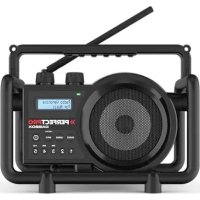
USBOX 2 - Radio PerfectPro - Free user manual and instructions
Find the device manual for free USBOX 2 PerfectPro in PDF.


Pick your language and provide your email: we'll send you a specifically translated version.
| Product Type | Portable AM/FM Radio |
| Brand | PerfectPro |
| Model | USBOX 2 |
| Dimensions (W x H x D) | Approx. 180 x 100 x 60 mm |
| Weight | Approx. 400 g (with batteries) |
| Power Source | 3 x AA batteries (not included) or AC adapter (5V, 1A) |
| Frequency Range (FM) | 87.5 – 108 MHz |
| Frequency Range (AM) | 520 – 1710 kHz |
| Display | LCD with backlight |
| Speaker | Built-in mono speaker, 3W output |
| Headphone Jack | 3.5 mm stereo |
| Antenna | Telescopic antenna for FM; built-in ferrite for AM |
| Battery Life | Up to 20 hours (alkaline, moderate volume) |
| Functions | AM/FM tuning, digital preset memory (20 stations), sleep timer, alarm clock, auto scan |
| Additional Features | LED indicator for power; DC input for adapter; battery level indicator |
| Maintenance & Cleaning | Wipe with a soft, dry cloth. Do not use solvents or water near openings. |
| Safety | Use only recommended batteries. Do not disassemble. Keep away from moisture and heat sources. |
| Spare Parts & Repairability | Contact PerfectPro customer service for replacement parts. Device is not user-serviceable. |
Frequently Asked Questions - USBOX 2 PerfectPro
How do I set the clock on the USBOX 2?
Press and hold the 'Time' button for 3 seconds. Use the 'Tune +/-' buttons to adjust hours, press again to set minutes. Wait 5 seconds to save.
How can I improve FM reception?
Fully extend the telescopic antenna and try rotating the radio or moving it near a window. Avoid metal objects nearby.
Can I use rechargeable batteries?
Yes, you can use Ni-MH rechargeable AA batteries. However, the battery level indicator may be less accurate. Use an external charger.
Why is there no sound?
Check that the volume is turned up and headphones are not connected. Ensure batteries are fresh or the AC adapter is plugged in securely.
How do I set the alarm?
Press the 'Alarm' button. Use 'Tune +/-' to set hour and minute. Press 'Alarm' again to confirm. Ensure alarm icon shows on display.
What type of AC adapter do I need?
Use a 5V DC, 1A adapter with a micro USB or barrel plug (check polarity). Not included. Using incorrect adapter may damage the radio.
How do I clean the radio?
Turn off and remove batteries. Wipe the exterior with a slightly damp cloth and dry immediately. Do not let moisture enter openings.
Can I preset radio stations?
Yes. Tune to a station, then press and hold a numeric preset button (1-10) until a beep sounds. Up to 20 presets (10 per band).
What does the sleep timer do?
Press 'Sleep' repeatedly to set the radio to turn off automatically after 15, 30, 60, or 90 minutes. The display shows the remaining time.
Where can I find the full manual?
The manual can be downloaded for free from notice-facile.com or the PerfectPro website in PDF format.
User questions about USBOX 2 PerfectPro
0 question about this device. Answer the ones you know or ask your own.
Ask a new question about this device
No questions yet. Be the first to ask one.
Download the instructions for your Radio in PDF format for free! Find your manual USBOX 2 - PerfectPro and take your electronic device back in hand. On this page are published all the documents necessary for the use of your device. USBOX 2 by PerfectPro.