
M-M7000RV - Television Macrom - Free user manual and instructions
Find the device manual for free M-M7000RV Macrom in PDF.


| Product Type | Home Audio Subwoofer |
| Brand | Macrom |
| Model | M-M7000RV |
| Dimensions (W x H x D) | 400 x 300 x 350 mm |
| Weight | 12 kg |
| Power Output (RMS) | 200 W |
| Impedance | 4 ohms |
| Frequency Response | 20 Hz – 200 Hz |
| Power Supply | 110-240 V AC, 50/60 Hz |
| Main Functions | Volume control, crossover adjustment, phase switch, bass boost |
| Automatic Standby | Yes |
| Input Connectors | RCA line level, speaker level |
| Output Connectors | Speaker level outputs |
| Protection Circuits | Thermal, overcurrent, DC offset |
| Cabinet Material | MDF with vinyl finish |
| Driver Size | 10 inch (254 mm) |
| Placement | Floor standing |
| Maintenance | Clean with soft dry cloth |
| Safety Precautions | Keep away from moisture, ensure adequate ventilation |
| Spare Parts | Fuse, power cord |
| Repairability | Contact authorized service center |
Frequently Asked Questions - M-M7000RV Macrom
User questions about M-M7000RV Macrom
0 question about this device. Answer the ones you know or ask your own.
Ask a new question about this device
Download the instructions for your Television in PDF format for free! Find your manual M-M7000RV - Macrom and take your electronic device back in hand. On this page are published all the documents necessary for the use of your device. M-M7000RV by Macrom.
USER MANUAL M-M7000RV Macrom
7" 16/9TFT LCD roof color monitor

natural_image
Exterior view of a modern office desk with a mounted remote control and a flat-screen monitor displaying a video player (no visible text or symbols)MACROM
MACROM SA. LUXEMBOURG, MENDRISO BRANCH
3 MOREE ST., CH 6850 MENDRISIO
SWITZERLAND
OWNER'S MANUAL
FEATURES
7" 16/9 TFT LCD color monitor
SPECIFICATION
□ Aspect ratio 16/9 wide screen
□ Resolution: 1440 (W)x234(H)
□ Full electronic control
□ 2 Video Input
□ 2 Audio stereo Input
□ Wireless IR Stereo transmitter
□ IR remote controller
power lamps
Power sorce : DC 12Volt
Luninance : 300 Cd/M ^2
Operating Temperature : -10°C \~ +60°C
View Angle : L/R±65°, Up 45, Down 65°
CONTROL AND INDICATORS

CONTROL AND INDICATORS
REMOTE CONTROL

① Power On/Off
② CHANNEL (down)
③ CHANNEL > (up)
④ Volume (down)
⑤ Volume (up)
⑥ Picture
⑦ AV1/AV2
⑧ Set Search
⑨ Mute
BATTERY INSTALL/REPLACE

natural_image
Three identical line drawings of a cylindrical device with internal components, no text or symbols present.-
Slide battery compartment cover out the back of remote control.
-
Insert two 1.5V (AAA) batteries as diagrammed. Make sure to match "+" and "-" on the batteries to marks inside the battery.
-
Replace battery compartment cover back in.
-
Point the remote control at the remote sensor or point the remote control at the screen display, operate in the range of 5 meters and 30° from the front of the remote sensor. Make sure there is no barrier between them.
Notes:
1. The batteries can last about 6 months generally. Change the batteries if the remote control does not work.
2. If the remote control is not used for a long time, remove the batteries to prevent bat-
CONNECTIONS VIEW
Dome Ligth Power

NOTE:
□ PROTECT THE VEHICLE -
Always disconnect the negative battery cable before starting any kind of installation work. This prevents a possible high current electrical short (potential fires).
- Connect the unit to the car mobile DC 12V

-3-
① Monitor Back view
② AV distributor
③ Connection cable
① Video 1 Input
② Video 2 Input
③ Audio left 1 input
④ Audio right 1 input
⑤ Audio left 2 input
⑥ Audio right 2 input
⑦ Audio right Output
⑧ Audio left Output
⑨ Video Output
⑩ 12v DC Power cable
FUNCTION SETTING
MAIN MENU

Press PIC button on remote control or MODE (on the monitor) to select the following.
CONTRAST

flowchart
graph LR
    A["75<br>CONTRAST"] --> B["50<br>BRIGHTNESS"]
    B --> C["50<br>COLOR"]
TINT

flowchart
graph LR
    A["TINT"] --> B["Blue Screen: OFF"]
    B --> C["Power Direct: OFF"]
COLOR SYSTEM

flowchart
graph LR
    A["Color System: PAL"] --> B["Mode Selector : Wide"]
    B --> C["Mirror Mode: NORMAL"]
AV INPUT

Press AV button on remote control to change the AV input.
-4-
FUNCTION SETTING
MODE SELECTOR FUNCTION

flowchart
graph TD
    A["Press P/C button on the remote control until show you Mode Selector and change the size of screen as below using vol(+,-) button."] --> B["Mode Selector : FULL"]
    B --> C["Mode Selector : NORMAL"]
    C --> D["Mode Selector : CINEMA"]
    D --> E["Mode Selector : WIDE"]
    B --> F["1. Picture ratio size for FULL is 16:9."]
    C --> G["2. Picture ratio size for NORMAL is 4:3."]
    D --> H["3. CINEMA picture ratio size is larger than FULL picture size."]
    E --> I["4. WIDE picture ratio size is also 16:9, but width is slightly narrower than FULL picture size."]
IR TRANSMITTER

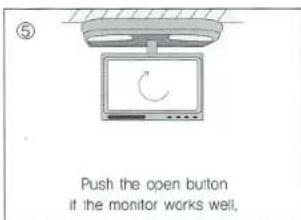
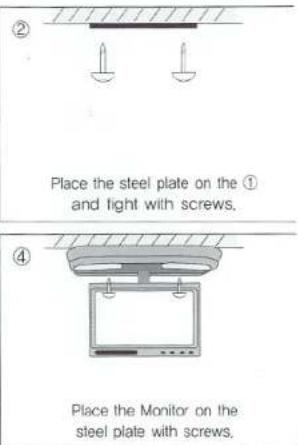
INSTALLATION




Brand : Macrom
Model : M-M7000RV
Category : Television