PANASONIC RB-HF420 - Headphones

RB-HF420 - Headphones PANASONIC - Free user manual and instructions

Find the device manual for free RB-HF420 PANASONIC in PDF.

📄 2 pages English EN Download 💬 AI Question 10 questions ⚙️ Specs
Notice PANASONIC RB-HF420 - page 1
Pick your language and provide your email: we'll send you a specifically translated version.
Product Type Over-ear Wired Headphones
Model Panasonic RB-HF420
Driver Diameter 40 mm
Impedance 32 ohms
Sound Pressure Level 108 dB
Frequency Response 20 Hz – 20 kHz
Cable Length 1.2 m
Plug Type 3.5 mm stereo jack
Weight (without cable) 180 g
Dimensions (W x H x D) 175 x 190 x 75 mm
Color Black
Earpad Material Leatherette
Headband Pad Cushioned leatherette
Folding Design Yes, foldable
Controls None (wired only)
Power Source None (passive)
Warranty 1 year (varies by region)
Included Accessories Stereo cable, user manual
Recommended Use Music, home audio
Cleaning Instructions Wipe with dry cloth; avoid liquids

Frequently Asked Questions - RB-HF420 PANASONIC

What is the impedance of the Panasonic RB-HF420 headphones?
The impedance is 32 ohms, suitable for most smartphones and audio devices.
Are the Panasonic RB-HF420 headphones wireless?
No, they are wired headphones with a 3.5 mm plug.
Do the headphones have a built-in microphone?
No, the RB-HF420 does not include a microphone.
How do I clean the Panasonic RB-HF420 headphones?
Clean with a soft dry cloth. Avoid using water or chemicals.
Can I fold the headphones for storage?
Yes, they feature a foldable design for easy portability.
What is the cable length?
The cable is 1.2 meters long.
Are replacement earpads available?
Replacement earpads may be available through authorized Panasonic service centers.
What is the frequency response?
The frequency response is 20 Hz to 20 kHz.
Do the headphones work with gaming consoles?
Yes, they work with any device that has a 3.5 mm headphone jack.
What is the weight of the headphones?
They weigh approximately 180 grams without the cable.

User questions about RB-HF420 PANASONIC

0 question about this device. Answer the ones you know or ask your own.

Ask a new question about this device

The email remains private: it is only used to notify you if someone responds to your question.

No questions yet. Be the first to ask one.

Download the instructions for your Headphones in PDF format for free! Find your manual RB-HF420 - PANASONIC and take your electronic device back in hand. On this page are published all the documents necessary for the use of your device. RB-HF420 by PANASONIC.

USER MANUAL RB-HF420 PANASONIC

RB-HF520B

RB-HF420B

Revisar Importante! Guía Rápida

Carga

Nota: -El LED se ilumina en rojo cuando la carga esta en curso

1

El tiempo de carga desde descargado a 100% tarda aprox. 4 hrs.

Cuando se ha completado la carga, el LED se apaga.

PANASONIC RB-HF420 - 1 - 1

PC encendido Cable USB

Al Completar la carga el LED se apagará aun conectado al cable USB

Carga 100%
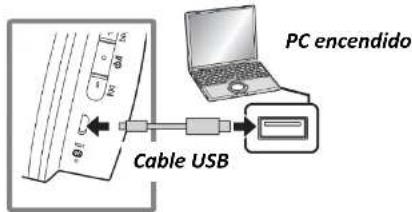
PC encendido Cable USB

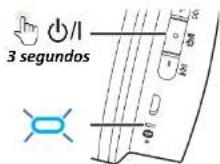
Encendido / apagado

2

PANASONIC RB-HF420 - 2 - 1

Encendido Parpadea Azul

PANASONIC RB-HF420 - 2 - 3

Nota: Si no esta conectado a un dispositivo BT, los Audifonos se apagaran 5 min. después de que haya dejado de usarlos.

Apagado

PANASONIC RB-HF420 - Apagado - 1

Conexión a Bluetooth

3

3 segundos ELLED nappadea en rojo.v

El LED parpadea en rojo y azul hasta completar la conexión con el dispositivo

PANASONIC RB-HF420 - 3 - 2

Contraseña: 0000 \*Para configuración RB-HF520B Para HF420B se indicará RB-HF420B ![](images/2280067e335b57a5e00e1cb691492476bf39815a2462d4dd0e832559b423867e.jpg)

Conexión establecida

![](images/b37da02b9047b56980c6aab43491c538f6cc67a2f055f5fbc135dd83cc1d2682.jpg) Cuando el LED parpadea en color azul, la conexión se ha establecido. RB-HF520B RB-HF420B

Revisar Importante! Guía Rápida

Control y reproducción 4 ![](images/238356ef2371ad4f0ab4ae5c8c662aee4c3b145217a7c41983e83386208e02bb.jpg)
FunciónOperación
Reproducir / Pausa[○] (a)
Aumentar el volumon[⊕] (b)
Reducir el volumen[⊖] (c)
Avanzar al inicio de lasigulente pista[⊕] (b) Presionar 2 seg.
Volver al inicio de la pistaactual[⊖] (c) Presionar 2 seg.
![](images/3429549ae6e8c05a9b018766ed1e0919470682996998f53497bc6e32a377dea9.jpg)
natural_image Illustration of a smartphone displaying musical notes and Bluetooth signal, no text or symbols present
➢ Responder Llamadas / Finalizar Llamadas 5 ![](images/11fa37f80d431dc8da783dccb0eb955aaa45be1887bf5c2c8bc99becd1ecea55.jpg) ![](images/4f5cce142c8206b916ae90e26e516b7aca4ceba7cb4a2d487215240a0a09485e.jpg)
natural_image Line drawing of a pair of headphones with a Bluetooth symbol on the head (no text or labels)
![](images/4fd0129f9320253be0bae68657564b773e4eeab4a9cc57cd9380ffba00e2f2c6.jpg) ![](images/f37f5dfb31e4e4a9d3e1bb6028745d0535508dc1bf702506dfb490e5a42306d7.jpg) Restauración Ajustes de Fabrica 6 ![](images/f2aaf9063f3b6cccf38211b6e6418d8aa309bfccfb17aeb895b7eeeb9af396cf.jpg) Usar solo en caso de reestablecer configuración de fabrica ![](images/2a419d1d32619d050ec755ae96811a8b2df7eec373fb2ab1678ee8bfef05728f.jpg)
natural_image Line drawing of a pair of headphones with a logo and abstract icons below (no text or symbols)
![](images/e6388b0dbc2f4bd66cd1635290dc8e221824032c154fd3ce0fc5ca1453f3a0dd.jpg) Ambos botones 5 segundos ![](images/1e946424e8df4936cf72b2df047cfcd41375f35e7a2faf03fe0fd99fe53710d6.jpg) ![](images/d57750a715f241c0a6b24efc0feccc728446c71dafbca83d915229ea76cb26a6.jpg) Parpadeo rápido ![](images/1f1a3a8c470a64d70cdd83f90802f6cacf19a4dea69437a0b362bf0210cd96a0.jpg) □ Atención: - Cuando vuelva a emparejar un dispositivo, elimine la información de registro [Dispositivo: "R0-HF520B" o "R0-HF420B"] del menú del dispositivo Bluetooth® y registre esta unklad con el dispositivo Bluetooth® nuevamente
Manual assistant
Powered by Anthropic
Waiting for your message
Product information

Brand : PANASONIC

Model : RB-HF420

Category : Headphones