
TN-B32 - Fan Infiniton - Free user manual and instructions
Find the device manual for free TN-B32 Infiniton in PDF.


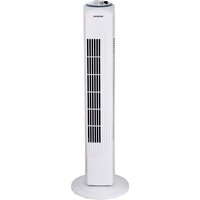
| Product Type | Tower Fan |
| Brand | Infiniton |
| Model | TN-B32 |
| Dimensions (H x W x D) | Approx. 100 x 30 x 30 cm |
| Weight | Approx. 4.5 kg |
| Power Supply | AC 220-240V, 50/60Hz |
| Power Consumption | 45 W |
| Speed Settings | 3 (Low, Medium, High) |
| Modes | Normal, Sleep, Natural Wind |
| Oscillation | Yes, 90° wide angle |
| Timer | Up to 7.5 hours |
| Remote Control | Included, battery operated (CR2025) |
| Control Panel | Touch buttons on top |
| Filter | Washable dust filter |
| Noise Level | ≤ 55 dB |
| Safety Features | Overheat protection, tip-over auto shut-off |
| Material | ABS plastic |
| Color | Black/White |
| Assembly | Minimal assembly required (base attachment) |
| Warranty | 2 years |
Frequently Asked Questions - TN-B32 Infiniton
User questions about TN-B32 Infiniton
0 question about this device. Answer the ones you know or ask your own.
Ask a new question about this device
Download the instructions for your Fan in PDF format for free! Find your manual TN-B32 - Infiniton and take your electronic device back in hand. On this page are published all the documents necessary for the use of your device. TN-B32 by Infiniton.
USER MANUAL TN-B32 Infiniton
natural_image
Two modern vertical air purifiers with mesh grille, one white and one metallic, displayed against a plain background (no text or symbols visible)OPERACIÓN
• Gama Blanca: rmablanca.infiniton.es
• Gama Marrón: rma.infiniton.es
natural_image
Two modern vertical air purifiers with mesh grille, one white and one metallic, against a white background (no text or symbols visible)Tower Fan
45W 1 220-240V/S0Hz 1 80cm
READ INSTRUCTIONS CAREFULLY BEFORE ASSEMBLING, OPERATING OR MAINTAINING THIS FAN. KEEP THIS MANUAL FOR FUTURE REFERENCE.
IMPORTANT SAFETY INSTRUCTIONS
- When using electrical appliances basic safety precautions should always be followed.
- Check that the voltage indicated on the rating plate corresponds with that of the local network before connecting the appliance to the mains power supply.
• This appliance is intended for domestic use only.
• It should not be used for commercial purposes. - This appliance can only be used by children aged 8 years or above, and persons with reduced physical, sensory or mental capabilities or lack of experience and knowledge if they have been given supervision or instruction concerning the use of the appliance in a safe way and understands the hazards involved.
• Children shall not play with this appliance.
• Cleaning and maintenance shall not be done by children without supervision.
• There are no user-serviceable parts in this product. Refer servicing to qualified personnel. - Do not operate this fan with a damaged plug or cord, after a malfunction or after being dropped or damaged in any way.
- If the supply cord is damaged, it must be replaced by the manufacturer, its service agent or similarly qualified persons in order to avoid a hazard.
- Ensure that the fanis switched off before removing the guard.
• Do not insert anything through the grill when the fan is in use.
• Make sure that the fan is on a stable surface when operating.
ASSEMBLY
WARNING: Check for damages that may have occurred during tran sportation. If any damage is detected, please contact the distributor or return to the store for replacement.
- Control panel
- Vents
- Fan body
- Base plate
ASSEMBLY INSTRUCTIONS:
- Put the two base plates together.
- Pull the cable into the designated channel.
- Place the body on the base plate.

OPERATION
Plug the device into a suitable outlet. The red light indicates the fan is on.
CONTROLS ON THE DEVICE

flowchart
graph TD
    A["ON/OFF"] --> B["SWING"]
    A --> C["MODE"]
    A --> D["SPEED"]
    A --> E["TIME"]
    A --> F["Normal"]
    A --> G["Sleep"]
    A --> H["High"]
    A --> I["Mid"]
    A --> J["Low"]
    A --> K["0.5H"]
    A --> L["1H"]
    A --> M["2H"]
    A --> N["4H"]
    A --> O["Swing"]
ON/OFF: Turn the device on or off.
Swing: Turn the oscillation function on or off.
Speed: Choose your desired air speed level : Low - Mid (Medium) - High.
Mode: Select your desired wind mode: Normal, Sleep or Nature. When both LEDs are off Nature mode is active.
Timer: Set the timer time by pressing the button until the LED burns next to the desired time. Once the selected time is up the device will turn off.
REMOTE CONTROL
ON/OFF: Turn the device on or off.
Swing: Turn the oscillation function on or off.

Speed: Choose your desired air speed level : Low - Mid (Medium) - High.
Mode: Select your desired wind mode: Normal, Sleep or Nature. When both LEDs on the fan are off Nature mode is active.
Timer: Set the timer time by pressing the button until the LED on the fan burns next to the desired time. Once the selected time is up the device will turn off.
MAINTENANCE
WARNING: To prevent an electrical shock you should turn the unit off and unplug it from the wall outlet before you start any maintenance or repairs.
• Use a soft cloth to wipe off any dust. If the fan is very dirty, use a damp cloth and wipe dry.
- Do not use any chemicals, abrasives or solvents that could damage the fan.
- The motor bearings are permanently sealed and do not require additional lubrication.
Incase the unit will not be used for a longer period of time:
• Turn the machine off and unplug the power cord.
• Store the unit in a dry place.
- Keep the unit dust free.
WARRANTY
The guarantee period amounts to 2 years and commences on the date of purchase. During the guarantee period Eltra NV resolves any defects caused by material or manufacturing faults. Eltra NV may optionally either repair or replace the defective appliance. Eltra NV is not obligated to repair or replace units if the defect is a result of damage, misuse, modification or changes made after the date of purchase. Bring the defective device, along with the original sales receipt, back to the store where the unit was purchased. Always include a note describing the problem.
DAMAGE
Eltra NV can under no circumstances whatsoever be held responsible for damage of whatever nature if the appliance was not correctly installed according to the specified installation instructions, nor for damage as a result of unforeseen circumstances such as natural disasters, lightning strike, etc. All such resulting costs are consequently at the expense of the buyer and are not covered by the guarantee conditions.
USED HOUSEHOLD APPLIANCE COLLECTION

The European Directive 2002/96/EC on waste electrical and electronic equipment mandates that used appliances are not allowed in the municipal waste stream. Used appliances must be separately collected for the optimal recovery and recycling of materials to reduce the impact on public health and the environment. All these products are marked with a specific symbol (crossed-out wheeled bin) as a reminder of the obligation to separate waste. Consumers should contact local authorities or suppliers to receive information on the procedure they must follow when disposing of their appliances.
PROCEDURE IN CASE OF FAILURE OF AN INFINITON PRODUCT
Dear customers, to request technical assistance or repair of your Infiniton product, you have our website, operating 24 hours a day and 7 days a week:
• Gama Blanca: rmablanca.infiniton.es
• Gama Marrón: rma.infiniton.es
Alternatively, if they wish, they can request technical assistance via email:
• Gama Blanca: rmablanca@infiniton.es
• Gama Marrón: rma@infiniton.es
To streamline all procedures, the following information should always be indicated:
- Name and surname
- Telephone 1
- Telephone 2
- Full address
- Postal Code
- Population
- Brand
- Product model
- Serial number
- Failure presented by the product
If they wish, they can request technical assistance through the number 902 676 518 or 958 087 169, available only for white range products (except for free-standing microwaves).
INFINITON
MANUAL DE USUÁRIO

natural_image
Two modern vertical air purifiers with mesh grille, one white and one metallic, against a white background (no text or symbols visible)Tower Fan
45W 1 220-240V/S0Hz 1 80cm
LEIA AS INSTRUÇÕES COM ATENÇÃO ANTES DE MONTAR, OPERAR OU MANTER ESTE VENTILADOR. GUARDE ESTE MANUAL PARA REFERÊNCIA FUTURA.
IMPORTANTES INSTRUÇÕES DE SEGURANÇA
OPERAÇÃO
• Linha Branca: rmablanca.infiniton.es
• Linha Marrom: rma.infiniton.es
- OPERACIÓN
- READ INSTRUCTIONS CAREFULLY BEFORE ASSEMBLING, OPERATING OR MAINTAINING THIS FAN. KEEP THIS MANUAL FOR FUTURE REFERENCE.
- IMPORTANT SAFETY INSTRUCTIONS
- ASSEMBLY
- ASSEMBLY INSTRUCTIONS:
- OPERATION
- CONTROLS ON THE DEVICE
- REMOTE CONTROL
- MAINTENANCE
- WARRANTY
- DAMAGE
- USED HOUSEHOLD APPLIANCE COLLECTION
- PROCEDURE IN CASE OF FAILURE OF AN INFINITON PRODUCT
- INFINITON
- MANUAL DE USUÁRIO
- LEIA AS INSTRUÇÕES COM ATENÇÃO ANTES DE MONTAR, OPERAR OU MANTER ESTE VENTILADOR. GUARDE ESTE MANUAL PARA REFERÊNCIA FUTURA.
- IMPORTANTES INSTRUÇÕES DE SEGURANÇA
- OPERAÇÃO
Brand : Infiniton
Model : TN-B32
Category : Fan