
MW141 - Television AIRIS - Free user manual and instructions
Find the device manual for free MW141 AIRIS in PDF.


Pick your language and provide your email: we'll send you a specifically translated version.
| Product Type | Television |
| Brand | Airis |
| Model | MW141 |
| Screen Size | 14 inches (35.6 cm) |
| Display Technology | LED |
| Resolution | 1366 x 768 pixels (HD ready) |
| Refresh Rate | 60 Hz |
| Power Supply | 100-240 V AC, 50/60 Hz |
| Power Consumption (typical) | 25 W |
| Weight (with stand) | 2.5 kg |
| Dimensions (without stand) | 320 x 210 x 50 mm |
| Speaker Output | 2 x 3 W |
| Tuner | DVB-T/T2/C |
| HDMI Inputs | 2 |
| USB Port | 1 (for media playback) |
| VGA Input | 1 |
| Headphone Jack | 1 (3.5 mm) |
| Cleaning Instructions | Wipe with a soft dry cloth. Do not use chemical cleaners. |
| Safety Features | Over-voltage protection, auto power-off after 4 hours of inactivity |
| Spare Parts Availability | Remote control and stand available from authorized service centers |
Frequently Asked Questions - MW141 AIRIS
How do I connect external devices like a DVD player?
Use the HDMI or VGA input on the back of the TV. For older equipment, use the HDMI-to-VGA adapter if needed.
Can I mount this TV on the wall?
Yes, the TV has VESA 75x75 mm mounting holes. Use a compatible wall mount bracket.
Why is there no sound?
Check if the volume is muted or too low. Ensure the TV is set to the correct audio output. If using external speakers, verify connections.
How do I perform a channel scan?
Go to Menu > Channel Setup > Auto Scan. Select your region and start the scan. The TV will find available digital channels.
What to do if the remote control stops working?
Replace the batteries with new ones (AAA type). Ensure there are no obstacles between the remote and the TV sensor. If still not working, contact support for a replacement.
How do I update the TV firmware?
The MW141 does not support online updates. Firmware is factory-installed. If you experience issues, consult the manual or contact Airis service.
Can I use a USB drive to watch movies?
Yes, insert a USB drive with FAT32 format into the USB port. Use the Media Player from the menu to play video, music, or photos.
What is the recommended cleaning method?
Turn off the TV and unplug it. Gently wipe the screen and body with a soft, lint-free cloth slightly dampened with water. Do not spray liquids directly.
How do I reset the TV to factory settings?
Navigate to Menu > Settings > Factory Reset. Enter the PIN (default 0000) and confirm. All settings will be erased.
Is there a sleep timer?
Yes, go to Menu > Timer > Sleep Timer and select a time from 15 to 240 minutes. The TV will turn off automatically.
User questions about MW141 AIRIS
0 question about this device. Answer the ones you know or ask your own.
Ask a new question about this device
No questions yet. Be the first to ask one.
Download the instructions for your Television in PDF format for free! Find your manual MW141 - AIRIS and take your electronic device back in hand. On this page are published all the documents necessary for the use of your device. MW141 by AIRIS.
USER MANUAL MW141 AIRIS
natural_image
Line drawing of a remote control device with handle and internal components (no text or symbols)② Inserte las pilas

natural_image
Technical line drawing of a remote control device with labeled buttons and a battery (no text or symbols present)natural_image
Black cable with a small terminal plug, isolated on white background (no text or symbols)
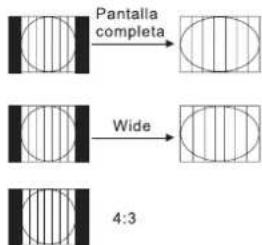
flowchart
graph TD
    A["Smart"] --> B["Cinema"]
    B --> C["14:9"]
5.- Ajustes del temporizador (Sleep settings):
FIGURA 1
Table of contents
Click a title to access it
Manual assistant
Powered by Anthropic
Waiting for your message
Product information
Brand : AIRIS
Model : MW141
Category : Television