
MW167 - Television AIRIS - Free user manual and instructions
Find the device manual for free MW167 AIRIS in PDF.


Pick your language and provide your email: we'll send you a specifically translated version.
| Product Type | LED TV |
| Screen Size | 16 inches (40.6 cm) |
| Resolution | 1366 x 768 pixels (HD) |
| Dimensions (with stand) | 400 x 300 x 100 mm |
| Weight (with stand) | 3.2 kg |
| Power Consumption | 35 W (typical) |
| Standby Power Consumption | < 0.5 W |
| Power Supply | AC 100-240 V, 50/60 Hz |
| Connectivity | HDMI, USB, VGA, Composite AV, RF, Headphone jack |
| Built-in Speakers | 2 x 5 W |
| Remote Control | Yes, included |
| VESA Mount | 100 x 100 mm |
| Operating System | None (standard TV) |
| Parental Control | Yes |
| Sleep Timer | Yes |
| Auto Power Off | Yes (adjustable) |
| Cleaning Instructions | Wipe with a soft dry cloth; do not use liquid cleaners. |
| Safety Warning | Do not expose to rain or moisture; unplug during storms. |
| Sustainability / Repairability | Replaceable remote control, stand, and power cord. |
| Manual Language | English (PDF available) |
Frequently Asked Questions - MW167 AIRIS
How do I connect my TV to a cable or antenna?
Connect the coaxial cable from your wall outlet or antenna to the RF IN port on the back of the TV. Then use the remote to select DTV or ATV source and run an auto scan to find channels.
My TV shows 'No Signal'. What should I do?
Check that the correct input source is selected (e.g., HDMI, AV). Ensure the external device is powered on and connected properly. Try a different cable or port. If using antenna, perform a channel scan.
How to connect a USB drive to play media?
Insert the USB drive into the USB port. Press SOURCE on the remote, select USB. Use the remote to navigate and select media files. Supported formats: MP4, AVI, MKV, JPEG, MP3.
The remote control is not working. What can I do?
First, replace the batteries with new ones (AAA). Ensure there are no obstructions between the remote and the TV sensor. Try pointing directly at the TV. If still not working, reset the TV by unplugging for 30 seconds.
How do I adjust picture settings like brightness and contrast?
Press MENU on the remote, go to Picture settings. Use arrow keys to adjust Brightness, Contrast, Color, and Sharpness. You can also choose preset modes like Standard, Movie, or Sport.
Can I mount this TV on a wall?
Yes, the TV supports VESA 100 x 100 mm wall mounts. Use a compatible mount and follow the safety instructions. Ensure the wall can support the TV's weight (3.2 kg).
How do I reset the TV to factory settings?
Go to MENU > Settings > Factory Reset. Enter the default password 0000 (or as stated in manual). Confirm to restore all settings to defaults. This will erase all channel presets.
Why is there no sound from the TV speakers?
Check if the volume is muted or turned down. Press VOL+ on the remote. Ensure Audio Output is set to TV Speaker in the menu (not external audio). If using external speakers, check connections.
What should I do if the TV turns off by itself?
This may be due to the Sleep Timer or Auto Power Off feature. Check in MENU > Timer settings and disable if desired. Also ensure the TV is not overheating; allow ventilation.
Where can I download the user manual?
The user manual is available for free on notice-facile.com. Simply search for 'MW167 AIRIS' and download the PDF in English or other languages.
User questions about MW167 AIRIS
0 question about this device. Answer the ones you know or ask your own.
Ask a new question about this device
No questions yet. Be the first to ask one.
Download the instructions for your Television in PDF format for free! Find your manual MW167 - AIRIS and take your electronic device back in hand. On this page are published all the documents necessary for the use of your device. MW167 by AIRIS.
USER MANUAL MW167 AIRIS


natural_image
Line drawing of a remote control device with an arrow pointing to the interior panel (no text or symbols)PARA INTRODUCIR LAS PILAS
natural_image
Line drawing of a remote control device with a switch and arrow indicating action (no text or symbols)natural_image
Line drawing of a remote control device with directional arrows indicating movement (no text or symbols)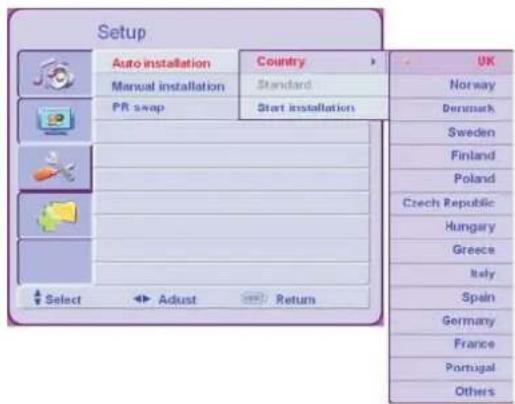

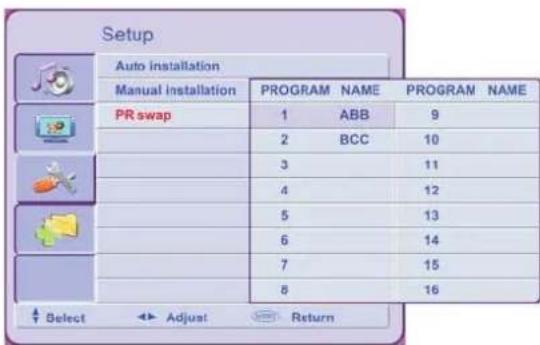
![Setup Auto installation Country [Others] Manual installation Standard [0] PR swap PR NO [1] Frequency [55.7#] PR name [ ] PR Skip [Off] PR delete [No] Select Adjust Return](/content/2026/05/1078841/images/3cad63e44f21ec9e89f0b7b3b8146d63aadfaae92b968d6ae452e3708ba48d7d.jpg)

natural_image
Two black-and-white photos: one of a man with glasses and the other of a Spider-Man character in a dramatic pose (no visible text or symbols)![Picture Picture Mode [Standard] Contrast 050 Brightness 050 Colour 050 Sharpness 004 Colour TEMP. [Normal] Select Adjust Return](/content/2026/05/1078841/images/1d514c0f15ecb28d5ea039cfaea10c452049884d296b62ba7160c9fddefc7caf.jpg)

![Option Language [English] Auto format [Off] Auto power off [Off] Child lock Txt Language [West-Eu] Reset All [No] Select Adjust Return](/content/2026/05/1078841/images/58b4dffdf77ce57e13ab70a537aa6efe522805af35526222596eeb3dcb8f8b95.jpg)


![Setup Auto installation Country [Others] Manual installation Standard [0] PR swap PR NO [1] Frequency [ 5.78] PR name [ ? ? ? ? ? ] PR Skip [Off] PR delete [No] Select Adjust Return](/content/2026/05/1078841/images/1b4d95f0dc878870ed001c672a1f8c43a5e7c47d39395d903e554da6aad8c27a.jpg)

![Setup Auto installation Country [Others] Manual installation Standard [1] PR swap PR NO [1] Frequency [ 55,78] PR name PR Skip [Off] PR delete [Yes] Select Adjust Return](/content/2026/05/1078841/images/a116dea91f231a5e3978e499fad8afcc6b5f902765c5af6a553c92db03bf18ea.jpg)

![Setup Auto installation Country [Others] Manual installation Standard [1] PR swap PR NO [1] Frequency [55.78] PR name [ ] PR Skip [Off] PR deletes No Yes Select Adjust Return](/content/2026/05/1078841/images/8c11c5777d62cd79d5cff29c6f2050b4784dd4ab575ab5a1b988fa7588909cef.jpg)
![Option Language [English] Auto format [Off] Auto power off [Off] Child lock Txt Language [West-EU] Reset All [No] Select Adjust Return](/content/2026/05/1078841/images/d81a5242d1e8b588561921954b98e289164d2e15db7ff468d35be03c356ed615.jpg)
![Option Language [English] Auto format [Off] Auto power off [Off] Child lock Text Language Reset All Please Input Password - Select Adjust Return](/content/2026/05/1078841/images/dc4e232cf46dd1e2e5d2aa362d1ee6239f7ffb249f0d4ca8e831384e8f140ae3.jpg)
![Option Language [English] Auto format [Off] Auto power off [Off] Child lock For all program [No] Txt Language For this program [No] Reset All Change password Select Adjust Return](/content/2026/05/1078841/images/c875732305d992aa98a64b191519e3c29b312c907b6e75c7dbf20c8fb44c3c7a.jpg)
![Option Language [English] Auto format [Off] Auto power off [Off] Child lock Txt Language [West-EU] Reset All [No] Select Adjust Return](/content/2026/05/1078841/images/08349b76240737ab4c1cc8af4b4035f8834cf6b9e6e255117ee83ba9a4970e9d.jpg)
![Option Language [English] Auto format [Off] Auto power off [Off] Child lock For all program Text Language For this program Reset All Change password Enter New Password Reconfirm New Password Select Adjust Return](/content/2026/05/1078841/images/799bdff3689f50c23db770432448558ba71926b7a364e91b9f7b888bf3d0fd17.jpg)


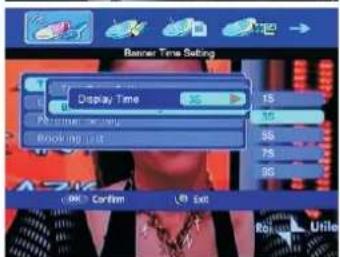
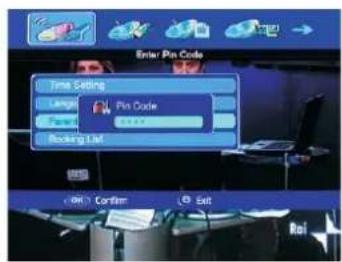




Table of contents
Click a title to access it
Manual assistant
Powered by Anthropic
Waiting for your message
Product information
Brand : AIRIS
Model : MW167
Category : Television