
RK-DVS-TX16S - Audio/video extender Smart-AVI - Free user manual and instructions
Find the device manual for free RK-DVS-TX16S Smart-AVI in PDF.


| Product Type | Audio/video extender (transmitter) |
| Brand | Smart-AVI |
| Model | RK-DVS-TX16S |
| Supported Signals | DVI-D single-link |
| Max. Resolution | 1920 x 1200 @ 60 Hz (WUXGA) |
| Max. Extension Distance | 220 ft (67 m) over Cat6 23AWG STP cable |
| Input Ports | 16 x DVI-D 29-pin female |
| Output Interface (to receiver) | RJ-45 (STP) per channel |
| DDC Support | Internal DDC table for Mac/PC |
| Video Performance | Zero pixel loss with TMDS signal correction |
| Plug-and-Play | Yes |
| Compatibility | Mac, PC, Linux; all major KVM switches |
| Rack Mountable | Yes, 19-inch rack, 2U height |
| Power Supply | Internal, 110-240 VAC |
| Dimensions | 17 in x 3.5 in x 3.25 in (432 x 89 x 83 mm) |
| Weight | 10 lb (4.5 kg) |
| Operating Temperature | 0 to 55 °C (32 to 131 °F) |
| Storage Temperature | -20 to 85 °C (-4 to 185 °F) |
| Humidity | Up to 95% (non-condensing) |
| Included in Box | RK-DVS-TX16S transmitter unit, power cord, user manual |
Frequently Asked Questions - RK-DVS-TX16S Smart-AVI
User questions about RK-DVS-TX16S Smart-AVI
0 question about this device. Answer the ones you know or ask your own.
Ask a new question about this device
Download the instructions for your Audio/video extender in PDF format for free! Find your manual RK-DVS-TX16S - Smart-AVI and take your electronic device back in hand. On this page are published all the documents necessary for the use of your device. RK-DVS-TX16S by Smart-AVI.
USER MANUAL RK-DVS-TX16S Smart-AVI
Rackable 16-Port DVI-D Extender up to 220 feet

natural_image
Exterior view of a black Smart-AM server rack with multiple Ethernet ports (no text or symbols visible on the device body beyond branding)Introduction
The RK-DVS200 is the ideal solution for extending DVI-D signals to remote locations up to 220 feet away. It is the ideal way to extend up to 16 workstation computers from one location to another location or various locations. It is fully compatible with Mac, PC and Linux standards. Up to 16 displays can be extended easily from a rack without the complication or expense of multiple extenders. Rather than buy multiple extenders for rack components, and having to find power strips or numerous power outlets for the adapters, the SmartAVI rack series of extenders allows for up to 16 inputs and 16 outputs from a single rack device. The extender comes in three configurations: four inputs and four outputs, eight inputs and eight outputs, and 16 inputs and 16 outputs. The extender can achieve the full output distance of 220 feet when using a Cat6 23AWG STP cable.
Features
• Supports up to 16 DVI-D single-link sources
• Supports high resolution 1920x1200 60Hz WUXGA
• Supports Mac, PC, and Linux DVI
• Distance: 220 feet using Cat6 23AWG STP cables
• Uses universal DVI Single Link connectors
• Zero pixel loss with TMDS signal correction
• DDC from internal table for Mac/PC
• Compatible with all operating systems
• Compatible with all major KVM switches
- Rack mountable solution
• Data recovery for digital video
• Supports 1.5 and 12Mbps data rates
- Plug-and-play
Applications
• Medical Applications
• Industrial Work Areas
• Home Theater Integration
• Digital Signage Deployment
• Information Kiosks/Displays
• Film/Recording Studios
What's in the Box?
| PART NO. DESCRIPTION | |
| RK-DVS-TX4S DVI RACK 4-port Transmitter over STP CAT6 | |
| RK-DVS-TX8S DVI RACK 8-port Transmitter over STP CAT6 | |
| RK-DVS-TX16S DVI RACK 16-port Transmitter over STP CAT6 | |
| RK-DVS-RX4S DVI RACK 4-port Receiver over STP CAT6 | |
| RK-DVS-RX8S DVI RACK 8-port Receiver over STP CAT6 | |
| RK-DVS-RX16S DVI RACK 16-port Receiver over STP CAT6 |
Technical Specifications\*
| VIDEO | |
| Format DVI-D Single Line | 165 MHz |
| Maximum Pixel Clock 165 MHz | |
| Input Interface (TX) (16) | DVI-D 29-pin female |
| Output Interface (RX) (16) | DVI-D 29-pin female |
| Resolution Up to 1920 x | 1200 @60Hz |
| DDC | 5 volts p-p(TTL) |
| Input Equalization | Automatic |
| Input/Output Cable Length | Up to 20 ft. |
| Extension over Cat6 | Up to 220 ft. |
| OTHER | |
| Power | Internal 110-240 VAC |
| Dimensions | 17 in W x 3.5 in H x 3.25 in D |
| Weight | 10 lb |
| Operating Temp. | 0-55 °C (32-131°F) |
| Storage Temp. | -20-85 °C (-4-185 °F) |
| Humidity | Up to 95% |
*specifications shown are for 16-Port option
Installation Diagram One - Rack to Endpoint

- Power off all devices.
- Connect up to 16 DVI-D sources (computers) to each of the 16 DVI-D ports on the rear of the RK-DVS200 transmitter.
- Connect the RK-DVS200 transmitter to the rear of each of the receivers with one STP (Sheilded Twisted Pair) cable per receiver.
- Connect up to 16 DVI displays to the DVI-D ports on the front of the receivers.
- Connect the power to the RK-DVS200 transmitter and receiver.
- Power on the computers and displays.
Installation Diagram Two - Endpoint to Rack

- Power off all devices.
- Connect up to 16 DVI-D sources (computers) to the DVI-D ports of up to 16 transmitters.
- Connect each of the transmitters to the RK-DVS200 receiver with one STP (Sheilded Twisted Pair) cable per transmitter.
- Connect up to 16 DVI displays (or optional DVI-D outputs) to the ports on the rear of the RK-DVS200 receiver.
- Connect the power to the RK-DVS200 receiver and the transmitters.
- Power on the computers and displays.
Installation Diagram Three - Rack to Rack

- Power off all devices.
- Connect DVI-D sources (computers) to the DVI-D ports of the RK-DVS200 transmitter.
- Connect the RK-DVS200 transmitter to the RK-DVS200 receiver with one STP (Sheilded Twisted Pair) cable per channel (up to 16).
- Connect up to 16 DVI displays (or optional DVI-D outputs) to the ports on the rear of the RK-DVS200 receiver.
- Connect the power to the RK-DVS200 transmitter and the RK-DVS200 receiver.
- Power on the computers and displays.

RK-DVS200-TX Front
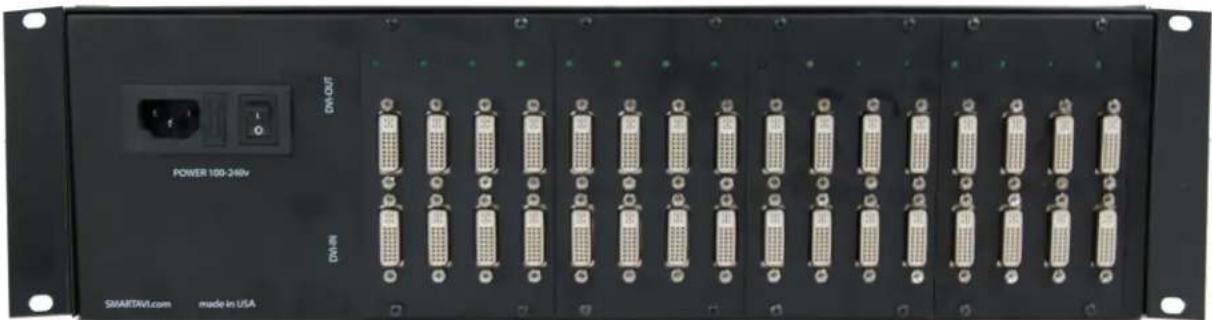
natural_image
Front view of a black industrial rack-mounted server unit with multiple 24-pin connectors and a power outlet (no visible text or symbols on the device body)RK-DVS200-TX Rear
Supported Resolutions
| Resolution | Refresh Rate |
| 640 x 480 | 85 Hz |
| 800 x 600 | 85 Hz |
| 1024 x 768 | 85 Hz |
| 1152 x 870 | 75 Hz |
| 1280 x 768 | 75 Hz |
| 1280 x 960 | 60 Hz |
| 1280 x 1024 | 60 Hz |
| 1600 x 1200 | 60 Hz |
STP Cable Configuration
The following is the wiring standard for terminating UTP/STP cable using RJ-45 connector:
Pair 1 Pins 1 & 2
Pair 2 Pins 3 & 6
Pair 3 Pins 4 & 5
Pair 4 Pins 7 & 8

Connectors: RJ-45
Capacitance: 14 pf/ft (46.2 pf/m)
Conductor Gauge: 24 AWG
Impedance: 100 +/- 15 ohms
DVI-D Configuration

| Pin # | Signal | Pin # | angiS |
| 1 | T. - | 16 | 2 |
| 2 | T.M.D.S Data 2+ | 17 | T.M.D.S Data 0- |
| 3 | T.M.D.S Data 2/4 Shield | 18 | T.M.D.S Data 0+ |
| 4 | T.M.D.S Data 4- | 19 | T.M.D.S Data 0/5 Shield |
| 5 | T.M.D.S Data 4+ | 20 | T.M.D.S Data 5- |
| 6 | DDC Clock | 21 | T.M.D.S Data 5+ |
| 7 | DDC Data | 22 | T.M.D.S Clock Shield |
| 8 | Analog Vert. Sync | 23 | T.M.D.S Clock+ |
| 9 | T.M.D.S Data 1- | 24 | T.M.D.S Clock - |
| 10 | T.M.D.S Data 1+ | ||
| 11 | T.M.D.S Data 1/3 Shield | C1 | Analog Red |
| 12 | T.M.D.S Data 3- | C2 | eer6yn |
| 13 | T.M.D.S Data 3+ | C3 | Analog Blue |
| 14 | 5□□□□6□ | C4 | Analog Horz Sync |
| 15 | GND | C5 | Analog Ground |
© Copyright 2016 Smart-AVI, All Rights Reserved
NOTICE
The information contained in this document is subject to change without notice. Smart-AVI makes no warranty of any kind with regard to this material, including but not limited to, implied warranties of merchantability and fitness for any particular purpose.
Smart-AVI will not be liable for errors contained herein or for incidental or consequential damages in connection with the furnishing, performance or use of this material.
No part of this document may be photocopied, reproduced or translated into another language without prior written consent from Smart-AVI.
For more information, visit www.smartavi.com.
Smart-AM
SMART AUDIO VIDEO INNOVATION
SmartAVI, Inc. / Twitter: @smartavi
11651 Vanowen St. North Hollywood, CA 91605
Tel: (818) 503-6200 Fax: (818) 574-5581
http://www.SmartAVI.com


Brand : Smart-AVI
Model : RK-DVS-TX16S
Category : Audio/video extender