
TS-924 - Wristwatch ALECTO - Free user manual and instructions
Find the device manual for free TS-924 ALECTO in PDF.


Pick your language and provide your email: we'll send you a specifically translated version.
| Product Type | Digital Watch |
| Brand | Alecto |
| Model | TS-924 |
| Display Type | Digital LCD |
| Dimensions | Approx. 45 x 40 x 12 mm |
| Weight | Approx. 50 g |
| Power Source | 1x CR2032 lithium battery (included) |
| Battery Life | Approx. 2 years with normal use |
| Water Resistance | Not specified; avoid contact with water |
| Main Functions | Time, date, alarm, timer (ON/OFF programmable), stopwatch |
| Alarm Type | Beep alarm |
| Timer Range | 1 minute to 24 hours, with ON/OFF scheduling |
| Backlight | LED backlight for night visibility |
| Strap Material | Plastic or resin |
| Clasp Type | Buckle |
| Cleaning Instructions | Wipe with a soft, dry cloth. Do not use chemicals or immerse in water. |
| Safety Precautions | Keep away from magnets, extreme heat, and moisture. Remove battery if storing for prolonged period. |
| Spare Parts Availability | Battery readily available (CR2032). Other parts not user-serviceable. |
| Repairability | Battery replacement is the only user-accessible repair. For other issues, contact Alecto support. |
| Certifications | CE, RoHS |
Frequently Asked Questions - TS-924 ALECTO
How do I set the time on my Alecto TS-924?
Press and hold the MODE button until the hour digits flash. Use the SET button to adjust hours, then MODE to move to minutes. Press SET to adjust, then MODE to confirm and exit.
How do I set the alarm on the TS-924?
Press MODE until AL appears. Press and hold SET until hour flashes. Adjust with SET, press MODE for minutes, then SET to adjust. Press MODE to save. Ensure alarm icon is displayed.
How do I turn the timer on/off?
Press the TIMER button. Use SET to set the duration (1 min to 24 hours). Press TIMER to start. The timer will count down and beep at zero. To stop, press TIMER again. The diagram shows ON at 08:00 and OFF at 12:00 for scheduling.
What type of battery does the TS-924 use?
It uses one CR2032 lithium coin cell battery. Replace when the display dims or functions become unreliable.
How do I replace the battery?
Open the battery compartment on the back using a small screwdriver. Remove the old battery and insert a new CR2032 with the + side facing up. Close the compartment securely.
Is the Alecto TS-924 water resistant?
The manual does not specify a water resistance rating. It is recommended to avoid contact with water, rain, and sweat. Remove the watch before swimming or showering.
How do I use the backlight?
Press the LIGHT button briefly. The display will illuminate for a few seconds. The backlight helps in low-light conditions.
How do I reset the watch?
If the watch malfunctions, remove the battery, wait 30 seconds, and reinsert it. This will reset the watch to factory defaults.
Why is my alarm not sounding?
Check that the alarm is activated (alarm icon visible). Ensure the volume is not muted (if adjustable). Verify the alarm time is set correctly. Replace the battery if it is weak.
Can I adjust the strap length?
The strap has multiple holes for the buckle. Remove links if needed (not applicable for plastic straps). Alternatively, you can replace the strap with a standard 18mm band.
User questions about TS-924 ALECTO
0 question about this device. Answer the ones you know or ask your own.
Ask a new question about this device
No questions yet. Be the first to ask one.
Download the instructions for your Wristwatch in PDF format for free! Find your manual TS-924 - ALECTO and take your electronic device back in hand. On this page are published all the documents necessary for the use of your device. TS-924 by ALECTO.
USER MANUAL TS-924 ALECTO
TS-924
fig.2
08.00 horas ON
12.00 horas OFF
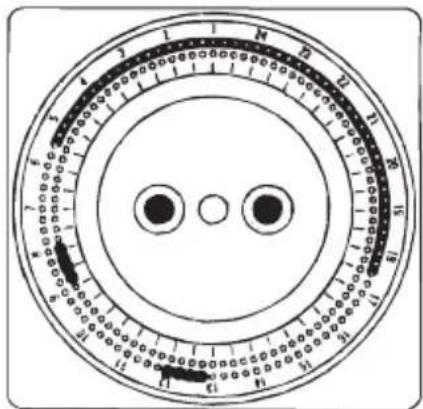
Table of contents
Click a title to access it
Manual assistant
Powered by Anthropic
Waiting for your message
Product information
Brand : ALECTO
Model : TS-924
Category : Wristwatch