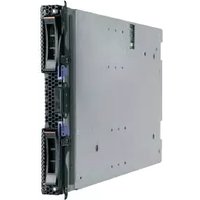
BladeCenter HS22 7870G2Y - Server IBM - Free user manual and instructions
Find the device manual for free BladeCenter HS22 7870G2Y IBM in PDF.


| Product Type | Blade Server |
| Model | BladeCenter HS22 7870G2Y |
| Dimensions (Height x Width x Depth) | 1.7 inches (4.3 cm) x 10.4 inches (26.4 cm) x 20.0 inches (50.8 cm) |
| Weight | Approximately 14.5 lbs (6.6 kg) |
| Processor | Intel Xeon 5500/5600 series (Dual Socket) |
| Memory | Up to 96 GB DDR3 ECC (12 DIMM slots) |
| Storage | Up to two 2.5-inch SAS/SATA hot-swap drives |
| Networking | Integrated dual-port 10Gb Ethernet + optional mezzanine card |
| Power Supply | Dual redundant (powered by BladeCenter chassis) |
| Cooling | Managed via BladeCenter shared fans |
| Management | Integrated Management Module (IMM) with IPMI 2.0 |
| Security | Trusted Platform Module (TPM), secure boot, and chassis intrusion detection |
| Operating Temperature | 10°C to 35°C (50°F to 95°F) |
| Humidity | 8% to 80% (non-condensing) |
| Maintenance | Hot-swap drives, LCD diagnostics panel, and drive activity LEDs |
| Spare Parts | Supported via IBM FRU program; common parts like memory, drives, and mezzanine cards |
| Regulatory | FCC, CE, UL, CSA, RoHS compliant |
| Warranty | Standard 3-year limited warranty (extendable) |
Frequently Asked Questions - BladeCenter HS22 7870G2Y IBM
User questions about BladeCenter HS22 7870G2Y IBM
0 question about this device. Answer the ones you know or ask your own.
Ask a new question about this device
Download the instructions for your Server in PDF format for free! Find your manual BladeCenter HS22 7870G2Y - IBM and take your electronic device back in hand. On this page are published all the documents necessary for the use of your device. BladeCenter HS22 7870G2Y by IBM.
USER MANUAL BladeCenter HS22 7870G2Y IBM

Product Guide
March 2010
IBM BladeCenter HS22
Product Overview
CONTENTS
Product Overview 1
Selling Features 2
Key Features 5
Key Options 12
HS22 Images 13
HS22 Specifications 14
The Bottom Line 16
Server Comparison 17
For More Information 18
Legal Information 18
No compromise, truly balanced, 2-socket blade server for infrastructure, virtualization and enterprise business applications
Suggested uses: Front-end and mid-tier applications requiring high performance, enterprise-class availability and extreme flexibility and power efficiency.
Today's data center environment is tougher than ever. You are looking to reduce IT cost, complexity, space requirements, power consumption and heat output, while increasing flexibility, utilization and manageability. Incorporating IBM X-Architecture ™ features, the IBM ® BladeCenter ® HS22 blade server, combined with the various BladeCenter chassis, can help you accomplish all of these goals.
Reducing an entire server into as little as .5U of rack space (i.e., up to 14 servers in 7U) does not mean trading away features and capabilities for smaller size. Each HS22 blade server offers features comparable to many 1U rack-optimized full-featured servers: The HS22 supports up to two of the latest high-performance or low-voltage 6-core, 4-core, and 2-core Intel® Xeon® 5500 series and 5600 series processors.. The Xeon processors are designed with up to 12MB of shared cache and leading-edge memory performance (up to 1333MHz, depending on processor model) to help provide the computing power you require to match your business needs and growth. The HS22 supports up to 96GB of registered double data rate III (DDR-3) ECC (Error Checking and Correcting) memory in 12 DIMM slots, with optional Chipkill™ protection¹, for high performance and reliability. Selected models are planned for NEBS-3/ETSI-compliance.
The HS22 offers an option for VMware ESXi preloaded on a standard USB flash drive. It operates in a diskless configuration, offers a smaller memory footprint, extremely high performance, and stronger security, making getting a system up and running in a virtualized environment faster and easier than ever before.
An integrated dual-port Gigabit Ethernet 2 controller is standard, providing high-speed data transfers and offering TOE (TCP Offload Engine) support, load-balancing and failover capabilities. Via optional expansion cards, each blade can also connect to additional Ethernet, SAS, Fibre Channel, ISCSI, InfiniBand ™ and other high-speed communication switches housed in the chassis. Optional 2-port and 4-port Expansion Cards add additional fabrics to the HS22 server as needed. This blade is designed with power management capability to provide the maximum uptime possible for your systems. In extended thermal conditions or power brownouts, rather than shut down completely, or fail, the HS22 automatically reduces the processor frequency to maintain acceptable thermal and power levels.
All HS22 models offer impressive features at an equally impressive price, including up to two hot-swap SAS or SATA hard disk drives or two hot-swap solid-state drives with RAID-0/1/1E support, and one USB-based internal flash drive (for embedded hypervisor). Additional storage is available via the BladeCenter S chassis. Moreover, the HS22 is optimized for diskless operation, offering each blade server access to essentially unlimited external storage capacity via Fibre Channel, SAS, or iSCSI.
A single BladeCenter E or BladeCenter H chassis supports up to 14 hot-swappable 30mm-wide HS22 blades in only 7U (BladeCenter E) or 9U (BladeCenter H) of rack space or up to 12 in the 12U BladeCenter HT high-speed telecommunications chassis. In addition to the blade servers, these chassis also hold up to 4 switches (BladeCenter E) or up to 10 (BladeCenter H) or 8 switches/bridges (BladeCenter HT) internally. The BladeCenter S, designed for SMB and mid-market customers, takes integration and affordability to a new level, combining up to 12 hot-swap SAS/SATA HDDs (with optional SAS card) and up to 6 blade servers and 4 switches. Not only can this save significant data center space (and therefore the cost of floor space and
| rack hardware) compared to 1U servers, it also consolidates switches/bridges and cables for reduced complexity and lower cabling costs, and it allows clients to manage everything in the solution as one. Using a BladeCenter E chassis, up to84HS22 servers (168processors) can be installed in oneindustry-standard 42U rack; but the value of BladeCenter extends far beyond high density data center environments.The various BladeCenter chassis are designed to monitor environmental conditions in the chassis and each blade and send alerts to the administrator. Advanced standard features, such asActive MemoryTM, Predictive Failure AnalysisTM, light path diagnostics, hot-swap redundant hard disk drives, power supplies and blower modules withCalibrated Vectored CoolingTM; IPMI 2.0 support, including highly secure remote power control; text-console redirect over LAN, next-generation BIOS (UEFI), an Advanced Management Module (upgradeable with a redundant AMM), IBM Systems Director management software including IBM Systems Director Active Energy ManagerTMfor x86. Remote Deployment Manager, and IBM ServerGuideTMhelp maintain system availability with increased uptime.If you need highly manageable, high-performance computing power in a space- or power-constrained environment, the HS22 is the ideal system. | |
| Selling Features | Price/PerformanceThere is an HS22 model to fit all budgets. The HS22 offers a choice of high-performance6-core/4-core/2-core Xeonprocessors with integrated memory controllers, clock rates from2.00GHzto3.06GHz, and up to12MBof shared cache (processor-specific) of integrated L3 cache. Xeon 5600 Series processors offer up to60% better performandthan the previous-generation 5500 Series processors and up to1500% better performance than the single-core processors of a few years ago that you may still be using.Low-voltage processorsdraw less energy and produce less waste heat than higher-voltage processors, thus helping to reduce datacenterenergy costs. On a per-core basis, the standard80Wprocessors are extremely economical, consuming as little as20Wper core. Some low-voltage Xeon processors consume only60W(15Wper core).Up to96GB of registered DDR-3 ECC memory operates at800MHzto1333MHz (depending on the system configuration), for high performance and wide memory bandwidth.Run two DIMMs per memory channel at 1333MHz in 5600 Series processor configurationsEmbedded virtualization(optional on all models) offers extremely high performance, enhanced security, and a zero-gigabyte HDD footprint. (In other words, no mechanical HDD to fail.)Optional solid-state drives (SDDs) use only 2W of energy per drive, vs.9-10Wfor 2.5-inch HDDs. This is as much as80% less energy than a HDD would use (with a corresponding reduction in heat output).Low power 1.35V memorydraws up to15% less power than current shipping memory DIMMs.Selected HS22 blade servers are planned forNEBS3/ETSI-complianceand feature long-life availability. These blades are ideal for telecom or Next Generation Network (NGN) applications such as IPTV, IP Multimedia Subsystem (IMS) and security.Theextremely high degree of integrationin the various BladeCenter chassis reduces the need for server components, replacing numerous fans, KVM and Ethernet cables, power supplies, external switches and other components with fewer shared hot-swap/redundant components in the BladeCenter chassis itself. This integration also can greatlyreducethe amount ofpower consumedandheat produced, relative to an equivalent number of 1U servers. This can significantly reduce a data center power bill. Thereduced datacenterfootprintcan also save on infrastructure cost.The midplanes used in all chassis providehigh-speed blade-to-blade, blade-to-switch-module and module-to-module communicationsinternally as well as externally. The midplanes used the BladeCenter H and BladeCenter HT chassis providefour 10Gbdata channels to each blade, and supports high-speed switch modules, including4X InfiniBandand10Gb Ethernet.The various BladeCenter chassis useultrahigh efficiency power supplies. Most industry-standard servers use power supplies that are between70-75%efficientat converting power from AC wall current to the DC power used inside servers. BladeCenter power modules are up to92efficient. This helps save even more money, as more of the power input you are paying for is used for processing, rather than released into the data center as waste heat that requires even more energy to cool.BladeCenter alsoreduces the number of parts requiredto run the system. Sharing fans, systems management, floppy devices and media means fewer parts to buy and maintain, and fewer item that can fail and bring the overall solution down. |
Flexibility
The HS22 has the ability to grow with your application requirements, thanks to:
- Up to two multi-core Xeon processors (four, eight or twelve cores in all).
- A choice of processor speeds from 2.00 to 3.06GHz, up to 12MB of shared cache, and a choice of power draw from 40W to 95W.
• A choice of memory speeds from 800MHz to 1333MHz. - Up to 96GB of system memory in 12 DIMM slots.
- Two internal hot-swap 2.5-inch SAS or SATA HDDs or solid state drives, and access to terabytes of external IBM System Storage SAN and NAS storage devices. 2.5-inch drives consume approximately half the power of 3.5-inch drives.
- Two Gigabit Ethernet ports standard; plus more, using either a 2-port or 4-port Gigabit Ethernet Expansion Card or a BladeCenter PCI Express I/O Expansion Unit.
In addition, the various BladeCenter chassis offer a high degree of flexibility:
- A 30mm HS22 blade server can be upgraded, via a planned PCI Express I/O Expansion Unit. This expandability allows configurations that are 30mm or 60mm wide, with a variety of I/O options, depending on need.
- When installed in a BladeCenter H high-speed switch bay, the optional Multi-Switch Interconnect Module doubles the number of Gigabit Ethernet and Fibre Channel connections to every blade in the chassis (up to 8 or 12 ports, depending on the blade server).
- Xeon processor-based HS22 blades can be used in the same chassis as Intel processor-based HC10, HS12, HS20, HS21, HS21 XM, HS40, and HX5 blades; AMD Opteron processor-based LS20, LS21, LS22, LS41 and LS42 blades; IBM PowerPC® processor-based JS12, JS20, JS21 and JS22 blades; Cell Broadband Engine™ processor-based QS21 and IBM PowerXCell™ processor-based QS22 blades. Depending on the blade servers used, the various BladeCenter chassis support Microsoft® Windows®, Linux®, Novell Netware, IBM AIFx and Sun Solaris 10 operating systems in the same chassis.
- Every HS/LS/JS blade server ever released by IBM is supported in BladeCenter H and BladeCenter HT, and most are supported in every BladeCenter chassis ever released, going back to 2002. Every switch module released by IBM is equally compatible. (Ask HP and Dell how far back their compatibility goes.)
- A blade server has access to as many as 10 communication switches/bridges in a BladeCenter H or 8 in a BladeCenter HT chassis. (Up to 4 switches in a BladeCenter E chassis.) And the switches can be Ethernet, iSCSI, SAS, InfiniBand, Fibre Channel, or anything else designed and ServerProven for BladeCenter use. Switches, bridges and interface cards are currently available from such vendors as Brocade, Cisco, Intel, McData, Nortel, QLogic, Cisco Topspin and others, in addition to IBM.
Manageability
- The HS22 blade server includes an Integrated Management Module (IMM) to monitor server availability, perform Predictive Failure Analysis, etc., and trigger IBM Systems Director alerts. The IMM performs the functions of both the Baseboard Management Controller (BMC) of earlier systems, and the Remote Supervisor Adapter II, as well as remote presence/cKVM.
- Each BladeCenter chassis includes an Advanced Management Module to provide additional systems management capabilities, including Web-based out-of-band control; virtual floppy and CD-ROM support; Windows "blue screen" error capture; LDAP and SSL support; and remote redirection of video, text, keyboard and mouse.
- Integrated industry-standard Unified Extensible Firmware Interface (UEFI) next-generation BIOS. New capabilities include:
☐ Human readable event logs – no more beep codes
☐ Complete setup solution by allowing adapter configuration function to be moved into UEFI
□ Complete out-of-band coverage by the Advance Settings Utility to simplify remote setup - Integrated industry-standard IPMI 2.0 support works with the IMM to alert IBM Systems Director to anomalous environmental factors, such as voltage and thermal conditions. It also supports highly secure remote power control.
• Integrated Trusted Platform Module (TPM) 1.2 support. - IBM Systems Director Active Energy Manager, an IBM-exclusive, is designed to take advantage of new system power management features, by monitoring actual power usage and providing power consumption capping features. More accurate power usage data helps with data center construction planning and the sizing of power and cooling needs, as well as allowing you to use available power more efficiently.
• The HS22 supports remote presence/concurrent KVM (cKVM) and concurrent media (cMedia)
access by multiple administrators at once, via the IMM.
- IBM Systems Director is included for proactive systems management and works with both the blade's internal IMM and the chassis' management module. It comes with a portfolio of tools, including IBM Systems Director Active Energy Manager, Service and Support Manager, and others. In addition, IBM Systems Director offers extended systems management tools for additional server management and increased availability. When a problem is encountered, IBM Systems Director can issue administrator alerts via e-mail, pager, and other methods.
Availability and Serviceability
- BladeCenter chassis are designed for operation with greatly reduced potential for single points of failure. Most aspects of operation, from blade servers to communication modules, to management modules, to power and blower modules, are hot-swappable. The midplane connections are redundant and the other features can be made so, when used in pairs.
- HS22 blade servers support the use of Chipkill-enabled ECC (error checking and correcting) memory. Chipkill memory can be up to 16X better than standard ECC memory at correcting some types of memory errors. This can help reduce downtime caused by memory errors.
- Solid-state drives offer up to triple the availability (MTBF rates) of conventional SAS HDDs. This can lessen the need for redundant drives.
- IPMI 2.0 supports highly secure remote system power on/off using data encryption. This allows an administrator to restart a server without having to visit it in person, saving travel time and getting the server back up and running quickly and securely.
- Environmentally tuned blower modules in the chassis adjust to compensate for changing thermal characteristics. At the lower speeds they draw less power and suffer less wear. Equally important in a crowded data center, temperature-controlled blowers produce less ambient noise in the data center than if they were constantly running at full speed.
- Text and graphics console redirection support allows the administrator to remotely view HS22 text and graphic messages over serial or LAN connections.
- A standard three-year (parts and labor) limited onsite warranty words you peace of mind and greater potential investment protection.
Right, Open, Easy, Green
You need to make IT decisions that will drive business success. You face management challenges and technological complexity such as space constraints, power and cooling limitations, heterogeneous environments and I/O connectivity issues. IBM brings together the widest choice of compatible chassis, blade servers, storage and networking offerings and solution providers in the industry to help you build an open and flexible IT environment. And regardless of the size of your business, you want to be up and running 24/7. With built-in redundancy, innovative power and cooling and the latest I/O and management tools, IBM BladeCenter is easy to own—so you can focus on your business demands and stay ahead of the competition.
The RIGHT choice, tailored to fit your diverse needs:
- It's flexible and modular. As needs evolve, a one-size-fits-all solution doesn't work.
- Meet your needs with BladeCenter: everything from a high-performance data center to a small office with limited IT skills—IBM has you covered
- Get flexibility with 5 compatible chassis and 5 blade types supporting multiple I/O fabrics, all managed from a common point
- It's robust and reliable, providing redundancy throughout and the information you need to keep your business up and running.
- Provide redundancy for no single point of failure with IBM BladeCenter
- Preserve application uptime with IBM Predictive Failure Analysis® and light path diagnostics
- Make decisions based on accurate data for quick problem diagnosis with First Failure Data Capture
OPEN and innovative, for a flexible business foundation:
- It's comprehensive, providing broad, fast, and reliable networking and storage I/O with BladeCenter Open Fabric.
- Match your data center needs and the appropriate interconnect using a common management point, and 5 I/O fabrics to choose from
- Extract the most from your third-party management solutions by utilizing the BladeCenter
Open Fabric Manager
- It's collaborative, enabling you to harness the power of the industry to deliver innovation that matters.
- Get flexibility from a myriad of solutions created by Blade.org members and industry leaders that have downloaded our open specification
EASY to deploy, integrate and manage:
- It enables efficient integrated management, which allows you to minimize costs with the tools you need for effective management.
- Automate OS installation and BIOS updates remotely with IBM Systems Director tools
- Administer your blades at the chassis or rack level with the Advanced Management Module
- Plug into your enterprise management software
- It enable deployment simplicity without tradeoffs by speeding the deployment of new hardware in minutes rather than days, using BladeCenter Open Fabric Manager
- Get significantly faster deployment of servers and I/O than from rack solutions
- Reduce costly downtime with integrated failover capability
- Manage from a single point of control via the Advanced Management Module
- Use with virtually all IBM switches, blades and chassis
GREEN today for a better tomorrow:
- It offers control via powerful tools that help you optimize your data center infrastructure so you can be responsive.
- Understand your power requirements with IBM Power Configurator
– Monitor, control and virtualize your power with IBM Systems Director Active Energy Manager - Reduce data center hot spots with the IBM Rear Door Heat eXchanger
- Optimize and future-proof your data center with IBM Data Center Energy Efficiency services
- Our eco-friendly servers and services can help you be environmentally responsible.
- Become more energy efficient with IBM expertise
Key Features
Multicore Intel Xeon Processors
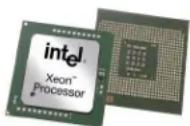
The HS22 supports up to two identical Xeon 5600 Series or 5500 Series processors (that is, the same clock rate and cache size and the same number of cores). Each processor contains a memory controller (meaning two in a two-processor system) for superior performance. (Some processor models are available via CTO only.) The choice of processors includes:
- 95W six-core Xeon processor model X5670 running at 2.93GHz, with impressive performance/watt (15.84W per core; 6.4GTps QPI speed), 12MB of shared L3 cache, 1333MHz memory access, 2 threads per core, and Intel Turbo Boost technology; supported in all BladeCenter chassis, except BladeCenter T.
- 95W four-core Xeon processor model X5667 running at 3.06GHz, with impressive performance/watt (15.84W per core; 6.4GTps QPI speed), 12MB of shared L3 cache, 1333MHz memory access, 2 threads per core, and Intel Turbo Boost technology; supported in all BladeCenter chassis, except BladeCenter T.
- 80W four-core Xeon processor models E5640 at 2.66GHz, with reduced power draw and impressive performance/watt (only 20W per core; 5.86GTps QPI speed), 12MB of shared L3 cache. 1066MHz memory access, 2 threads per core, and Intel Turbo Boost technology; supported in all BladeCenter chassis, except BladeCenter T.
- 80W four-core Xeon processor models E5507 at 2.26GHz, with reduced power draw and impressive performance/watt (only 20W per core; 4.8GTps QPI speed), 4MB of shared L3 cache, and 800MHz memory access; supported in all BladeCenter chassis, except BladeCenter T.
- 60W four-core Xeon processor models L5640 at 2.40GHz, with reduced power draw and impressive performance/watt (only 10W per core; 5.86GTps QPI speed), 12MB of shared L3 cache, 1333MHz memory access, 2 threads per core, and Intel Turbo Boost technology; supported in all BladeCenter chassis, except BladeCenter T.
Note: Because of the integrated memory controllers the former front-side bus (FSB) no longer exists.
With the Xeon 5500 series and 5600 series processors, Intel has diverged from its traditional Symmetric Multiprocessing (SMP) architecture to a Non-Uniform Memory Access (NUMA) architecture. The Xeon 5500 and Xeon 5600 processors are connected through a serial coherency link called QuickPath Interconnect (QPI). QPI is capable of 6.4, 5.6 or 4.8 GTps (gigatransfers per second), depending on the processor model. Put another way, the 5500 series processors offer 3.6 times the bandwidth of the previous 5400 series processors.
The six-core Xeon processors contain six complete processor cores. The processors also contain one shared 12MB cache. The shared cache is dynamically allocated among cores as needed. The six cores appear to software as six physical processors. The six-core processors offer considerably higher performance than a same-speed Xeon processor with four cores.
Turbo Boost Technology dynamically turns off unused processor cores and increases the clock speed of the cores in use, by up to two model frequencies. For example, a 2.93GHz 6-core X5670 processor with 3-6 cores active can run the cores at 3.2GHz. With only one or two cores active, the same processor can run those cores at 3.33GHz. Similarly, a 3.46GHz 4-core X5677 processor can run at 3.6GHz or even 3.73GHz. When the cores are needed again, they are dynamically turned back on and the processor frequency is adjusted accordingly.
In processors implementing Intel Hyper-Threading Technology, each core has two threads capable of running an independent process. Thus, a 6-core processor can run 12 threads concurrently.
Intelligent Power Capability powers individual processor elements on and off as needed, to reduce power draw.
Execute Disable Bit functionality can help prevent certain classes of malicious buffer overflow attacks when combined with a supporting operating system.
Intel's Virtualization Technology (VT) integrates hardware-level virtualization hooks that allow operating system vendors to better utilize the hardware for virtualization workloads.
DDR-3 Registered Memory with Chipkill ECC Protection
The HS22 uses registered double data rate III (DDR-3) VLP (very-low-profile) DIMMs and provides Active Memory features, including advanced Chipkill memory protection, for up to 16X better error correction than standard ECC memory. In addition to offering triple the memory bandwidth of DDR-2 or fully-buffered memory, DDR-3 memory also uses less energy. DDR-2 memory already offered up to 37% lower energy use than fully buffered memory. Now, a generation later, DDR-3 memory is even more efficient, using 10-15% less energy than DDR-2 memory.
The HS22 supports up to 96GB of memory in twelve DIMM slots. Redesign in the architecture of the 5500 and 5600 Series processors bring radical changes in the way memory works in these servers. For example, the Xeon 5500 and 5600 Series processors integrate the memory controller inside the processor, resulting in two memory controllers in a two-socket system. Each memory controller has three memory channels. Depending on the type of memory, population of memory, and processor model, the memory may be clocked at 1333MHz, 1066MHz or 800MHz.
![graph TD A["Xeon 5600 / 5500 Processor 0"] -->|QPI| B["Xeon 5600 / 5500 Processor 1"] A --> C["Memory Controller"] C --> D["Ch0"] C --> E["Ch1"] C --> F["Ch2"] D --> G["1"] D --> H["2"] E --> I["5"] E --> J["6"] F --> K["3"] F --> L["4"] B --> M["Memory Controller"] M --> N["Ch0"] M --> O["Ch1"] M -…](/content/2026/05/1077820/images/c38b2de20930960346430184bb28364e071a1aa66603af4bc6eff2d22cc7cb7d.jpg)
Note: If only one processor is installed, only the first six DIMM slots can be used. Adding a second processor not only doubles the amount of memory available for use, but also doubles the number of memory controllers, thus doubling the system memory bandwidth. If you add a second processor, but no additional memory for the second processor, the second processor has to access the memory from the first processor "remotely," resulting in longer latencies and lower performance. The latency to access remote memory is almost 75% higher than local memory access. So, the goal should be to always populate both processors with memory.
The L5640 and X56xx processor models support memory running at up to 1333MHz, while E56xx-and-up models support memory at up to 1066MHz, and the E550x models support memory at 800MHz only. Running memory at 1333MHz (where supported) versus 1066MHz offers up to 9% better performance, while running memory at 1066MHz produces up to 28% better performance than memory running at 800MHz.
Xeon 5500 and 5600 Series processors access memory with almost 50% lower latency than the previous generation 5400 Series processors. That can result in faster processing of latency-sensitive workloads.
This new processor design comes with some trade-offs in memory capacity, performance, and cost: For example, more lower-cost/lower-capacity DIMMs mean lower memory speed. Alternatively, fewer higher-capacity DIMMs cost more but offer higher performance.
Regardless of memory speed, the Xeon 5500 platform represents a significant improvement in memory bandwidth over the previous Xeon 5400 platform. At 1333MHz, the improvement is almost 500% over the previous generation. This huge improvement is mainly due to the dual integrated memory controllers and faster DDR-3 1333MHz memory. Throughput at 800MHz is 25 gigabytes per second (GBps); at 1066MHz it's 32GBps; and at 1333MHz it's 35GBps. This improvement translates into improved application performance and scalability.
Memory interleaving refers to how physical memory is interleaved across the physical DIMMs. A balanced system provides the best interleaving. A Xeon 5500 processor-based system is balanced when all memory channels on a socket have the same amount of memory.
In the case of HS22, which has a balanced DIMM layout, it is easy to balance the system for all three memory frequencies. The recommended DIMM population is shown below, assuming DIMMs with identical capacities.
| Desired Memory Speed DIMMs per Channel DIMM Slots to Populate | ||
| 1333MHz 1 2,4,6,8,10, and 12 | ||
| 1066MHz 2 All slots | ||
| 800MHz 2 | All slots;clock memory speed to 800MHz in BIOS | |
A memory rank is simply a segment of memory that is addressed by a specific address bit. DIMMs typically have 1, 2 or 4 memory ranks, as indicated by their size designation.
A typical memory DIMM description is 2GB 4Rx8 DIMM
- The 4R designator is the rank count for this particular DIMM (R for rank = 4)
- The x8 designator is the data width of the rank
It is important to ensure that DIMMs with appropriate number of ranks are populated in each channel for optimal performance. Whenever possible, it is recommended to use dual-rank DIMMs in the system. Dual-rank DIMMs offer better interleaving and hence better performance than single-rank DIMMs. For instance, a system populated with six 2GB dual-rank DIMMs outperforms a system populated with six 2GB single-rank DIMMs by 7% for SPECjbb2005. Dual-rank DIMMs are also better than quad-rank DIMMs because quad-rank DIMMs will cause the memory speed to be down-clocked.
Another important guideline is to populate equivalent ranks per channel. For instance, mixing one single-rank DIMM and one dual-rank DIMM in a channel should be avoided.
Note: It is important to ensure that all three memory channels in each processor are populated. The relative memory bandwidth decreases as the number of channels populated decreases. This is because the bandwidth of all the memory channels is utilized to support the capability of the processor. So, as the channels are decreased, the burden to support the requisite bandwidth is increased on the remaining channels, causing them to become a bottleneck.
For peak performance:
■ Always populate both processors with equal amounts of memory to ensure a balanced NUMA system.
- Always populate all 3 memory channels on each processor with equal memory capacity.
- Ensure an even number of ranks are populated per channel.
- Use dual-rank DIMMs whenever appropriate.
- For optimal 1333MHz performance, populate 6 dual-rank DIMMs (3 per processor).
For optimal 1066MHz performance, populate 12 dual-rank DIMMs (6 per processor).
For optimal 800MHz performance with high DIMM counts, populate 12 dual-rank or quad-rank DIMMs (6 per processor) and clock memory down to 800MHz in BIOS.
- With the above rules, it is not possible to have a performance-optimized system with 4GB, 8GB, 16GB, or 128GB. With 3 memory channels and interleaving rules, configure systems with 6GB, 12GB, 18GB, 24GB, 48GB, 72GB, 96GB, etc., for optimized performance.
Power guidelines:
- Fewer larger DIMMs (for example 6 x 4GB DIMMs vs. 12 x 2GB DIMMs will generally have lower power requirements
- x8 DIMMs (x8 data width of rank) will generally draw less power than equivalently sized x4 DIMMs


Reliability guidelines:
- Using fewer, larger DIMMs (for example 6 x 4 GB DIMMs vs. 12 x 2GB DIMMs is generally more reliable
- Xeon 5500 and 5600 Series memory controllers support IBM Chipkill™ memory protection technology with x4 DIMMs (x4 data width of rank), but not with x8 DIMMs
For increased availability, the HS22 offers an additional level of IBM Active Memory protection: memory mirroring.
Memory mirroring works much like disk mirroring. The total memory is divided into two channels. Data is written concurrently to both channels. (The third channel is unused.) If a DIMM fails in one of the DIMMs in the primary channel, it is instantly disabled and the mirrored (backup) memory in the other channel becomes active (primary) until the failing DIMM is replaced. With mirroring enabled, one-third of total memory (4 DIMMs) is available for use. (Note: Due to the double writes to memory, performance is affected.) Mirroring is handled at the hardware level; no operating system support is required.
DDR-3 memory is available in 1GB, 2GB, 4GB and 8GB DIMMs. DIMMs are installed individually (not in pairs).
Flexible Internal Storage
The HS22 offers a choice of internal 2.5-inch storage: up to two hot-swap SAS or SATA drives or two hot-swap solid-state drives:
• SAS 10K RPM 2.5-inch HDD — 73.4, 146.8, 300, or 500GB capacities (1TB maximum)
• SAS 15K RPM 2.5-inch HDD — 73.4 or 146.8GB capacity (293.6GB)
• SATA 10K RPM 2.5-inch HDD — 300GB capacities (600GB)
- SATA-based solid state —31.4GB (single) capacities (62.8GB maximum)
Due to the statistically higher failure rates for traditional spinning media, IBM recommends the use of the solid state drives (SSDs) as an alternative. They store data on flash memory chips, rather than on magnetic media. Like HDDs, SSDs can be used as boot media and for random access storage. However, SSDs offer higher thresholds of shock and vibration, and a higher operating temperature range (between 0 and 70 degrees C). This yields a failure rate only 1/3 that of HDDs (approximately 3,000,000 hours MTBF vs. 1,000,000 hours). In addition, the IBM 31.4GB 2.5" Solid State Drive requires only 2W. This reduces the storage power requirement and heat output by as much as 80%, compared to 2.5-inch HDDs. If used as a boot device, no special device drivers are required.
Additional storage is available via the BladeCenter S chassis.
If you need more storage space, terabyte capacities are possible with optional external iSCSI and SAN storage solutions.
Disk Controllers
All HS22 models include an integrated LSI 1064E SAS/SATA controller. This controller supports up to two internal SAS or SATA HDDs or two internal solid-state drives and offers hardware RAID-0/1 support. 256MB of optional battery-backed cache memory is available.
An optional ServeRAID-MR10ie controller (CIOv form-factor) adds RAID-5/50/6/60 support for direct-attach BladeCenter S storage or external System Storage EXP3000 access, along with 256MB of cache memory and battery backup. For SAN storage, use the optional IBM SAS Connectivity Card (CIOv). For iSCSI storage, use an Ethernet Expansion Card (CIOv). For Fibre Channel SAN storage, use an optional Fibre Channel Expansion Card (CIOv).
The SAS controller provides data transfer speeds of up to 300MB per second 5 in each direction (full-duplex) across the SAS bus, for an aggregate speed of 600MBps, nearly double that of Ultra320 SCSI's 320MBps (half-duplex) bandwidth. The serial design of the SAS bus allows maximum performance to be maintained as additional drives are added.
Integrated Virtualization
HS22 offers a separately orderable IBM 2GB standard USB Flash Drive option preloaded with VMware ESXi. This is an embedded version of VMware ESX Server. It is fully contained on the flash drive, without requiring any disk space. Rather than management through a Service Console based on a Linux operating system, ESXi relies on aggregate management tools, including VirtualCenter, the Remote Command Line interface and the introduction of CIM for standards-based and agentless hardware monitoring.
VMware ESXi includes all the performance, scalability and compatibility features of ESX Server,
including full VMFS support across FC SAN, iSCSI SAN, and NAS, and 4-way VSMP. Because it runs from flash memory, it's extremely fast and ideal for diskless configurations. It also offers enhanced security, because it runs without an operating system-based console and is updated/patched mush like firmware. Licensing works the same as for "standard" ESX Server.
External Tape Storage
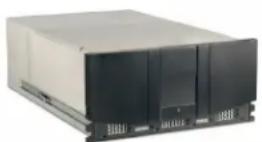
The HS22 supports various external rack-mounted SAN-attached tape drives. Supported tape technologies include:
• IBM LTO3 2U Autoloader
• IBM LTO3 4U Tape Library
• IBM System Storage TS2230 Express Tape Drive
• IBM System Storage TS2240 Tape Drive Model H4S
• IBM System Storage TS3100 or TS3200 Tape Library
• IBM System Storage TS3310 Modular Tape Library
Light Path Diagnostics
Light path diagnostics enables a technician to quickly identify and locate a failed or failing system component, such as a specific blower module or memory DIMM. This enables quick replacement of the component, which helps increase server uptime and lower servicing costs.
The front of each blade server—and the chassis itself—has an LED indicator light to show possible component failures. This lets the servicer identify the failing component without the need to or remove the blade server from the chassis. The light path diagnostics panel tells the servicer which component of the affected server requires attention.
In addition, many components have their own identifying LEDs. For example, each of the memory modules has an LED next to the socket, as do both processors. This allows the servicer to easily identify exactly which component needs servicing. By following the "light path," the component can be replaced quickly, and without guesswork. (Note: In the event of a failed DIMM, the system will restart and mark the DIMM as bad while offline, thus allowing the system to continue running, with reduced memory capacity, until serviced.)

Gigabit Ethernet Controllers
The HS22 includes a dual-port integrated Broadcom BCM5709S Gigabit Ethernet controller for up to 10X higher maximum throughput than a 10/100 Ethernet controller. The controller offers TOE (TCP Offload Engine) support, as well as failover and load balancing for better throughput and system availability. It also supports highly secure remote power management using IPMI 2.0, plus Wake on LAN ® and PXE (Preboot Execution Environment) Flash interface.
For additional Gigabit Ethernet controllers, an optional 2-port or 4-port Ethernet expansion card adds additional Gigabit Ethernet ports.

High-Performance Adapter Slots
The HS22 blade server includes two x8 PCIe adapter slots. They support CFF (compact form factor) cards: one standard-speed CIOv and one high-speed CFFh.
Support for one of two possible expansion units is planned for sometime after general availability (GA) to increase the number of expansion card slots available. Only one may be used as each will utilize the one high-speed expansion connector in the HS22:
Adapters can also be used to add interfaces to BladeCenter switch modules, including Fibre Channel, additional Gigabit Ethernet modules, InfiniBand, SAS, etc.
BladeCenter Chassis
IBM's blade architecture offers five choices of compatible and interoperable chassis in which to use various blade servers. Each chassis serves different customer needs. The new
BladeCenter S is a small, entry-level chassis designed for office environments. The original BladeCenter E chassis offers maximum density, great flexibility and a wide variety of expansion options at an entry-level price. The next-generation BladeCenter H chassis offers all of BladeCenter's capabilities, and adds new high-performance features. If you need a ruggedized chassis (for example, government/military or telecom), BladeCenter T offers special features optimized for those environments. (HS22 is not currently supported in the BladeCenter T.) The next-generation BladeCenter HT is a high-performance ruggedized telecommunications platform. There is a high degree of interchangeability and compatibility of features among the chassis. Any or all of these chassis can be installed in a rack along with other rack-optimized equipment.
See the separate BladeCenter Chassis Sales Guide for details.

Extensive System Support Features
The IBM services and technical support portfolio provides world-class, consistent, high-quality service and support. From the start, IBM programs make it easier for you to plan for, configure and purchase BladeCenter servers, get them running and keep them running long-term. These features include IBM ServerProven ® , IBM Standalone Solutions Configuration Tool, IBM System x and BladeCenter Power Configurator, IBM ServerGuide, IBM Systems Director Service and Support Manager, Product Customization Services and extensive technical support offerings.
The IBM ServerProven program provides the confidence that specific options and operating systems have been tested on the blade servers and chassis and are officially supported to work together. It is updated frequently to keep the latest compatibility information at your fingertips.
The IBM Standalone Solutions Configuration Tool (SSCT) is a downloadable tool that simplifies the often complex chore of configuring a full rack of servers (including blade servers) and confirming that you have all the cables, power distribution units, KVM (keyboard, video and mouse) switch boxes and other components you need, as well as the proper airflow clearances, electrical circuits and other environmental conditions.
IBM System x and BladeCenter Power Configurator helps IT managers plan for data center power needs, by providing the following information for specific configurations of System x and BladeCenter systems: power input (watts), PDU sizing (amps), heat output (BTUs), airflow requirements through chassis (CFM), VA rating, leakage current (mA), and peak inrush current (amps).
IBM ServerGuide (installed from CD) simplifies the process of installing and configuring System x servers. ServerGuide goes beyond mere hardware configuration by assisting with the automated installation of the Microsoft® Windows® Server 2000 and 2003 operating systems, device drivers and other system components, with minimal user intervention. (Drivers are also included for support of Novell NetWare, Red Hat Linux and SUSE LINUX.) This focus on deployment helps to reduce both your total cost of ownership and the complexity that administrators and technical personnel face.
IBM Systems Director Service and Support Manager (previously called IBM Electronic Service Agent ™ ) is an innovative "call home" feature that allows System x and BladeCenter servers to automatically report hardware problems to IBM support, which can even dispatch onsite service 6 if necessary to those customers entitled to onsite support under the terms of their warranty or an IBM Maintenance Agreement. Service and Support Manager resides on a server and provides electronic support and problem management capabilities through a highly secure electronic dialogue between your systems and IBM. It monitors networked servers for hardware errors and it can perform hardware and software inventories and report inventory changes to IBM. All information sent to IBM is stored in a highly secure database and used for improved problem determination.
Additional services include hardware warranty upgrades and factory-installed Product Customization Services (PCS), such as asset tagging, hardware integration, software imaging and operating systems personalization.
IBM offers extensive technical support by phone and via the Web. Support options include links to forums/newsgroups, problem submission, online shopping support, service offerings, device drivers for all IBM product lines, software downloads and even upcoming technical seminar worldwide schedules and registration. Also available are remote installation, configuration and usage support for both System x hardware and software, as well as onsite custom services to provide the level of expertise you require.
IBM Maintenance and Technical Support solutions can help you get the most out of your IT investment by reducing support costs, increasing availability and simplifying management with integrated support for your multiproduct, multivendor hardware and software environment. For more information on hardware maintenance, software support, solution support and managed support, visit http://ibm.com/services/maintenance.
Advanced Systems Management Capabilities
Each BladeCenter chassis offers a high level of systems management capabilities that are well-suited to remote locations as well as to stand-alone environments. Features include the Advanced Management Module (AMM), Integrated Management Module (IMM), Automatic Server Restart, Systems Director Active Energy Manager for x86, Wake on LANupport, PXE 2.0 support, text and graphics console redirect, Predictive Failure Analysis, Embedded Dynamic System Analysis, and IBM Systems Director.
The chassis-based AMM, in combination with the HS22 blade server's IMM, provides industry-
standard Intelligent Platform Management Interface (IPMI) 2.0-compliant systems management. The AMM provides a number of important system functions, including:
- Monitoring of system and battery voltage, system temperature, fans, power supplies, processor and DIMM status
- Fan speed control
• Product ID and Family ID detection
• Highly secure remote power on/off - System reset control
• NMI/SMI detection and generation - System diagnostic LED control (power, HDD, activity, alerts, heartbeat)
- IPMI over LAN
- Serial Over LAN
- Proxy server support
• LAN messaging and alerting - VLAN support
- Enhanced authentication and encryption algorithms (RMCP+, SHA-1, AES)
- Local update of IMM firmware
- Firmware firewall
- Support for IPMI v2.0 compliant management software (e.g., xCAT)
- Other mandatory and optional IPMI functions in the blade's IMM
The IMM, via the management module, alerts IBM Systems Director to anomalous environmental factors, such as voltage and thermal conditions—even if the server has failed.
Other systems management features offered for the combination of blade server and chassis include:
- Predictive Failure Analysis for system processors, memory and HDDs, as well as chassis switch modules, blower modules and power modules
• Web-based out-of-band control - Windows "blue screen" capture
- Remote virtual media
• High-speed remote redirection of PCI video, keyboard and mouse - SSL (Secure Socket Layer) and LDAP (Lightweight Directory Access Protocol) support
In order to put control of processor power-saving features at the fingertips of administrators, IBM developed IBM Systems Director Active Energy Manager. Active Energy Manager is designed to take advantage of new processor features, such as balancing the performance of the system according to available power input. It provides the ability to plan and predict power consumption based on your BladeCenter hardware configuration. It also helps you reduce the infrastructure required for redundancy, by using fewer servers on smaller power feeds and potentially lowering your overall data center support costs. It does this by inventorying all components at the blade level, then adding up the power draw for each blade and tracking that usage. In failure mode, Active Energy Manager (through the BladeCenter Management Module) might request that certain blades in each domain throttle down to reduce power consumption.
Automatic Server Restart (ASR) helps reduce downtime by restarting the server automatically in the event of a system lockup. ASR technology is a combination of hardware circuitry tied into the server's system reset function and a device driver. As long as the server continues running, the ASR watchdog timer will keep being reset, but if the operating system crashes or the hardware freezes somehow the ASR software will be unable to reset the hardware timer. If the timer is not reset within five minutes, it automatically triggers the ASR hardware, which immediately restarts the server (and logs an ASR event with IBM Systems Director). These features are designed so that no more than five minutes can pass before the server is restarted.
Text and Graphics Console Redirect support allows the administrator to remotely view HS22 text and graphics messages over serial or LAN.
Wake on LAN permits the server to be remotely powered on if it has been shut off. Once powered up, the server can be controlled across the network, using the Preboot Execution Environment (PXE).
Like Wake on LAN, PXE is system firmware. It allows software such as the IBM Remote Deployment Manager to take control of a system before the BIOS, operating system or applications are loaded (using Wake on LAN/PXE) and lets an administrator perform many low-level tasks remotely that would otherwise require a visit to each system. These tasks may
include such things as formatting a hard disk drive, updating system firmware, or deploying a Windows or Linux operating system.
Predictive Failure Analysis (PFA) enables the MM/AMM and the IMM to detect impending failure of supported components (processors; memory; expansion cards; switch, blower and power supplies; and hard disk drives) before actual failure, and alert the administrator through IBM Systems Director. This gives you the ability to replace the failing component before it fails, resulting in increased uptime.
Embedded Dynamic System Analysis (DSA) feature collects and analyzes system information to aid in diagnosing problems. The diagnostic programs collect the following information:
- System configuration
• Network interfaces and settings - Installed hardware
• Service processor status and configuration
• Vital product data, firmware, and BIOS configuration
• Hard disk drive health
• RAID controller configuration
• Event logs for ServeRAID controllers and service processors
The diagnostic programs create a merged log that includes events from all collected logs. The information is collected into a file that you can send to IBM service and support. Additionally, you can view the information locally through a generated text report file, or you can copy the log to removable media and view the log from a Web browser.
IBM Systems Director software for advanced workgroup management is included with the server. IBM Systems Director comes with a portfolio of tools, including Active Energy Manager, Service and Support Manager, and other tools. System Availability (a no-charge download) and Capacity Manager (sold separately) are available as add-ons for additional server management and increased availability. IBM Systems Director provides a single uniform graphical interface for all of these systems management functions.
IBM Systems Director enables you to customize thresholds and monitor system components (for things like temperature, voltage regulation, etc.) to help maximize uptime.
Key Options
IBM options for System x servers let you take your servers to a higher level
You can rely on System x and blade options to supply a comprehensive solution for your business needs. Options help create an optimized server system to meet your data protection, storage and availability needs. Every IBM option is designed and tested for peak performance and flexibility, helping to maximize your return on investment. The combination of System x servers and options lets you keep your fingers on the pulse of your e-business.
Processors — The Intel Xeon processor provides high clock rates, 64-bit extensions, a large cache, Hyper Threading Technology, Turbo Boost Technology, energy-saving features, and advanced features for availability and manageability. Large cache size and multiple cores, combined with a 1066MHz or 1333MHz memory access speed, reduce memory latency and facilitate the movement of data through the processor and I/O devices. (Note: System performance depends not only on the number of processors in the server but also on the power and functionality of each processor, as well as the number, capacity, and arrangement of the DIMMs.) Adding a second processor may be a cost-effective way to achieve significant performance improvements.
Memory — Memory is a significant factor in systems application performance. Adding more memory to a BladeCenter server is one of the most effective ways to increase application performance. For best performance in a server with a quad-core processor, there should be twice as much memory available as for a dual-core processor. Note: Fewer large-capacity DIMMs may provide better performance and use less energy than more lower-capacity DIMMs.
Hard Disk Drives — IBM hard disk drives help you improve the transaction and cost performance of your HS22 servers. The choice of hard disk drives can be a critical aspect of maximizing the I/O throughput of the system. Hot-swap SAS hard disk drives (2.5-inch) are available for the HS22 with capacities up to 300GB at 10,000 RPMs or up to 146.8GB at 15,000 RPMs. Hot-swap SATA hard disk drives (2.5-inch) are available for the HS22 with capacities up to 300GB at 10K RPMs. Additional direct-attach storage is available via the BladeCenter S chassis.
Solid-State Drives — IBM offers a choice of 31.4 or 50GB 2.5-inch solid-state drive as an alternative to internal HDDs. They can be used as a highly available boot drive or for storing disk images, or for other primarily read-only uses.
ServeRAID Controllers — System x servers using ServeRAID technology allow organizations to build a reliable foundation for business-critical computing. IBM ServeRAID technology allows
an array consisting of multiple physical hard disk drives to be treated as one logical drive. ServeRAID technology also allows data to be stored redundantly, across multiple hard disk drives—enhancing both the integrity and the availability of the data. SAS and SATA ServeRAID controllers offer enhanced performance due to onboard processors and cache. Because IBM ServeRAID controllers can help significantly improve data transfer rates, this technology is extremely effective when implementing demanding, transaction-oriented applications. By employing the advanced fault tolerance of IBM ServeRAID technology, companies can effectively implement networked business systems that require large amounts of storage space for data and applications that must be available for their businesses to continue operating.
The optional ServeRAID-MR10ie controller (CIOv form-factor), with up to 6Gbps throughput per SAS port, adds RAID-5/50/6/60 support and 256MB of cache memory and battery backup, as well as support for direct-attach BladeCenter S storage or external System Storage expansion units.
I/O Slots — The HS22 supports the addition of a PCIe I/O Expansion Unit 3, which 3 additional PCIe slots.
External Storage — The IBM System Storage DS3000, DS4000, DS5000, and DS8000 series, as well as the System Storage N3000, N5000, N6000, and N7000 series, comprise a powerful and broad shared storage family with integrated management software designed to meet midrange and enterprise needs. For lower-end needs, IBM offers the System Storage EXP810 and EXP3000 storage expansion units.
Additionally, external LAN-attached tape storage is available.
Communication Modules — The various BladeCenter chassis support integrated communication and I/O switches and/or bridges for Gigabit and 10Gb Ethernet, Myricom, 4Gb and 8Gb Fibre Channel, 1X and 4X InfiniBand, iSCSI, 3Gb SAS, and others. Expansion adapters for individual HS22 blades are available to interface with these modules. The BladeCenter H and BladeCenter HT also support the Multi-Switch Interconnect Module, which doubles the number of Gigabit Ethernet and Fibre Channel connections available to all blades in the chassis.
Rear Door Heat eXchanger — The unit attaches to the back of an IBM S2 42U Enterprise Rack. It is capable of removing up to 50,000 BTUs (14KVa) from the data center using water lines under the raised floor. The door swings open for servicing.
Redundant features — Optional hot-swap drives, power supply modules, blower modules, management modules, switches and bridges provide redundancy for the various BladeCenter chassis.
HS22 Images
Front View

Interior View

| BladeCenter HS22 Specifications | |||
| Machine type | 7870- Axx, Dxx, Gxx, Hxx, Nxx | ||
| Form factor | 30mm blade | ||
| Processor type | Six-core Xeon (L56xx, X56xx)2.26GHz L5640 (N2x), 2.66GHz X5650 (H2x/HAx), 2.93GHz X5670 (H4x) | Four-core Xeon (E56xx/X56xx)2.40GHz E5620 (G2x), 2.66GHz E5640 (G4x), 3.06GHz X5667 (H5x) | Two-core Xeon (E55xx)2.00GHz E5503 (D3x) |
| Four-core Xeon (E55xx)2.26GHz E5507 (A4x) | |||
| Processor power draw | 95W (H2x/H4x/H5x/HAx) | 80W (A4x, D3x, G2x/G4x/GCx) | 60W (N2x) |
| Internal cache | 12MB shared cache (G2x/G4x/GCx, H2x/H4x/H5x/HAx, N2x) | 4MB shared cache (A4x, D3x) | |
| QuickPath Interconnect (QPI) speed (gigatransfers per second) | 6.4 Gbps (H2x/H4x/H5x/HAx) | 5.86 Gbps (G2x/G4x/GCx, N2x) | 4.8 Gbps (A4x, D3x) |
| Maximum memory access speed | 1333MHz (H2x/H4x/H5x/HAx, N2x) | 1066MHz (G2x/G4x/GCx) | 800MHz (A4x, D3x) |
| # of processors standard / maximum | 1 / 2 | ||
| NEBS/ETSI Compliance | Select blades are NEBS3/ETSI-compliant. (Contact IBM sales for details.) | ||
| Chipset | Intel 5520 | ||
| Standard / maximum memory* | 6GB (3 x 2GB) / 96GB (G2x/G4x/GCx, H2x/H4x/H5x/HAx, N2x) | 3GB (3 x 1GB) /96GB (A4x, D3x) | |
| Standard memory type | Registered DDR-3 ECC (operating at 1333MHz, 1066MHz or 800MHz, depending onprocessor and memory configuration) | ||
| Memory interleaving | Yes | ||
| DIMM capacities supported | 1GB, 2GB, 4GB, 8GB (when available) | ||
| Chipkill protection supported | Yes (using x4 DIMMs) | ||
| # of DIMM sockets total / available | 12 / 9 | ||
| # of 2.5-inch drive bays total / available | 2 / 2 SAS/SATA/SSD | ||
| # of 3.5-inch drive bays total / available | None | ||
| Maximum internal 2.5" HDD capacity | Standard1TB (2 x 500GB) hot-swap | ||
| 2.5-inch drive capacities supported | SAS73.4, 146.8, 300, 500GB—10K RPMs;73.4, 146.8GB — 15K RPMs | SATA300, 500GB — 10K RPMsSFF HS | Solid-State31.4, 50GB |
| # of HDDs standard | None | ||
| Internal USB Flash Drive | Optional 2GB (preloaded with VMware ESXi | ||
| # of optical drives standard | None (one standard in chassis) | ||
| # of diskette drives standard | None (one standard in BladeCenter E or BladeCenter H chassis) | ||
| Internal tape drives supported | None (SAN-attached) | ||
| Disk drive technology | SAS/SATA | ||
| Integrated disk controller | LSI Logic 53C1046E | ||
| Optional RAID controller | ServeRAID-MR10ie | ||
| RAID levels supported | RAID-0/1 (standard) | ||
| External disk drive support | NAS/SAN-attach | ||
| # of PCIe slots standard | 2 x8 PCIe included;Additional PCIe slots available with BladeCenter PCI Express I/O Expansion Unit 3 | ||
| # of PCI-X slots standard | None | ||
| # of legacy PCI slots | None | ||
| # of video ports | None (chassis-attached) | ||
| Video controller | Matrox G200eV (in IMM) | ||
| Video memory | 16MB SDRAM | ||
| Maximum video resolution at 32-bit color | 1600 x 1200 x 16-bit color at 85Hz | ||
| Gigabit Ethernet controllers standard | Dual-port Broadcom BCM5709S—TOE-enabled | ||
| # of Gigabit Ethernet ports 2 (standard) | Maximum 12 | 8 | |
| # of RS485 ports | None | ||
| # of serial ports | None (1 direct via BladeCenter H chassis, or Serial over LAN in BladeCenter E and BladeCenter H) | ||
| # of parallel ports | None | ||
| # of mouse ports | None (1 via chassis) | ||
| # of keyboard ports | None (1 via chassis) | ||
| # of USB ports | 1 (plus 2 via chassis) | ||
| Systems management controller | Integrated Management Module | ||
| Diagnostic LEDs (front panel) | Power good, blade location, over temperature, information, general fault | ||
| Predictive Failure Analysis support | Processor, memory, HDDs, expansion cards | ||
| BIOS type | UEFI 2.1 | ||
| Power supply size | Contained in chassis | ||
| # of power supplies standard / maximum | Contained in chassis | ||
| # of fans/blowers standard / maximum | Contained in chassis | ||
| Dimensions (HWD) / weight | 9.7" (245mm) H1.14" (29mm) W17.6" (446mm) D | 12 lbs (maximum)5.44 kg (maximum) | |
| Operating systems supported | Microsoft Windows Server 2008, Microsoft Windows Small Business Server 2008, Microsoft Windows Server 2003 and R2 (Standard/Web/Enterprise Editions) 32-bit and 64-bit, RHEL 5.3 32-bit and 64-bit—with or without Xen, RHEL 5.3 32-bit, SLES 11 32-bit and 64-bit—with or without Xen, Sun Solaris 10, VMware ESX Server 3.5/4.0 ESXi 3.5/4.0 Update 4 | ||
| Extended/long life support | Select blades are supported for long life. (Contact IBM sales for details.) | ||
| Length of limited warranty | 3 years (parts and labor) onsite | ||
The Bottom Line
The HS22 offers maximum bang for the buck by incorporating outstanding features in a tiny package:
Price/Performance:
- Multi-core processors — Up to two 2.00 to 3.06GHz two-/four-/six-core Xeon 5500 Series or 5600 Series processors
• Large cache — Up to 12MB of L3 processor cache (processor-specific) - Fast memory access — 1333MHz, 1066MHz, or 800MHz access (depending on the processor model and DIMMs used)
- Fast memory access — 1333MHz or 1066MHz registered DDR-3 ECC memory
- Embedded virtualization (Separately orderable option)
- Fast disk technology — Internal SAS or SATA storage (2 HDDs), PCIe I/O Expansion Unit or BladeCenter S chassis; RAID-0 data striping
- Fast I/O — 10Gb Ethernet, 4X InfiniBand, iSCSI, 3Gb SAS or 8Gb Fibre Channel connectivity via an optional expansion card
- Fast communications — Integrated dual Gigabit Ethernet, with the option for two or four additional Gigabit Ethernet ports via expansion cards and expansion unit (total 12 ports per blade); support for 10Gb Ethernet
Flexibility:
- Single- or double-wide configurations (blade server and one expansion unit)
• Large memory capacity — Up to 96GB standard using twelve 8GB DIMMs
• A choice of hard disk or solid-state storage - High-capacity disk storage — Up to 1TB of internal SAS or SATA storage, with the option for
additional 2.5-inch SAS HDDs in BladeCenter S chassis
- Optional IBM 31.4GB or 50.0GB Solid State Drive as an energy-saving alternative to HDD storage
- Integrated RAID — RAID-1 mirrored arrays standard; enhanced RAID-1E/5 arrays optional using a BladeCenter S chassis; RAID-5 arrays also available using an optional ServeRAID-MR10ie controller
- Two available adapter slots standard —
☐ Two CFF (compact form factor) slots: one high-speed CFFh and one standard-speed CIOv
• Additional optional adapter slots —
☐ Provided by a BladeCenter PCI Express I/O Expansion Unit
Manageability and Availability:
• IBM Systems Director systems management software, including:
☐ IBM Systems Director Active Energy Manager for x86
☐ IBM Management Processor Assistant
□ IBM Rack Manager
□ IBM RAID Manager
□ IBM Update Assistant
□ IBM Software Distribution
□ IBM System Availability
• Integrated Management Module:
IPMI 2.0 compliance, including highly secure remote power control
□ cKVM
□ Advanced management capabilities
- Interface to one or two Advanced Management Modules in the chassis for advanced systems management capability
□ Supports LDAP and SSL industry standards
☐ Text and graphics console redirection systems management
Serial over LAN
- Optional solid-state drive as a high-reliability alternative to internal storage (with up to three times the MTBF of spinning disk drives)
• Numerous hot-swap/redundant capabilities provided via the chassis
Server Comparison Chart
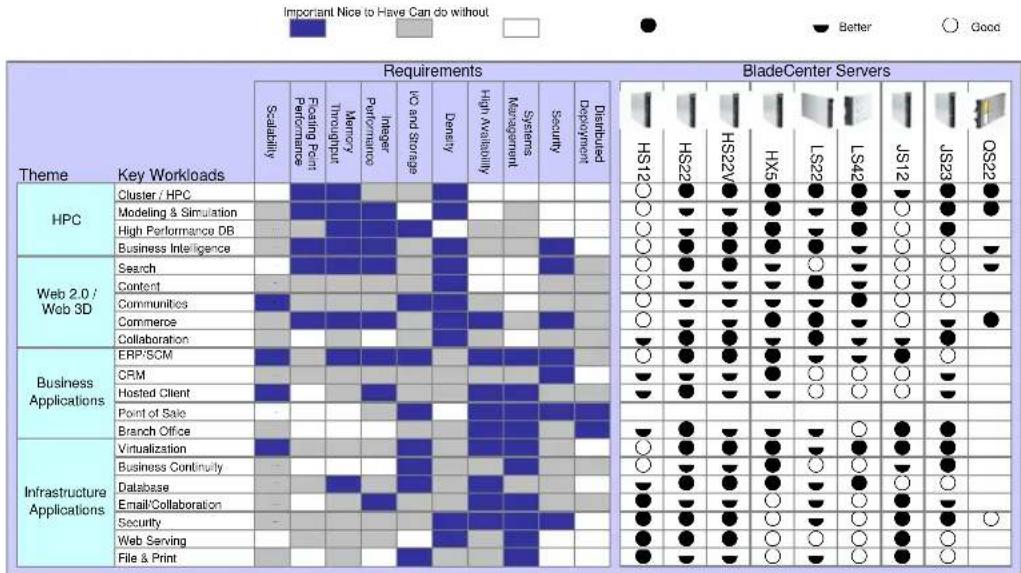
The following table shows the suggested uses for the respective IBM BladeCenter blade servers, including comparisons of the uses for which each server is best suited:
9 The PCI I/O Expansion Unit requires an adjacent blade slot.
For More Information
| IBM BladeCenter Servers and Options | http://ibm.com/systems/bladecenter |
| Electronic Service Agent | http://ibm.com/support/electronic |
| IBM System x and BladeCenter Power Configurator | http://ibm.com/systems/bladecenter/powerconfig |
| Standalone Solutions Configuration Tool (SSCT) | http://ibm.com/servers/eserver/xseries/library/configtools.html |
| Configuration and Options Guide | http://ibm.com/servers/eserver/xseries/cog |
| ServerProven Program | http://ibm.com/servers/eserver/serverproven/compat/us |
| Technical Support | http://ibm.com/server/support |
| Other Technical Support Resources | http://ibm.com/servers/eserver/techsupport.html |
Legal Information
© IBM Corporation 2009
IBM Systems and Technology Group Dept. U2SA
3039 Cornwallis Road
Research Triangle Park, NC 27709
Produced in the USA
March 2009
All rights reserved
For a copy of applicable product warranties, write to: Warranty Information, P.O. Box 12195, RTP, NC 27709, Attn: Dept. JDJA/B203. IBM makes no representation or warranty regarding third-party products or services including those designated as ServerProven or ClusterProven. Telephone support may be subject to additional charges. For onsite labor, IBM will attempt to diagnose and resolve the problem remotely before sending a technician.
IBM, the IBM logo, ibm.com, AIX, BladeCenter, Calibrated Vectored Cooling, IBM System Storage, ServeRAID, System x, Systems Director Active Energy Manager, Wake on LAN, and X-Architecture are trademarks of IBM Corporation in the United States, other countries, or both. If these and other IBM trademarked terms are marked on their first occurrence in this information with a trademark symbol ( ® or ™ ), these symbols indicate U.S. registered or common law trademarks owned by IBM at the time this information was published. Such trademarks may also be registered or common law trademarks in other countries. A current list of IBM trademarks is available on the Web at http://ibm.com/legal/copytrade.shtml.
AMD, the AMD arrow logo, AMD Opteron and combinations thereof are trademarks of Advanced Micro Devices, Inc.
Cell Broadband Engine is a trademark of Sony Computer Entertainment, Inc. in the United States, other countries, or both and is used under license therefrom.
InfiniBand is a trademark of the InfiniBand Trade Association.
Intel and Xeon are trademarks or registered trademarks of Intel Corporation or its subsidiaries in the United States and other countries.
Linux is a registered trademark of Linus Torvalds.
Microsoft, Windows and the Windows logo are trademarks or registered trademarks of Microsoft Corporation.
Other company, product and service names may be trademarks or service marks of others.
IBM reserves the right to change specifications or other product information without notice. References in this publication to IBM products or services do not imply that IBM
intends to make them available in all countries in which IBM operates. IBM PROVIDES THIS PUBLICATION "AS IS" WITHOUT WARRANTY OF ANY KIND, EITHER EXPRESS OR IMPLIED, INCLUDING THE IMPLIED WARRANTIES OF MERCHANTABILITY AND FITNESS FOR A PARTICULAR PURPOSE. Some jurisdictions do not allow disclaimer of express or implied warranties in certain transactions; therefore, this statement may not apply to you.
This publication may contain links to third party sites that are not under the control of or maintained by IBM. Access to any such third party site is at the user's own risk and IBM is not responsible for the accuracy or reliability of any information, data, opinions, advice or statements made on these sites. IBM provides these links merely as a convenience and the inclusion of such links does not imply an endorsement.
Information in this presentation concerning non-IBM products was obtained from the suppliers of these products, published announcement material or other publicly available sources. IBM has not tested these products and cannot confirm the accuracy of performance, compatibility or any other claims related to non-IBM products. Questions on the capabilities of non-IBM products should be addressed to the suppliers of those products.
Some machines are designed with a power management capability to provide customers with the maximum uptime possible for their systems. In extended thermal conditions, rather than shutdown completely, or fail, these machines automatically reduce the processor frequency to maintain acceptable thermal levels.
MB, GB and TB = 1,000,000, 1,000,000,000 and 1,000,000,000,000 bytes, respectively, when referring to storage capacity. Accessible capacity is less; up to 3GB is used in service partition. Actual storage capacity will vary based upon many factors and may be less than stated.
Performance is in Internal Throughput Rate (ITR) ratio based on measurements and projections using standard IBM benchmarks in a controlled environment. The actual throughput that any user will experience will depend on considerations such as the amount of multiprogramming in the user's job stream, the I/O configuration, the storage configuration and the workload processed. Therefore, no assurance can be given that an individual user will achieve throughput improvements equivalent to the performance ratios stated here.
Maximum internal hard disk and memory capacities may require the replacement of any standard hard drives and/or memory and the population of all hard disk bays and memory slots with the largest currently supported drives available. When referring to variable speed CD-ROMs, CD-Rs, CD-RWs and DVDs, actual playback speed will vary and is often less than the maximum possible.
BLO03029-USEN-03
- PRODUCT GUIDE
- IBM BLADECENTER HS22
- PRODUCT OVERVIEW
- CONTENTS
- NO COMPROMISE, TRULY BALANCED, 2-SOCKET BLADE SERVER FOR INFRASTRUCTURE, VIRTUALIZATION AND ENTERPRISE BUSINESS APPLICATIONS
- FLEXIBILITY
- MANAGEABILITY
- AVAILABILITY AND SERVICEABILITY
- RIGHT, OPEN, EASY, GREEN
- OPEN FABRIC MANAGER
- EASY TO DEPLOY, INTEGRATE AND MANAGE
- GREEN TODAY FOR A BETTER TOMORROW
- KEY FEATURES
- MULTICORE INTEL XEON PROCESSORS
- DDR-3 REGISTERED MEMORY WITH CHIPKILL ECC PROTECTION
- FOR PEAK PERFORMANCE
- POWER GUIDELINES
- RELIABILITY GUIDELINES
- FLEXIBLE INTERNAL STORAGE
- DISK CONTROLLERS
- INTEGRATED VIRTUALIZATION
- EXTERNAL TAPE STORAGE
- LIGHT PATH DIAGNOSTICS
- GIGABIT ETHERNET CONTROLLERS
- HIGH-PERFORMANCE ADAPTER SLOTS
- BLADECENTER CHASSIS
- EXTENSIVE SYSTEM SUPPORT FEATURES
- ADVANCED SYSTEMS MANAGEMENT CAPABILITIES
- KEY OPTIONS
- IBM OPTIONS FOR SYSTEM X SERVERS LET YOU TAKE YOUR SERVERS TO A HIGHER LEVEL
- HS22 IMAGES
- FRONT VIEW
- THE BOTTOM LINE
- PRICE/PERFORMANCE
- ADDITIONAL 2.5-INCH SAS HDDS IN BLADECENTER S CHASSIS
- MANAGEABILITY AND AVAILABILITY
- SERVER COMPARISON CHART
Brand : IBM
Model : BladeCenter HS22 7870G2Y
Category : Server