
SCH-X619 - Smartphone SAMSUNG - Free user manual and instructions
Find the device manual for free SCH-X619 SAMSUNG in PDF.


| Product Type | Smartphone (Flip Phone) |
| Brand | Samsung |
| Model | SCH-X619 |
| Dimensions | Approx. 88 x 45 x 22 mm |
| Weight | Approx. 90 g |
| Battery Type | Lithium-ion, rechargeable |
| Battery Capacity | 700 mAh |
| Display Resolution | 128 x 160 pixels (estimated) |
| Camera Resolution | VGA (0.3 MP) |
| Internal Memory | 32 MB (estimated) |
| Network | CDMA (UIM card) |
| Key Features | MP3 player, camera, voice dialing, calendar, games, alarm |
| Connectivity | USB, headset jack |
| Input Method | Keypad with T9, handwriting (Chinese) |
| Security | PIN code, phone lock |
| Power Consumption | Standby: up to 200 hours; Talk: up to 3 hours (estimated) |
| Manufacturing Date | 2004 (estimated) |
| Repairability | Battery and UIM card user-replaceable; other parts require professional service |
| Accessories Included | Battery, charger, user manual |
Frequently Asked Questions - SCH-X619 SAMSUNG
User questions about SCH-X619 SAMSUNG
0 question about this device. Answer the ones you know or ask your own.
Ask a new question about this device
Download the instructions for your Smartphone in PDF format for free! Find your manual SCH-X619 - SAMSUNG and take your electronic device back in hand. On this page are published all the documents necessary for the use of your device. SCH-X619 by SAMSUNG.
USER MANUAL SCH-X619 SAMSUNG
natural_image
Silver flip phone with visible brand logo and screen, set against a blue abstract background with light beams (no text or symbols on device)目录
重要的安全防范措施....7
打开包装....9
您的手机
手机部位图....10
显示屏....13
背景灯....15
服务指示灯....16
照相机....16
开始使用
使用UIM卡....17
使用电池....18
开机和关机....24
PIN码....25
使用软键....26
手机模式....27
呼叫功能
拨打电话....30
结束通话....31
紧急拨号....31
使用近期的电话目录....32
利用电话簿拨打电话....32
预置拨号....33
快速拨号....34
暂停拨号....36
语音呼叫....38
通话中调节音量....39
呼叫应答....40
振铃转静音....41
拒接来电....41
查看未接电话....42
通话中功能....42
目录
呼叫功能(续上页)
呼叫转移....43
呼叫等待....44
三方通话....45
文本输入
改变文本输入法……47
英文词输入法....48
英文字输入法....50
数字输入法....53
符号输入法....53
拼音输入法....54
笔画输入法....59
使用菜单
使用滚动方式访问菜单功能....63
使用快捷方式访问菜单功能....64
使用菜单....65
呼叫
未接(菜单1-1)....71
打入(菜单1-2)....72
打出(菜单1-3)....73
删除记录(菜单1-4)....73
通话时间(菜单1-5)....74
呼叫转移(菜单1-6)....75
呼叫等待(菜单1-7)....76
电话簿
查找(菜单2-1)....77
增加(菜单2-2)....81
组群设置(菜单2-3)87
本机号码(菜单2-4)87
目录
信息/彩e
信息(菜单3-1)88
彩e(菜单3-2)96
日程表
月历查看(菜单4-1)97
选择日期(菜单4-2).....100
闹钟设置(菜单4-3).....100
计算器(菜单4-4)....101
当天(菜单4-5).....102
计划清单(菜单4-6).....103
记事本(菜单4-7).....104
倒计时(菜单4-8).....105
世界时间(菜单4-9)……106
娱乐
音乐箱(菜单5-1).....107
图片箱(菜单5-2).....108
游戏箱(菜单5-3).....109
三星乐园(菜单5-4)....111
MP3播放器(菜单5-5).....113
存储状态(菜单 5-6).....116
语音呼叫
设置(菜单6-1).....117
编辑姓名(菜单6-2)....119
设置
声音(菜单7-1).....120
显示(菜单7-2)....124
自动重拨(菜单7-3).....128
自动应答(菜单7-4)....128
应答模式(菜单7-5).....129
漫游选项(菜单7-6)....130
保密(菜单7-7)....131
输入方式(菜单7-8).....136
数据选项(菜单7-9)....137
目录
联通无限
互动视界(菜单8-1).....138
彩e(菜单8-2)....144
神奇宝典(菜单8-3)....144
联通在信(菜单8-4)....144
照相机
拍摄照片....145
拍摄照片(菜单9-1).....149
录像(菜单9-2)....149
画廊(菜单9-3).....152
影片夹(菜单9-4)....153
设置(菜单9-5).....155
存储状态(菜单9-6).....155
健康和安全信息
电池安全....156
交通安全....159
工作环境....159
电子器件....160
在可能引起爆炸的环境 162
紧急呼叫....163
其它重要安全信息....164
保养与维护....165
术语表....167
快速指南....171
重要的安全防范措施
natural_image
Illustration of a mobile phone with a partially open panel and a magnified inset showing internal components (no text or symbols)16
17
开始使用
取出UIM卡
将UIM卡推出卡槽。

natural_image
Illustration of a mobile phone with an open circuit board and a close-up of its internal components (no text or symbols visible)使用电池
手机由可充电的锂离子电池供电。
18
开始使用
- 向上推动电池至锁扣扣住.
在开机之前确认电池插入妥当。
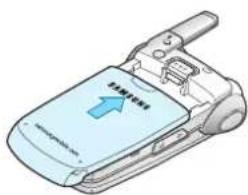
natural_image
Illustration of a light blue flip phone with an open screen showing the next right side (no text or symbols on the device body)取出电池
19
开始使用
电池充电
natural_image
Illustration of a mobile phone connected to a cable with a blue arrow pointing to it (no text or symbols present)开始使用
natural_image
Line drawing of a mobile phone with a partially open cover and keypad (no text or symbols)003-031_X619(CH) 2004.4.21:46 PM 页面22
开始使用
- 将旅行充电器插头插入台式充电座。
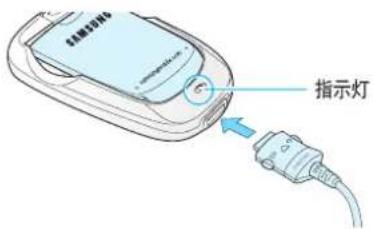
- 将旅行充电器连接到标准交流电源插座。
