
5.0 - Baby product Baby Trend - Free user manual and instructions
Find the device manual for free 5.0 Baby Trend in PDF.


| Product Type | Convertible Car Seat |
| Model | 5.0 |
| Brand | Baby Trend |
| Dimensions (Overall) | 30 x 20 x 26 inches |
| Weight | 12 lbs |
| Weight Capacity (Rear-facing) | 5 to 40 lbs |
| Weight Capacity (Forward-facing) | 22 to 65 lbs |
| Height Limit | 49 inches max |
| Harness Type | 5-point harness |
| Recline Positions | Multiple recline positions for comfort |
| LATCH System | Yes, with lower anchors and tether |
| Power Source | None (manual operation) |
| Installation Method | Vehicle seat belt or LATCH |
| Main Functions | Rear-facing and forward-facing child restraint |
| Safety Standards | FMVSS 213 compliant |
| Side Impact Protection | EPS energy-absorbing foam |
| Carrier Compatibility | Not compatible with stroller carriers (standalone) |
| Cleaning Instructions | Hand wash cover with mild soap, air dry |
| Maintenance | Check harness regularly, tighten as needed |
| Spare Parts Available | Yes, from Baby Trend or authorized retailers |
| Warranty | Limited 1-year warranty |
| Country of Origin | China |
Frequently Asked Questions - 5.0 Baby Trend
User questions about 5.0 Baby Trend
0 question about this device. Answer the ones you know or ask your own.
Ask a new question about this device
Download the instructions for your Baby product in PDF format for free! Find your manual 5.0 - Baby Trend and take your electronic device back in hand. On this page are published all the documents necessary for the use of your device. 5.0 by Baby Trend.
USER MANUAL 5.0 Baby Trend
natural_image
Line drawing of a toy car with steering wheel and seat (no text or symbols)Instruction Manual Manual de Instrucciones
WK15XXXXA
Baby Trend, Inc. 13048 Valley Blvd. Fontana CA 92335
1-800-328-7363 (8:00 a.m. \~ 4:30 p.m. PST) www.babytrend.com

babytrend®
Quality·Comfort·Style
babytrend
WARRANTY
DO NOT RETURN YOUR PRODUCT TO THE STORE. PLEASE CONTACT BABY TREND® FOR REPLACEMENT PARTS, SERVICE AND REPAIR.
The Baby Trend® warranty covers workmanship defects within 1 year of purchase. Any product which has been subjected to misuse, abuse, abnormal use, excessive wear and tear, improper assembly, negligence, environmental exposure, alteration or accident, or has had its serial number altered or removed invalidates all claims against the manufacturer. Any damage to property during installation is the sole responsibility of the end user.
Customer Service Department can be contacted at 1 (800) 328-7363 Monday through Friday between 8:00 a.m. and 4:30 p.m. (PST). Return Authorizations are required prior to returning product(s) to Baby Trend®. Please visit http://babytrend.com/pages/limited-warranty for complete warranty details.
GARANTIA
NO DEVUELVA SU PRODUCTO A LA TIENDA. POR FAVOR CONTACTE A BABY TREND® PARA PIEZAS DE REPUESTO, SERVICIO Y REPARACION.
Baby Trend, Inc. 13048 Valley Blvd. Fontana CA 92335 1-800-328-7363 • (8:00am \~ 4:30pm PST)
www.babytrend.com


WARNING W
WARNING: Please read all instructions before assembly and use of the walker. Keep instructions for future use.
WARNING: Never leave child unattended. Always keep child in view while in walker.
⚠ WARNING: Use only on flat surfaces free of objects that could cause the walker to tip over.
WARNING: To reduce chance of child slipping out of the seat, check that both feet of the child touch the floor. Never carry walker with the child in it, as the child may get hurt or slip out.
WARNING: To avoid burns, keep the child away from hot liquids, ranges, radiators, space heaters, fireplaces, etc.
WARNING-STAIR HAZARD: Avoid serious injury or death, block stairs/steps securely before using walker.
- This walker is to be used only by infants, who are old enough to sit upright on their own and are ready to learn to walk (about 6 months old).
DO NOT USE UNTIL BABY CAN SIT UP BY ITSELF. - Discontinue using the walker if your child attempts to climb out, reaches 30 pounds in weight or 32 inches in height, or when your child is able to walk unassisted.
• DO NOT ADJUST TRAY HEIGHT WITH THE BABY IN THE WALKER.
- Periodically inspect seat pad plastic tabs to be sure they are secured in the body.
DO NOT USE THE WALKER IF IT IS DAMAGED OR BROKEN.
Discontinue use should any part become damaged. Please contact our customer service at 1-800-328-7363 to order replacement parts or arrange for repairs.
- Clean the stoppers on walker base regularly to maintain stopping performance. To clean the seat pad, use only mild household soap and warm water with a sponge or cloth.
DO NOT MACHINE WASH. For metal and plastic parts, use only lukewarm water and mild soap.

Decoration Wheel (4 pcs)
Rueda decorativa (4 pcs)

Decoration Rear Spoiler
Alerón trasero decorativo
natural_image
Line drawing of a medical device with a circular component and two cups (no text or symbols)Base Base

Seat Asiento

BABY TREND® CUSTOMER SERVICE
The Customer Service Department can be contacted at 1 (800) 328-7363 Monday through Friday between 8:00 a.m. and 4:30 p.m. (PST). Return Authorizations are required prior to returning product(s) to Baby Trend®.
BABY TREND® SERVICIO AL CLIENTE
IMPORTANT! To ensure safe operation of your product, please follow these instructions carefully. Please keep these instructions for future reference.
IMPORTANT! Before assembly and each use, inspect this product for damaged hardware, loose joints, missing parts or sharp edges. NEVER use if any parts are missing or broken.
IMPORTANT! Adult assembly is required.
IMPORTANT! Always check that the baby walker is locked in the open position before using.
ATTENTION: Carefully remove parts from box. Check that you have all the parts for this model before assembling the baby walker.
2) • The baby walker can be used for 3 different heights. Turn the safety button and slide vertically to adjust the height. See the 3 heights diagram under the walker for indications of the height being used (Fig. 2).
3) • Check that the safety button is turned 90 degrees to prevent the accidental release of the mechanism (Fig. 3).
natural_image
Line drawing of a mechanical device with a base and mounting base (no text or symbols)Fig. 1

Fig. 2

Fig. 3
ASSEMBLY ASAMBLEA
ASSEMBLY ASAMBLEA
4) Attach the fabric nearest to the tray, push the pin downward through the fabric into to the hole of the frame until it snaps into place. Repeat for the opposite side (Fig. 4a).
- Insert the pins on the back of the seat, into the holes by pushing downwards through the fabric until each one clicks (Fig. 4b).
- Lastly, insert the pins into the holes behind the tray, by pushing downwards through the fabric until each one clicks (Fig. 4c).
NOTE: All pins should be aligned to the corresponding holes of the frame and click into place to ensure the fabric is securely attached.
natural_image
Line drawing of a hand holding a device with an orange arrow indicating motion (no text or symbols)Fig. 4b

natural_image
Line drawing of a hand holding a curved object with an arrow indicating direction (no text or symbols)Fig. 4c
natural_image
Line drawing of a baby seat with orange seat and gray frame (no text or symbols)Fig. 4d
ASSEMBLY ASAMBLEA
ASSEMBLY ASAMBLEA
natural_image
Diagram of a car's side view showing dashboard and steering wheel (no text or labels)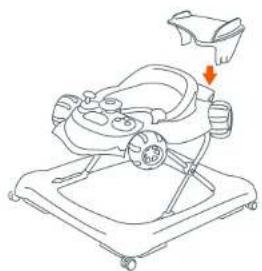
natural_image
Line drawing of a baby baby care device with a hand holding a cup (no text or symbols)Fig. 5c
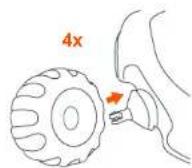
Fig. 5d
ASSEMBLY ASAMBLEA
ASSEMBLY ASAMBLEA
Fig. 6a
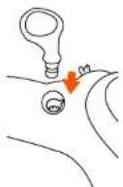
Fig. 6b
Fig. 7
TO REMOVE SEAT PARA RETIRAR EL ASIENTO
natural_image
Pure technical diagram of a mechanical component with no text, numbers, or symbolsFig. 8a

natural_image
Diagram showing a vehicle under load with arrows indicating upward and downward motion (no text or symbols)Fig. 8b
ASSEMBLY ASAMBLEA
natural_image
Diagram of a vehicle's seatbelt mechanism with two directional arrows indicating rotation (no text or labels)Fig. 9a

Fig. 9b
PLACING CHILD IN THE WALKER
WARNING: To reduce chance of child slipping out of the seat, check that both feet of the child touch the floor. Never carry walker with the child in it, as the child may get hurt of slip out.
- Always check the walker prior to each use to ensure that the seat is snapped in place and that the walker has no loose or broken parts. Do Not use the walker if it is damaged or broken or missing parts.
- Before placing your child in the walker, please determine that your child is developmentally ready for this type of product. Generally, your child must be able to sit upright unassisted and have adequate neck strength to exhibit very good control of his or her head. Typically, a child should be at least 6 months of age to use this product. Infants develop at different rates and you should discuss the use of a walker with your pediatrician to ensure that your infant is ready.
- Adjust the seat height of the walker to the lowest setting. Place your child in the walker and check that both feet touch the floor. The child should have only part of their weight on their feet when their legs are straight. Adjust the walker height as needed as your child grows. Do not adjust height with child in the walker. Discontinue using the walker if your child attempts to climb out, reaches 30 pounds in weight or 32 inches in height, or when your child is able to walk unassisted.
- The baby walker can be used for 3 different heights. To adjust height, remove baby from walker. Turn the safety button lengthwise and press the safety button until the mechanism is released. Adjust to desired height.
- When the position has been selected, check that the safety button turned through 90 degrees to prevent the accidental release of the mechanism. Always follow this procedure. Never use the baby walker
if the button is not in the sideways position. Important: Never change the height when the baby is in the walker.
TO ASSEMBLE TOY TRAY
WARNING: Keep batteries out of children's reach. Old and new batteries should not be mixed. Alkaline, standard carbon-zinc, and rechargeable batteries should not be mixed. Remove batteries before storing music center for a long period of time.
natural_image
Diagram of a device with a screen and directional arrows indicating movement (no text or symbols)Fig. 10

This device complies with Part 15 of the FCC rules. Operation is subject to the following two conditions:
1 this device may not cause harmful interference, and
2 this device must accept any interference received, including interference that may cause undesired operation.

WARNING: Changes or modifications to this unit not expressly approved by the party responsible for compliance could void the user's authority to operate the equipment.
NOTE: This equipment has been tested and found to comply with the limits for a Class B digital device, pursuant to Part 15 of the FCC Rules. These limits are designed to provide reasonable protection against harmful interference in a residential installation. This equipment generates, uses and can radiate radio frequency energy and, if not installed and used in accordance with the instructions, may cause harmful interference to radio communications.
However, there is no guarantee that interference will not occur in a particular installation. If this equipment does cause harmful interference to radio or television reception, which can be determined by turning the equipment off and on, the user is encouraged to try to correct the interference by one or more of the following measures:
• Reorient or relocate the receiving antenna.
- Increase the separation between the equipment and receiver.
- Connect the equipment into an outlet on a circuit different from that to which the receiver is connected.
- Consult the dealer or an experienced radio/TV technician for help.
OTHER OTRO


Brand : Baby Trend
Model : 5.0
Category : Baby product