ICD-E11 - Security Camera Ikegami - Free user manual and instructions
Find the device manual for free ICD-E11 Ikegami in PDF.


| Product Type | Security Camera |
| Brand | Ikegami |
| Model | ICD-E11 |
| Image Sensor | 1/3-inch CCD |
| Resolution | 380 TV lines |
| Minimum Illumination | 0.1 lux |
| Lens Type | Fixed, 3.6mm |
| Video Output | 1.0 Vp-p composite, 75 ohms |
| Sync System | Internal |
| Power Supply | 12V DC, 200mA |
| Dimensions (W x H x D) | 120mm x 60mm x 60mm |
| Weight | 300g |
| Operating Temperature | -10°C to 50°C |
| Housing | Indoor use |
| Functions | Automatic gain control, backlight compensation |
| Mounting | Fixed bracket included |
| Maintenance | Clean lens with soft cloth; check cable connections |
| Safety | Use only specified 12V DC adapter; avoid moisture |
| Spare Parts | Contact Ikegami support |
| Included Accessories | Mounting bracket, screws, power adapter |
Frequently Asked Questions - ICD-E11 Ikegami
User questions about ICD-E11 Ikegami
0 question about this device. Answer the ones you know or ask your own.
Ask a new question about this device
Download the instructions for your Security Camera in PDF format for free! Find your manual ICD-E11 - Ikegami and take your electronic device back in hand. On this page are published all the documents necessary for the use of your device. ICD-E11 by Ikegami.
USER MANUAL ICD-E11 Ikegami
IR Day/Night Megapixel 4 in 1 HD Camera
Model: ICD-E11-EFN
High resolution, 2.0 Megapixel.1080P, 12 VDC 12 LEDs, NTSC
natural_image
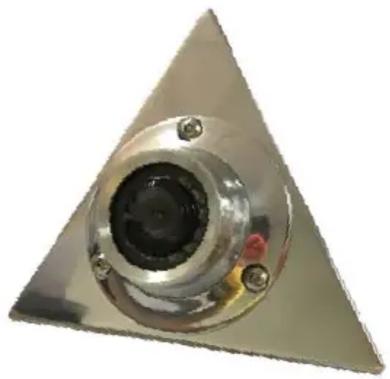
Close-up of a metallic triangular component with a central circular opening and mounting holes (no visible text or symbols)Description:
This is a high quality 4 in 1 HD (HDTVI,HDCVI,AHD,CVBS) Color camera, using the latest CMOS technology, the camera can produce high definition image with little distortion.
Analog High Definition is a high video definition standard, through the coaxial cable, using the analog modulation technology to transfer progressive-scan HD Video signal. 4 in 1 HD (HDTVI,HDCVI,AHD,CVBS) system is same as traditional analog system, using common 75-3 coaxial cable to carry out as far as 500 meters HD video without any video signal loss.
Cautions:
- In order to protect the camera, please avoid placing or using the camera under direct sunlight.
- Please ensure that the input voltage range is within the specifications.
- Please do not place the camera in a location with a temperature exceeding 50^ C.
- Do not attempt to service the camera by yourself. Please refer all services to qualified Dealers.
Installation procedures:
- Loosen the lock screws on the bezel, remove the camera block to the suitable position.
- Attach the mounting bracket to the wall or ceiling, wherever you want to install the camera. Locate a wall stud or ceiling joint and secure the base by the supplied mounting screws.
- Connect the BNC+DC Jack to the monitor or DVR.
- Fix the lock screw.
Packing list:
| Camera | 1 | |
| Instruction Manual | 1 | |
| Mounting Screw | 12 | |
| Hex-Key | 1 | |
Operation procedures:

natural_image
Technical diagram of a mechanical assembly with exploded view and internal components (no text or labels)Connection:

Up and hold 5 seconds: Switch to CVI
Down and hold 5 seconds: Switch to TVI
Left and hold 5 seconds: Switch to CVBS (Default)
Right and hold 5 seconds: Switch to AHD
Specifications:
| Model | ICD-E11-EFN |
| Pick up Device 1/2.7" CMOS | Sensor AR0237 |
| TV System NTSC/PAL | |
| Picture Elements 1920(H)*1080(V) | |
| Effective pixels | 2.0M pixels |
| Day-night mode | External control (default) / Auto / color / black and white |
| Infrared Spectrum | N/A |
| S/N Ratio | More than 50 dB, (AGC Off) |
| Auto Gain Control | Auto |
| White Balance | Auto |
| Electronic Shutter | AUTO/ 1/50 ( 1/60 ) -1/100,000sec |
| Back Light Compensation | Auto |
| Infrared LED | 12 LEDs |
| Infrared LED Range | 10 m |
| Video output | 1 Vp-p, 75Ωcomposite , BNC Jack x1 |
| Audio Output | N/A |
| Mirror | Available |
| Lens | f2.1mm |
| Lens Mount | M12XP0.5mm Thread |
| Pan Adjusting | +/-180 Degree |
| Tilt Adjusting | 0-60 Degree |
| Power Supply | 12V DC ±10% |
| Power Consumption | 130mA(led on)/65mA(led off) |
| Dimensions(L x W x H) | 124.72 x108.58x62.55mm |
| Net Weight | 350g |
| Weatherproof | IP67 |
| Operating Temperature | -10°C to +50°C |
*Specifications are subject to change without prior notice.
Brand : Ikegami
Model : ICD-E11
Category : Security Camera